คนที่อยากหารายได้จาก Shopee Affiliate มักเจอข้อมูลในอินเทอร์เน็ตที่บอกว่าคอมมิชชัน 5-30% แล้วเลือกหมวดสินค้าผิดตั้งแต่วันแรก พอเริ่มจริงก็ไม่รู้ว่าต้องทำอะไรก่อนหลัง ลิงก์แบบไหนถึงนับคอม และโพสต์แบบไหนเสี่ยงโดนระงับบัญชีPeople starting with Shopee Affiliate read online that commission runs 5-30%, pick the wrong category on day one, and then have no idea what order to do things in, which link format actually earns, or which posting habits get an account suspended.
← ผลงานทั้งหมด← All work
เครื่องมือเดสก์ท็อปDesktop tool
ลิงก์ทอง AILinkthong AI (Shopee Affiliate tool)
ไกด์ 16 ขั้น พาจากยังไม่มีบัญชี Shopee Affiliate ไปจนถึงคอมมิชชันแรก โดยมี AI ช่วยคิดงานให้ทุกขั้นA 16-step guide from no Shopee Affiliate account to your first commission, with AI helping at every step
กำลังพัฒนาIn development เครื่องมือเดสก์ท็อปDesktop tool
รันบนคอมของเจ้าของ เปิดในเบราว์เซอร์ที่เครื่องตัวเอง ยังไม่เปิดให้คนอื่นใช้และยังไม่ขาย · หน้าจอครบทั้ง 16 ขั้นและปุ่ม AI ทดสอบแล้วใช้ได้จริงเมื่อ 17 ก.ย. 2569 · ส่วนที่ต้องเรียก Shopee Open API ยังใช้ไม่ได้ เพราะ Shopee ให้สิทธิ์เฉพาะคนที่มียอดคำสั่งซื้อเกิน 1,000 ต่อเดือน ตอนนี้จึงต้องสร้างลิงก์แบบมือไปก่อน และยังไม่เคยเรียก API จริงสำเร็จสักครั้งIt runs in a browser on the founder's own computer; nobody else uses it and it is not for sale. All 16 steps are built and the AI buttons were tested working on 17 September 2026. Anything that needs the Shopee Open API does not work yet: Shopee grants access only to accounts above 1,000 orders a month, so links are built by hand for now and no real API call has ever succeeded.
16ขั้นตอนในไกด์Steps in the guide
32เทสต์หลังบ้านที่ผ่านBackend tests passing
27เทสต์หน้าเว็บที่ผ่านFront-end smoke tests passing
2.00% / 0.60%คอมฐาน Shopee ไทย ทุกหมวดShopee Thailand base commission, all categories
01 · ภาพรวม01 · Overview
ภาพรวมของระบบThe system at a glance
เครื่องมือนี้ (ชื่อในโฟลเดอร์ว่า ลิงก์ทอง AI) คือไกด์ 16 ขั้นที่พาคนที่ยังไม่มีบัญชี Shopee Affiliate ไปจนถึงรับคอมมิชชันแรก โดยมี AI ช่วยคิดงานในแต่ละขั้น ตั้งแต่เช็กว่าช่องโซเชียลที่มีพร้อมสมัครไหม ไปจนถึงเลือกสินค้า สร้างลิงก์ที่นับคอมจริง เขียนแคปชันและสคริปต์คลิป และตรวจว่าโพสต์ไม่เสี่ยงโดนระงับบัญชีThis tool (called Link Thong AI in its folder) is a 16-step guide that takes someone with no Shopee Affiliate account all the way to a first commission, with AI helping think through each step: from checking whether your social channels are ready to apply, to picking products, building links that actually earn, writing captions and video scripts, and checking posts do not risk a suspension.
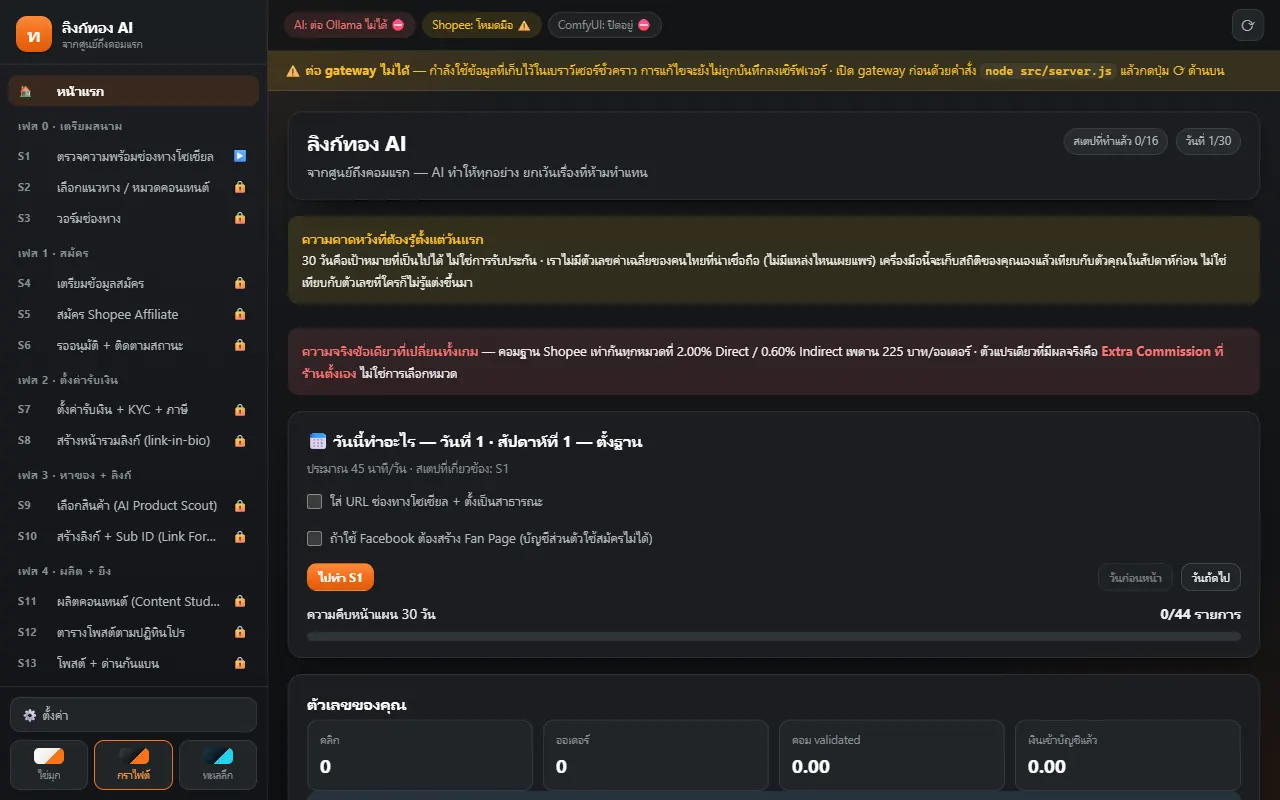
ใช้งานโดยเปิดเว็บของเครื่องมือในเบราว์เซอร์ที่เครื่องตัวเอง แถบซ้ายเรียง 16 ขั้นตามเฟส แต่ละขั้นบอกเป้าหมายและให้กรอกข้อมูลหรือกดปุ่ม AI ขั้นไหนที่ต้องสมัครหรือยืนยันตัวตนกับ Shopee ผู้ใช้ทำเองบนเว็บ Shopee เสมอ เครื่องมือไม่มีช่องกรอกรหัสผ่าน OTP เลขบัตรประชาชน หรือเลขบัญชีธนาคารYou open the tool's page in a browser on your own computer. The left bar lists the 16 steps by phase, and each step states its goal and offers fields to fill or an AI button. Anything that involves signing up or verifying identity with Shopee you always do yourself on Shopee's own site. The tool has no fields for passwords, OTPs, ID numbers or bank accounts.
ตอนนี้เป็นเครื่องมือที่เจ้าของใช้เองบนคอมตัวเอง ยังไม่เปิดให้คนอื่นใช้และยังไม่ขาย หน้าจอครบ 16 ขั้นและปุ่ม AI 13 ปุ่มทดสอบใช้ได้จริงเมื่อ 17 ก.ย. 2569 และต้นเดือน ต.ค. เจ้าของใช้สร้างลิงก์ชุดแรก 5 ลิงก์ที่นับคอมได้ ส่วนการเรียก Shopee Open API ยังใช้ไม่ได้ เพราะ Shopee ให้สิทธิ์เฉพาะคนที่มียอดสั่งซื้อเกิน 1,000 รายการต่อเดือน ตอนนี้จึงทำลิงก์แบบมือToday it is the owner's own tool on their own computer, not open to others and not for sale. All 16 screens and 13 AI buttons were tested working on 17 September 2026, and in early October the owner used it to build a first set of five commission-earning links. Calling the Shopee Open API does not work yet because Shopee grants it only to accounts above 1,000 orders a month, so links are built by hand for now.
ที่ออกแบบแบบนี้เพราะงานวิจัยพบว่าข้อมูลที่แชร์กันตามอินเทอร์เน็ตผิดหลายจุด เช่น คอมไม่ได้ 5-30% ตามหมวดอย่างที่เข้าใจกัน ตัดสินผ่านหรือไม่ผ่านจึงทำด้วยโค้ดที่ตรวจได้เท่านั้น ให้ AI แค่ใส่คำแนะนำติดป้ายไว้ เพราะโมเดลเล็กชอบแต่งกฎขึ้นเอง และเครื่องมือไม่โพสต์ แกะ scrape หรือใช้ browser automation แทนผู้ใช้The design follows research that found much of the advice online is wrong; for example commission is not 5-30% by category as commonly believed. So pass/fail decisions are made only by checkable code, with AI limited to labelled suggestions because small models like to invent rules, and the tool never posts, scrapes or automates the browser on your behalf.
02 · โจทย์02 · The brief
สร้างขึ้นมาเพราะอะไรWhy this exists
คนไทยที่เพิ่งเริ่มทำ Shopee Affiliate และคนที่ทำอยู่แล้วแต่ยังไม่ได้ใช้ Sub ID แยกวัดผลThai beginners starting with Shopee Affiliate, and people already doing it who have never used Sub IDs to measure what works
ใช่โจทย์ของคุณไหมSound like your problem?
03 · ฟีเจอร์03 · Features
ทำอะไรได้บ้าง อย่างละเอียดWhat it does, in detail
10 ความสามารถ10 capabilitiesไกด์ 16 ขั้น 7 เฟสSixteen steps in seven phases
เฟส 0 เตรียมสนาม (ตรวจช่องโซเชียล เลือกแนว วอร์มช่อง) เฟส 1 สมัคร (เตรียมข้อมูล สมัคร รออนุมัติ) เฟส 2 ตั้งค่ารับเงินและ KYC และภาษี กับหน้ารวมลิงก์ เฟส 3 หาของและลิงก์ (AI Product Scout, Link Forge) เฟส 4 ผลิตและยิง (Content Studio ตารางโพสต์ ด่านกันแบน) เฟส 5 วัดผลและปรับ (กระทบยอด AI Coach) เฟส 6 เก็บเงินและขยายแพลตฟอร์มPhase 0 prepares the ground (check social channels, pick a niche, warm up), phase 1 is applying (prepare details, apply, wait for approval), phase 2 sets up payout, KYC and tax plus a link-in-bio page, phase 3 finds products and links (AI Product Scout, Link Forge), phase 4 produces and posts (Content Studio, post calendar, anti-ban check), phase 5 measures and adjusts (reconciliation, AI Coach), and phase 6 collects money and expands to other platforms.
ให้คะแนนสินค้า 0-100 เป็นบาทจริงProduct scoring from 0 to 100, in real baht
ขั้นเลือกสินค้าให้คะแนน 0-100 จากคอมมิชชันที่คาดว่าจะได้เป็นบาทต่อออเดอร์ (รวม Extra Commission ที่ร้านตั้ง) ยอดขาย และปัจจัยอื่น น้ำหนักแก้ได้ในหน้าตั้งค่า และเตือนเมื่อสินค้าชนเพดานคอมมิชชัน 225 บาทต่อออเดอร์ ตัวอย่างในบันทึก ที่วางแก้วราคา 93 บาท คอมคาดหวัง 13.02 บาทThe product step scores 0-100 from expected commission in baht per order (including shop-set Extra Commission), sales and other factors. The weights are editable in settings, and it warns when an item hits the 225-baht per-order commission cap. In the project notes, a cup holder at 93 baht shows an expected commission of 13.02 baht.
สร้างลิงก์ที่นับคอมจริง พร้อม Sub IDLinks that count, with Sub IDs
เครื่องมือรับเฉพาะลิงก์ที่ขึ้นต้นด้วย s.shopee.co.th เพราะ shope.ee และ th.shp.ee ไม่นับคอมแล้ว สร้างได้ครั้งละไม่เกิน 5 ลิงก์ตามข้อจำกัดของ Shopee และใส่ Sub ID เพื่อแยกวัดผลต่อโพสต์ ตัว Sub ID รับเฉพาะ a-z A-Z 0-9 และขีดล่าง เพราะ Shopee ปฏิเสธตัวอักษรอื่นIt accepts only links starting with s.shopee.co.th, since shope.ee and th.shp.ee no longer count. Up to five links are built per batch, matching Shopee's limit, and Sub IDs let you measure each post separately. Sub IDs allow only a-z, A-Z, 0-9 and underscore, because Shopee rejects anything else.
ผลิตคอนเทนต์ 3 อย่างพร้อมกันContent in three forms at once
Content Studio ร่างแคปชัน สคริปต์คลิป และพรอมป์ตสร้างภาพกับวิดีโอ ให้เอาไปแก้ต่อ ได้ผลผ่านด่านตรวจทั้งสองก่อนถึงมือคุณ มีโหมด ไม่มีสินค้าในมือ ที่ใช้มุมคนหาของมาแนะนำ อ้างราคา ยอดขาย และรีวิวจากหน้าสินค้า และบล็อกประโยคแนวซื้อมาใช้แล้ว ถ้าคุณยังไม่ได้ซื้อContent Studio drafts captions, video scripts and image and video prompts for you to edit, each passing both checks before reaching you. A no-product-in-hand mode writes from the angle of someone curating finds, citing price, sales and reviews from the listing, and blocks lines like bought-and-used-it if you have not actually bought the item.
ด่านตรวจก่อนโพสต์ สองชั้นA two-layer pre-post check
ชั้นแรกคือกฎของเนื้อหา ตรวจลิงก์เก่าหรือลิงก์เปล่า ๆ การโอ้อวดเกินจริง อ้างว่าใช้แล้วทั้งที่ไม่มีของ แอบอ้างเป็นทางการ การขายอาหารหรือเครื่องสำอางโดยไม่มีเลขอนุญาต การไม่เปิดเผยว่าลิงก์มีค่าคอม และข้อความสั้นเกินไป บางข้อเป็นการบล็อก บางข้อเป็นเตือน ชั้นที่สองคือตัวกันแบนที่ตั้งเพดานโพสต์ต่อวัน เว้นช่วงอย่างน้อย 2 ชั่วโมง เทียบความคล้ายของแคปชันกับโพสต์ที่ผ่านมา (เกณฑ์เริ่มต้น 0.8 ในช่วง 30 โพสต์) และไม่ให้ใช้ลิงก์เดิมซ้ำภายใน 7 วัน ทุกค่าตั้งต้นแก้ได้ในหน้าตั้งค่าThe first layer is content rules: stale or bare links, exaggerated claims, claiming use without owning the item, posing as official, selling food or cosmetics without a licence number, not disclosing a commission link, and text that is too short; some block and some only warn. The second is an anti-ban limiter with a daily ceiling, a minimum two-hour gap, a caption-similarity check against past posts (default threshold 0.8 over 30 posts) and no reuse of the same link within seven days. All of these defaults are editable in settings.
ตารางโพสต์ตามปฏิทินโปรA posting calendar tied to promo dates
ขั้นตารางโพสต์จัดวันโพสต์ให้เกาะวันเงินสะพัดและแคมเปญ โดยไม่ชนกติกา anti-ban และมีขั้นหน้ารวมลิงก์ (link-in-bio) ที่ทำเป็นหน้า HTML นิ่งไว้วางใน bio ของทุกแพลตฟอร์ม ไม่ต้องพึ่งบริการ link-in-bio ภายนอกThe calendar step lays out posting days around payday and campaign dates without breaking the anti-ban rules, and the link-in-bio step produces a static HTML page to place in every platform's bio, with no dependence on a third-party link-in-bio service.
ติดตามผลและกระทบยอดTracking and reconciliation
ขั้นติดตามผลให้วางตารางจากรายงานของ Shopee แล้วแยกตัวเลขตาม Sub ID เพื่อรู้ว่าโพสต์ไหนได้คลิกและออเดอร์ และจับว่าคอมหายไปตรงไหน ตามด้วย AI Coach ที่บอกว่า ทำอะไรต่อ ไม่ใช่แค่ให้ดูกราฟ การตัดสินใจเหล่านี้ใช้ตัวเลขจากโค้ด AI ใส่แค่คำแนะนำThe tracking step takes a table pasted from Shopee's report and splits the numbers by Sub ID to show which post earned clicks and orders and where commission went missing, followed by an AI Coach that says what to do next rather than just showing charts. The decisions use numbers from code; the AI only adds advice.
โหมดมือ เมื่อไม่มี Open APIManual mode when there is no Open API
เมื่อไม่มีสิทธิ์ Open API ผู้ใช้วาง URL สินค้า หรือลิงก์ s.shopee.co.th เองในตาราง ระบบคำนวณคะแนนและตรวจลิงก์ให้เหมือนกัน ถ้าภายหลังได้ AppId และ Secret ใส่ในหน้าตั้งค่า เครื่องมือก็สลับไปเรียก API ได้ และปิดบัง credentials ทุกจุดที่แสดงผลWithout Open API access you paste product URLs or s.shopee.co.th links into the table by hand and get the same scoring and link checks. If you later obtain an AppId and Secret, putting them in settings lets the tool switch to calling the API, and credentials are masked everywhere they are displayed.
รองรับแพลตฟอร์มอื่นในอนาคตRoom for other affiliate platforms
ตัวเชื่อมแพลตฟอร์ม (adapter) แยกระดับความพร้อมไว้ Involve Asia เป็นแบบเรียก API Accesstrade Lazada และ TikTok Shop Affiliate เป็นแบบนำทางให้ทำมือเพราะไม่มี API สาธารณะ ขั้นสุดท้ายในไกด์พาไปดูการขยายแพลตฟอร์มที่สองPlatform adapters record how ready each one is: Involve Asia is API-based, while Accesstrade, Lazada and TikTok Shop Affiliate are manual-guided because they lack a public API. The guide's last step walks you through adding a second platform.
ธีม 3 แบบและหน้าตาที่อ่านง่ายThree themes and a readable layout
สลับธีมไข่มุก ดำ และน้ำเงินลึกได้ หน้าตาปรับเมื่อ 17 ต.ค. 2569 ให้ตัวอักษรฐาน 15 พิกเซล หัวขั้น 26 พิกเซล จำกัดความยาวบรรทัด และกล่องหมายเหตุเป็นพื้นจางพร้อมแถบสีข้าง เพราะเจ้าของรู้สึกว่าตัวหนังสือเต็มหน้าไปหมดSwitch between pearl, black and deep-blue themes. On 17 October 2026 the layout was reworked to a 15-pixel base size, 26-pixel step headings, limited line length and pale note boxes with a side stripe, because the owner felt the page was crowded with text.
04 · วิธีทำงาน04 · How it works
ทำงานยังไง ตั้งแต่ต้นจนจบHow it works, start to finish
- 1
1. เปิดเครื่องมือบนเครื่องตัวเอง1. Open the tool on your own machine
ดับเบิลคลิกไอคอน ลิงก์ทอง AI บนเดสก์ท็อป ตัวเปิดตรวจว่าเซิร์ฟเวอร์ที่พอร์ต 8902 ทำงานอยู่ไหม ถ้ายังก็สตาร์ตให้แล้วเปิดเบราว์เซอร์ หน้าต่างดำที่ค้างอยู่คือตัวเซิร์ฟเวอร์ ปิดแล้วเครื่องมือหยุดDouble-click the Link Thong AI desktop icon. The launcher checks whether the server on port 8902 is running, starts it if not and opens the browser. The black window left open is the server; closing it stops the tool.
- 2
2. ตรวจช่องทางและเลือกแนว2. Check channels and pick a niche
ขั้น S1-S3 ให้กรอกช่องที่มี (เช่น TikTok เพจ Facebook YouTube) ตรวจว่าผ่านเกณฑ์สมัครไหม เลือกหมวดคอนเทนต์ที่ทำต่อเนื่องได้ และวอร์มช่องให้มีโพสต์ตรงหมวดอย่างน้อย 5 ชิ้นพร้อม bio ที่ชัดSteps S1-S3 ask for the channels you have (such as TikTok, a Facebook page, YouTube), check whether they meet the application bar, pick a niche you can sustain and warm the channel up to at least five on-topic posts and a clear bio.
- 3
3. สมัครเองบน Shopee แล้วรอ3. Apply yourself on Shopee and wait
S4-S6 เตรียมข้อมูลให้ครบหน้าเดียว แล้วคุณกรอกใบสมัครบนเว็บ Shopee ด้วยมือตัวเอง เครื่องมือแค่ช่วยเตรียมและเตือนสถานะรออนุมัติ ซึ่งงานวิจัยบอกว่าอีเมลยืนยันใช้ 1-2 วันทำการS4-S6 gather everything on one page, then you fill in the application on Shopee's site with your own hands. The tool only helps prepare and tracks the waiting status; research puts the confirmation email at one to two working days.
- 4
4. เลือกสินค้าและสร้างลิงก์4. Pick products and build links
S9 ให้ AI Product Scout คัดสินค้า 5-10 ชิ้นพร้อมเหตุผลเป็นบาท S10 สร้างลิงก์ s.shopee.co.th พร้อม Sub ID ทุกอัน คุณวางลิงก์ที่ได้จากหน้า Shopee กลับเข้ามาS9 has the AI Product Scout shortlist five to ten items with reasons in baht, and S10 builds s.shopee.co.th links each carrying a Sub ID; you paste the links obtained from Shopee's page back in.
- 5
5. ผลิต ตรวจ แล้วโพสต์เอง5. Produce, check, then post yourself
S11-S13 ผลิตแคปชันกับสคริปต์ ผ่านด่านตรวจสองชั้น จัดตารางโพสต์ แล้วคุณโพสต์ด้วยมือบนแต่ละแพลตฟอร์ม เครื่องมือไม่โพสต์แทนS11-S13 produce captions and scripts, pass the two-layer check and schedule posts, and then you post by hand on each platform. The tool never posts for you.
- 6
6. วัดผลและปรับ6. Measure and adjust
S14-S16 วางรายงานจาก Shopee แยกตาม Sub ID กระทบยอดว่าเงินหายตรงไหน ให้ AI Coach เสนอสิ่งที่ควรทำต่อ แล้วดูเรื่องรับเงิน ภาษี และการขยายไปแพลตฟอร์มที่สองS14-S16 take Shopee's report split by Sub ID, reconcile where money went missing, let the AI Coach suggest next moves, then cover payout, tax and a second platform.
05 · ภาพ05 · Visuals
ภาพจากระบบจริงFrom the real system
1 ภาพ1 imagesภาพหน้าจอจริงถ่ายจากระบบที่เปิดใช้อยู่ ส่วนภาพโปรโมตและภาพประกอบมีป้ายกำกับไว้ทุกใบReal screenshots come from the running system; promo images and illustrations are labelled on every card.
06 · สถานการณ์06 · Scenarios
ตัวอย่างสถานการณ์ใช้งานExample scenarios
เป็นตัวอย่างสมมติเพื่อให้เห็นภาพ ไม่ใช่เรื่องของลูกค้าจริงIllustrative scenarios to help you picture it — not real customer stories.
มือใหม่ที่ไม่รู้จะเริ่มตรงไหนA beginner who does not know where to start
สมมติว่าคุณมีช่อง TikTok เล็ก ๆ และอยากหารายได้จาก Shopee Affiliate ให้เดินตามขั้น S1-S3 เพื่อรู้ว่าช่องพร้อมสมัครไหมและควรเลือกหมวดอะไร ก่อนเสียเวลาไปสมัครแล้วถูกปฏิเสธSuppose you have a small TikTok channel and want to earn from Shopee Affiliate. Walk through S1-S3 to learn whether the channel is ready to apply and which niche to pick, before wasting time on an application that gets rejected.
คนที่ถูกคำว่า คอม 30% หลอกSomeone misled by the 30% commission claim
สมมติว่าคุณเห็นคลิปบอกว่าคอมมิชชัน Shopee ได้ถึง 30% ขั้นเลือกสินค้าจะแสดงเป็นบาทจริง ว่าสินค้าราคา 93 บาทคอมประมาณกี่บาท เทียบกับฐาน 2.00% และ Extra Commission ที่ร้านตั้งเอง และเตือนเมื่อชนเพดาน 225 บาทSuppose you saw a clip claiming up to 30% commission on Shopee. The product step shows, in real baht, what a 93-baht item earns against the 2.00% base and any shop-set Extra Commission, and warns when the 225-baht cap bites.
คนที่โพสต์ถี่แล้วกลัวโดนระงับA frequent poster afraid of a suspension
สมมติว่าคุณโพสต์ลิงก์สินค้าคล้ายกันวันละหลายชิ้น ด่านตรวจจะเทียบแคปชันใหม่กับของเก่าและเตือนเมื่อซ้ำเกินไป หรือเมื่อโพสต์ในวันนั้นถึงเพดานที่ตั้งไว้ ก่อนที่คุณจะกดโพสต์Suppose you post similar product links several times a day. The check compares each new caption with old ones and warns when it is too similar, or when the day's posts hit your set ceiling, before you press post.
คนที่ยังไม่มีสินค้าในมือSomeone with no product in hand
สมมติว่าคุณอยากทำคอนเทนต์แนะนำของโต๊ะทำงานงบไม่เกิน 100 บาท แต่ยังไม่ได้ซื้อมาลอง ใช้โหมดไม่มีสินค้าในมือ ระบบจะเขียนแบบคนรวมของมาแนะนำและกันไม่ให้ใช้คำว่าซื้อมาใช้แล้ว เพื่อไม่ให้ผิดความจริงSuppose you want a roundup of desk items under 100 baht but have not bought them. Use the no-product-in-hand mode and the system writes as a curator and stops you claiming you used them, keeping the content honest.
07 · เบื้องหลัง07 · Under the hood
เบื้องหลังระบบ ข้อมูล และความปลอดภัยUnder the hood: data and security
- แพลตฟอร์มและสแต็กPlatform and stack
- หน้าเว็บเป็น HTML, CSS และ JavaScript แบบโมดูลล้วน ไม่มีขั้นตอน build (ราว 17 ไฟล์) หลังบ้านเป็น Node.js กับ Express เรียก gateway ทำงานที่พอร์ต 8902 ในเครื่องผูกกับ 127.0.0.1 ข้อมูลเป็นไฟล์ JSON ในโฟลเดอร์ gateway/data ที่ไม่เข้า gitThe front end is plain HTML, CSS and ES-module JavaScript with no build step (about 17 files). The backend is Node.js with Express, called the gateway, running on port 8902 and bound to 127.0.0.1. Data are JSON files in gateway/data, kept out of git.
- AIAI
- เรียก Ollama ในเครื่อง ตั้งไว้ใช้ qwen3.8:27b ตัวเวลาตอบรอได้ถึง 5 นาที ทดสอบปุ่ม AI 13 ปุ่มบน qwen3:8b ใช้ราว 5-18 วินาทีต่อครั้ง ตัดแท็ก think ของโมเดลออก ตัดสินผ่านหรือไม่ผ่านด้วยโค้ดเท่านั้น เพราะโมเดลเล็กแต่งกฎเองได้It calls a local Ollama, configured for qwen3.8:27b with up to a five-minute wait. The 13 AI buttons took about 5 to 18 seconds each on qwen3:8b. The model's think tags are stripped, and pass/fail is decided by code alone because small models can invent rules.
- ความเป็นส่วนตัวและความปลอดภัยPrivacy and safety
- ไม่มีช่องกรอกรหัสผ่าน OTP เลขบัตร หรือเลขบัญชีธนาคาร มีด่านฝั่งเซิร์ฟเวอร์กันไว้ credentials ที่ใช้เรียก API ถูกปิดบังทุก route ป้องกัน __proto__ และเซิร์ฟเวอร์ตอบเฉพาะ localhost ไม่ใช้ scraping หรือ browser automation โพสต์แทนผู้ใช้There are no fields for passwords, OTPs, ID numbers or bank accounts, with a server-side guard against them. Credentials for API calls are masked on every route, __proto__ is guarded against, and the server answers only on localhost. No scraping or browser automation posts on the user's behalf.
- การเชื่อมต่อภายนอกExternal connections
- Shopee Open API (GraphQL) เขียนตัวเรียกไว้แล้วแต่ยังไม่เคยเรียกสำเร็จ ต้องมี AppId และ Secret ของผู้ใช้เอง ComfyUI ในเครื่องสำหรับภาพและวิดีโอ (ส่งงานเข้า ComfyUI จริงยังอยู่ในแผนเฟส 2) ไม่ต่อ API โซเชียลสำหรับโพสต์ในขั้นนี้The Shopee Open API (GraphQL) client is written but has never succeeded, since it needs the user's own AppId and Secret. A local ComfyUI is meant for images and video (actually submitting jobs to ComfyUI is a phase-2 plan). No social APIs are used for posting at this stage.
- เทสต์Tests
- ชุดเทสต์หลังบ้านรวม 32 ข้อ ครอบคลุมปฏิทิน ด่านคอมพลายแอนซ์ ลิงก์ ตัวกันแบน Shopee และที่เก็บข้อมูล ตามจำนวนเทสต์ในโค้ด และมีเทสต์หน้าเว็บ (smoke test) แยกอีกชุดหนึ่งThe backend suite has 32 tests covering the calendar, compliance, links, the anti-ban limiter, Shopee client and the store, counted from the code, plus a separate front-end smoke test.
- ข้อจำกัดที่ควรรู้Limits to know about
- ใช้ได้กับ Shopee ประเทศไทยเป็นหลัก ตัวเลขคอมมิชชันที่ยืนยันไม่ได้ถูกตั้งเป็นค่าตั้งแก้ได้ ไม่ฮาร์ดโค้ด TikTok โพสต์ผ่าน API ไม่ได้จนกว่าจะผ่านการตรวจ ส่วน LINE VOOM ปิดบริการ 28 ก.ย. 2569 จึงตัดออก ต้องเปิดคอมเจ้าของไว้ ไม่มีระบบหลายผู้ใช้It is mainly for Shopee Thailand. Commission figures that could not be confirmed are editable settings, not hard-coded. TikTok cannot be posted through the API until the app passes review, and LINE VOOM was dropped because it closes on 28 September 2026. The owner's computer must be on, and there is no multi-user system.
08 · ความคืบหน้า08 · Progress
ความคืบหน้าและแผนต่อไปProgress and what comes next
- ทำแล้วDone
16 ก.ย. 2569 วิจัยจากหน้าทางการ 9 ไฟล์ และสร้างหลังบ้านพร้อมเทสต์16 Sep 2026: nine research files from official pages, and the backend built with tests
- ทำแล้วDone
17 ก.ย. 2569 หน้าเว็บ 16 ขั้นเสร็จ ทดสอบปุ่ม AI 13 ปุ่มในเบราว์เซอร์ได้จริง และแก้บั๊กหลายจุด17 Sep 2026: the 16-step front end finished, the 13 AI buttons tested in a real browser and several bugs fixed
- ทำแล้วDone
3-4 ต.ค. 2569 สร้างลิงก์ชุดแรก 5 ลิงก์ที่นับคอม แก้กฎ Sub ID เพิ่มด่านตรวจ ไม่ได้ซื้อมาใช้ และทำคลิปรวมของ 21 วินาทีด้วยเครื่องมือในโปรเจกต์3-4 Oct 2026: built the first five commission-earning links, fixed the Sub ID rule, added the not-bought-it check and made a 21-second roundup clip with the project's own tooling
- ทำแล้วDone
17-20 ต.ค. 2569 ปรับหน้าตาให้อ่านง่าย และทำไอคอนเปิดเครื่องมือบนเดสก์ท็อป17-20 Oct 2026: readability redesign and a desktop launch icon
- ถัดไปNext
ขอสิทธิ์ Shopee Open API (ต้องมียอดสั่งซื้อเกิน 1,000 ต่อเดือนและหลักฐานการเข้าถึง) แล้วทดสอบเรียก API จริงครั้งแรกApply for Shopee Open API access (needs over 1,000 orders a month plus reach evidence) and make the first real API call
- ถัดไปNext
เฟส 2 ตามบันทึก ได้แก่ adapter Involve Asia, นับคลิกผ่าน /r/ลิงก์, ส่งงานเข้า ComfyUI จริง, IG/Pinterest API และแจ้งเตือน TelegramPhase 2 per the notes: an Involve Asia adapter, click counting via /r/ links, real ComfyUI submission, IG/Pinterest APIs and Telegram alerts
09 · คำถาม09 · FAQ
คำถามที่พบบ่อยFrequently asked questions
ขายไหม ราคาเท่าไรIs it for sale, and at what price?
ยังไม่ขาย ยังไม่มีราคา และยังไม่เปิดให้คนอื่นใช้ เจ้าของใช้เองบนคอมของตัวเองNot for sale, no price, and not open to others; the owner uses it on their own computer.
เครื่องมือสมัคร Shopee Affiliate ให้ฉันไหมDoes it apply to Shopee Affiliate for me?
ไม่ การสมัคร การยืนยันตัวตน และข้อมูลภาษีหรือบัญชีธนาคาร คุณทำเองบนเว็บ Shopee เครื่องมือแค่ช่วยเตรียมและติดตามสถานะ และไม่มีช่องรับรหัสผ่าน OTP เลขบัตร หรือเลขบัญชีเลยNo. The application, identity verification and tax or bank details you do yourself on Shopee's site. The tool only helps prepare and track status, and has no field that accepts a password, OTP, ID or account number.
คอมมิชชันจริงเท่าไรWhat is the real commission?
ตามงานวิจัยจากหน้าทางการ ณ วันที่ 20 เม.ย. 2569 ฐานคือ 2.00% สำหรับ Direct และ 0.60% สำหรับ Indirect ทุกหมวด และเพดาน 225 บาทต่อออเดอร์ ตัวเลข 5-30% ที่เห็นในอินเทอร์เน็ตคือ Extra Commission ที่ร้านตั้งเอง ไม่ใช่เรตฐาน ควรเช็กหน้า Shopee ก่อนตัดสินใจ เพราะเรตเปลี่ยนได้Per research from official pages, as of 20 April 2026 the base is 2.00% direct and 0.60% indirect across all categories, with a cap of 225 baht per order. The 5-30% seen online is shop-set Extra Commission, not the base rate. Check Shopee's page before deciding, since rates can change.
เครื่องมือโพสต์ให้อัตโนมัติไหมDoes it post automatically?
ไม่ โพสต์คือการกดของคุณเอง เครื่องมือเตรียมแคปชัน สคริปต์ และตรวจกติกาให้ เพราะ Shopee มีข้อกำหนดเรื่องคอนเทนต์ซ้ำและคุณภาพต่ำ และไม่ใช้ browser automationNo. Posting is your own click. The tool prepares captions and scripts and checks the rules, because Shopee has rules against duplicate and low-quality content, and it does not use browser automation.
ข้อมูลของฉันไปอยู่ที่ไหนWhere does my data go?
ไฟล์ข้อมูลอยู่บนคอมของคุณ และ AI รันบน Ollama ในเครื่อง จึงไม่ต้องส่งข้อมูลขึ้นคลาวด์ ถ้าตั้ง AppId กับ Secret ของ Shopee Open API ก็เก็บไว้ในเครื่องและแสดงแบบปิดบังData files sit on your computer and the AI runs on a local Ollama, so nothing is sent to the cloud. If you set a Shopee Open API AppId and Secret they are stored locally and shown masked.
ต้องมีคอมแรงไหมDo I need a powerful computer?
ต้องมีเครื่องที่รัน Ollama ได้ โมเดลที่ตั้งไว้คือ qwen3.8:27b (ปุ่ม AI ตอบเร็วกว่ามากบน qwen3:8b) ถ้าไม่มี ยังใช้ไกด์และตัวคำนวณได้ แต่ปุ่ม AI จะใช้ไม่ได้You need a machine that can run Ollama; the configured model is qwen3.8:27b (the AI buttons are much faster on qwen3:8b). Without one you can still use the guide and calculators, but the AI buttons will not work.
10 · วิธีเริ่ม10 · Get started
เริ่มได้ใน 3 ขั้นUp and running in three steps
ถ้าอยากได้ระบบแบบเดียวกันสำหรับธุรกิจของคุณ บอกโจทย์มาสั้น ๆ เราตอบกลับพร้อมขอบเขตงานและราคาภายใน 1 วันทำการIf you want something like this for your own business, send us a line about the problem. You'll get scope and price within one working day.
- 1ขั้นที่ 1 เปิดเครื่องมือในเบราว์เซอร์ แล้วกรอกช่องทางโซเชียลที่มีอยู่ในขั้นแรกStep 1: Open the tool in a browser and enter the social channels you already have in step one
- 2ขั้นที่ 2 ทำตามทีละขั้น ขั้นที่ต้องสมัครหรือยืนยันตัวตนกับ Shopee ผู้ใช้ทำเองบนเว็บ ShopeeStep 2: Work through the steps in order; anything involving signing up or verifying identity you do yourself on Shopee
- 3ขั้นที่ 3 เมื่อมีบัญชีแล้ว ใช้ขั้นเลือกสินค้าและสร้างลิงก์ แล้วดูผลที่ขั้นติดตามผลและกระทบยอดStep 3: Once the account exists, use the product-picking and link-building steps, then watch results in the tracking and reconciliation steps
เริ่มงานกับเราWork with us
อยากได้ระบบแบบนี้สำหรับธุรกิจคุณWant a system like this for your business?
เล่าปัญหาของคุณมา เราจะบอกตรง ๆ ว่าช่วยได้ไหม ภายใน 1 วันทำการ ส่งแล้วได้รหัสติดตามงานทันทีTell us the problem and we'll say honestly whether we can help, within one working day. You get a tracking code the moment you send it.