ของที่ไม่ใช้แล้วในบ้านทิ้งก็เสียดาย จะขายก็ติดค่าส่งกับการนัดเจอที่ไกลเกินคุ้ม ส่วนคนที่อยากได้ของมือสองราคาถูกก็ต้องเดินทางข้ามเมืองไปรับ สุดท้ายของดีเลยกลายเป็นขยะทั้งที่เพื่อนบ้านอาจกำลังต้องการUnused things at home feel wasteful to throw out, but selling them means shipping costs and meet-ups too far to be worth it. Buyers of cheap second-hand goods end up driving across town. Good things become rubbish while a neighbour may have wanted them.
← ผลงานทั้งหมด← All work


แอปมือถือMobile app
BaanMartBaanMart
ของมือสองและของแจกฟรีในรัศมี 5 กิโลเมตรรอบบ้านคุณSecond-hand goods and free giveaways within 5 km of your home
ใช้งานจริงLive แอปมือถือMobile app
ใช้งานได้จริงทั้งเว็บ zzaxstudio.com/baanmart แอป Android บน Google Play (ขึ้นเวอร์ชันจริง 16 ก.ย. 2569) และแอป iPhone บน App StoreLive on the web at zzaxstudio.com/baanmart, on Google Play for Android (production since 16 Sep 2026), and on the App Store for iPhone.
01 · ภาพรวม01 · Overview
ภาพรวมของระบบThe system at a glance
BaanMart คือแอปส่งต่อของมือสองและของแจกฟรีให้เพื่อนบ้านในรัศมีใกล้บ้าน ลงของที่ไม่ใช้แล้วเป็นประกาศขายหรือแจกฟรี ส่วนคนที่อยากได้ก็ค้นหาบนรายการและแผนที่ นัดรับกันใกล้ ๆ โดยไม่ต้องจ่ายค่าส่งหรือเดินทางข้ามเมืองBaanMart is an app for passing second-hand goods and free giveaways on to neighbours within a short radius of home. You list things you no longer use for sale or for free, and people who want them browse the list and map and arrange a pickup nearby, with no shipping cost and no trip across town.
วิธีใช้คือสมัครด้วยเบอร์โทรและรหัส SMS ถ่ายรูปของแล้วลงประกาศ (เลือกขายหรือแจกฟรี ลงได้ครั้งละหลายชิ้น) ผู้ซื้อทักแชทและส่งคำขอนัดรับ ผู้ขายยืนยันนัด แล้วระบบจึงเปิดเผยที่อยู่จริง หลังรับของผู้รับกดยืนยันและส่งคำขอบคุณ ซึ่งนับเป็นความใจดีให้ผู้แจกTo use it, sign up with a phone number and an SMS code, photograph the item and post it (for sale or free, several at once if you like). A buyer opens a chat and sends a pickup request, the seller confirms, and only then does the system reveal the real address. After pickup the receiver confirms and sends a thank-you, which counts as kindness for the giver.
ใช้ได้จริงทั้งแอป Android บน Google Play (ขึ้น production เมื่อ 16 ก.ย. 2569 รุ่น 1.0.5 ขึ้นเมื่อ 6 ต.ค. 2569) แอป iPhone บน App Store และเว็บ zzaxstudio.com/baanmart ส่วนตัวเลขผู้ใช้จริงยังไม่มีที่เชื่อถือได้ เพราะบัญชีทดสอบและตัวอย่างปนอยู่ (ตรวจเมื่อ 3 ต.ค. 2569 พบว่าไม่ใช่ 43 คนจริง)It is live as an Android app on Google Play (production since 16 September 2026, version 1.0.5 since 6 October 2026), an iPhone app on the App Store and on the web at zzaxstudio.com/baanmart. Reliable real-user numbers do not exist yet because test and sample accounts are mixed in (a 3 October 2026 check showed the count was not 43 real people).
จุดยืนของระบบคือปลอดภัยและเป็นของชุมชน: หมุดบนแผนที่เบลอตำแหน่ง ±150 เมตร ที่อยู่จริงเปิดหลังยืนยันนัด เงินโอนตรงถึงผู้ขาย และแพลตฟอร์มไม่หักค่าธรรมเนียมหรือโฆษณาThe design stance is safety and community: map pins are blurred by ±150 metres, the real address opens after the appointment is confirmed, payment goes straight to the seller, and the platform takes no fee and shows no ads.
02 · โจทย์02 · The brief
สร้างขึ้นมาเพราะอะไรWhy this exists
คนในชุมชนที่อยากส่งต่อของไม่ใช้แล้ว คนที่หาของมือสองราคาถูกใกล้บ้าน และคนที่อยากลดขยะด้วยการหมุนเวียนของใช้Neighbours passing on unused things, bargain hunters looking close to home, and anyone reducing waste through reuse
ใช่โจทย์ของคุณไหมSound like your problem?
03 · ฟีเจอร์03 · Features
ทำอะไรได้บ้าง อย่างละเอียดWhat it does, in detail
10 ความสามารถ10 capabilitiesเห็นของในรัศมีใกล้บ้าน เลือกระยะได้ 5/10/15 กม.Items near home, with a 5/10/15 km radius
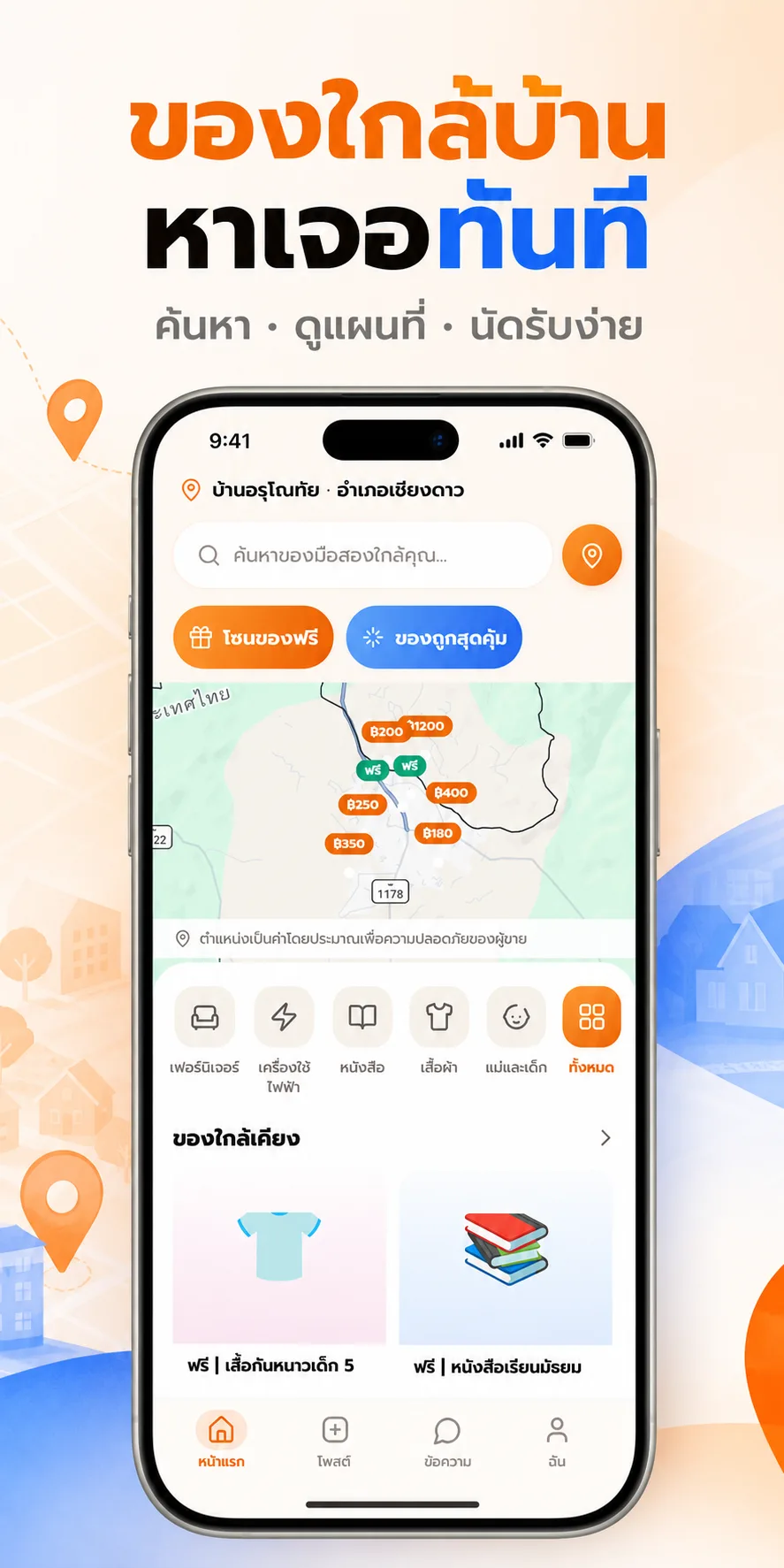
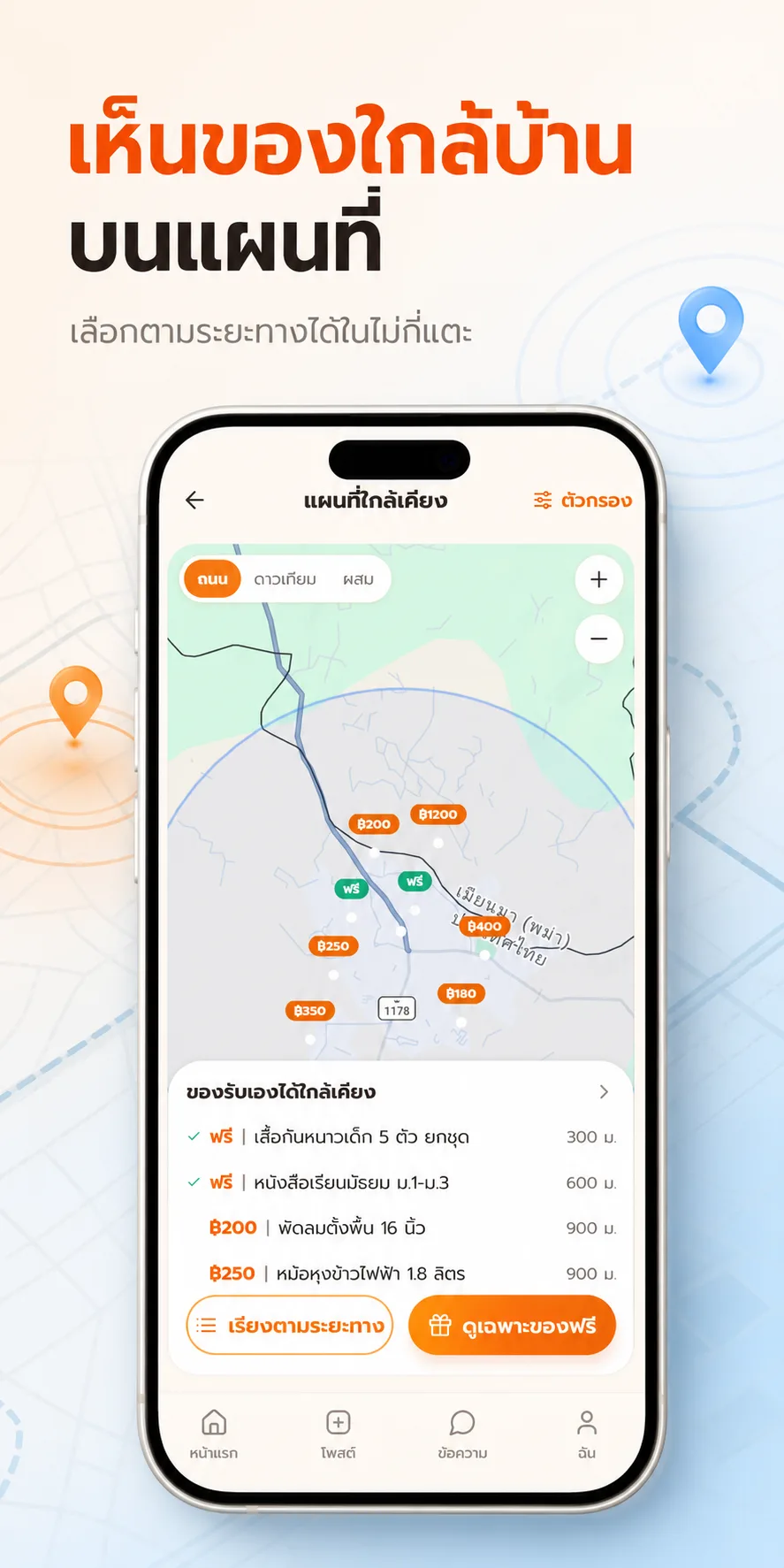
หน้าแรกแสดงของในรัศมีมาตรฐาน 5 กม. จากตำแหน่งของคุณ และในรุ่น 1.0.5 เลือกเมืองที่อยากดูและปรับระยะเป็น 5 / 10 / 15 กม. ได้ วงกลมบนแผนที่ตามระยะที่เลือก มีหมวดสินค้า เช่น เฟอร์นิเจอร์ เครื่องใช้ไฟฟ้า หนังสือ เสื้อผ้า และแม่และเด็กThe home screen shows items within the standard 5 km of your position, and in version 1.0.5 you can choose the city to browse and set the radius to 5 / 10 / 15 km, with the map circle following the choice. There are categories such as furniture, electrical goods, books, clothes, and mother and child.
โซนของแจกฟรีและโซนของถูกสุดคุ้มA free-giveaway zone and a bargain zone
หน้าแรกมีปุ่มแยก "โซนของฟรี" กับ "ของถูกสุดคุ้ม" ลงประกาศไม่มีค่าธรรมเนียมและไม่มีโฆษณา ของแจกฟรีเปิดให้ผู้รับกดยืนยันได้เองหลังรับของThe home screen has separate "Free zone" and "Best-value" buttons. Listing is free of fees and ads, and for free items the receiver can confirm pickup on their own.
แผนที่ที่เบลอพิกัดเพื่อความปลอดภัยผู้ขายA map that blurs sellers' positions
หมุดสินค้าใช้พิกัดที่เบลอแบบสุ่มคงที่ ±150 เมตร และระยะที่แสดงวัดจากพิกัดเบลอ ไม่ใช่บ้านจริง API ไม่เคยส่งพิกัดจริงออกไป ที่อยู่จริงเปิดเผยหลังผู้ขายยืนยันนัดเท่านั้นItem pins use a fixed random blur of ±150 metres and the displayed distance is measured from the blurred point, not the real house. The API never sends the exact coordinates, and the real address is shown only once the seller confirms the appointment.
แชทในแอปและนัดรับIn-app chat and pickup appointments
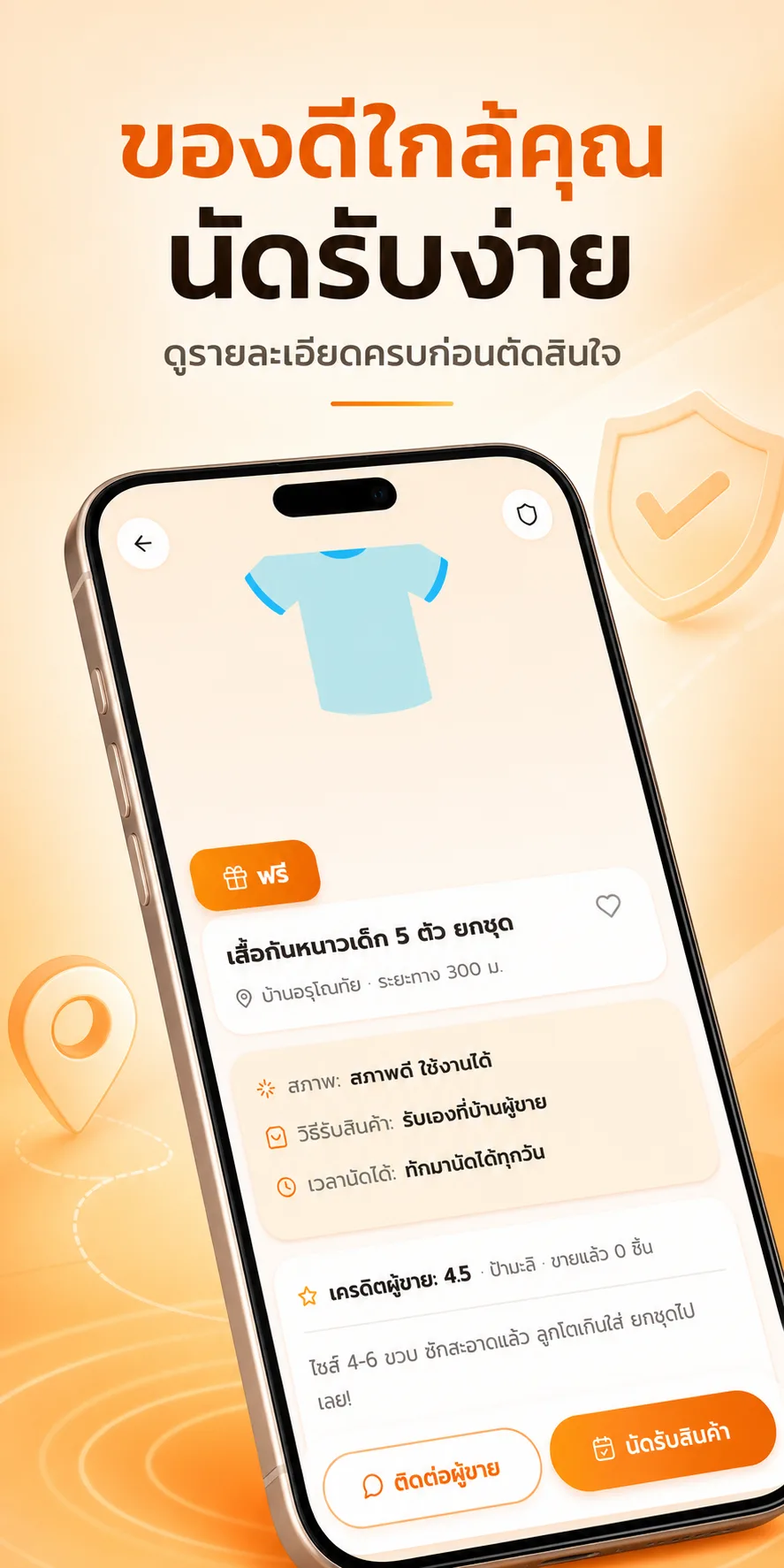
ผู้ซื้อส่งคำขอนัดรับจากหน้าประกาศ ผู้ขายยืนยันในแอป ห้องแชทเป็นเรียลไทม์ผ่าน WebSocket รุ่น 1.0.5 เตือนก่อนถึงเวลานัด 2 ชั่วโมง และแก้ป้ายข้อความใหม่ที่ค้างหรือส่งไม่สำเร็จแต่ไม่แจ้งA buyer sends a pickup request from the listing page and the seller confirms in the app. Chat runs in real time over WebSocket. Version 1.0.5 adds a reminder 2 hours before the appointment and fixes stuck unread badges and silent send failures.
ลงประกาศ "กำลังหาของ" และลงหลายชิ้นรวดเดียว"Looking for" posts and batch listing
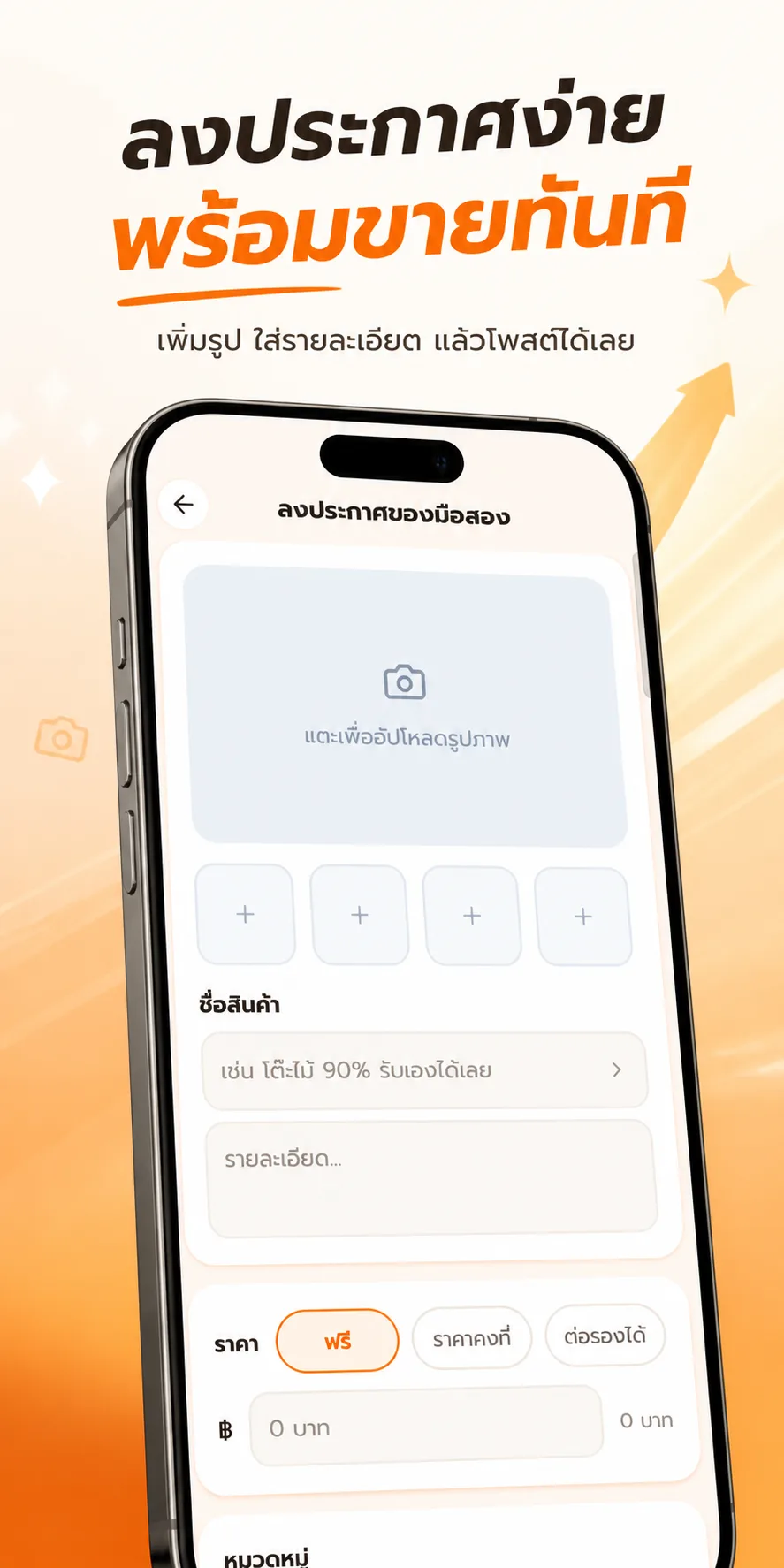
รุ่น 1.0.5 เพิ่มแท็บ "กำลังหาของ" ให้บอกเพื่อนบ้านว่ากำลังหาอะไร และหน้าลงหลายชิ้น เลือกรูปทีละหลายใบ 1 รูป = 1 ประกาศ กรอกหมวดและจุดนัดรับครั้งเดียวใช้ทั้งชุด สูงสุด 10 ชิ้นต่อครั้งVersion 1.0.5 adds a "Looking for" tab where you tell neighbours what you need, and a batch-listing page: pick several photos at once, one photo per listing, fill in the category and pickup point once for the whole set, up to 10 items at a time.
ระบบ "คนใจดี" นับของแจกที่ส่งต่อสำเร็จThe "kind neighbour" counter for completed giveaways
เมื่อผู้รับกดยืนยันรับของและส่งคำขอบคุณ ระบบนับเฉพาะของแจกฟรี และคู่เดิมนับได้ครั้งเดียวต่อ 30 วัน ผู้ให้กดนับเองไม่ได้ ระดับตั้งแต่ เริ่มแบ่งปัน (1 ครั้ง) คนใจดีประจำซอย (5) ขวัญใจเพื่อนบ้าน (15) ถึงใจบุญระดับตำนาน (30) มีหน้าฉลองให้ผู้ให้When a receiver confirms pickup and sends thanks, only free items count, and the same pair counts once per 30 days. The giver cannot count themselves. Levels run from Starter (1), Neighbourhood Kind (5) and Neighbours' Favourite (15) to Legend (30), with a celebration screen for the giver.
แจ้งเตือนของใหม่ใกล้บ้านAlerts for new items nearby
เมื่อมีคนลงของในรัศมี 5 กม. ผู้ใช้ได้แจ้งเตือน ของแต่ละชิ้นแจ้งครั้งเดียว และจำกัด 1 ครั้งต่อ 30 นาที และ 6 ครั้งต่อวันต่อคน เปิดเป็นค่าเริ่มต้น ปิดได้ในตั้งค่า เมื่อปิดระบบลบตำแหน่งล่าสุดทันที ประกาศที่รอตรวจแจ้งตอนแอดมินอนุมัติWhen someone lists an item within 5 km, users get an alert. Each item notifies once, with a cap of one alert per 30 minutes and six per day per person. It is on by default and can be turned off in settings, which deletes the last saved location immediately. Listings under review are announced when an admin approves them.
จ่ายผ่านพร้อมเพย์ QR ตรงถึงผู้ขายPromptPay QR straight to the seller
ระบบสร้าง QR พร้อมเพย์ตามมาตรฐาน EMVCo สแกนจ่ายได้จริง เงินเข้าผู้ขายโดยตรง แพลตฟอร์มไม่หักส่วนแบ่งThe system builds a PromptPay QR to the EMVCo standard that really scans and pays, with the money going directly to the seller and no platform cut.
ตรวจประกาศอัตโนมัติ และหลังบ้านAutomatic listing screening and a back office
มีตัวกรองกฎ 3 ภาษาตรวจเนื้อหา และมี LLM ช่วยเข้มงวดขึ้นได้อย่างเดียวผ่อนไม่ได้ (กันการหลอก prompt) แอดมินอนุมัติหรือปฏิเสธประกาศที่รอตรวจ ลิมิตลงประกาศ 10 ชิ้นต่อชั่วโมงต่อ IPA rule-based filter checks content in three languages, and an LLM can only make it stricter, never looser, to resist prompt injection. Admins approve or reject listings under review, and listing is capped at 10 per hour per IP.
ล็อกอินและ 4 ภาษาSign-in and four languages
ล็อกอินด้วยเบอร์โทร (SMS จริง) Facebook LINE Google และ Apple แอปมือถือสลับได้ 4 ภาษา คือ ไทย อังกฤษ จีน และลาว เลือกจากรายการSign in by phone (real SMS), Facebook, LINE, Google and Apple. The mobile app switches between four languages: Thai, English, Chinese and Lao, chosen from a list.
04 · วิธีทำงาน04 · How it works
ทำงานยังไง ตั้งแต่ต้นจนจบHow it works, start to finish
- 1
1. สมัครและตั้งตำแหน่ง1. Sign up and set your position
ยืนยันเบอร์ด้วยรหัส SMS แล้วให้แอปใช้ตำแหน่งหรือปักหมุดบ้าน พิกัดถูกปัดเหลือประมาณ 100 เมตรก่อนเก็บVerify your number with an SMS code, then let the app use your location or pin your home. Coordinates are rounded to about 100 metres before storing.
- 2
2. ลงประกาศ2. List an item
ถ่ายรูป เลือกหมวด ตั้งราคาหรือเลือกแจกฟรี ประกาศผ่านการตรวจอัตโนมัติ บางชิ้นรอแอดมินอนุมัติPhotograph the item, choose a category, set a price or mark it free. The listing passes automatic screening and some wait for admin approval.
- 3
3. เพื่อนบ้านเห็นและทักมา3. Neighbours see it and get in touch
ผู้ใช้ในรัศมีได้แจ้งเตือน ดูรายการหรือแผนที่ ทักแชทและส่งคำขอนัดรับUsers inside the radius get an alert, browse the list or map, open a chat and send a pickup request.
- 4
4. ยืนยันนัดและเปิดที่อยู่4. Confirm the appointment and reveal the address
ผู้ขายยืนยันนัด ระบบแจ้งที่อยู่จริงให้ฝ่ายที่นัด คำแนะนำความปลอดภัยคือไปช่วงกลางวันและตรวจของก่อนจ่ายThe seller confirms and the real address goes to the matched party. The safety advice is to go in daylight and check the item before paying.
- 5
5. รับของ ขอบคุณ และรีวิว5. Pick up, thank, and review
ผู้รับกด "ได้รับของแล้ว" ส่งคำขอบคุณ ปลดล็อกรีวิว และระบบนับความใจดีให้ผู้แจกThe receiver taps "got the item" and sends thanks, which unlocks reviews and counts kindness for the giver.
05 · ภาพ05 · Visuals
ภาพจากระบบจริงFrom the real system
11 ภาพ11 imagesภาพหน้าจอจริงถ่ายจากระบบที่เปิดใช้อยู่ ส่วนภาพโปรโมตและภาพประกอบมีป้ายกำกับไว้ทุกใบReal screenshots come from the running system; promo images and illustrations are labelled on every card.





06 · สถานการณ์06 · Scenarios
ตัวอย่างสถานการณ์ใช้งานExample scenarios
เป็นตัวอย่างสมมติเพื่อให้เห็นภาพ ไม่ใช่เรื่องของลูกค้าจริงIllustrative scenarios to help you picture it — not real customer stories.
เก็บบ้านแล้วมีของเหลือClearing out the house
สมมติว่าบ้านหนึ่งจัดตู้แล้วมีเก้าอี้ไม้และเสื้อผ้าเด็กเหลือ ใช้หน้าลงหลายชิ้นถ่ายรูป 5 ชิ้นแล้วกดลงพร้อมกัน เพื่อนบ้านในซอยได้แจ้งเตือนและมารับSuppose a household tidies up and has a wooden chair and children's clothes left over. They use batch listing to post five items at once, and neighbours in the street get alerts and come to collect.
แม่บ้านที่หาของให้ลูกA parent looking for kids' things
สมมติว่ามีคนหาจักรยานเด็กมือสอง เขาลงในแท็บ "กำลังหาของ" ใครมีของชิ้นนั้นก็ทักมาเอง ไม่ต้องไล่ดูทุกประกาศSuppose someone wants a second-hand child's bicycle. They post it in the "Looking for" tab and anyone who has one gets in touch, with no need to scroll every listing.
คนที่ห่วงความปลอดภัยของที่อยู่Someone worried about their address
สมมติว่าผู้ขายหญิงอยู่บ้านคนเดียว หมุดของเธอเบลอ ±150 เมตร เธอเห็นว่าใครขอนัด และที่อยู่จริงเปิดเมื่อเธอยืนยันเท่านั้นSuppose a woman selling from home alone has her pin blurred by ±150 metres. She sees who asks for an appointment and the real address opens only when she confirms.
ชมรมคนใจดีในหมู่บ้านA village giving circle
สมมติว่าอาสาสมัครแจกของบริจาคเป็นประจำ ผู้รับกดขอบคุณทุกครั้ง ระบบสะสมจนถึงระดับคนใจดีและโชว์เป็นป้ายในโปรไฟล์Suppose a volunteer regularly gives away donated goods. Each receiver sends thanks, the system accumulates up to a kindness level, and shows a badge on the profile.
07 · เบื้องหลัง07 · Under the hood
เบื้องหลังระบบ ข้อมูล และความปลอดภัยUnder the hood: data and security
- แพลตฟอร์มPlatform
- แอปมือถือสร้างด้วย Expo 54 / React Native 0.81 และ NativeWind ส่วนเว็บเป็น H5 ที่ zzaxstudio.com/baanmart Android build ในเครื่องด้วย Gradle ไม่ผ่าน EASThe mobile app is built with Expo 54 / React Native 0.81 and NativeWind, and the web is an H5 version at zzaxstudio.com/baanmart. Android is built locally with Gradle rather than through EAS.
- เซิร์ฟเวอร์และข้อมูลServer and data
- เซิร์ฟเวอร์ Express + SQLite + WebSocket รันเป็นคอนเทนเนอร์ Docker บน VPS ที่ api.zzaxstudio.com มี Redis เป็นตัวเลือก มี rate limit ระดับ IP และต่อบัญชีAn Express + SQLite + WebSocket server runs as a Docker container on a VPS at api.zzaxstudio.com, with Redis optional and rate limits per IP and per account.
- ความเป็นส่วนตัวPrivacy
- พิกัดจริงของสินค้าไม่ออกจาก API พิกัดผู้ใช้ปัดเป็น 3 ตำแหน่งทศนิยม ปิดสวิตช์แจ้งเตือนแล้วลบตำแหน่งล่าสุด ลบบัญชีแล้วลบตำแหน่งและหมุดบ้านThe item's exact coordinates never leave the API, user coordinates are rounded to three decimals, turning alerts off deletes the last location, and deleting the account deletes the location and home pin.
- การเชื่อมต่อภายนอกExternal services
- SMS ThaiBulkSMS ล็อกอิน Facebook LINE Google Apple แจ้งเตือนผ่าน Expo Push / Firebase และ Web Push อีเมลยังเป็นโหมดพัฒนา ไม่ส่งอีเมลจริงThaiBulkSMS for SMS, sign-in with Facebook, LINE, Google and Apple, notifications via Expo Push / Firebase and Web Push. Email is still in development mode and sends no real mail.
- ความปลอดภัยและการตรวจSecurity and audits
- มีการตรวจความปลอดภัยเมื่อ ก.ย. 2569 แก้ 14 ข้อ และปิดช่องโหว่ชุดแรก ต.ค. 2569 เช่น ลิมิต OTP ต่อ IP ดัชนีฐานข้อมูล ลิมิต WebSocket ด่านคีย์ตอนบูตA security audit in September 2026 led to 14 fixes, and a first hardening batch in October 2026 covered per-IP OTP limits, database indexes, WebSocket limits and a key check at boot.
- ข้อจำกัดที่ควรรู้Limits to know
- ลิมิตลงประกาศนับต่อ IP จึงอาจกระทบหลายคนที่ใช้เน็ตมือถือเครือข่ายเดียวกัน และแอป iPhone เคยตามหลัง Android หลายรุ่นListing limits count per IP, which can hit several people sharing one mobile carrier, and the iPhone app has lagged behind Android by several versions.
08 · ความคืบหน้า08 · Progress
ความคืบหน้าและแผนต่อไปProgress and what comes next
- ทำแล้วDone
1 ส.ค. 2569 เว็บ H5 ต้นแบบเสร็จ และ 6 ส.ค. 2569 เปิดเว็บและ backend จริง1 Aug 2026: the H5 web prototype finished, and on 6 Aug 2026 the web and the real backend went live
- ทำแล้วDone
16 ก.ย. 2569 แอป Android ขึ้น production ของ Google Play พร้อมแจ้งเตือนของใกล้บ้าน16 Sep 2026: the Android app went into Google Play production, with nearby-item alerts
- ทำแล้วDone
3 ต.ค. 2569 ระบบ "คนใจดี" ขึ้นเซิร์ฟเวอร์3 Oct 2026: the "kind neighbour" system went onto the server
- ทำแล้วDone
6 ต.ค. 2569 Android 1.0.5 ขึ้น Play: เลือกเมือง/ระยะ กำลังหาของ ลงหลายชิ้น เตือนก่อนนัด6 Oct 2026: Android 1.0.5 on Play: city and radius picker, "Looking for", batch listing, pre-appointment reminder
- กำลังทำIn progress
ปล่อยแอป iPhone ให้ตามทันรุ่น Android (เป้าหมาย iOS 1.0.5)Bringing the iPhone app up to the Android version (target iOS 1.0.5)
- ถัดไปNext
กระดานคนใจดีประจำย่าน (ข้อ 5 ของดีไซน์ที่ยังไม่ทำ) และเพิ่มภาษาลาวบนเว็บA neighbourhood kindness board (item 5 of the design, not yet built) and Lao on the web
09 · คำถาม09 · FAQ
คำถามที่พบบ่อยFrequently asked questions
BaanMart ต้องเสียเงินไหมDoes BaanMart cost money?
ลงประกาศไม่มีค่าธรรมเนียมและไม่มีโฆษณา และแพลตฟอร์มไม่หักส่วนแบ่งจากการโอนพร้อมเพย์Listing carries no fee or ads, and the platform takes no cut from PromptPay transfers.
คนอื่นจะรู้บ้านฉันไหมWill others learn where I live?
ไม่ หมุดเบลอ ±150 เมตร และที่อยู่จริงเปิดหลังคุณยืนยันนัดเท่านั้นNo. Pins are blurred by ±150 metres and the real address opens only after you confirm the appointment.
ใช้นอกประเทศไทยได้ไหมDoes it work outside Thailand?
ล็อกอินด้วย SMS ใช้เบอร์ไทย แต่ยังไม่มีบันทึกว่ารองรับประเทศอื่นเป็นทางการ จึงยังไม่ได้กำหนดSMS sign-in uses Thai numbers and there is no record of formal support for other countries, so it is not yet defined.
เลือกรัศมีได้เท่าไหร่What radius can I choose?
มาตรฐาน 5 กม. และปรับเป็น 10 หรือ 15 กม. ได้ในรุ่น 1.0.5The default is 5 km and version 1.0.5 lets you set 10 or 15 km.
ทำไมเปิดแอปแล้วไม่เห็นของWhy do I see no items when I open the app?
ตอนนี้ยังมีผู้ลงประกาศน้อย ถ้ารัศมีไม่มีของ หน้าว่างมีปุ่มให้ขยายระยะ ลงของชิ้นแรกของย่าน หรือเปิดแจ้งเตือนThere are still few sellers. If the radius is empty, the empty screen offers buttons to widen the radius, list the first item in your area, or turn on alerts.
ใครดูแลระบบWho runs it?
ZZAX StudioZZAX Studio.
10 · วิธีเริ่ม10 · Get started
เริ่มได้ใน 3 ขั้นUp and running in three steps
ถ้าอยากได้ระบบแบบเดียวกันสำหรับธุรกิจของคุณ บอกโจทย์มาสั้น ๆ เราตอบกลับพร้อมขอบเขตงานและราคาภายใน 1 วันทำการIf you want something like this for your own business, send us a line about the problem. You'll get scope and price within one working day.
- 1ขั้นที่ 1 เปิด zzaxstudio.com/baanmart แล้วยืนยันเบอร์โทรด้วย OTPStep 1: Open zzaxstudio.com/baanmart and verify your phone with an OTP
- 2ขั้นที่ 2 เปิดแผนที่ดูของที่ประกาศอยู่ในรัศมี 5 กิโลเมตรรอบตัวคุณStep 2: Open the map to see what's listed within 5 km of you
- 3ขั้นที่ 3 ถ่ายรูปของที่ไม่ใช้แล้วลงประกาศ เลือกว่าจะขายหรือแจกฟรีStep 3: Photograph what you no longer use and list it — for sale or free
เริ่มงานกับเราWork with us
อยากได้ระบบแบบนี้สำหรับธุรกิจคุณWant a system like this for your business?
เล่าปัญหาของคุณมา เราจะบอกตรง ๆ ว่าช่วยได้ไหม ภายใน 1 วันทำการ ส่งแล้วได้รหัสติดตามงานทันทีTell us the problem and we'll say honestly whether we can help, within one working day. You get a tracking code the moment you send it.