ร้านบุฟเฟต์ที่มีหลายราคาต้องคอยเช็กว่าโต๊ะไหนสั่งเมนูเกินสิทธิ์ พนักงานจดออเดอร์ผิด ครัวได้รับช้า และไม่มีตัวเลขว่าวันนี้ขายอะไรไปเท่าไหร่ ระบบนี้ให้ลูกค้าสแกน QR แล้วเห็นเฉพาะเมนูตามแพ็กเกจที่จ่าย ออเดอร์เด้งเข้าครัวทันที และปิดโต๊ะแล้ว QR ใช้ต่อไม่ได้A multi-tier buffet has to police who ordered beyond their package, staff mis-write orders, the kitchen hears late, and nobody knows what sold today. Here guests scan a QR and see only the dishes their package allows, orders hit the kitchen screen instantly, and the QR dies when the table is closed.
← ผลงานทั้งหมด← All work
เว็บแอปWeb app
Buffet QRBuffet QR
ระบบสั่งอาหารผ่าน QR สำหรับร้านบุฟเฟต์ 3 ราคา ใช้งานจริงในร้านหมาล่า TAIXI ของเราเองQR ordering for a 3-tier buffet, running daily in our own TAIXI mala hotpot restaurant
ใช้งานจริงLive เว็บแอปWeb app
ใช้งานจริงทุกวันในร้าน TAIXI (泰喜火锅) ร้านบุฟเฟต์หมาล่าของผู้ก่อตั้ง ระบบรันในร้านผ่าน Wi-Fi ไม่ต้องใช้อินเทอร์เน็ตIn daily use at TAIXI (泰喜火锅), the founder's own mala hotpot buffet. Runs on the restaurant's Wi-Fi with no internet needed.
67เมนูจริงในระบบReal dishes in the system
86เทสต์อัตโนมัติผ่านAutomated tests passing
3ภาษาบนหน้าลูกค้าGuest languages
01 · ภาพรวม01 · Overview
ภาพรวมของระบบThe system at a glance
Buffet QR คือระบบสั่งอาหารผ่าน QR สำหรับร้านบุฟเฟต์หมาล่าหลายราคา สร้างขึ้นสำหรับร้าน TAIXI (泰喜火锅) ของผู้ก่อตั้งเอง ลูกค้าสแกน QR ที่โต๊ะแล้วสั่งเองจากมือถือ เห็นเฉพาะเมนูที่แพ็กเกจที่จ่ายครอบคลุม ส่วนครัวเห็นออเดอร์เด้งขึ้นจอทันทีBuffet QR is a QR ordering system for a multi-price mala hotpot buffet, built for the founder's own restaurant TAIXI (泰喜火锅). Guests scan a QR at the table and order from their own phones, seeing only the dishes their package covers, while the kitchen sees orders pop up on its screen at once.
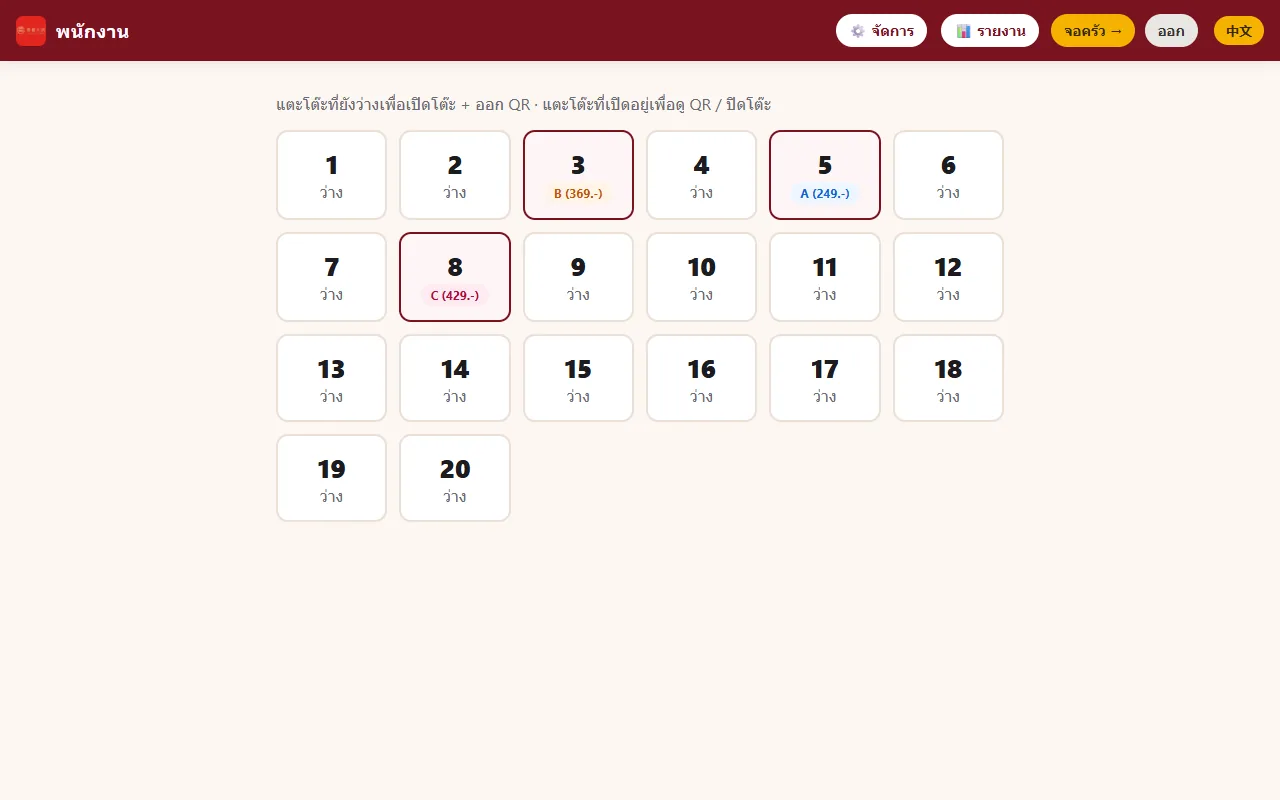
พนักงานแตะโต๊ะว่างบนหน้าจอพนักงาน เลือกแพ็กเกจ (ค่าตั้งต้น A 249 / B 369 / C 429 บาท) เลือกน้ำซุป ใส่จำนวนคนและเวลาที่ให้ทาน แล้วระบบออก QR ของโต๊ะนั้น ลูกค้าสั่งได้จนหมดเวลา และเมื่อพนักงานปิดโต๊ะ QR นั้นใช้ต่อไม่ได้Staff tap a free table on the staff screen, pick the package (default A 249 / B 369 / C 429 baht), choose soups, enter the head count and time allowed, and the system issues that table's QR. Guests can order until time runs out, and once staff close the table the QR stops working.
สถานะคือติดตั้งใช้งานสำหรับร้านของเจ้าของเอง โค้ดผ่านชุดทดสอบ 5 ชุดรวม 86 ข้อตามเอกสาร และมีคู่มือติดตั้ง สคริปต์เปิดอัตโนมัติ และวิธีเปิดผ่านเน็ตมือถือ ส่วนการใช้งานจริงทุกวัน จำนวนโต๊ะหรือยอดที่ผ่านระบบจริง ไม่มีตัวเลขยืนยันในเอกสารที่ตรวจ ระบบไม่มีหน้าเว็บสาธารณะเพราะรันในร้านThe status is installed for the owner's own restaurant. The code passes five test suites totalling 86 checks per the documentation, with an install guide, auto-start scripts and a way to open it over mobile data. Day-to-day use, real table counts or sales through it are not confirmed in the documents checked. There is no public website because it runs inside the restaurant.
เจตนาตั้งแต่แรกคือไม่เชื่อมกับ POS เป็นเพียงระบบรับออเดอร์และคุมสิทธิ์แพ็กเกจ จึงติดตั้งได้ในวันเดียวโดยไม่ต้องเปลี่ยนเครื่องคิดเงินเดิม ร้านที่มีแพ็กเกจหลายราคาจึงไม่ต้องคอยเดินเช็กว่าโต๊ะไหนสั่งเกินสิทธิ์By design it does not connect to a POS; it only takes orders and enforces package rights. That makes it installable in a day without replacing the existing till, and a restaurant with several package prices no longer needs staff walking round to check who ordered above their tier.
02 · โจทย์02 · The brief
สร้างขึ้นมาเพราะอะไรWhy this exists
ร้านบุฟเฟต์ หมาล่า ชาบู ปิ้งย่าง ที่มีแพ็กเกจหลายราคา และร้านอาหารที่อยากให้ลูกค้าสั่งเองโดยไม่ต้องลงทุนระบบ POS ใหม่Buffet, hotpot, shabu and grill restaurants with several price packages, and any restaurant that wants self-ordering without replacing its POS.
ใช่โจทย์ของคุณไหมSound like your problem?
03 · ฟีเจอร์03 · Features
ทำอะไรได้บ้าง อย่างละเอียดWhat it does, in detail
10 ความสามารถ10 capabilitiesแพ็กเกจราคาซ้อนกันและเซิร์ฟเวอร์ตรวจซ้ำNested price packages checked again on the server
เมนูแต่ละจานมีระดับขั้นต่ำ ลูกค้าเห็นเมนูที่ระดับไม่เกินแพ็กเกจที่เปิดโต๊ะ ข้อมูลตั้งต้นมี 71 เมนู แบ่งเป็นระดับ 249 จำนวน 42 รายการ ระดับ 369 จำนวน 21 รายการ และระดับ 429 จำนวน 8 รายการ เซิร์ฟเวอร์ตรวจซ้ำตอนส่งออเดอร์ ถ้าสั่งเมนูเกินสิทธิ์จะถูกปฏิเสธEach dish has a minimum tier and guests see dishes up to the package the table was opened with. The starter data has 71 dishes: 42 at the 249 tier, 21 at 369 and 8 at 429. The server checks again when the order is sent and rejects anything above the table's tier.
หน้าสั่งอาหารของลูกค้า 3 ภาษาGuest ordering page in three languages
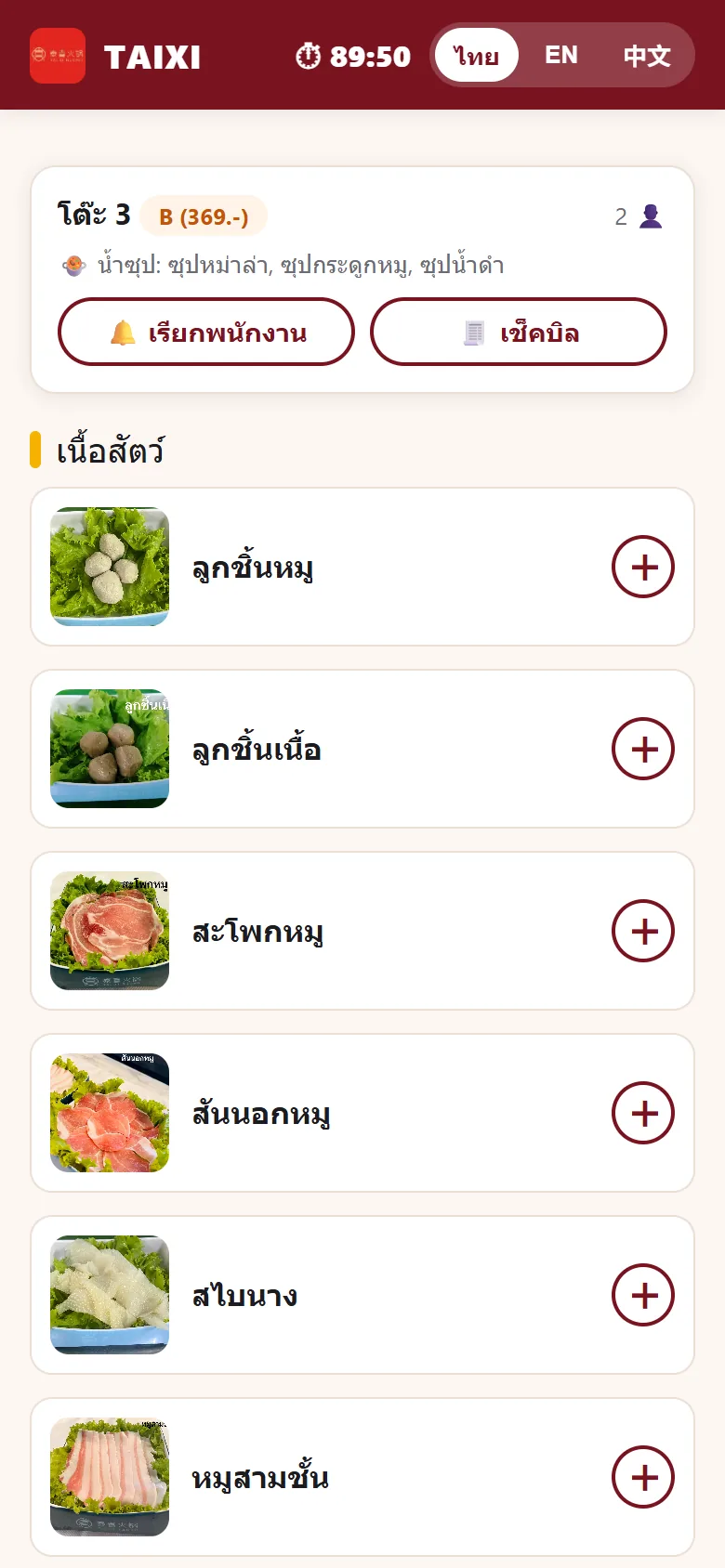
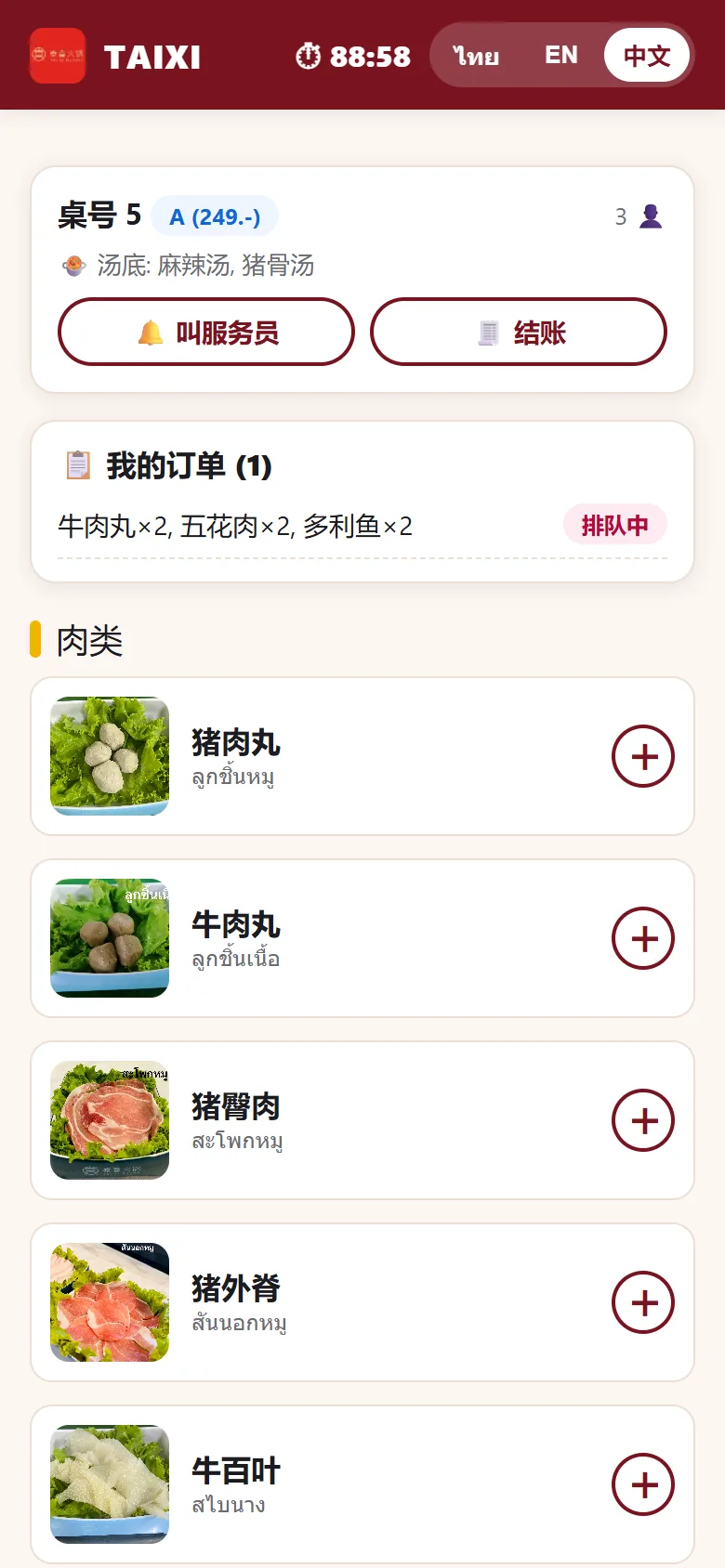
สแกนแล้วเข้าหน้าเว็บได้เลยไม่ต้องติดตั้งแอป มีปุ่มสลับ ไทย EN 中文 ทุกเมนูมีชื่อ 3 ภาษาและรูปจริง หัวหน้าจอบอกโต๊ะ แพ็กเกจ จำนวนคน น้ำซุปที่เลือก และนาฬิกานับถอยหลังเวลาทานScanning opens a web page with no app to install and a Thai / EN / 中文 switch. Every dish has names in three languages and a photo, and the top of the screen shows the table, package, head count, chosen soups and a countdown of remaining time.
เลือกน้ำซุปตอนเปิดโต๊ะSoup choice when the table opens
พนักงานเลือกน้ำซุปให้ก่อนเพื่อไปเตรียมในครัว มีน้ำซุป 7 ชนิด แพ็กเกจ 249 เลือกได้จาก 3 ชนิดและเลือกได้ 2 อย่าง แพ็กเกจ 369 มี 5 ชนิดเลือกได้ 3 อย่าง แพ็กเกจ 429 มี 7 ชนิดเลือกได้ 3 อย่าง ซุปหม่าล่าในแพ็กเกจ 249 บวก 59 บาท และค่าซุปเข้าบิลกับรายงานอัตโนมัติStaff pick the soups up front so the kitchen can prepare them. There are 7 soups: the 249 package offers 3 types and allows 2 picks, 369 offers 5 types and allows 3, and 429 offers 7 types and allows 3. Mala soup on the 249 package adds 59 baht, and the surcharge flows into the bill and reports automatically.
จอครัวเรียลไทม์Realtime kitchen screen
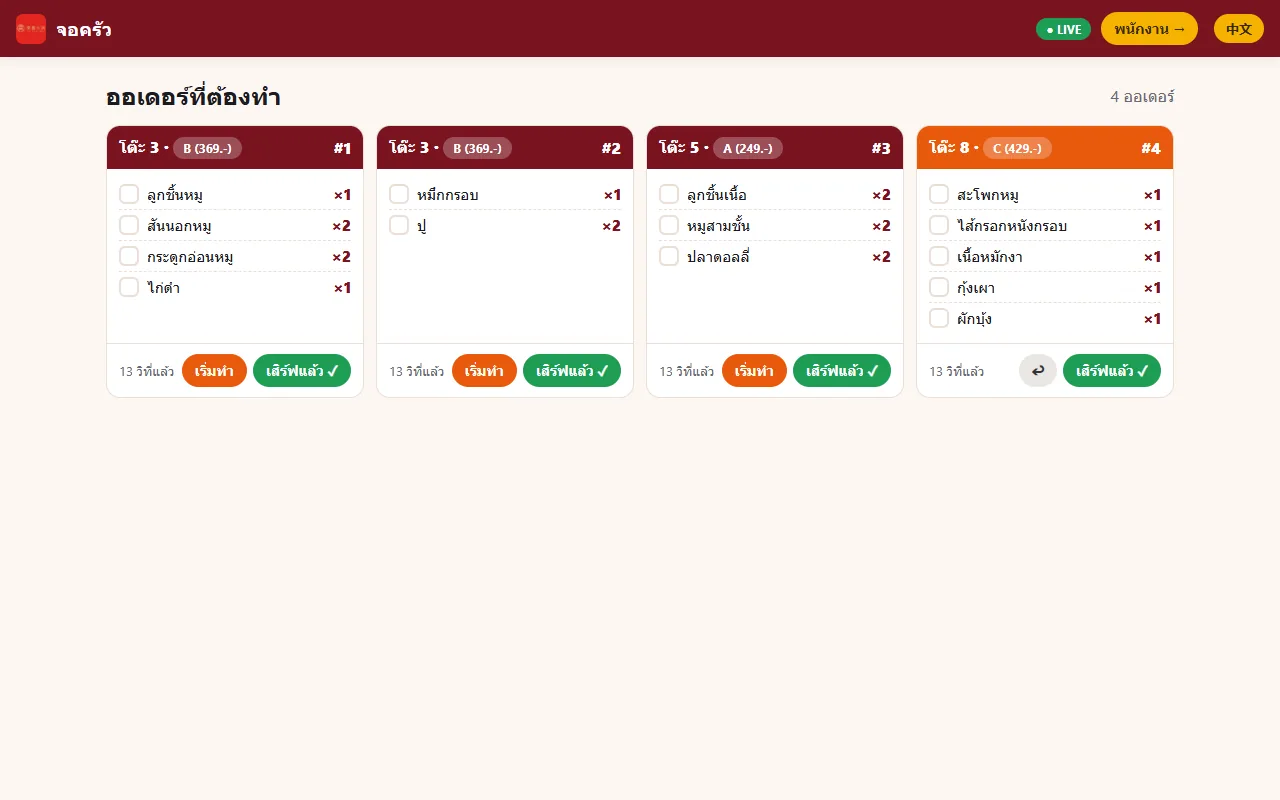
ออเดอร์แต่ละครั้งขึ้นเป็นการ์ดบอกโต๊ะ แพ็กเกจ เลขออเดอร์ รายการและจำนวน ติ๊กรายการได้ มีเวลานับว่าสั่งมานานเท่าไร ปุ่ม "เริ่มทำ" และ "เสิร์ฟแล้ว" และมีไฟ LIVE ที่มุมบน ลูกค้าเห็นสถานะ รอครัว กำลังทำ เสิร์ฟแล้ว ของออเดอร์ตัวเองอัปเดตสดบนมือถือEach order appears as a card with table, package, order number, items and quantities that can be ticked off, an elapsed-time label, Start and Served buttons and a LIVE light. Guests see their own order status (waiting, cooking, served) update live on their phones.
จับเวลาโต๊ะ ต่อเวลา และบล็อกอัตโนมัติTable timer, extensions and automatic blocking
แต่ละโต๊ะมีเวลาทานที่ตั้งได้ พนักงานกดต่อเวลา +15 หรือ +30 นาทีและหน้าจอลูกค้าอัปเดตสด เมื่อหมดเวลาเซิร์ฟเวอร์ปฏิเสธการสั่งเพิ่มและลูกค้าเห็นแบนเนอร์หมดเวลา ไม่ใช่แค่ซ่อนปุ่มบนหน้าจอEach table has a configurable dining time. Staff press +15 or +30 minutes and the guest screen updates live. After time runs out the server refuses new orders and the guest sees a time-up banner, rather than the button merely being hidden.
จำกัดจำนวนจานต่อครั้ง กันของเหลือPer-submission dish cap to curb leftovers
ตั้งจำนวนจานสูงสุดต่อการกดส่งหนึ่งครั้ง (ค่าตั้งต้น 10 จาน) เซิร์ฟเวอร์ตรวจจริงและลูกค้าเห็นคำเตือน ช่วยลดการสั่งมาเยอะแล้วกินไม่หมดA maximum number of dishes per send (default 10) is set, enforced by the server with a warning to the guest, which helps reduce over-ordering that ends as leftovers.
ปุ่มเรียกพนักงานและเช็กบิลของลูกค้าGuest buttons to call staff or ask for the bill
ลูกค้ากดเรียกพนักงานหรือเช็กบิลจากมือถือ พนักงานเห็นแถบแจ้งเตือน มีเสียง และโต๊ะนั้นกะพริบ จนกดรับเรื่องแล้ว มีระบบกันกดซ้ำรัวไม่ให้สแปมGuests press Call Staff or Ask for Bill on their phones; staff see an alert bar with a sound and the table blinks until acknowledged, with de-duplication so repeated presses do not spam.
ปิดโต๊ะ ค่าปรับของเหลือ และสรุปบิลClosing a table, wastage charge and bill summary
ตอนเช็กบิลพนักงานเห็นสรุปบิล แล้วใส่ค่าปรับของเหลือได้ มีปุ่มลัด 50 100 200 บาท ระบบรวมยอดให้ ได้ค่าอาหารบวกค่าซุปและค่าปรับ จากนั้นปิดโต๊ะ QR ของโต๊ะนั้นหมดอายุทันทีAt checkout staff see a bill summary and can add a wastage charge with 50, 100 and 200 baht shortcuts; the system totals food plus soup surcharge plus the wastage fee. Closing the table expires that table's QR immediately.
รายงานรายวันDaily report
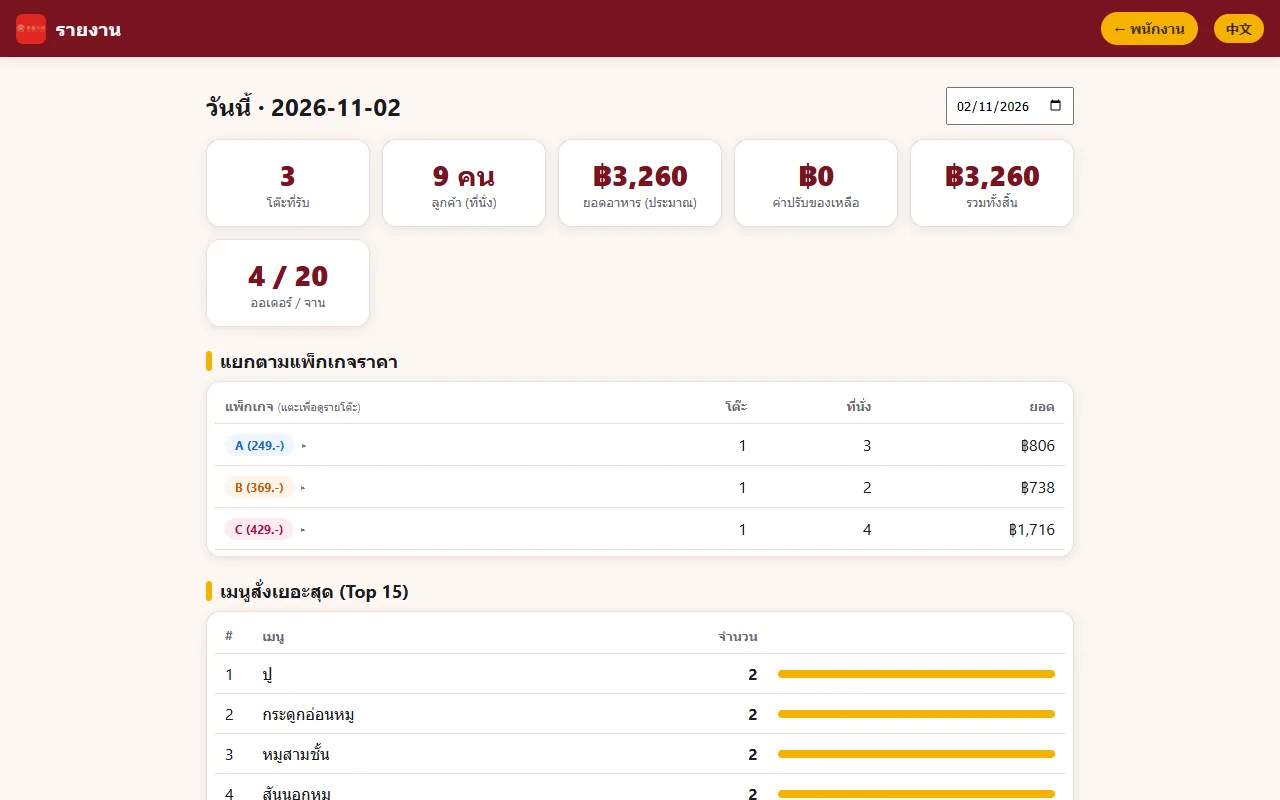
หน้ารายงานเลือกวันได้ แสดงจำนวนโต๊ะที่รับ จำนวนลูกค้า ยอดอาหาร ค่าปรับของเหลือ รวมทั้งสิ้น และจำนวนออเดอร์/จาน แยกตามแพ็กเกจ แตะดูรายโต๊ะ และตารางเมนูสั่งเยอะสุด 15 อันดับThe report page lets you pick a day and shows tables served, guests, food total, wastage fees, grand total and orders/dishes, split by package with per-table drill-down, plus a top-15 table of most-ordered dishes.
หน้าจัดการร้านโดยไม่ต้องแก้โค้ดAdmin page without touching code
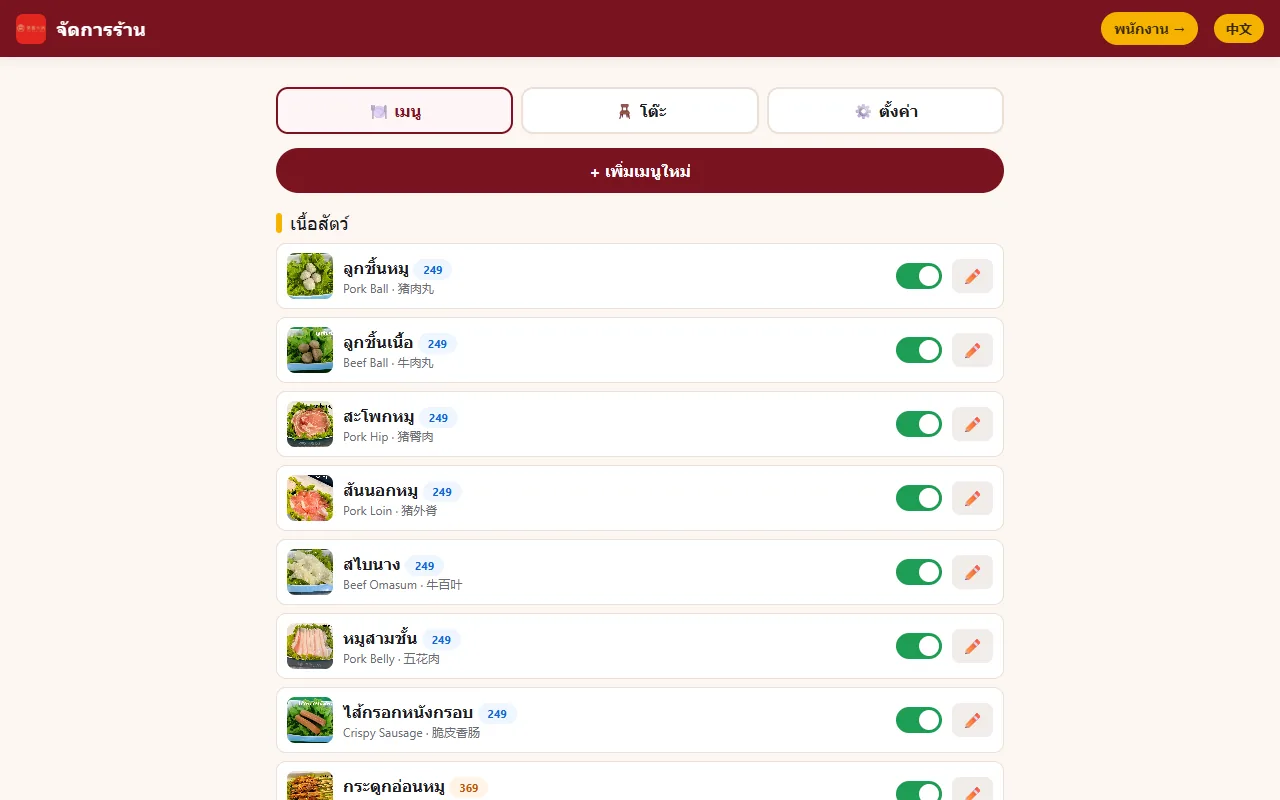
แท็บ เมนู: เพิ่ม แก้ ลบ เปิดปิดการขายเมื่อของหมด และอัปโหลดรูป เมนูที่เคยถูกสั่งแล้วลบไม่ได้ ต้องปิดการขายแทนเพื่อไม่ให้ประวัติหาย แท็บ โต๊ะ: เพิ่มลดโต๊ะ แท็บ ตั้งค่า: ชื่อร้าน ราคาต่อหัว A/B/C เวลาตั้งต้น ลิมิตต่อครั้ง และ PINMenu tab: add, edit, delete, switch dishes off when sold out and upload photos; dishes that were ever ordered cannot be deleted, only switched off, so history stays intact. Tables tab: add or remove tables. Settings tab: restaurant name, per-head price for A/B/C, default time, per-send cap and the PIN.
04 · วิธีทำงาน04 · How it works
ทำงานยังไง ตั้งแต่ต้นจนจบHow it works, start to finish
- 1
ติดตั้งเครื่องเซิร์ฟเวอร์เครื่องเดียวInstall on a single server machine
ลง Node.js แล้วดับเบิลคลิก setup.bat กับ start.bat บนคอมร้านหรือมินิพีซี ระบบพิมพ์ IP ของเครื่องให้ ควรล็อก IP ให้คงที่ที่เราเตอร์ ส่วนอุปกรณ์อื่นแค่เปิดเว็บ ไม่ต้องลงโปรแกรมInstall Node.js, then double-click setup.bat and start.bat on the shop PC or a mini PC. The system prints the machine's IP; lock it at the router. Every other device simply opens a web page with nothing to install.
- 2
พนักงานเปิดโต๊ะStaff open the table
ที่หน้า /staff ใส่ PIN แตะโต๊ะว่าง เลือกแพ็กเกจ น้ำซุป จำนวนคน เวลา แล้วกด เปิดโต๊ะ + ออก QR ระบบแสดง QR ให้ลูกค้าสแกนหรือพิมพ์On the /staff page enter the PIN, tap a free table, choose package, soups, head count and time, and press Open table + issue QR. A QR appears for the guests to scan or for printing.
- 3
ลูกค้าสแกนและสั่งGuests scan and order
ลูกค้าเห็นเมนูตามสิทธิ์ กดบวกเพื่อใส่ตะกร้า ส่งออเดอร์ เห็นรายการ "ออเดอร์ของฉัน" และสถานะ จนเวลาหมดหรือโต๊ะปิดGuests see the dishes they are entitled to, tap plus to fill the basket, send the order and follow My Orders and its status until time is up or the table is closed.
- 4
ครัวทำและเสิร์ฟThe kitchen cooks and serves
จอครัวที่ /kitchen แสดงออเดอร์ทันที ครัวติ๊กรายการ กดเริ่มทำและเสิร์ฟแล้ว พนักงานเห็นการเรียกจากโต๊ะเป็นแถบแจ้งเตือนThe /kitchen screen shows orders at once; the kitchen ticks items and presses Start and Served, while staff see table calls as alert bars.
- 5
เช็กบิลและปิดโต๊ะBill and close the table
พนักงานเปิดสรุปบิล ใส่ค่าปรับของเหลือถ้ามี แล้วปิดโต๊ะ QR หมดอายุ และข้อมูลไปรวมในรายงานประจำวันStaff open the bill summary, add any wastage fee and close the table; the QR expires and the data joins the daily report.
05 · ภาพ05 · Visuals
ภาพจากระบบจริงFrom the real system
6 ภาพ6 imagesภาพหน้าจอจริงถ่ายจากระบบที่เปิดใช้อยู่ ส่วนภาพโปรโมตและภาพประกอบมีป้ายกำกับไว้ทุกใบReal screenshots come from the running system; promo images and illustrations are labelled on every card.
06 · สถานการณ์06 · Scenarios
ตัวอย่างสถานการณ์ใช้งานExample scenarios
เป็นตัวอย่างสมมติเพื่อให้เห็นภาพ ไม่ใช่เรื่องของลูกค้าจริงIllustrative scenarios to help you picture it — not real customer stories.
สมมติว่าร้านหมาล่ามีสามแพ็กเกจและพนักงานน้อยSuppose a mala hotpot shop has three packages and few staff
สมมติว่าโต๊ะที่จ่าย 249 พยายามสั่งเนื้อพรีเมียมของแพ็กเกจ 429 ถ้าใช้ระบบนี้ เมนูพรีเมียมไม่ปรากฏบนหน้าจอลูกค้าโต๊ะนั้น และถ้ามีใครยิงคำสั่งตรง เซิร์ฟเวอร์ก็ปฏิเสธ พนักงานไม่ต้องคอยเช็กSuppose a table that paid 249 tries to order the 429 premium meats. In this system the premium dishes never appear on that table's screen, and a direct request is rejected by the server, so staff do not have to police it.
สมมติว่ามีลูกค้านักท่องเที่ยวที่อ่านไทยไม่ออกSuppose guests are tourists who cannot read Thai
สมมติว่าโต๊ะหนึ่งเป็นลูกค้าชาวจีน ลูกค้ากดปุ่ม 中文 แล้วเห็นชื่อเมนูและสถานะออเดอร์เป็นภาษาจีน ในขณะที่ครัวเห็นรายการเป็นภาษาไทยตามปกติSuppose one table is Chinese guests. They tap 中文 and see dish names and order status in Chinese, while the kitchen still sees the items in Thai.
สมมติว่าเจ้าของอยากรู้ว่าวันนี้ขายอะไรดีและเหลือทิ้งเท่าไรSuppose the owner wants to know what sold and how much was wasted
สมมติว่าปิดร้านแล้วเจ้าของเปิดรายงานวันนี้ เห็นจำนวนโต๊ะและหัว ยอดแยกตามแพ็กเกจ เมนูที่ถูกสั่งบ่อยที่สุด และค่าปรับของเหลือที่เก็บไป โดยไม่ต้องนับจากกระดาษSuppose the owner opens today's report after closing and sees tables and heads, revenue by package, the most-ordered dishes and the wastage fees collected, without counting paper slips.
07 · เบื้องหลัง07 · Under the hood
เบื้องหลังระบบ ข้อมูล และความปลอดภัยUnder the hood: data and security
- แพลตฟอร์มPlatform
- เซิร์ฟเวอร์เขียนด้วย Node.js (ต้องเป็นรุ่น 22 ขึ้นไป) ร่วมกับ Express และ Socket.IO ฐานข้อมูลเป็น SQLite ในตัวของ Node (node:sqlite) ไม่ต้องลงฐานข้อมูลเพิ่ม ไฟล์เดียวชื่อ restaurant.db สร้าง QR ด้วยไลบรารี qrcodeThe server is Node.js (version 22 or later) with Express and Socket.IO, and uses Node's built-in SQLite (node:sqlite) so no database needs installing, in a single restaurant.db file. QR codes come from the qrcode library.
- การทำงานในร้านและเครือข่ายIn-shop operation and network
- ติดตั้งเครื่องเดียว อุปกรณ์อื่นเปิดเว็บผ่าน Wi-Fi ร้านเดียวกัน ใช้ iPad มือถือ หรือจอเก่าเป็นจอพนักงานและครัวได้ ในโหมดนี้ไม่ต้องใช้อินเทอร์เน็ต ถ้าอยากให้ลูกค้าใช้เน็ตมือถือ มีคู่มือใช้ Cloudflare Tunnel ซึ่งต้องมีอินเทอร์เน็ตA single machine hosts it and other devices open the site over the same shop Wi-Fi; iPads, phones or old monitors can serve as staff and kitchen screens. In this mode no internet is needed. For guests on mobile data there is a Cloudflare Tunnel guide, which does need internet.
- ความปลอดภัยและการสำรองSecurity and backup
- หน้า staff kitchen reports และ admin ต้องใส่ PIN (เปลี่ยนได้ในหน้าตั้งค่า) ส่วนลูกค้าไม่ต้องใช้ PIN QR เป็นโทเคนสุ่มต่อโต๊ะและหมดอายุเมื่อปิดโต๊ะ การสำรองคือก๊อปไฟล์ restaurant.db เก็บไว้ที่ USB หรือ Google DriveThe staff, kitchen, reports and admin pages require a PIN (changeable in Settings); guests need none. The QR is a random per-table token that expires when the table closes. Backup is copying the restaurant.db file to a USB stick or Google Drive.
- การเชื่อมต่อและข้อจำกัดIntegrations and limits
- ไม่เชื่อม POS ไม่รับชำระเงินออนไลน์ ไม่มีรายงานช่วงวันที่หรือส่งออก Excel ไม่มีระบบสมาชิกและแต้ม และน้ำซุปแก้ผ่านไฟล์ข้อมูลตั้งต้นยังไม่มีหน้า admin รองรับNo POS link, no online payment, no date-range report or Excel export, no membership or points, and soups are edited in the seed data file because the admin page does not cover them yet.
- การทดสอบTesting
- มีสคริปต์ smoke test 5 ชุด รวม 86 ข้อ ตามเอกสาร (ยังไม่ได้รันซ้ำตอนจัดทำหน้านี้) ครอบคลุมวงจรหลัก ตัวจับเวลา ค่าปรับ รายงาน ลิมิต เรียกพนักงาน หน้า admin PIN และน้ำซุปFive smoke-test scripts totalling 86 checks per the documentation (not re-run for this page) cover the core loop, timer, wastage, reports, limits, staff calls, the admin page, PIN and soups.
08 · ความคืบหน้า08 · Progress
ความคืบหน้าและแผนต่อไปProgress and what comes next
- ทำแล้วDone
รอบ 1-2 (มิ.ย. 2569): วงจรหลัก เปิดโต๊ะ ออก QR ลูกค้าสั่ง ครัวรับ ปิดโต๊ะ พร้อมตัวจับเวลา ต่อเวลา ค่าปรับของเหลือ และรายงานรายวันRounds 1-2 (Jun 2026): the core loop of opening a table, QR, guest ordering, kitchen and closing, plus timer, extensions, wastage charge and the daily report
- ทำแล้วDone
รอบ 3-4: ลิมิตจานต่อครั้ง เรียกพนักงาน/เช็กบิล สถานะออเดอร์ฝั่งลูกค้า และหน้า admin แก้เมนู โต๊ะ ตั้งค่าได้เองRounds 3-4: per-send cap, call staff/ask for bill, guest-side order status, and an admin page for menu, tables and settings
- ทำแล้วDone
รอบ 5 (15 มิ.ย. 2569): PIN ล็อกหน้าหลังร้าน เลือกน้ำซุปตอนเปิดโต๊ะ รูปจริง 67 เมนู โลโก้ และเปลี่ยนชื่อแบรนด์เป็น TAIXIRound 5 (15 Jun 2026): PIN on back-office pages, soup choice at table opening, 67 real dish photos, logo and the rebrand to TAIXI
- ถัดไปNext
รายงานแบบช่วงวันที่และส่งออก ExcelDate-range reports and Excel export
- ถัดไปNext
ระบบสมาชิกและสะสมแต้มMembership and loyalty points
- ถัดไปNext
จัดการน้ำซุปผ่านหน้า adminManaging soups from the admin page
09 · คำถาม09 · FAQ
คำถามที่พบบ่อยFrequently asked questions
ต้องมีอินเทอร์เน็ตไหมDoes it need internet?
ไม่ต้องในโหมดปกติ ระบบรันในร้านและทุกคนใช้ Wi-Fi ร้านเดียวกัน ถ้าอยากให้ลูกค้าสั่งด้วยเน็ตมือถือต้องตั้ง Cloudflare Tunnel ตามคู่มือNot in normal mode: the system runs in the shop and everyone uses the same Wi-Fi. For guests on mobile data you set up a Cloudflare Tunnel per the guide.
ต้องเปลี่ยนเครื่อง POS ไหมDo we need to replace our POS?
ไม่ต้อง ระบบนี้ไม่เชื่อมกับ POS เป็นส่วนเสริมรับออเดอร์และคุมแพ็กเกจ คิดเงินยังใช้ระบบเดิมของร้านNo. It does not connect to a POS; it is an add-on for orders and package control, and payment still goes through the shop's existing till.
ราคาเท่าไหร่ และขายให้ร้านอื่นไหมWhat does it cost, and is it sold to other restaurants?
ยังไม่ได้กำหนดราคา หน้าเดิมในเว็บชวนให้เล่าความต้องการของร้านแล้วเราปรับเมนู ราคา และรูปให้ แต่ยังไม่มีข้อมูลราคาหรือลูกค้าร้านอื่นNo price is set. The existing web page invites restaurants to describe their needs so the menu, prices and photos are tailored, but there is no pricing information or other-restaurant customer yet.
ถ้าเครื่องเซิร์ฟเวอร์ดับ ข้อมูลหายไหมIf the server machine dies, do we lose data?
ข้อมูลอยู่ในไฟล์ restaurant.db ไฟล์เดียว ถ้าก๊อปสำรองไว้ก็นำกลับไปวางในเครื่องใหม่ได้ ตัวระบบไม่ได้สำรองเองให้ จึงควรก๊อปไฟล์นี้เป็นระยะData lives in a single restaurant.db file; with a copy you can drop it onto a new machine. The system does not back itself up, so copy the file regularly.
เพิ่มภาษาหรือเปลี่ยนแพ็กเกจราคาได้ไหมCan languages or package prices be changed?
เปลี่ยนราคาต่อหัวของแพ็กเกจ เมนู และเวลาได้จากหน้า admin ภาษาตอนนี้มีไทย อังกฤษ จีน การเพิ่มภาษาอื่นต้องแก้ไฟล์แปลPackage per-head prices, dishes and time can be changed in the admin page. The languages are Thai, English and Chinese; adding another requires editing the translation files.
ใครดูแลWho maintains it?
ZZAX Studio พัฒนาและดูแล โดยเริ่มจากการใช้ในร้านของผู้ก่อตั้งเองZZAX Studio builds and maintains it, starting from use in the founder's own restaurant.
10 · วิธีเริ่ม10 · Get started
เริ่มได้ใน 3 ขั้นUp and running in three steps
ถ้าอยากได้ระบบแบบเดียวกันสำหรับธุรกิจของคุณ บอกโจทย์มาสั้น ๆ เราตอบกลับพร้อมขอบเขตงานและราคาภายใน 1 วันทำการIf you want something like this for your own business, send us a line about the problem. You'll get scope and price within one working day.
- 1เล่าให้เราฟังว่าร้านคุณมีกี่แพ็กเกจ กี่โต๊ะ และใช้ภาษาอะไรบ้างTell us how many packages, tables and languages your restaurant needs.
- 2เราปรับเมนู ราคา และรูปให้ตรงร้านคุณ แล้วติดตั้งบนคอมในร้านหรือเครื่องเล็ก ๆ ที่ต่อ Wi-Fi ร้านWe load your menu, prices and photos, then install it on a PC or small box on the restaurant Wi-Fi.
- 3พนักงานเปิดโต๊ะ ออก QR ลูกค้าสแกนสั่ง ครัวรับออเดอร์ทันที เริ่มใช้ได้ในวันเดียวStaff open a table and hand over a QR, guests order, the kitchen gets it instantly. Live in a day.
เริ่มงานกับเราWork with us
อยากได้ระบบแบบนี้สำหรับธุรกิจคุณWant a system like this for your business?
เล่าปัญหาของคุณมา เราจะบอกตรง ๆ ว่าช่วยได้ไหม ภายใน 1 วันทำการ ส่งแล้วได้รหัสติดตามงานทันทีTell us the problem and we'll say honestly whether we can help, within one working day. You get a tracking code the moment you send it.