เจ้าของร้านอาหารส่วนใหญ่รู้ว่าวันนี้ขายได้เท่าไหร่ แต่ไม่รู้ว่าเหลือกำไรจริงเท่าไหร่ เพราะออเดอร์อยู่ในเครื่องหนึ่ง สต็อกจดในสมุด ค่าแรงคิดในหัว พอสิ้นเดือนจะดูว่าเมนูไหนคุ้มก็ต้องนั่งไล่เอกสารเป็นวันMost restaurant owners know today's sales but not today's profit. Orders live in one machine, stock in a notebook, labour costs in their head. Working out which dish pays at month-end means a day of paperwork.
← ผลงานทั้งหมด← All work
เว็บแอปWeb app
Smart AI RestaurantSmart AI Restaurant
ระบบหลังร้านอาหารครบวงจร POS สต็อก ต้นทุน และผู้ช่วย AIAn all-in-one restaurant back office: POS, stock, costing, and an AI assistant
กำลังพัฒนาIn development เว็บแอปWeb app
กำลังพัฒนา ยังไม่เปิดให้ใช้งานIn development, not yet available
01 · ภาพรวม01 · Overview
ภาพรวมของระบบThe system at a glance
Smart AI Restaurant คือเว็บแอประบบหลังร้านอาหารแบบรวมศูนย์ ตั้งแต่รับออเดอร์ที่โต๊ะ จอครัว แคชเชียร์ สต็อกวัตถุดิบ พนักงาน สมาชิก ไปจนถึงแดชบอร์ดกำไรขาดทุนของเจ้าของร้าน และมีช่องถามเรื่องร้านเป็นภาษาไทยที่ตอบจากตัวเลขจริงในระบบSmart AI Restaurant is a web app that gathers a restaurant's back office in one place: taking orders at the table, the kitchen screen, the cashier, ingredient stock, staff, members and an owner dashboard of profit and loss, plus a Thai-language box for asking about the restaurant that answers from the real numbers in the system.
ลำดับการใช้งาน: พนักงานเปิดหน้าสั่งอาหาร แตะโต๊ะ กดเมนูแล้ว "ส่งเข้าครัว" ออเดอร์เด้งขึ้นจอครัวแยกตามสถานี ครัวกดเริ่มทำและเสิร์ฟแล้ว แคชเชียร์เลือกบิล ใส่ส่วนลดหรือ VAT เลือกวิธีชำระ แล้วรับเงิน ส่วนเจ้าของเปิดแดชบอร์ดดูยอดขาย ต้นทุน ค่าแรง และกำไรสุทธิThe flow: a waiter opens the order page, taps a table, taps dishes and presses Send to Kitchen. The order pops up on the kitchen screen by station, the kitchen marks it started and served, and the cashier picks the bill, adds a discount or VAT, chooses a payment method and takes the money. The owner opens the dashboard to see sales, costs, labour and net profit.
สถานะตอนนี้คือกำลังพัฒนาและยังไม่เปิดให้ใช้งาน โค้ดอยู่ในเครื่อง (36 คอมมิต ระหว่าง 27 มิ.ย. ถึง 3 ก.ค. 2569) และทดสอบด้วยข้อมูลเดโมที่สร้างขึ้นเอง ยังไม่มี URL ใช้งานจริง ไม่มีหลักฐานว่าเปิดขายหรือมีร้านจริงใช้ และเอกสารออกแบบเขียนไว้ตรง ๆ ว่ายังไม่มีร้านจริงของตัวเองIt is in development and not yet available. The code lives locally (36 commits between 27 June and 3 July 2026) and has been exercised with self-generated demo data. There is no live URL, no evidence of sales or a restaurant using it, and the design document states plainly that the owner has no restaurant of their own to test in.
แนวคิดคือทำเป็นสินค้า SaaS ขายให้ร้านอาหารหลายร้านบนระบบเดียว แยกข้อมูลแต่ละร้านด้วยกลไก row-level security ของ PostgreSQL และใช้ AI เป็นจุดต่างจาก POS ฟรีทั่วไป โดยบังคับให้ตัวเลขทุกตัวที่ AI พูดมาจากฐานข้อมูล ไม่ให้แต่งเองThe idea is a SaaS product serving many restaurants on one system, isolating each restaurant's data with PostgreSQL row-level security, and using AI as the differentiator from free POS tools, with every number the AI states required to come from the database rather than be invented.
02 · โจทย์02 · The brief
สร้างขึ้นมาเพราะอะไรWhy this exists
ร้านอาหารขนาดเล็กถึงกลางที่อยากจัดการหลังบ้านให้เป็นระบบและคุมต้นทุนให้แม่นขึ้นSmall to mid-size restaurants that want an organised back office and tighter cost control
ใช่โจทย์ของคุณไหมSound like your problem?
03 · ฟีเจอร์03 · Features
ทำอะไรได้บ้าง อย่างละเอียดWhat it does, in detail
10 ความสามารถ10 capabilitiesสั่งอาหารและจัดการโต๊ะOrdering and tables
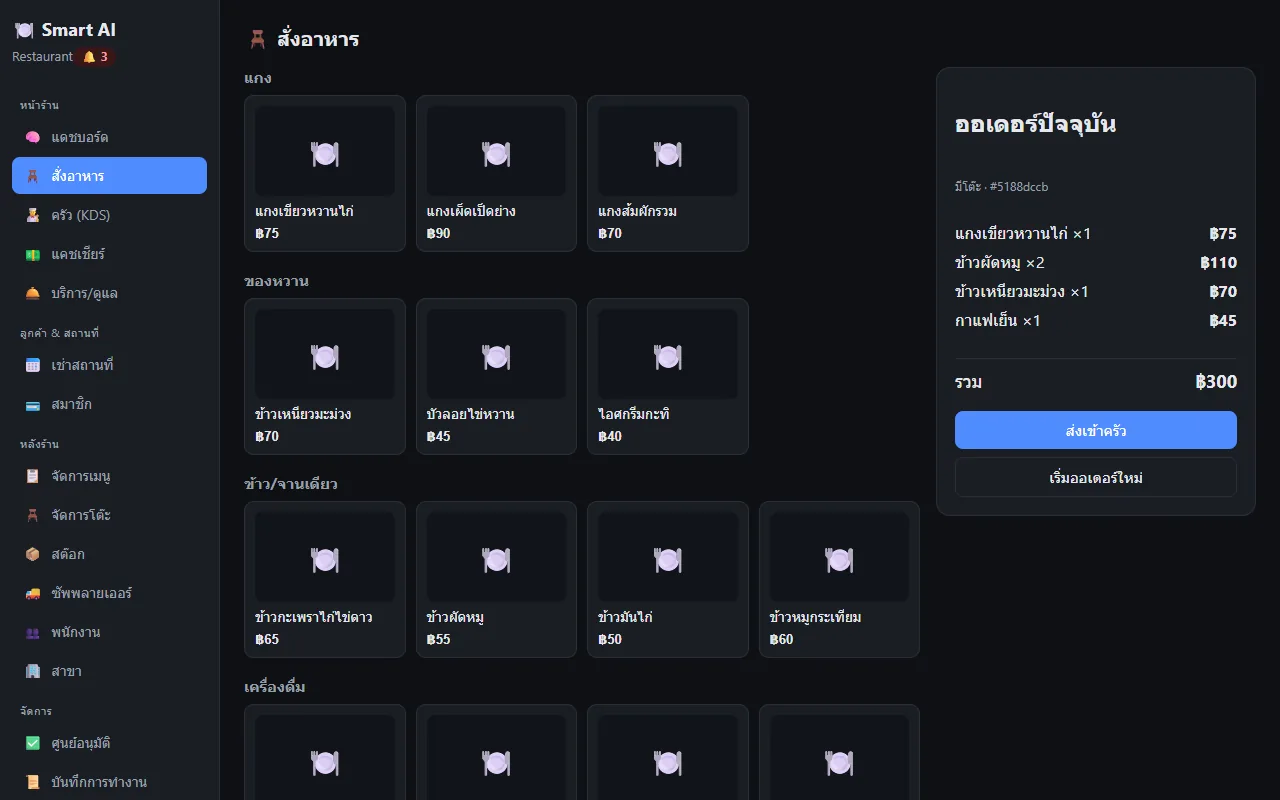
หน้าสั่งอาหารแสดงโต๊ะแยกตามโซนพร้อมจำนวนที่นั่งและสถานะ (ว่าง/มีลูกค้า) โต๊ะที่มีขั้นต่ำจะโชว์ยอดขั้นต่ำ แตะโต๊ะเพื่อเปิดออเดอร์ แตะเมนูเพื่อเพิ่มรายการ เห็นยอดรวมทันทีแล้วกดส่งเข้าครัว ในข้อมูลเดโมมี 6 โต๊ะใน 2 โซนThe order page lists tables by zone with seat counts and status (free or occupied), and tables with a minimum spend show it. Tap a table to open an order, tap dishes to add them, see the total instantly and press Send to Kitchen. The demo data has 6 tables in 2 zones.
จอครัว KDS เรียลไทม์แยกสถานีRealtime kitchen display by station
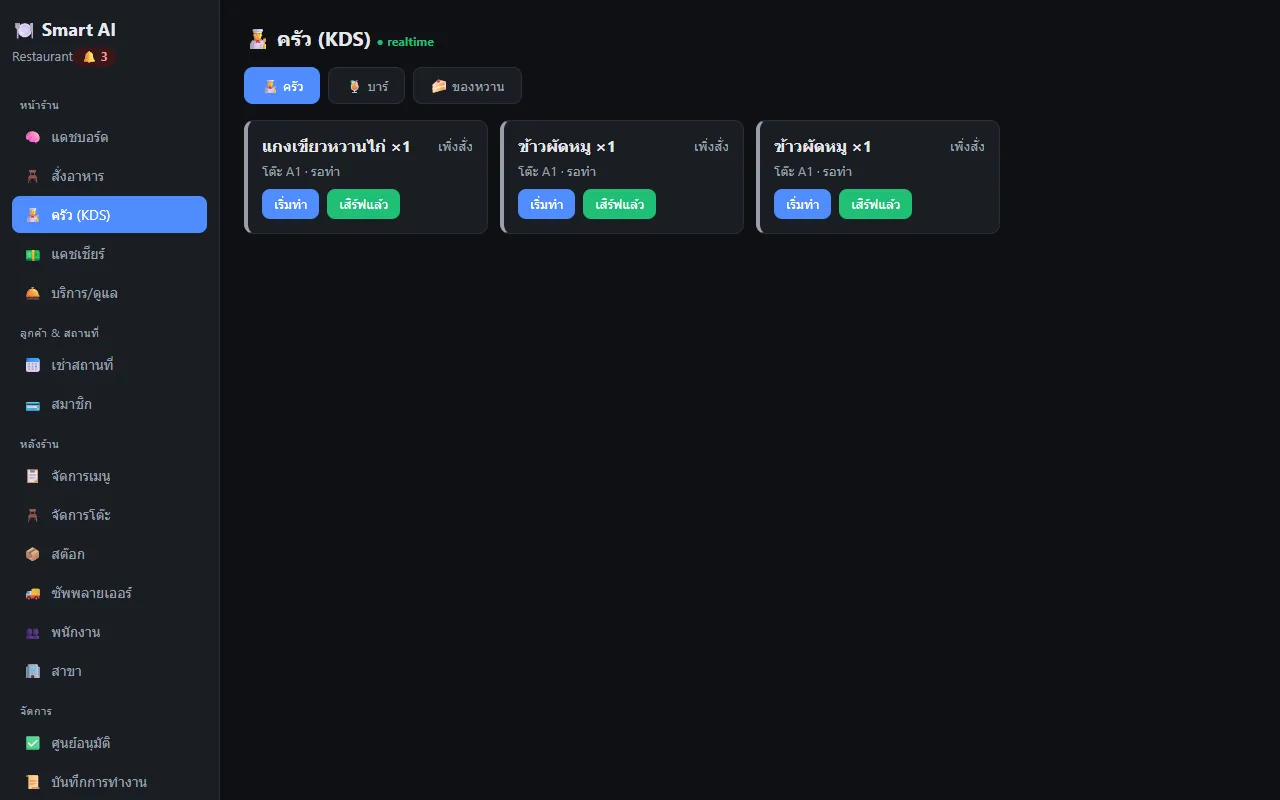
จอครัวมีแท็บ ครัว บาร์ ของหวาน ออเดอร์ที่ส่งมาปรากฏทันทีผ่าน Socket.IO เป็นการ์ดต่อรายการ บอกโต๊ะและสถานะ มีปุ่ม "เริ่มทำ" และ "เสิร์ฟแล้ว" และสถานะ realtime ขึ้นที่หัวหน้าThe kitchen screen has Kitchen, Bar and Dessert tabs. Sent items appear immediately over Socket.IO as one card per item with table and status, with Start and Served buttons and a live indicator in the header.
แคชเชียร์: ส่วนลด VAT และสี่วิธีชำระCashier: discount, VAT and four payment methods
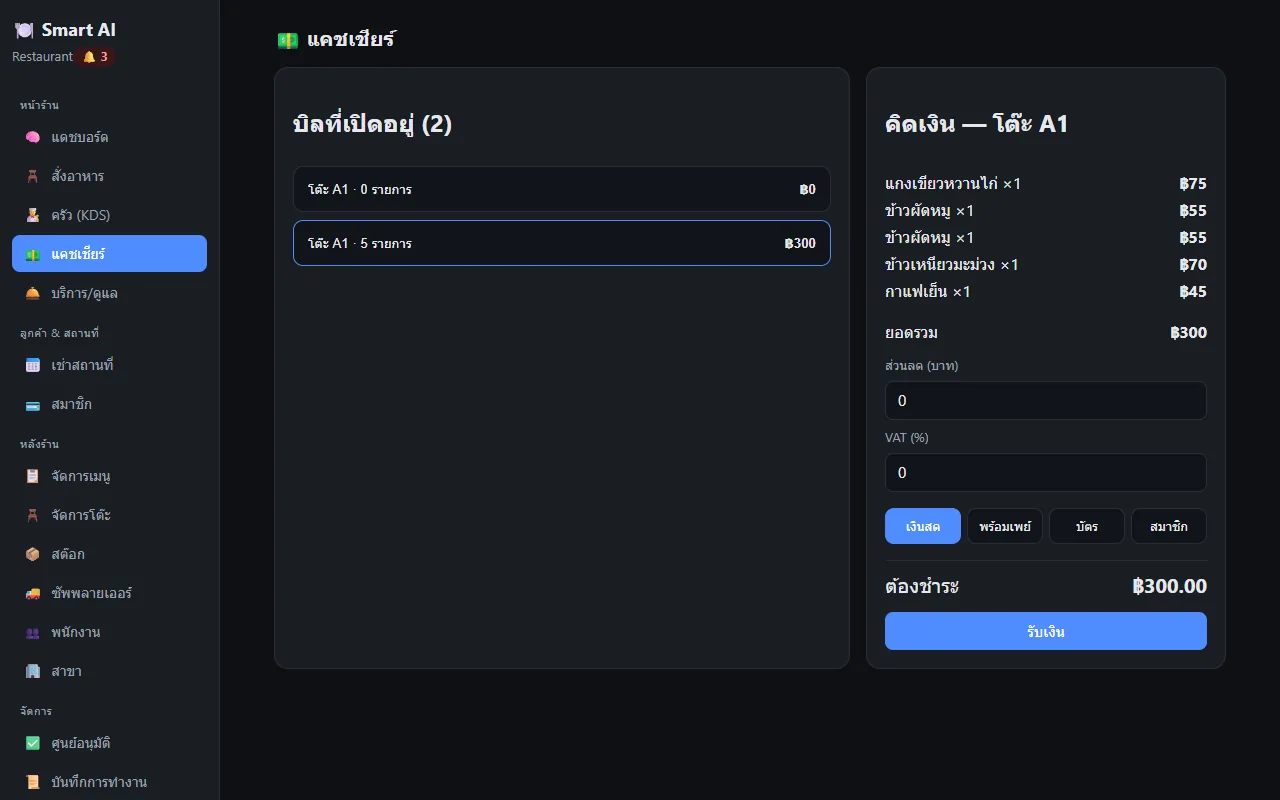
เลือกบิลที่เปิดอยู่ ใส่ส่วนลดเป็นบาท และ VAT เป็นเปอร์เซ็นต์ (ระบบรองรับ service charge ที่ฝั่งหลังบ้านด้วย) เลือกเงินสด พร้อมเพย์ บัตร หรือสมาชิก (ตัดจากยอดคงเหลือของสมาชิก) แล้วกดรับเงิน พร้อมพิมพ์ใบเสร็จ หมายเหตุ พร้อมเพย์เป็นเพียงตัวเลือกบันทึกวิธีชำระ ยังไม่ได้สร้าง QR หรือต่อ gatewayPick an open bill, enter a discount in baht and VAT in percent (the back end also supports a service charge), choose cash, PromptPay, card or member (deducted from the member's balance) and take the money, with receipt printing. PromptPay is only a recorded payment method; no QR is generated and no gateway is connected.
เมนูและสูตร BOM ตัดสต็อกอัตโนมัติMenu and recipes (BOM) with automatic stock deduction
จัดการหมวดและเมนูพร้อมอัปโหลดรูป มีปุ่มเพิ่มหมวดยอดนิยม เช่น ผัด ทอด แกง ต้ม ยำ ย่าง กำหนดสถานีครัวของแต่ละเมนู และผูกสูตรวัตถุดิบ เมื่อกดส่งออเดอร์ ระบบตัดสต็อกตามสูตรและบันทึกความเคลื่อนไหว ถ้าเหลือต่ำกว่าจุดสั่งซื้อจะเตือน เดโมมีเมนู 30 รายการใน 9 หมวดManage categories and dishes with image upload, quick-add chips for popular categories such as stir-fry, fried, curry, soup, salad and grilled, a kitchen station per dish, and an ingredient recipe. When an order is sent the system deducts stock per recipe and records the movement, warning when stock falls below the reorder point. The demo has 30 dishes in 9 categories.
สต็อกวัตถุดิบและซัพพลายเออร์Stock and suppliers
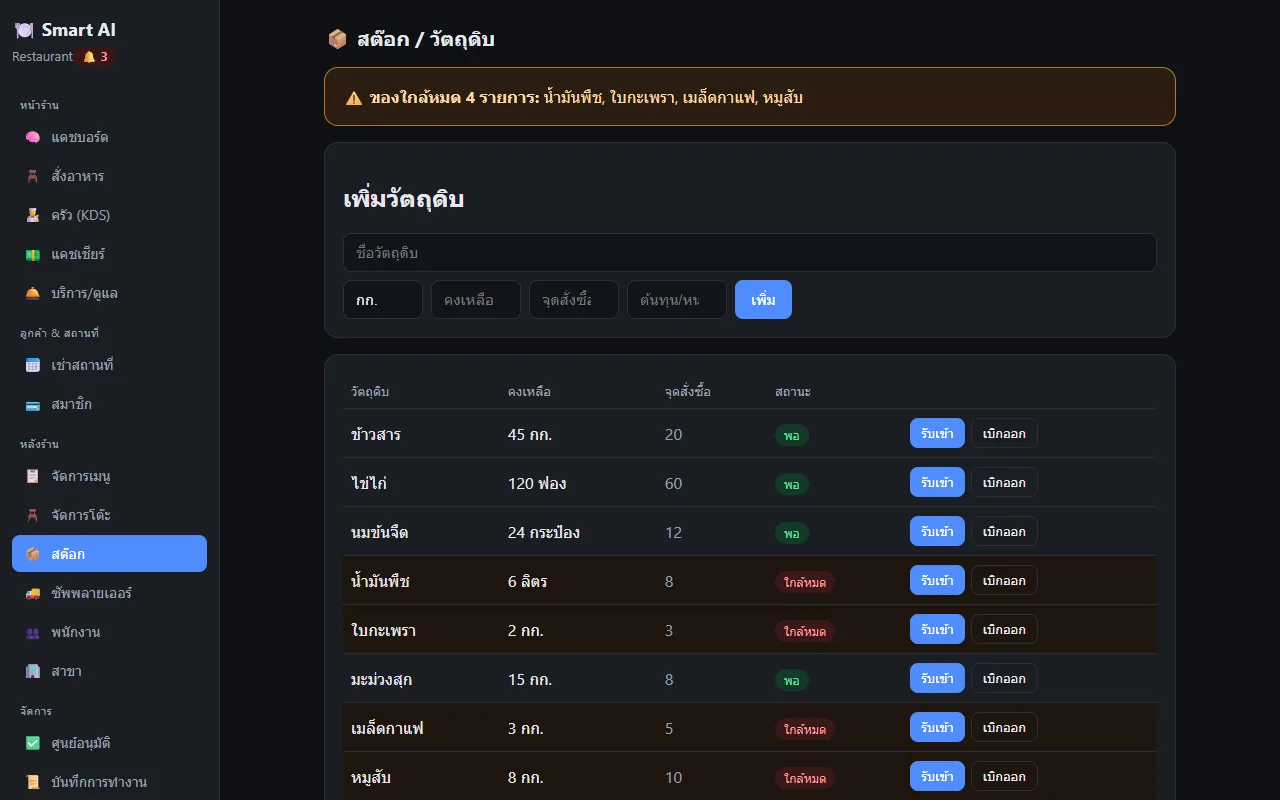
ตารางวัตถุดิบแสดงคงเหลือ จุดสั่งซื้อ และสถานะ พอ/ใกล้หมด มีปุ่มรับเข้าและเบิกออก และแถบเตือนด้านบนระบุชื่อของใกล้หมด เช่น น้ำมันพืช ใบกะเพรา เมล็ดกาแฟ หมูสับ มีหน้าซัพพลายเออร์แยกThe ingredient table shows on-hand, reorder point and an OK/low status, with Receive and Issue buttons and a warning bar naming items running low, such as cooking oil, basil, coffee beans and minced pork. A separate suppliers page exists.
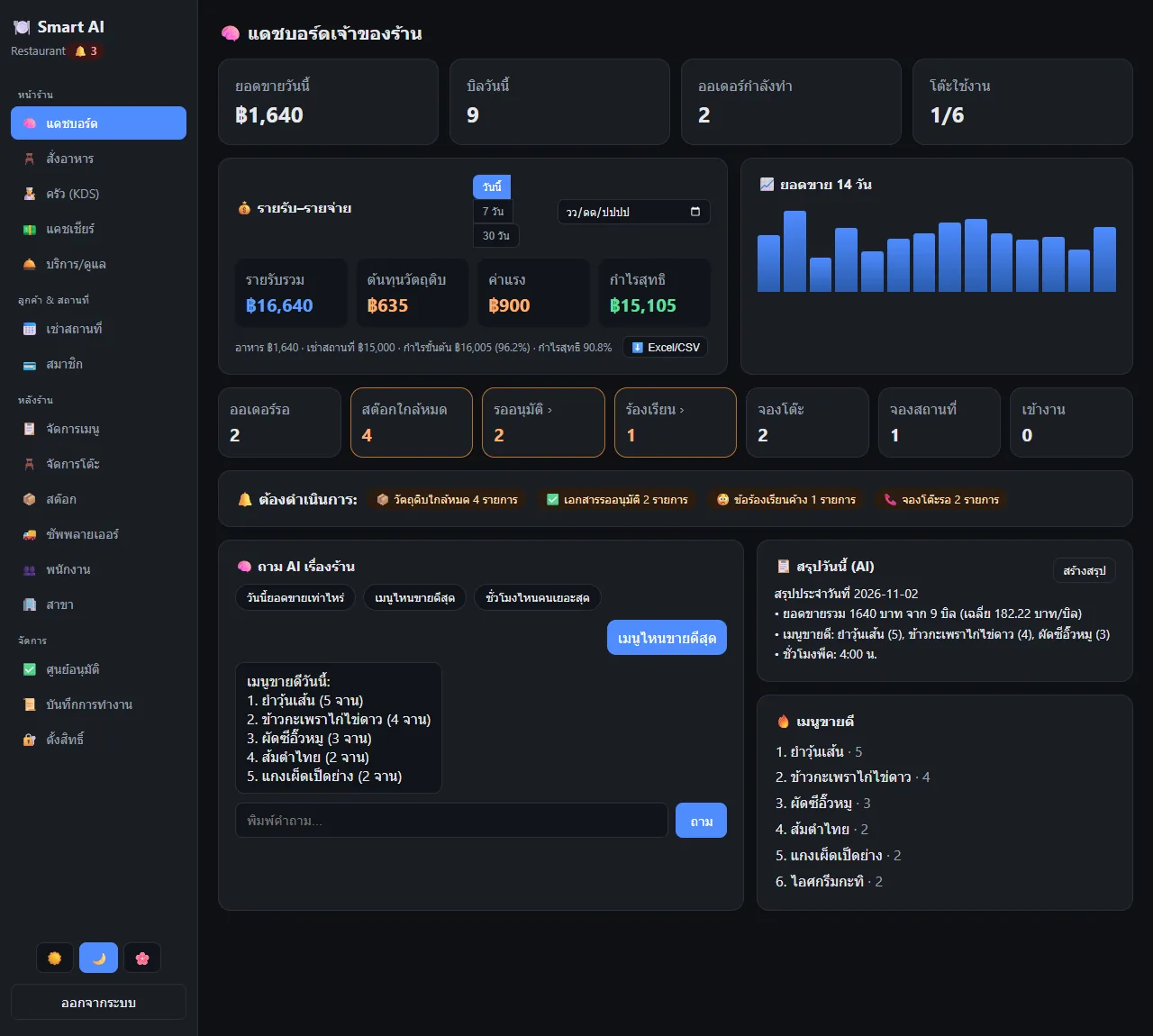
แดชบอร์ดเจ้าของ กำไรขาดทุน 14 วันOwner dashboard with profit and loss and a 14-day chart
การ์ดยอดขายวันนี้ จำนวนบิล ออเดอร์ที่กำลังทำ โต๊ะที่ใช้งาน แล้วต่ำลงมาเป็นรายรับ ต้นทุนวัตถุดิบ ค่าแรง และกำไรสุทธิ เลือกดูวันนี้ 7 วัน 30 วัน หรือเลือกวันที่ ส่งออก Excel/CSV กราฟยอดขาย 14 วัน และแถบ "ต้องดำเนินการ" เช่น ของใกล้หมด เอกสารรออนุมัติ ข้อร้องเรียน จองโต๊ะCards show today's sales, bills, orders in progress and tables in use, then income, ingredient cost, labour and net profit, switchable between today, 7 days, 30 days or a chosen date, with Excel/CSV export, a 14-day sales chart and an "action needed" bar for low stock, pending approvals, complaints and reservations.
ผู้ช่วย AI ตอบจากตัวเลขจริงAn AI assistant that answers from real figures
ช่องถามมีปุ่มคำถามสำเร็จรูป เช่น วันนี้ยอดขายเท่าไหร่ เมนูไหนขายดีสุด ชั่วโมงไหนคนเยอะสุด ระบบจับคำสำคัญแล้วเลือกรายงานที่เกี่ยวข้อง 1 ใน 5 แบบ (ยอดขาย เมนูขายดี วิธีชำระ ชั่วโมงพีค ภาพรวม) แล้วตอบเป็นภาษาไทยจากข้อมูลจริง ถ้าตั้งคีย์ Gemini จะให้ Gemini เรียบเรียงคำตอบใหม่ ถ้าไม่ตั้งก็ใช้ข้อความสำเร็จรูปที่ตัวเลขเท่ากันThe box offers canned questions such as today's sales, best-selling dish and busiest hour. The system matches keywords, picks one of five reports (sales, best sellers, payment methods, peak hours, overview) and answers in Thai from real data. With a Gemini key set, Gemini rephrases the answer; without one, a template gives the same numbers.
สรุปประจำวันและเมนูขายดีDaily summary and best sellers
ปุ่ม "สร้างสรุป" สร้างสรุปประจำวัน บอกยอดขาย จำนวนบิล ค่าเฉลี่ยต่อบิล เมนูขายดี 3 อันดับ และชั่วโมงพีค แล้วเก็บไว้ในฐานข้อมูล ตอนนี้ต้องกดเอง ยังไม่ได้ตั้งให้รันทุกคืนอัตโนมัติ ด้านขวามีรายการเมนูขายดีของวันThe Generate Summary button builds the day's summary: sales, bill count, average per bill, top three dishes and the peak hour, then stores it. It must be pressed by hand; no nightly automatic run is set up. A best-sellers list sits beside it.
สิทธิ์ตามบทบาทแบบแก้ได้เองEditable role-based permissions
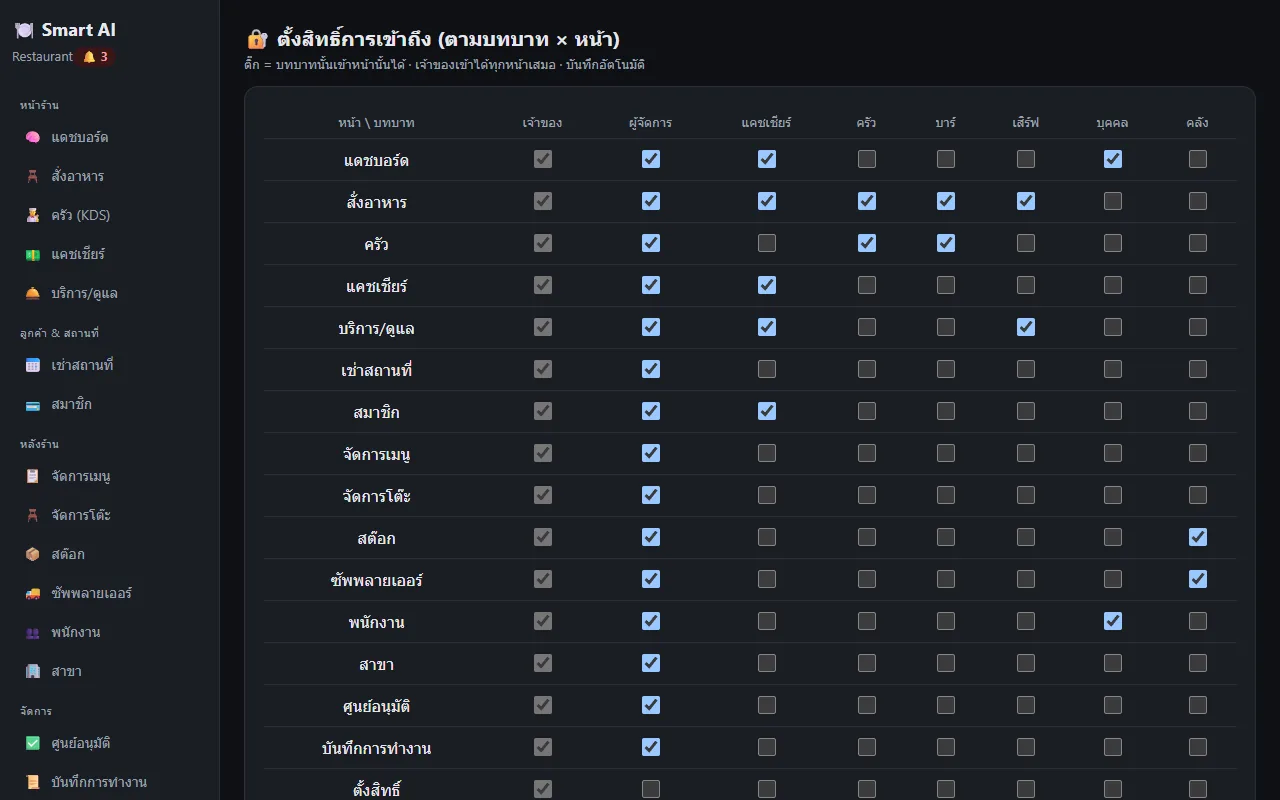
หน้าตั้งสิทธิ์เป็นตารางบทบาท × หน้า ติ๊กว่าบทบาทไหน (เจ้าของ ผู้จัดการ แคชเชียร์ ครัว บาร์ เสิร์ฟ บุคคล คลัง) เข้าหน้าไหนได้ เจ้าของเข้าได้ทุกหน้าเสมอ ข้อมูลแต่ละร้านแยกกันด้วย row-level security ที่ฐานข้อมูล และการเงินสำคัญถูกบันทึกลงบันทึกการทำงานThe permissions page is a role × page grid: tick which role (owner, manager, cashier, kitchen, bar, waiter, HR, warehouse) may open which page; the owner can always open everything. Each restaurant's data is isolated by row-level security in the database, and important financial actions are written to the operation log.
พนักงาน สมาชิก เช่าสถานที่ และงานหลังบ้านอื่น ๆStaff, members, venue rental and other back-office pages
นอกจากแกนหลัก มีหน้าพนักงานพร้อมลงเวลาเข้า-ออกและตารางกะ (ค่าแรงเข้างบกำไรขาดทุน) สมาชิกพร้อมยอดคงเหลือ เช่าสถานที่ จองโต๊ะ ข้อร้องเรียน งานดูแลสถานที่ ศูนย์อนุมัติ สาขา และการแจ้งเตือน รวมเป็น 14 แผนกตามที่คอมมิตระบุ และเปลี่ยนธีมสว่าง/มืด/อ่อนได้Beyond the core there are pages for staff with clock-in/out and a shift calendar (labour feeds the profit and loss), members with balances, venue rental, reservations, complaints, facility tasks, an approvals centre, branches and notifications: 14 departments per the commit log, and light, dark and soft themes.
04 · วิธีทำงาน04 · How it works
ทำงานยังไง ตั้งแต่ต้นจนจบHow it works, start to finish
- 1
ตั้งร้านและเมนูSet up the restaurant and menu
เจ้าของเพิ่มโซนและโต๊ะ เพิ่มหมวดและเมนู ใส่ราคาและต้นทุน เลือกสถานีครัว แล้วผูกสูตรวัตถุดิบ กำหนดสต็อกเริ่มต้นและจุดสั่งซื้อThe owner adds zones and tables, categories and dishes with price and cost and a kitchen station, links ingredient recipes, and sets starting stock and reorder points.
- 2
เปิดโต๊ะและรับออเดอร์Open a table and take the order
พนักงานเปิดหน้าสั่งอาหาร แตะโต๊ะที่ว่าง เลือกเมนู ระบบแสดงรายการและยอดรวมทางขวา เมื่อกด "ส่งเข้าครัว" ออเดอร์ถูกแยกเป็นรายการตามสถานี และสต็อกถูกตัดตามสูตรA waiter opens the order page, taps a free table and picks dishes; the list and total show on the right. Pressing Send to Kitchen splits the order into items by station and deducts stock per recipe.
- 3
ครัวทำและเสิร์ฟThe kitchen cooks and serves
จอครัวของแต่ละสถานีเห็นการ์ดรายการเด้งขึ้นทันที ครัวกดเริ่มทำเมื่อลงมือ และเสิร์ฟแล้วเมื่อส่งออก สถานะเปลี่ยนแบบเรียลไทม์ทุกเครื่องEach station's screen shows item cards popping up at once. The kitchen presses Start when cooking begins and Served when it leaves; status changes in realtime on every device.
- 4
คิดเงินและปิดบิลTake payment and close the bill
แคชเชียร์เลือกบิล ใส่ส่วนลดหรือ VAT เลือกเงินสด พร้อมเพย์ บัตร หรือสมาชิก กดรับเงิน ระบบบันทึกการชำระพร้อมบันทึกการทำงานทางการเงิน และพิมพ์ใบเสร็จได้The cashier picks the bill, enters discount or VAT, chooses cash, PromptPay, card or member and takes payment. The payment is recorded with a financial audit entry, and a receipt can be printed.
- 5
ดูตัวเลขและถาม AIReview the numbers and ask the AI
เจ้าของเปิดแดชบอร์ดดูรายรับ ต้นทุน ค่าแรง กำไรสุทธิ และกราฟ 14 วัน แล้วถามผู้ช่วย AI หรือกดสร้างสรุปประจำวัน ถ้าเจอของใกล้หมดก็ไปที่หน้าสต็อกแล้วกดรับเข้าThe owner opens the dashboard for income, cost, labour, net profit and the 14-day chart, then asks the AI or generates the daily summary. If stock is low, go to the stock page and receive more.
05 · ภาพ05 · Visuals
ภาพจากระบบจริงFrom the real system
6 ภาพ6 imagesภาพหน้าจอจริงถ่ายจากระบบที่เปิดใช้อยู่ ส่วนภาพโปรโมตและภาพประกอบมีป้ายกำกับไว้ทุกใบReal screenshots come from the running system; promo images and illustrations are labelled on every card.
06 · สถานการณ์06 · Scenarios
ตัวอย่างสถานการณ์ใช้งานExample scenarios
เป็นตัวอย่างสมมติเพื่อให้เห็นภาพ ไม่ใช่เรื่องของลูกค้าจริงIllustrative scenarios to help you picture it — not real customer stories.
สมมติว่าร้านอาหารตามสั่งมีหน้าร้านกับครัวแยกกันSuppose an à la carte restaurant has a front and a separate kitchen
สมมติว่าพนักงานเสิร์ฟต้องเดินเอากระดาษไปครัว ถ้าใช้ระบบนี้ ออเดอร์ที่โต๊ะ A1 เด้งขึ้นจอครัวทันที ครัวเห็นว่าโต๊ะไหนรออะไร และเสิร์ฟกดสถานะได้โดยไม่ต้องเดินSuppose waiters walk paper tickets to the kitchen. With this system the order for table A1 pops up on the kitchen screen at once, the kitchen sees which table waits for what, and statuses are updated without walking.
สมมติว่าเจ้าของอยากรู้ว่าวันนี้กำไรจริงเท่าไหร่Suppose the owner wants to know today's real profit
สมมติว่าเจ้าของรู้แต่ยอดขาย แต่ไม่รู้ต้นทุนวัตถุดิบและค่าแรง หน้าแดชบอร์ดหักต้นทุนจากสูตรที่ตัดสต็อกและค่าแรงจากการลงเวลาพนักงาน แล้วแสดงกำไรสุทธิ และถามต่อได้ว่าเมนูไหนขายดีSuppose the owner knows only sales, not ingredient cost or labour. The dashboard subtracts cost from the recipes that deduct stock and labour from staff clock-ins, shows net profit, and the owner can ask which dishes sell best.
สมมติว่าร้านมีหลายแผนกและพนักงานหลายบทบาทSuppose the restaurant has several departments and roles
สมมติว่าเจ้าของไม่อยากให้แคชเชียร์เห็นหน้าสต็อกหรือเงินเดือน ก็เปิดหน้าตั้งสิทธิ์แล้วเอาเครื่องหมายออก บทบาทครัวและบาร์เห็นเฉพาะหน้าสั่งอาหารและจอครัวSuppose the owner does not want cashiers to see the stock or staff pages. Open the permissions page and untick them; kitchen and bar roles then see only the order page and the kitchen screen.
07 · เบื้องหลัง07 · Under the hood
เบื้องหลังระบบ ข้อมูล และความปลอดภัยUnder the hood: data and security
- สแต็กStack
- หลังบ้านใช้ NestJS ร่วมกับ Prisma และฐานข้อมูล PostgreSQL 16 มี Socket.IO สำหรับเรียลไทม์ หน้าเว็บใช้ Vue 3 กับ Vite เป็นเว็บแอปเดียวสำหรับทุกบทบาท (ในเอกสารออกแบบเดิมตั้งใจใช้ Element Plus แต่โค้ดจริงไม่ได้ใช้)The back end is NestJS with Prisma and PostgreSQL 16, with Socket.IO for realtime. The front end is Vue 3 with Vite, one web app for every role (the original design planned Element Plus, but the actual code does not use it).
- การแยกข้อมูลและความปลอดภัยData isolation and security
- ทุกตารางมีรหัสร้าน และใช้ row-level security ของ PostgreSQL บังคับให้เห็นเฉพาะข้อมูลร้านตัวเอง รหัสผ่านเก็บด้วย argon2 โทเคนล็อกอินอายุ 7 วัน และการเงินสำคัญเขียนลงบันทึกการทำงานEvery table carries a restaurant ID and PostgreSQL row-level security forces each restaurant to see only its own data. Passwords are hashed with argon2, login tokens last 7 days, and important financial actions are written to an audit log.
- ผู้ช่วย AIThe AI assistant
- ไม่ใช่ตัวแทนที่เรียกเครื่องมือเองอิสระ เป็นการจับคำสำคัญเลือกรายงานแล้วดึงข้อมูลจากฐานข้อมูล Gemini (gemini-2.5-flash) ใช้เรียบเรียงเท่านั้นและต้องตั้งคีย์เอง ถ้าไม่มีคีย์หรือเรียกไม่สำเร็จจะใช้ข้อความสำเร็จรูป ตัวเลขทุกตัวมาจากฐานข้อมูลIt is not a free-roaming tool-calling agent: it matches keywords, picks a report and pulls data from the database. Gemini (gemini-2.5-flash) only rephrases, needs a key you provide, and a template is used when there is no key or the call fails. Every number comes from the database.
- การติดตั้งและโครงสร้างพื้นฐานSetup and infrastructure
- ตอนนี้รันในเครื่องด้วย Docker (PostgreSQL กับ Redis) แล้วเปิดหลังบ้านที่พอร์ต 3000 และหน้าเว็บที่พอร์ต 5173 มี seed สร้างร้านเดโม เมนู ออเดอร์ย้อนหลัง 14 วัน และพนักงานตัวอย่าง แผนในเอกสารคือ Docker Compose บน VPS แต่ยังไม่ได้ติดตั้งจริงIt currently runs locally with Docker (PostgreSQL and Redis), the back end on port 3000 and the web app on port 5173. A seed script creates a demo restaurant, menu, 14 days of past orders and sample staff. The planned deployment is Docker Compose on a VPS, which has not been done.
- ข้อจำกัดที่ควรรู้Limits to know about
- ยังไม่ต่อเครื่องพิมพ์ครัว ไม่สร้าง QR พร้อมเพย์ ไม่ต่อ payment gateway ไม่มีโหมดออฟไลน์ ไม่มีแอปมือถือ และสรุป AI รายคืนยังเป็นปุ่มกดเอง ภาพเมนูในเดโมเป็นไอคอนจานแทนรูปจริงNo kitchen printer integration, no PromptPay QR, no payment gateway, no offline mode, no mobile app, and the AI daily summary is still a manual button. Menu photos in the demo are plate icons rather than real pictures.
08 · ความคืบหน้า08 · Progress
ความคืบหน้าและแผนต่อไปProgress and what comes next
- ทำแล้วDone
27 มิ.ย. 2569: เอกสารออกแบบ Phase 1 (7 โมดูล: สิทธิ์ผู้ใช้ เมนู โต๊ะ/ออเดอร์ KDS ชำระเงิน แดชบอร์ด ผู้ช่วย AI)27 Jun 2026: Phase 1 design document (7 modules: auth, menu, tables/orders, KDS, payments, dashboard, AI assistant)
- ทำแล้วDone
ต้น ก.ค. 2569: MVP ครบ ทั้งหน้าสั่งอาหาร ครัว แคชเชียร์ แดชบอร์ด AI สต็อกและสูตร BOM ตัดสต็อกอัตโนมัติ ธีม และ 14 แผนกหลังร้านEarly Jul 2026: MVP complete with order, kitchen, cashier, dashboard, AI, stock with BOM auto-deduction, themes and 14 back-office departments
- ทำแล้วDone
3 ก.ค. 2569: ตั้งสิทธิ์รายหน้า ส่งออก CSV ชำระด้วยยอดสมาชิก ตารางกะ พิมพ์ใบเสร็จ และค่าแรงในงบกำไรขาดทุน3 Jul 2026: page-level permissions, CSV export, member-balance payment, shift calendar, receipt printing and labour cost in the profit and loss
- ถัดไปNext
เอกสารออกแบบวางไว้ Phase 2: AI แจ้งเตือนความผิดปกติและแนะนำเมนู/ราคา โหมดออฟไลน์ ระบบอนุมัติแบบชั้น payment gateway จริง และแอปมือถือสำหรับพนักงานDesign document Phase 2: AI anomaly alerts and menu/price suggestions, offline mode, tiered approvals, a real payment gateway and a staff mobile app
- ถัดไปNext
Phase 3-4 ตามเอกสาร: จองโต๊ะผ่าน LINE แดชบอร์ดหลายสาขา คะแนนสะสม/คูปอง และระบบเก็บค่าสมาชิกรายเดือนเมื่อขายจริงPhase 3-4 per the document: LINE reservations, multi-branch dashboard, loyalty/coupons and monthly subscription billing once sold
09 · คำถาม09 · FAQ
คำถามที่พบบ่อยFrequently asked questions
เปิดให้ใช้งานหรือยัง ราคาเท่าไหร่Is it available, and what does it cost?
ยังไม่เปิดให้ใช้งาน และยังไม่ได้กำหนดราคาNot yet available, and no price has been set.
ต้องมีคีย์ AI ไหมDo I need an AI key?
ไม่ต้อง ระบบทำงานได้ด้วยข้อความสำเร็จรูปที่ตัวเลขเท่ากัน ถ้าใส่คีย์ Gemini ถึงจะได้สำนวนที่เรียบเรียงใหม่No. It works with template answers carrying the same numbers; adding a Gemini key only gives rephrased wording.
ต่อกับพร้อมเพย์ เครื่องพิมพ์ หรือ POS เดิมได้ไหมDoes it connect to PromptPay, printers or an existing POS?
ยังไม่ได้ พร้อมเพย์เป็นตัวเลือกบันทึกวิธีชำระเท่านั้น ใบเสร็จพิมพ์ผ่านหน้าเว็บ ไม่ได้ต่อเครื่องพิมพ์ครัวหรือ POS ภายนอกNot yet. PromptPay is only a recorded method, receipts print through the web page, and there is no kitchen printer or external POS connection.
ข้อมูลร้านอยู่ที่ไหน ปลอดภัยไหมWhere is the data and is it safe?
ในฐานข้อมูล PostgreSQL ที่รันเอง ตอนนี้อยู่ในเครื่องผู้พัฒนา แผนคือติดตั้งบน VPS ของผู้พัฒนา ข้อมูลแต่ละร้านแยกกันด้วย row-level security แต่ยังไม่ได้ตรวจความปลอดภัยแบบเต็มหรือทดสอบกับร้านจริงIn a PostgreSQL database you run yourself, currently on the developer's machine; the plan is a VPS run by the developer. Each restaurant is isolated by row-level security, but no full security review or real-restaurant test has been done.
ใช้บนมือถือหรือแท็บเล็ตได้ไหมDoes it work on phones and tablets?
เป็นเว็บแอปเดียวสำหรับทุกบทบาท เอกสารออกแบบวางให้ responsive แต่ยังไม่ได้ตรวจหน้าจอมือถือในงานนี้It is one web app for every role and the design aims for responsive layouts, but mobile screens were not checked for this page.
ใครพัฒนาและตอนนี้ไปถึงไหนWho builds it and how far along is it?
ZZAX Studio พัฒนา โค้ดครบ 14 หน้าแผนกในเครื่องและมีทดสอบอัตโนมัติ ตามเอกสาร 26 เคส (ยังไม่ได้รันซ้ำตอนจัดทำหน้านี้) ขั้นต่อไปคือเอาขึ้นเซิร์ฟเวอร์และทดลองกับร้านจริงZZAX Studio builds it. The 14 department pages work locally and the README cites 26 automated end-to-end tests (not re-run for this page). The next step is deploying it and trying it with a real restaurant.
10 · วิธีเริ่ม10 · Get started
เริ่มได้ใน 3 ขั้นUp and running in three steps
ถ้าอยากได้ระบบแบบเดียวกันสำหรับธุรกิจของคุณ บอกโจทย์มาสั้น ๆ เราตอบกลับพร้อมขอบเขตงานและราคาภายใน 1 วันทำการIf you want something like this for your own business, send us a line about the problem. You'll get scope and price within one working day.
- 1ขั้นที่ 1 ใส่เมนูและสูตรของร้าน พร้อมราคาวัตถุดิบที่ซื้อจริงStep 1: Enter your menu and recipes with the ingredient prices you actually pay
- 2ขั้นที่ 2 ใช้ POS รับออเดอร์ตามปกติ ระบบตัดสต็อกให้เองStep 2: Take orders through the POS as usual — stock deducts itself
- 3ขั้นที่ 3 ถามผู้ช่วย AI หรือเปิดรายงานกำไรขาดทุนเมื่อต้องการตัดสินใจStep 3: Ask the AI assistant or open the P&L report when a decision comes up
เริ่มงานกับเราWork with us
อยากได้ระบบแบบนี้สำหรับธุรกิจคุณWant a system like this for your business?
เล่าปัญหาของคุณมา เราจะบอกตรง ๆ ว่าช่วยได้ไหม ภายใน 1 วันทำการ ส่งแล้วได้รหัสติดตามงานทันทีTell us the problem and we'll say honestly whether we can help, within one working day. You get a tracking code the moment you send it.