อยากทำกับข้าวเองแต่เปิดตู้เย็นมาแล้วนึกไม่ออกว่าของที่มีทำอะไรได้ พอหาสูตรในเน็ตก็เจอขั้นตอนห้วน ๆ ที่คนไม่เคยทำตามไม่ทัน และคลิปอาหารที่ดูสนุกก็มักไม่มีสูตรจริงให้ทำตามYou want to cook, but staring into the fridge you can't think what those ingredients make. Recipes online skip the steps beginners need, and the fun food clips rarely come with a recipe you can actually follow.
← ผลงานทั้งหมด← All work


แอปมือถือMobile app
ZabVerZabVer
ผู้ช่วยทำอาหารไทยด้วย AI พร้อมฟีดคลิปอาหารสั้นAn AI Thai-cooking assistant with a short-video food feed
ใช้งานจริงLive แอปมือถือMobile app
ใช้งานจริงบน App Store และ Play Store แล้ว เปิดให้โหลดใน 177 ประเทศLive on the App Store and Play Store, available in 177 countries
เปิดใช้งานเลยOpen it nowดาวน์โหลดบน App StoreDownload on the App Storeดาวน์โหลดบน Google PlayGet it on Google Playเพจ FacebookFacebook page
177ประเทศที่เปิดให้โหลดCountries available
400-500สูตรอาหารในแอปRecipes in the app
01 · ภาพรวม01 · Overview
ภาพรวมของระบบThe system at a glance
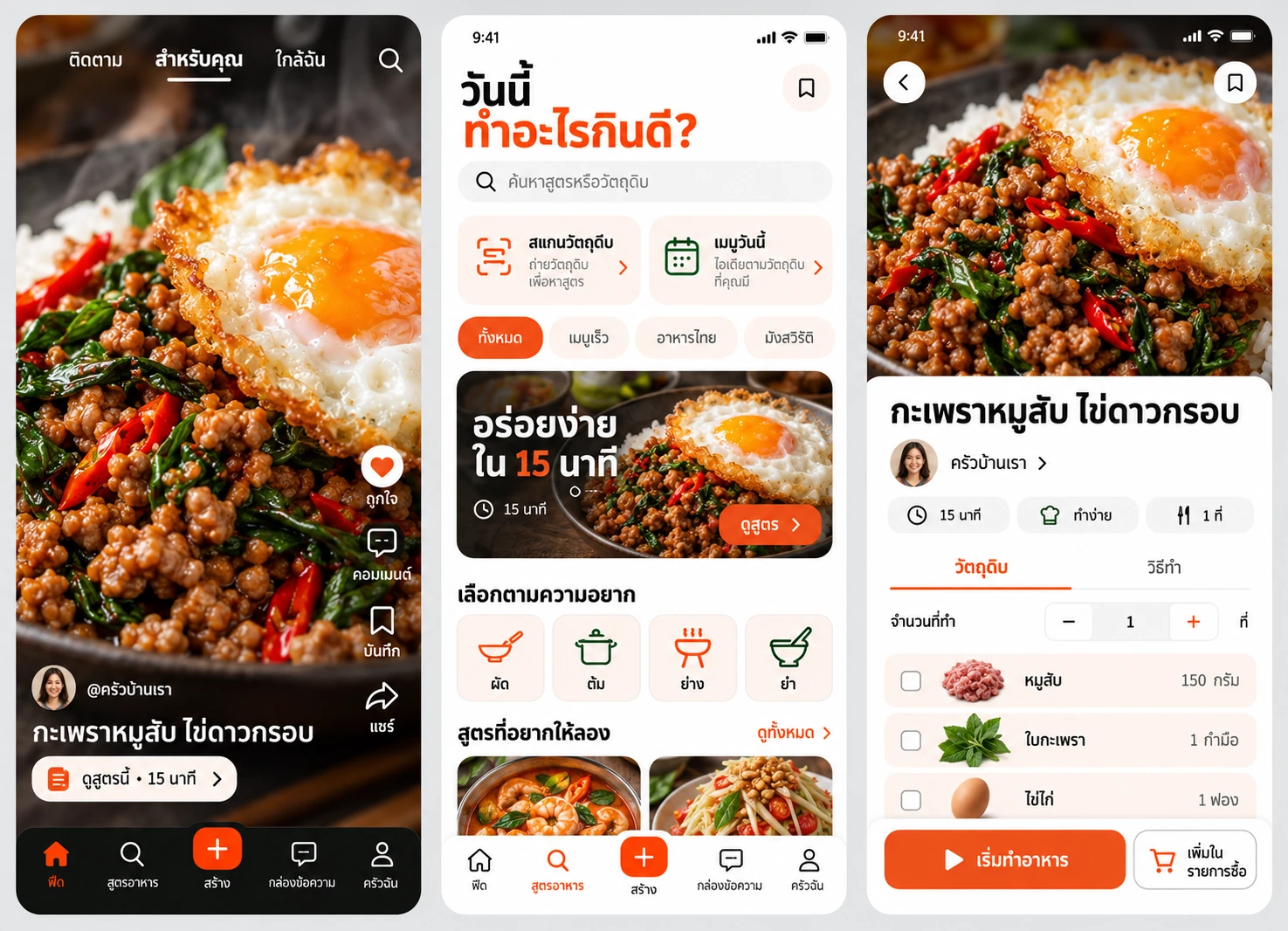
ZabVer คือผู้ช่วยทำอาหารไทยในมือถือ ถ่ายรูปวัตถุดิบที่มีในครัวแล้วแอปบอกว่าทำเมนูอะไรได้ มีสูตรอาหารไทยราว 400–500 เมนูพร้อมโหมดทำตามทีละขั้น ตู้เย็นดิจิทัล แพลนมื้ออาหาร และฟีดคลิปอาหารสั้นที่ผูกกับสูตรจริงZabVer is a Thai-cooking assistant on your phone. Photograph the ingredients in your kitchen and the app tells you what you can cook. It has roughly 400-500 Thai recipes with a step-by-step cooking mode, a digital fridge, a meal planner, and a feed of short food clips tied to real recipes.
วิธีใช้คือสมัครด้วยอีเมล Google Facebook Apple หรือเบอร์โทร ถ่ายรูปของในตู้เย็นให้ AI (Gemini) จำแนกวัตถุดิบ เลือกเมนูที่แนะนำ แล้วเปิดโหมดทำอาหารที่อ่านขั้นตอนออกเสียงและไม่ให้จอดับ ทำเสร็จแล้วถ่ายคลิปผลงานผูกกับสูตรลงฟีด ให้คนอื่นไลก์ บันทึก คอมเมนต์ ติดตาม และทักแชทTo use it, sign up with email, Google, Facebook, Apple or a phone number, photograph what is in the fridge so an AI (Gemini) identifies the ingredients, pick a suggested dish, then open the cooking mode that reads the steps aloud and keeps the screen awake. When done, post a clip of the result linked to the recipe so others can like, save, comment, follow and message.
ZabVer เปิดทั้ง App Store และ Play Store ใน 177 ประเทศตั้งแต่ราว ก.ค. 2569 (รุ่น 1.0.4 ณ ตอนที่บันทึกไว้) แต่ยังอยู่ช่วงเริ่มต้นเต็มตัว: บันทึก 31 ก.ค. 2569 มียอดติดตั้งแบบออร์แกนิกราว 16 ครั้ง และ ณ มิ.ย. 2569 มีวิดีโอจริงราว 2 คลิปจากผู้อัปโหลดคนเดียว ยังไม่มีตัวเลขใหม่กว่านี้ZabVer is on both the App Store and Google Play in 177 countries since about July 2026 (version 1.0.4 when last recorded) but is firmly in its cold-start phase: the 31 July 2026 record shows about 16 organic installs, and as of June 2026 production held about 2 real videos from one uploader. No newer numbers exist.
จุดยืนคือเริ่มจากสิ่งที่ครัวมีจริง ไม่ใช่เริ่มจากสูตรที่ต้องไปซื้อของใหม่ และให้คลิปอาหารมีสูตรจริงแนบเสมอ เพื่อให้คนดูทำตามได้The stance is to start from what the kitchen really has rather than a recipe that needs new shopping, and to attach a real recipe to every food clip so viewers can follow along.
02 · โจทย์02 · The brief
สร้างขึ้นมาเพราะอะไรWhy this exists
คนที่อยากทำอาหารไทยเองที่บ้าน ครีเอเตอร์สายอาหาร และคนที่อยากดูคลิปอาหารพร้อมสูตรจริงHome cooks of Thai food, food creators, and anyone who wants food clips with a real recipe attached
ใช่โจทย์ของคุณไหมSound like your problem?
03 · ฟีเจอร์03 · Features
ทำอะไรได้บ้าง อย่างละเอียดWhat it does, in detail
10 ความสามารถ10 capabilitiesสแกนวัตถุดิบด้วย AIScan ingredients with AI
เปิดกล้องหรือเลือกรูป แอปส่งรูปให้โมเดล Gemini ระบุวัตถุดิบ (คำอธิบายสโตร์ระบุรู้จักวัตถุดิบไทยกว่า 200 ชนิด) แล้วแนะนำเมนูที่ทำได้ทันที ถ้าไม่มีสูตรตรงกัน AI สร้างสูตรใหม่ให้ได้Open the camera or pick a photo and the app sends it to the Gemini model to identify ingredients (the store description says over 200 Thai ingredients are recognised), then suggests dishes you can cook now. If no recipe matches, the AI can draft a new one.
สูตรอาหารไทยหลายร้อยเมนูHundreds of Thai recipes
ราว 400–500 เมนู ตั้งแต่ผัดกะเพรา ต้มยำ แกงเขียวหวาน ถึงของหวาน แบ่งตามภาค (อีสาน เหนือ ใต้) อาหารริมทาง และก๋วยเตี๋ยว แต่ละสูตรมีวัตถุดิบ ขั้นตอน และวิดีโอ YouTube สอนทำในหน้าเดียวกันAbout 400-500 dishes from pad kra pao, tom yum and green curry to desserts, grouped by region (Isan, northern, southern), street food and noodles. Each recipe has ingredients, steps and a YouTube cooking video on the same page.
โหมดทำอาหารทีละขั้นพร้อมเสียงอ่านStep-by-step cooking mode with voice
โหมดทำอาหารแสดงทีละขั้น อ่านออกเสียงด้วย text-to-speech และกันหน้าจอดับระหว่างที่มือเปื้อนแป้ง เมื่อทำเสร็จครบ แอปมีเอฟเฟกต์ฉลองและในรุ่น 1.0.5 ขอให้ผู้ใช้ให้คะแนนรีวิวThe cooking mode shows one step at a time, reads it aloud with text-to-speech, and keeps the screen awake while your hands are messy. At the end there is a celebration effect, and version 1.0.5 asks the user for a store rating.
ตู้เย็นดิจิทัลและรายการช็อปปิ้งDigital fridge and shopping list
บันทึกวัตถุดิบในตู้เย็น แอปแนะนำสูตรจากของที่มี และกดเพิ่มวัตถุดิบที่ขาดจากหน้าสูตรลงรายการช็อปปิ้งได้ทันทีRecord what is in the fridge and the app suggests recipes from it, and tap to add any missing ingredient from a recipe page straight to the shopping list.
แพลนมื้ออาหารและโภชนาการMeal planning and nutrition
มีหน้าวางแผนมื้อรายวันและรายสัปดาห์ บันทึกแคลอรีที่กินในวัน แสดงวงแหวนสรุปเทียบเป้าหมายโดยประมาณ และโปรไฟล์สุขภาพThere are daily and weekly meal-planning screens, a daily calorie log with a summary ring against an estimated target, and a health profile.
ค้นหาร้านอาหารใกล้ตัวFind nearby restaurants
ใช้ตำแหน่งและแผนที่แสดงร้านอาหารที่เปิดอยู่ กรองตามราคา คะแนน และระยะทาง พร้อมโปรไฟล์ร้านUses your location and a map to show restaurants that are open, filterable by price, rating and distance, with a restaurant profile page.
ฟีดคลิปอาหารสั้นแบบ 4 แท็บA four-tab short-video feed
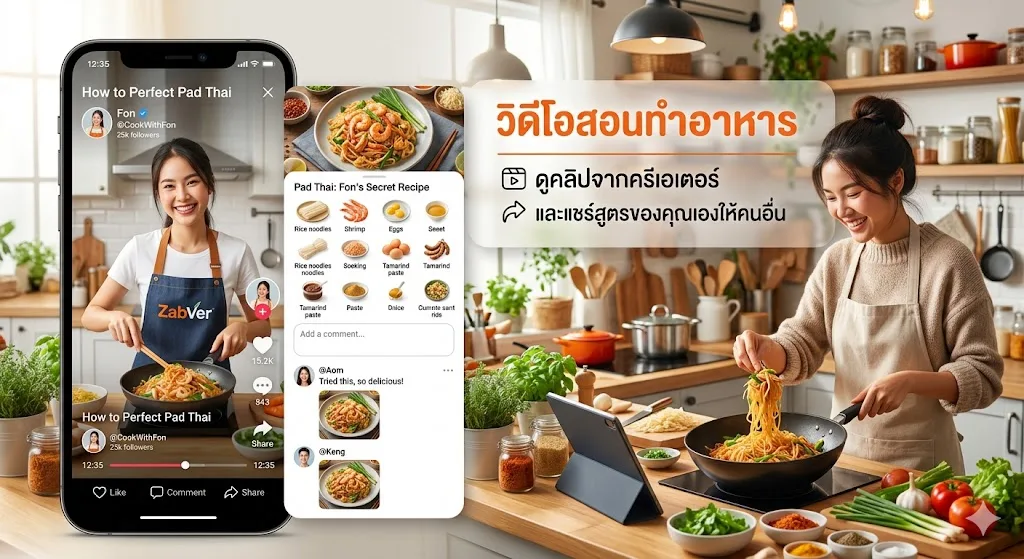
ฟีดวิดีโอแนวตั้งมี 4 แท็บ คือ ติดตาม ดัง ใกล้เคียง และสำหรับคุณ อัปโหลดคลิปพร้อมผูกกับสูตรได้ ผู้ชมกดปุ่ม "ดูสูตร" เปิดสูตรจากคลิปได้ทันที ไลก์ บันทึก และคอมเมนต์ทำงานแบบเรียลไทม์The vertical video feed has four tabs: Following, Famous, Nearby and For You. You can upload a clip linked to a recipe, viewers tap a "view recipe" button to open it straight from the clip, and likes, saves and comments update in real time.
ติดตามครีเอเตอร์ แชทส่วนตัว และแจ้งเตือนFollowing, direct messages and notifications
ติดตามครีเอเตอร์ ทักแชทตัวต่อตัว (ส่งรูปและอีโมจิได้ในโค้ดรุ่นใหม่) ดูกล่องข้อความและแจ้งเตือนในแอป และมีรายชื่อแนะนำเพื่อน ส่วนส่วนเสริมใหม่เหล่านี้อยู่ในโค้ดรุ่น 1.0.5Follow creators, message one-to-one (photos and emoji in the newer code), and see an inbox plus in-app notifications and friend suggestions. These newer additions sit in the version 1.0.5 code.
5 ภาษาFive languages
ตั้งภาษาของแอปได้ ไทย อังกฤษ ญี่ปุ่น เกาหลี และจีนThe app language can be set to Thai, English, Japanese, Korean or Chinese.
หน้าเว็บ zzabver.com และลิงก์แชร์The zzabver.com site and share links
เว็บ zzabver.com เป็นหน้าแนะนำที่มีปุ่มดาวน์โหลด App Store และ Google Play ลิงก์แชร์คลิป โปรไฟล์ และสูตร ใช้โดเมน zzabver.com โดยหน้ารับลิงก์แสดงปุ่มสโตร์ ยังไม่มี deep link เปิดเข้าแอปโดยตรงThe zzabver.com site is an introduction page with App Store and Google Play download buttons. Share links for clips, profiles and recipes use the zzabver.com domain, and the landing page shows store buttons, but there is no direct deep link into the app yet.
04 · วิธีทำงาน04 · How it works
ทำงานยังไง ตั้งแต่ต้นจนจบHow it works, start to finish
- 1
1. ถ่ายรูปวัตถุดิบ1. Photograph the ingredients
เปิดหน้าสแกน ถ่ายผัก เนื้อ หรือเครื่องปรุงที่มีOpen the scan page and photograph the vegetables, meat or seasonings you have.
- 2
2. AI ระบุและแนะนำ2. AI identifies and suggests
โมเดลระบุวัตถุดิบ แอปค้นหาสูตรที่ใช้ของเหล่านั้นได้ ถ้าไม่มีสูตรที่ตรง AI ช่วยสร้างให้The model identifies the ingredients and the app finds recipes that use them, with AI drafting one if none fits.
- 3
3. ทำตามทีละขั้น3. Cook step by step
เปิดโหมดทำอาหาร อ่านขั้นตอนออกเสียงและจอไม่ดับStart the cooking mode, which reads each step aloud and keeps the screen on.
- 4
4. โพสต์ผลงานลงฟีด4. Post the result to the feed
ถ่ายคลิป ผูกกับสูตรที่ทำ แล้วอัปโหลด ผู้ชมกดดูสูตรจากคลิปได้Record a clip, link it to the recipe you cooked and upload it, and viewers can open the recipe from the clip.
- 5
5. ติดตามและคุยกับครีเอเตอร์5. Follow and chat with creators
ไลก์ บันทึก คอมเมนต์ ติดตามครีเอเตอร์ และทักแชทส่วนตัวLike, save, comment, follow creators and send direct messages.
05 · ภาพ05 · Visuals
ภาพจากระบบจริงFrom the real system
11 ภาพ11 imagesภาพหน้าจอจริงถ่ายจากระบบที่เปิดใช้อยู่ ส่วนภาพโปรโมตและภาพประกอบมีป้ายกำกับไว้ทุกใบReal screenshots come from the running system; promo images and illustrations are labelled on every card.







06 · สถานการณ์06 · Scenarios
ตัวอย่างสถานการณ์ใช้งานExample scenarios
เป็นตัวอย่างสมมติเพื่อให้เห็นภาพ ไม่ใช่เรื่องของลูกค้าจริงIllustrative scenarios to help you picture it — not real customer stories.
เปิดตู้เย็นแล้วนึกไม่ออกStaring into the fridge
สมมติว่ามีหมูสับ ใบกะเพรา และไข่ในตู้เย็นแต่ไม่รู้จะทำอะไร ถ่ายรูปแล้วแอปแนะนำผัดกะเพรา พร้อมขั้นตอนที่มือใหม่ทำตามได้Suppose there is minced pork, holy basil and eggs in the fridge and no idea what to cook. A photo leads the app to suggest pad kra pao with steps a beginner can follow.
มือใหม่หัดทำอาหารไทยA beginner learning Thai cooking
สมมติว่านักศึกษาย้ายไปอยู่หอคนเดียว ใช้โหมดทำตามทีละขั้นที่อ่านออกเสียง วางแผนมื้อรายสัปดาห์ และจดรายการซื้อของSuppose a student living alone for the first time uses the voice-guided step mode, plans the week's meals and keeps a shopping list.
ครีเอเตอร์สายอาหารA food creator
สมมติว่าแม่ครัวสอนทำอาหารอีสาน อัปโหลดคลิปพร้อมผูกสูตร คนดูกด "ดูสูตร" และติดตามช่องของเธอSuppose a home cook teaching Isan food uploads a clip linked to the recipe, and viewers tap "view recipe" and follow her channel.
นักเดินทางที่หาของอร่อยใกล้ตัวA traveller looking for food nearby
สมมติว่าอยากกินอาหารไทยแท้ ๆ เปิดหน้าร้านใกล้ฉัน กรองตามระยะและคะแนนSuppose someone wants authentic Thai food, opens the nearby page and filters by distance and rating.
07 · เบื้องหลัง07 · Under the hood
เบื้องหลังระบบ ข้อมูล และความปลอดภัยUnder the hood: data and security
- แพลตฟอร์มPlatform
- แอป Flutter ตัวเดียวสำหรับ iOS และ Android (เวอร์ชันในโค้ดล่าสุด 1.0.5+14) ใช้ Firebase เป็นหลังบ้านทั้งหมด ได้แก่ Authentication, Firestore, Storage, Analytics และ CrashlyticsOne Flutter app for iOS and Android (latest code version 1.0.5+14) with Firebase as the entire backend: Authentication, Firestore, Storage, Analytics and Crashlytics.
- AIAI
- การสแกนวัตถุดิบเรียก Google Gemini โดยตรงจากแอปด้วยโมเดล gemini-2.0-flash รูปถ่ายถูกส่งไปประมวลผลที่ GoogleIngredient scanning calls Google Gemini directly from the app using the gemini-2.0-flash model, so the photo is sent to Google for processing.
- ข้อมูลและความเป็นส่วนตัวData and privacy
- วิดีโอ ความคิดเห็น และบทสนทนาเก็บบน Firestore ฟีดวิดีโออ่านได้สาธารณะ แต่การเขียนต้องล็อกอินและเป็นเจ้าของเนื้อหา แชทส่วนตัวอ่านได้เฉพาะผู้ร่วมสนทนา มีนโยบายความเป็นส่วนตัวที่ zabver.web.app/privacyVideos, comments and conversations live in Firestore. The video feed is publicly readable, but writing needs a signed-in owner of the content, and direct messages are readable only by the two participants. A privacy policy is at zabver.web.app/privacy.
- การเชื่อมต่อภายนอกExternal services
- แผนที่ Google Maps, ตำแหน่ง, วิดีโอ YouTube, รูปจาก Pexels/Wikipedia และ Google Image สำหรับภาพประกอบ, ล็อกอินด้วย Google, Facebook และ AppleGoogle Maps, location, YouTube videos, Pexels/Wikipedia and Google image lookups for illustrations, and sign-in with Google, Facebook and Apple.
- การเปิดใช้และราคาAvailability and price
- ดาวน์โหลดจาก App Store และ Google Play ใน 177 ประเทศ ใช้งานฟรีDownload from the App Store and Google Play in 177 countries, free to use.
- ข้อจำกัดที่ควรรู้Limits to know
- ยังไม่มีลายน้ำบนวิดีโอและยังไม่มีการส่งออกคลิป ปุ่มตัดต่อ/เพลงถูกซ่อน ปุ่ม Live เป็นแค่ปุ่ม ยังไม่ใช่ฟีเจอร์จริง ไม่มี referral หรือ leaderboard และต้องต่ออินเทอร์เน็ตสำหรับ AIThere is no watermark on videos and no clip export yet, the editing/music buttons are hidden, the Live button is only a button and not a real feature, there is no referral or leaderboard, and AI features need an internet connection.
08 · ความคืบหน้า08 · Progress
ความคืบหน้าและแผนต่อไปProgress and what comes next
- ทำแล้วDone
ราว ก.ค. 2569 เปิดตัวบน App Store และ Play Store ใน 177 ประเทศ (รุ่น 1.0.4 ตามบันทึก)About Jul 2026: launched on the App Store and Play Store in 177 countries (version 1.0.4 per the record)
- ทำแล้วDone
มิ.ย.–ส.ค. 2569 ฟีดวิดีโอ ติดตาม และแชทส่วนตัวถูกเพิ่มเข้าในแอปJun-Aug 2026: the video feed, following and direct messages were added to the app
- ทำแล้วDone
17 ส.ค. 2569 ย้ายลิงก์แชร์เป็น zzabver.com และทำหน้าเว็บที่มีปุ่มสโตร์จริง17 Aug 2026: share links moved to zzabver.com and the web page got real store buttons
- กำลังทำIn progress
รุ่น 1.0.5 (โค้ดล่าสุด 31 ต.ค. 2569): ขอรีวิวหลังทำอาหารเสร็จ แจ้งเตือนในแอป แชทส่งรูป/อีโมจิ และรายชื่อแนะนำเพื่อนVersion 1.0.5 (latest code 31 Oct 2026): a review prompt after cooking, in-app notifications, photo/emoji chat and friend suggestions
- ถัดไปNext
ลายน้ำและการส่งออกคลิป ตัดต่อ/เพลงในแอป การเปิดลิงก์เข้าแอปโดยตรง (App Links) เป็นงานค้างตามเอกสารการตลาดWatermark and clip export, in-app editing and music, and direct app links (App Links) are the open items in the marketing record
09 · คำถาม09 · FAQ
คำถามที่พบบ่อยFrequently asked questions
ZabVer ต้องเสียเงินไหมDoes ZabVer cost money?
ใช้ฟรีIt is free to use.
ข้อมูลรูปที่ฉันสแกนไปไหนWhere does the photo I scan go?
รูปถูกส่งไปให้บริการ Gemini ของ Google ประมวลผลระบุวัตถุดิบThe photo is sent to Google's Gemini service to identify the ingredients.
ใช้ได้กับภาษาอะไรบ้างWhich languages are supported?
ไทย อังกฤษ ญี่ปุ่น เกาหลี และจีนThai, English, Japanese, Korean and Chinese.
สมัครด้วยอะไรได้บ้างHow can I sign up?
อีเมล Google Facebook Apple หรือเบอร์โทรด้วยรหัส OTPEmail, Google, Facebook, Apple, or a phone number with an OTP code.
ลิงก์ที่แชร์จากแอปรุ่นเก่าใช้ได้ไหมDo share links from older app versions work?
ผู้ใช้ v1.0.4 แชร์ลิงก์รุ่นเก่าที่โดเมนเดิมซึ่งอาจเป็นลิงก์ตาย รุ่นใหม่ใช้ลิงก์ zzabver.com ที่มีหน้ารับลิงก์แล้วUsers on v1.0.4 share older links on the earlier domain that may be dead, while the newer version uses zzabver.com links that have a landing page.
ใครดูแลแอปWho runs the app?
ZZAX Studio ติดต่อทางอีเมล support@zzabver.comZZAX Studio, contactable at support@zzabver.com.
10 · วิธีเริ่ม10 · Get started
เริ่มได้ใน 3 ขั้นUp and running in three steps
ถ้าอยากได้ระบบแบบเดียวกันสำหรับธุรกิจของคุณ บอกโจทย์มาสั้น ๆ เราตอบกลับพร้อมขอบเขตงานและราคาภายใน 1 วันทำการIf you want something like this for your own business, send us a line about the problem. You'll get scope and price within one working day.
- 1ขั้นที่ 1 โหลดแอปจาก App Store หรือ Play Store แล้วสมัครด้วยอีเมลหรือเบอร์โทรStep 1: Download from the App Store or Play Store and sign up with email or phone
- 2ขั้นที่ 2 ถ่ายรูปวัตถุดิบที่มีอยู่ ให้ AI แนะนำเมนูที่ทำได้Step 2: Photograph the ingredients you have and let the AI suggest dishes
- 3ขั้นที่ 3 เปิดโหมดทำตามทีละขั้น แล้วถ่ายคลิปผลงานลงฟีดได้เลยStep 3: Follow the step-by-step mode, then post a clip of the result to the feed
เริ่มงานกับเราWork with us
อยากได้ระบบแบบนี้สำหรับธุรกิจคุณWant a system like this for your business?
เล่าปัญหาของคุณมา เราจะบอกตรง ๆ ว่าช่วยได้ไหม ภายใน 1 วันทำการ ส่งแล้วได้รหัสติดตามงานทันทีTell us the problem and we'll say honestly whether we can help, within one working day. You get a tracking code the moment you send it.