คนไทยส่วนใหญ่เปิด AI ขึ้นมาแล้วไม่รู้จะพิมพ์อะไร พอลองพิมพ์เองก็ได้คำตอบกว้าง ๆ ที่เอาไปใช้จริงไม่ได้ ส่วน prompt ดี ๆ ที่หาเจอก็เป็นภาษาอังกฤษและบริบทต่างประเทศ ซึ่งพอแปลตรงตัวแล้วผลลัพธ์ก็ไม่เข้ากับงานที่ทำอยู่Most Thai users open an AI tool and don't know what to type. What they do type returns something too vague to use. The good prompts they find are in English, written for foreign contexts, and translating them word for word doesn't fit the work at hand.
← ผลงานทั้งหมด← All work


เว็บแอปWeb app
PromptThaiPromptThai
คลัง Prompt ภาษาไทยที่คัดมาแล้ว ค้นแล้วคัดลอกไปใช้ได้เลยA curated Thai prompt library — search, copy, paste, done
ใช้งานจริงLive เว็บแอปWeb app
ใช้งานได้จริงที่ promptthai.zzaxstudio.com ใช้ฟรี ไม่ต้องสมัครLive at promptthai.zzaxstudio.com, free to use with no sign-up
13,689prompt ทั้งหมดบนเว็บPrompts on the site
01 · ภาพรวม01 · Overview
ภาพรวมของระบบThe system at a glance
PromptThai คือคลัง prompt บนเว็บสำหรับคนไทย เปิดแล้วค้นหาตามงานที่ทำอยู่ เช่น ตอบลูกค้า เขียนโพสต์ขายของ ทำสคริปต์วิดีโอสั้น หรือสร้างภาพสินค้า เจอ prompt ที่ใช่ก็เติมรายละเอียดของตัวเองแล้วกดคัดลอกไปวางใน ChatGPT, Claude, Gemini หรือเครื่องมือสร้างภาพได้ทันทีPromptThai is a web-based prompt library for Thai users. You search by the job at hand — replying to customers, writing a sales post, scripting a short video, creating a product image — fill in your own details, then copy the prompt straight into ChatGPT, Claude, Gemini or an image tool.
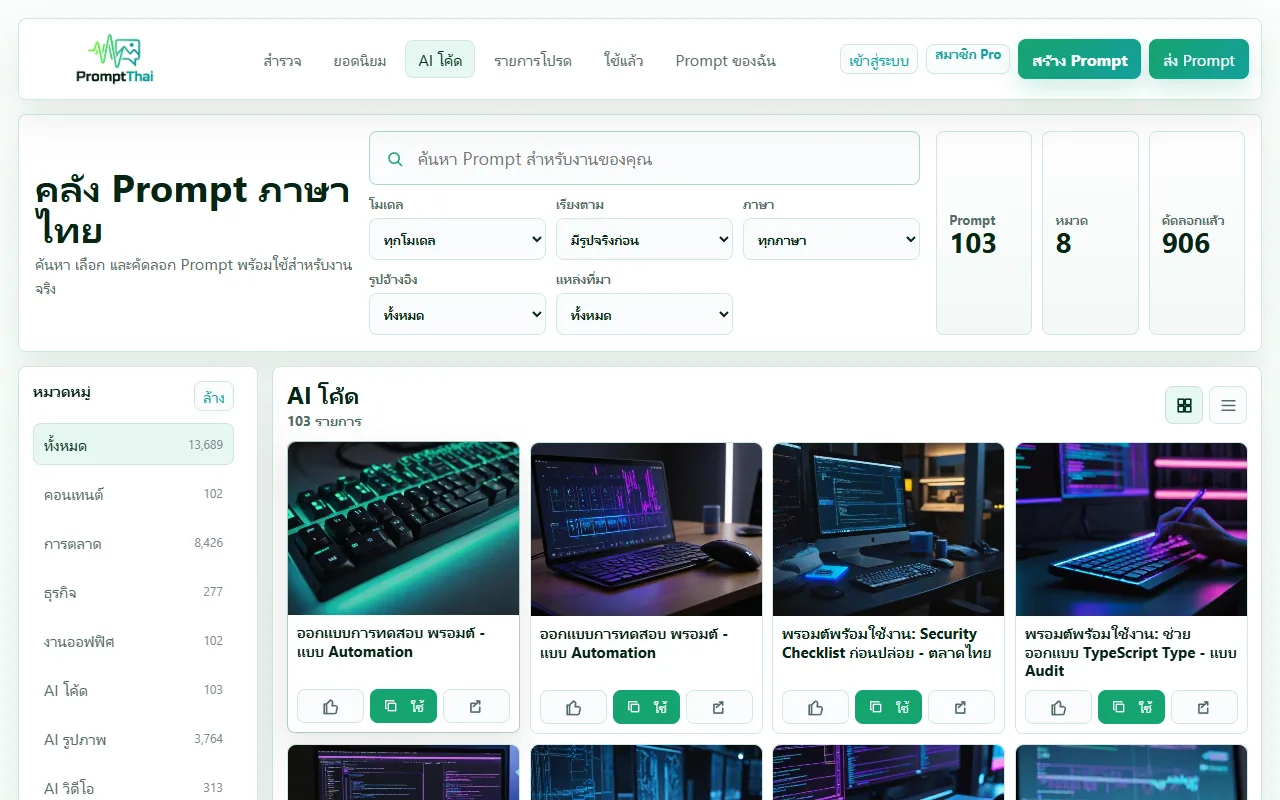
หน้าแรกมีช่องค้นหาและตัวกรองโมเดล ภาษา รูปอ้างอิง และแหล่งที่มา ด้านซ้ายเป็นหมวดงาน 8 หมวด กดการ์ดใดก็จะเห็นตัว prompt ตัวอย่าง input ผลลัพธ์ที่ควรได้ และเวอร์ชันสั้น/ละเอียด/มืออาชีพให้เลือก การค้นหาและคัดลอกใช้ได้โดยไม่ต้องสมัคร ส่วนการซิงก์รายการโปรดข้ามเครื่องและการส่ง prompt ของตัวเองต้องเข้าสู่ระบบThe home page has a search box and filters for model, language, reference image and source, with 8 work categories down the left. Click any card to see the prompt itself, an example input, the expected result, and short/detailed/professional versions. Searching and copying need no account; syncing favourites across devices and submitting your own prompts require signing in.
เว็บเปิดใช้จริงที่ promptthai.zzaxstudio.com ณ วันที่ 2 พ.ย. 2569 มี prompt เผยแพร่ 13,689 รายการ แบ่งเป็น prompt ที่ PromptThai เขียนเอง 816 รายการ และ prompt สร้างภาพที่นำเข้าจากคลังภายนอก (YouMind) 12,873 รายการ ยังไม่มีตัวเลขผู้ใช้ที่เปิดเผยได้ และระบบสมาชิก Pro แบบเสียเงินยังไม่เปิดรับชำระThe site is live at promptthai.zzaxstudio.com. As of 2 November 2026 it publishes 13,689 prompts: 816 written by PromptThai and 12,873 image prompts imported from an outside library (YouMind). There are no published user numbers yet, and the paid Pro membership isn't taking payments.
เหตุที่ทำแบบนี้คือ prompt ดี ๆ ที่หาได้ส่วนใหญ่เป็นภาษาอังกฤษและบริบทต่างประเทศ PromptThai จึงเน้นให้ใส่ข้อมูลงานของตัวเองลงช่องว่างก่อนคัดลอก มีตัวอย่าง input/output ให้เห็นก่อนลอง และให้ผู้ใช้กดบอกได้ว่าผลออกมาตรงหรือไม่ เพื่อใช้จัดอันดับ prompt ที่ใช้ได้จริงThe reasoning: most good prompts out there are in English and written for foreign contexts. PromptThai therefore has you fill your own details into the blanks before copying, shows an example input and output before you try, and lets you report whether the result matched — signals used to rank the prompts that actually work.
02 · โจทย์02 · The brief
สร้างขึ้นมาเพราะอะไรWhy this exists
ครีเอเตอร์ นักการตลาด เจ้าของธุรกิจ พนักงานออฟฟิศ และใครก็ตามที่อยากใช้ AI ให้ได้ผลดีขึ้นโดยไม่ต้องเป็นผู้เชี่ยวชาญCreators, marketers, business owners, office workers — anyone who wants better AI results without being an expert
ใช่โจทย์ของคุณไหมSound like your problem?
03 · ฟีเจอร์03 · Features
ทำอะไรได้บ้าง อย่างละเอียดWhat it does, in detail
9 ความสามารถ9 capabilitiesค้นหาพร้อมตัวกรองละเอียดSearch with detailed filters
พิมพ์งานที่ต้องการในช่องค้นหา แล้วกรองตามโมเดล (ChatGPT 273, Claude 238, Gemini 236, DeepSeek 35, AI รูปภาพ 12,907 รายการ ณ 2 พ.ย. 2569) เรียงตาม "มีรูปจริงก่อน" นิยมสุด ล่าสุด คัดลอกมากสุด หรือชื่อ A–Z และเลือกได้ว่าต้องใช้รูปอ้างอิงหรือไม่Type the task into the search box, then filter by model (as of 2 Nov 2026: ChatGPT 273, Claude 238, Gemini 236, DeepSeek 35, image AI 12,907), sort by "real preview first", most popular, newest, most copied or A–Z, and choose whether a reference image is required.
8 หมวดงาน8 work categories
แถบซ้ายแบ่งเป็น คอนเทนต์ การตลาด ธุรกิจ งานออฟฟิศ AI โค้ด AI รูปภาพ AI วิดีโอ และการศึกษา พร้อมจำนวนในแต่ละหมวด หมวดการตลาดใหญ่ที่สุด (8,426 รายการ) เพราะ prompt ภาพโพสต์และโปสเตอร์ที่นำเข้ามาถูกจัดไว้ในหมวดนี้The left sidebar splits prompts into content, marketing, business, office work, AI code, AI images, AI video and education, with a count for each. Marketing is the largest (8,426) because imported social-post and poster image prompts are filed there.
เติมข้อมูลก่อนคัดลอกFill in your details before copying
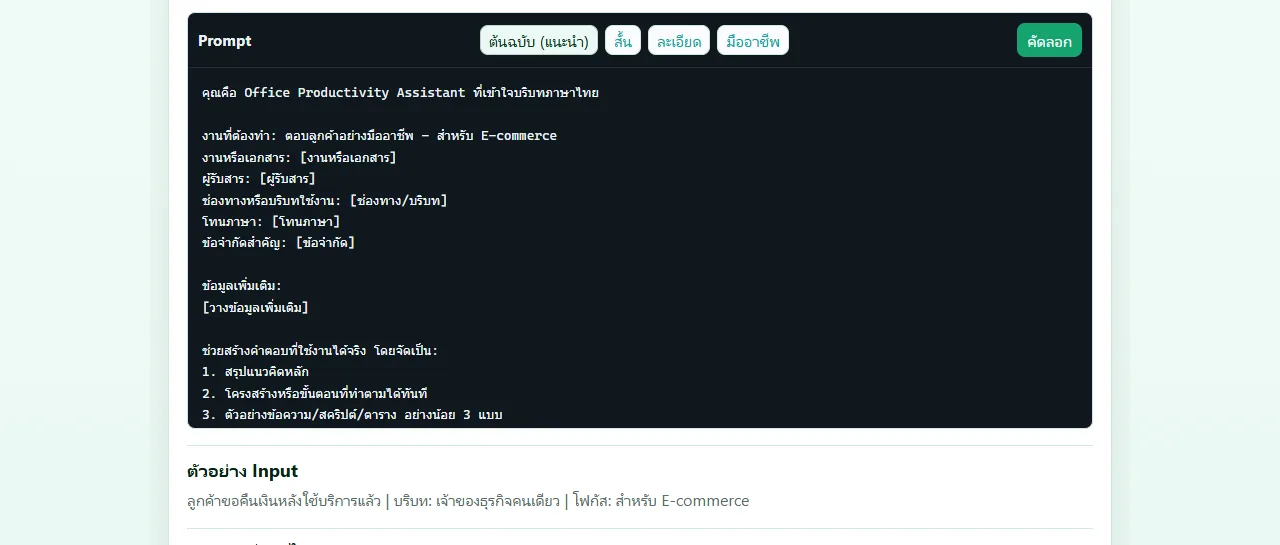
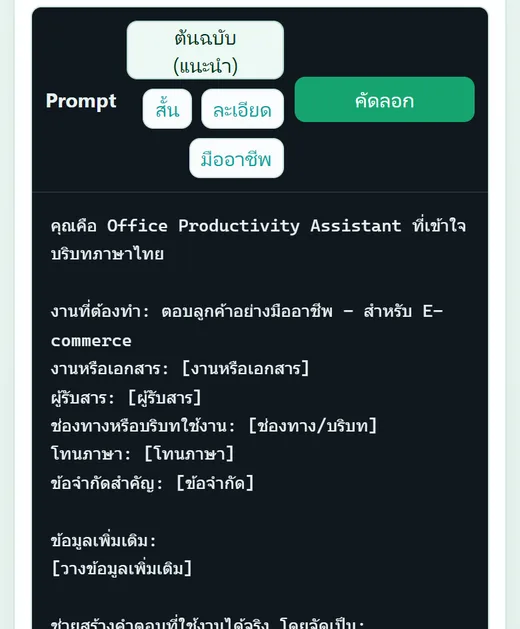
prompt มีช่องในวงเล็บเหลี่ยม เช่น [ผู้รับสาร] [โทนภาษา] [ข้อจำกัด] ในแผงรายละเอียดมีช่องให้กรอกค่าเหล่านี้ ข้อความด้านล่างจะเปลี่ยนตามทันที แล้วกดคัดลอกครั้งเดียวได้ prompt ที่พร้อมใช้Prompts contain bracketed blanks such as [audience], [tone] and [constraints]. The detail panel has fields for these; the prompt text below updates as you type, and one click copies a ready-to-use prompt.
4 เวอร์ชันต่อ promptFour versions of each prompt
เหนือกล่อง prompt มีปุ่ม "ต้นฉบับ (แนะนำ)" "สั้น" "ละเอียด" และ "มืออาชีพ" สลับดูได้ก่อนคัดลอก ด้านล่างมีตัวอย่าง Input และผลลัพธ์ที่ควรได้ เช่น prompt ตอบลูกค้าแสดงตัวอย่างกรณีลูกค้าขอคืนเงินหลังใช้บริการแล้วAbove each prompt are buttons for "Original (recommended)", "Short", "Detailed" and "Professional" to switch between before copying. Below are an example input and the expected result — the customer-reply prompt, for example, shows a customer asking for a refund after using a service.
จดผลการใช้และส่งสัญญาณกลับLog results and send feedback
แต่ละ prompt ตั้งสถานะส่วนตัวได้ว่า "ยังไม่ลอง" "ใช้ได้ดี" หรือ "ต้องปรับ" และเขียนโน้ตส่วนตัว (เก็บในเครื่อง และซิงก์เมื่อเข้าสู่ระบบ) หลังลองใช้กดบอกได้ว่า "ผลใกล้ตัวอย่าง" "ไม่ตรงรูป" "คุณภาพต่ำ" หรือรายงานปัญหา เพื่อให้ระบบดันหรือลดอันดับ promptYou can mark each prompt as "not tried", "works well" or "needs tweaking" and keep a private note (stored on your device, synced once you sign in). After trying it you can report "close to the example", "doesn't match", "low quality" or flag a problem, which the system uses to promote or demote prompts.
ชุด Prompt ของฉันMy prompt set
กด "เพิ่มเข้าชุด" เพื่อเก็บ prompt ที่ใช้คู่กันไว้ในชุดเดียว (สูงสุด 12 รายการ) แล้วคัดลอกทั้งชุดหรือดาวน์โหลดเป็นไฟล์ได้ นอกจากนี้มีแท็บรายการโปรด และแท็บ "ใช้แล้ว" ที่รวม prompt ที่เคยคัดลอกPress "Add to set" to gather prompts you use together into one set (up to 12), then copy the whole set or download it. There's also a favourites tab and a "used" tab listing prompts you've copied before.
หน้าเฉพาะของแต่ละ promptA dedicated page for every prompt
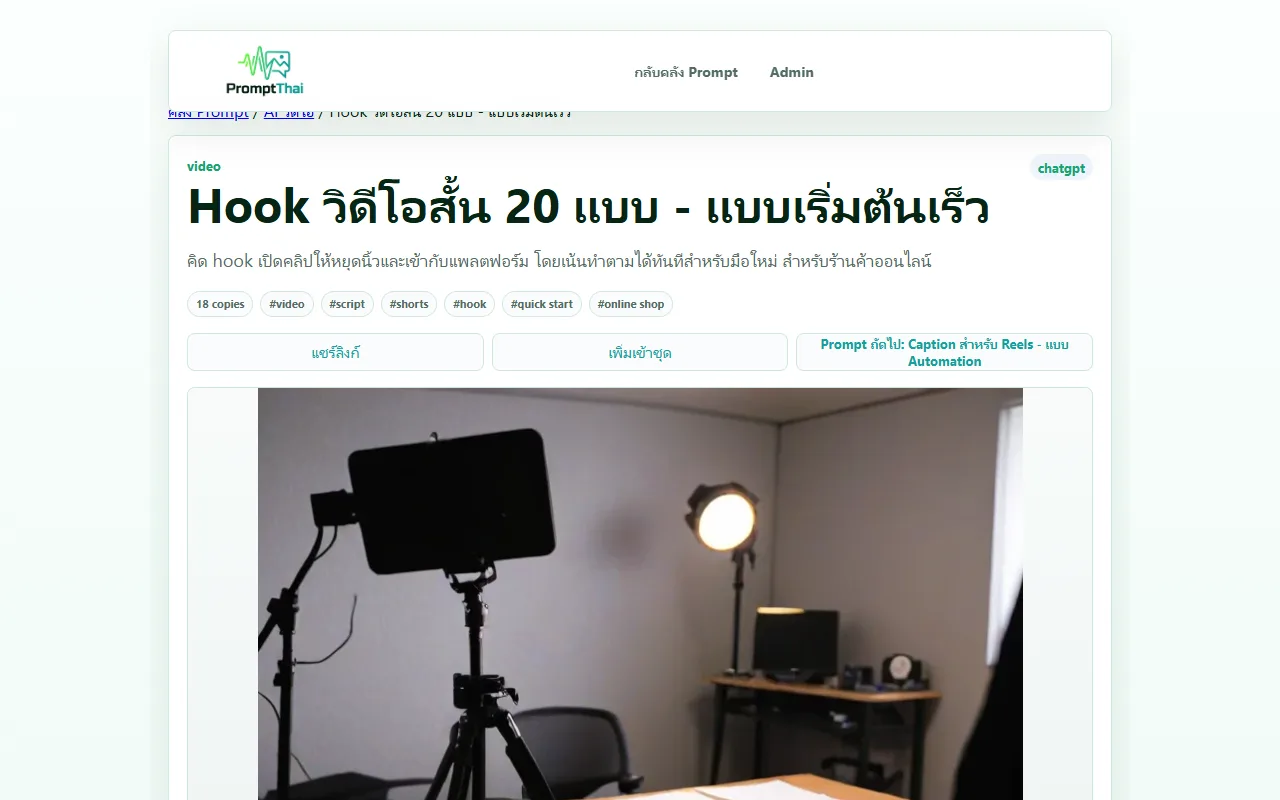
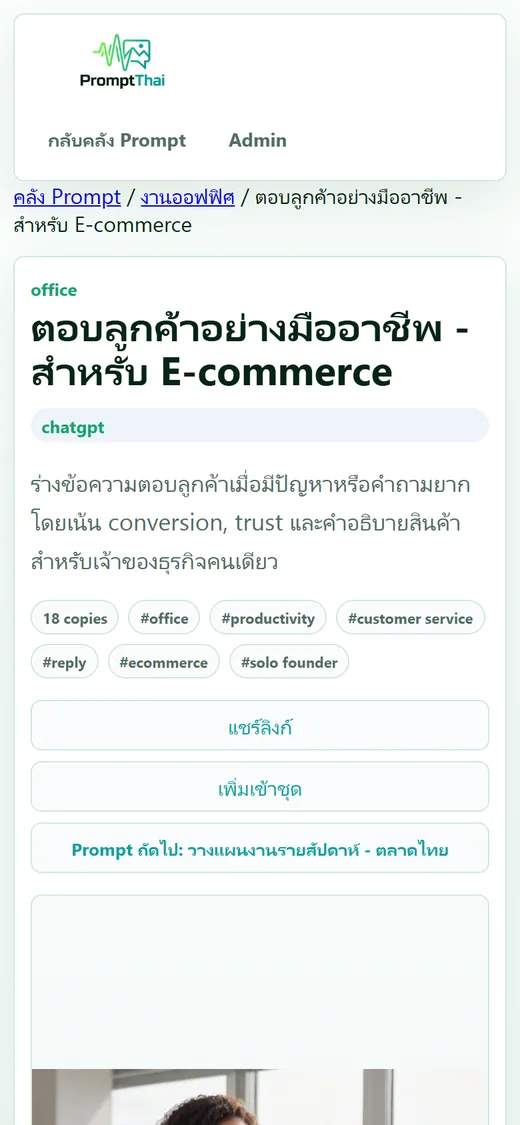
ทุก prompt มีลิงก์ของตัวเอง (promptthai.zzaxstudio.com/prompt/...) แสดงหมวด โมเดลที่แนะนำ แท็ก ภาพตัวอย่าง ตัว prompt และปุ่ม "Prompt ถัดไป" ไปยังเรื่องที่เกี่ยวข้อง กด "แชร์ลิงก์" ส่งให้เพื่อนร่วมงานเปิดดูได้โดยไม่ต้องมีบัญชีEvery prompt has its own link (promptthai.zzaxstudio.com/prompt/...) showing the category, recommended model, tags, preview image, the prompt itself and a "next prompt" button to related ones. "Share link" lets you send it to a colleague, who can open it without an account.
ตัวช่วยสร้าง PromptPrompt builder
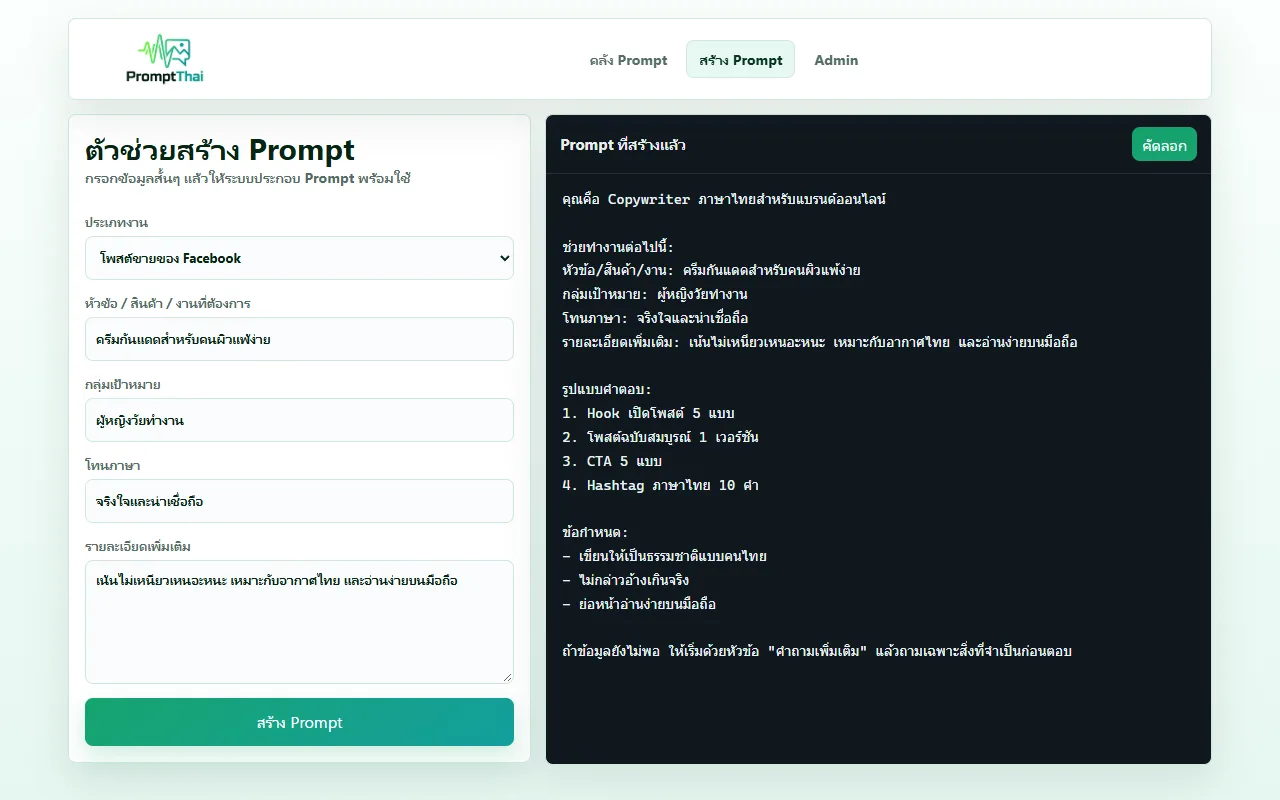
หน้า "สร้าง Prompt" ให้เลือกประเภทงาน 6 แบบ (โพสต์ขายของ Facebook, สคริปต์ TikTok/Reels, สรุปรายงานประชุม, โครงบทความ SEO, รีวิวโค้ด, prompt ภาพสินค้า) แล้วกรอกหัวข้อ กลุ่มเป้าหมาย โทนภาษา และรายละเอียด ระบบประกอบเป็น prompt ที่มีบทบาท รูปแบบคำตอบ และข้อกำหนดให้คัดลอก การประกอบทำในเบราว์เซอร์ ไม่ได้ส่งข้อมูลไปให้ AIThe "Build a prompt" page offers 6 task types (Facebook sales post, TikTok/Reels script, meeting summary, SEO article outline, code review, product image prompt). Enter a topic, audience, tone and details, and it assembles a prompt with a role, answer format and requirements ready to copy. Assembly happens in the browser; nothing is sent to an AI.
สมาชิกส่ง Prompt ของตัวเองได้Members can submit their own prompts
ผู้ที่เข้าสู่ระบบใช้ Creator Studio บันทึกร่างและส่ง prompt ให้ผู้ดูแลตรวจก่อนเผยแพร่ ได้วันละ 5 รายการ กรอกชื่อ หมวด โมเดล คำอธิบาย แท็ก ลิงก์ภาพตัวอย่าง และตัวอย่าง input/output แล้วติดตามสถานะได้ในแท็บ "Prompt ของฉัน"Signed-in users can use Creator Studio to save drafts and submit prompts for review before publication, up to 5 per day. They enter a title, category, model, description, tags, a preview image link and example input/output, then follow the status in the "My prompts" tab.
04 · วิธีทำงาน04 · How it works
ทำงานยังไง ตั้งแต่ต้นจนจบHow it works, start to finish
- 1
ค้นหางานที่ต้องการSearch for your task
เปิด promptthai.zzaxstudio.com พิมพ์งานที่จะทำ หรือเลือกหมวดด้านซ้าย แล้วกรองตามโมเดลที่ใช้อยู่Open promptthai.zzaxstudio.com, type the task or pick a category on the left, then filter by the model you use.
- 2
เปิดดูรายละเอียดOpen the details
กดการ์ด prompt เพื่อดูตัว prompt ตัวอย่าง input ผลลัพธ์ที่ควรได้ และเลือกเวอร์ชันสั้น ละเอียด หรือมืออาชีพClick a prompt card to see the prompt, an example input and the expected result, and choose the short, detailed or professional version.
- 3
เติมข้อมูลแล้วคัดลอกFill in and copy
กรอกค่าตามช่องว่างในวงเล็บ ข้อความจะพร้อมใช้ทันที กด "คัดลอก"Fill in the bracketed blanks; the text is ready immediately. Press "Copy".
- 4
วางใน AI ที่ใช้อยู่Paste into your AI tool
วางใน ChatGPT, Claude, Gemini หรือเครื่องมือสร้างภาพ ถ้าเป็น prompt ภาพที่ติดป้ายว่าต้องใช้รูปอ้างอิง ให้แนบรูปของคุณไปด้วยPaste it into ChatGPT, Claude, Gemini or an image tool. If an image prompt is marked as needing a reference image, attach your own picture too.
- 5
บอกผลกลับReport back
กลับมากดว่าผลใกล้ตัวอย่างหรือไม่ เก็บเข้ารายการโปรดหรือชุดของตัวเองไว้ใช้ครั้งต่อไปCome back to say whether the result was close to the example, and save it to your favourites or your set for next time.
05 · ภาพ05 · Visuals
ภาพจากระบบจริงFrom the real system
11 ภาพ11 imagesภาพหน้าจอจริงถ่ายจากระบบที่เปิดใช้อยู่ ส่วนภาพโปรโมตและภาพประกอบมีป้ายกำกับไว้ทุกใบReal screenshots come from the running system; promo images and illustrations are labelled on every card.


06 · สถานการณ์06 · Scenarios
ตัวอย่างสถานการณ์ใช้งานExample scenarios
เป็นตัวอย่างสมมติเพื่อให้เห็นภาพ ไม่ใช่เรื่องของลูกค้าจริงIllustrative scenarios to help you picture it — not real customer stories.
แม่ค้าออนไลน์ที่ต้องตอบแชทลูกค้ายาก ๆAn online seller handling difficult customer messages
สมมติว่ามีลูกค้าทักมาขอคืนเงิน เลือกหมวดงานออฟฟิศ เปิด prompt "ตอบลูกค้าอย่างมืออาชีพ - สำหรับ E-commerce" ใส่ช่องทาง โทนภาษา และข้อจำกัดของร้าน แล้วให้ AI ร่างคำตอบหลายแบบให้เลือก ก่อนส่งจริงควรอ่านทวนเองSuppose a customer messages asking for a refund. Go to office work, open "Reply to customers professionally – for e-commerce", fill in the channel, tone and your shop's constraints, and let the AI draft several replies to choose from. Read it over yourself before sending.
ครีเอเตอร์ที่ต้องทำคลิปสั้นทุกวันA creator posting short videos daily
สมมติว่าคิด hook เปิดคลิปไม่ออก เปิด prompt "Hook วิดีโอสั้น 20 แบบ" ในหมวด AI วิดีโอ หรือใช้หน้า "สร้าง Prompt" แบบสคริปต์ TikTok/Reels ใส่สินค้าและกลุ่มเป้าหมาย ได้ prompt ที่ขอตารางเวลา 0–30 วินาที ภาพที่ควรถ่าย คำพูด และข้อความบนจอSuppose you're stuck for an opening hook. Open "20 short-video hooks" in the AI video category, or use the "Build a prompt" page with the TikTok/Reels script type, entering your product and audience. You get a prompt asking for a 0–30 second timeline, shots to film, voice-over and on-screen text.
ร้านที่อยากได้ภาพสินค้าสวยโดยไม่จ้างช่างภาพA shop wanting better product photos without a photographer
สมมติว่าอยากได้ภาพสินค้าแบบสตูดิโอ กรองโมเดลเป็น "AI รูปภาพ" และเรียง "มีรูปจริงก่อน" เพื่อดูภาพตัวอย่างก่อนเลือก prompt ที่ใกล้สไตล์ที่ต้องการ แล้วนำไปใช้กับเครื่องมือสร้างภาพที่ใช้อยู่ ผลจริงขึ้นกับเครื่องมือนั้นSuppose you want studio-style product shots. Filter by "image AI" and sort by "real preview first" to see example images, pick a prompt close to the style you want, and use it in your image tool. Actual results depend on that tool.
07 · เบื้องหลัง07 · Under the hood
เบื้องหลังระบบ ข้อมูล และความปลอดภัยUnder the hood: data and security
- แพลตฟอร์มPlatform
- เว็บแอปที่ใช้ผ่านเบราว์เซอร์ทั้งคอมและมือถือ ไม่ต้องติดตั้ง หลังบ้านเป็นเซิร์ฟเวอร์ Node.js (Express) กับฐานข้อมูล SQLite ของตัวเอง โฮสต์บน HostingerA web app used in any browser on desktop or mobile, nothing to install. The back end is a Node.js (Express) server with its own SQLite database, hosted on Hostinger.
- บัญชีและความปลอดภัยAccounts and security
- สมัครได้ด้วยอีเมลและรหัสผ่าน (ต้องยืนยันอีเมลก่อนใช้) หรือเข้าด้วย Google รหัสผ่านเก็บแบบแฮช (scrypt) ไม่เก็บรหัสจริง ลิงก์ยืนยันและลิงก์ตั้งรหัสใหม่หมดอายุใน 30 นาทีและใช้ได้ครั้งเดียว มีการจำกัดจำนวนครั้งในการล็อกอินและสมัครSign up with email and password (email must be verified first) or continue with Google. Passwords are stored as scrypt hashes, never in plain form. Verification and password-reset links expire after 30 minutes and work once, and sign-in and sign-up attempts are rate-limited.
- ข้อมูลที่เก็บWhat is stored
- ถ้าไม่สมัคร รายการโปรด ชุด prompt และโน้ตเก็บในเบราว์เซอร์ของผู้ใช้ ถ้าเข้าสู่ระบบจะซิงก์ไปเก็บที่เซิร์ฟเวอร์ ระบบนับยอดคัดลอก ใช้ ไลก์ และแชร์ของแต่ละ prompt ฝั่งเซิร์ฟเวอร์เพื่อจัดอันดับ PromptThai ไม่ได้รับข้อความที่ผู้ใช้ส่งให้ AI เพราะการใช้ AI เกิดในเครื่องมือของผู้ใช้เองWithout an account, favourites, sets and notes stay in the user's browser; signed-in users have them synced to the server. Copies, uses, likes and shares are counted server-side for ranking. PromptThai never sees what users send to their AI, because that happens in the user's own AI tool.
- แหล่งที่มาของ promptWhere prompts come from
- prompt 816 รายการเขียนโดย PromptThai และอีก 12,873 รายการเป็น prompt สร้างภาพที่นำเข้าจากคลัง YouMind ซึ่งตัว prompt ยังเป็นภาษาอังกฤษ มีชื่อและคำอธิบายภาษาไทยกำกับ ภาพตัวอย่างของ prompt ที่นำเข้าโหลดจากเซิร์ฟเวอร์ของแหล่งต้นทาง เลือกดูเฉพาะแหล่งใดแหล่งหนึ่งได้จากตัวกรอง "แหล่งที่มา"816 prompts are written by PromptThai; the other 12,873 are image prompts imported from the YouMind library, whose prompt text is still in English with a Thai title and description. Preview images for imported prompts load from the source's servers. The "source" filter shows one source at a time.
- ข้อจำกัดที่ควรรู้Limitations to know
- ชื่อภาษาไทยของ prompt ที่นำเข้าบางรายการเป็นการแปลอัตโนมัติที่ยังอ่านแปลก และ prompt ที่เขียนเองหลายรายการเป็นแม่แบบเดียวกันที่ปรับให้กลุ่มผู้ใช้ต่างกัน (เช่น ร้านค้า ฟรีแลนซ์ ทีมเล็ก) ผลลัพธ์จริงขึ้นกับโมเดลที่ผู้ใช้เลือกและข้อมูลที่เติม ควรตรวจข้อเท็จจริงก่อนนำไปใช้เสมอSome imported prompts have machine-translated Thai titles that still read awkwardly, and many in-house prompts are one template adapted for different audiences (shop owners, freelancers, small teams). Real results depend on the model chosen and the details filled in; always fact-check before use.
08 · ความคืบหน้า08 · Progress
ความคืบหน้าและแผนต่อไปProgress and what comes next
- ทำแล้วDone
มิ.ย. 2569: ระบบนำเข้า prompt สร้างภาพจำนวนมากพร้อมตัดรายการซ้ำและจัดหมวด (คลังจริงตอนนี้ 13,689 รายการ)June 2026: bulk import of image prompts with de-duplication and category mapping (the live library now holds 13,689)
- ทำแล้วDone
ก.ค. 2569: ระบบ Creator ให้สมาชิกส่ง prompt ให้ตรวจ พร้อมนับไลก์/แชร์/การใช้ฝั่งเซิร์ฟเวอร์เพื่อจัดอันดับJuly 2026: Creator system for members to submit prompts for review, with server-side like/share/use counts for ranking
- ทำแล้วDone
ก.ค.–ต.ค. 2569: ระบบบัญชีใหม่ สมัครด้วยอีเมลที่ต้องยืนยัน หรือเข้าด้วย Google (ขึ้นเว็บพร้อมรอบอัปเดต ต.ค. 2569 ที่ปรับหน้าตาและคุณภาพคลัง)July–October 2026: new account system with verified-email sign-up or Google sign-in (deployed with the October 2026 update that refreshed the UI and catalogue quality)
- ถัดไปNext
เปิดรับชำระสมาชิก Pro (หน้าแพ็กเกจมีแล้ว แต่ระบบรับเงินยังไม่ได้ตั้งค่า และยังไม่ได้ประกาศราคา)Start taking payments for Pro membership (the plan page exists, but payment isn't set up and no price has been announced)
09 · คำถาม09 · FAQ
คำถามที่พบบ่อยFrequently asked questions
ใช้ฟรีไหม ต้องสมัครหรือเปล่าIs it free? Do I need to sign up?
ค้นหา ดู และคัดลอก prompt ได้ฟรีโดยไม่ต้องสมัคร สมัครเมื่ออยากซิงก์รายการโปรดข้ามเครื่องหรือส่ง prompt ของตัวเองSearching, viewing and copying prompts is free with no sign-up. You only need an account to sync favourites across devices or submit your own prompts.
สมาชิก Pro ราคาเท่าไรHow much is Pro?
ยังไม่ได้กำหนด หน้าแพ็กเกจระบุว่า Pro เป็นแบบรายเดือนสำหรับคนทำคอนเทนต์และผู้ดูแลคลัง prompt แต่ยังไม่เปิดรับชำระเงินNot set yet. The plan page describes Pro as a monthly plan for content creators and prompt-library curators, but it isn't taking payments.
ใช้กับ AI ตัวไหนได้บ้างWhich AI tools does it work with?
prompt เป็นข้อความธรรมดา วางใช้ได้กับ ChatGPT, Claude, Gemini, DeepSeek และเครื่องมือสร้างภาพ แต่ละ prompt ระบุโมเดลที่แนะนำไว้ ผลลัพธ์จะต่างกันไปตามเครื่องมือPrompts are plain text, so they work in ChatGPT, Claude, Gemini, DeepSeek and image tools. Each prompt lists a recommended model; results vary by tool.
prompt เป็นภาษาไทยทั้งหมดไหมAre all prompts in Thai?
ไม่ทั้งหมด prompt ที่ PromptThai เขียนเอง (816 รายการ) เป็นภาษาไทย ส่วน prompt สร้างภาพที่นำเข้า (12,873 รายการ) ตัว prompt เป็นภาษาอังกฤษ มีชื่อและคำอธิบายภาษาไทย ซึ่งเครื่องมือสร้างภาพส่วนใหญ่รับภาษาอังกฤษได้ดีกว่าอยู่แล้วNot all. The 816 prompts PromptThai wrote are in Thai; the 12,873 imported image prompts are in English with a Thai title and description — most image tools handle English better anyway.
ข้อมูลที่ใส่ในช่องว่างถูกส่งไปไหนWhere does the information I fill in go?
การเติมช่องว่างและการประกอบ prompt ทำในหน้าเว็บ แล้วคุณเป็นคนคัดลอกไปวางใน AI เอง PromptThai ไม่ได้ส่งข้อความนั้นไปให้ AI แต่อย่างใด ระบบนับเพียงว่ามีการคัดลอกหรือใช้ prompt นั้นกี่ครั้งFilling in the blanks and assembling the prompt happen on the page, and you paste it into your AI yourself. PromptThai doesn't send that text to any AI; it only counts how many times a prompt is copied or used.
ใครดูแล ส่ง prompt ไปแล้วขึ้นเลยไหมWho runs it, and do submitted prompts go live immediately?
ZZAX Studio เป็นผู้ดูแล prompt ที่สมาชิกส่งมาต้องผ่านการตรวจของผู้ดูแลก่อนเผยแพร่ ส่งได้วันละ 5 รายการZZAX Studio runs it. Prompts submitted by members are reviewed by the site's administrators before publication, with a limit of 5 submissions a day.
10 · วิธีเริ่ม10 · Get started
เริ่มได้ใน 3 ขั้นUp and running in three steps
ถ้าอยากได้ระบบแบบเดียวกันสำหรับธุรกิจของคุณ บอกโจทย์มาสั้น ๆ เราตอบกลับพร้อมขอบเขตงานและราคาภายใน 1 วันทำการIf you want something like this for your own business, send us a line about the problem. You'll get scope and price within one working day.
- 1ขั้นที่ 1 เปิด promptthai.zzaxstudio.com แล้วเลือกหมวดงานที่ตรงกับสิ่งที่ทำอยู่Step 1: Open promptthai.zzaxstudio.com and pick the category matching your work
- 2ขั้นที่ 2 กดคัดลอก prompt ที่ถูกใจStep 2: Copy the prompt you like
- 3ขั้นที่ 3 วางลงใน AI ที่ใช้อยู่ แล้วแก้รายละเอียดให้ตรงกับงานของคุณStep 3: Paste it into your AI of choice and adjust the details to your case
เริ่มงานกับเราWork with us
อยากได้ระบบแบบนี้สำหรับธุรกิจคุณWant a system like this for your business?
เล่าปัญหาของคุณมา เราจะบอกตรง ๆ ว่าช่วยได้ไหม ภายใน 1 วันทำการ ส่งแล้วได้รหัสติดตามงานทันทีTell us the problem and we'll say honestly whether we can help, within one working day. You get a tracking code the moment you send it.