คนไทยที่อยากเรียน AI จริงจังต้องไปอ่านคอร์สภาษาอังกฤษที่ข้ามพื้นฐานไปหมด หรือไม่ก็ดูคลิปสั้น ๆ ที่สอนแค่ทีละทริกจนต่อภาพไม่ติด สุดท้ายใช้ AI เป็นแต่ไม่เคยสร้างอะไรของตัวเองได้เลยThais who want to learn AI properly end up in English courses that skip the basics, or short clips teaching one trick at a time that never join up. They learn to use AI but never build anything of their own.
← ผลงานทั้งหมด← All work


คอร์สCourse
คู่มือ AI สำหรับผู้เริ่มต้นAI Guide for Beginners
คอร์สภาษาไทยที่พาจากศูนย์ไปถึงการเขียนแอป AI ได้เองA Thai course that takes you from zero to building your own AI apps
ใช้งานจริงLive คอร์สCourse
เปิดให้อ่านได้จริงบนเว็บแล้ว 12 บทแรกฟรี บท VIP ปลดล็อกด้วยรหัสหลังชำระเงินLive on the site — the first 12 chapters are free, VIP chapters unlock with a code after payment
24โมดูลในหลักสูตรModules in the curriculum
37บทเรียนที่เขียนเสร็จแล้วChapters written
12บทที่อ่านฟรีFree chapters
199บาท · ค่าสมาชิก VIP รายเดือนVIP monthly price
01 · ภาพรวม01 · Overview
ภาพรวมของระบบThe system at a glance
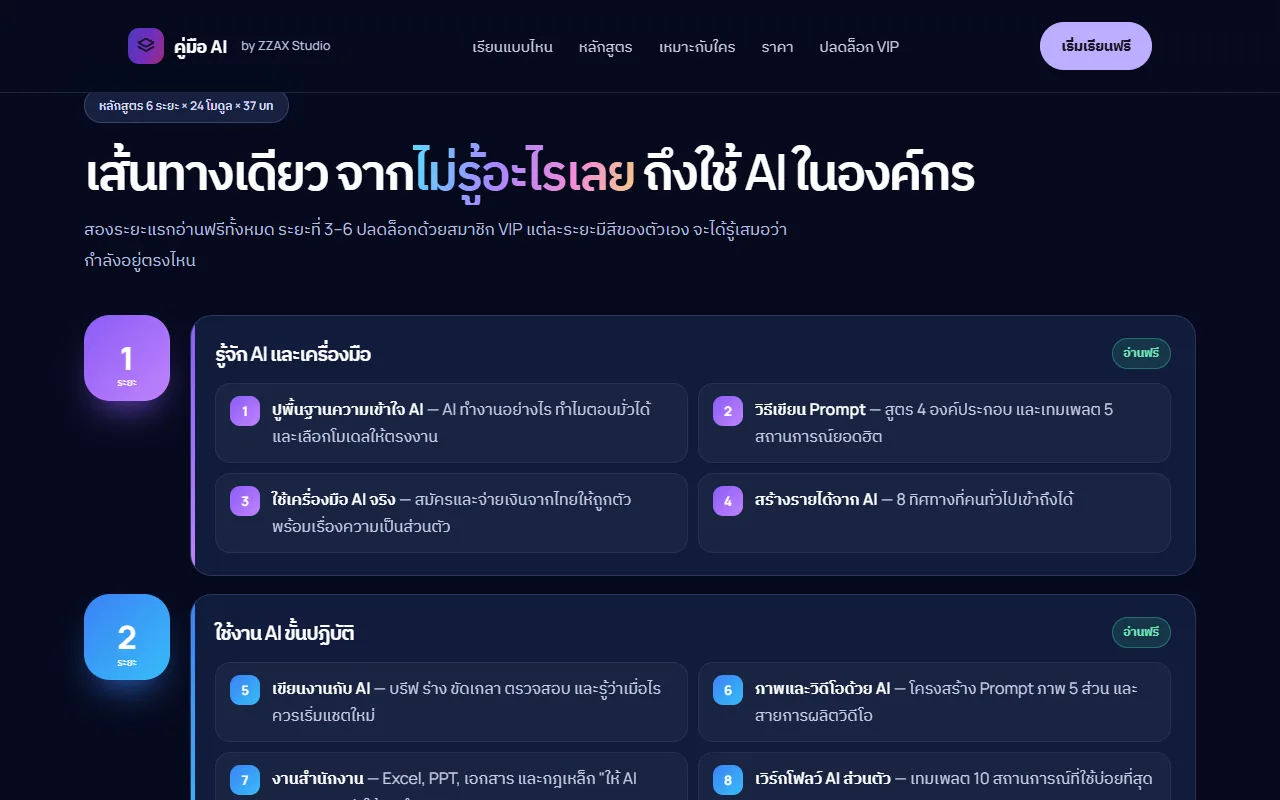
คู่มือ AI สำหรับผู้เริ่มต้น คือคอร์สภาษาไทยแบบอ่านบนเว็บ ที่พาคนที่ไม่เคยใช้ AI จริงจังไปทีละก้าว ตั้งแต่เข้าใจว่า AI ตอบมาจากอะไร เขียน prompt ให้ได้งาน ใช้ AI ทำเอกสาร ภาพ และวิดีโอ ไปจนถึงเขียนแอป AI ของตัวเอง และวางแผนใช้ AI ในธุรกิจหรือองค์กร ทั้งหมดเรียงเป็นเส้นทางเดียว 6 ระยะ 24 โมดูล 37 บทThe AI Guide for Beginners is a Thai-language course you read in the browser. It takes people who have never used AI seriously one step at a time: how AI produces its answers, how to write prompts that get work done, using AI for documents, images and video, building your own AI apps, and finally planning AI for a business or organisation. It is laid out as a single path of 6 stages, 24 modules and 37 chapters.
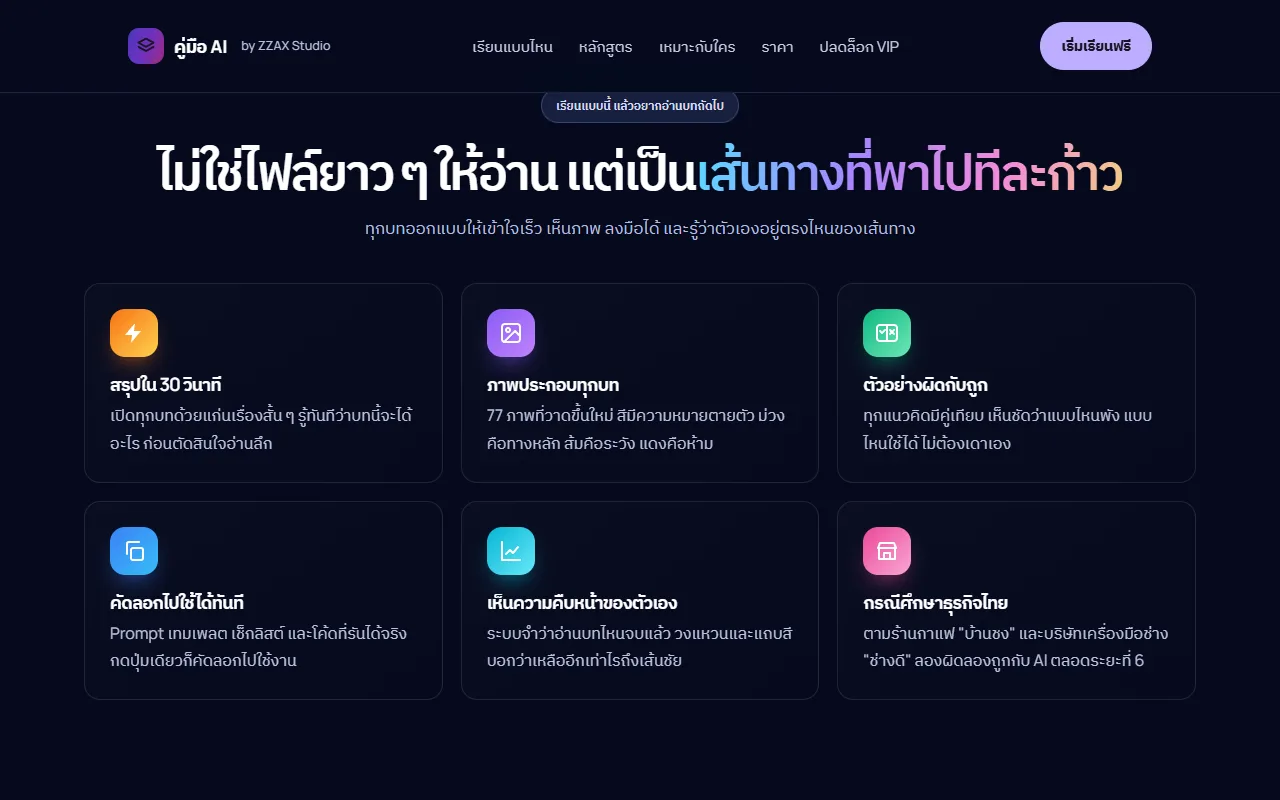
เปิดหน้าคู่มือแล้วกด "เริ่มเรียนฟรี" ได้เลยโดยไม่ต้องสมัคร หน้าเรียนมีสารบัญด้านซ้าย แต่ละบทเปิดด้วยกล่อง "สรุปใน 30 วินาที" บอกเวลาอ่านโดยประมาณและระดับความยาก แล้วจึงเป็นเนื้อหา ภาพประกอบ ตัวอย่างผิดกับถูก และเทมเพลตที่กดคัดลอกได้ ระยะที่ 1–2 (12 บท) อ่านฟรีทั้งหมด ส่วนระยะที่ 3–6 (25 บท) ปลดล็อกด้วยรหัสที่ได้ทางอีเมลหลังชำระเงินOpen the guide and press "Start learning free" — no sign-up needed. The reader has a table of contents on the left. Every chapter opens with a "30-second summary" box and shows an estimated reading time and level, followed by the lesson, illustrations, wrong-versus-right examples and copyable templates. Stages 1–2 (12 chapters) are entirely free; stages 3–6 (25 chapters) unlock with a code sent by email after payment.
ตอนนี้คอร์สเปิดให้อ่านจริงที่ zzaxstudio.com/ai-guide ครบ 37 บท พร้อมภาพประกอบต้นฉบับ 77 ภาพ (นับจากเลข "ภาพที่" ในหน้าบทเรียน) เนื้อหา 24 บทแรกเขียนเสร็จเมื่อ ก.ค. 2569 และเพิ่มระยะที่ 6 "AI สำหรับธุรกิจและองค์กร" พร้อมปรับปรุงบทเดิมทั้งหมดเมื่อ 24 ก.ย. 2569 ยังไม่มีตัวเลขผู้อ่านหรือผู้ซื้อ VIP ที่เปิดเผยได้The course is live at zzaxstudio.com/ai-guide with all 37 chapters and 77 original illustrations (counted from the numbered figures in the lessons). The first 24 chapters were completed in July 2026; stage 6, "AI for business and organisations", was added and every earlier chapter reworked on 24 September 2026. There are no published reader or VIP-buyer numbers yet.
จุดยืนของคอร์สคือสอนให้ "ตัดสินใจเป็น" มากกว่าท่องปุ่ม เพราะหน้าจอและราคาเครื่องมือเปลี่ยนทุกไม่กี่เดือน บทที่มีราคาหรือชื่อรุ่นจึงติดป้ายวันที่ปรับปรุงล่าสุด คอร์สตั้งใจไม่สอนเรื่องที่เสี่ยงผิดกฎหรือทำร้ายคนอื่น เช่น การเลี่ยงข้อจำกัดประเทศของบริการ หรือการทำ deepfake คนจริง และย้ำทุกช่วงว่างานที่ AI ร่างต้องมีคนตรวจก่อนใช้The course aims to teach judgement rather than button-clicking, because tool screens and prices change every few months — chapters that mention prices or model names carry a "last updated" date. It deliberately refuses to teach risky or harmful things such as getting around a service's country restrictions or making deepfakes of real people, and it repeats throughout that anything AI drafts must be checked by a person before use.
02 · โจทย์02 · The brief
สร้างขึ้นมาเพราะอะไรWhy this exists
มือใหม่ที่อยากเริ่มใช้และพัฒนา AI ด้วยตัวเองแบบมีระบบ โดยไม่ต้องมีพื้นฐานโปรแกรมมิ่งมาก่อนBeginners who want to use and build AI systematically, with no programming background
ใช่โจทย์ของคุณไหมSound like your problem?
03 · ฟีเจอร์03 · Features
ทำอะไรได้บ้าง อย่างละเอียดWhat it does, in detail
10 ความสามารถ10 capabilitiesเส้นทางเดียว 6 ระยะ 37 บทOne path: 6 stages, 37 chapters
หลักสูตรเรียงจาก "รู้จัก AI และเครื่องมือ" → "ใช้งาน AI ขั้นปฏิบัติ" → "พื้นฐานการพัฒนา AI" → "การพัฒนา AI ขั้นสูง" → "จากโปรเจกต์สู่ธุรกิจ" → "AI สำหรับธุรกิจและองค์กร" แต่ละระยะมีสีของตัวเองในสารบัญ ผู้อ่านจึงรู้เสมอว่ากำลังอยู่ตรงไหนของเส้นทางThe curriculum runs from "Getting to know AI and its tools" → "Using AI in practice" → "AI development basics" → "Advanced AI development" → "From project to business" → "AI for business and organisations". Each stage has its own colour in the table of contents, so readers always know where they are on the path.
12 บทแรกอ่านฟรี ไม่ต้องสมัครFirst 12 chapters free, no sign-up
บท 1.1 ถึง 8.1 (ระยะที่ 1–2) เปิดอ่านได้ทันที ครอบคลุมพื้นฐาน AI การเขียน prompt การสมัครและจ่ายเงินจากไทยให้ถูกตัว ความเป็นส่วนตัว การเขียนงาน ภาพ วิดีโอ งาน Excel/PPT และเทมเพลต 10 สถานการณ์ อ่านจบแล้วค่อยตัดสินใจว่าจะซื้อต่อหรือไม่Chapters 1.1 to 8.1 (stages 1–2) open immediately. They cover AI basics, prompting, signing up and paying correctly from Thailand, privacy, writing, images, video, Excel/PowerPoint work and templates for 10 everyday situations. Readers can finish them before deciding whether to buy.
"สรุปใน 30 วินาที" เปิดทุกบทA "30-second summary" opens every chapter
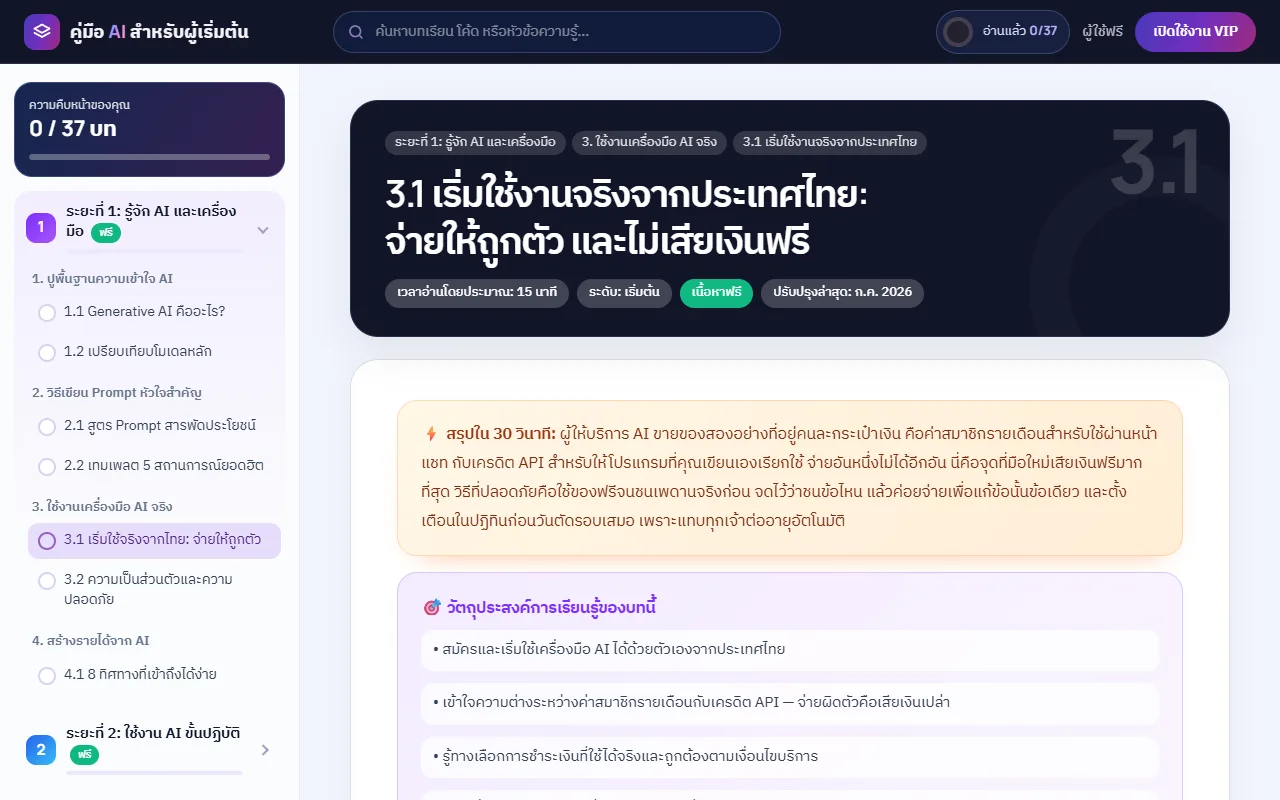
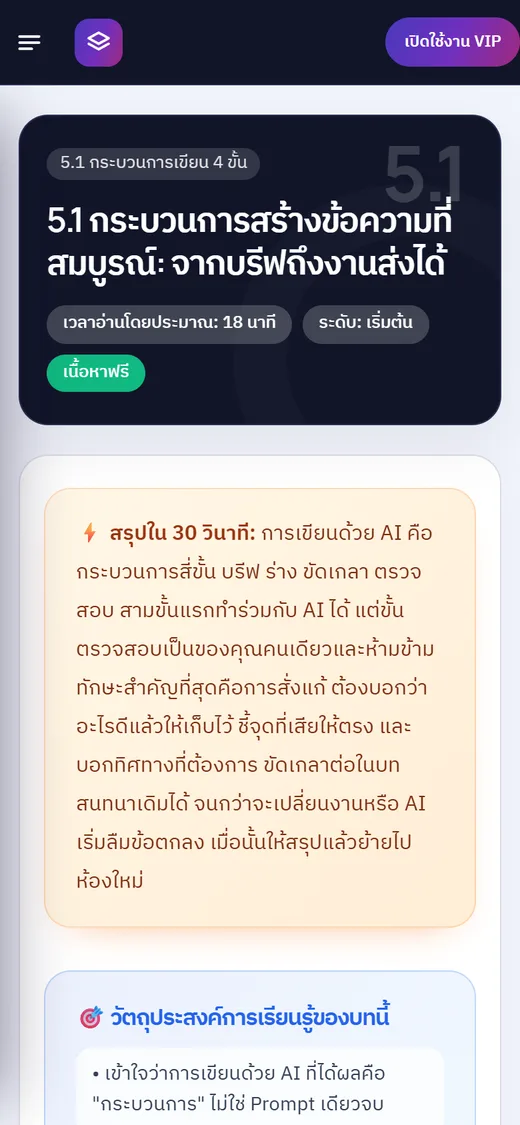
ทั้ง 37 บทขึ้นต้นด้วยกล่องสีส้มที่สรุปแก่นของบทไว้สั้น ๆ ตามด้วยวัตถุประสงค์การเรียนรู้ เวลาอ่านโดยประมาณ (เช่น บท 3.1 ราว 15 นาที บท 5.1 ราว 18 นาที) และระดับความยาก ผู้อ่านจึงรู้ก่อนว่าบทนี้จะได้อะไรและควรอ่านลึกหรือไม่All 37 chapters start with an orange box that sums up the core idea, followed by learning objectives, an estimated reading time (about 15 minutes for chapter 3.1, about 18 for 5.1) and a difficulty level, so readers know what they'll get before committing to the full read.
ภาพประกอบต้นฉบับ 77 ภาพที่สีมีความหมาย77 original illustrations with meaningful colours
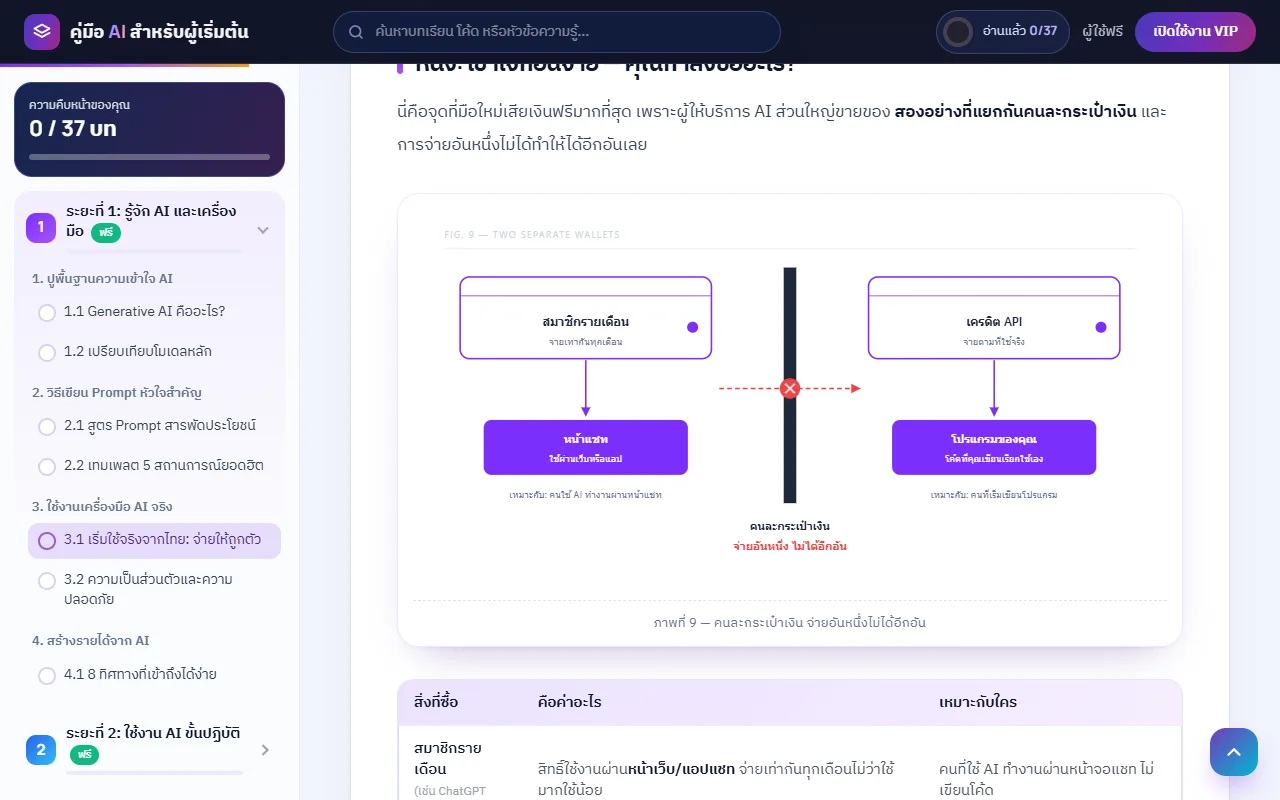
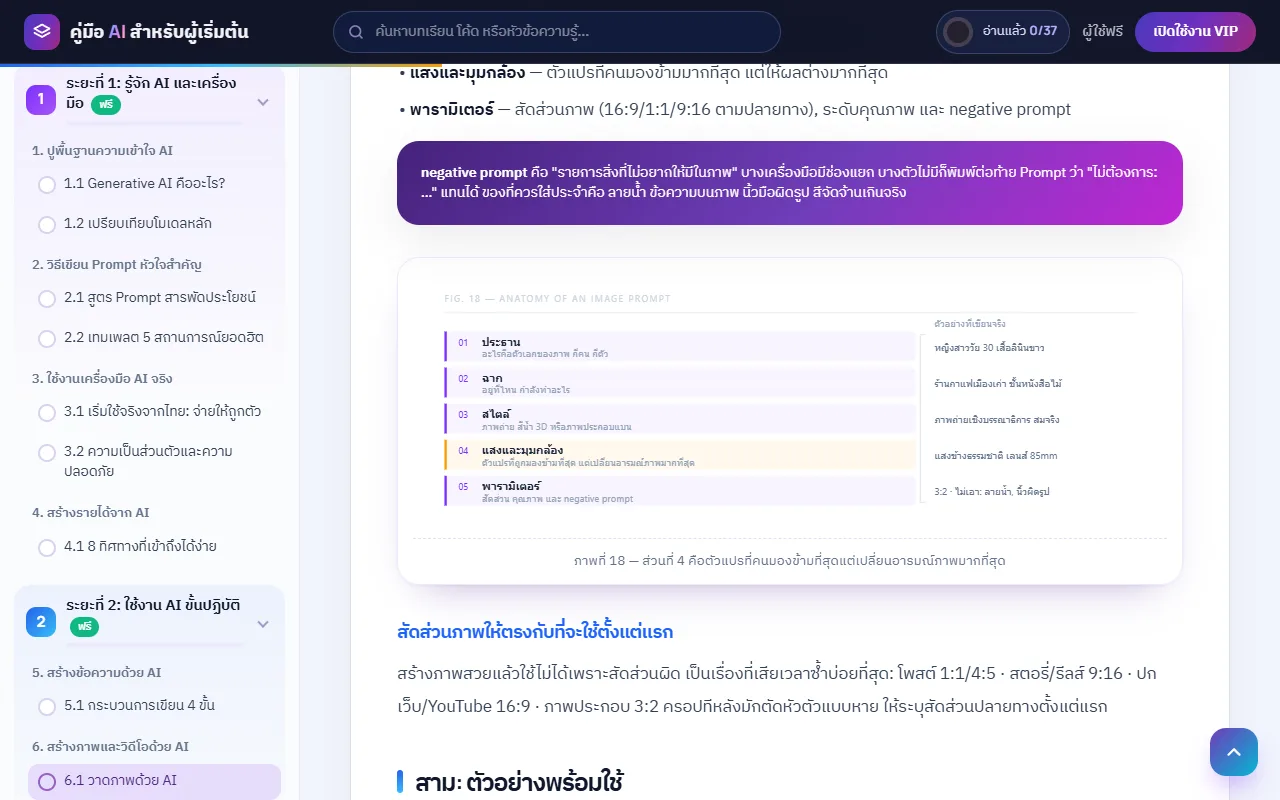
ภาพทุกภาพวาดขึ้นใหม่สำหรับคอร์สนี้ และใช้สีแบบตายตัว ม่วงคือทางหลัก ส้มคือจุดที่ต้องระวัง แดงคือเส้นที่ห้ามข้าม เช่น ภาพ "คนละกระเป๋าเงิน" ในบท 3.1 อธิบายว่าค่าสมาชิกรายเดือนกับเครดิต API จ่ายแยกกัน จ่ายอันหนึ่งไม่ได้อีกอันEvery illustration was drawn for this course and uses fixed colours: purple for the main path, orange for caution, red for a line you must not cross. For example, the "two separate wallets" figure in chapter 3.1 shows that a monthly chat subscription and API credit are paid separately — paying for one does not give you the other.
ตัวอย่างผิดกับถูกวางคู่กันWrong and right examples side by side
แนวคิดสำคัญมีกล่อง ❌ กับ ✅ วางเทียบกัน เช่น ความเข้าใจผิดว่า "จ่ายค่าสมาชิกแล้วเรียก API ได้ฟรี" เทียบกับความเข้าใจที่ถูก และหลายบทมีส่วน "หลุมพราง" ที่บอกข้อผิดพลาดที่มือใหม่เจอบ่อย เช่น ใส่ข้อกำหนดที่ขัดกันเอง หรือไม่ตรวจข้อเท็จจริงที่ AI แต่งขึ้นKey ideas come with ❌ and ✅ boxes side by side — for instance the mistaken belief that "a paid subscription means free API calls" next to the correct understanding. Many chapters also have a "pitfalls" section on common beginner mistakes, such as giving contradictory instructions or not fact-checking what AI makes up.
เทมเพลตและโค้ดกดคัดลอกได้Copy-ready templates and code
prompt เทมเพลต เช็กลิสต์ และโค้ดในบทเรียนมีปุ่มคัดลอก กดครั้งเดียวแล้วนำไปวางใช้ได้ ตัวอย่างเช่นสูตร prompt 4 องค์ประกอบ (กำหนดบทบาท + ระบุงานให้ชัด + ข้อกำหนดที่เจาะจง + เงื่อนไขข้อจำกัด) ในบท 2.1 ที่เป็นแกนของเทมเพลตในบทถัด ๆ ไปPrompt templates, checklists and code in the lessons have a copy button. One example is the four-part prompt formula in chapter 2.1 (set a role + state the task clearly + specific requirements + constraints), which underpins the templates in later chapters.
ติดตามความคืบหน้าของตัวเองTrack your own progress
หน้าเรียนแสดงวงแหวนและตัวเลข "อ่านแล้ว x/37" บทจะถูกทำเครื่องหมายว่าอ่านจบอัตโนมัติเมื่อเลื่อนถึงราว 96% ของบท และเปิดกลับมาครั้งหน้าจะไปที่บทล่าสุดให้เอง ข้อมูลนี้เก็บในเบราว์เซอร์ของผู้อ่านเท่านั้นThe reader shows a progress ring and a "read x/37" counter. A chapter is marked as finished automatically once you scroll to about 96% of it, and the next visit reopens your last chapter. This is stored only in the reader's own browser.
ค้นหาบทเรียนจากสารบัญSearch the table of contents
ช่องค้นหาด้านบนกรองรายชื่อบทในสารบัญทันทีที่พิมพ์ เช่น พิมพ์ "Ollama" หรือ "RAG" ก็จะเหลือเฉพาะบทที่เกี่ยวข้อง และปุ่มก่อนหน้า/ถัดไปท้ายบทแสดงชื่อบทให้เห็นก่อนกดThe search box at the top filters the chapter list as you type — type "Ollama" or "RAG" and only the relevant chapters remain. The previous/next buttons at the end of each chapter show the chapter titles before you click.
ระยะที่ 6 สำหรับเจ้าของธุรกิจที่ไม่เขียนโค้ดStage 6 for business owners who don't code
13 บทในระยะที่ 6 (บท 21.1–24.3) พูดเรื่องต้นทุนและความคุ้มของ AI แผน 90 วัน คนกับ AI ใครทำอะไร การสร้างทีม ระบบอัตโนมัติแบบไม่เขียนโค้ด AI บริการลูกค้า ข้อมูลธุรกิจ และโครงการนำร่อง 30 วัน โดยใช้กรณีศึกษาร้านกาแฟ "บ้านชง" และบริษัทเครื่องมือช่าง "ช่างดี" ตลอดทั้งระยะ ท้ายบทมีกล่อง "สำหรับทีมเทคนิค" แยกไว้The 13 chapters of stage 6 (21.1–24.3) cover AI costs and payback, a 90-day plan, who does what between people and AI, building a team, no-code automation, AI customer service, business data and a 30-day pilot. They follow two recurring example businesses — a café called "Baan Chong" and a tools company called "Chang Dee" — and end with a separate "for the technical team" box.
แพ็กเกจ VIP สามแบบThree VIP plans
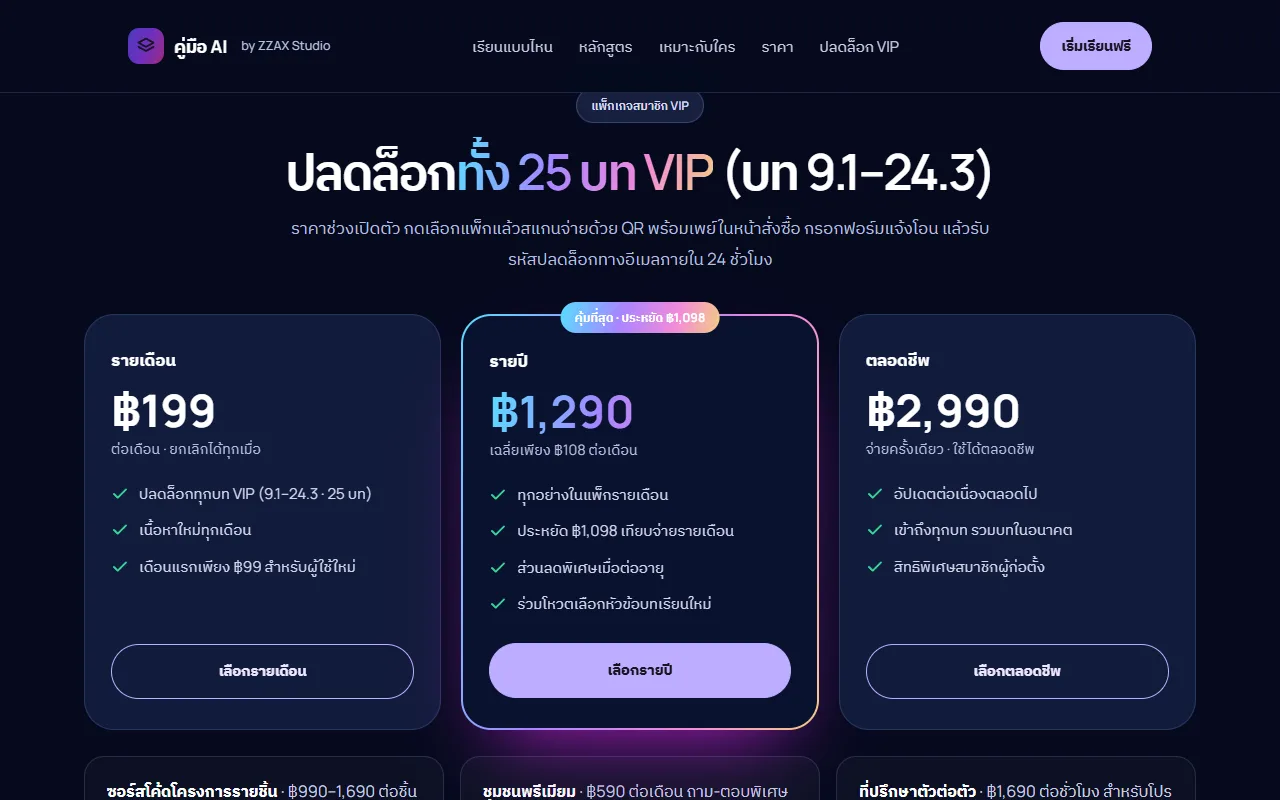
หน้าคอร์สแสดงราคาช่วงเปิดตัว: รายเดือน ฿199 (หน้าแรกระบุว่าเดือนแรก ฿99 สำหรับผู้ใช้ใหม่) รายปี ฿1,290 และตลอดชีพ ฿2,990 จ่ายครั้งเดียว ทุกแพ็กปลดล็อกบท 9.1–24.3 รวม 25 บท ชำระด้วย QR พร้อมเพย์ในหน้าสั่งซื้อ กรอกฟอร์มแจ้งโอน แล้วรับรหัสทางอีเมลภายใน 24 ชั่วโมง และมีเงื่อนไขคืนเงินภายใน 7 วันThe course page lists launch prices: monthly ฿199 (the landing page mentions ฿99 for a new user's first month), yearly ฿1,290 and lifetime ฿2,990 as a one-off payment. Every plan unlocks chapters 9.1–24.3, 25 in total. You pay by PromptPay QR on the order page, submit a transfer form and receive the code by email within 24 hours, with a 7-day refund policy.
04 · วิธีทำงาน04 · How it works
ทำงานยังไง ตั้งแต่ต้นจนจบHow it works, start to finish
- 1
เปิดหน้าคอร์สOpen the course page
เข้า zzaxstudio.com/ai-guide ดูหลักสูตรทั้ง 6 ระยะว่าแต่ละโมดูลสอนอะไร แล้วกด "เริ่มเรียนฟรี"Go to zzaxstudio.com/ai-guide, look through what each of the 6 stages and their modules teach, then press "Start learning free".
- 2
อ่าน 12 บทฟรีRead the 12 free chapters
อ่านระยะที่ 1–2 ในหน้าเรียน ระบบจำว่าอ่านบทไหนจบแล้วและพากลับมาบทล่าสุดเมื่อเปิดใหม่ บนมือถือเปิดสารบัญจากปุ่มเมนูมุมซ้ายRead stages 1–2 in the reader. It remembers which chapters you've finished and brings you back to the last one. On a phone, the table of contents opens from the menu button at the top left.
- 3
เลือกแพ็ก VIPChoose a VIP plan
ถ้าอยากเรียนต่อ กดเลือกแพ็กรายเดือน รายปี หรือตลอดชีพ ระบบพาไปหน้าสั่งซื้อที่มี QR พร้อมเพย์และฟอร์มแจ้งโอนTo keep going, pick the monthly, yearly or lifetime plan. You are taken to an order page with a PromptPay QR code and a transfer form.
- 4
รับรหัสทางอีเมลReceive your code by email
หลังตรวจยอดโอน ผู้ดูแลส่งรหัสปลดล็อกให้ทางอีเมลภายใน 24 ชั่วโมง (เป็นขั้นตอนที่คนทำ ไม่ใช่อัตโนมัติ)Once the transfer is checked, the unlock code is emailed within 24 hours (this step is handled by a person, not automated).
- 5
กรอกรหัสแล้วอ่านต่อEnter the code and keep reading
กดปุ่ม "เปิดใช้งาน VIP" ในหน้าเรียน กรอกรหัส บท 9.1–24.3 จะเปิดให้อ่านทันทีในเบราว์เซอร์นั้นPress "Activate VIP" in the reader and enter the code; chapters 9.1–24.3 open straight away in that browser.
05 · ภาพ05 · Visuals
ภาพจากระบบจริงFrom the real system
9 ภาพ9 imagesภาพหน้าจอจริงถ่ายจากระบบที่เปิดใช้อยู่ ส่วนภาพโปรโมตและภาพประกอบมีป้ายกำกับไว้ทุกใบReal screenshots come from the running system; promo images and illustrations are labelled on every card.
06 · สถานการณ์06 · Scenarios
ตัวอย่างสถานการณ์ใช้งานExample scenarios
เป็นตัวอย่างสมมติเพื่อให้เห็นภาพ ไม่ใช่เรื่องของลูกค้าจริงIllustrative scenarios to help you picture it — not real customer stories.
พนักงานออฟฟิศที่อยากใช้ AI ให้เป็นAn office worker who wants to use AI properly
สมมติว่าคุณใช้ ChatGPT ทุกวันแต่ได้คำตอบกว้าง ๆ อ่านบท 2.1–2.2 เพื่อใช้สูตร prompt 4 องค์ประกอบ แล้วไปบท 7.1 เรื่อง Excel, PPT และเอกสาร ซึ่งสอนหลัก "ให้ AI เขียนสูตร อย่าให้ AI คำนวณ" ทั้งหมดนี้อยู่ในส่วนที่อ่านฟรีSuppose you use ChatGPT daily but get vague answers. Read chapters 2.1–2.2 for the four-part prompt formula, then chapter 7.1 on Excel, PowerPoint and documents, which teaches the rule "have AI write the formula, don't let AI do the arithmetic". All of this is in the free part.
คนที่อยากเขียนแชทบอทตัวแรกSomeone who wants to build a first chatbot
สมมติว่าคุณไม่เคยเขียนโปรแกรม ระยะที่ 3 พาตั้งเครื่อง เรียก API ครั้งแรกพร้อมเก็บ API key ให้ปลอดภัย เขียนแชทบอทในราว 50 บรรทัด แล้วทำหน้าเว็บแชทที่มีตัวกลางซ่อน key ไว้ จากนั้นระยะที่ 4 ต่อยอดเป็นให้ AI ตอบจากเอกสารของคุณ (RAG) และรันโมเดลฟรีในเครื่องด้วย OllamaSuppose you've never programmed. Stage 3 walks you through setting up your machine, making a first API call while keeping your API key safe, writing a chatbot in about 50 lines, and building a web chat page with a proxy that hides the key. Stage 4 then has AI answer from your own documents (RAG) and run free models locally with Ollama.
เจ้าของร้านที่อยากเริ่มใช้ AI ในธุรกิจA shop owner starting to use AI in the business
สมมติว่าคุณมีร้านพนักงาน 10 กว่าคนแบบร้าน "บ้านชง" ในคอร์ส ระยะที่ 6 ช่วยคิดว่างานไหนควรให้ AI ช่วย คำนวณต้นทุนเทียบกับเวลาที่ประหยัดได้ วางแผน 90 วัน และทดลองนำร่อง 30 วันก่อนขยายทั้งร้าน โดยไม่ต้องเขียนโค้ดSuppose you run a business of a dozen or so staff, like the course's café "Baan Chong". Stage 6 helps you decide which tasks AI should help with, weigh its cost against the time saved, plan 90 days ahead and run a 30-day pilot before rolling out further — without writing code.
07 · เบื้องหลัง07 · Under the hood
เบื้องหลังระบบ ข้อมูล และความปลอดภัยUnder the hood: data and security
- รูปแบบFormat
- เว็บไซต์อ่านบนเบราว์เซอร์ทั้งคอมและมือถือ ไม่ต้องติดตั้งแอป เป็นหน้า HTML แบบคงที่บนโฮสต์ของ zzaxstudio.com ภาพประกอบเป็นไฟล์ SVG จึงคมทุกขนาดจอ ไม่มีวิดีโอในบทเรียนตอนนี้A website you read in any browser on desktop or mobile — no app to install. It is a set of static HTML pages hosted with zzaxstudio.com; illustrations are SVG files that stay sharp at any screen size. There is no video in the lessons at present.
- ข้อมูลผู้อ่านReader data
- การอ่านฟรีไม่ต้องสมัครและไม่ต้องให้ข้อมูลส่วนตัว ความคืบหน้าการอ่านและรหัส VIP เก็บไว้ในเบราว์เซอร์ของผู้อ่านเอง ข้อมูลที่ผู้ดูแลได้รับมีเฉพาะสิ่งที่ผู้ซื้อกรอกในฟอร์มแจ้งโอน (เช่น อีเมลสำหรับส่งรหัส) เว็บนับจำนวนครั้งที่กดปุ่มซื้อด้วย Cloudflare Web AnalyticsFree reading needs no account and no personal details. Reading progress and the VIP code are kept in the reader's own browser. The only data the course owner receives is what a buyer types into the transfer form (such as the email address for the code). Clicks on the buy buttons are counted with Cloudflare Web Analytics.
- การชำระเงินPayment
- ชำระด้วย QR พร้อมเพย์ในหน้าสั่งซื้อ หน้า VIP ในหน้าเรียนระบุว่ายังไม่รับบัตรเครดิต รหัสส่งทางอีเมลโดยคนภายใน 24 ชั่วโมง เงื่อนไขคืนเงิน 7 วันอยู่ในหน้าเงื่อนไขการใช้งานของเว็บPayment is by PromptPay QR on the order page; the VIP section of the reader states that credit cards are not accepted yet. Codes are emailed by a person within 24 hours, and the 7-day refund policy is in the site's terms of use.
- ข้อจำกัดที่ควรรู้Limitations to know
- รหัส VIP ผูกกับเบราว์เซอร์ที่กรอก ถ้าเปลี่ยนเครื่องหรือล้างข้อมูลเบราว์เซอร์ต้องกรอกรหัสใหม่ ความคืบหน้าการอ่านไม่ซิงก์ข้ามเครื่อง และเนื้อหาเรื่องราคาหรือรุ่นของเครื่องมือ AI อาจล้าสมัยได้ จึงมีป้าย "ปรับปรุงล่าสุด" ให้ตรวจกับหน้าทางการก่อนจ่ายเงินเสมอA VIP code is tied to the browser it was entered in — switch devices or clear browser data and you'll need to enter it again. Reading progress doesn't sync across devices, and content about AI tool prices or models can go out of date, which is why chapters carry a "last updated" label and advise checking the official pricing page before paying.
- แนวทางเนื้อหาContent principles
- เนื้อหาเขียนใหม่ทั้งหมด ไม่แปลหรือคัดลอกหนังสือหรือคอร์สอื่น ระยะที่ 6 กำหนดว่าข้อมูลความลับระดับสูงสุดของธุรกิจห้ามส่งให้ AI ภายนอกเลย และข้อมูลลูกค้าห้ามส่งทั้งไฟล์All content is written from scratch, not translated or copied from other books or courses. Stage 6 sets the rule that a business's most confidential data should never be sent to an outside AI service, and customer data should never be sent as a whole file.
08 · ความคืบหน้า08 · Progress
ความคืบหน้าและแผนต่อไปProgress and what comes next
- ทำแล้วDone
11 ก.ค. 2569: เขียนครบ 24 บทแรก (5 ระยะ 20 โมดูล ฟรี 12 บท) และกำหนดให้เป็นผลิตภัณฑ์ทางการของ ZZAX Studio11 July 2026: the first 24 chapters (5 stages, 20 modules, 12 free) were completed and the guide became an official ZZAX Studio product
- ทำแล้วDone
24 ก.ย. 2569: ขึ้นเว็บระยะที่ 6 "AI สำหรับธุรกิจและองค์กร" (13 บท) และปรับปรุงบทเดิมทั้ง 24 บท รวมเป็น 37 บท 77 ภาพ24 September 2026: stage 6, "AI for business and organisations" (13 chapters), went live and all 24 earlier chapters were reworked — 37 chapters and 77 figures in total
- ทำแล้วDone
24 ก.ย. 2569: ออกแบบหน้าเรียนและหน้าแรกใหม่ เพิ่มวงแหวนความคืบหน้า สีประจำระยะ และปุ่มบทถัดไปที่บอกชื่อบท24 September 2026: redesigned the reader and landing page, adding the progress ring, per-stage colours and next/previous buttons that show chapter titles
- ถัดไปNext
ย้ายการปลดล็อกบท VIP ไปตรวจที่ฝั่งเซิร์ฟเวอร์ก่อนรับผู้ซื้อจำนวนมากMove VIP unlocking to a server-side check before taking on large numbers of buyers
- ถัดไปNext
ผลิตวิดีโอสั้นประกอบบทเรียน (มีสเปกวิดีโอรายบทเตรียมไว้แล้ว ยังไม่ได้ผลิต)Produce short videos for the lessons (per-chapter video specs exist; none produced yet)
- ถัดไปNext
ตรวจข้อกฎหมายแรงงานในบท 22.3 กับผู้รู้ก่อนยืนยันเนื้อหาHave the labour-law points in chapter 22.3 checked by a qualified person
09 · คำถาม09 · FAQ
คำถามที่พบบ่อยFrequently asked questions
ต้องเขียนโปรแกรมเป็นไหมDo I need to know how to code?
ไม่ต้อง ระยะที่ 1–2 และระยะที่ 6 ไม่มีการเขียนโค้ด ส่วนระยะที่ 3–5 สอนเขียนโค้ดตั้งแต่ติดตั้งเครื่องมือ โดยมีโค้ดให้คัดลอกไปลองทุกขั้นNo. Stages 1–2 and stage 6 involve no coding. Stages 3–5 teach coding from installing the tools onwards, with copyable code at every step.
อ่านฟรีได้แค่ไหนHow much can I read for free?
12 บทแรก (บท 1.1–8.1 ระยะที่ 1–2) อ่านได้ครบโดยไม่ต้องสมัครหรือจ่ายเงินThe first 12 chapters (1.1–8.1, stages 1–2) in full, with no sign-up or payment.
VIP ราคาเท่าไร จ่ายยังไงHow much is VIP and how do I pay?
ตามหน้าคอร์สตอนนี้ รายเดือน ฿199 รายปี ฿1,290 ตลอดชีพ ฿2,990 (ราคาช่วงเปิดตัว) จ่ายด้วย QR พร้อมเพย์ในหน้าสั่งซื้อ กรอกฟอร์มแจ้งโอน แล้วรับรหัสทางอีเมลภายใน 24 ชั่วโมง ยังไม่รับบัตรเครดิตAccording to the course page today: ฿199 monthly, ฿1,290 yearly, ฿2,990 lifetime (launch prices). Pay by PromptPay QR on the order page, submit the transfer form, and get your code by email within 24 hours. Credit cards aren't accepted yet.
ถ้าอ่านแล้วไม่ชอบ ขอคืนเงินได้ไหมCan I get a refund if it isn't for me?
ได้ภายใน 7 วัน ตามเงื่อนไขในหน้าเงื่อนไขการใช้งานของ zzaxstudio.comYes, within 7 days, under the conditions in zzaxstudio.com's terms of use.
เปลี่ยนเครื่องแล้วต้องซื้อใหม่ไหมDo I have to buy again on a new device?
ไม่ต้องซื้อใหม่ แต่ต้องกรอกรหัสเดิมอีกครั้งในเบราว์เซอร์ของเครื่องใหม่ เพราะรหัสและความคืบหน้าเก็บไว้ในเบราว์เซอร์No, but you'll need to enter the same code again in the new device's browser, because the code and your progress are stored in the browser.
เนื้อหาเก่าไหม ใครดูแลIs the content up to date, and who maintains it?
ZZAX Studio เป็นผู้เขียนและดูแล บทที่พูดถึงราคาและรุ่นเครื่องมือติดป้ายวันที่ปรับปรุงล่าสุด (ส่วนใหญ่ ก.ค. 2569) รอบการปรับปรุงครั้งต่อไปยังไม่ได้กำหนดวันแน่นอนZZAX Studio writes and maintains it. Chapters that mention tool prices or models carry a last-updated date (mostly July 2026). The date of the next update round hasn't been set.
10 · วิธีเริ่ม10 · Get started
เริ่มได้ใน 3 ขั้นUp and running in three steps
ถ้าอยากได้ระบบแบบเดียวกันสำหรับธุรกิจของคุณ บอกโจทย์มาสั้น ๆ เราตอบกลับพร้อมขอบเขตงานและราคาภายใน 1 วันทำการIf you want something like this for your own business, send us a line about the problem. You'll get scope and price within one working day.
- 1ขั้นที่ 1 เปิดหน้าคู่มือ AI แล้วกดเริ่มเรียนฟรีที่บทที่ 1Step 1: Open the AI Guide and start free at chapter one
- 2ขั้นที่ 2 อ่าน 12 บทแรกให้จบระยะที่ 1 และ 2 เพื่อดูว่าสไตล์การสอนถูกใจไหมStep 2: Read the 12 free chapters through stages one and two to see if the teaching suits you
- 3ขั้นที่ 3 เลือกแพ็กเกจ VIP แล้วชำระผ่านพร้อมเพย์ รับรหัสปลดล็อกภายใน 24 ชั่วโมงStep 3: Choose a VIP plan, pay via PromptPay, and get your unlock code within 24 hours
เริ่มงานกับเราWork with us
อยากได้ระบบแบบนี้สำหรับธุรกิจคุณWant a system like this for your business?
เล่าปัญหาของคุณมา เราจะบอกตรง ๆ ว่าช่วยได้ไหม ภายใน 1 วันทำการ ส่งแล้วได้รหัสติดตามงานทันทีTell us the problem and we'll say honestly whether we can help, within one working day. You get a tracking code the moment you send it.