ร้านค้าออนไลน์ที่ขายดีจะเจอปัญหาเดียวกันหมด คือแชทเข้ามาเร็วกว่าที่คนตอบไหว ลูกค้าถามราคาถามสต็อกตอนดึกแล้วไม่มีใครตอบ พอตอบช้าไปไม่กี่ชั่วโมงเขาก็ไปซื้อร้านอื่นแล้วEvery online shop that sells well hits the same wall: chats arrive faster than anyone can answer. Someone asks about price or stock at midnight and nobody replies. A few hours late and they've bought elsewhere.
← ผลงานทั้งหมด← All work
AI AgentAI agent
Ai ZaxBotAi ZaxBot
AI ตอบแชทลูกค้าแทนแอดมินบน LINE และ Messenger ตลอด 24 ชั่วโมงAI that answers customer chats on LINE and Messenger around the clock
ใช้งานจริงLive AI AgentAI agent
ใช้งานจริงบน production แล้ว รองรับ LINE OA และ Messenger ตรวจความปลอดภัยรอบใหญ่และแก้ครบเมื่อ ก.ย. 2569Running in production on LINE OA and Messenger. A full security audit was completed and its findings fixed in September 2026.
01 · ภาพรวม01 · Overview
ภาพรวมของระบบThe system at a glance
Ai ZaxBot คือระบบที่ให้ AI ช่วยตอบแชทลูกค้าของร้านค้าออนไลน์ ร้านเชื่อมช่องทางแชทที่ลูกค้าทักเข้ามา เช่น LINE OA หรือเพจ Messenger แล้วใส่ข้อมูลสินค้า ราคา สต็อก และคำถามที่ลูกค้าถามบ่อย จากนั้น AI จะตอบลูกค้าจากข้อมูลของร้านเอง ไม่ใช่ตอบจากความรู้ทั่วไป และเมื่อเจอเรื่องที่ต้องใช้คน ระบบจะส่งแชทนั้นให้ทีมงานของร้านรับต่อAi ZaxBot lets AI answer an online shop's customer chats. The shop connects the channels customers already message — a LINE OA or a Messenger page, for example — and adds its products, prices, stock and frequent questions. The AI then answers from the shop's own data rather than general knowledge, and when a chat needs a person, it is handed to the shop's staff.
เจ้าของร้านใช้งานผ่านแดชบอร์ดบนเว็บ ทุกแชทจากทุกช่องทางไหลเข้ากล่องข้อความรวมที่เดียว แต่ละแชทมีป้ายบอกสถานะว่า AI กำลังตอบ กำลังรอคน หรือคนรับไปแล้ว ทีมงานกดรับแชทได้ทันที AI จะเงียบจนกว่าจะกดคืนให้บอท ส่วนการตั้งค่า เช่น บุคลิกของบอท เวลาทำการ กติกาตอบอัตโนมัติ และสิทธิ์ของพนักงาน อยู่ในหน้าตั้งค่าของร้านShop owners work from a web dashboard. Chats from every channel land in one shared inbox, each tagged with whether the AI is answering, it's waiting for a person, or a person has taken over. Staff can take a chat with one click and the AI stays quiet until they hand it back. Settings such as the bot's personality, opening hours, auto-reply rules and staff permissions live on the shop's settings pages.
ระบบรันอยู่บนเซิร์ฟเวอร์จริงแล้ว มีหน้าเข้าสู่ระบบและปุ่มสมัครร้านใหม่ที่ hook.zabver.io พร้อมคู่มือการใช้งานสาธารณะ 3 ภาษา (ไทย อังกฤษ จีน) งานยกเครื่องครั้งใหญ่ 4 ระยะ ทั้งกล่องข้อความแบบใหม่ ระบบติดตามการขาย รายงานวิเคราะห์ และ QR พร้อมเพย์ ขึ้นใช้จริงเมื่อ 3–4 ต.ค. 2569 ส่วนจำนวนร้านที่ใช้งานจริงยังไม่มีตัวเลขบันทึกไว้The system is running on a live server, with a sign-in page and a 'register a new shop' option at hook.zabver.io and a public help guide in three languages (Thai, English, Chinese). A major four-phase overhaul — a new inbox, sales tracking, analytics reports and PromptPay QR — went live on 3–4 October 2026. There is no recorded figure yet for how many shops actually use it.
หลักการออกแบบคือให้ AI ช่วย แต่คนยังคุมได้เสมอ AI ล่มหรือตอบไม่ได้ แชทต้องเด้งไปให้คนเห็น ไม่ใช่ปล่อยลูกค้าค้างเงียบ ยอดขายนับเฉพาะที่ทีมงานกดยืนยันเอง ส่วนสิ่งที่ AI เดาจากแชทจะแยกไว้อีกช่องและไม่ถูกนำไปปนกับยอดจริง และสำหรับแพลตฟอร์มที่ยังไม่เปิดให้ต่อระบบแชท เราเลือกให้ AI ร่างคำตอบให้คนกดส่งเอง แทนการให้โปรแกรมกดส่งแทนในแอปซึ่งเสี่ยงทำให้ร้านโดนแบนThe design principle is that AI helps but people stay in control. If the AI fails or can't answer, the chat must surface for a person instead of leaving the customer hanging in silence. Sales only count when staff confirm them; the AI's guesses from chats are kept in a separate column and never mixed into real revenue. And for platforms that don't open their chat to outside systems, the AI drafts replies for a person to send, rather than having software tap 'send' inside the app — which risks getting the shop banned.
02 · โจทย์02 · The brief
สร้างขึ้นมาเพราะอะไรWhy this exists
ร้านค้าออนไลน์ที่แชทเยอะจนตอบไม่ทัน อยากลดภาระแอดมินและไม่พลาดยอดขายนอกเวลาOnline shops drowning in chats that want to cut admin load and stop losing after-hours sales
ใช่โจทย์ของคุณไหมSound like your problem?
03 · ฟีเจอร์03 · Features
ทำอะไรได้บ้าง อย่างละเอียดWhat it does, in detail
10 ความสามารถ10 capabilitiesตอบจากข้อมูลของร้านเองAnswers from the shop's own data
ร้านใส่รายการสินค้า ราคา สต็อก และคำถามที่พบบ่อย เช่น เวลาเปิดปิด ค่าส่ง วิธีชำระเงิน ระบบค้นข้อมูลที่ตรงกับคำถามแล้วให้ AI ตอบจากข้อมูลนั้น เมื่อ AI ต้องเช็กสินค้า บน LINE จะส่งการ์ดสินค้าเลื่อนดูได้ไปพร้อมคำตอบ ข้อมูลของแต่ละร้านแยกกันเด็ดขาด ร้านหนึ่งไม่เห็นข้อมูลของอีกร้านThe shop adds its products, prices, stock and common questions — opening hours, shipping fees, payment methods. The system finds the matching information and the AI answers from it. When the AI looks up products on LINE, it sends a swipeable product card along with the answer. Every shop's data is strictly separated; no shop can see another's.
กล่องข้อความรวมพร้อมรับแชทต่อShared inbox with take-over
แชทจากทุกช่องทางขึ้นในกล่องข้อความเดียวแบบอัปเดตสด แต่ละแชทมี 3 สถานะ คือ AI ตอบอยู่ รอคน และคนรับแล้ว ทีมงานกด "รับแชท" แล้วพิมพ์ตอบได้ทันที AI จะเงียบจนกว่าจะกดคืนให้บอท มีข้อความตอบสำเร็จรูปให้กดใช้ซ้ำ และระบบกระจายแชทให้พนักงานที่มีงานค้างน้อยที่สุดได้อัตโนมัติChats from every channel appear in one live-updating inbox, each in one of three states: AI answering, waiting for a person, or taken by a person. Staff tap 'take chat' and reply straight away; the AI stays silent until the chat is handed back. Saved replies can be reused with a tap, and new chats can be assigned automatically to whoever has the fewest open ones.
ส่งต่อให้คนเมื่อจำเป็นHands off to people when needed
ร้านตั้งคำที่เมื่อลูกค้าพิมพ์แล้วบอทจะหยุดและส่งต่อให้คน เช่น "ขอคุยกับแอดมิน" หรือ "ร้องเรียน" AI เองก็เลือกส่งต่อได้เมื่อตอบไม่ได้ และถ้า AI ขัดข้องหรือโควตาข้อความหมด แชทจะเปลี่ยนเป็น "รอคน" ให้เห็นในกล่องข้อความ แทนการเงียบหาย ลูกค้าที่ส่งข้อความรัว ๆ ติดกันจะถูกรวบตอบครั้งเดียวในช่วง 3 วินาทีThe shop sets words that make the bot stop and pass the chat to a person — 'talk to an admin' or 'complaint', for example. The AI can also hand off on its own when it can't answer, and if the AI fails or the message quota runs out, the chat switches to 'waiting for a person' in the inbox instead of going silent. Customers who fire off several messages in a row get one combined answer within a 3-second window.
เตือนเมื่อแชทรอนานเกินไปAlerts when a chat waits too long
ร้านกำหนดได้ว่าแชทที่รอคนตอบควรรอได้ไม่เกินกี่นาที เมื่อเกินเวลาที่ตั้ง ระบบจะแจ้งเตือนครั้งแรก และถ้าปล่อยถึง 3 เท่าของเวลานั้นจะเตือนอีกระดับ ช่วยให้แชทที่หลุดมือไม่ถูกลืมThe shop sets how many minutes a chat may wait for a human reply. Once that time passes, the system sends a first alert, and if the wait reaches three times that limit it escalates a second time — so dropped chats don't get forgotten.
กติกาตอบอัตโนมัติและข้อความติดตามAuto-reply rules and follow-ups
นอกจาก AI แล้ว ร้านตั้งกติกาแบบการ์ดได้ เช่น ถ้าลูกค้าพิมพ์คำนี้หรือส่งรูปมา ให้ตอบข้อความนี้ ส่งการ์ดสินค้า หรือส่งต่อให้คน และตั้งข้อความติดตามลูกค้าที่เงียบไปได้ โดยต้องตั้งให้รออย่างน้อย 10 นาที ระบบส่งครั้งเดียวต่อช่วงที่ลูกค้าเงียบ และเคารพข้อจำกัดของ Messenger/Instagram ที่ให้ตอบได้ภายใน 24 ชั่วโมงหลังลูกค้าทักล่าสุดAlongside the AI, shops can set card-style rules: if a customer types a certain word or sends a photo, reply with this message, send a product card, or hand off to a person. They can also set follow-up messages for customers who go quiet — the wait must be at least 10 minutes, each silence gets one follow-up, and the system respects Messenger/Instagram's rule that replies must come within 24 hours of the customer's last message.
ติดตามการขายและ QR พร้อมเพย์Sales tracking and PromptPay QR
ทีมงานบันทึกดีลจากแชทได้เป็นขั้น ๆ ตั้งแต่สนใจ เสนอราคา ต่อรอง รอชำระเงิน จนปิดการขาย เมื่อถึงขั้นเก็บเงิน ระบบสร้าง QR พร้อมเพย์จากเบอร์พร้อมเพย์ของร้านเองให้ส่งในแชท และตั้งเวลาเตือนติดตามได้ ยอดขายนับเฉพาะที่ทีมงานกดยืนยันStaff can log deals from chats stage by stage — interested, quoted, negotiating, awaiting payment, won. At the payment stage, the system generates a PromptPay QR from the shop's own PromptPay number to send in the chat, and reminders can be scheduled to follow up. Only sales confirmed by staff count toward revenue.
รายงานวิเคราะห์ 6 หมวดAnalytics in six sections
หน้าวิเคราะห์แบ่งเป็นภาพรวม การตอบแชท ยอดขาย ลูกค้า AI และปัญหา เลือกช่วงวันที่ตามเวลาไทยได้ยาวสุด 366 วัน ดูได้ว่าตอบเร็วแค่ไหน แชทไหนไม่มีใครตอบ AI ตอบเองได้กี่แชท มีส่วนอธิบายว่ายอดขายเปลี่ยนเพราะอะไร และส่งออกเป็นไฟล์ CSV ได้The analytics page covers overview, replies, sales, customers, AI and problems, over any Bangkok-time date range up to 366 days. It shows how fast chats were answered, which ones got no reply and how many the AI handled alone, explains what drove a change in sales, and exports to CSV.
สรุปแชทประจำวันส่งถึงเจ้าของDaily chat summary for the owner
ร้านที่เปิดใช้รายงานประจำวัน ระบบจะให้ AI อ่านแชทของวันหลังเวลา 01:30 น. แล้วส่งสรุปตอนเช้าเข้าแชทส่วนตัวของเจ้าของ ซึ่งผูกด้วยรหัสขึ้นต้น ZB- ระบบไม่ส่งสรุปเข้ากลุ่มแชท และร้านที่ไม่เปิดใช้จะไม่ถูกอ่านแชทเพื่อทำสรุปFor shops that switch on the daily report, the AI reads the day's chats after 1:30 a.m. and sends a morning summary to the owner's private chat, linked with a code starting with ZB-. Summaries are never sent to group chats, and shops that don't opt in are not read for summaries.
ทีมงาน สิทธิ์ และค่าคอมTeam, permissions and commission
เจ้าของเชิญพนักงานด้วยลิงก์ที่หมดอายุใน 48 ชั่วโมง และกำหนดสิทธิ์แยกได้ 5 เรื่อง คือ ดูยอดเงิน แก้สินค้า แก้ฐานความรู้ เห็นแชททุกคน และส่งออกข้อมูล พนักงานที่ไม่ได้สิทธิ์เห็นทุกแชทจะเห็นเฉพาะแชทของตัวเอง มีระบบตั้งเป้าและค่าคอมมิชชันของทีมOwners invite staff with a link that expires in 48 hours and set five separate permissions: view revenue, edit products, edit the knowledge base, see everyone's chats, and export data. Staff without the 'see all chats' permission see only their own. Team targets and commission tracking are built in.
โหมดร่างคำตอบผ่านมือถือDraft-reply mode via phone
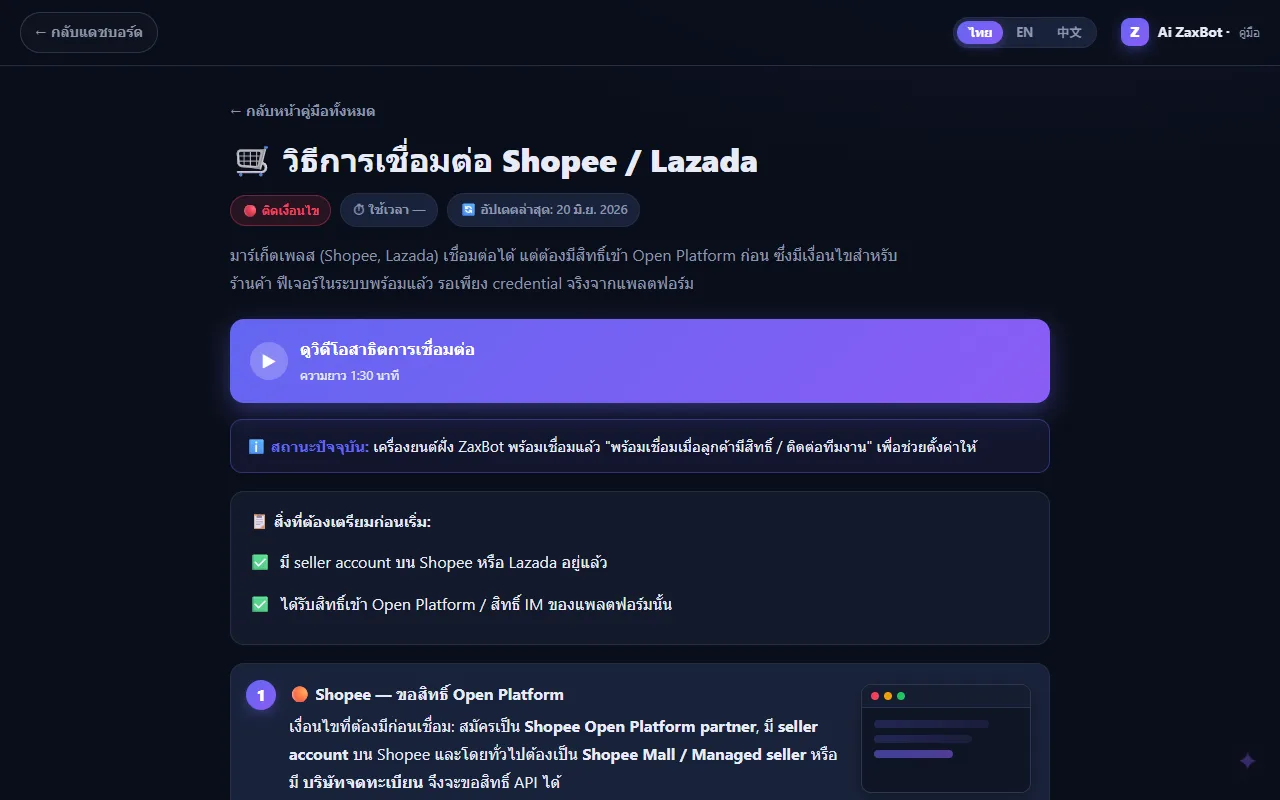
สำหรับ Shopee, Lazada และ TikTok ที่ยังไม่เปิดให้ต่อระบบแชทโดยตรง ร้านตั้งมือถือ Android ด้วยแอป MacroDroid ให้ส่งการแจ้งเตือนจากแอปผู้ขายเข้ามา AI จะร่างคำตอบไว้ในกล่องข้อความ ทีมงานกดคัดลอกไปตอบในแอปเอง แล้วกด "ตอบแล้ว" ระบบไม่กดส่งแทนในแอปของแพลตฟอร์มFor Shopee, Lazada and TikTok, which don't yet open their chat to outside systems, a shop can set up an Android phone with MacroDroid to forward notifications from the seller app. The AI drafts a reply in the inbox, staff copy it into the app themselves, then tap 'replied'. The system never sends on the shop's behalf inside the platform's app.
04 · วิธีทำงาน04 · How it works
ทำงานยังไง ตั้งแต่ต้นจนจบHow it works, start to finish
- 1
สมัครร้านและเชื่อมช่องทางRegister the shop and connect channels
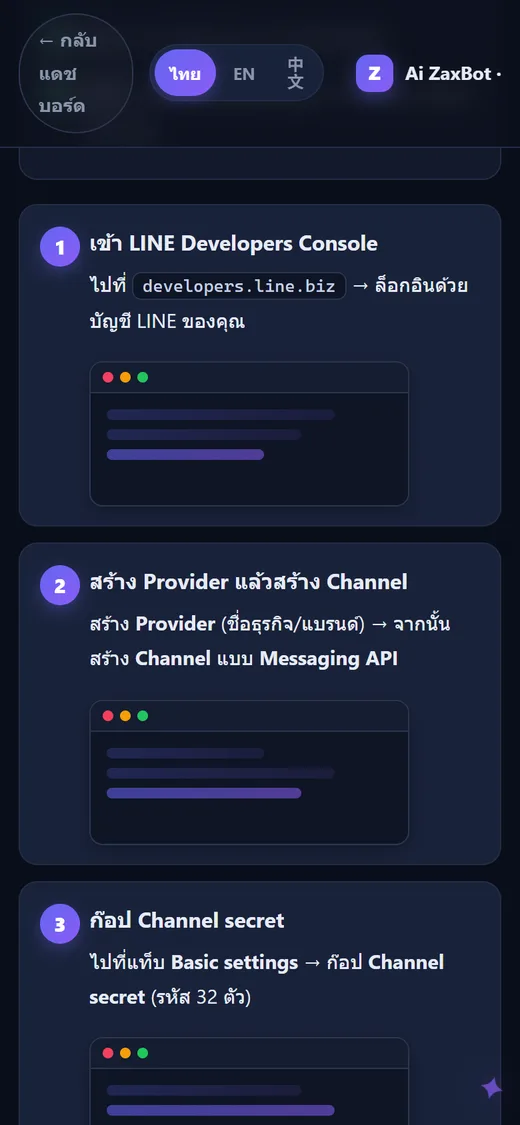
เจ้าของร้านสมัครที่หน้าเข้าสู่ระบบ แล้วเชื่อมช่องทางแชท เช่น LINE OA โดยวาง Channel secret กับ access token จาก LINE Developers ระบบตรวจว่าใช้ได้แล้วตั้ง webhook ให้ ข้อสำคัญคือต้องปิดข้อความตอบกลับอัตโนมัติของ LINE เอง ไม่อย่างนั้นลูกค้าจะได้ข้อความซ้อนสองชุดThe owner registers on the sign-in page and connects a chat channel — for LINE OA, by pasting the Channel secret and access token from LINE Developers. The system checks them and sets up the webhook. The key step is switching off LINE's own auto-reply, or customers get two sets of messages.
- 2
ใส่ข้อมูลร้านและตั้งบุคลิกบอทAdd shop data and set the bot's personality
ใส่สินค้า ราคา สต็อก (นำเข้าเป็นไฟล์ CSV ได้) และคำถามที่พบบ่อย แล้วเลือกโทนของบอท เช่น เป็นกันเองหรือสุภาพทางการ เขียนคำสั่งว่าบอทขายอะไร ห้ามพูดอะไร และตั้งคำที่ให้ส่งต่อคนAdd products, prices and stock (a CSV import is available) plus common questions, then pick the bot's tone — friendly or formal, for example — write instructions on what it sells and what it must never say, and set the words that trigger a handoff.
- 3
ลูกค้าทัก AI ตอบA customer writes, the AI replies
ลูกค้าส่งข้อความเข้ามา ระบบบันทึกแชท ค้นข้อมูลสินค้าและคำถามที่เกี่ยวข้อง แล้วให้ AI ตอบกลับในช่องทางเดิม ถ้าลูกค้าส่งรูปมา ระบบให้โมเดลที่อ่านภาพได้อธิบายรูปก่อนแล้วจึงตอบ ถ้าอ่านภาพไม่ได้จะส่งต่อให้คนThe customer sends a message; the system logs the chat, looks up the relevant products and answers, and the AI replies on the same channel. If the customer sends a photo, an image-reading model describes it first before the reply; if the image can't be read, the chat goes to a person.
- 4
คนรับต่อเมื่อจำเป็นA person steps in when needed
เมื่อลูกค้าพิมพ์คำที่ตั้งไว้ AI ตอบไม่ได้ หรือระบบขัดข้อง แชทจะขึ้นสถานะ "รอคน" พร้อมแจ้งเตือนเมื่อรอนานเกินกำหนด ทีมงานกดรับแชท ตอบเอง แล้วกดคืนให้บอทเมื่อเสร็จWhen the customer types a trigger word, the AI can't answer, or something fails, the chat shows 'waiting for a person' and raises an alert if it waits too long. Staff take the chat, reply themselves, and hand it back to the bot when done.
- 5
ปิดการขายและเก็บเงินClose the sale and collect payment
ทีมงานเลื่อนดีลไปตามขั้น ส่ง QR พร้อมเพย์ของร้านในแชท แล้วกดยืนยันเมื่อได้รับเงิน ยอดนั้นจึงถูกนับเป็นยอดขายจริงในรายงานStaff move the deal through its stages, send the shop's PromptPay QR in the chat, and confirm once the money arrives — only then does it count as a real sale in the reports.
- 6
ดูผลและปรับปรุงReview and improve
เจ้าของดูรายงานว่าตอบเร็วแค่ไหน แชทไหนหลุด AI ตอบเองได้เท่าไร และดูรายการคำถามที่บอทตอบไม่ได้ เพื่อเติมข้อมูลสินค้าหรือคำถามที่พบบ่อยให้ครบขึ้นThe owner checks reports on response speed, missed chats and how much the AI handled alone, and reviews the list of questions the bot couldn't answer to fill gaps in the product data or FAQ.
05 · ภาพ05 · Visuals
ภาพจากระบบจริงFrom the real system
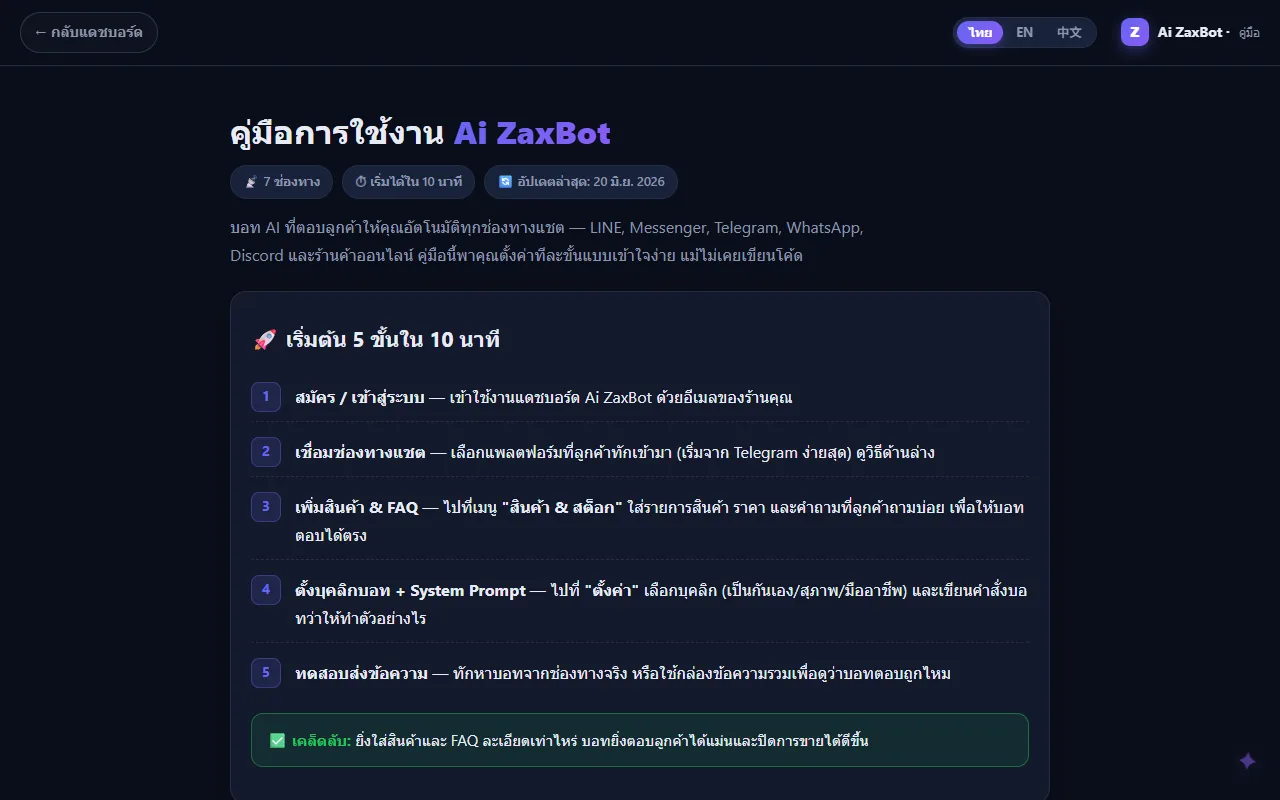
4 ภาพ4 imagesภาพหน้าจอจริงถ่ายจากระบบที่เปิดใช้อยู่ ส่วนภาพโปรโมตและภาพประกอบมีป้ายกำกับไว้ทุกใบReal screenshots come from the running system; promo images and illustrations are labelled on every card.
06 · สถานการณ์06 · Scenarios
ตัวอย่างสถานการณ์ใช้งานExample scenarios
เป็นตัวอย่างสมมติเพื่อให้เห็นภาพ ไม่ใช่เรื่องของลูกค้าจริงIllustrative scenarios to help you picture it — not real customer stories.
ร้านเสื้อผ้าที่แชทเข้าตอนดึกA clothing shop with late-night chats
สมมติว่าร้านเสื้อผ้าออนไลน์มีลูกค้าถามไซซ์และสต็อกตอนสี่ทุ่ม AI ตอบจากรายการสินค้าที่ร้านใส่ไว้พร้อมการ์ดสินค้า ส่วนลูกค้าที่ขอเปลี่ยนของจะถูกส่งต่อให้คน แล้วเช้าวันรุ่งขึ้นแอดมินเปิดกล่องข้อความมาก็เห็นว่าแชทไหนรอคนอยู่Suppose an online clothing shop gets size and stock questions at 10 p.m. The AI answers from the shop's product list with product cards, while a customer asking for an exchange is handed to a person — and next morning the admin opens the inbox and sees exactly which chats are waiting.
ร้านที่มีแอดมินหลายคนA shop with several admins
สมมติว่าร้านมีแอดมิน 3 คนแบ่งกะ ระบบกระจายแชทให้คนที่งานน้อยที่สุด พนักงานเห็นเฉพาะแชทของตัวเองถ้าไม่ได้รับสิทธิ์ดูทั้งหมด และเจ้าของดูยอดปิดการขายกับค่าคอมของแต่ละคนได้จากหน้าเดียวSuppose a shop has three admins working shifts. The system routes chats to whoever is least busy, staff see only their own chats unless given wider access, and the owner sees each person's closed sales and commission on one page.
ร้านที่ขายผ่าน Shopee เป็นหลักA shop that mainly sells on Shopee
สมมติว่าร้านขายบน Shopee ซึ่งยังต่อระบบแชทตรงไม่ได้ ร้านตั้งมือถือ Android ให้ส่งการแจ้งเตือนจากแอปผู้ขายเข้ามา AI ร่างคำตอบไว้ให้ แอดมินแค่กดคัดลอกไปวางตอบในแอป Shopee เอง ประหยัดเวลาพิมพ์โดยไม่เสี่ยงผิดกติกาแพลตฟอร์มSuppose a shop sells on Shopee, which can't yet be connected directly. The shop sets up an Android phone to forward seller-app notifications, the AI drafts replies, and the admin simply copies them into the Shopee app — saving typing time without breaking the platform's rules.
07 · เบื้องหลัง07 · Under the hood
เบื้องหลังระบบ ข้อมูล และความปลอดภัยUnder the hood: data and security
- แพลตฟอร์มPlatform
- เป็นเว็บแอปที่ร้านหลายร้านใช้ระบบเดียวกันแต่ข้อมูลแยกขาดจากกัน เขียนด้วย TypeScript รันบนเซิร์ฟเวอร์ของ ZZAX Studio ใน Docker ใช้ฐานข้อมูล PostgreSQL ที่มีส่วนค้นหาตามความหมาย (pgvector) สำหรับดึงข้อมูลสินค้าและคำถามมาให้ AIA web app where many shops share one system with fully separated data. Written in TypeScript and running in Docker on ZZAX Studio's server, with a PostgreSQL database that includes meaning-based search (pgvector) to pull product and FAQ data for the AI.
- สมองของ AIThe AI behind it
- แต่ละร้านเลือกได้ว่าจะใช้ AI ที่แพลตฟอร์มจัดให้ ใช้คีย์ Gemini หรือ OpenAI ของตัวเอง ใช้โมเดลที่รันในเครื่องผ่าน Ollama หรือบริการอื่นที่ใช้รูปแบบเดียวกับ OpenAI ส่วนระบบค้นหาข้อมูลใช้ตัวเดียวกันทุกร้านเพื่อให้ผลค้นหาคงที่Each shop chooses the platform-provided AI, its own Gemini or OpenAI key, a model running locally via Ollama, or any other OpenAI-compatible service. The search layer uses the same engine for every shop so retrieval stays consistent.
- ช่องทางที่รองรับSupported channels
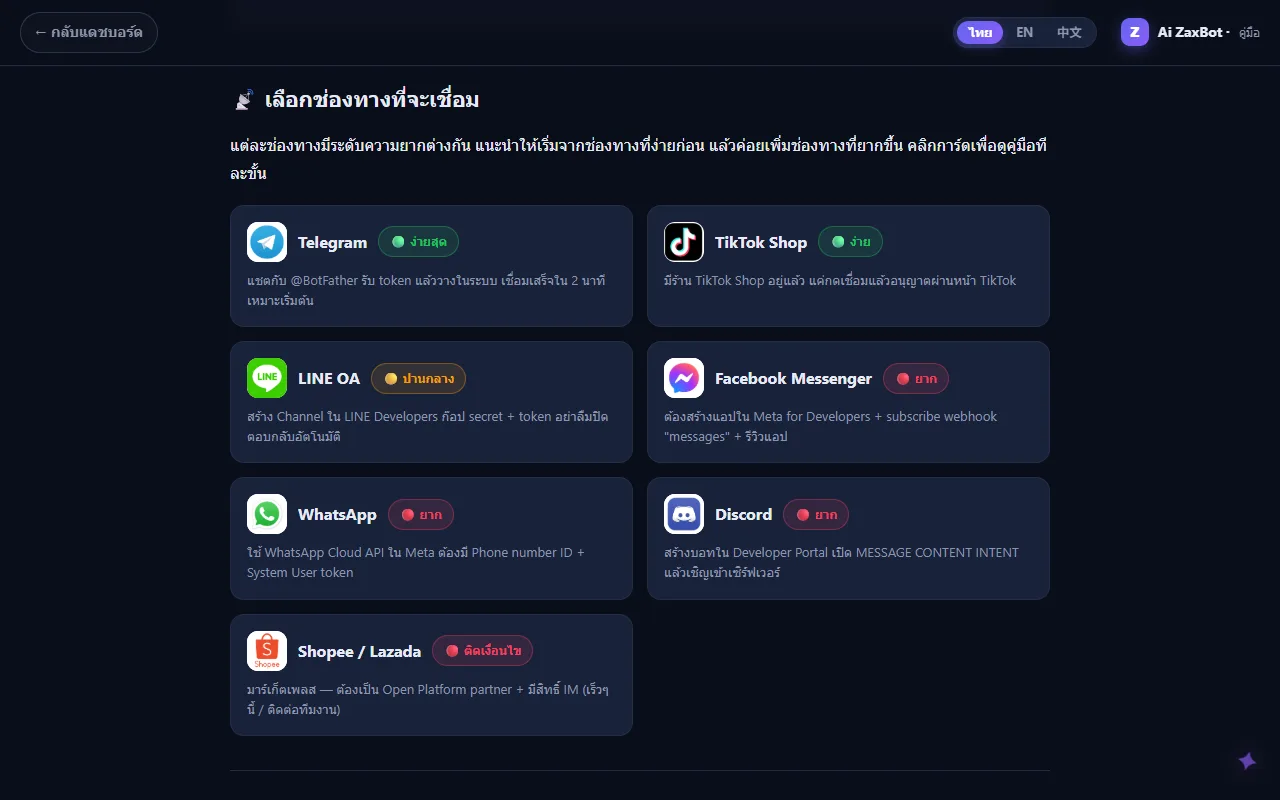
- ตามคู่มือและโค้ด รองรับ LINE OA, Facebook Messenger, Instagram, WhatsApp, Telegram และ Discord ส่วน Shopee, Lazada และ TikTok Shop มีตัวเชื่อมเตรียมไว้แล้วแต่ต้องรอแพลตฟอร์มอนุมัติสิทธิ์ partner ก่อน ระหว่างนี้ใช้โหมดร่างคำตอบผ่านมือถือแทนAccording to the guide and the code, it supports LINE OA, Facebook Messenger, Instagram, WhatsApp, Telegram and Discord. Connectors for Shopee, Lazada and TikTok Shop are written but wait on partner approval from each platform; until then the phone-based draft-reply mode fills the gap.
- ความปลอดภัยและความเป็นส่วนตัวSecurity and privacy
- รหัสเชื่อมต่อช่องทางและคีย์ AI ของร้านถูกเข้ารหัส AES-256-GCM ก่อนเก็บ ทุกคำขอผูกกับร้านจากการเข้าสู่ระบบ ไม่ใช่จากลิงก์ ผ่านการตรวจความปลอดภัยรอบใหญ่และแก้ครบเมื่อ ก.ย. 2569 มีจำกัดจำนวนครั้งการเข้าสู่ระบบ และร้านลบข้อมูลลูกค้าตามคำขอ PDPA ได้จากในระบบChannel credentials and the shop's AI keys are encrypted with AES-256-GCM before storage. Every request is tied to the shop through the login session, never through the URL. A full security audit was completed and fixed in September 2026, sign-in attempts are rate-limited, and shops can erase a customer's data on PDPA request from inside the system.
- ข้อจำกัดที่ควรรู้Limits to know
- ระบบยังไม่มีการส่งอีเมล การเชิญพนักงานและรีเซ็ตรหัสผ่านจึงใช้วิธีออกลิงก์ให้ส่งต่อเอง การชำระค่าบริการในแอปยังไม่เปิด และการเชื่อม Messenger/Instagram/WhatsApp ให้ลูกค้าทั่วไปใช้ได้ขึ้นกับการอนุมัติแอปของ MetaThe system doesn't send email yet, so staff invites and password resets work by generating a link to pass on manually. In-app payment for the service isn't open yet, and letting the general public reach a shop through Messenger, Instagram or WhatsApp depends on Meta approving the app.
08 · ความคืบหน้า08 · Progress
ความคืบหน้าและแผนต่อไปProgress and what comes next
- ทำแล้วDone
ตรวจความปลอดภัยทั้งระบบและแก้ครบ พร้อมเพิ่มโหมดร่างคำตอบผ่านมือถือสำหรับ Shopee/Lazada/TikTok ขึ้นใช้จริง 8 ก.ย. 2569Full security audit fixed, plus the phone-based draft-reply mode for Shopee/Lazada/TikTok, live on 8 September 2026
- ทำแล้วDone
ระบบรีเซ็ตรหัสผ่านด้วยลิงก์ และปรับให้ระบบรันแบบไม่ใช้สิทธิ์ผู้ดูแลเครื่อง ขึ้นใช้จริง 9 ก.ย. 2569Link-based password reset and running the app without root privileges, live on 9 September 2026
- ทำแล้วDone
ยกเครื่อง 4 ระยะ: กล่องข้อความใหม่ ติดตามการขาย กติกาตอบอัตโนมัติหลายขั้น รายงาน 6 หมวด สรุปแชทรายวัน QR พร้อมเพย์ และสิทธิ์ทีมงาน ขึ้นใช้จริง 3–4 ต.ค. 2569Four-phase overhaul — new inbox, sales tracking, multi-step auto-replies, six-section reports, daily chat summaries, PromptPay QR and team permissions — live on 3–4 October 2026
- กำลังทำIn progress
ยื่นขอสิทธิ์ partner ของ Shopee, Lazada และ TikTok เพื่อเชื่อมแชทตรง (เตรียมเอกสารแล้ว เจ้าของต้องเป็นผู้กดยื่นเอง)Applying for Shopee, Lazada and TikTok partner access to connect chats directly (documents prepared; the owner has to submit them)
- กำลังทำIn progress
ยื่นรีวิวแอปกับ Meta เพื่อให้ร้านเชื่อม Messenger, Instagram และ WhatsApp ด้วยปุ่มเดียวแล้วรับลูกค้าทั่วไปได้ (เตรียมเอกสารยื่นไว้แล้ว ยังไม่มีบันทึกผล)Meta app review so shops can connect Messenger, Instagram and WhatsApp in one click and serve the general public (submission prepared; no recorded result yet)
- ถัดไปNext
ระบบส่งอีเมลสำหรับคำเชิญพนักงาน และระบบชำระค่าบริการในแอป ซึ่งเจ้าของตั้งใจรอให้มีร้านจ่ายเงินจริงก่อนEmail delivery for staff invites, and in-app payment for the service — which the owner chose to hold until real paying shops arrive
09 · คำถาม09 · FAQ
คำถามที่พบบ่อยFrequently asked questions
ราคาเท่าไรHow much does it cost?
ยังไม่ได้ประกาศราคาสาธารณะ ในระบบมีแพ็กเกจ 3 ระดับ (Free, Starter, Pro) ซึ่งต่างกันที่จำนวนช่องทาง จำนวนสินค้า และจำนวนข้อความ AI ต่อเดือน แต่การชำระเงินในแอปยังไม่เปิด ถ้าสนใจให้ติดต่อ ZZAX Studio โดยตรงNo public price has been announced. The system has three plan levels (Free, Starter, Pro) that differ in the number of channels, products and AI messages per month, but in-app payment isn't open yet. If you're interested, contact ZZAX Studio directly.
ใช้กับช่องทางไหนได้บ้างWhich channels does it work with?
LINE OA, Messenger, Instagram, WhatsApp, Telegram และ Discord ตามคู่มือ ส่วน Shopee, Lazada และ TikTok Shop ยังต้องรอแพลตฟอร์มอนุมัติ ระหว่างนี้ใช้โหมดให้ AI ร่างคำตอบผ่านมือถือ Android แทนLINE OA, Messenger, Instagram, WhatsApp, Telegram and Discord, per the guide. Shopee, Lazada and TikTok Shop still await platform approval; in the meantime the AI can draft replies through an Android phone.
AI จะตอบมั่วหรือเปล่าWill the AI make things up?
ระบบให้ AI ตอบจากข้อมูลสินค้าและคำถามที่ร้านใส่ไว้ ยิ่งใส่ละเอียดยิ่งตอบตรง แต่ AI ก็ยังผิดได้ จึงมีปุ่มให้คนรับแชทต่อได้ทุกเมื่อ มีคำที่สั่งให้ส่งต่อคน และมีรายการคำถามที่บอทตอบไม่ได้ให้ร้านกลับมาเติมข้อมูลThe AI answers from the products and FAQ the shop provides — the more detail, the more accurate. It can still get things wrong, so staff can take over any chat at any time, trigger words force a handoff, and a list of unanswered questions shows the shop what data to add.
ข้อมูลลูกค้าเก็บไว้ที่ไหนWhere is customer data stored?
เก็บในฐานข้อมูลบนเซิร์ฟเวอร์ของ ZZAX Studio แยกตามร้าน รหัสเชื่อมต่อและคีย์ AI ถูกเข้ารหัสก่อนเก็บ ร้านลบข้อมูลลูกค้าตามคำขอ PDPA ได้เอง ถ้าร้านเลือกใช้ AI ภายนอก ข้อความที่ต้องตอบจะถูกส่งไปยังผู้ให้บริการ AI รายนั้นIn a database on ZZAX Studio's server, separated by shop. Connection credentials and AI keys are encrypted before storage, and shops can erase a customer's data on PDPA request themselves. If a shop chooses an outside AI provider, the messages being answered are sent to that provider.
ต้องเขียนโค้ดเป็นไหมDo I need to know how to code?
ไม่ต้อง คู่มือพาตั้งทีละขั้น และบอกระดับความยากของแต่ละช่องทาง Telegram ง่ายที่สุด LINE OA ปานกลาง ส่วน Messenger, WhatsApp และ Discord ยากกว่าเพราะต้องตั้งค่าในหน้านักพัฒนาของแพลตฟอร์มนั้นNo. The guide walks you through step by step and rates each channel's difficulty: Telegram is easiest, LINE OA is moderate, and Messenger, WhatsApp and Discord are harder because they require setup in that platform's developer console.
ใครดูแลระบบWho runs it?
ZZAX Studio เป็นผู้พัฒนาและดูแลเซิร์ฟเวอร์ ในคู่มือมีปุ่มติดต่อทีมงานผ่าน LINE OA ของ ZZAX StudioZZAX Studio builds it and runs the servers. The guide has a contact button that reaches the team through ZZAX Studio's LINE OA.
10 · วิธีเริ่ม10 · Get started
เริ่มได้ใน 3 ขั้นUp and running in three steps
ถ้าอยากได้ระบบแบบเดียวกันสำหรับธุรกิจของคุณ บอกโจทย์มาสั้น ๆ เราตอบกลับพร้อมขอบเขตงานและราคาภายใน 1 วันทำการIf you want something like this for your own business, send us a line about the problem. You'll get scope and price within one working day.
- 1ขั้นที่ 1 สร้างบัญชีร้านของคุณ แล้วเชื่อม LINE OA หรือเพจ MessengerStep 1: Create your shop account and connect your LINE OA or Messenger page
- 2ขั้นที่ 2 ใส่ข้อมูลสินค้า ราคา และคำถามที่ลูกค้าถามบ่อยเข้าฐานความรู้Step 2: Load your products, prices, and frequent questions into the knowledge base
- 3ขั้นที่ 3 เปิดโหมด AI ตอบอัตโนมัติ แล้วดูแชททั้งหมดจากอินบ็อกซ์รวมStep 3: Turn on automatic AI replies and watch every chat from the unified inbox
เริ่มงานกับเราWork with us
อยากได้ระบบแบบนี้สำหรับธุรกิจคุณWant a system like this for your business?
เล่าปัญหาของคุณมา เราจะบอกตรง ๆ ว่าช่วยได้ไหม ภายใน 1 วันทำการ ส่งแล้วได้รหัสติดตามงานทันทีTell us the problem and we'll say honestly whether we can help, within one working day. You get a tracking code the moment you send it.