ลูกค้าคนไทยส่วนใหญ่อยู่ใน LINE อยู่แล้ว แต่ร้านเล็กที่เปิด LINE OA มักปล่อยให้หน้าบัญชีว่างเปล่า ไม่มีเมนูรูปภาพ ไม่มีคำตอบอัตโนมัติ คนที่กดเพิ่มเพื่อนมาจึงไม่รู้ว่าจะทำอะไรต่อ แล้วก็หายไป ส่วนการจ้างทำเมนูรูปภาพสวย ๆ ก็มีค่าใช้จ่ายทุกครั้งที่อยากแก้Most Thai customers already live inside LINE, but small shops that open an official account often leave it empty — no rich menu, no automatic replies — so people who add it have nothing to do next and drift away. Paying a designer for a rich menu also costs money every time something changes.
← ผลงานทั้งหมด← All work
LINE OALINE OA
LINE OA ของแอปเราOur apps on LINE
บัญชีทางการ LINE ของแต่ละแอป ทั้งภาพหน้าปก เมนูรูปภาพ และข้อความอัตโนมัติ ออกแบบและตั้งค่าเองทั้งหมดThe LINE official account for each app — cover art, rich menus and automated messages, all designed and set up in-house
ใช้งานจริงLive LINE OALINE OA
เปิดใช้จริงแล้ว 5 บัญชี คือ POS WAI, กาดดอย, จดไว, ZZAX Studio และ ZzaxMaster ภาพทุกใบในหน้านี้ถ่ายจากแอป LINE ในมือถือของเจ้าของเมื่อ 10 พ.ย. 2569 ทั้งหมดยังเป็นบัญชีใหม่ จำนวนเพื่อนอยู่ที่ 2 ถึง 12 คนต่อบัญชี เพราะยังไม่ได้ประกาศหาคนเพิ่มFive accounts are live: POS WAI, Kaddoi, JodWai, ZZAX Studio and ZzaxMaster. Every image here was taken from LINE on the owner phone on 10 Nov 2026. All of them are new accounts with 2 to 12 friends each, because none has been promoted yet.
5บัญชีทางการที่เปิดใช้จริงOfficial accounts live
9ภาพหน้าจอจริงในหน้านี้Real screenshots on this page
01 · ภาพรวม01 · Overview
ภาพรวมของระบบThe system at a glance
งานชุดนี้คือบัญชีทางการ LINE (LINE OA) ของแอปที่เราทำเอง 5 ตัว ได้แก่ POS WAI สำหรับร้านอาหาร กาดดอยไลฟ์ จดไว ZZAX Studio และ ZzaxMaster ทุกบัญชีออกแบบภาพหน้าปก รูปโปรไฟล์ เมนูรูปภาพ และข้อความอัตโนมัติเองทั้งหมด แล้วตั้งค่าในบัญชีจริงจนใช้งานได้This is the set of LINE official accounts for five of our own apps: POS WAI for restaurants, Kaddoi Live, JodWai, ZZAX Studio and ZzaxMaster. For each one we designed the cover, the profile picture, the rich menu and the automated messages, then set it all up in the live account.
เหตุผลที่ทำคือคนไทยเปิด LINE อยู่แล้วทุกวัน การให้ลูกค้าเริ่มจากแชทจึงง่ายกว่าการขอให้โหลดแอปใหม่ เมนูรูปภาพทำหน้าที่เหมือนหน้าแรกของแอป กดปุ่มเดียวก็เข้าหน้าที่ต้องใช้ เช่น สั่งอาหาร ดูไลฟ์ จดเรื่องใหม่ หรือเปิดร้านThe reason is simple: people in Thailand already open LINE every day, so starting from a chat is easier than asking them to install something. The rich menu works like the app home screen — one tap opens ordering, a live stream, a new note or a shop.
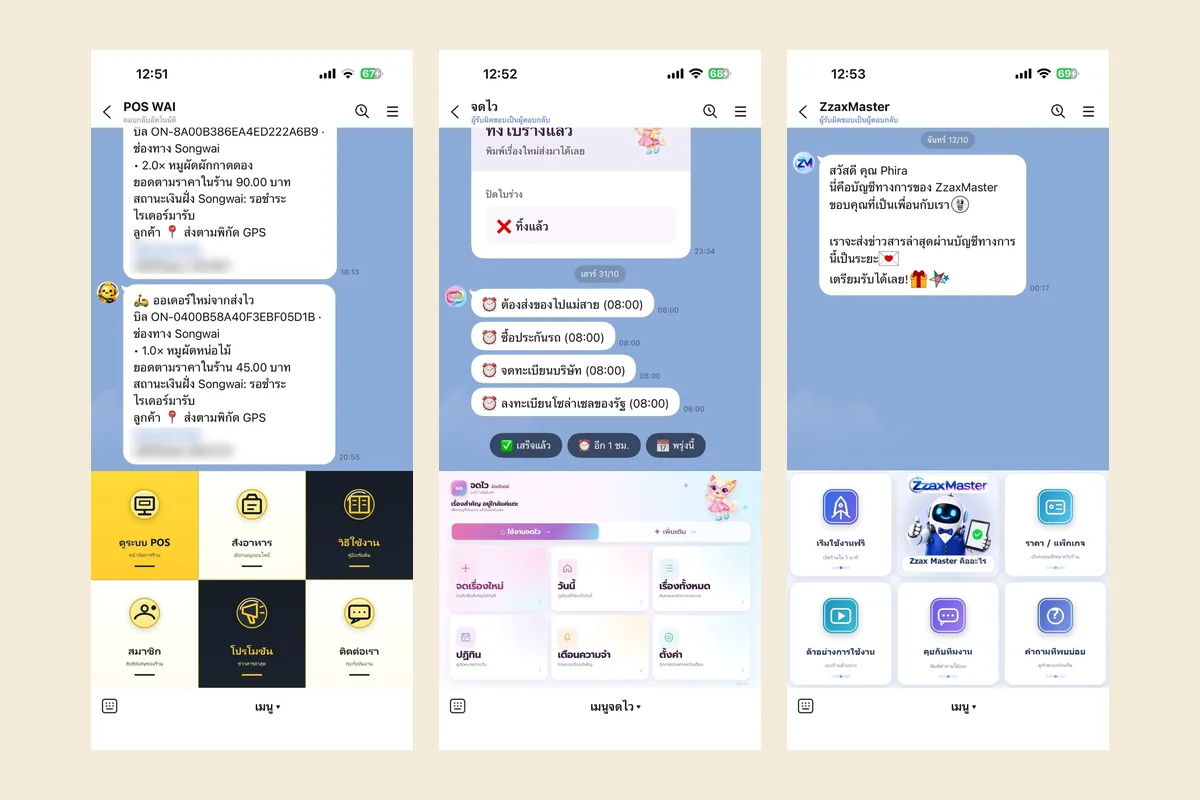
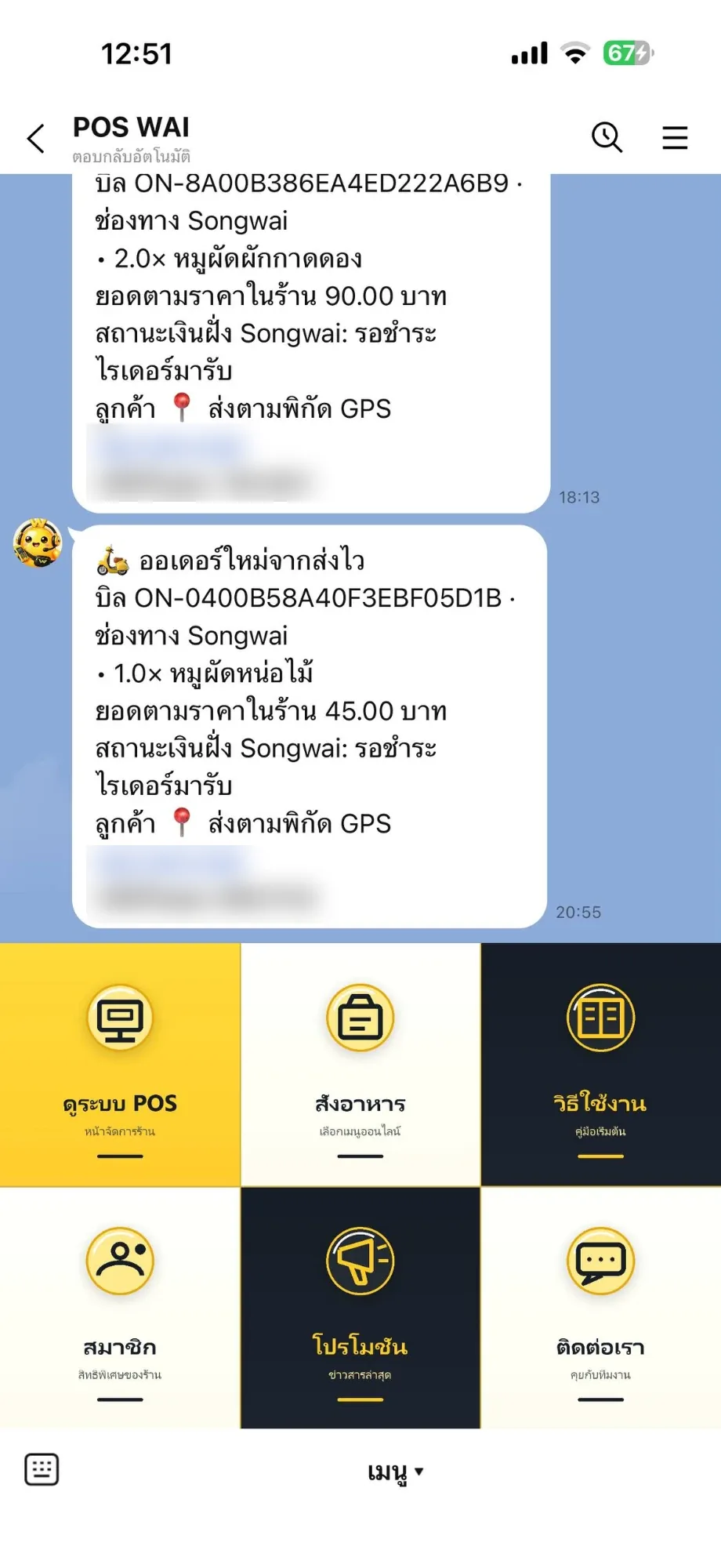
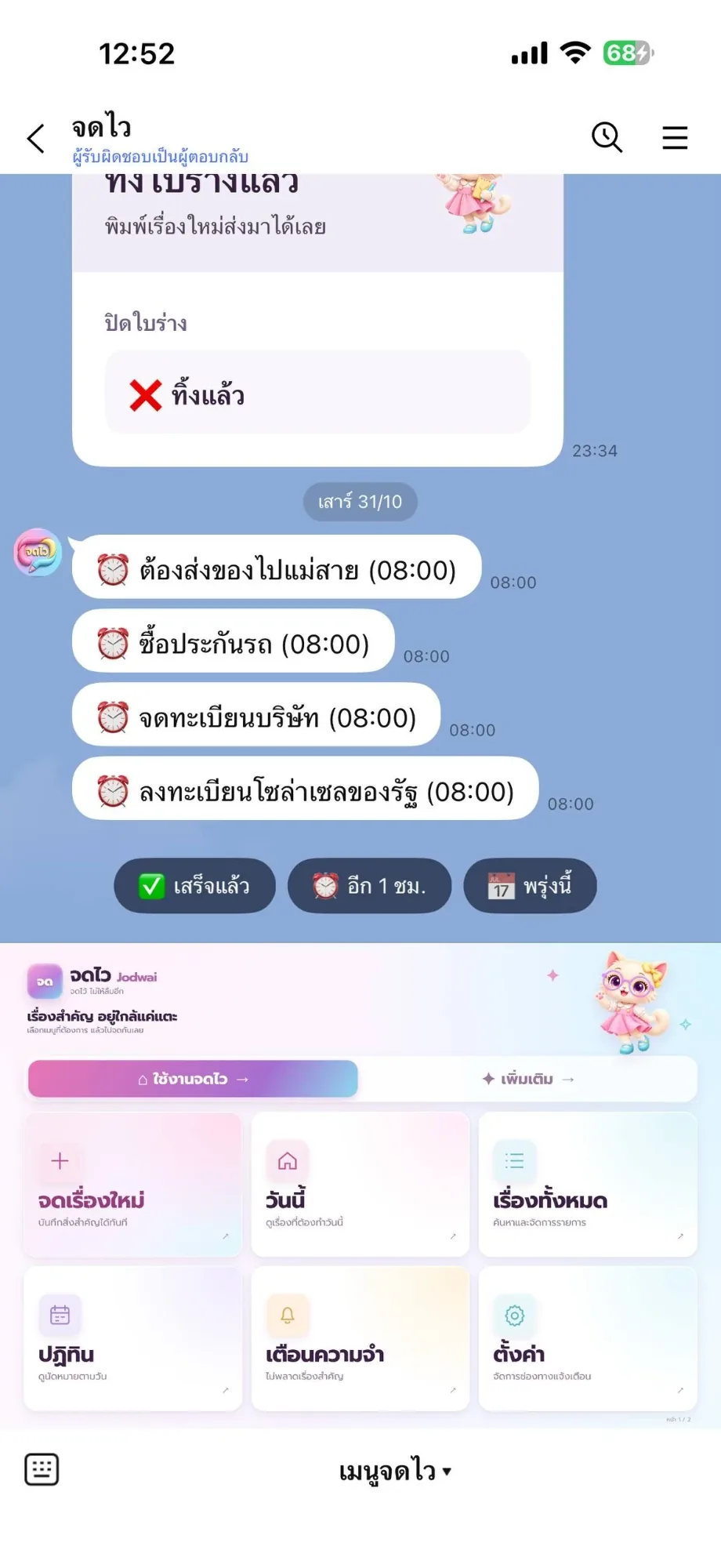
บางบัญชีไม่ได้เป็นแค่ภาพ แต่ต่อกับระบบหลังบ้านจริง บัญชี POS WAI รับแจ้งออเดอร์จากส่งไวเข้ามาในแชทพร้อมเลขบิล รายการอาหาร ยอดเงิน และสถานะการชำระ ส่วนจดไวส่งการ์ดเตือนที่กดตอบได้เลยว่าเสร็จแล้ว เลื่อนอีก 1 ชั่วโมง หรือพรุ่งนี้Some accounts are more than artwork. The POS WAI account receives Songwai orders in the chat with the bill number, the items, the amount and the payment status, while JodWai sends reminder cards you answer in place: done, snooze an hour, or tomorrow.
ตรงไปตรงมาเรื่องขนาด ทั้งห้าบัญชีเพิ่งเปิดและยังไม่ได้ประกาศหาคนเพิ่ม จำนวนเพื่อนจึงอยู่แค่ 2 ถึง 12 คน สิ่งที่หน้านี้อวดคืองานออกแบบและการตั้งค่าที่ใช้ได้จริง ไม่ใช่จำนวนผู้ติดตามTo be straight about scale: all five accounts are new and none has been promoted, so each has only 2 to 12 friends. What this page shows is the design and the working setup, not an audience.
02 · โจทย์02 · The brief
สร้างขึ้นมาเพราะอะไรWhy this exists
เจ้าของแอปและร้านที่อยากให้ลูกค้าเริ่มใช้งานได้จากแชท LINE โดยไม่ต้องลงแอปใหม่ และอยากได้หน้าบัญชีที่ดูเป็นมืออาชีพตั้งแต่วันแรกApp and shop owners who want customers to get started straight from a LINE chat, without installing anything, and want the account to look professional from day one
ใช่โจทย์ของคุณไหมSound like your problem?
03 · ฟีเจอร์03 · Features
ทำอะไรได้บ้าง อย่างละเอียดWhat it does, in detail
7 ความสามารถ7 capabilitiesเมนูรูปภาพที่ออกแบบต่อแบรนด์A rich menu built per brand
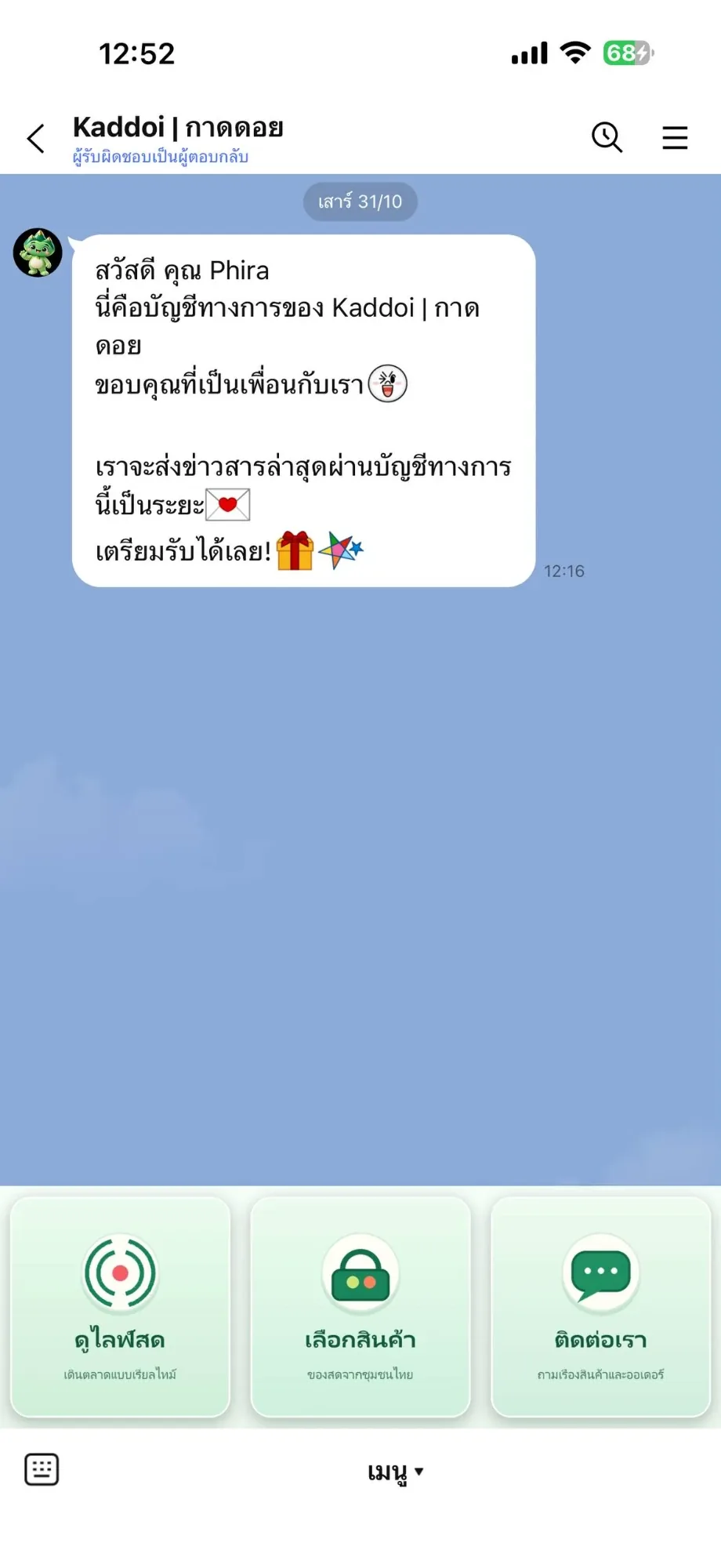
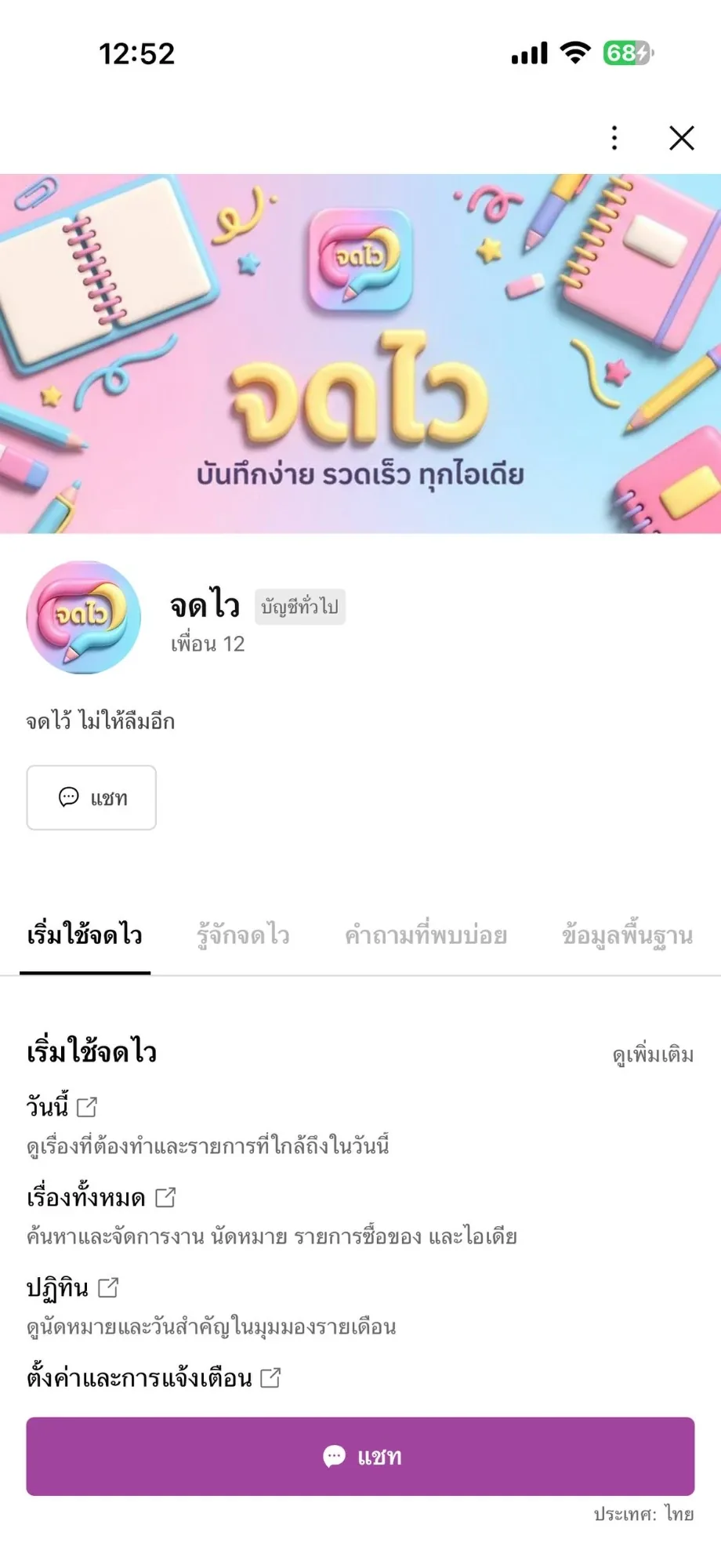
แต่ละบัญชีมีเมนูของตัวเอง POS WAI ใช้โทนเหลือง–ดำ 6 ช่อง (ดูระบบ POS, สั่งอาหาร, วิธีใช้งาน, สมาชิก, โปรโมชัน, ติดต่อเรา) กาดดอยใช้โทนเขียว 3 ช่องใหญ่ (ดูไลฟ์สด, เลือกสินค้า, ติดต่อเรา) ส่วนจดไวใช้โทนชมพู–ฟ้าพร้อมมาสคอตแมวด้านบนEach account has its own menu. POS WAI uses a yellow-and-black six-tile grid (POS system, order food, how to use, members, promotions, contact). Kaddoi uses three large green tiles (watch live, browse goods, contact). JodWai uses a pink-and-blue layout with its cat mascot across the top.
เมนูสองหน้าเมื่อปุ่มเดียวไม่พอA two-page menu when six tiles are not enough
เมนูของจดไวแบ่งเป็น 2 หน้า หน้าแรกเป็นงานที่ใช้บ่อย (จดเรื่องใหม่ วันนี้ เรื่องทั้งหมด ปฏิทิน เตือนความจำ ตั้งค่า) และมีแถบสลับไปหน้า "เพิ่มเติม" อยู่ด้านบน ทำให้ไม่ต้องยัดทุกอย่างลงในหกช่องเดียวJodWai menu is split across two pages: the first holds the everyday actions (new note, today, all items, calendar, reminders, settings) with a switcher to a second "more" page at the top, so everything does not have to be crammed into six tiles.
ต่อกับระบบจริง ไม่ใช่แค่ลิงก์Connected to the real system, not just links
บัญชี POS WAI ผูกกับส่งไว เมื่อมีออเดอร์เข้า ร้านจะเห็นข้อความแจ้งในแชททันที พร้อมเลขบิล รายการ ยอดตามราคาในร้าน สถานะเงิน และวิธีรับของ ร้านจึงไม่ต้องเฝ้าหน้าจอ POS ตลอดเวลาThe POS WAI account is linked to Songwai: when an order arrives the shop sees it in the chat straight away with the bill number, the items, the in-shop total, the payment status and the handover method, so nobody has to watch the POS screen all day.
การ์ดเตือนที่กดตอบได้ในแชทReminder cards you answer in the chat
จดไวส่งเรื่องที่ถึงกำหนดเป็นการ์ดพร้อมปุ่ม เสร็จแล้ว / อีก 1 ชม. / พรุ่งนี้ กดปุ่มเดียวจบ ไม่ต้องเปิดเว็บหรือพิมพ์ตอบJodWai sends each due item as a card with Done, +1 hour and Tomorrow buttons — one tap finishes it, with no website to open and nothing to type.
หน้าแนะนำการใช้งานในตัวบัญชีGetting-started tabs inside the account
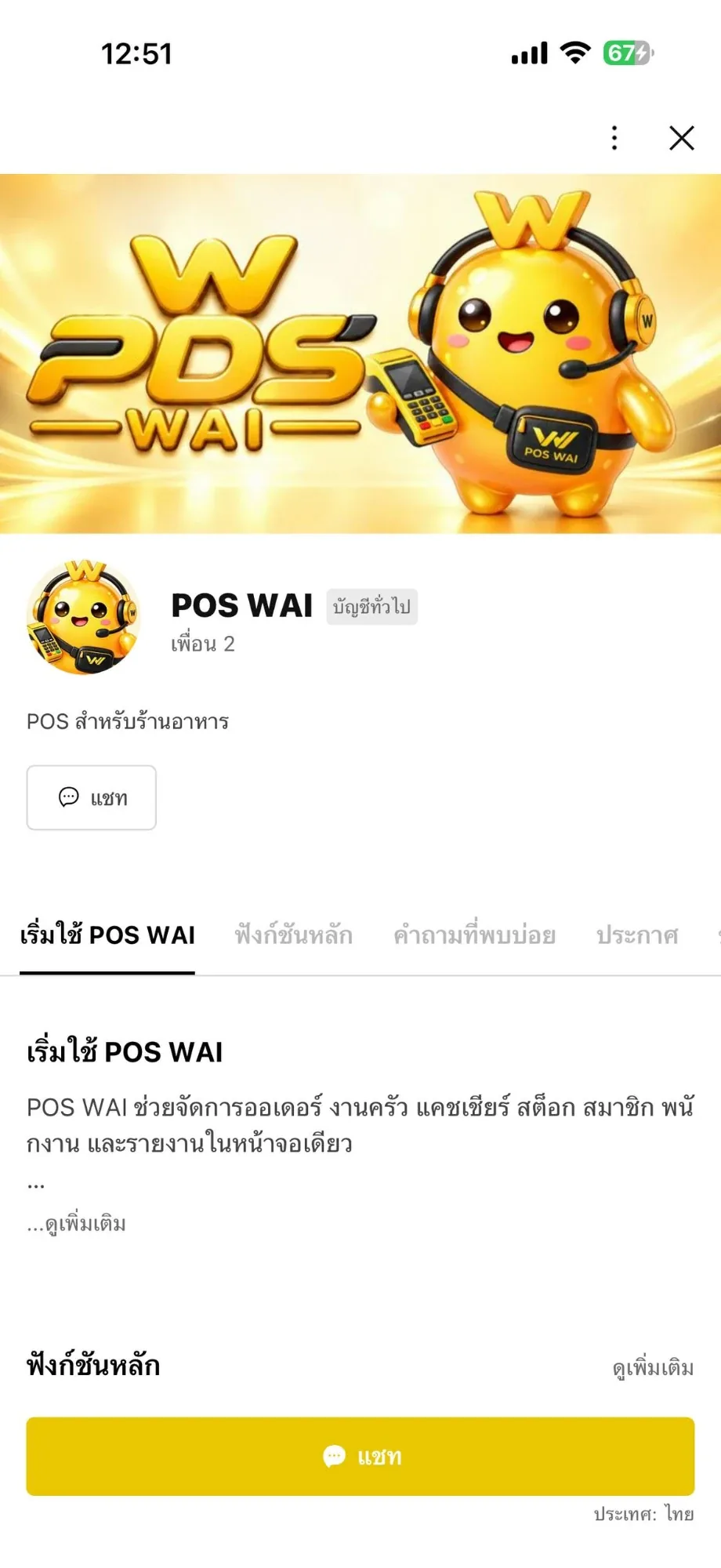
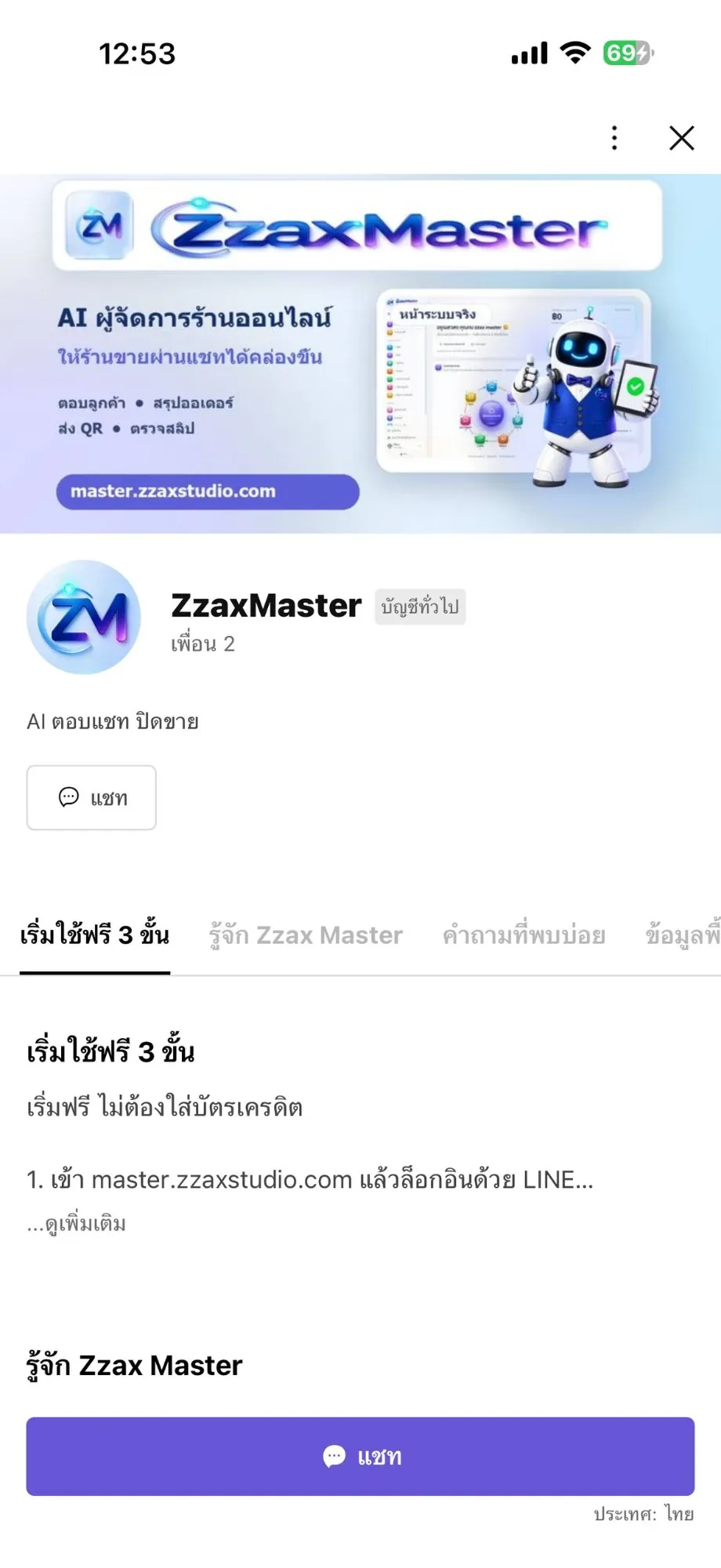
หน้าโปรไฟล์ของแต่ละบัญชีมีแท็บแนะนำ เช่น POS WAI มี เริ่มใช้ POS WAI / ฟังก์ชันหลัก / คำถามที่พบบ่อย / ประกาศ ส่วน ZzaxMaster มี เริ่มใช้ฟรี 3 ขั้น ทำให้คนที่เพิ่งเพิ่มเพื่อนอ่านเองได้โดยไม่ต้องรอทีมงานตอบEvery profile carries intro tabs — POS WAI has getting started, main functions, FAQ and announcements, while ZzaxMaster has a three-step free start — so a new friend can read for themselves instead of waiting for a reply.
ภาพหน้าปกที่บอกว่าบัญชีนี้ทำอะไรCover art that says what the account is for
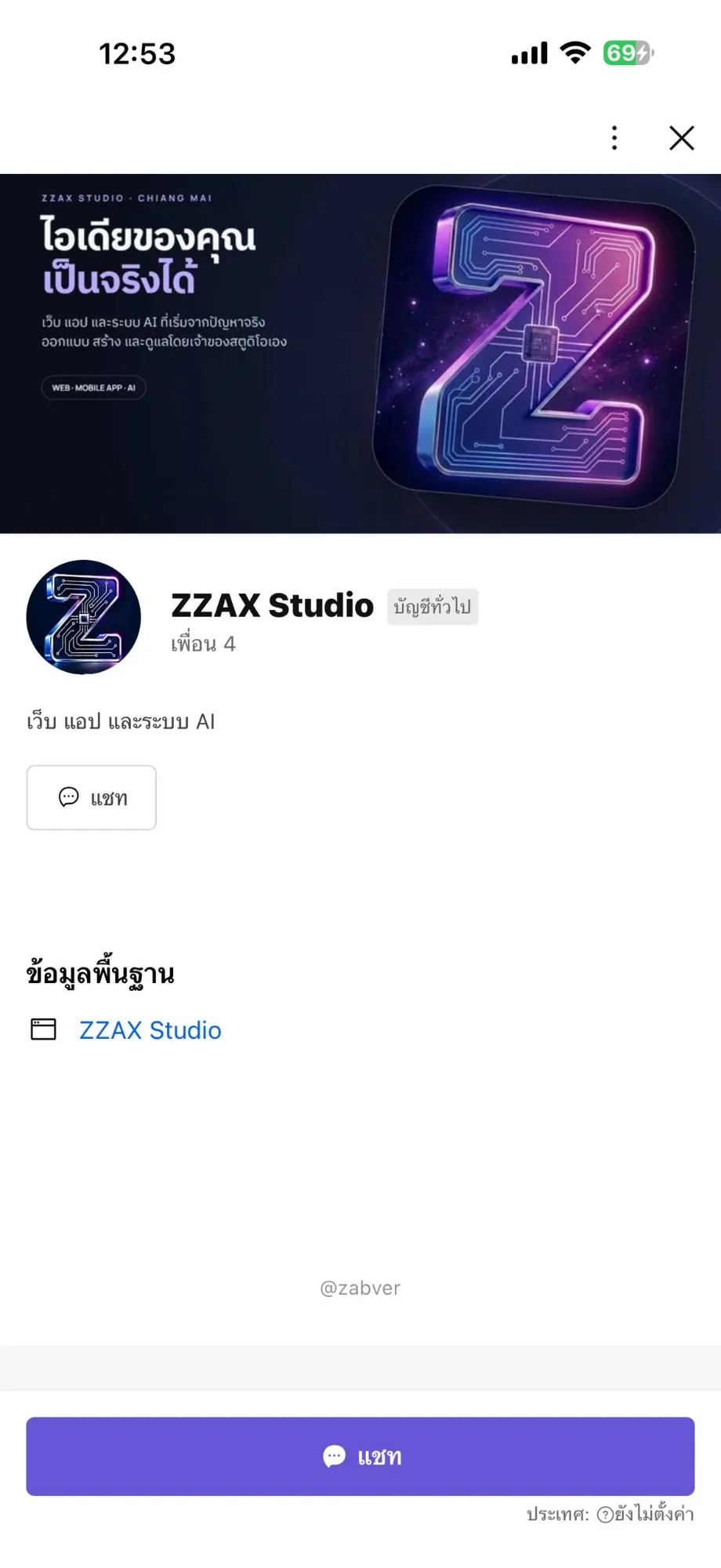
ภาพหน้าปกเขียนประโยคเดียวที่อ่านจบใน 2 วินาที เช่น ZzaxMaster เขียนว่า "AI ผู้จัดการร้านออนไลน์ ให้ร้านขายผ่านแชทได้คล่องขึ้น" พร้อมที่อยู่เว็บ ส่วน ZZAX Studio เขียนว่า "ไอเดียของคุณเป็นจริงได้"Each cover carries one line you can read in two seconds — ZzaxMaster says it is an AI manager that helps a shop sell over chat, with its web address, while ZZAX Studio says your idea can become real.
เมนูของสตูดิโอที่พาไปดูผลงานA studio menu that leads to the work
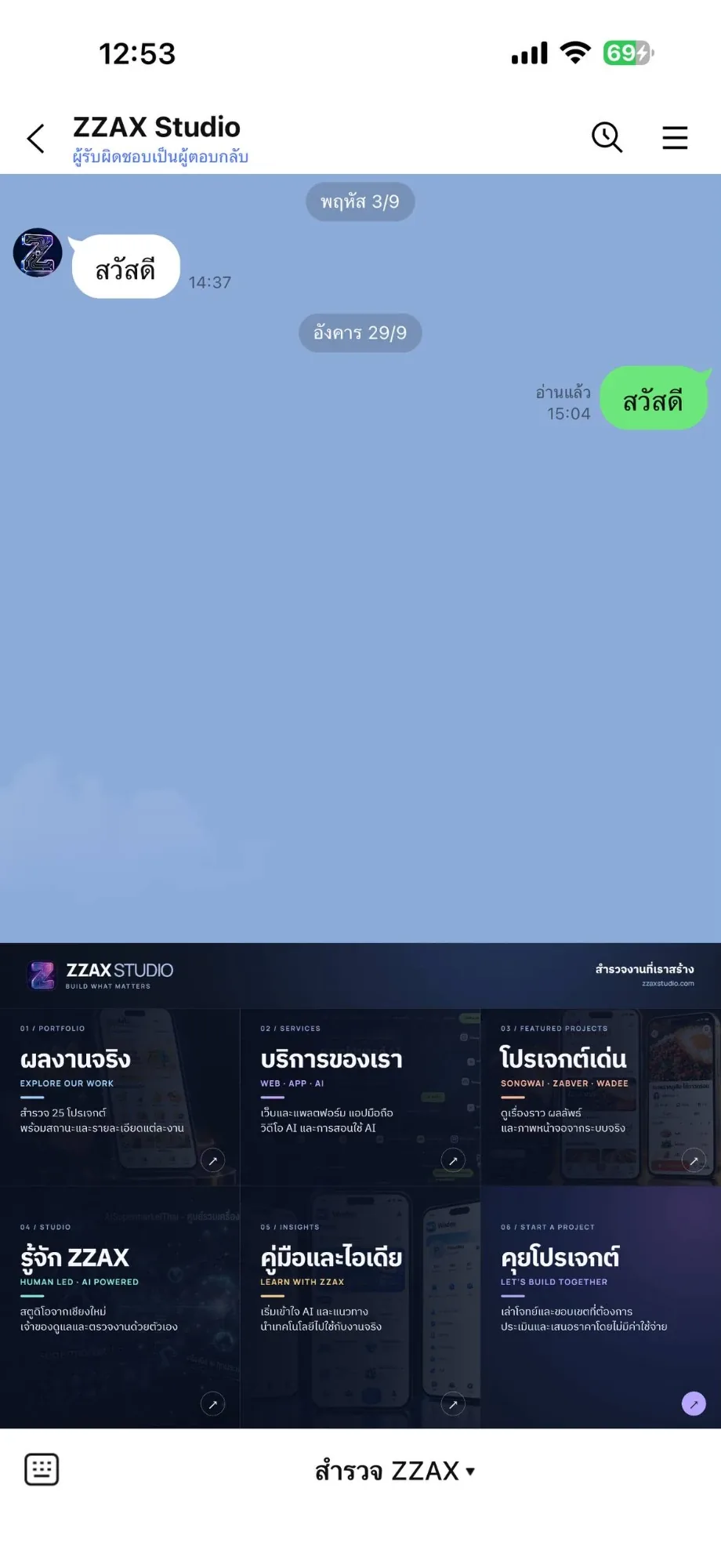
บัญชี ZZAX Studio ใช้เมนู 6 ช่องแบบใช้ภาพจริงของโปรเจกต์ แบ่งเป็น ผลงานจริง บริการของเรา โปรเจกต์เด่น รู้จัก ZZAX คู่มือและไอเดีย และคุยโปรเจกต์ กดแล้วเข้าหน้าเว็บ zzaxstudio.com ตรงส่วนนั้นThe ZZAX Studio account uses a six-tile menu built from real project photos — portfolio, services, featured projects, about, insights and start a project — each opening the matching part of zzaxstudio.com.
04 · วิธีทำงาน04 · How it works
ทำงานยังไง ตั้งแต่ต้นจนจบHow it works, start to finish
- 1
1. เลือกงานแรกที่อยากให้คนกด1. Pick the first action
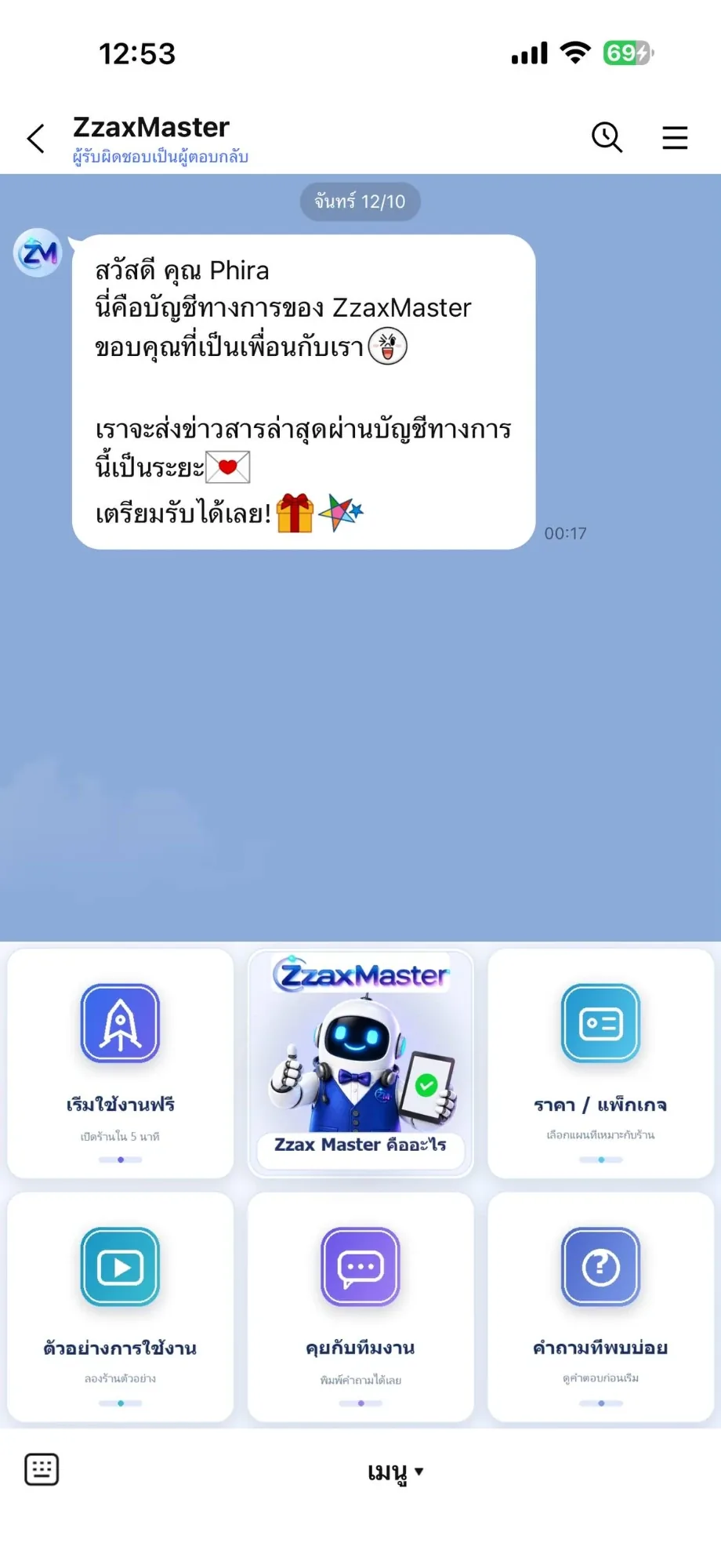
เริ่มจากคำถามเดียว คือคนที่เพิ่งเพิ่มเพื่อนควรทำอะไรเป็นอย่างแรก คำตอบนี้กลายเป็นช่องที่ใหญ่ที่สุดในเมนู เช่น กาดดอยให้ "ดูไลฟ์สด" และ ZzaxMaster ให้ "เริ่มใช้งานฟรี"It starts with one question: what should a brand-new friend do first? That answer becomes the biggest tile — watch live for Kaddoi, start free for ZzaxMaster.
- 2
2. วางผังเมนูและเขียนคำบนปุ่ม2. Lay out the menu and write the tiles
วางผัง 3 หรือ 6 ช่องตามจำนวนงานที่ต้องมี แล้วเขียนคำบนปุ่มให้เป็นภาษาคนใช้ ไม่ใช่ศัพท์ระบบ ทุกช่องมีคำอธิบายสั้นใต้ชื่อ เช่น "สมาชิก — สิทธิพิเศษของร้าน"We lay out three or six tiles depending on how many jobs there are, then label them in plain language rather than system terms, with a short line under each name such as "Members — shop perks".
- 3
3. ทำภาพเมนูและภาพหน้าปก3. Produce the menu and cover art
ทำภาพตามขนาดของ LINE โดยใช้สี มาสคอต และฟอนต์ชุดเดียวกับแอป แล้วตัดเป็นพื้นที่กดตามช่องThe artwork is produced at LINE sizes using the app own colours, mascot and type, then sliced into tappable regions.
- 4
4. ผูกปุ่มกับลิงก์และข้อความ4. Wire the tiles to links and messages
แต่ละช่องผูกกับลิงก์เว็บของแอป หรือข้อความที่บอทตอบกลับ บัญชีที่มีระบบหลังบ้านจะผูกกับ Messaging API เพื่อส่งแจ้งเตือนเข้ามาในแชทด้วยEach region is wired to one of the app web links or to a message the bot replies with; accounts with a back end also connect through the Messaging API so notifications arrive in the chat.
- 5
5. ทดสอบบนมือถือจริงก่อนเปิด5. Test on a real phone before opening
เปิดบัญชีในมือถือจริงแล้วไล่กดทุกปุ่ม ดูว่าลิงก์ไปถูกหน้าและภาพไม่โดนแถบล่างบัง ภาพทั้ง 9 ใบในหน้านี้คือภาพจากการไล่ตรวจรอบล่าสุดWe open the account on a real phone and tap every tile, checking that links land on the right page and that nothing is hidden behind the bottom bar. The nine images on this page come from the latest pass.
05 · ภาพ05 · Visuals
ภาพจากระบบจริงFrom the real system
9 ภาพ9 imagesภาพหน้าจอจริงถ่ายจากระบบที่เปิดใช้อยู่ ส่วนภาพโปรโมตและภาพประกอบมีป้ายกำกับไว้ทุกใบReal screenshots come from the running system; promo images and illustrations are labelled on every card.
06 · สถานการณ์06 · Scenarios
ตัวอย่างสถานการณ์ใช้งานExample scenarios
เป็นตัวอย่างสมมติเพื่อให้เห็นภาพ ไม่ใช่เรื่องของลูกค้าจริงIllustrative scenarios to help you picture it — not real customer stories.
ร้านอาหารที่ไม่อยากเฝ้าหน้าจอA restaurant that cannot watch a screen
สมมติว่าร้านกำลังทำอาหารอยู่หลังเตา ออเดอร์จากส่งไวเข้ามาที่ LINE ของร้านพร้อมเลขบิลและรายการ ร้านเห็นจากมือถือเครื่องเดียวที่ถืออยู่แล้วSuppose the kitchen is busy at the stove: a Songwai order lands in the shop LINE chat with its bill number and items, visible on the one phone already in hand.
คนที่อยากจดของแต่ยังไม่อยากลงแอปSomeone who wants to take notes but not install an app
เพิ่มเพื่อนจดไวแล้วพิมพ์เรื่องที่ไม่อยากลืมในแชทได้เลย ถึงเวลาจดไวส่งการ์ดมาเตือน กดปุ่มในแชทได้เลยว่าเสร็จแล้วหรือเลื่อนAdd JodWai as a friend and type what you must not forget straight into the chat; when it is due a card arrives and you tap Done or snooze right there.
คนที่เพิ่งรู้จักสตูดิโอจากคอมเมนต์Someone who just found the studio in a comment
กดเพิ่มเพื่อน ZZAX Studio แล้วเห็นเมนูที่พาไปดูผลงานจริง บริการ และช่องทางคุยโปรเจกต์ ได้ทันทีโดยไม่ต้องถามว่าทำอะไรบ้างAdding ZZAX Studio shows a menu that leads straight to the real work, the services and the way to start a project, with no need to ask what we do.
07 · เบื้องหลัง07 · Under the hood
เบื้องหลังระบบ ข้อมูล และความปลอดภัยUnder the hood: data and security
- แพลตฟอร์มPlatform
- LINE Official Account Manager สำหรับภาพหน้าปก เมนูรูปภาพ ข้อความต้อนรับ และแท็บแนะนำ ส่วนบัญชีที่ต้องส่งแจ้งเตือนเองใช้ LINE Messaging APILINE Official Account Manager for cover art, rich menus, greetings and intro tabs; accounts that push their own notifications use the LINE Messaging API.
- การเชื่อมระบบIntegrations
- POS WAI รับออเดอร์ต่อจากส่งไว และจดไวส่งการ์ดเตือนพร้อมปุ่มตอบกลับ ทั้งสองทำงานผ่านเซิร์ฟเวอร์ของแอปเอง ไม่ได้ใช้บริการตัวกลางPOS WAI receives orders relayed from Songwai and JodWai sends reminder cards with quick replies; both run through the apps own servers rather than a third-party middleman.
- งานภาพArtwork
- ภาพหน้าปก ไอคอน และเมนูรูปภาพทำเองด้วยเครื่องมือสร้างภาพ AI ในเครื่องแล้วจัดองค์ประกอบและใส่ตัวอักษรไทยเองCovers, icons and menu art are produced in-house with local AI image tools, then composed and set in Thai type by hand.
- ขนาดเมนูMenu sizes
- ใช้ผัง 3 ช่องสำหรับงานที่เลือกน้อย และ 6 ช่องสำหรับบัญชีที่มีหลายงาน บัญชีที่เกินหกงานใช้เมนูสองหน้าแทนการย่อปุ่มA three-tile layout for accounts with few jobs and six tiles for busier ones; anything beyond six moves to a second page rather than shrinking the tiles.
- ความเป็นเจ้าของOwnership
- บัญชีอยู่ในมือเจ้าของงานเอง เราตั้งค่าให้แล้วส่งคืน ไม่ได้ผูกกับระบบของเราและย้ายผู้ดูแลได้ตลอดEach account belongs to its owner. We configure it and hand it back; nothing is locked to our systems and the admin can be transferred at any time.
08 · ความคืบหน้า08 · Progress
ความคืบหน้าและแผนต่อไปProgress and what comes next
- ทำแล้วDone
เปิดบัญชี ZZAX Studio (@zabver) พร้อมเมนู 6 ช่องที่พาไปดูผลงานบนเว็บOpened the ZZAX Studio account (@zabver) with a six-tile menu leading to the portfolio.
- ทำแล้วDone
เปิดบัญชีจดไว พร้อมเมนูสองหน้าและการ์ดเตือนที่กดตอบได้Opened the JodWai account with a two-page menu and tappable reminder cards.
- ทำแล้วDone
เปิดบัญชี POS WAI และต่อกับส่งไว ให้ออเดอร์เข้าแชทร้านได้จริงOpened the POS WAI account and connected it to Songwai so orders reach the shop chat.
- ทำแล้วDone
เปิดบัญชีกาดดอยและ ZzaxMaster พร้อมเมนูและข้อความต้อนรับครบOpened the Kaddoi and ZzaxMaster accounts with menus and greetings in place.
ตัดภาพเมนู ZZAX Studio ใหม่เป็น "สำรวจ 30 โปรเจกต์" เสร็จแล้ว (ขนาด 2500×1686) รอขึ้นแทนภาพเดิมในบัญชีThe new ZZAX Studio menu artwork saying 30 projects is ready at 2500x1686, waiting to replace the old one in the account.
- ถัดไปNext
วัดผลว่าปุ่มไหนถูกกดบ่อย แล้วสลับปุ่มที่ไม่มีใครกดออกMeasuring which tiles get tapped and swapping out the ones nobody uses.
09 · คำถาม09 · FAQ
คำถามที่พบบ่อยFrequently asked questions
รับทำ LINE OA ให้ร้านอื่นไหมDo you build LINE accounts for other businesses?
รับทำครับ ออกแบบภาพหน้าปก เมนูรูปภาพ ข้อความต้อนรับ และแท็บแนะนำให้ครบ แล้วตั้งค่าในบัญชีของคุณจนใช้งานได้ ถ้าสนใจทักมาคุยได้ที่หน้าคุยโปรเจกต์Yes. We design the cover, the rich menu, the greeting and the intro tabs, then set everything up in your own account until it works. Start a conversation from the contact page if you are interested.
บัญชีจะเป็นของใครWho owns the account?
เป็นของคุณ เราตั้งค่าในบัญชีของคุณแล้วคืนสิทธิ์ผู้ดูแลให้ ไม่ได้ถือรหัสไว้และย้ายออกจากเราได้ตลอดYours. We set things up inside your account and hand the admin rights back; we keep no password and you can move away at any time.
มีคนติดตามเยอะไหมDo the accounts have a big following?
ยังไม่เยอะเลย ณ 10 พ.ย. 2569 แต่ละบัญชีมีเพื่อน 2 ถึง 12 คน เพราะเพิ่งเปิดและยังไม่ได้ประกาศ หน้านี้ตั้งใจโชว์งานออกแบบและการตั้งค่า ไม่ใช่ยอดผู้ติดตามNot yet. As of 10 Nov 2026 each account has between 2 and 12 friends because they are new and unpromoted. This page is about the design and the setup, not an audience.
เมนูรูปภาพแก้ทีหลังได้ไหมCan the rich menu be changed later?
ได้ เปลี่ยนภาพและลิงก์ได้ตลอด เช่น เปลี่ยนช่องโปรโมชันตามเทศกาล หรือสลับปุ่มที่ไม่มีใครกดออกYes. The artwork and links can be replaced whenever you like — a seasonal promotion tile, or swapping out a button nobody taps.
ต้องมีแอปของตัวเองก่อนไหมDo I need my own app first?
ไม่ต้อง ปุ่มในเมนูชี้ไปที่หน้าเว็บ เบอร์โทร หรือข้อความอัตโนมัติก็ได้ แต่ถ้ามีระบบหลังบ้านอยู่แล้วจะต่อให้แจ้งเตือนเข้าแชทได้ด้วยNo. Tiles can point at a web page, a phone number or an automatic reply. If you already have a back end, we can also wire notifications into the chat.
10 · วิธีเริ่ม10 · Get started
เริ่มได้ใน 3 ขั้นUp and running in three steps
ถ้าอยากได้ระบบแบบเดียวกันสำหรับธุรกิจของคุณ บอกโจทย์มาสั้น ๆ เราตอบกลับพร้อมขอบเขตงานและราคาภายใน 1 วันทำการIf you want something like this for your own business, send us a line about the problem. You'll get scope and price within one working day.
- 1ขั้นที่ 1 บอกเราว่าอยากให้คนที่เพิ่มเพื่อนมาทำอะไรเป็นอย่างแรก เช่น สั่งของ ดูเมนู หรือทักแชทStep 1: tell us the first thing a new friend should do — order, browse the menu, or start a chat
- 2ขั้นที่ 2 เราออกแบบภาพหน้าปก เมนูรูปภาพ และข้อความต้อนรับให้เข้ากับแบรนด์ แล้วส่งให้ดูก่อนขึ้นจริงStep 2: we design the cover, the rich menu and the greeting to match the brand, and send it for review first
- 3ขั้นที่ 3 ติดตั้งในบัญชี LINE OA ของคุณเอง บัญชียังเป็นของคุณ เราไม่ถือรหัสStep 3: we install it in your own LINE official account — the account stays yours and we hold no password
เริ่มงานกับเราWork with us
อยากได้ระบบแบบนี้สำหรับธุรกิจคุณWant a system like this for your business?
เล่าปัญหาของคุณมา เราจะบอกตรง ๆ ว่าช่วยได้ไหม ภายใน 1 วันทำการ ส่งแล้วได้รหัสติดตามงานทันทีTell us the problem and we'll say honestly whether we can help, within one working day. You get a tracking code the moment you send it.