คนที่อยากลองใช้ AI agent จริง ๆ มักติดตั้งแต่ยังไม่ทันเริ่ม เพราะต้องลงเครื่องมือหลายตัว ตั้งค่าให้ถูก และเครื่องต้องแรงพอ พอเจอด่านแรกเป็นเรื่องเทคนิคล้วน ๆ ส่วนใหญ่ก็เลิกไปก่อนจะได้เห็นว่ามันทำอะไรได้People who want to try a real AI agent stall before they start: several tools to install, settings to get right, and a machine strong enough to run it. When the first hurdle is purely technical, most give up before seeing what it can do.
← ผลงานทั้งหมด← All work
เครื่องมือเดสก์ท็อปDesktop tool
FlashAgentAiFlashAgentAi
AI agent พร้อมใช้ในแฟลชไดรฟ์ตัวเดียว เสียบแล้วรันได้เลยA ready-to-run AI agent on a single USB drive — plug in and go
กำลังพัฒนาIn development เครื่องมือเดสก์ท็อปDesktop tool
กำลังพัฒนาเพื่อขายจริง ต้นฉบับอยู่ที่ D:\FlashAgentAi (พิทช์เด็ค มิ.ย. 2569 เขียนว่า MVP พร้อมขาย แต่ยังไม่เปิดจำหน่าย)In development as a commercial product; source found on the owner's D: drive. A June 2026 pitch deck says MVP-ready, but it is not yet on sale.
01 · ภาพรวม01 · Overview
ภาพรวมของระบบThe system at a glance
FlashAgentAi คือแฟลชไดรฟ์ที่บรรจุชุดทำงาน AI Agent ไว้ทั้งชุด เสียบเข้าคอม ดับเบิลคลิก start.bat แล้วหน้าควบคุมจะเปิดในเบราว์เซอร์ที่ localhost:7777 ในไดรฟ์มี agent โอเพนซอร์ส 2 ตัว (OpenClaw และ Hermes) โมเดลภาษาที่รันในเครื่อง (llama.cpp พร้อมไฟล์ llama3.2-3b และ qwen2.5-7b) และตัวรัน Node, Python, Git ที่พกไปได้ จึงไม่ต้องติดตั้งอะไรลงเครื่องที่ไปเสียบFlashAgentAi is a flash drive carrying a complete AI-agent workstation. Plug it into a computer, double-click start.bat and a control panel opens in the browser at localhost:7777. On the drive are two open-source agents (OpenClaw and Hermes), a language model that runs locally (llama.cpp with llama3.2-3b and qwen2.5-7b files) and portable Node, Python and Git runtimes, so nothing needs installing on the host machine.
หน้าควบคุมมีเมนู 15 ส่วน เช่น แชท ภาพรวม Agent โมเดล บุคลิก มอนิเตอร์ MCP Skills การเชื่อมแพลตฟอร์ม ตัวช่วยตั้งค่า 4 ขั้น ระบบขาย Co-pilot ออเดอร์ ตั้งค่า และคู่มือ คุณเลือกใช้โมเดลที่รันในไดรฟ์ได้โดยไม่ต้องมีอินเทอร์เน็ตและไม่ต้องจ่ายค่า API หรือใส่คีย์ของ Claude หรือ OpenAI ถ้าอยากได้โมเดลที่เก่งกว่า ใช้ได้ทั้ง Windows, macOS และ Linux จากไดรฟ์เดียวกันThe control panel has 15 sections, including chat, an agent overview, models, personalities, monitor, MCP, skills, platform connections, a four-step setup wizard, a sales system, a co-pilot, orders, settings and a guide. You can use the model on the drive with no internet and no API fees, or enter a Claude or OpenAI key for a stronger one. It works on Windows, macOS and Linux from the same drive.
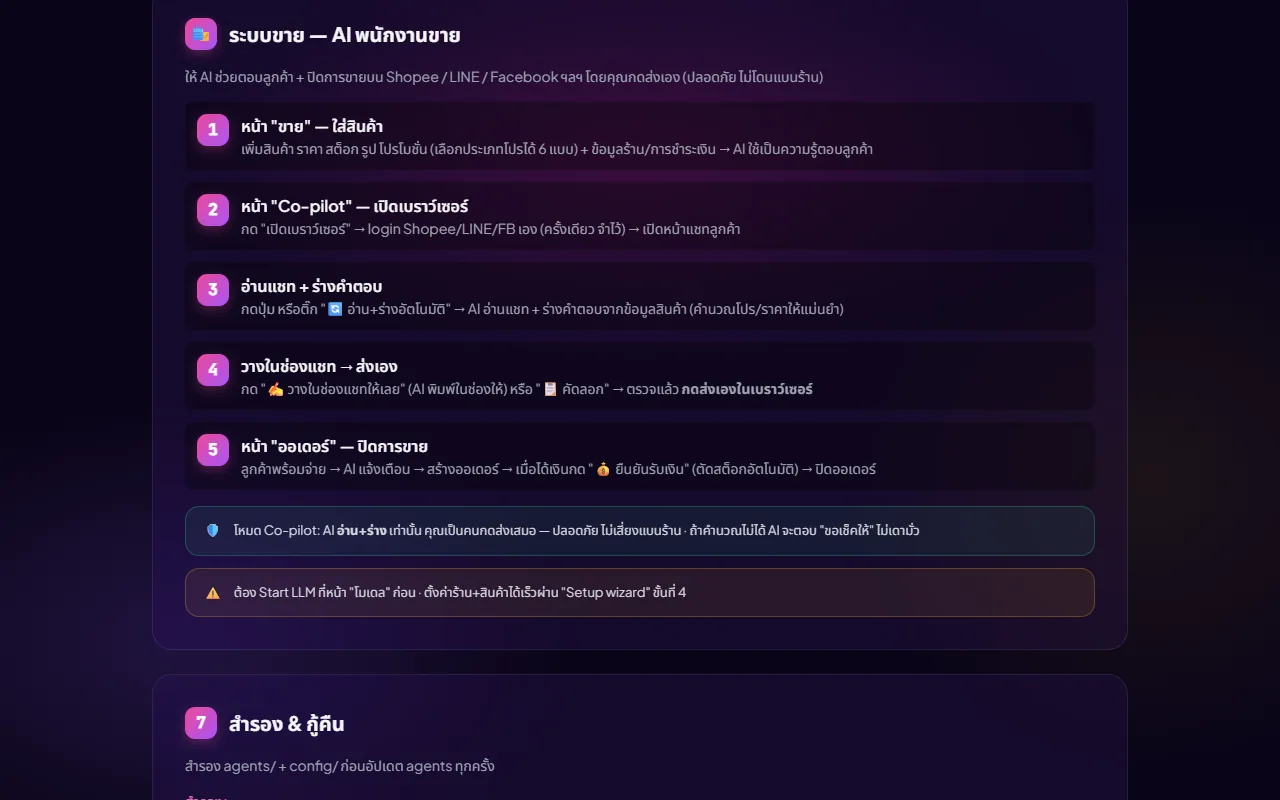
ส่วนที่เด่นคือระบบขาย ให้ AI ช่วยตอบลูกค้าบน Shopee, LINE หรือ Facebook ในโหมด Co-pilot AI อ่านแชทและร่างคำตอบจากข้อมูลสินค้า แต่คุณเป็นคนกดส่งเสมอ ตอนนี้โครงการอยู่ในช่วงพัฒนา ยังไม่ขาย (ตาม portfolio) แม้พิทช์เด็คเดือนมิถุนายน 2569 จะบรรยายว่าเป็น MVP ที่พร้อมขายแล้ว ยังไม่มีราคา ยังไม่มีลิงก์สาธารณะ และยังไม่มีผู้ซื้อThe standout is the sales system, which helps answer customers on Shopee, LINE or Facebook in Co-pilot mode: the AI reads the chat and drafts replies from your product data, but you always press send. The project is in development and not on sale according to the portfolio, although the June 2026 pitch deck describes it as a sale-ready MVP. There is no price, no public link and no buyer yet.
ที่ออกแบบแบบนี้เพราะคนที่อยากลอง AI agent ส่วนใหญ่ติดที่การติดตั้ง ตั้งค่า และฮาร์ดแวร์ การรวมทุกอย่างไว้ในไดรฟ์ตัวเดียวทำให้จุดเริ่มต้นเหลือแค่เสียบแล้วเปิด และการล็อกโปรแกรมไว้กับหมายเลขซีเรียลของไดรฟ์ตั้งใจให้ก๊อปไปใช้ต่อไม่ได้The reason for this design is that most people who want to try an AI agent get stuck on installing, configuring and hardware. Putting everything on one drive reduces the start to plugging in and opening, and tying the software to the drive's serial number is meant to stop it being copied.
02 · โจทย์02 · The brief
สร้างขึ้นมาเพราะอะไรWhy this exists
มือใหม่และผู้สนใจ AI agent ที่อยากลองใช้งานจริงโดยไม่ต้องซื้อเครื่องแรงหรือเซ็ตระบบเองBeginners and the AI-curious who want a real agent without buying powerful hardware or setting things up themselves
ใช่โจทย์ของคุณไหมSound like your problem?
03 · ฟีเจอร์03 · Features
ทำอะไรได้บ้าง อย่างละเอียดWhat it does, in detail
10 ความสามารถ10 capabilitiesเสียบแล้วเปิดด้วยไฟล์เดียวPlug in and open with one file
บน Windows ดับเบิลคลิก start.bat บน macOS คลิกขวา start.command แล้วเลือก Open ครั้งแรก ตัวเปิดตรวจแพลตฟอร์มเอง (win, mac-arm64, mac-x64, linux-x64) ใช้โฟลเดอร์ติดตั้งที่ตรงกัน แล้วเปิดหน้าควบคุมที่พอร์ต 7777 ไดรฟ์ต้องฟอร์แมตเป็น exFAT หรือ NTFS เพราะ FAT32 ไฟล์ใหญ่เกิน 4 GB ไม่ได้On Windows double-click start.bat; on macOS right-click start.command and choose Open the first time. The launcher detects the platform itself (win, mac-arm64, mac-x64 or linux-x64), uses the matching install folder and opens the control panel on port 7777. The drive must be formatted exFAT or NTFS because FAT32 cannot hold files over 4 GB.
Agent 2 ตัว ติดตั้งแยกตามระบบปฏิบัติการTwo agents, installed per operating system
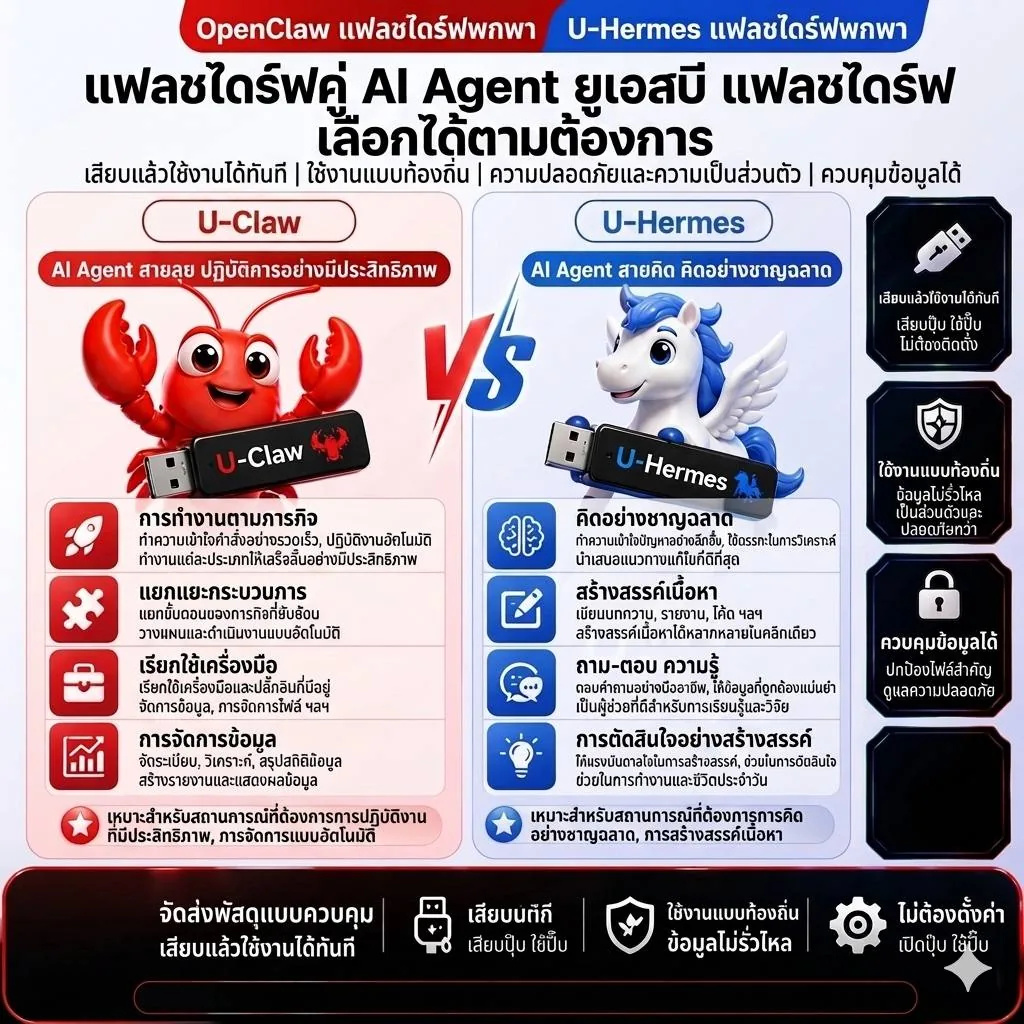
OpenClaw เป็น agent gateway หลายช่องทางสำหรับ Discord, Slack และ Telegram ส่วน Hermes เป็น agent ที่พัฒนาตัวเองได้และมีความจำถาวร ทั้งสองเป็นโครงการโอเพนซอร์สของคนอื่น (openclaw/openclaw และ NousResearch/hermes-agent) แต่ละแพลตฟอร์มมีโฟลเดอร์ติดตั้งแยกกัน ไม่ทับกัน การ์ด Agent มีปุ่ม ติดตั้ง เริ่ม หยุด และ Logs ติดตั้งครั้งแรกบนแพลตฟอร์มใหม่ใช้อินเทอร์เน็ตและเวลา 1-2 นาทีสำหรับ OpenClaw กับ 5-10 นาทีสำหรับ HermesOpenClaw is a multi-channel agent gateway for Discord, Slack and Telegram; Hermes is a self-improving agent with persistent memory. Both are other people's open-source projects (openclaw/openclaw and NousResearch/hermes-agent). Each platform has its own install folder so they never overwrite each other, and each agent card has install, start, stop and logs buttons. The first install on a new platform needs the internet and takes about 1-2 minutes for OpenClaw and 5-10 for Hermes.
โมเดลในเครื่อง ไม่ต้องมีอินเทอร์เน็ตA local model, no internet needed
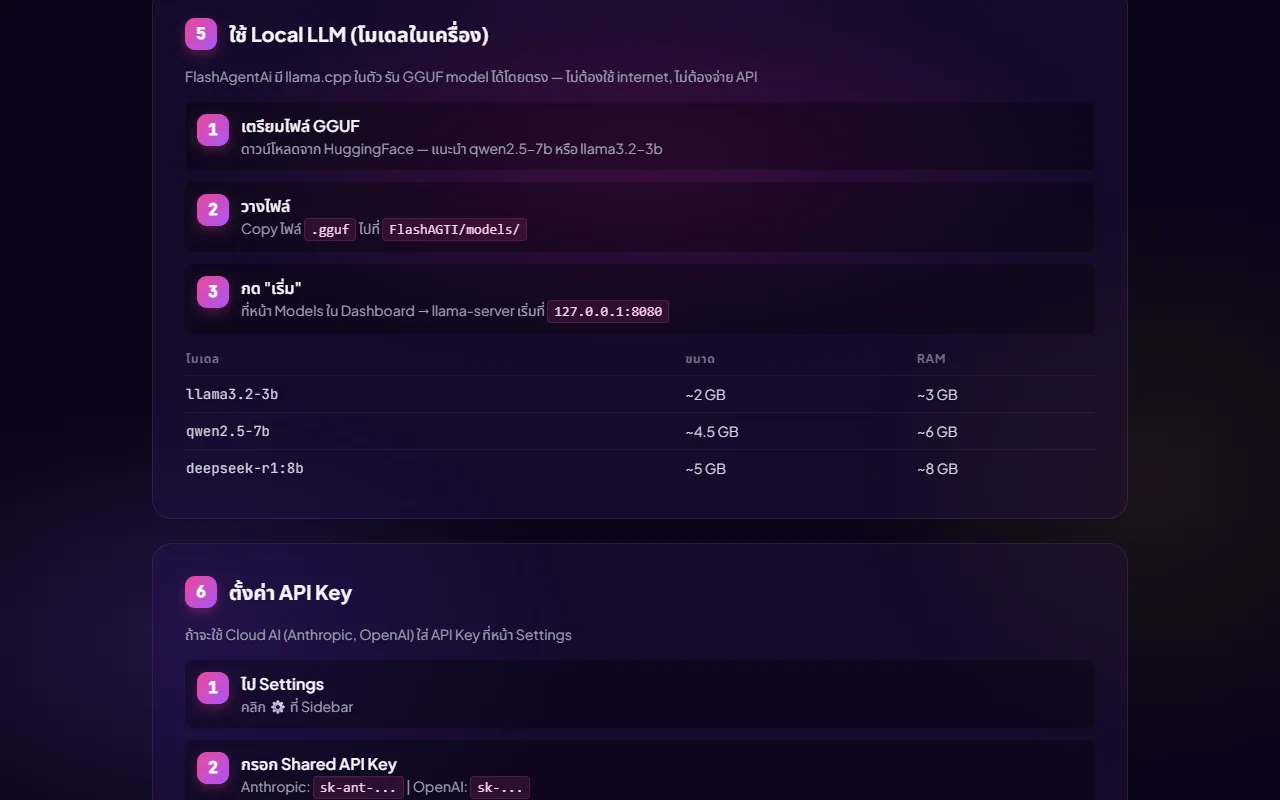
วางไฟล์ .gguf ไว้ในโฟลเดอร์ models แล้วกด เริ่ม ที่หน้าโมเดล ระบบเปิด llama-server ที่ 127.0.0.1:8080 และ agent ทั้งสองใช้โมเดลนี้อัตโนมัติโดยไม่ต้องใส่คีย์ ในไดรฟ์มี llama3.2-3b (ราว 2 GB ใช้แรม 3 GB) กับ qwen2.5-7b (ราว 4.5 GB แรม 6 GB) และมีรายการแนะนำให้ดาวน์โหลดจาก Hugging Face เช่น Qwen2.5-14B (9 GB แรม 16 GB ขึ้นไป) ถ้าจะรันโมเดล 7B ต้องมีแรมอย่างน้อย 8 GBPut a .gguf file in the models folder and press start on the models page; the system launches llama-server at 127.0.0.1:8080 and both agents use it automatically with no key. The drive includes llama3.2-3b (about 2 GB, 3 GB of RAM) and qwen2.5-7b (about 4.5 GB, 6 GB of RAM), and a recommended list to download from Hugging Face, such as Qwen2.5-14B (9 GB, 16 GB RAM or more). Running a 7B model needs at least 8 GB of RAM.
ต่อ Claude หรือ OpenAI ได้เมื่อมีคีย์Claude or OpenAI when you have a key
ในหน้าตั้งค่ากรอก API Key รวมช่องเดียว (รูปแบบ sk-ant-... สำหรับ Anthropic หรือ sk-... สำหรับ OpenAI) กดบันทึก คีย์ถูกเก็บในไฟล์ config บนไดรฟ์ ไม่ใช่ในเครื่องที่ไปเสียบ ถ้าโมเดลในเครื่องกำลังรันอยู่ agent จะเลือกใช้ตัวในเครื่องก่อนโดยอัตโนมัติIn settings enter one shared API key (sk-ant-... for Anthropic or sk-... for OpenAI) and save. The key is kept in a config file on the drive, not on the host machine. If the local model is running, the agents route to it first automatically.
ระบบขาย AI พนักงานขายSales system: an AI sales assistant
หน้า ขาย ให้ใส่สินค้า ราคา สต็อก รูป และโปรโมชัน (เลือกประเภทโปรได้ 6 แบบ) พร้อมข้อมูลร้านและวิธีชำระเงิน AI ใช้ข้อมูลนี้ตอบลูกค้า การคำนวณโปรและราคาทำด้วยโค้ด ไม่ให้ AI เดา ถ้าคำนวณไม่ได้ AI จะตอบว่า ขอเช็คให้ แทนการเดา ตัวช่วยตั้งค่าขั้นที่ 4 ช่วยตั้งร้านและสินค้าได้เร็ว และอัปโหลดไฟล์ PDF เพื่ออ่านข้อมูลได้The sales page takes products, prices, stock, pictures and promotions (six promotion types to choose from), plus shop details and payment methods; the AI uses these to answer customers. Promotion and price maths is done by code rather than guessed by the AI, and if it cannot compute something the AI says it will check rather than guess. Step 4 of the setup wizard speeds up entering the shop and products, and a PDF can be uploaded to be read.
Co-pilot เปิดเบราว์เซอร์จริง อ่านแชท ร่างคำตอบCo-pilot: a real browser, reads the chat, drafts replies
กด เปิดเบราว์เซอร์ แล้วระบบเปิด Chrome หรือ Edge จริงด้วยโปรไฟล์แยกที่จำการล็อกอิน คุณล็อกอิน Shopee, LINE หรือ Facebook เองครั้งเดียว เปิดหน้าแชทลูกค้า แล้วกดอ่านและร่าง หรือเปิดโหมดอ่านและร่างอัตโนมัติ AI อ่านข้อความและจับภาพหน้าจอ ร่างคำตอบจากข้อมูลสินค้า แล้วคุณเลือก วางในช่องแชทให้เลย หรือคัดลอก ตรวจ และกดส่งเองในเบราว์เซอร์ ระบบอ่านและร่างเท่านั้น ไม่ส่งเอง จึงเสี่ยงโดนระงับร้านต่ำPress open-browser and the system launches a real Chrome or Edge with a separate profile that remembers logins. You log into Shopee, LINE or Facebook yourself once, open a customer chat, then press read-and-draft or switch on automatic read-and-draft. The AI reads the messages and screenshots the page, drafts a reply from your product data, and you choose paste-into-the-chat-box or copy, check, and press send yourself in the browser. It only reads and drafts and never sends, so the risk of a shop suspension is low.
ออเดอร์และตัดสต็อกOrders and stock deduction
เมื่อลูกค้าพร้อมจ่าย AI แจ้งเตือนและสร้างออเดอร์ได้ เมื่อได้รับเงินแล้วกด ยืนยันรับเงิน ระบบตัดสต็อกอัตโนมัติ จากนั้นปิดออเดอร์ หน้าออเดอร์มีสถานะและรายการให้ลบหรือบันทึกWhen a customer is ready to pay, the AI can alert you and create an order. Once the money has arrived, press confirm-payment and stock is deducted automatically, then close the order. The orders page has statuses and lets you delete or save entries.
MCP เครื่องมือในตัว 6 อย่างSix built-in MCP tools
ใน MCP server ที่มากับไดรฟ์ มีเครื่องมือค้นเว็บ ข่าว ดึงข้อมูลจากลิงก์ คิดเลข วันที่เวลา และสภาพอากาศ agent เรียกใช้ได้เอง และหน้า MCP ให้เพิ่มเซิร์ฟเวอร์อื่นได้The MCP server shipped on the drive provides web search, news, fetching a URL, a calculator, date and time and weather, callable by the agents, and the MCP page lets you add other servers.
บุคลิก AI สำเร็จรูป 5 แบบFive ready-made AI personalities
มีไฟล์ SOUL.md สำเร็จรูป 5 แบบ คือเจ้าของธุรกิจ SME, Content Creator, เจ้าของร้านอาหารหรือร้านออนไลน์, Developer และนักศึกษาหรือนักวิจัย เลือกในตัวช่วยตั้งค่าขั้นแรกหรือรันสคริปต์ apply-personality แล้ว agent จะใช้สไตล์และความเชี่ยวชาญนั้นตั้งแต่เซสชันถัดไป ปรับต่อเองได้Five ready-made SOUL.md files cover a small-business owner, a content creator, a restaurant or online-shop owner, a developer and a student or researcher. Pick one in the first wizard step or run the apply-personality script and the agent uses that style and expertise from the next session; you can edit it further.
แชท ความจำ สำรองและกู้คืนChat, memory, backup and restore
แชทเก็บประวัติ แยกกลุ่ม ซ่อนเก็บ และแตกสาขาจากบทสนทนาเดิมได้ มีหน้าดูความจำของ agent ปุ่ม สำรองเดี๋ยวนี้ สร้าง snapshot ของโฟลเดอร์ agents และ config ก่อนอัปเดต และสคริปต์ rollback ย้อนกลับได้ ส่วนหน้าจอใช้ได้ 3 ภาษา ไทย อังกฤษ จีนChat keeps history, groups, archives and lets you fork from an earlier conversation, and there is a page to view the agent's memory. A back-up-now button snapshots the agents and config folders before an update, and a rollback script restores them. The interface comes in three languages: Thai, English and Chinese.
04 · วิธีทำงาน04 · How it works
ทำงานยังไง ตั้งแต่ต้นจนจบHow it works, start to finish
- 1
1. เสียบและเปิด1. Plug in and open
เสียบไดรฟ์ (ชื่อวอลุ่ม FlashAGTI) ดับเบิลคลิก start.bat เบราว์เซอร์เปิดที่ localhost:7777 ระบบตรวจใบอนุญาตผูกกับซีเรียลของไดรฟ์ ถ้าไม่ตรงจะขึ้นหน้า license invalidPlug in the drive (volume name FlashAGTI) and double-click start.bat. The browser opens at localhost:7777 and the system checks the licence tied to the drive's serial number; if it does not match, a licence-invalid page appears.
- 2
2. ติดตั้ง agent ครั้งแรกบนเครื่องนั้น2. First-time agent install on that machine
ถ้าแพลตฟอร์มนี้ยังไม่เคยติดตั้ง การ์ดของ OpenClaw และ Hermes จะมีปุ่ม ติดตั้งสำหรับแพลตฟอร์มนี้ กดแล้วรอ (ต้องมีอินเทอร์เน็ต) จนสถานะเป็น ติดตั้งแล้วIf this platform has not been installed yet, the OpenClaw and Hermes cards show an install-for-this-platform button. Press it and wait, with internet, until the status reads installed.
- 3
3. เลือกสมอง3. Choose the brain
วาง .gguf ในโฟลเดอร์ models แล้วเริ่มโมเดลในเครื่อง หรือกรอก API Key ในตั้งค่าเพื่อใช้ Claude หรือ OpenAIPut a .gguf in the models folder and start the local model, or enter an API key in settings to use Claude or OpenAI.
- 4
4. ตั้งบุคลิกและร้านด้วยตัวช่วย 4 ขั้น4. Personality and shop through the four-step wizard
เลือกบุคลิก AI ติดตั้ง Skills เชื่อมแพลตฟอร์ม แล้วตั้งค่าร้านและสินค้า ใช้เวลาราว 5 นาทีตามที่หน้าตัวช่วยบอกChoose the AI personality, install skills, connect platforms and set up the shop and products, about five minutes according to the wizard page.
- 5
5. ใช้งานและหยุดก่อนถอด5. Use it and stop before removing
คุยกับ agent หรือใช้ Co-pilot ตอบลูกค้า ก่อนถอดไดรฟ์ให้กดหยุดทุก agent แล้ว Eject อย่างถูกวิธีChat with an agent or use the co-pilot to answer customers. Before removing the drive, stop all agents and eject it properly.
05 · ภาพ05 · Visuals
ภาพจากระบบจริงFrom the real system
4 ภาพ4 imagesภาพหน้าจอจริงถ่ายจากระบบที่เปิดใช้อยู่ ส่วนภาพโปรโมตและภาพประกอบมีป้ายกำกับไว้ทุกใบReal screenshots come from the running system; promo images and illustrations are labelled on every card.
06 · สถานการณ์06 · Scenarios
ตัวอย่างสถานการณ์ใช้งานExample scenarios
เป็นตัวอย่างสมมติเพื่อให้เห็นภาพ ไม่ใช่เรื่องของลูกค้าจริงIllustrative scenarios to help you picture it — not real customer stories.
มือใหม่ที่อยากลอง AI agentA beginner curious about AI agents
สมมติว่าคุณไม่เคยลง Node หรือ Python เลย เสียบไดรฟ์เข้าโน้ตบุ๊กที่มีแรม 8 GB เปิดโมเดล llama3.2-3b แล้วลองคุยกับ agent โดยไม่ต้องตั้งค่าอะไรและไม่เสียค่า APISuppose you have never installed Node or Python. Plug the drive into a laptop with 8 GB of RAM, start the llama3.2-3b model and try an agent with no setup and no API fee.
เจ้าของร้านออนไลน์รายย่อยA small online shop owner
สมมติว่าคุณขายของบน Shopee และ LINE ตอบแชทซ้ำ ๆ ใส่สินค้าและโปรโมชันในหน้า ขาย เปิด Co-pilot ให้ AI ร่างคำตอบจากข้อมูลสินค้า แล้วคุณตรวจและกดส่งเองSuppose you sell on Shopee and LINE and answer the same chats repeatedly. Put products and promotions on the sales page, open the co-pilot so the AI drafts replies from the product data, then check and send them yourself.
คนที่ห่วงข้อมูลลับSomeone worried about confidential data
สมมติว่าคุณมีเอกสารที่ไม่อยากส่งขึ้นคลาวด์ ใช้โมเดลในเครื่องที่รันในไดรฟ์ ข้อมูลไม่ต้องออกจากคอมที่เสียบ (คุณภาพของโมเดล 3B ถึง 7B ไม่เท่ากับโมเดลคลาวด์ขนาดใหญ่)Suppose you have documents you would rather not send to the cloud. Use the local model on the drive so the data need not leave the computer it is plugged into. (A 3B to 7B model is not as capable as large cloud models.)
ครูหรือผู้สอนที่อยากให้ผู้เรียนลองทีละเครื่องA teacher letting learners try it machine by machine
สมมติว่าคุณสอนเรื่อง AI ให้นักเรียนหลายคน ส่งไดรฟ์ต่อกันไปเสียบแต่ละเครื่อง ผู้เรียนเปิดใช้ได้เลยโดยไม่ต้องลงโปรแกรม (ถ้าเป็นเครื่อง macOS หรือ Linux เครื่องแรกต้องมีอินเทอร์เน็ตเพื่อติดตั้ง agent ราว 150 MB และใบอนุญาตผูกกับไดรฟ์ ไม่ใช่เครื่อง)Suppose you teach AI to many students and pass the drive from machine to machine. Learners can start without installing software. (On a macOS or Linux machine the first run needs the internet to install the agents, about 150 MB, and the licence is tied to the drive, not the computer.)
07 · เบื้องหลัง07 · Under the hood
เบื้องหลังระบบ ข้อมูล และความปลอดภัยUnder the hood: data and security
- แพลตฟอร์มและโครงPlatform and structure
- หน้าควบคุมเป็นเว็บแอป Node.js ล้วนไม่มี dependency หนัก (พอร์ต 7777) ในไดรฟ์มี runtime ของ Node 22 และ Python 3.11 (Windows, macOS Intel และ Apple Silicon) Git และ llama.cpp ตัวรันแยกโฟลเดอร์ agents ตามแพลตฟอร์ม มีโฟลเดอร์ backups และ scripts สำหรับ backup และ rollbackThe control panel is a Node.js web app with few dependencies (port 7777). The drive carries Node 22 and Python 3.11 runtimes (Windows, macOS Intel and Apple Silicon), Git and llama.cpp, with agents kept in per-platform folders plus backups and scripts for backup and rollback.
- ที่เก็บข้อมูลWhere data lives
- ทุกอย่างอยู่บนไดรฟ์ ได้แก่ ประวัติแชท ความจำ agent สินค้า ออเดอร์ โปรไฟล์ และ API Key ไม่ได้เก็บบนเครื่องที่ไปเสียบ Co-pilot ใช้โปรไฟล์เบราว์เซอร์ในโฟลเดอร์ browser-profile บนไดรฟ์ ดังนั้นการล็อกอินร้านค้าจึงอยู่ในไดรฟ์ด้วย ต้องดูแลไดรฟ์เหมือนกุญแจร้านEverything is on the drive: chat history, agent memory, products, orders, profiles and the API key, not on the host machine. The co-pilot uses a browser profile in a browser-profile folder on the drive, so shop logins live on the drive too; treat the drive like the keys to the shop.
- ใบอนุญาตผูกฮาร์ดแวร์Hardware-bound licence
- โมดูล license ผูกกับหมายเลขซีเรียลจริงของ USB (อ่านจากดิสก์ใน Windows และจาก system_profiler ใน macOS) ถ้าไม่ตรงเซิร์ฟเวอร์จะปฏิเสธทุกคำขอและขึ้นหน้า license invalid ในโค้ดบันทึกว่ากุญแจลับยังเป็นค่าตัวอย่างที่ต้องเปลี่ยนก่อนผลิตจริง และควรคอมไพล์เป็นไบนารีเพื่อซ่อนกุญแจThe licence module binds to the USB's physical serial number (read from the disk on Windows and via system_profiler on macOS); if it does not match, the server refuses every request and shows a licence-invalid page. The code notes that the secret is still a placeholder to be changed before real production, and that it should be compiled to a binary to hide the secret.
- AI และการเชื่อมต่อภายนอกAI and external connections
- llama.cpp รัน GGUF ในเครื่อง หรือเรียก Anthropic และ OpenAI ด้วยคีย์ของผู้ใช้ OpenClaw ต่อ Discord, Slack, Telegram ส่วน Co-pilot ขับ Chrome หรือ Edge ผ่าน Chrome DevTools Protocol ที่พอร์ต 9337 ตัวดาวน์โหลดโมเดลดึงไฟล์จาก Hugging Face เมื่อผู้ใช้สั่งllama.cpp runs GGUF locally, or the app calls Anthropic and OpenAI with the user's key. OpenClaw connects to Discord, Slack and Telegram, and the co-pilot drives Chrome or Edge through the Chrome DevTools Protocol on port 9337. The model downloader fetches files from Hugging Face when the user asks.
- ข้อจำกัดที่ควรรู้Limits to know about
- ไดรฟ์ต้องเป็น exFAT หรือ NTFS รุ่น macOS ครั้งแรกต้องเปิดแบบ right-click และอาจต้องล้าง quarantine flag โมเดลรุ่นใหม่บางตัว (qwen3.5, qwen3.6, gemma4) อาจโหลดไม่ได้ถ้า llama.cpp เก่ากว่า รุ่น Windows แบบ native หน้าแชทของ Hermes ใช้ได้เฉพาะ WSL2 (โหมด CLI ใช้ได้) และโมเดล 7B ต้องมีแรมอย่างน้อย 8 GBThe drive must be exFAT or NTFS. On macOS the first launch needs right-click Open and may need the quarantine flag cleared. Some newer models (qwen3.5, qwen3.6, gemma4) may fail to load if llama.cpp is older than their format. On native Windows, Hermes's chat pane works only under WSL2 (CLI mode works), and a 7B model needs at least 8 GB of RAM.
08 · ความคืบหน้า08 · Progress
ความคืบหน้าและแผนต่อไปProgress and what comes next
- ทำแล้วDone
ราว พ.ค.-มิ.ย. 2569 (ตามวันที่ของไฟล์ภาพโลโก้และพิทช์เด็ค) ทำชุดต้นแบบ ได้แก่ launcher คอนโซล 2 agent โมเดลในเครื่อง ใบอนุญาตผูกซีเรียล และเอกสารคู่มือ 3 ภาษา (ตามคู่มือฉบับ v1.0 และไฟล์ในไดรฟ์)Around May to June 2026 (judging by the logo-file and pitch-deck dates): the prototype set: launcher, console, two agents, local models, serial-bound licence and a three-language guide (per the v1.0 guide and files on the drive)
- ทำแล้วDone
มิ.ย. 2569 ทำพิทช์เด็ค 12 สไลด์สำหรับหาทุน (ช่องจำนวนเงินที่ขอยังว่าง) ระบุว่าเป็น MVP พร้อมขายJune 2026: a 12-slide funding pitch deck (the amount-requested field is still blank), describing it as a sale-ready MVP
- ทำแล้วDone
ระบบขาย AI พนักงานขาย Co-pilot และออเดอร์ มีในคอนโซลและคู่มือ v1.0 แล้ว (ไม่ทราบวันที่แน่ชัด)The AI sales system, co-pilot and orders are in the console and the v1.0 guide (exact date not known)
- ถัดไปNext
ตามพิทช์เด็ค เฟส 1 ขายตรงและทำคอนเทนต์ (เพจ Shopee ไลฟ์) เฟส 2 คอมมูนิตี้และคอร์ส เฟส 3 รีเซลเลอร์และสถานศึกษา ยังเป็นแผน ไม่มีหลักฐานว่าเริ่มแล้วPer the pitch deck: phase 1 direct sales and content (page, Shopee, livestreams), phase 2 community and courses, phase 3 resellers and schools. This is a plan; there is no evidence it has begun
- ถัดไปNext
ทำ skills ที่เพิ่มเองได้ให้ดาวน์โหลดได้จริง (ตอนนี้รายการใน Skills catalog เป็นตัวยึดที่รวมมากับคอนโซล) และเปลี่ยนกุญแจลับของใบอนุญาตก่อนผลิตจริงMake the add-on skills genuinely downloadable (the Skills catalog entries today are bundled placeholders) and replace the licence secret before real production
09 · คำถาม09 · FAQ
คำถามที่พบบ่อยFrequently asked questions
ขายไหม ราคาเท่าไรIs it for sale, and at what price?
ยังไม่ได้กำหนดราคาและยังไม่มีหน้าขาย พิทช์เด็คยกตัวอย่างราคาราว 2,500 บาทต่อชิ้นและต้นทุนไดรฟ์ 300-500 บาท แต่ระบุเองว่าเป็นตัวเลขตัวอย่าง ยังไม่ใช่ราคาที่ตัดสินใจNo price is set and there is no sales page. The pitch deck gives an illustrative price of about 2,500 baht per unit and a 300-500 baht drive cost, but labels these as sample figures, not a decision.
ต้องมีอินเทอร์เน็ตไหมDo I need the internet?
ถ้าใช้โมเดลในไดรฟ์ที่ติดตั้งแล้ว ไม่ต้องใช้อินเทอร์เน็ต แต่การติดตั้ง agent ครั้งแรกบนแพลตฟอร์มที่ยังไม่เคยติดตั้งต้องต่ออินเทอร์เน็ต (macOS ราว 150 MB) และถ้าใช้ Claude หรือ OpenAI ก็ต้องต่อเน็ตและจ่ายตามการใช้With a local model on a platform already installed, no. But the first agent install on a platform that has never been set up needs the internet (about 150 MB on macOS), and using Claude or OpenAI needs the internet and pay-per-use billing.
ข้อมูลของฉันอยู่ที่ไหนWhere is my data?
บนไดรฟ์ ทั้งประวัติแชท สินค้า ออเดอร์ และคีย์ ถ้าใช้โมเดลในเครื่องข้อมูลไม่ออกจากคอม ถ้าใช้ Claude หรือ OpenAI ข้อความที่ส่งไปจะถึงผู้ให้บริการนั้น ควรเก็บไดรฟ์ให้ดีเพราะการล็อกอินร้านค้าของ Co-pilot ก็อยู่บนไดรฟ์On the drive: chat history, products, orders and the key. With the local model data stays on the computer; with Claude or OpenAI the text you send reaches that provider. Keep the drive safe, since the co-pilot's shop logins sit on it too.
AI จะส่งข้อความหาลูกค้าเองไหมWill the AI message customers by itself?
ไม่ในโหมด Co-pilot AI อ่านและร่างเท่านั้น คุณตรวจแล้วกดส่งเองในเบราว์เซอร์ จึงไม่เสี่ยงโดนระงับร้านจากบอทตอบอัตโนมัติNot in co-pilot mode. The AI only reads and drafts; you check and press send in the browser, so there is no risk of a shop suspension from an auto-reply bot.
ใช้กับเครื่องอะไรได้Which computers does it work on?
Windows, macOS (Intel และ Apple Silicon) และ Linux แต่ต้องมีแรมอย่างน้อย 8 GB สำหรับโมเดล 7B และไดรฟ์เป็น exFAT หรือ NTFS บน macOS ครั้งแรกต้องทำตามขั้นตอนเปิดโปรแกรมที่ไม่ได้เซ็นรหัสWindows, macOS (Intel and Apple Silicon) and Linux, with at least 8 GB of RAM for a 7B model and an exFAT or NTFS drive. On macOS the first launch needs the steps for opening an unsigned program.
OpenClaw และ Hermes เป็นของใครWho owns OpenClaw and Hermes?
เป็นโครงการโอเพนซอร์สของผู้อื่น (openclaw/openclaw และ NousResearch/hermes-agent บน GitHub) FlashAgentAi รวมและห่อให้ใช้ง่ายบนไดรฟ์ ไม่ใช่ผู้สร้าง agent สองตัวนี้ ส่วนเงื่อนไขการแจกจ่ายซ้ำเชิงพาณิชย์ยังไม่ได้ตรวจThey are other people's open-source projects (openclaw/openclaw and NousResearch/hermes-agent on GitHub). FlashAgentAi bundles and packages them on a drive and did not create these agents. The terms for commercial redistribution have not been checked.
10 · วิธีเริ่ม10 · Get started
เริ่มได้ใน 3 ขั้นUp and running in three steps
ถ้าอยากได้ระบบแบบเดียวกันสำหรับธุรกิจของคุณ บอกโจทย์มาสั้น ๆ เราตอบกลับพร้อมขอบเขตงานและราคาภายใน 1 วันทำการIf you want something like this for your own business, send us a line about the problem. You'll get scope and price within one working day.
- 1ขั้นที่ 1 เสียบแฟลชไดรฟ์เข้ากับคอมพิวเตอร์ที่ใช้อยู่Step 1: Plug the USB drive into the computer you already use
- 2ขั้นที่ 2 กดไฟล์เริ่มโปรแกรมในไดรฟ์ แล้วเปิดหน้าควบคุมที่เบราว์เซอร์Step 2: Run the launcher on the drive and open the control panel in your browser
- 3ขั้นที่ 3 พิมพ์สั่งงานที่อยากให้ agent ทำ แล้วดูผลลัพธ์ได้ทันทีStep 3: Type the task you want the agent to do and watch the result
เริ่มงานกับเราWork with us
อยากได้ระบบแบบนี้สำหรับธุรกิจคุณWant a system like this for your business?
เล่าปัญหาของคุณมา เราจะบอกตรง ๆ ว่าช่วยได้ไหม ภายใน 1 วันทำการ ส่งแล้วได้รหัสติดตามงานทันทีTell us the problem and we'll say honestly whether we can help, within one working day. You get a tracking code the moment you send it.