คนที่ดูแลแอปหลายตัวต้องคิดคอนเทนต์ไทยใหม่ทุกวัน ทั้งสคริปต์คลิป โพสต์เพจ และข้อความชวนครีเอเตอร์ แล้วยังต้องไล่โพสต์ทีละช่องทางเอง พอทำหลายแอปพร้อมกันก็จำไม่ได้ว่าแอปไหนโพสต์อะไรไปแล้วAnyone running several apps has to invent fresh Thai content every day — video scripts, page posts, messages to creators — then post it channel by channel. Across several apps at once, it becomes impossible to remember what already went out for which.
← ผลงานทั้งหมด← All work
เครื่องมือเดสก์ท็อปDesktop tool
Promote APP AIPromote APP AI
เวิร์กเบนช์ที่ให้ AI Agent 7 ตัวช่วยวางแผนและเขียนคอนเทนต์โปรโมตแอปในตลาดไทยA workbench where seven AI agents plan and write Thai-market promotion content for your apps
กำลังพัฒนาIn development เครื่องมือเดสก์ท็อปDesktop tool
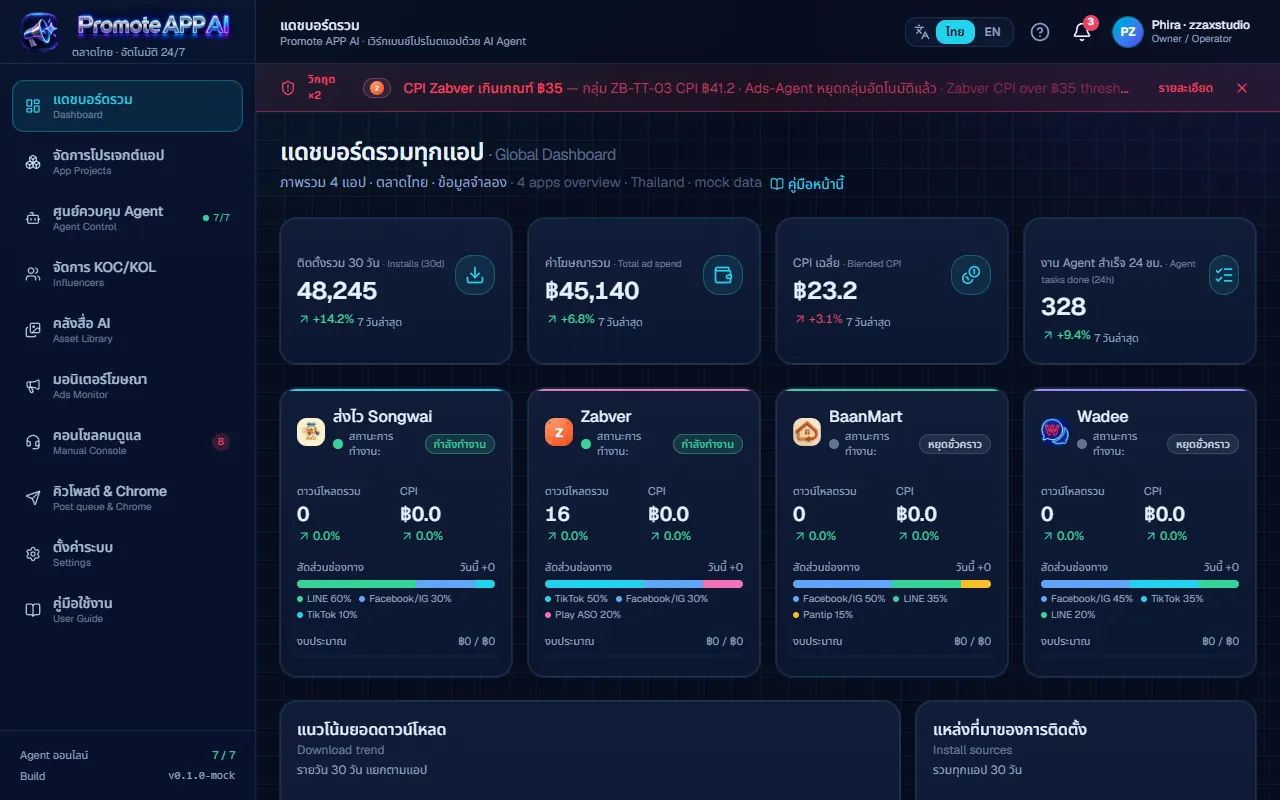
รันบนคอมของเจ้าของ เปิดจากไอคอนบนเดสก์ท็อป ยังไม่เปิดให้คนนอกใช้และยังไม่ขาย · ส่วนที่ทำงานจริงแล้วคือการเรียกโมเดล AI มาเขียนคอนเทนต์ คิวโพสต์ที่ต้องกดอนุมัติเอง และการต่อโมเดลที่รันในเครื่อง ส่วนตัวเลขบนแดชบอร์ด ค่าโฆษณา และข้อมูล KOC ยังเป็นข้อมูลตัวอย่างทั้งหมด ซึ่งหน้าจอกำกับไว้ว่า ข้อมูลจำลองIt runs on the founder's own computer, launched from a desktop icon; it is not open to anyone else and is not for sale. What works for real today is calling an AI model to write content, the approval queue for posts, and connecting to a locally hosted model. Every figure on the dashboard, all ad spend and all influencer data are sample values, and the interface labels them as such.
7AI Agent ในระบบAI agents in the system
10หน้าจอในแอปScreens in the app
5ผู้ให้บริการโมเดลที่ต่อได้Model providers supported
01 · ภาพรวม01 · Overview
ภาพรวมของระบบThe system at a glance
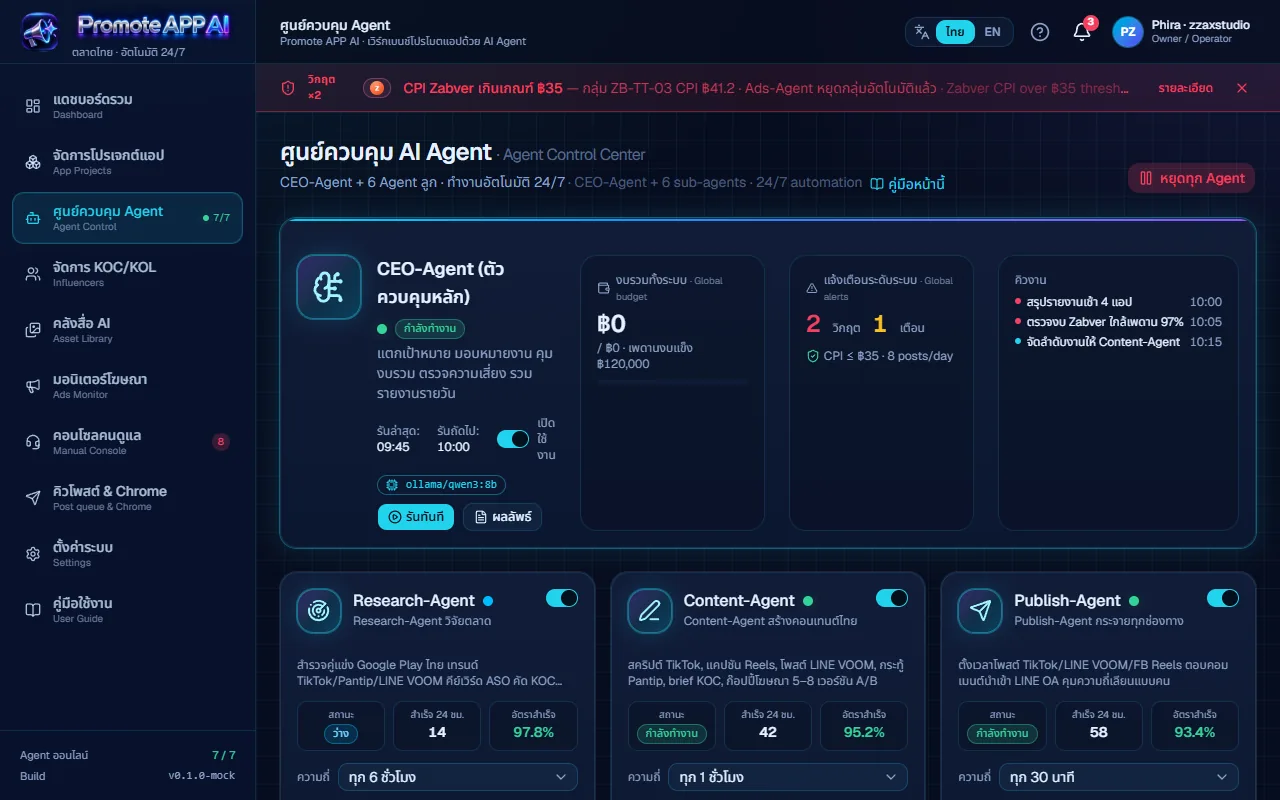
Promote APP AI คือเวิร์กเบนช์ที่ให้ AI Agent 7 ตัวช่วยคนที่ดูแลหลายแอปคิดและเขียนคอนเทนต์โปรโมตภาษาไทยทุกวัน ตัวหนึ่งสำรวจตลาด ตัวหนึ่งเขียนสคริปต์คลิปและโพสต์ ตัวหนึ่งกระจายโพสต์ ตัวหนึ่งหาครีเอเตอร์ ตัวหนึ่งดูโฆษณา ตัวหนึ่งสรุปผล และมี CEO-Agent คอยแตกเป้าหมายและคุมงบรวม ตอนนี้ตั้งค่าไว้กับ 4 แอปของ ZZAX Studio คือ ส่งไว Zabver BaanMart และ WadeePromote APP AI is a workbench where seven AI agents help someone running several apps to think up and write Thai promotion content every day. One researches the market, one writes video scripts and posts, one distributes, one finds creators, one watches ads, one reports, and a CEO-agent splits goals and holds the overall budget. It is currently set up around ZZAX Studio's four apps: Songwai, Zabver, BaanMart and Wadee.
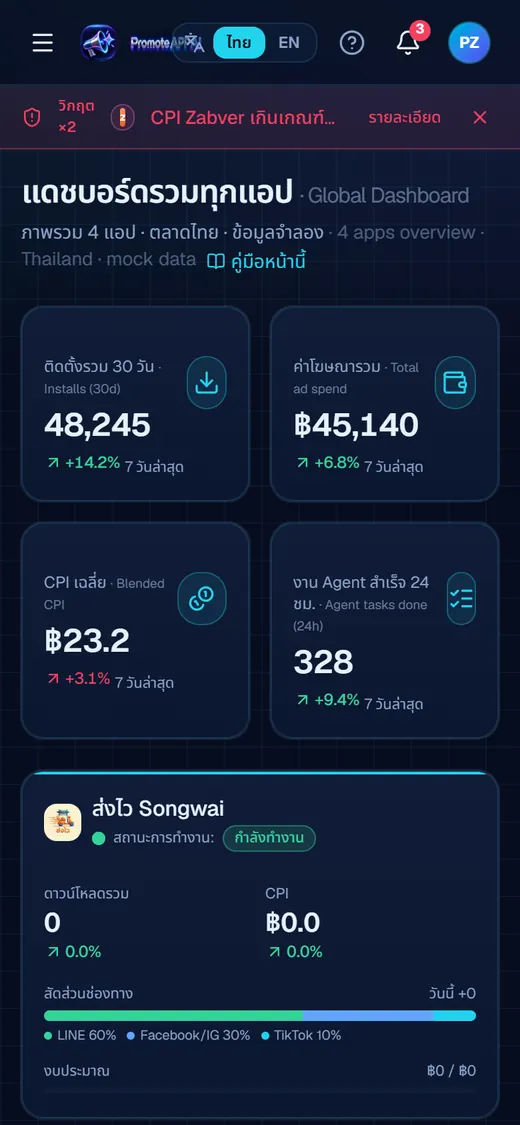
ใช้งานผ่านเบราว์เซอร์ที่เครื่องของเจ้าของ เปิดจากไอคอนบนเดสก์ท็อป มี 10 หน้า คือ แดชบอร์ด จัดการแอป ศูนย์ควบคุม Agent KOC/KOL คลังสื่อ มอนิเตอร์โฆษณา คอนโซลคนดูแล คิวโพสต์ ตั้งค่า และคู่มือ ส่วนที่ใช้งานได้จริงคือการเรียกโมเดล AI มาเขียนโพสต์จากข้อมูลจริงของแต่ละแอป คิวโพสต์ที่ต้องกดอนุมัติเอง ตารางเวลาที่ให้ระบบร่างโพสต์ไว้ล่วงหน้า และการต่อโมเดลที่รันในเครื่องIt runs in a browser on the owner's own computer, launched from a desktop icon, and has ten screens: dashboard, app projects, agent control, KOC/KOL influencers, asset library, ads monitor, manual console, post queue, settings and a user guide. What works for real is calling an AI model to write posts from each app's real facts, an approval queue, a timetable that makes the system draft posts ahead of time, and connecting to a locally hosted model.
สถานะตอนนี้คือกำลังพัฒนา ยังไม่เปิดให้คนนอกใช้และยังไม่ขาย ตัวเลขบนแดชบอร์ด ค่าโฆษณา ข้อมูล KOC และข้อความ DM ในคอนโซลเป็นข้อมูลจำลองทั้งหมด หน้าจอกำกับไว้ทุกจุด และบันทึกการทำงานติดป้ายว่า จริง หรือ จำลอง พร้อมสวิตช์ให้ดูเฉพาะงานจริง ซึ่งเปิดไว้เป็นค่าเริ่มต้นStatus is in development: not open to outsiders and not for sale. The dashboard figures, ad spend, KOC data and the DMs in the console are all simulated, labelled as such on screen, and every activity-log line is tagged real or simulated, with a show-only-real switch that is on by default.
ที่ออกแบบแบบนี้เพราะเจ้าของไม่ต้องการให้ AI โพสต์แทนโดยไม่ผ่านตา และไม่อยากจัดการ API token ของทุกแพลตฟอร์ม Agent จึงเขียนและเข้าคิว คุณอนุมัติ แล้วเปิดหน้าโพสต์ในเบราว์เซอร์ที่ล็อกอินไว้ ข้อความถูกคัดลอกให้ คุณกดโพสต์เอง ทางนี้ไม่มี token ไม่มีการโพสต์ลับหลังThat design follows the owner's wish that nothing is posted without a human look, and no wish to manage API tokens for every platform. The agent writes and queues; you approve; then the post page opens in your already logged-in browser with the text copied, and you press post yourself. There are no tokens and no posting behind your back.
02 · โจทย์02 · The brief
สร้างขึ้นมาเพราะอะไรWhy this exists
เจ้าของแอปหรือคนทำการตลาดที่ดูแลหลายแอปพร้อมกัน และอยากให้ AI ช่วยร่างงานไว้ก่อนตัดสินใจเองApp owners and marketers juggling several apps who want AI to draft the work first and keep the decision for themselves
ใช่โจทย์ของคุณไหมSound like your problem?
03 · ฟีเจอร์03 · Features
ทำอะไรได้บ้าง อย่างละเอียดWhat it does, in detail
9 ความสามารถ9 capabilitiesศูนย์ควบคุม AgentAgent control centre
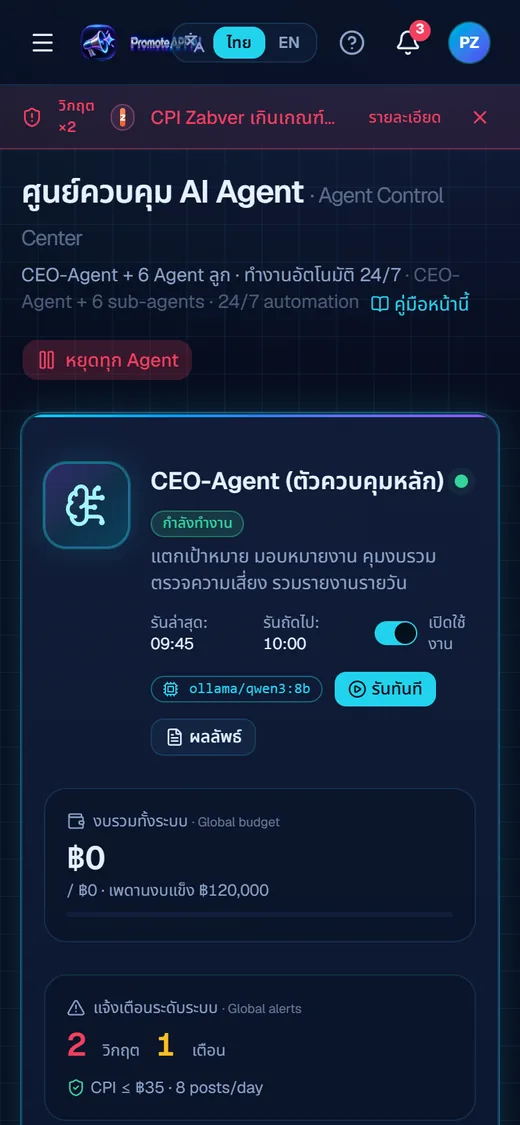
หน้าเดียวเห็น CEO-Agent ใบใหญ่ (สถานะ เวลารันล่าสุดและถัดไป งบรวม ตัวนับแจ้งเตือน คิวงาน) กับการ์ด Agent ลูก 6 ใบ แต่ละใบมีสวิตช์เปิดปิด ไฟสถานะ ความถี่ของการรัน คิวงาน และปุ่ม รันทันที ที่เรียกโมเดลจริงแล้วสตรีมผลเข้าปุ่ม ผลลัพธ์ มีปุ่ม หยุดทุก Agent และกล่องบันทึกการทำงานเลื่อนอัตโนมัติOne page shows the large CEO-agent card (status, last and next run, global budget, alert counts, task queue) and six sub-agent cards, each with an on/off switch, status light, run frequency, task queue and a run-now button that calls the real model and streams the reply into a results button. There is a stop-all button and an auto-scrolling activity log.
เลือกโมเดล AI ได้ 5 แบบ แยกตาม AgentFive model providers, set per agent
ต่อได้ทั้ง Ollama และ LM Studio หรือเซิร์ฟเวอร์แบบ OpenAI-compatible ที่รันในเครื่อง รวมถึง Anthropic, OpenAI และ Gemini ผ่านคีย์ของคุณเอง ตั้งโมเดลแยกรายตัวได้ เช่น CEO, Research, Data และ Ads ใช้ qwen3.8:27b ส่วนตัวอื่นใช้ qwen3:8b มีปุ่มดึงรายชื่อโมเดลและทดสอบเรียกโมเดลในหน้าตั้งค่าIt connects to Ollama, LM Studio or any OpenAI-compatible local server, plus Anthropic, OpenAI and Gemini through your own keys. Models can be set per agent; for example CEO, Research, Data and Ads use qwen3.8:27b while the rest use qwen3:8b. Settings has a fetch-model-list button and a test-call button.
เขียนโพสต์จากข้อมูลจริงของแอปPosts written from each app's real facts
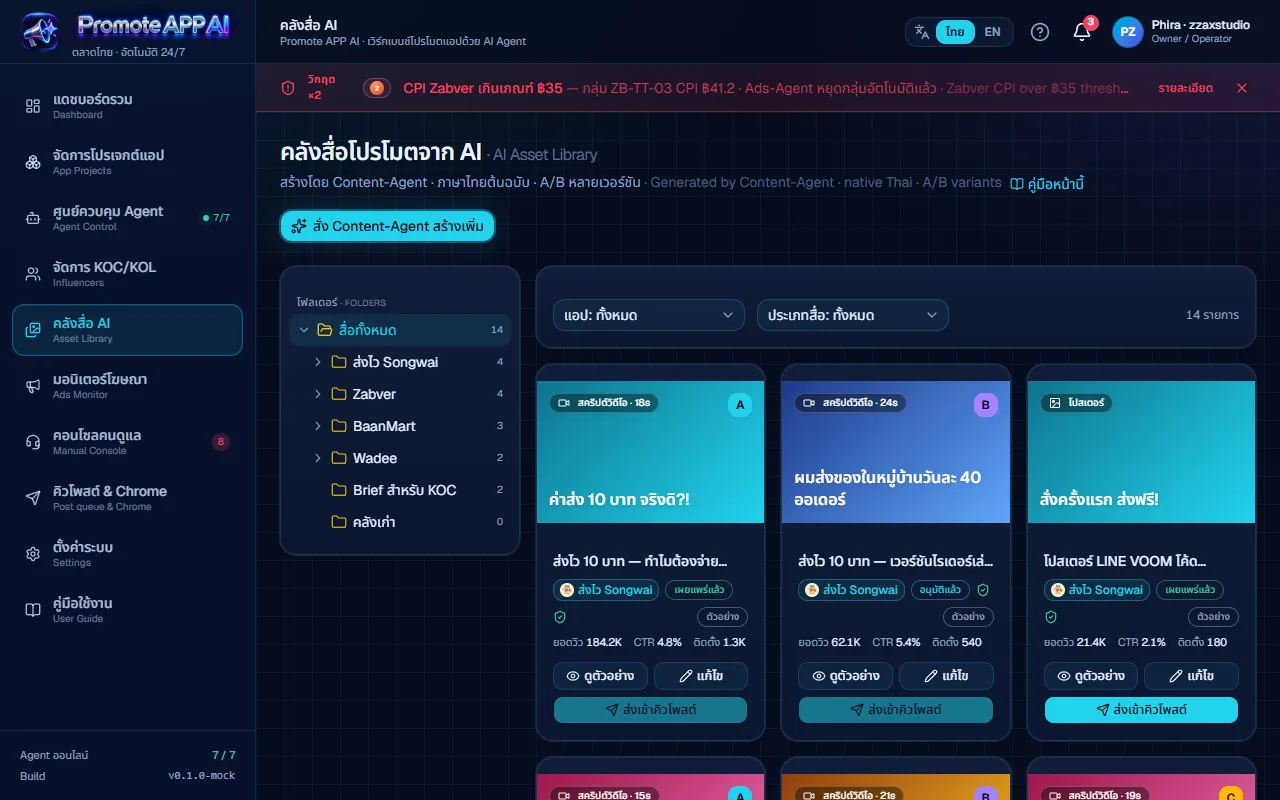
ข้อมูลของ 4 แอปที่ใส่ไว้ (ข้อเท็จจริง ข้อห้ามอ้าง วันเปิดตัว ลิงก์ น้ำเสียง) ถูกส่งให้ Content-Agent ทุกครั้ง ทดสอบแล้วว่าดึงค่าส่งเหมา 25 บาทของส่งไวถูกต้องและไม่อ้างว่าส่งฟรี คอนเทนต์ที่เขียนเสร็จเข้าคลังสื่อพร้อมป้าย ตัวอย่าง หรือ AI เขียนจริง ให้แยกออกว่าอันไหนมาจากโมเดลThe four apps' details (facts, claims to avoid, launch date, links, voice) go to the content agent every time. It was tested to quote Songwai's flat 25-baht delivery fee correctly and not claim free delivery. Finished content lands in the asset library tagged sample or AI-written so you can tell what came from the model.
คิวโพสต์และโพสต์ผ่าน ChromePost queue and posting through Chrome
โพสต์ที่ Agent เขียนไว้เข้าสถานะ รอตรวจ คุณอ่านแก้แล้วกด อนุมัติ เมื่อพร้อมกด เปิดใน Facebook, LINE OA หรือ TikTok ข้อความถูกคัดลอกและแท็บใหม่เปิดหน้าโพสต์ใน Chrome ที่ล็อกอินไว้ คุณวางแล้วกดโพสต์เอง จากนั้นกลับมาติ๊ก ว่าโพสต์แล้ว มีปุ่มเปิด Gemini พร้อมคัดลอกพรอมป์ตภาพ แล้ว วางรูป จากคลิปบอร์ด หรือเลือกรูปจากอัลบั้มบนมือถือPosts the agent wrote start as pending review. You read and edit, then approve; when ready, press open-in-Facebook, LINE OA or TikTok and the text is copied while a new tab opens the post page in your logged-in Chrome. You paste and press post yourself, then come back and tick it as posted. A button opens Gemini with the image prompt copied, and you paste the picture from the clipboard or pick one from the phone's album.
ตารางเวลาที่ร่างโพสต์ให้ล่วงหน้าA timetable that drafts posts ahead
ตั้งวัน เวลา ช่องทาง และน้ำหนักของแต่ละแอป (ส่งไวตั้งไว้ 70%) หลังบ้านเช็กทุก 20 วินาที พอถึงเวลาก็เลือกแอปตามน้ำหนัก ให้ Content-Agent เขียนโพสต์พร้อมพรอมป์ตภาพภาษาอังกฤษ แล้วใส่คิวรอคุณอนุมัติ ระบบไม่โพสต์ออกเอง การโพสต์ยังเป็นการกดของคุณเสมอSet days, times, channels and a weight per app (Songwai is set to 70%). The backend checks every 20 seconds; at the set time it picks an app by weight, has the content agent write a post with an English image prompt, and puts it in the queue for your approval. The system never posts by itself; posting is always your click.
คลังสื่อ AIAI asset library
ต้นไม้โฟลเดอร์ซ้ายแยกตามแอป การ์ดแต่ละใบมีปก ชื่อ ประเภท (สคริปต์วิดีโอ โปสเตอร์ ฯลฯ) ป้าย A/B และสถานะ ดูตัวอย่าง แก้ไข หรือ ส่งเข้าคิวโพสต์ ปุ่ม สั่ง Content-Agent สร้างเพิ่ม ให้เลือกแอป ประเภท และโจทย์ ได้การ์ดฉบับร่างใหม่ในคลังทันที หมายเหตุ วิดีโอสั้นในคลังคือสคริปต์วิดีโอ ไม่ใช่ไฟล์วิดีโอA folder tree by app on the left, with cards showing cover, title, type (video script, poster and so on), A/B badge and status; preview, edit or send to the post queue. The order-more button lets you pick app, type and brief and a new draft card appears in the library at once. Note that the short videos in the library are video scripts, not video files.
งานวิดีโอผ่าน ComfyUIVideo jobs through ComfyUI
หลังบ้านมีตัวไล่ผลิตชุดคอนเทนต์ที่แตกงานเป็นชิ้น (ข้อความ คลิป วิดีโอ ประกอบ) แล้วส่งคลิปไปให้ ComfyUI ที่ติดตั้งในเครื่องเรนเดอร์ด้วยเวิร์กโฟลว์ MiniMax H3 ใส่ซับ และผสมเสียงบรรยากาศ ชิ้นที่คุณแก้เองจะถูกล็อก ระบบไม่เขียนทับ ต้องเปิด ComfyUI ไว้ และการอัปขึ้น TikTok ยังต้องทำเองThe backend has a content-set runner that splits work into parts (text, clips, video, assembly) and hands clips to a ComfyUI installed on the same machine, rendering with a MiniMax H3 workflow, adding subtitles and mixing ambient sound. Parts you have edited are locked and never overwritten. ComfyUI must be running, and uploading to TikTok is still manual.
คอนโซลคนดูแลและมอนิเตอร์โฆษณาManual console and ads monitor
คอนโซลคนดูแลมี 2 แท็บ คือข้อความส่วนตัวรอตอบ (ดูบทสนทนา ให้ AI ร่างคำตอบ ปิดงาน) และคิวงานความเสี่ยง (อนุมัติหรือปฏิเสธพร้อมบันทึก) หน้ามอนิเตอร์โฆษณารวม TikTok, LINE, Meta ตารางต้นทุนต่อการติดตั้ง และไฮไลต์แถวที่เกินเกณฑ์ CPI ที่ตั้งในหน้าตั้งค่า ทั้งสองหน้านี้ยังใช้ข้อมูลจำลองThe manual console has two tabs: pending DMs (read the thread, have the AI draft a reply, close it) and a risk queue (approve or reject with a note). The ads monitor combines TikTok, LINE and Meta, shows cost per install and highlights rows above the CPI threshold set in settings. Both screens still use simulated data.
คู่มือในตัวแอปIn-app user guide
หน้าคู่มือ 14 หัวข้อ มีสารบัญที่เลื่อนตามที่อ่าน ช่องค้นหา ภาพจำลองแถบแจ้งเตือนพร้อมคำอธิบายทีละจุด ตารางสรุปว่าอะไรเป็นของจริงและอะไรจำลอง และวิธีแก้ปัญหา สลับไทยและอังกฤษได้ แต่ละหน้ามีลิงก์ คู่มือหน้านี้ ที่พาไปหัวข้อของหน้านั้นโดยตรงThe guide has 14 sections with a table of contents that follows your reading position, a search box, a mock-up of the alert bar explained point by point, a table of what is real and what is simulated, and troubleshooting. It switches between Thai and English, and each page carries a this-page link straight to its own section.
04 · วิธีทำงาน04 · How it works
ทำงานยังไง ตั้งแต่ต้นจนจบHow it works, start to finish
- 1
1. เปิดจากไอคอนบนเดสก์ท็อป1. Launch from the desktop icon
ไอคอน Promote APP AI เปิดหลังบ้านและเบราว์เซอร์ให้เอง รอจนพร้อมจริงก่อนเปิดหน้า กันหน้าขาว และรายงานว่า Ollama ทำงานอยู่ไหม ปิดหน้าต่างดำเมื่อไรคือปิดเซิร์ฟเวอร์The Promote APP AI icon starts the backend and opens the browser, waiting until the server is truly ready to avoid a blank page, and reports whether Ollama is running. Closing the black window shuts the server down.
- 2
2. ตั้งโมเดล พรอมป์ต และข้อมูลแอป2. Set the model, prompts and app data
ในตั้งค่าเลือกผู้ให้บริการโมเดล ตรวจพรอมป์ตของ Agent 7 ตัว ตั้งเกณฑ์ความเสี่ยง (เพดานงบ CPI ลิมิตโพสต์) แล้วใส่ข้อมูลของแอปที่จะโปรโมต กดบันทึกมุมบนขวาIn settings choose the model provider, review the seven agents' prompts, set risk thresholds (budget cap, CPI, post limits) and fill in the apps you promote, then press save at the top right.
- 3
3. ให้ Agent ร่าง3. Let an agent draft
กด รันทันที ที่ Agent หรือสั่ง Content-Agent สร้างสื่อ หรือเปิดตารางเวลาให้ร่างโพสต์เข้าคิวเอง โมเดลทำงานตามข้อมูลแอปที่ตั้งไว้Press run-now on an agent, ask the content agent for new assets, or switch on the timetable so drafts arrive in the queue by themselves. The model works from the app data you set.
- 4
4. ตรวจและอนุมัติในคิวโพสต์4. Review and approve in the post queue
อ่านโพสต์ แก้ข้อความ ดูพรอมป์ตภาพ แล้วกด อนุมัติ โพสต์ที่ยังไม่อนุมัติจะไม่ถูกเปิดโพสต์Read the post, edit the text, check the image prompt and press approve. Anything not approved is never opened for posting.
- 5
5. โพสต์เองในเบราว์เซอร์แล้วติ๊กกลับ5. Post it yourself, then tick it back
กดเปิดในช่องทางที่เลือก ข้อความถูกคัดลอกให้ แท็บใหม่เปิด คุณวางแล้วกดโพสต์ จากนั้นกลับมากดว่าโพสต์แล้ว เพื่อให้คิวและบันทึกตรงกับความจริง (หรือสั่ง Claude in Chrome ว่า โพสต์คิวผ่าน Chrome ให้กดแทน)Press open on the chosen channel; the text is copied and a new tab opens. Paste and post, then come back and mark it posted so the queue and log match reality. (Or tell Claude in Chrome to post the queue through Chrome and it will click for you.)
05 · ภาพ05 · Visuals
ภาพจากระบบจริงFrom the real system
6 ภาพ6 imagesภาพหน้าจอจริงถ่ายจากระบบที่เปิดใช้อยู่ ส่วนภาพโปรโมตและภาพประกอบมีป้ายกำกับไว้ทุกใบReal screenshots come from the running system; promo images and illustrations are labelled on every card.

06 · สถานการณ์06 · Scenarios
ตัวอย่างสถานการณ์ใช้งานExample scenarios
เป็นตัวอย่างสมมติเพื่อให้เห็นภาพ ไม่ใช่เรื่องของลูกค้าจริงIllustrative scenarios to help you picture it — not real customer stories.
เจ้าของแอปหลายตัวAn owner of several apps
สมมติว่าคุณดูแลแอปสี่ตัวและไม่อยากเสียเวลาคิดโพสต์ใหม่ทุกวัน ตั้งตารางให้ระบบร่างโพสต์วันละสองสามชิ้นตามน้ำหนักแอป แล้วใช้เวลาตอนเช้าแค่อ่านและกดอนุมัติSuppose you run four apps and do not want to invent new posts every day. Set the timetable so the system drafts a few posts a day weighted by app, and spend your morning only reading and approving.
คนทำการตลาดที่กลัวคอนเทนต์พลาดA marketer worried about wrong claims
สมมติว่าแอปของคุณมีข้อห้ามอ้าง เช่น ห้ามพูดว่าส่งฟรี ใส่ข้อห้ามนี้ในข้อมูลแอป Content-Agent จะเขียนโดยอ้างค่าส่งตามจริง และในคิวคุณยังเป็นด่านสุดท้ายก่อนโพสต์Suppose your app has a claim to avoid, such as never saying free delivery. Put it in the app data and the content agent writes with the real fee, while you remain the last gate in the queue before posting.
คนที่ใช้งานจากมือถือSomeone working from a phone
สมมติว่าคุณอยู่นอกบ้านและเห็นโพสต์ค้างในคิว เปิดหน้าคิวจากมือถือ (ผ่านทางเข้าที่ล็อกอินด้วยอีเมล ถ้าตั้งไว้) อนุมัติ แนบรูปจากอัลบั้ม แล้วเปิดโพสต์ในแอป Facebook (การเชื่อมจากนอกบ้านโค้ดพร้อมแล้ว สถานะการต่อจริงยังไม่ยืนยัน)Suppose you are out and see a post waiting. Open the queue from your phone (through the email-login gateway, if set up), approve it, attach a picture from the album and open the post in the Facebook app. (The remote-access code is ready; the live connection has not been confirmed.)
ลองให้ AI ทำคลิปสั้นแต่คุมเองLetting AI make a short clip while you stay in charge
สมมติว่าคุณอยากได้คลิปแนะนำแอป ให้ระบบเขียนสคริปต์ ส่งภาพไป ComfyUI ทำคลิป ใส่ซับและเสียง แล้วคุณแก้ชิ้นที่ไม่ชอบ (ชิ้นที่แก้จะไม่ถูกเขียนทับ) ก่อนอัปขึ้นแพลตฟอร์มเองSuppose you want an intro clip for an app. Let the system write the script, send it to ComfyUI for the clip, add subtitles and sound, and edit any part you dislike (edited parts are never overwritten) before uploading it yourself.
07 · เบื้องหลัง07 · Under the hood
เบื้องหลังระบบ ข้อมูล และความปลอดภัยUnder the hood: data and security
- แพลตฟอร์มและสแต็กPlatform and stack
- หน้าเว็บ React 19, TypeScript, Vite, Tailwind CSS v4, shadcn/ui (Base UI), recharts และ react-router หลังบ้านเป็น Express บนพอร์ต 5178 ทั้งหมดรันบนคอมของเจ้าของ (Windows) ภาษาบนหน้าจอไทยและอังกฤษ ธีมมืดโทนน้ำเงินกับฟ้านีออนThe front end uses React 19, TypeScript, Vite, Tailwind CSS v4, shadcn/ui (Base UI), recharts and react-router. The backend is Express on port 5178. Everything runs on the owner's Windows computer. The interface is Thai and English in a dark navy-and-neon-blue theme.
- ที่เก็บข้อมูลWhere data lives
- ข้อมูลแอป พรอมป์ต และโมเดลที่เลือกถือหลังบ้านเป็นแหล่งหลัก (เพื่อให้คอมกับมือถือเห็นชุดเดียวกัน) โพสต์ ตาราง และบันทึกอยู่ในโฟลเดอร์ server/data ที่ไม่เข้า git ค่าตั้งบางส่วนอยู่ใน localStorage ของเบราว์เซอร์ การแก้ไขพร้อมกันสองเครื่องยังเป็นแบบ เขียนทีหลังชนะ ไม่มีการเตือนชนกันApp data, prompts and the chosen model are held by the backend as the source of truth so a computer and a phone see the same set. Posts, the timetable and logs live in a server/data folder kept out of git; some settings sit in the browser's localStorage. Simultaneous edits from two devices are last-write-wins with no conflict warning.
- ความปลอดภัยSecurity
- ไม่ใช้ API ของโซเชียลและไม่เก็บ token โพสต์ เพราะโพสต์ผ่านเบราว์เซอร์ที่ล็อกอินไว้ของคุณ หลังบ้านมี 2 ประตู พอร์ต 5178 รับเฉพาะในเครื่อง ตรวจ Host กัน DNS rebinding และตรวจ Sec-Fetch-Site กัน CSRF ส่วนพอร์ต 5179 สำหรับอุโมงค์ ทุกคำขอต้องมี JWT ของ Cloudflare Access ที่อีเมลอยู่ในรายการอนุญาต ตั้งค่าไม่ครบ = ปฏิเสธทั้งหมด และตัวส่งต่อ Ollama เปิดเฉพาะ chat, generate, tags, show, versionIt uses no social-media APIs and stores no posting tokens, because posts go through your logged-in browser. The backend has two doors: port 5178 accepts local use only, checking Host against DNS rebinding and Sec-Fetch-Site against CSRF; port 5179 is for the tunnel and requires a Cloudflare Access JWT for an allow-listed email on every request, refusing everything if configuration is incomplete. The Ollama proxy exposes only chat, generate, tags, show and version.
- การเชื่อมต่อภายนอกExternal connections
- เรียกโมเดลคลาวด์ (Anthropic, OpenAI, Gemini) เมื่อคุณใส่คีย์เอง สร้างภาพผ่านเว็บ Gemini ที่คุณเปิดเอง ComfyUI ในเครื่องสำหรับวิดีโอ ข้อความเข้า LINE OA และ Facebook ไม่ถูกส่งผ่าน API ส่วน TikTok โพสต์ผ่าน API ไม่ได้เพราะต้องผ่านการตรวจแอปก่อนIt calls cloud models (Anthropic, OpenAI, Gemini) only when you enter your own key, makes images through the Gemini website you open yourself, and uses a local ComfyUI for video. LINE OA and Facebook posts do not go through APIs, and TikTok cannot be posted via API because the app must pass a review first.
- เทสต์และคุณภาพTests and quality
- มีชุดเทสต์ฝั่งเซิร์ฟเวอร์ (ครอบคลุมสิทธิ์ Access ตัวส่งต่อโมเดล ตัวรวมบริบท ตัวจัดการงานวิดีโอ และอื่น ๆ) บันทึกล่าสุดเมื่อ 3 ต.ค. 2569 ระบุว่าผ่าน 117 ข้อThere is a server-side test suite (covering Access auth, the model proxy, context merging, the video job runner and more); the latest notes, of 3 October 2026, record 117 passing.
- ข้อจำกัดที่ควรรู้Limits to know about
- ต้องเปิดคอมของเจ้าของไว้ ปิดเครื่องแล้วใช้ไม่ได้ ไม่มีระบบหลายผู้ใช้หรือราคา ผู้ใช้ผู้ดูแลคนเดียว Safari บนมือถืออ่านคลิปบอร์ดไม่ได้ จึงมีปุ่มเลือกรูปจากอัลบั้ม (ย่อให้ถ้าเกิน 4 MB หรือ 2,000 พิกเซล) และการสร้างภาพต้องไปทำเองบน GeminiThe owner's computer must stay on; there is no multi-user system or pricing, just one administrator. Mobile Safari cannot read the clipboard, hence the pick-from-album button (shrinking images over 4 MB or 2,000 px), and images must be made by hand on Gemini.
08 · ความคืบหน้า08 · Progress
ความคืบหน้าและแผนต่อไปProgress and what comes next
- ทำแล้วDone
22 ส.ค. 2569 สร้างเวิร์กเบนช์ครบทุกหน้าด้วยข้อมูลจำลองและต่อโมเดล AI จริง (Ollama, LM Studio, Anthropic, OpenAI, Gemini)22 Aug 2026: built every screen with mock data and connected real AI models (Ollama, LM Studio, Anthropic, OpenAI, Gemini)
- ทำแล้วDone
23 ส.ค. 2569 ทำให้หน้าจอบอกความจริง ติดป้ายจริง/จำลอง ใส่ข้อมูลจริงของ 4 แอป เพิ่มหลังบ้านคิวโพสต์และตารางเวลา และเปลี่ยนแนวเป็นโพสต์ผ่านเบราว์เซอร์ที่ล็อกอิน ไม่ใช้ API หรือ token23 Aug 2026: made the interface honest (real/simulated tags), added the four apps' real facts, a post-queue backend and timetable, and switched to posting through a logged-in browser instead of APIs or tokens
- ทำแล้วDone
15-16 ก.ย. 2569 เปลี่ยนชื่อและโลโก้เป็น Promote APP AI เขียนทางเข้านอกเครื่องแบบสองประตูพร้อม Cloudflare Access ผ่านการรีวิวความปลอดภัย15-16 Sep 2026: renamed and re-branded as Promote APP AI and wrote the two-door remote entry with Cloudflare Access, passing a security review
- ทำแล้วDone
3 ต.ค. 2569 ปรับให้ใช้ร่วมกันระหว่างคอมกับมือถือ (หลังบ้านเป็นแหล่งข้อมูลหลัก เลือกรูปจากอัลบั้ม ไอคอนเปิดจากมือถือ) เทสต์ผ่าน 117 ข้อ3 Oct 2026: made it shareable between computer and phone (backend as source of truth, album picker, a launch-for-phone icon); 117 tests passing
- กำลังทำIn progress
ต่อ Cloudflare Tunnel จริงเพื่อเปิดจากมือถือนอกบ้าน โค้ดเสร็จตั้งแต่ 16 ก.ย. 2569 ฝั่ง Cloudflare ต้องให้เจ้าของล็อกอินตั้งค่าConnect a real Cloudflare Tunnel for use from a phone away from home. The code has been ready since 16 Sep 2026; the Cloudflare side needs the owner to log in and configure it
- ถัดไปNext
เปิดการเปิดอัตโนมัติเมื่อบูตเครื่อง (สคริปต์พร้อมแล้ว รอเจ้าของสั่งเปิด)Enable auto-start at boot (the script is ready, awaiting the owner's go-ahead)
- ถัดไปNext
ทดลองเครื่องมือโพสต์ผ่าน Chrome อัตโนมัติเต็มรูป (ทาง B) ที่ประเมินไว้ และผูกบัญชีเพจและ TikTok ของแต่ละแอปให้ครบTrial the fully automatic Chrome-posting tools already evaluated (route B), and finish attaching each app's page and TikTok account
09 · คำถาม09 · FAQ
คำถามที่พบบ่อยFrequently asked questions
ขายไหม ราคาเท่าไรIs it for sale, and at what price?
ยังไม่ขายและยังไม่มีราคา ยังไม่เปิดให้คนนอกใช้Not for sale and no price yet; it is not open to outsiders.
AI จะโพสต์แทนฉันเองไหมWill the AI post on my behalf by itself?
ไม่ Agent เขียนและเข้าคิวเท่านั้น คุณต้องกดอนุมัติ แล้วโพสต์เองในเบราว์เซอร์ของคุณ (หรือสั่งให้ Claude in Chrome กดให้เป็นรายครั้ง) ไม่มีการโพสต์ลับหลังNo. Agents only write and queue. You approve, then post in your own browser (or ask Claude in Chrome to click for you case by case). Nothing is posted behind your back.
ข้อมูลของฉันถูกส่งไปไหนWhere does my data go?
ข้อมูลแอปและโพสต์อยู่บนคอมของคุณ ถ้าใช้โมเดลในเครื่อง ข้อความไม่ออกจากเครื่อง ถ้าคุณใส่คีย์ของ Anthropic, OpenAI หรือ Gemini ข้อความที่ส่งให้โมเดลจะไปที่ผู้ให้บริการนั้น ไม่มีการเก็บ token โซเชียลApp data and posts stay on your computer. With a local model nothing leaves it; if you enter an Anthropic, OpenAI or Gemini key, the text sent to the model goes to that provider. No social-media tokens are stored.
ใช้ได้กับแพลตฟอร์มอะไรบ้างWhich platforms does it work with?
เตรียมโพสต์สำหรับ Facebook (เพจแยกต่อแอป) LINE OA (บัญชีเดียวใช้ร่วม) และ TikTok (แยกบัญชีต่อแอป) โดยคุณเป็นคนกดโพสต์ ตอนนี้ตั้งค่าไว้สำหรับแอปของ ZZAX Studio 4 ตัว ใส่แอปอื่นเพิ่มได้ในหน้าจัดการแอปIt prepares posts for Facebook (one page per app), LINE OA (one shared account) and TikTok (one account per app), with you pressing post. It is currently set up for ZZAX Studio's four apps, and more apps can be added on the app-projects screen.
ตัวเลขบนหน้าจอเป็นของจริงไหมAre the numbers on screen real?
แดชบอร์ด ค่าโฆษณา KOC และ DM เป็นข้อมูลจำลองทั้งหมด หน้าจอระบุไว้ ส่วนที่เป็นของจริงคือผลที่โมเดลเขียนและคิวโพสต์ ซึ่งบันทึกติดป้ายจริงหรือจำลองให้The dashboard, ad spend, KOC and DM data are all simulated and the screens say so. What is real is the text the model writes and the post queue, with the log tagging each line as real or simulated.
ต้องมีคอมแรงไหมDo I need a powerful computer?
ถ้าใช้โมเดลในเครื่องต้องมีเครื่องที่รัน Ollama ได้ (ตั้งไว้ใช้ qwen3:8b และ qwen3.8:27b) ถ้าไม่มีก็ใช้คีย์คลาวด์ของคุณแทนได้ ส่วนงานวิดีโอต้องมี ComfyUI พร้อมการ์ดจอที่พอWith a local model you need a machine that can run Ollama (it is set to use qwen3:8b and qwen3.8:27b). Without one, use your own cloud key instead. The video jobs need ComfyUI and a capable graphics card.
10 · วิธีเริ่ม10 · Get started
เริ่มได้ใน 3 ขั้นUp and running in three steps
ถ้าอยากได้ระบบแบบเดียวกันสำหรับธุรกิจของคุณ บอกโจทย์มาสั้น ๆ เราตอบกลับพร้อมขอบเขตงานและราคาภายใน 1 วันทำการIf you want something like this for your own business, send us a line about the problem. You'll get scope and price within one working day.
- 1ขั้นที่ 1 ติดตั้งลงคอมของคุณ แล้วเปิดจากไอคอนบนเดสก์ท็อปStep 1: Install it on your computer and open it from the desktop icon
- 2ขั้นที่ 2 ใส่ข้อมูลแอปที่จะโปรโมต แล้วเลือกว่าจะใช้โมเดล AI ในเครื่องหรือใส่คีย์ของบริการคลาวด์ที่คุณมีStep 2: Enter the apps you want to promote and choose a local model or paste a key for a cloud service you already pay for
- 3ขั้นที่ 3 สั่ง Agent ให้ร่างคอนเทนต์ แล้วตรวจในคิวโพสต์ก่อนกดอนุมัติทุกครั้งStep 3: Ask an agent to draft content, then review it in the queue before approving anything
เริ่มงานกับเราWork with us
อยากได้ระบบแบบนี้สำหรับธุรกิจคุณWant a system like this for your business?
เล่าปัญหาของคุณมา เราจะบอกตรง ๆ ว่าช่วยได้ไหม ภายใน 1 วันทำการ ส่งแล้วได้รหัสติดตามงานทันทีTell us the problem and we'll say honestly whether we can help, within one working day. You get a tracking code the moment you send it.