เจ้าของร้านอาหารส่วนใหญ่ตั้งราคาจากการเดาหรือดูร้านข้าง ๆ ไม่เคยรู้ว่าจานหนึ่งมีต้นทุนจริงเท่าไหร่ พอขายดีแต่เงินไม่เหลือก็ไม่รู้ว่าปัญหาอยู่ตรงไหน เพราะการนั่งคิดต้นทุนทีละเมนูใช้เวลาเป็นวันและต้องกรอกราคาวัตถุดิบใหม่ทุกครั้งMost restaurant owners price by guesswork or by what the shop next door charges, never knowing the real cost of a plate. Busy but broke, they can't find the leak — because costing dish by dish takes days and means re-entering ingredient prices every time.
← ผลงานทั้งหมด← All work


เว็บแอปWeb app
เครื่องมือคำนวณต้นทุนร้าน F&BF&B Cost Calculator
รู้ต้นทุนต่อจานและจุดคุ้มทุนของร้านใน 10 นาทีKnow your cost per dish and break-even point in ten minutes
ใช้งานจริงLive เว็บแอปWeb app
ใช้งานได้จริง ใช้ฟรี ไม่ต้องสมัครสมาชิกLive, free to use, no sign-up required
01 · ภาพรวม01 · Overview
ภาพรวมของระบบThe system at a glance
เครื่องมือคำนวณต้นทุนร้าน F&B เป็นเว็บฟรีสำหรับเจ้าของร้านอาหาร คาเฟ่ และร้านเครื่องดื่ม ให้รู้ว่าแต่ละจานมีต้นทุนจริงเท่าไร ควรตั้งราคาเท่าไร และต้องขายวันละกี่จานจึงคุ้มทุน โดยไม่ต้องสมัครสมาชิกและไม่ต้องติดตั้งอะไรThe F&B Cost Calculator is a free website for owners of restaurants, cafés and drink shops that shows what each dish really costs, what to charge, and how many portions a day it takes to break even, with no sign-up and nothing to install.
ผู้ใช้เลือกประเภทร้านจากรายการ แล้วเดินตาม 7 ขั้น คือ ต้นทุนคงที่ ต้นทุนวัตถุดิบ ราคา/กำไร สรุป ลองปรับดู บันทึกรายวัน และสต็อก หน้าเปิดมาพร้อมข้อมูลตัวอย่างของร้านก๋วยเตี๋ยวเพื่อให้เห็นผลทันที และมีปุ่มล้างข้อมูลตัวอย่างเพื่อเริ่มร้านของตัวเองThe user picks a shop type and walks through 7 steps: fixed costs, ingredient costs, price and profit, summary, what-if, daily log and stock. The page opens with sample noodle-shop data so results show at once, and a button clears the sample to start your own shop.
สถานะคือใช้งานได้จริงบนเว็บสาธารณะที่ https://restaurant-cost-calc.vercel.app ใช้ฟรี รหัสต้นทางผ่านชุดทดสอบสูตรคำนวณ 40 ข้อ (รันผ่านเมื่อ 2 พ.ย. 2569) ยังไม่มีตัวเลขจำนวนผู้ใช้หรือผลลัพธ์จากร้านจริงในเอกสารที่ตรวจIt is live on the public website https://restaurant-cost-calc.vercel.app and free to use. The source passes 40 calculation tests (run on 2 November 2026). No user counts or results from real shops appear in the documents checked.
ตั้งใจให้เป็นตัวดึงลูกค้า (lead magnet) ของ Smart AI Restaurant จึงแจกฟรี เน้นหลักบัญชีที่ถูกต้อง แยกต้นทุนคงที่กับผันแปร คิดจุดคุ้มทุนจากส่วนต่างกำไร (ราคา ลบ ต้นทุนผันแปร) และตั้งราคาต่างกันตามประเภทร้าน เช่น อาหารใช้เปอร์เซ็นต์ต้นทุน กาแฟใช้ตัวคูณกำไร ของหวานเผื่อของเสียIt is meant as a lead magnet for Smart AI Restaurant, hence free. It follows sound accounting: fixed and variable costs are separated, break-even uses contribution margin (price minus variable cost), and pricing differs by shop type: a food-cost percentage for food, a markup multiple for coffee, and a waste allowance for desserts.
02 · โจทย์02 · The brief
สร้างขึ้นมาเพราะอะไรWhy this exists
เจ้าของร้านอาหาร คาเฟ่ และร้านเครื่องดื่ม ทั้งมือใหม่ที่กำลังจะเปิดและร้านที่อยากคุมต้นทุนให้แม่นขึ้นOwners of restaurants, cafés, and drink shops — those about to open and those wanting tighter cost control
ใช่โจทย์ของคุณไหมSound like your problem?
03 · ฟีเจอร์03 · Features
ทำอะไรได้บ้าง อย่างละเอียดWhat it does, in detail
9 ความสามารถ9 capabilitiesเลือกประเภทร้านแล้วตั้งวิธีคิดให้เองPick a shop type and the method is set for you
มี 10 ประเภท เช่น ร้านอาหารตามสั่ง ก๋วยเตี๋ยว กาแฟ ของหวาน/เบเกอรี่ เครื่องดื่ม/ชานมไข่มุก ชาบู/หมูกระทะ ส้มตำ/อีสาน ข้าวราดแกง น้ำปั่น และอื่น ๆ ตั้งค่าเอง แต่ละประเภทกำหนดหน่วยขายหลัก (ชาม แก้ จาน) และวิธีตั้งราคาThere are 10 types, including à la carte, noodles, coffee, dessert/bakery, drinks/bubble tea, shabu/Thai BBQ, som tam/Isan, rice and curry, smoothies, and other (set your own). Each sets the main selling unit (bowl, cup, plate) and the pricing method.
ขั้นที่ 1 ต้นทุนคงที่Step 1: fixed costs
กรอกค่าเช่า ค่าแรง ค่าน้ำไฟแก๊ส ค่าอื่น ๆ ต่อเดือน และจำนวนวันที่เปิดร้าน ระบบรวมเป็นต้นทุนคงที่ต่อเดือนและต่อวัน ข้อมูลตัวอย่างได้ 36,500 บาทต่อเดือน หรือ 1,404 บาทต่อวัน (26 วัน) และเตือนให้ใส่ค่าแรงตัวเองด้วย เพราะร้านเล็กมักลืมจนนึกว่ากำไรทั้งที่ขาดทุนEnter rent, labour, utilities and other costs per month and the days open. The tool totals monthly and daily fixed cost; the sample gives 36,500 baht a month or 1,404 a day (26 days), and reminds you to include your own wage because small shops forget it and think they profit while losing.
ขั้นที่ 2 ต้นทุนวัตถุดิบ สองโหมดStep 2: ingredient cost in two modes
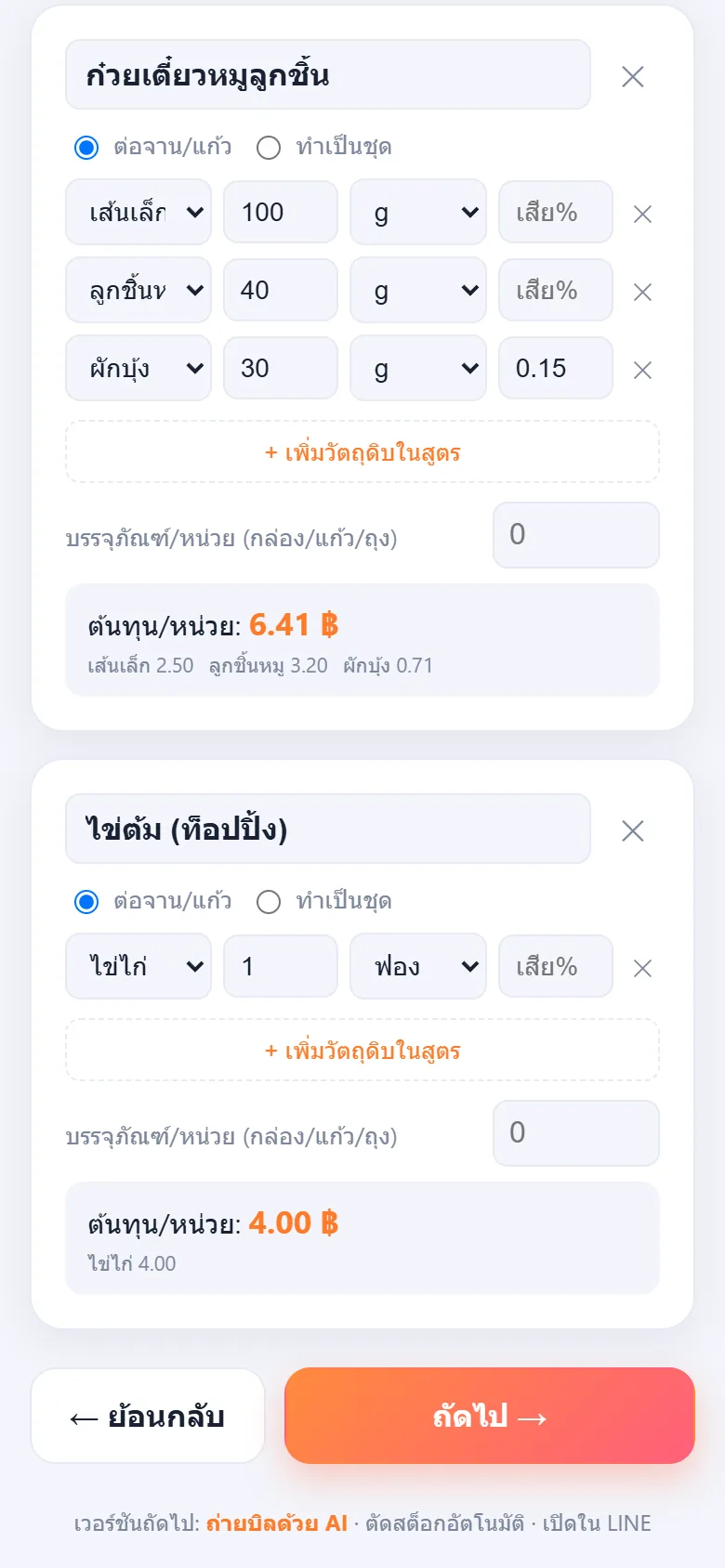
โหมดประเมินเร็ว กรอกต้นทุนวัตถุดิบต่อจานคร่าว ๆ เช่น 7 บาทต่อชาม โหมดแตกวัตถุดิบละเอียด ตั้งคลังวัตถุดิบพร้อมราคาซื้อและสูตรต่อเมนู (BOM) ระบุปริมาณเป็นกรัม ใส่เปอร์เซ็นต์เสียหาย รองรับสูตรทำเป็นชุด และคำนวณต้นทุนต่อหน่วยให้Quick mode takes a rough ingredient cost per plate, for example 7 baht a bowl. Detailed mode builds an ingredient stock list with purchase prices and a recipe (BOM) per dish, in grams with a waste percentage, supports batch recipes and works out unit cost.
ฐานราคาอ้างอิงและระบบจำราคาReference prices and remembered prices
มีราคาอ้างอิงวัตถุดิบ 128 รายการให้เป็นค่าตั้งต้น และระบบจำราคาจริงที่ผู้ใช้เคยกรอกหรือถ่ายจากบิล เด้งมาใช้ครั้งถัดไป ไม่ต้องกรอกซ้ำ ราคาที่จำเก็บในเบราว์เซอร์ของผู้ใช้เอง128 ingredients come with reference prices as defaults, and the prices a user actually typed or scanned from a receipt are remembered and reused next time without re-entry. Remembered prices are stored in the user's own browser.
ถ่ายบิลด้วย AIScan a receipt with AI
ในโหมดละเอียดมีปุ่ม "ถ่ายบิลด้วย AI" ถ่ายหรืออัปโหลดบิลตลาดหรือใบเสร็จ แล้ว AI (Gemini, Claude หรือ OpenAI) ดึงชื่อและราคาเข้าคลังวัตถุดิบ ผู้ใช้ใส่คีย์ของตัวเองซึ่งเก็บในเบราว์เซอร์ หรือเลือกส่งผ่าน backend ที่เก็บคีย์ไว้ฝั่งเซิร์ฟเวอร์ ถ้าเจ้าของเว็บตั้งคีย์ไว้Detailed mode has a Scan Receipt with AI button: photograph or upload a market bill or receipt and an AI (Gemini, Claude or OpenAI) pulls names and prices into the ingredient list. Users enter their own key, stored in their browser, or route it through a backend that keeps the key server-side if the site owner has set one.
ขั้นที่ 3 ราคาและกำไรต่อจาน รวมเดลิเวอรี่Step 3: price and profit per portion, including delivery
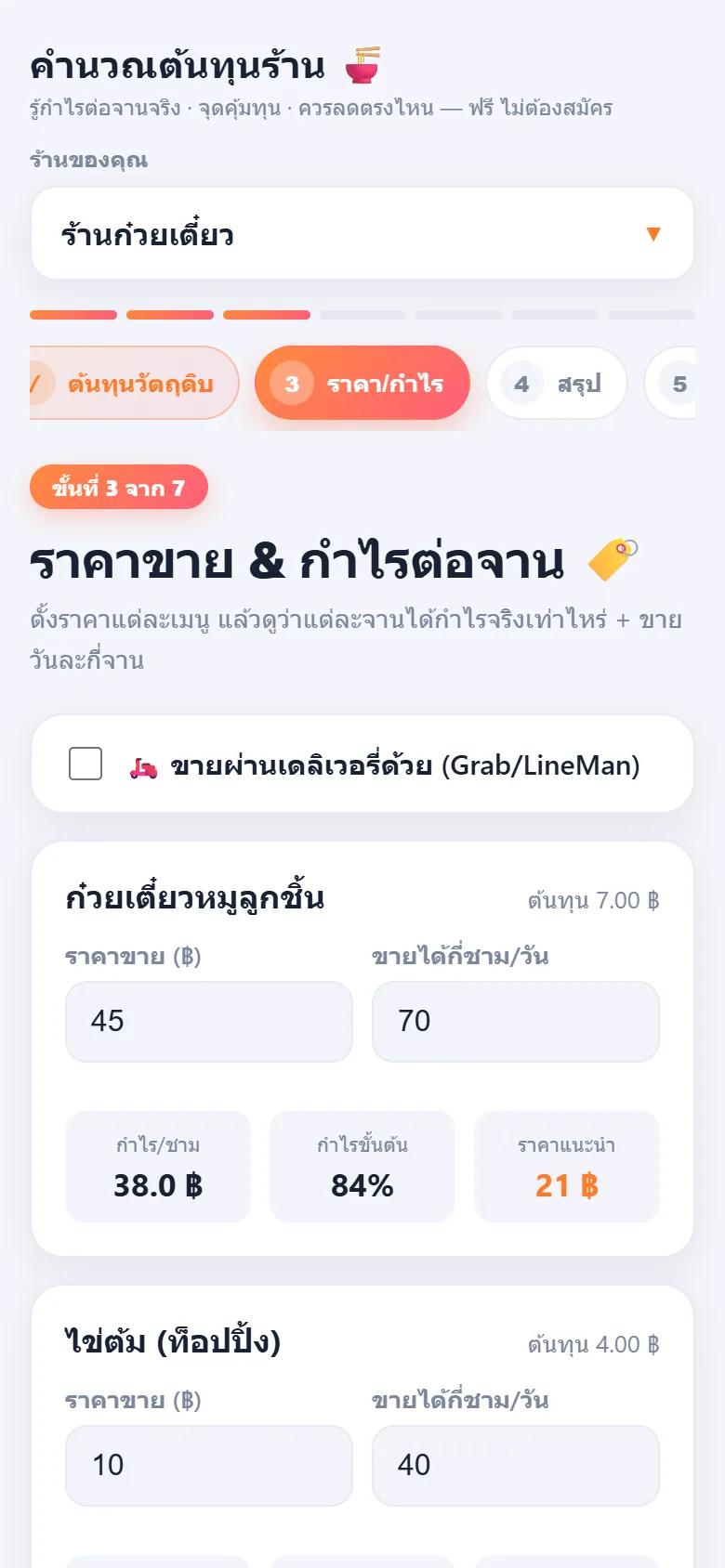
ตั้งราคาและยอดขายต่อวันของแต่ละเมนู แล้วเห็นกำไรต่อหน่วย กำไรขั้นต้นเป็นเปอร์เซ็นต์ และราคาแนะนำ ตัวอย่างชามต้นทุน 7 บาท ราคา 45 บาท ได้กำไร 38 บาท (84 เปอร์เซ็นต์) ติ๊กขายผ่าน Grab หรือ LINE MAN แล้วใส่ GP ระบบบอกว่าได้จริงเท่าไรและควรตั้งราคาบนแอปเท่าไรจึงกำไรเท่าขายหน้าร้านSet each dish's price and daily sales to see profit per unit, gross margin and a suggested price. In the sample a 7 baht bowl sold at 45 earns 38 baht (84 percent). Tick delivery via Grab or LINE MAN, enter the GP, and it shows what you really receive and the app price that gives the same profit as in-store.
ขั้นที่ 4 สรุปทั้งร้านและจุดคุ้มทุนStep 4: whole-shop summary and break-even
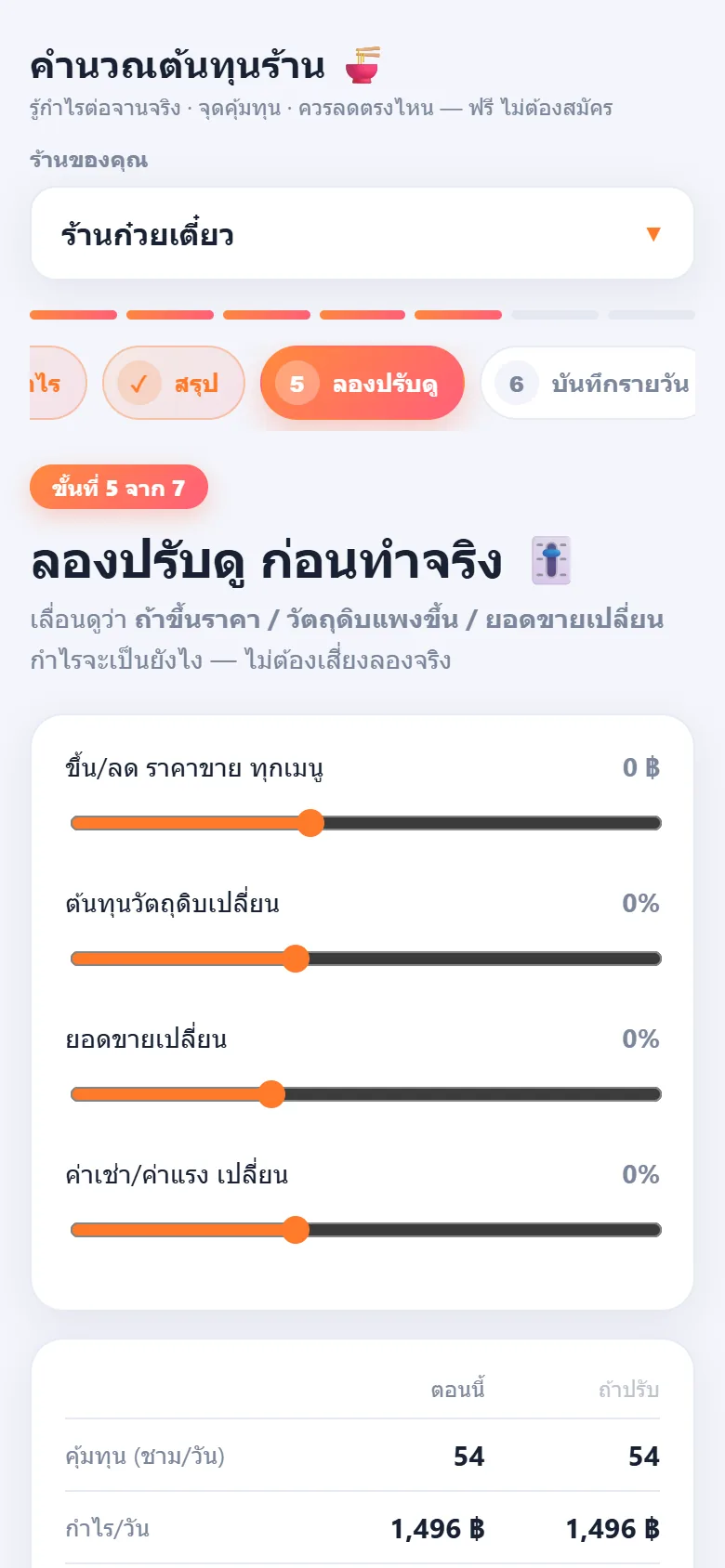
บอกต้องขายกี่ชามต่อวันจึงคุ้มทุน (ตัวอย่าง 54 ชามหรือ 1,719 บาทต่อวัน) สถานะความปลอดภัย กำไรต่อวันและต่อเดือน (ตัวอย่างขาย 110 ชามต่อวัน กำไรราววันละ 1,496 บาท เดือนละราว 38,900 บาท) กำไรส่วนเกินต่อเมนู และปุ่มคัดลอกสรุปShows how many bowls a day break even (sample: 54 bowls or 1,719 baht a day), a safety status, daily and monthly profit (sample: 110 bowls a day gives about 1,496 baht a day and about 38,900 a month), the surplus profit per dish and a Copy Summary button.
ขั้นที่ 5 ลองปรับดูก่อนทำจริงStep 5: try changes before committing
แถบเลื่อนปรับราคาขายทุกเมนู ต้นทุนวัตถุดิบ ยอดขาย และค่าเช่า/ค่าแรง แล้วตารางเทียบ ตอนนี้ กับ ถ้าปรับ ในเรื่องจุดคุ้มทุน กำไรต่อวันและเดือน มีโหมดเป้ากำไรบอกว่าถ้าอยากได้กำไรเดือนละเท่านี้ต้องขายวันละกี่ชามSliders adjust the selling price of every dish, ingredient cost, sales and rent/labour, and a table compares Now with If adjusted for break-even and daily and monthly profit. A target mode answers how many bowls a day you need to reach a chosen monthly profit.
ขั้นที่ 6 บันทึกรายวัน และขั้นที่ 7 สต็อกStep 6 daily log and step 7 stock
ปิดร้านแล้วใส่ยอดขายวันนี้ ระบบเทียบกับจุดคุ้มทุนว่าวันนั้นคุ้มหรือไม่ และสะสมกำไรประมาณการทั้งเดือน ส่วนสต็อก ใส่ของคงเหลือ ระบบบอกว่าเหลือกินได้กี่วันและเตือนของใกล้หมด มีปุ่มตัดสต็อกตามยอดขายวันนี้ตามสูตร BOMAfter closing, enter the day's sales; it compares with break-even to show whether the day paid and accumulates estimated profit for the month. In stock, enter what is left and it says how many days it will last and warns of low items, with a button that deducts stock by the day's sales through the BOM recipes.
04 · วิธีทำงาน04 · How it works
ทำงานยังไง ตั้งแต่ต้นจนจบHow it works, start to finish
- 1
เปิดเว็บและเลือกประเภทร้านOpen the site and choose the shop type
เปิดลิงก์ในมือถือหรือคอม เลือกประเภทร้านจากเมนูหัวหน้า หน้าแรกมีข้อมูลตัวอย่างอยู่แล้ว กด ล้างข้อมูลตัวอย่าง เริ่มร้านของฉัน เมื่อต้องการกรอกของจริงOpen the link on a phone or computer and choose the shop type from the dropdown. Sample data is already loaded; press Clear sample, start my shop when you want to enter your own.
- 2
ใส่ต้นทุนคงที่และวัตถุดิบEnter fixed costs and ingredients
ขั้นที่ 1 กรอกค่าใช้จ่ายประจำเดือน ขั้นที่ 2 ใส่ต้นทุนวัตถุดิบต่อจานแบบเร็ว หรือแตกเป็นสูตรละเอียดพร้อมถ่ายบิลให้ AI ดึงราคาStep 1 takes monthly costs; step 2 takes ingredient cost per dish, quickly or as detailed recipes, optionally scanning receipts for AI to read prices.
- 3
ตั้งราคาและยอดขายต่อวันSet prices and daily sales
ขั้นที่ 3 ใส่ราคาขายและจำนวนที่คาดว่าจะขายต่อวัน เปิดโหมดเดลิเวอรี่ถ้าขายผ่านแอปStep 3 takes the selling price and expected daily volume; switch on the delivery mode if you sell through apps.
- 4
อ่านผลและลองปรับRead the result and try changes
ขั้นที่ 4 ดูจุดคุ้มทุนและกำไร ขั้นที่ 5 เลื่อนแถบปรับดูผล และคัดลอกสรุปไปแชร์ได้Step 4 shows break-even and profit; step 5 lets you slide values and see the effect, and the summary can be copied to share.
- 5
ใช้ต่อทุกวันKeep using it daily
ขั้นที่ 6 บันทึกยอดขายรายวัน ขั้นที่ 7 ติดตามสต็อก ข้อมูลทั้งหมดเก็บในเบราว์เซอร์ของผู้ใช้ ถ้าล้างข้อมูลเบราว์เซอร์ข้อมูลก็หายStep 6 logs daily sales and step 7 tracks stock. Everything is stored in the user's own browser, so clearing browser data erases it.
05 · ภาพ05 · Visuals
ภาพจากระบบจริงFrom the real system
8 ภาพ8 imagesภาพหน้าจอจริงถ่ายจากระบบที่เปิดใช้อยู่ ส่วนภาพโปรโมตและภาพประกอบมีป้ายกำกับไว้ทุกใบReal screenshots come from the running system; promo images and illustrations are labelled on every card.



06 · สถานการณ์06 · Scenarios
ตัวอย่างสถานการณ์ใช้งานExample scenarios
เป็นตัวอย่างสมมติเพื่อให้เห็นภาพ ไม่ใช่เรื่องของลูกค้าจริงIllustrative scenarios to help you picture it — not real customer stories.
สมมติว่าคนจะเปิดร้านก๋วยเตี๋ยวอยากรู้ว่าต้องขายกี่ชามSuppose someone about to open a noodle shop wants to know how many bowls to sell
สมมติว่าเขาใส่ค่าเช่า ค่าแรง และต้นทุนวัตถุดิบต่อชามลงไป ระบบบอกจุดคุ้มทุนเป็นชามต่อวัน เขาจึงรู้ก่อนลงทุนว่าเป้ายอดขายขั้นต่ำควรเป็นเท่าไรSuppose they enter rent, labour and ingredient cost per bowl. The tool states break-even in bowls a day, so they know the minimum sales target before investing.
สมมติว่าร้านขายดีแต่เงินไม่เหลือSuppose a shop is busy but cash never builds up
สมมติว่าเจ้าของใส่ค่าแรงตัวเองและค่าเช่าที่ลืมคิด แล้วเห็นว่าบางเมนูกำไรต่อจานต่ำมาก หรือขายผ่านเดลิเวอรี่แล้วโดนหัก GP จนไม่เหลือ ก็รู้ว่าควรปรับราคาหรือเมนูตรงไหนSuppose the owner adds the wage and rent they forgot and sees some dishes earn very little, or that delivery GP leaves nothing; they learn where to adjust price or menu.
สมมติว่าร้านกาแฟอยากเทียบราคาก่อนขึ้นราคาSuppose a café wants to test a price rise
สมมติว่าเจ้าของเลื่อนแถบขึ้นราคา 5 บาทและลดยอดขาย 10 เปอร์เซ็นต์ ตารางเทียบแสดงกำไรต่อเดือนก่อนและหลัง ช่วยตัดสินใจก่อนเปลี่ยนป้ายราคาจริงSuppose the owner slides the price up 5 baht and sales down 10 percent; the comparison table shows monthly profit before and after, helping the decision before changing the real menu.
07 · เบื้องหลัง07 · Under the hood
เบื้องหลังระบบ ข้อมูล และความปลอดภัยUnder the hood: data and security
- แพลตฟอร์มPlatform
- เว็บแอปที่สร้างด้วย Vue 3 และ TypeScript ด้วย Vite บันทึกเป็น PWA ติดตั้งบนหน้าจอโฮมมือถือได้ โฮสต์บน Vercel ส่วนคำนวณทั้งหมดอยู่ฝั่งเบราว์เซอร์A web app built with Vue 3 and TypeScript on Vite, also a PWA installable on a phone home screen, hosted on Vercel. All calculation runs in the browser.
- ที่เก็บข้อมูลและความเป็นส่วนตัวData and privacy
- ข้อมูลร้าน ราคาที่จำ และการตั้งค่า AI เก็บใน localStorage ของเบราว์เซอร์ผู้ใช้เองเท่านั้น ไม่ส่งขึ้นเซิร์ฟเวอร์เพื่อเก็บ ไม่ต้องสมัครสมาชิก คีย์ AI ที่ผู้ใช้ใส่ก็อยู่ในเบราว์เซอร์ และไม่รวมในข้อมูลที่ส่งออกหรือแชร์Shop data, remembered prices and AI settings sit in the user's own browser localStorage and are not uploaded for storage. No sign-up is needed. An AI key a user enters stays in the browser and is excluded from exported or shared data.
- เครื่องมือ AI และบริการภายนอกAI and external services
- ถ่ายบิลเรียก Gemini Claude หรือ OpenAI ด้วยคีย์ของผู้ใช้ หรือผ่าน serverless backend บน Vercel ที่เก็บคีย์ฝั่งเซิร์ฟเวอร์ มีทางเชื่อมราคากลางกระทรวงพาณิชย์ (MOC) ถ้ามีคีย์ และรองรับแชร์เข้า LINE ผ่าน LIFFReceipt scanning calls Gemini, Claude or OpenAI with the user's key, or through a Vercel serverless backend that keeps the key server-side. There is a hook for Ministry of Commerce (MOC) reference prices if a key exists, and sharing into LINE through LIFF.
- หลักการคำนวณCalculation principles
- แยกต้นทุนคงที่กับผันแปรเสมอ จุดคุ้มทุนใช้ส่วนต่างกำไรต่อหน่วย (ราคา ลบ ต้นทุนผันแปร) ต้นทุนต่อหน่วยแสดง 2 ตัวคือ food cost สำหรับตั้งราคา และต้นทุนเต็ม ราคาแนะนำต่างตามประเภทร้านFixed and variable costs are always separated, break-even uses contribution margin per unit (price minus variable cost), unit cost is shown two ways (food cost for pricing and full cost), and suggested prices differ by shop type.
- ข้อจำกัดLimits
- ข้อมูลอยู่ในเบราว์เซอร์เครื่องเดียว ไม่ซิงก์ข้ามอุปกรณ์ ราคาอ้างอิงเป็นค่ากลางที่ใส่ไว้ ไม่ใช่ราคาตลาดสดของวันนี้ ผลที่ได้เป็นประมาณการเพื่อการตัดสินใจ ไม่ใช่งบการเงินData lives in one browser and does not sync across devices. Reference prices are built-in typical values, not today's market prices. Results are estimates for decisions, not financial statements.
- การทดสอบTesting
- ชุดทดสอบ Vitest 5 ไฟล์ 40 ข้อ ครอบคลุมสูตรต้นทุน จุดคุ้มทุน การตั้งราคา การวินิจฉัย และการอ่านผลบิล รันผ่านครบเมื่อ 2 พ.ย. 2569Five Vitest files with 40 tests cover costing, break-even, pricing, diagnostics and receipt parsing, all passing on 2 November 2026.
08 · ความคืบหน้า08 · Progress
ความคืบหน้าและแผนต่อไปProgress and what comes next
- ทำแล้วDone
2 ก.ค. 2569: เวอร์ชันแรก wizard หลายขั้น เครื่องคำนวณแยกจาก UI หมวดร้านค้า PWA และปุ่มล้างข้อมูลตัวอย่าง2 Jul 2026: first version with a multi-step wizard, a UI-independent calculation engine, shop categories, PWA and a clear-sample button
- ทำแล้วDone
2-3 ก.ค. 2569: ถ่ายบิลด้วย AI ผ่านคีย์ผู้ใช้หรือ backend และ deploy ขึ้น Vercel2-3 Jul 2026: AI receipt scanning via the user's key or a backend, and deployment to Vercel
- ทำแล้วDone
4 ก.ค. 2569: ออกแบบหน้าใหม่ ฐานราคาอ้างอิง 128 รายการ ระบบจำราคาจากบิล และเปิด LINE LIFF4 Jul 2026: new design, 128 reference prices, receipt-based price memory and LINE LIFF enabled
- ถัดไปNext
เชื่อมราคากลางจากกระทรวงพาณิชย์ (MOC Open Data) ให้ราคาอ้างอิงอัปเดตอัตโนมัติ ตามหมายเหตุในโค้ดConnect Ministry of Commerce (MOC Open Data) prices so reference prices update automatically, per a note in the code
- ถัดไปNext
เชื่อมเป็นทางเข้าสู่ Smart AI Restaurant เมื่อระบบนั้นพร้อมเปิดใช้Funnel users into Smart AI Restaurant once that system is ready
09 · คำถาม09 · FAQ
คำถามที่พบบ่อยFrequently asked questions
ใช้ฟรีจริงไหม ต้องสมัครไหมIs it really free, and is sign-up needed?
ฟรี และไม่ต้องสมัครสมาชิก เปิดลิงก์แล้วใช้ได้เลยFree, and no sign-up; open the link and use it.
ข้อมูลร้านของฉันไปอยู่ที่ไหนWhere does my shop's data go?
อยู่ในเบราว์เซอร์ของคุณเองเท่านั้น ไม่ถูกส่งไปเก็บที่เซิร์ฟเวอร์ แต่ถ้าล้างข้อมูลเบราว์เซอร์หรือเปลี่ยนเครื่อง ข้อมูลจะไม่ตามไปOnly in your own browser and not uploaded for storage. If you clear browser data or change device, it does not follow you.
ถ่ายบิลด้วย AI ต้องจ่ายเงินไหมDoes receipt scanning cost money?
ตัวเว็บไม่คิดเงิน แต่การเรียก AI ใช้คีย์ของผู้ให้บริการ (Gemini Claude หรือ OpenAI) ซึ่งอาจมีค่าบริการตามผู้ให้บริการนั้น หรือใช้ผ่าน backend ถ้าเจ้าของเว็บเปิดให้ ว่าตอนนี้เปิดให้ใช้ backend สาธารณะหรือไม่ ยังไม่ได้ยืนยันThe site charges nothing, but the AI call uses a provider key (Gemini, Claude or OpenAI) that may incur that provider's fees, or the backend if the site owner enables it. Whether a public backend is currently enabled has not been confirmed.
ใช้กับร้านประเภทไหนได้บ้างWhich shop types does it suit?
10 ประเภท ตั้งแต่ร้านตามสั่ง ก๋วยเตี๋ยว กาแฟ ของหวาน ชานมไข่มุก ชาบู ส้มตำ ข้าวราดแกง น้ำปั่น และตั้งค่าเองสำหรับประเภทอื่น10 types from à la carte, noodles, coffee, dessert, bubble tea, shabu, som tam, rice and curry and smoothies to a custom setting for others.
ตัวเลขแม่นแค่ไหนHow accurate are the numbers?
สูตรคำนวณผ่านชุดทดสอบ 40 ข้อ แต่ผลลัพธ์ขึ้นกับตัวเลขที่ใส่ ราคาอ้างอิงเป็นค่ากลาง ควรใส่ราคาที่ซื้อจริงเพื่อให้แม่น และถือเป็นประมาณการThe formulas pass 40 tests, but results depend on what you enter. Reference prices are typical values, so enter the prices you actually pay, and treat output as an estimate.
ใครพัฒนาWho builds it?
ZZAX Studio พัฒนาเพื่อเป็นเครื่องมือฟรีที่ชวนร้านอาหารมารู้จัก Smart AI RestaurantZZAX Studio built it as a free tool introducing restaurants to Smart AI Restaurant.
10 · วิธีเริ่ม10 · Get started
เริ่มได้ใน 3 ขั้นUp and running in three steps
ถ้าอยากได้ระบบแบบเดียวกันสำหรับธุรกิจของคุณ บอกโจทย์มาสั้น ๆ เราตอบกลับพร้อมขอบเขตงานและราคาภายใน 1 วันทำการIf you want something like this for your own business, send us a line about the problem. You'll get scope and price within one working day.
- 1ขั้นที่ 1 เปิดเว็บแล้วเริ่ม wizard กรอกข้อมูลร้านและค่าใช้จ่ายคงที่Step 1: Open the site and start the wizard with your shop details and fixed costs
- 2ขั้นที่ 2 ถ่ายบิลวัตถุดิบให้ AI ดึงราคาเข้าระบบ หรือพิมพ์เองก็ได้Step 2: Photograph your ingredient receipts for the AI to read, or type them in
- 3ขั้นที่ 3 ดูผลลัพธ์ว่าเมนูไหนกำไรดี และต้องขายวันละกี่จานถึงคุ้มทุนStep 3: Read the result — which dishes pay, and how many a day it takes to break even
เริ่มงานกับเราWork with us
อยากได้ระบบแบบนี้สำหรับธุรกิจคุณWant a system like this for your business?
เล่าปัญหาของคุณมา เราจะบอกตรง ๆ ว่าช่วยได้ไหม ภายใน 1 วันทำการ ส่งแล้วได้รหัสติดตามงานทันทีTell us the problem and we'll say honestly whether we can help, within one working day. You get a tracking code the moment you send it.