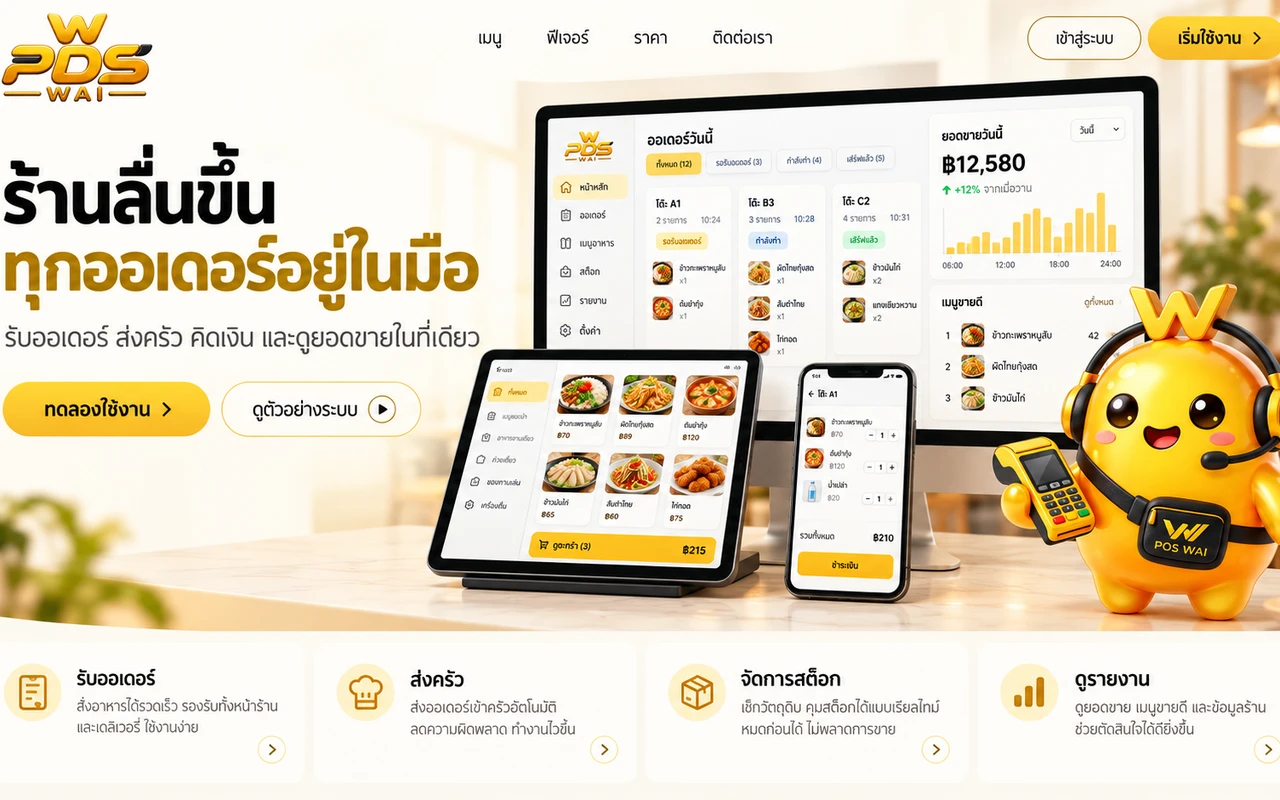
ระบบขายหน้าร้านสำหรับร้านอาหาร ใช้งานได้แม้เน็ตหลุด ผูกกับ LINEA restaurant POS that keeps working when the internet drops, tied into LINE
เบต้าBetaเว็บแอปWeb app
ภาพประกอบโปรเจกต์ · ดูภาพหน้าจอจริงในแกลเลอรีด้านล่างProject editorial image · actual screenshots in the gallery below
58ชุดทดสอบอัตโนมัติที่ผ่านทั้งหมดAutomated test cases, all passing
01 · โจทย์01 · The brief
สร้างขึ้นมาเพราะอะไรWhy this exists
ปัญหาที่แก้The problem it solves
ร้านอาหารและคาเฟ่เล็ก ๆ ต้องจดออเดอร์ด้วยมือ คิดเงินผิดบ่อย เน็ตในร้านหลุดก็ขายต่อไม่ได้ แล้วยังต้องจัดตารางกะและดูแลเอกสารพนักงานแยกเป็นอีกงานSmall restaurants and cafés write orders by hand, miscalculate bills, and cannot sell at all when the shop's internet drops — on top of scheduling shifts and managing staff paperwork as a separate job.
เหมาะกับใครWho it is for
ร้านอาหารและคาเฟ่ขนาดเล็กถึงกลางที่อยากได้ระบบขายหน้าร้านของตัวเองSmall to mid-size restaurants and cafés that want their own point-of-sale system
ขายหน้าร้านแบบออฟไลน์ก่อน (PWA) บันทึกออเดอร์ได้แม้เน็ตหลุด แล้วค่อยซิงก์ทีหลังOffline-first point of sale (PWA) — takes orders even without internet, then syncs later
02
สั่งอาหารผ่าน LINE ได้ด้วยลิงก์โต๊ะ ไม่ต้องติดตั้งแอปCustomers order via LINE using a table link, no app install needed
03
ระบบสิทธิ์ตามตำแหน่งพนักงาน ซ่อนเมนูที่ไม่เกี่ยวกับงานของแต่ละคนอัตโนมัติRole-based permissions that automatically hide menus not relevant to each staff member
04
โควตาวันลาและตารางกะต่อคน จัดการได้ในหน้าเดียวPer-employee leave quotas and shift schedules managed in one screen
05
ยกเลิกบิลและคืนเงินมีขั้นตอนกันพลาด ต้องใส่เหตุผลทุกครั้งและแจ้งผู้จัดการผ่าน LINEVoiding a bill or issuing a refund requires a reason every time and notifies the manager via LINE
06
แฟ้มประวัติพนักงานพร้อมเช็กลิสต์เอกสารและวันหมดอายุ ไม่เก็บสำเนาบัตรประชาชนบนเซิร์ฟเวอร์A staff dossier with a document checklist and expiry dates — no ID-card copies stored on the server
03 · สถานะและแผน03 · Status and plan
ตอนนี้ไปถึงไหนแล้วWhere this stands today
เรายังไม่ใส่ภาพหน้าจอของโปรเจกต์นี้ เพราะยังไม่เปิดให้คนนอกใช้จริง เราจะอัปเดตหน้านี้พร้อมภาพทันทีที่เปิด — นโยบายของเราคือขึ้นเฉพาะภาพที่ถ่ายจากระบบที่ใช้งานอยู่จริงเท่านั้นWe haven't put screenshots on this page because it isn't open to outside users yet. This page gets updated with real shots the moment it is — our rule is that only screens from a running system go on the site.
ข้อมูลโปรเจกต์Project facts
สถานะStatus
เบต้าBeta
หมวดงานCategory
เว็บแอปWeb app
ปีที่สร้างYear
25692026
ช่องทางChannels
เว็บเว็บ
04 · วิธีเริ่ม04 · Get started
เริ่มได้ใน 3 ขั้นUp and running in three steps
เปิดใช้ได้แล้ววันนี้ ทำตาม 3 ขั้นนี้ได้เลย ถ้าอยากได้ระบบแบบนี้สำหรับธุรกิจของคุณเอง ทักเรามาได้It's open today — follow these three steps. Want something like this for your own business? Talk to us.
เข้า poswai.zzaxstudio.com แล้วกดดูตัวอย่างระบบ หรือทักเราเพื่อเปิดร้านจริงGo to poswai.zzaxstudio.com and try the preview, or contact us to set up your real shop
2
เพิ่มเมนู ตั้งพนักงานและสิทธิ์การใช้งานของแต่ละคนAdd your menu, and set up staff accounts with their permissions
3
เปิดลิงก์โต๊ะให้ลูกค้าสั่งผ่าน LINE แล้วให้พนักงานรับออเดอร์จากหน้าแคชเชียร์Share the table link for customers to order via LINE, and have staff take orders from the cashier screen
ระบบหลังร้านอาหารครบวงจร POS สต็อก ต้นทุน และผู้ช่วย AIAn all-in-one restaurant back office: POS, stock, costing, and an AI assistantดูรายละเอียดView details
ใช้งานจริงLive
เว็บแอปWeb app
Buffet QRBuffet QR
ระบบสั่งอาหารผ่าน QR สำหรับร้านบุฟเฟต์ 3 ราคา ใช้งานจริงในร้านหมาล่า TAIXI ของเราเองQR ordering for a 3-tier buffet, running daily in our own TAIXI mala hotpot restaurantดูรายละเอียดView details
ใช้งานจริงLive
เว็บแอปWeb app
เครื่องมือคำนวณต้นทุนร้าน F&BF&B Cost Calculator
รู้ต้นทุนต่อจานและจุดคุ้มทุนของร้านใน 10 นาทีKnow your cost per dish and break-even point in ten minutesดูรายละเอียดView details
06 · เริ่มงานกับเรา06 · Work with us
อยากได้ระบบแบบนี้สำหรับธุรกิจคุณWant a system like this for your business?
เล่าปัญหาของคุณมา เราจะบอกตรง ๆ ว่าช่วยได้ไหม ภายใน 1 วันทำการ ส่งแล้วได้รหัสติดตามงานทันทีTell us the problem and we'll say honestly whether we can help, within one working day. You get a tracking code the moment you send it.