เจ้าของร้านออนไลน์ไทยที่ขายพร้อมกันหลายแพลตฟอร์มต้องเปิดหลังบ้านทีละเว็บ ตอบแชทเรื่องเดิมซ้ำ ๆ ลงสินค้าใหม่ทีละที่ และไม่มีหน้าไหนรวมให้เห็นว่าวันนี้ทั้งสามแพลตฟอร์มขายได้เท่าไหร่A Thai shop selling on several marketplaces logs into each back office separately, answers the same chats over and over, re-uploads every new product one platform at a time, and has no single screen showing what all three sold today.
← ผลงานทั้งหมด← All work
เว็บแอปWeb app
ThaiEComThaiECom
แดชบอร์ดรวม AI Agent 6 ตัว สำหรับร้านไทยที่ขายพร้อมกันบน Shopee, Lazada และ TikTok ShopOne dashboard with six AI agents for Thai shops selling on Shopee, Lazada and TikTok Shop at once
เบต้าBeta เว็บแอปWeb app
หน้าเว็บสาธารณะเปิดเข้าไปกดดูได้ทุกหน้า แต่เป็นโหมดจำลอง ตัวเลขและผลของ Agent ทั้งหมดเป็นตัวอย่าง ไม่ได้ต่อร้านจริง · ตัวเต็มที่ต่อ AI จริงรันอยู่บนคอมของเจ้าของ เปิดจากนอกบ้านได้เฉพาะเจ้าของโดยต้องล็อกอินด้วยอีเมล · ยังไม่ได้สิทธิ์เชื่อม API ของ Shopee, Lazada และ TikTok Shop จึงยังดึงข้อมูลร้านจริงไม่ได้Anyone can open the public page and click through every screen, but it runs in demo mode: the figures and agent results are samples, not a real shop. The full version with live AI runs on the founder's own computer and is reachable from outside only by him, behind an email login. Platform API access for Shopee, Lazada and TikTok Shop has not been granted yet, so no real store data flows in.
6Agent ในระบบAgents in the system
3แพลตฟอร์มที่ออกแบบให้รองรับMarketplaces designed for
3ภาษาบนหน้าจอInterface languages
4ธีมที่สลับได้Switchable themes
01 · ภาพรวม01 · Overview
ภาพรวมของระบบThe system at a glance
ThaiECom (ชื่อบนหน้าจอคือ Thai E Com AI) คือแดชบอร์ดเดียวที่รวม AI Agent 6 ตัวไว้ช่วยร้านที่ขายพร้อมกันบน Shopee, Lazada และ TikTok Shop ตัวหนึ่งหาสินค้า ตัวหนึ่งเขียนและลงสินค้า ตัวหนึ่งตอบแชท ตัวหนึ่งดูแลออเดอร์และการขนส่ง ตัวหนึ่งทำการตลาด และตัวหนึ่งวิเคราะห์ยอดขาย กำไร และสต็อก โดยเรียงเป็นสายพานต่อกันเหมือนทีมงานเล็ก ๆThaiECom (shown on screen as Thai E Com AI) is a single dashboard holding six AI agents for shops that sell on Shopee, Lazada and TikTok Shop at once. One finds products, one writes and lists them, one answers chats, one handles orders and delivery, one does marketing and one analyses sales, profit and stock, chained together like a small team.
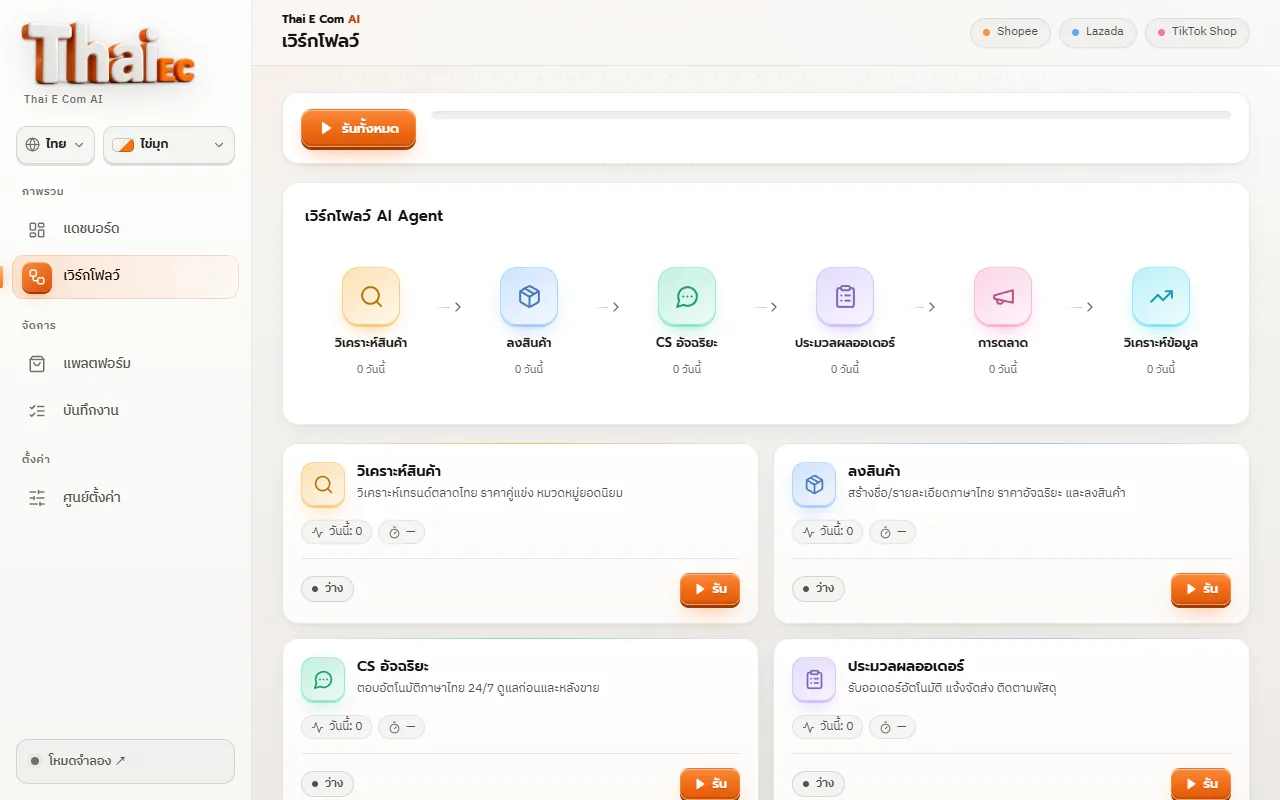
หน้าจอแบ่งเป็นแดชบอร์ด เวิร์กโฟลว์ แพลตฟอร์ม บันทึกงาน และศูนย์ตั้งค่า บนเวิร์กโฟลว์คุณจะเห็นสายพาน 6 ขั้นพร้อมปุ่ม รันทั้งหมด และปุ่ม รัน ของแต่ละตัว กดแล้ว Agent จะเรียกโมเดล AI ให้ทำงานตามคำสั่งที่ตั้งไว้ ผลลัพธ์และสถานะเข้าไปอยู่ในบันทึกงาน ตั้งค่าได้ว่าแต่ละตัวเปิดหรือปิด ดูแลหมวดสินค้าไหน กำไรเป้าหมายกี่เปอร์เซ็นต์ และใช้พรอมป์ตอะไรThe screens are dashboard, workflow, platforms, job log and settings. On the workflow page you see the six-step pipeline with a run-all button and a run button per agent; pressing one calls an AI model with the instruction you configured, and the result and status land in the job log. Each agent can be switched on or off, given a product category and target margin, and a prompt of your own.
ตอนนี้มี 2 รูปแบบ หน้าเว็บสาธารณะที่ zzaxstudio.com/thai-e-com-ai/ เป็นโหมดจำลอง เปิดกดดูได้ทุกหน้า แต่ตัวเลขและผลของ Agent เป็นตัวอย่าง ไม่ได้ต่อร้านจริง ส่วนตัวเต็มที่ต่อโมเดล AI จริงรันบนคอมของเจ้าของ ยังไม่ได้รับสิทธิ์ API ของทั้งสามแพลตฟอร์ม จึงยังไม่เคยดึงข้อมูลร้านจริงสำเร็จ และเมื่อ 6 ต.ค. 2569 เจ้าของตัดสินใจจะรวมงานนี้เข้ากับ ShopFlow AIIt exists in two forms today. The public page at zzaxstudio.com/thai-e-com-ai/ is a demo mode that you can click through, but its figures and agent output are samples with no shop behind them. The full version, wired to a real AI model, runs on the owner's own computer. API access from the three platforms has not been granted, so real shop data has never been pulled, and on 6 October 2026 the owner decided to fold this work into ShopFlow AI.
แนวคิดคือให้ AI ทำงานเป็นสายพานที่คุณคุมได้ ทุกครั้งที่รันมีบันทึก ป้ายบอกชัดว่าเป็นของจริงหรือจำลอง และเมื่อเรียกโมเดลไม่ได้ ระบบจะบอกว่าเป็นโหมดจำลองแทนที่จะแกล้งทำเป็นสำเร็จ ข้อมูลร้านไม่จำเป็นต้องขึ้นคลาวด์เพราะตัวเต็มต่อกับโมเดลที่รันในเครื่องThe idea is an AI pipeline you control. Every run is logged, labelled real or simulated, and when the model cannot be reached the system says it is in demo mode rather than pretending to succeed. Shop data need not go to the cloud, because the full version talks to a model running on your own machine.
02 · โจทย์02 · The brief
สร้างขึ้นมาเพราะอะไรWhy this exists
เจ้าของร้านและทีมแอดมินที่ขายบน Shopee, Lazada และ TikTok Shop พร้อมกันShop owners and their admin teams selling on Shopee, Lazada and TikTok Shop at the same time
ใช่โจทย์ของคุณไหมSound like your problem?
03 · ฟีเจอร์03 · Features
ทำอะไรได้บ้าง อย่างละเอียดWhat it does, in detail
9 ความสามารถ9 capabilitiesเวิร์กโฟลว์ AI Agent 6 ตัวA six-agent workflow
สายพานเรียงเป็น วิเคราะห์สินค้า, ลงสินค้า, CS อัจฉริยะ, ประมวลผลออเดอร์, การตลาด และวิเคราะห์ข้อมูล แต่ละการ์ดแสดงคำอธิบายงาน จำนวนครั้งที่รันวันนี้ เวลาที่ใช้ และสถานะ ว่าง หรือกำลังทำงาน ปุ่ม รันทั้งหมด ทำงานเรียงทีละตัวพร้อมแถบความคืบหน้า และกด หยุด กลางทางได้The chain runs product analysis, listing, smart customer service, order processing, marketing and data analysis. Each card shows a job description, runs today, time taken and a status of idle or running. Run-all goes one agent at a time with a progress bar and can be stopped mid-way.
แดชบอร์ดรวมสามแพลตฟอร์มOne dashboard for three marketplaces
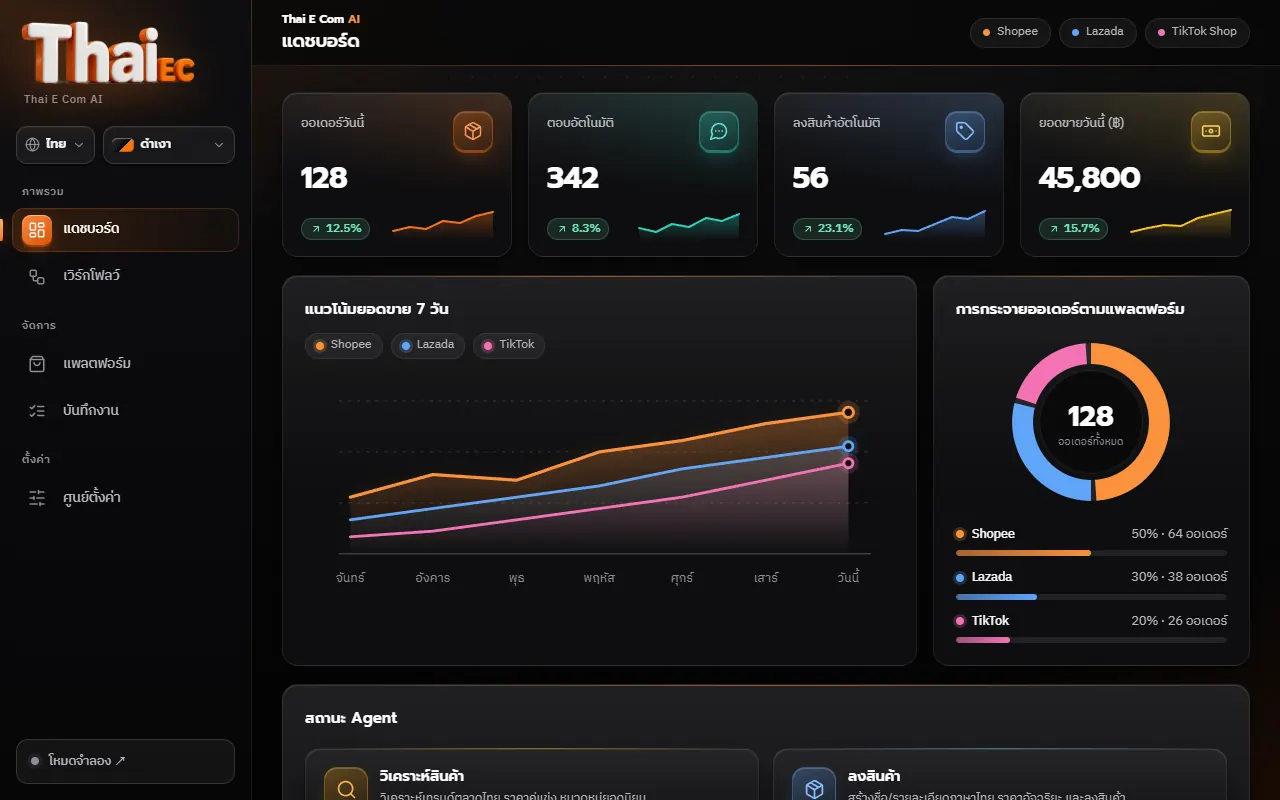
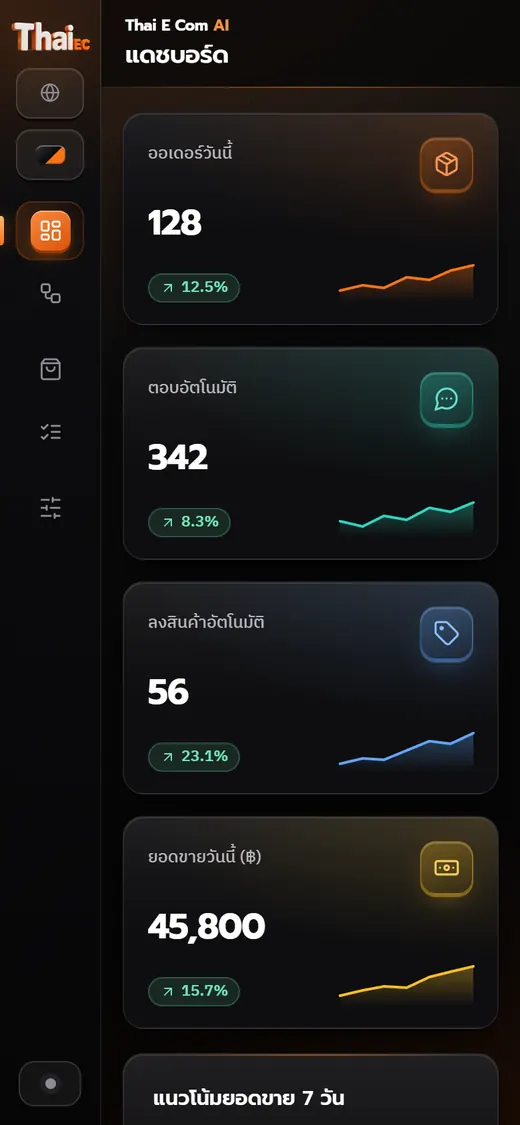
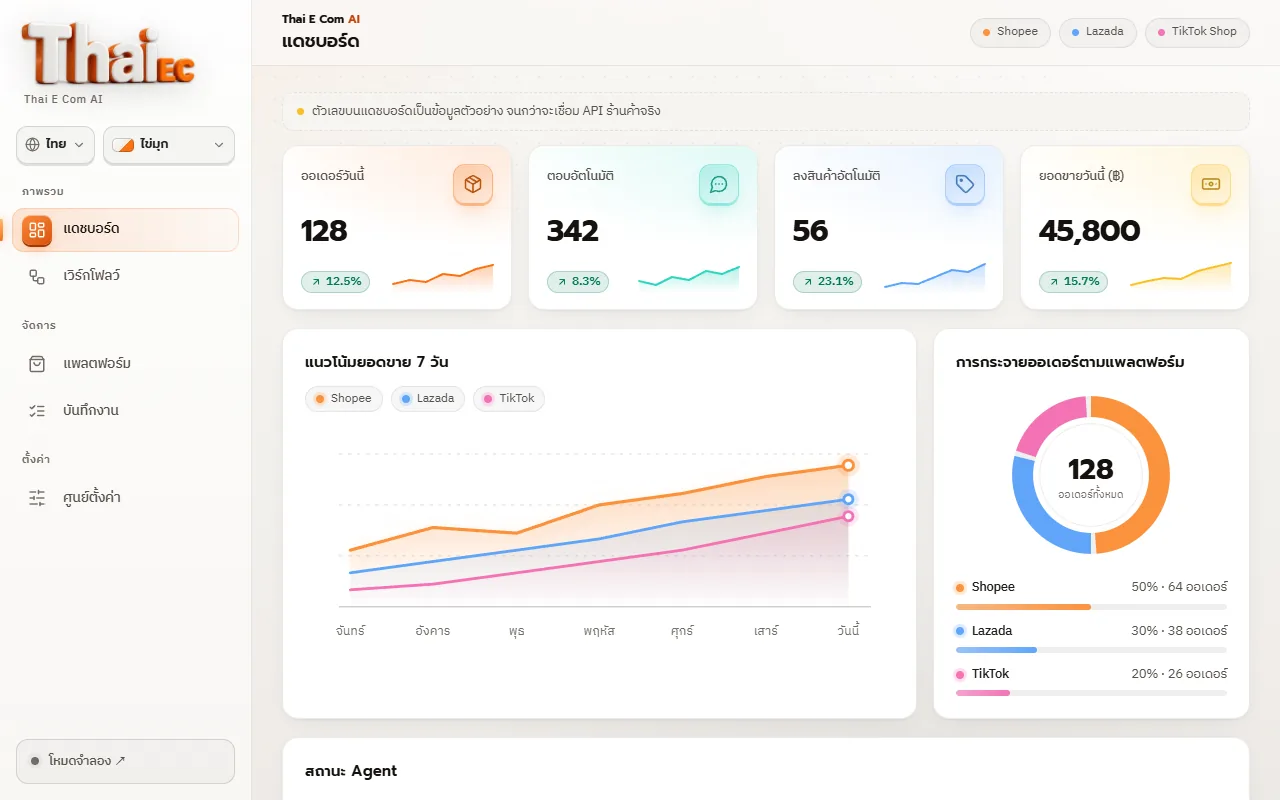
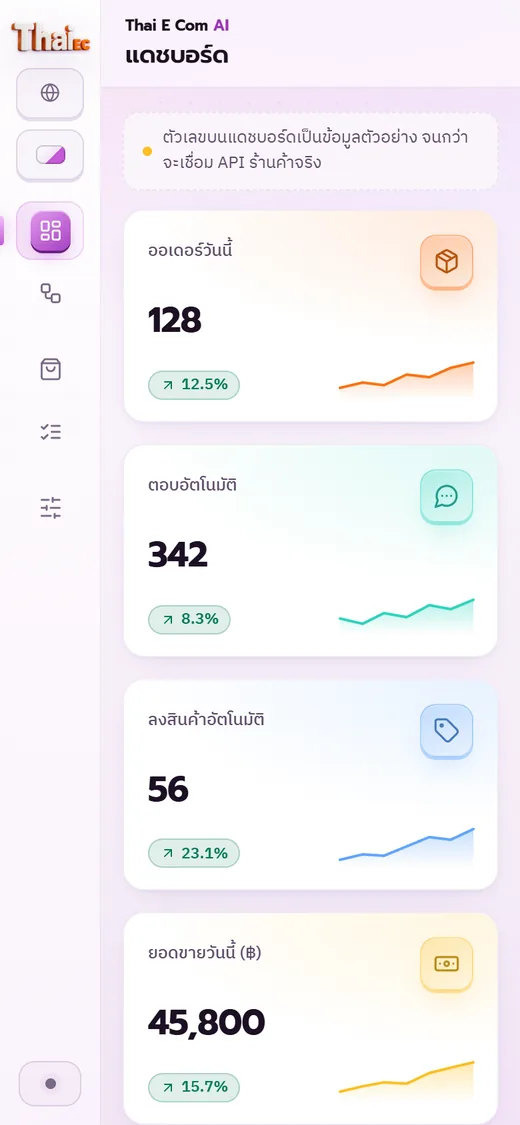
หน้าแรกมีการ์ดออเดอร์วันนี้ ตอบอัตโนมัติ ลงสินค้าอัตโนมัติ และยอดขายวันนี้ กราฟแนวโน้ม 7 วันของ Shopee, Lazada และ TikTok และกราฟโดนัทแสดงสัดส่วนออเดอร์ของแต่ละแพลตฟอร์ม ตัวเลขทั้งหมดบนหน้าเว็บสาธารณะเป็นตัวอย่าง (128 ออเดอร์ ฿45,800) และมีแถบบอกว่าเป็นข้อมูลตัวอย่างจนกว่าจะเชื่อมร้านจริงThe home page has cards for orders today, auto-replies, auto-listings and sales today, a seven-day trend for Shopee, Lazada and TikTok, and a donut of the order split by platform. All figures on the public page are samples (128 orders, 45,800 baht) with a banner saying so until a real shop is connected.
หน้าแพลตฟอร์มPlatforms page
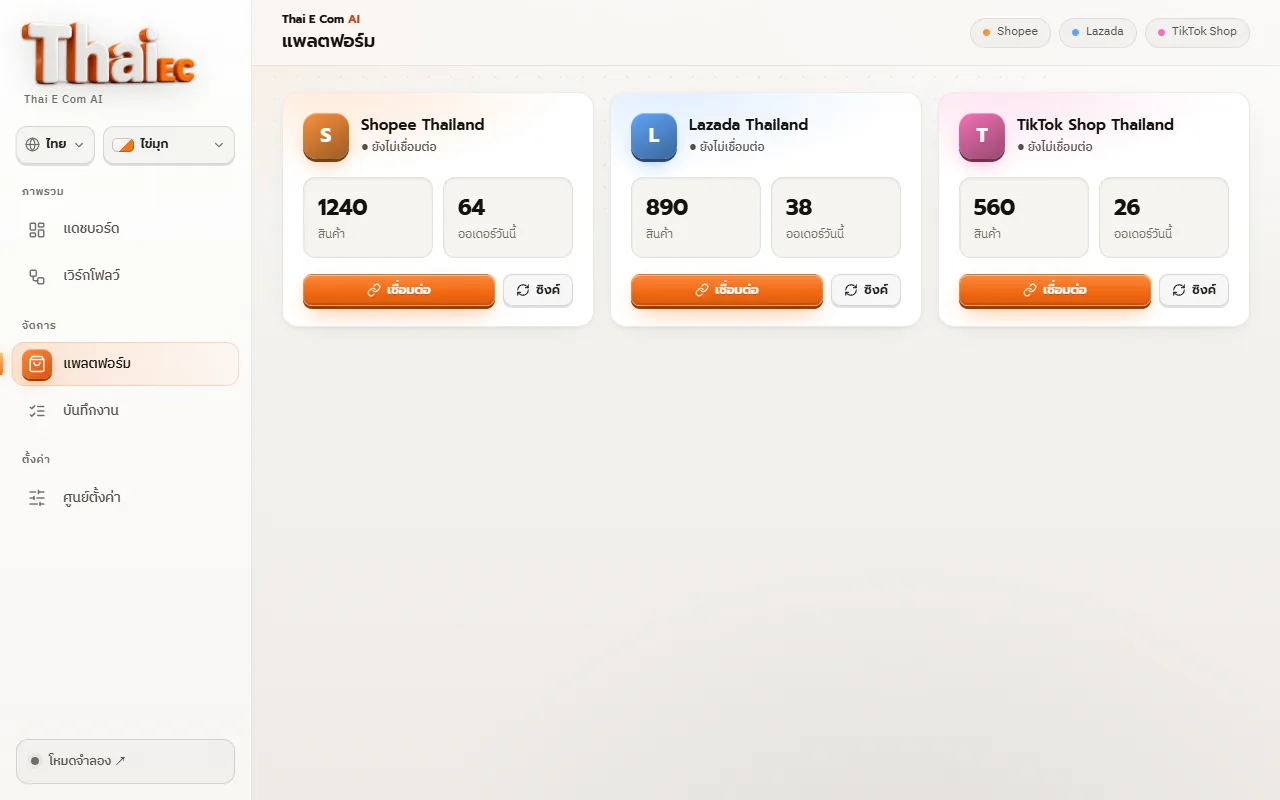
การ์ดของ Shopee Thailand, Lazada Thailand และ TikTok Shop Thailand แสดงสถานะ ยังไม่เชื่อมต่อ จำนวนสินค้า ออเดอร์วันนี้ และปุ่ม เชื่อมต่อ กับ ซิงค์ ตัวเต็มมีส่วนหลังบ้านที่เขียนวิธีเซ็นลายเซ็นของทั้งสามเจ้าไว้แล้ว แต่ปุ่มเชื่อมตอนนี้ยังตอบเป็นค่าจำลอง เพราะยังไม่มีบัญชีนักพัฒนาและกุญแจของจริงCards for Shopee Thailand, Lazada Thailand and TikTok Shop Thailand show a not-connected status, product count, orders today and connect and sync buttons. The full version's backend already contains the request-signing code for all three, but the connect button still returns simulated values because there are no developer accounts or real keys yet.
บันทึกงานJob log
ทุกครั้งที่ Agent รันจะเกิดแถวในบันทึกงาน มีรหัสงาน ชื่อ Agent สถานะ (สำเร็จ ผิดพลาด จำลอง) เวลาเริ่ม และระยะเวลา เก็บล่าสุด 100 งาน มีการ์ดสรุปจำนวนทั้งหมดและอัตราสำเร็จ กราฟจำนวนการรันและเวลาเฉลี่ยต่อ Agent ตัวกรองตาม Agent สถานะ และช่องค้นหา กดแถวเพื่อดูรายละเอียดผลลัพธ์Each agent run adds a row with a job id, agent name, status (success, error or simulated), start time and duration, keeping the latest 100. There are summary cards for totals and success rate, charts of runs and average time per agent, filters by agent and status, and a search box; open a row for the full output.
ตั้งค่ารายตัวPer-agent settings
ในศูนย์ตั้งค่าแต่ละ Agent เปิดหรือปิดได้ ตั้งหมวดสินค้า กำไรเป้าหมายเป็นเปอร์เซ็นต์ และแก้ system prompt เองได้ ค่าเหล่านี้ถูกใส่เข้าไปในคำสั่งที่ส่งให้โมเดลจริง ไม่ได้เป็นแค่ช่องตกแต่ง ภาษาที่ AI ตอบเปลี่ยนตามภาษาบนหน้าจอIn the settings centre each agent can be enabled or disabled, given a product category and a target margin in percent, and a custom system prompt. These values really go into the instruction sent to the model rather than being decorative, and the language of the AI's reply follows the interface language.
เชื่อมโมเดล AI ในเครื่องหรือออนไลน์Local or online AI model
หน้า AI Model Key รับ API Base URL คีย์ และชื่อโมเดล รองรับ Ollama ในเครื่องและ API ออนไลน์ มีปุ่มทดสอบการเชื่อมต่อ ตัวเต็มดึงรายชื่อโมเดลที่ติดตั้งจริงจากเครื่อง แล้วเลือกตัวที่มีอยู่ให้ ค่าเริ่มต้นเป็น qwen3.5:9b ปิดโหมดคิดยาวเพื่อให้ข้อความแรกมาในราว 5 วินาทีและทั้งงานราว 20 วินาทีThe AI Model Key page takes an API base URL, key and model name, supporting local Ollama and online APIs, with a connection-test button. The full version reads the models actually installed on the machine and picks one that exists. The default is qwen3.5:9b with long reasoning switched off, which brings the first text in around 5 seconds and a whole job in about 20.
ผลลัพธ์ภาษาไทยที่ไม่หลุดคำจีนThai output without stray Chinese
โมเดล qwen ในเครื่องบางทีหลุดคำจีน 2-6 คำกลางประโยคไทย ตัวเต็มมีตัวแก้ที่ตรวจเจอแล้วแปลทีละคำพร้อมบริบทในเวลาไม่ถึงวินาที ทำให้ผลลัพธ์ที่ได้อ่านเป็นไทยล้วน ส่วนข้อความสำเร็จรูปของโหมดจำลองก็แยกเป็น 3 ภาษาไว้เช่นกันThe local qwen model sometimes leaks two to six Chinese words into a Thai sentence. The full version detects them and translates each with its context in under a second, so the output reads as pure Thai. The canned demo-mode text is likewise kept in three languages.
3 ภาษา 4 ธีมThree languages, four themes
สลับภาษาไทย อังกฤษ จีน ได้จากแถบข้าง และเลือกธีมได้ 4 แบบ คือ ไข่มุก (สว่าง) ดำเงา (เข้ม ค่าเริ่มต้น) น้ำเงินทะเลลึก และชมพูม่วงอ่อน ตัวเลือกที่เลือกถูกจำไว้ในเบราว์เซอร์ ทุกสีในหน้าจอดึงจากตัวแปรธีม ธีมสว่างจึงไม่ทำให้ตัวอักษรหายSwitch between Thai, English and Chinese from the sidebar, and pick one of four themes: pearl (light), glossy black (dark, the default), deep-sea blue and soft pink-violet. The choice is remembered in the browser, and every colour is drawn from theme variables so the light themes do not lose text.
ความปลอดภัยของตัวเต็มเมื่อเปิดจากนอกบ้านSafety of the full version when reached from outside
ตัวเต็มมี 2 ประตู ประตูในเครื่อง (พอร์ต 8901) กันการยิงข้ามเว็บ ส่วนประตูสำหรับอุโมงค์ (พอร์ต 8903) ปฏิเสธทุกคำขอที่ไม่มีบัตรผ่านของ Cloudflare Access ที่ตรงกับอีเมลที่อนุญาต ถ้าตั้งค่าไม่ครบจะปฏิเสธหมด ทดสอบความปลอดภัยผ่าน 8 จาก 8 ข้อ และตัวส่งต่อไป Ollama จำกัดพร้อมกัน 2 งานThe full version has two doors. The local door (port 8901) blocks cross-site requests; the tunnel door (port 8903) rejects every request lacking a Cloudflare Access pass for an allow-listed email, and refuses everything if configuration is incomplete. Security tests passed 8 of 8, and the relay to Ollama is capped at two concurrent jobs.
04 · วิธีทำงาน04 · How it works
ทำงานยังไง ตั้งแต่ต้นจนจบHow it works, start to finish
- 1
1. เปิดแดชบอร์ด1. Open the dashboard
เปิดหน้าเว็บสาธารณะเพื่อดูโหมดจำลอง หรือดับเบิลคลิกไอคอน Thai E Com AI บนเดสก์ท็อปของเจ้าของเพื่อเปิดตัวเต็มที่ localhost:8901 ตัวเปิดจะสตาร์ตหลังบ้านให้ถ้ายังไม่รันOpen the public page for demo mode, or double-click the Thai E Com AI icon on the owner's desktop to launch the full version at localhost:8901, which starts the backend if it is not already running.
- 2
2. ตั้งค่า Agent และโมเดล2. Set up agents and the model
ไปที่ศูนย์ตั้งค่า เลือกโมเดล AI ทดสอบการเชื่อมต่อ แล้วตั้งหมวดสินค้า กำไรเป้าหมาย และพรอมป์ตของแต่ละ AgentGo to the settings centre, choose the AI model and test the connection, then set category, target margin and prompt for each agent.
- 3
3. รันทีละตัวหรือรันทั้งหมด3. Run one agent or all of them
บนหน้าเวิร์กโฟลว์กด รัน ที่ Agent ใดก็ได้ หรือ รันทั้งหมด ระบบประกอบคำสั่งจากค่าที่ตั้งไว้และสถานะแพลตฟอร์ม แล้วสตรีมคำตอบจากโมเดลเข้าการ์ดOn the workflow page press run on any agent or run-all. The system assembles the instruction from your settings and the platform status, then streams the model's reply into the card.
- 4
4. ดูผลและบันทึกงาน4. Read the result and the log
ผลลัพธ์ขึ้นพร้อมป้ายสถานะ สำเร็จ หรือ จำลอง ถ้าเรียกโมเดลไม่ได้ เข้าบันทึกงานเพื่อดูรายละเอียด เวลาที่ใช้ และอัตราสำเร็จของแต่ละ AgentThe result appears with a success or simulated badge, the latter if the model could not be reached. Open the job log for detail, time taken and each agent's success rate.
- 5
5. ต่อร้านจริง (ยังไม่เปิดใช้)5. Connect a real shop (not live yet)
เมื่อมีกุญแจนักพัฒนาของ Shopee, Lazada หรือ TikTok Shop ใส่ในหลังบ้าน ปุ่ม เชื่อมต่อ และ ซิงค์ จะเปลี่ยนจากค่าจำลองเป็นเรียก API จริง ขั้นนี้ยังไม่เคยทำสำเร็จเพราะยังไม่มีบัญชีและกุญแจOnce developer keys for Shopee, Lazada or TikTok Shop are placed in the backend, the connect and sync buttons switch from simulated values to real API calls. This step has never succeeded because there are no accounts or keys yet.
05 · ภาพ05 · Visuals
ภาพจากระบบจริงFrom the real system
6 ภาพ6 imagesภาพหน้าจอจริงถ่ายจากระบบที่เปิดใช้อยู่ ส่วนภาพโปรโมตและภาพประกอบมีป้ายกำกับไว้ทุกใบReal screenshots come from the running system; promo images and illustrations are labelled on every card.
06 · สถานการณ์06 · Scenarios
ตัวอย่างสถานการณ์ใช้งานExample scenarios
เป็นตัวอย่างสมมติเพื่อให้เห็นภาพ ไม่ใช่เรื่องของลูกค้าจริงIllustrative scenarios to help you picture it — not real customer stories.
เจ้าของร้านที่ขายสามแพลตฟอร์มAn owner selling on all three marketplaces
สมมติว่าคุณขายของใช้ในบ้านบน Shopee, Lazada และ TikTok Shop แล้วต้องเปิดหลังบ้านทีละเว็บ ให้ ThaiECom เป็นหน้าเดียวที่เห็นสัดส่วนออเดอร์ของแต่ละแพลตฟอร์ม เมื่อต่อ API ได้จริง (วันนี้ยังเป็นข้อมูลตัวอย่าง)Suppose you sell household goods on Shopee, Lazada and TikTok Shop and log into each back office separately. ThaiECom would be the one page showing each platform's share of orders once the APIs are connected (today it shows sample data).
แอดมินที่ตอบแชทซ้ำ ๆAn admin repeating the same chat answers
สมมติว่าแอดมินต้องตอบเรื่องค่าส่งและการเปลี่ยนคืนทุกวัน ตั้งพรอมป์ตของ Agent CS อัจฉริยะด้วยนโยบายร้าน แล้วให้ร่างคำตอบภาษาไทยไว้ให้ตรวจ (ตอนนี้ตัวทริกเกอร์ข้อความใหม่ยังปิดอยู่ เพราะต้องมี API ของแพลตฟอร์มก่อน)Suppose an admin answers delivery and returns questions every day. Set the smart-customer-service agent's prompt with the shop's policy and have it draft Thai replies for review. (The new-message trigger is still switched off because it needs the platform API.)
วางแผนสินค้าใหม่ประจำสัปดาห์Weekly product planning
สมมติว่าคุณอยากลองสินค้าใหม่หมวดจัดระเบียบบ้าน ตั้งหมวดและกำไรเป้าหมาย 25% ให้ Agent วิเคราะห์สินค้า แล้วส่งต่อไป ลงสินค้า และ การตลาด ในสายพานเดียวกัน ดูผลทั้งสามตัวในบันทึกงาน (ผลเป็นข้อเสนอจากโมเดล ต้องตรวจเอง)Suppose you want to test a new home-organising product. Set the category and a 25% target margin, let the product-analysis agent run, then pass the result on to listing and marketing in the same chain and read all three in the job log. (The results are model suggestions that you must check.)
ลองก่อนตัดสินใจติดตั้งTrying it before committing
สมมติว่าคุณเป็นร้านที่สนใจ เข้าหน้าโหมดจำลองกดทุกหน้า เปลี่ยนภาษาและธีม แล้วบอกเราว่าร้านขายแพลตฟอร์มไหนและอยากได้ Agent ตัวไหน เราจะติดตั้งตัวเต็มบนคอมของคุณ (ยังไม่มีราคาหรือแผนขาย)Suppose you are a shop that is curious. Click through every page of the demo, switch language and theme, then tell us which platforms you sell on and which agents you want, and we would install the full version on your computer. (No price or sales plan yet.)
07 · เบื้องหลัง07 · Under the hood
เบื้องหลังระบบ ข้อมูล และความปลอดภัยUnder the hood: data and security
- แพลตฟอร์มและโครงPlatform and structure
- หน้าเว็บเป็นไฟล์ HTML ไฟล์เดียว (ประมาณ 1,000 บรรทัดในฉบับ 20 ส.ค.) ไม่มีเฟรมเวิร์ก ไอคอนเป็น SVG ฟอนต์ Prompt และ IBM Plex Sans Thai ตัวเต็มมีหลังบ้านเป็น Node.js กับ Express เรียกว่า gatewayThe front end is a single HTML file (about 1,000 lines in the 20 August version) with no framework, SVG icons, and Prompt and IBM Plex Sans Thai fonts. The full version adds a Node.js and Express backend called the gateway.
- ที่เก็บข้อมูลWhere data lives
- ค่าตั้งและบันทึกงานเก็บในเบราว์เซอร์ (localStorage) ส่วนสถานะการเชื่อมแพลตฟอร์มเก็บในไฟล์ state.json ของ gateway ทั้งหมดอยู่บนคอมของเจ้าของ ไม่มีฐานข้อมูลบนคลาวด์Settings and the job log live in the browser (localStorage); platform connection state is kept in the gateway's state.json file. Everything sits on the owner's computer, with no cloud database.
- AIAI
- ตัวเต็มส่งคำขอผ่านตัวส่งต่อใน gateway ไปที่ Ollama ในเครื่อง (ค่าเริ่มต้น qwen3.5:9b) หรือ API ที่ระบุ จึงไม่ต้องส่งข้อมูลร้านขึ้นคลาวด์ ถ้าเรียกโมเดลไม่ได้ จะแสดงเป็นผลจำลองพร้อมป้ายส้มThe full version relays requests through the gateway to local Ollama (default qwen3.5:9b) or a specified API, so shop data need not go to the cloud. If the model cannot be reached the output is shown as simulated with an orange badge.
- การเข้าถึงจากนอกบ้านRemote access
- ตามบันทึก 3 ต.ค. 2569 ตัวเต็มเปิดจากนอกบ้านได้ผ่าน Cloudflare Tunnel ที่โดเมนย่อยของเรา ล็อกอินด้วยอีเมลผ่าน Cloudflare Access ซึ่งอนุญาตเฉพาะอีเมลเจ้าของ แต่ต้องเปิดคอมและไอคอนไว้ ยังไม่มีการเปิดอัตโนมัติเมื่อบูตเครื่องPer the 3 October 2026 notes, the full version can be reached from outside through a Cloudflare Tunnel on one of our subdomains, behind a Cloudflare Access email login that admits only the owner's address. The computer and the launcher must be running, and there is no auto-start at boot.
- การเชื่อมแพลตฟอร์มMarketplace connections
- โค้ดเซ็นลายเซ็นของ Shopee (HMAC), Lazada และ TikTok Shop เขียนไว้แล้ว แต่ยังไม่มี OAuth การต่ออายุ token (token Shopee อายุราว 4 ชั่วโมง) หรือสิทธิ์เขียนกลับ และ Shopee ไทยให้ API เฉพาะร้านระดับ Mall หรือที่มีผู้ดูแลบัญชี ทุก route จึงตอบเป็นค่าจำลองจนกว่าจะใส่ credentialsRequest-signing code for Shopee (HMAC), Lazada and TikTok Shop is written, but there is no OAuth, token refresh (Shopee tokens last about four hours) or write-back permission, and Shopee Thailand grants API access mainly to Mall-level shops or those with an account manager. Every route returns simulated values until credentials are supplied.
- ข้อจำกัดที่ควรรู้Limits to know about
- ตัวทริกเกอร์ข้อความใหม่และออเดอร์ใหม่ยังปิดอยู่ เพราะต้องมี webhook ตัวจับเวลารายวันทำงานเฉพาะตอนเปิดหน้าเว็บค้างไว้ ปิดคอมเมื่อไรตัวเต็มจากนอกบ้านใช้ไม่ได้The new-message and new-order triggers are off because they need webhooks. The daily timer only fires while the page is left open. When the computer is off, the full version cannot be reached from outside.
08 · ความคืบหน้า08 · Progress
ความคืบหน้าและแผนต่อไปProgress and what comes next
- ทำแล้วDone
20 ส.ค. 2569 แก้บั๊ก 7 จุดใหญ่ (คำสั่งใช้ค่าที่ตั้งจริง แยกสถานะจำลองออกจากสำเร็จ ปุ่มหยุด กัน XSS) และปรับหน้าตาเป็นธีมใหม่20 Aug 2026: fixed seven major bugs (instructions use the real settings, simulated status separated from success, stop button, XSS escaping) and restyled the interface
- ทำแล้วDone
15-16 ก.ย. 2569 ใส่แบรนด์ ThaiEC ระบบ 4 ธีม ปุ่มเลือกภาษาและธีมแบบเมนู และเปลี่ยนชื่อเป็น Thai E Com AI15-16 Sep 2026: ThaiEC branding, four themes, dropdown pickers for language and theme, and the rename to Thai E Com AI
- ทำแล้วDone
16 ก.ย. 2569 ขึ้นเว็บสาธารณะ zzaxstudio.com/thai-e-com-ai/ เป็นโหมดจำลอง (อัปเดตล่าสุด 3 ต.ค.)16 Sep 2026: public page live at zzaxstudio.com/thai-e-com-ai/ in demo mode (last updated 3 Oct)
- ทำแล้วDone
16 ก.ย. - 3 ต.ค. 2569 เขียน gateway ใหม่เป็นสองประตู พร้อมอุโมงค์ Cloudflare และ Access ผ่านการทดสอบความปลอดภัย 8/8 และแก้พอร์ตชนกับโปรเจกต์อื่น16 Sep to 3 Oct 2026: rewrote the gateway as two doors with a Cloudflare tunnel and Access, passed 8 of 8 security tests, and fixed a port clash with another project
- ทำแล้วDone
3 ต.ค. 2569 QA รอบใหญ่ แก้ข้อความ 3 ภาษา สตอปรายตัว รายละเอียดงาน ตัวเลขนับจากประวัติจริง และตัวแก้คำจีนที่หลุด3 Oct 2026: major QA pass: three-language text, per-agent stop, job detail, counters from real history and the stray-Chinese fixer
- ถัดไปNext
สมัครบัญชีนักพัฒนา Shopee, Lazada, TikTok Shop แล้วทำ OAuth และต่ออายุ token (ยังไม่ได้เริ่ม รอการยื่น)Apply for Shopee, Lazada and TikTok Shop developer accounts, then build OAuth and token refresh (not started, awaiting applications)
- ถัดไปNext
รวมเข้า ShopFlow AI ตามแผน 6 ต.ค. 2569 (ย้ายชั้นเชื่อมแพลตฟอร์มกับสายพาน AI แล้วปิด ThaiECom หลังใช้ ShopFlow ได้ครบหนึ่งสัปดาห์) ยังไม่เริ่มโค้ดMerge into ShopFlow AI under the 6 Oct 2026 plan (move the platform layer and AI pipeline across, then retire ThaiECom after a week of using ShopFlow); no code yet
09 · คำถาม09 · FAQ
คำถามที่พบบ่อยFrequently asked questions
ลองใช้ได้ไหมCan I try it?
ได้ที่ zzaxstudio.com/thai-e-com-ai/ เป็นโหมดจำลอง กดดูได้ทุกหน้า แต่ตัวเลขและผลของ Agent เป็นตัวอย่าง ไม่ได้ต่อร้านจริงYes, at zzaxstudio.com/thai-e-com-ai/ in demo mode. You can click every page, but figures and agent output are samples with no real shop behind them.
ต่อกับร้านบน Shopee, Lazada, TikTok Shop จริงได้หรือยังDoes it connect to my real Shopee, Lazada or TikTok Shop yet?
ยังไม่ได้ ยังไม่มีสิทธิ์ API ของทั้งสามแพลตฟอร์ม และ Shopee ไทยให้ API เฉพาะบางประเภทร้าน ถ้าสนใจ ให้บอกเราว่าคุณขายแพลตฟอร์มไหน เราจะประเมินว่าเริ่มจากที่ไหนได้ก่อนNot yet. API access from all three platforms has not been granted, and Shopee Thailand offers its API to only some shop types. Tell us which platforms you sell on and we will assess where to start.
ต้องจ่ายค่า AI ไหม ข้อมูลร้านไปอยู่ที่ไหนDo I pay for AI, and where does shop data go?
ตัวเต็มต่อกับโมเดลที่รันในเครื่อง จึงไม่มีค่า API ต่อครั้งและข้อมูลไม่ต้องขึ้นคลาวด์ ถ้าคุณเลือกต่อ API ออนไลน์เอง ค่าใช้จ่ายขึ้นกับผู้ให้บริการนั้น ต้องมีเครื่องที่รันโมเดลได้ (ค่าเริ่มต้นเป็นโมเดลขนาด 9 พันล้านพารามิเตอร์)The full version talks to a model on your own machine, so there is no per-call API fee and shop data need not go to the cloud. If you point it at an online API yourself, cost depends on that provider. You need a machine that can run the model (the default is a 9-billion-parameter one).
ราคาเท่าไรWhat does it cost?
ยังไม่ได้กำหนด ยังไม่มีแผนขาย และเจ้าของตัดสินใจจะรวมงานนี้เข้า ShopFlow AINot set. There is no sales plan, and the owner has decided to fold this work into ShopFlow AI.
ใช้จากมือถือหรือนอกบ้านได้ไหมCan I use it from a phone or away from home?
หน้าเว็บสาธารณะเปิดจากมือถือได้ ส่วนตัวเต็มเปิดจากนอกบ้านได้ผ่านอุโมงค์ที่ล็อกอินด้วยอีเมลของเจ้าของเท่านั้น ต้องเปิดคอมไว้ ตามบันทึกเจ้าของเปิดดูแดชบอร์ดจากมือถือได้แล้ว แต่ยังไม่ได้ยืนยันว่าสั่ง AI ทำงานจากมือถือสำเร็จThe public page opens on a phone. The full version can be reached from outside through a tunnel that admits only the owner's email login, and the computer must stay on. The owner has confirmed that the dashboard opens from a phone, but running an AI job from the phone has not been confirmed.
ตัวเลขบนแดชบอร์ดคือยอดขายจริงไหมAre the dashboard figures real sales?
ไม่ใช่ ตัวเลข 128 ออเดอร์ และ ฿45,800 เป็นข้อมูลตัวอย่างที่เขียนไว้ในหน้าเว็บ มีแถบเตือนบนหน้าจอบอกไว้ จนกว่าจะเชื่อมร้านจริงNo. The 128 orders and 45,800 baht are sample data written into the page, flagged by a banner on screen, until a real shop is connected.
10 · วิธีเริ่ม10 · Get started
เริ่มได้ใน 3 ขั้นUp and running in three steps
ถ้าอยากได้ระบบแบบเดียวกันสำหรับธุรกิจของคุณ บอกโจทย์มาสั้น ๆ เราตอบกลับพร้อมขอบเขตงานและราคาภายใน 1 วันทำการIf you want something like this for your own business, send us a line about the problem. You'll get scope and price within one working day.
- 1ขั้นที่ 1 เปิดหน้าเว็บสาธารณะ แล้วกดดูแดชบอร์ดและ Agent ในโหมดจำลองก่อนStep 1: Open the public page and click through the dashboard and agents in demo mode
- 2ขั้นที่ 2 บอกเราว่าร้านคุณขายอยู่แพลตฟอร์มไหนบ้าง และอยากให้ Agent ตัวไหนทำงานให้Step 2: Tell us which platforms your shop sells on and which agents you want working for you
- 3ขั้นที่ 3 เราติดตั้งตัวเต็มบนคอมของคุณ แล้วต่อ AI ในเครื่องให้ก่อนเชื่อมบัญชีร้านจริงStep 3: We install the full version on your computer and wire up local AI before connecting any real shop account
เริ่มงานกับเราWork with us
อยากได้ระบบแบบนี้สำหรับธุรกิจคุณWant a system like this for your business?
เล่าปัญหาของคุณมา เราจะบอกตรง ๆ ว่าช่วยได้ไหม ภายใน 1 วันทำการ ส่งแล้วได้รหัสติดตามงานทันทีTell us the problem and we'll say honestly whether we can help, within one working day. You get a tracking code the moment you send it.