คนขายของออนไลน์ในไทยต้องเขียนชื่อสินค้า จุดเด่น คำตอบลูกค้า และแผนแคมเปญเองทุกครั้ง พอย้ายไปขายอีกแพลตฟอร์มก็ต้องพิมพ์ใหม่หมด และตอนตั้งราคาก็ไม่รู้ว่าหักค่าคอมมิชชัน ค่าธรรมเนียม กับค่าส่งแล้วเหลือกำไรจริงเท่าไหร่Thai online sellers rewrite product names, selling points, customer replies and campaign plans from scratch every time, then type it all again for the next platform. And when it comes to pricing, few know what is actually left after commission, transaction fees and shipping.
← ผลงานทั้งหมด← All work
เว็บแอปWeb app
ShopflowAi เครื่องมือขายของShopflowAi เครื่องมือขายของ
เครื่องมือ AI 14 ตัวสำหรับคนขายของออนไลน์ไทย กรอกข้อมูลสินค้าครั้งเดียว ใช้ต่อได้ทุกเครื่องมือFourteen AI tools for Thai online sellers — enter a product once and every tool reuses it
เบต้าBeta เว็บแอปWeb app
มีเว็บสาธารณะแล้ว เปิดเข้าไปดูได้ทุกเครื่องมือ และตัวคำนวณราคากับกำไรใช้ได้เต็มโดยไม่ต้องมีรหัส แต่ปุ่มที่เรียก AI ต้องใส่รหัสเข้าใช้งานที่เราตั้งไว้กันค่าใช้จ่ายบานปลาย คนนอกจึงยังสร้างงานด้วย AI ไม่ได้ · ผลตรวจครบทั้ง 14 เครื่องมือเมื่อ 7 ก.ย. 2569 พบว่าใช้ได้เต็ม 4 ตัว ใช้ได้บางส่วน 8 ตัว และใช้ไม่ได้ 2 ตัว หลังจากนั้นแก้ชุดใหญ่และย้ายหลังบ้านมาเป็นของเราเองเมื่อ 8 ก.ย. 2569 แต่ยังไม่ได้ตรวจซ้ำทั้ง 14 ตัวThe public site is up and every tool can be opened; the price-and-profit calculator works in full with no code. The AI buttons, however, are behind an access code we set to keep costs from running away, so outsiders cannot generate anything yet. A full pass over all 14 tools on 7 September 2026 found 4 working end to end, 8 partly working and 2 broken; a large round of fixes followed on 8 September along with a move to our own backend, but the 14 have not been re-tested since.
14เครื่องมือในชุดTools in the set
2ภาษาบนหน้าจอInterface languages
01 · ภาพรวม01 · Overview
ภาพรวมของระบบThe system at a glance
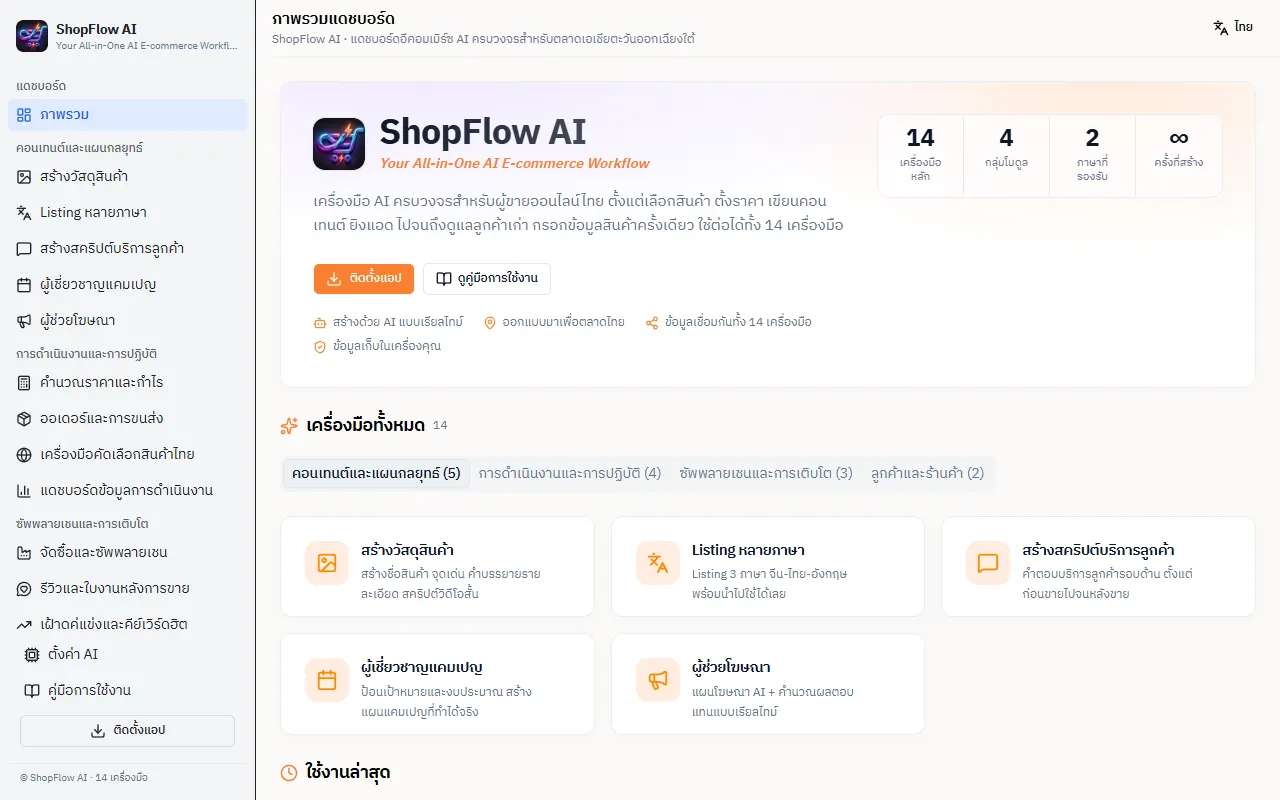
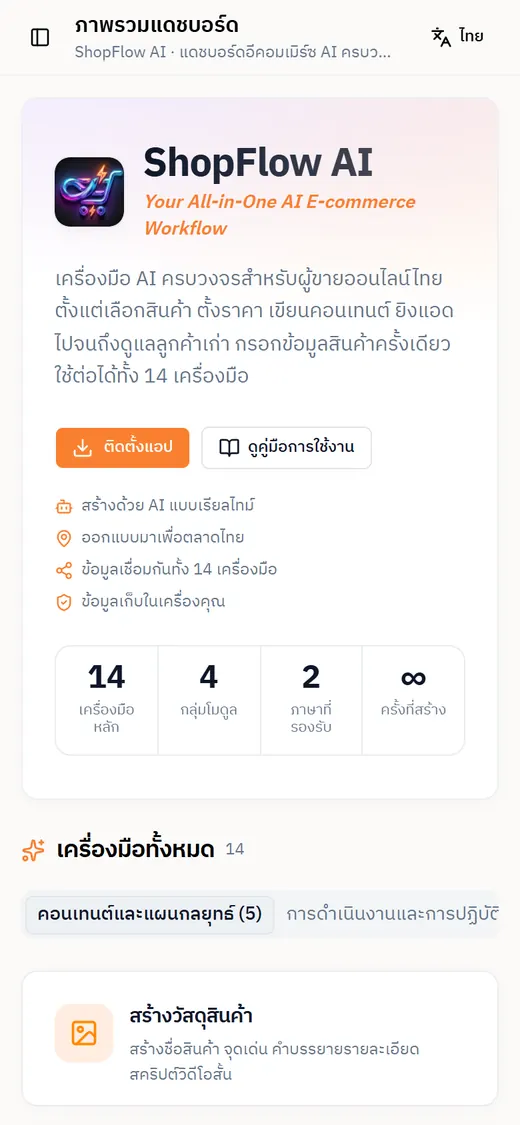
ShopFlow AI คือชุดเครื่องมือบนเว็บสำหรับคนขายของออนไลน์ในไทย รวมงานที่ต้องทำทุกวันไว้ 14 หน้าในที่เดียว ตั้งแต่เขียนชื่อสินค้าและคำบรรยาย แปล Listing ตอบแชทลูกค้า วางแผนแคมเปญและโฆษณา ไปจนถึงคำนวณว่าตั้งราคาเท่าไรแล้วเหลือกำไรจริง คุณกรอกข้อมูลสินค้าครั้งเดียว เครื่องมือที่เหลือหยิบไปใช้ต่อให้ShopFlow AI is a web workbench for Thai online sellers that puts the daily jobs on 14 pages in one place: writing product names and descriptions, translating listings, answering customer chats, planning campaigns and ads, and working out what is actually left after fees at a given price. You enter a product once and the other tools reuse it.
วิธีใช้คือเปิดเว็บแล้วเลือกเครื่องมือจากเมนูซ้าย ซึ่งแบ่งเป็น 4 กลุ่ม คือคอนเทนต์และแผนกลยุทธ์ การดำเนินงานและการปฏิบัติ ซัพพลายเชนและการเติบโต และลูกค้าและร้านค้า แต่ละหน้ามีฟอร์มทางซ้ายและช่องผลลัพธ์ทางขวา กรอกแล้วกดสร้าง ข้อความจาก AI จะค่อย ๆ ไหลเข้าช่องผลลัพธ์ แล้วกด คัดลอกทั้งหมด ไปวางตอนลงขายได้ ข้อมูลสินค้าเก็บไว้ในเบราว์เซอร์ของคุณ และซิงก์ข้ามเครื่องได้ถ้าใช้รหัสเข้าใช้งานเดียวกันOpen the site and pick a tool from the left menu, which is split into four groups: content and strategy, operations, supply chain and growth, and customers and storefront. Each page has a form on the left and a results panel on the right: fill it in, press generate, and the AI text streams into the panel, ready to copy with one click. Product data stays in your browser and can sync between devices if you use the same access code.
ตอนนี้มีเว็บสาธารณะที่ shopflow-ai.aisupermarket-thai.workers.dev เปิดดูทุกหน้าได้ และเครื่องคำนวณราคากับกำไรใช้ได้เต็มโดยไม่ต้องมีรหัส แต่ปุ่มที่เรียก AI ต้องใส่รหัสเข้าใช้งานที่เราตั้งไว้ จึงยังไม่มีผู้ใช้ภายนอก ผลตรวจครบ 14 เครื่องมือเมื่อ 7 ก.ย. 2569 พบว่าใช้ได้เต็ม 4 ใช้ได้บางส่วน 8 ใช้ไม่ได้ 2 หลังจากนั้นแก้ชุดใหญ่เมื่อ 8 ก.ย. แต่ยังไม่ได้ตรวจซ้ำทั้งชุด เจ้าของตัดสินใจเมื่อ 6 ต.ค. 2569 ว่าจะใช้เองก่อนแล้วค่อยขายThe public site at shopflow-ai.aisupermarket-thai.workers.dev lets anyone open every page, and the price-and-profit calculator works fully without a code. The AI buttons, though, sit behind an access code we set, so there are no outside users yet. A pass over all 14 tools on 7 September 2026 found 4 fully working, 8 partly working and 2 broken; a large round of fixes followed on 8 September, but the whole set has not been re-tested. On 6 October 2026 the owner decided to use it in-house first and sell it later.
ที่ออกแบบแบบนี้เพราะคนขายรายย่อยไม่ต้องการระบบใหญ่ที่ต้องต่อบัญชีร้าน แต่ต้องการผู้ช่วยที่ร่างงานให้เร็ว ใช้ภาษาไทยเป็นหลัก และไม่เอาข้อมูลสินค้าไปเก็บที่ใครอื่น AI ทำหน้าที่ร่าง ส่วนตัวเลขกำไรคำนวณด้วยสูตรในโค้ดที่เห็นทีละบรรทัด คุณยังเป็นคนตรวจและกดลงขายเองThe design follows what small sellers actually need: not a big system wired to a shop account, but a fast drafting assistant that works in Thai first and does not park product data with anyone else. The AI drafts; the profit figures come from a formula in code that you can read line by line; you still review everything and publish it yourself.
02 · โจทย์02 · The brief
สร้างขึ้นมาเพราะอะไรWhy this exists
ผู้ขายรายย่อยไทยบน Shopee, Lazada และ TikTok Shop รวมถึงคนที่นำเข้าสินค้าจากจีนมาขายต่อSmall Thai sellers on Shopee, Lazada and TikTok Shop, including those reselling goods imported from China
ใช่โจทย์ของคุณไหมSound like your problem?
03 · ฟีเจอร์03 · Features
ทำอะไรได้บ้าง อย่างละเอียดWhat it does, in detail
10 ความสามารถ10 capabilitiesสร้างวัสดุสินค้า และนำเข้าจากลิงก์Product copy, plus import from a link
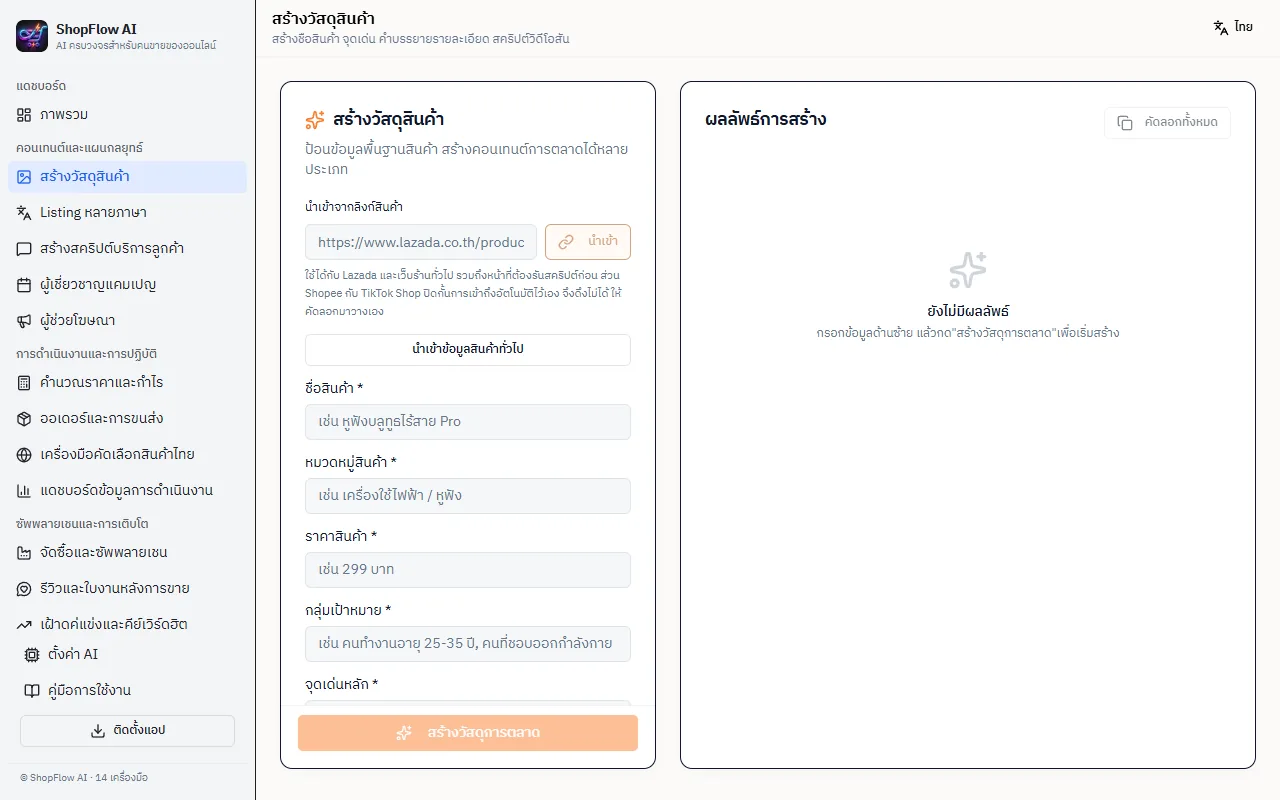
ฟอร์มรับชื่อสินค้า หมวดหมู่ ราคา กลุ่มเป้าหมาย จุดเด่นหลัก และคำอธิบายเพิ่ม แล้วสร้างชื่อสินค้า จุดเด่น คำบรรยาย และสคริปต์วิดีโอสั้น ถ้าไม่อยากพิมพ์เอง วางลิงก์ Lazada หรือเว็บร้านทั่วไปในช่อง นำเข้าจากลิงก์สินค้า ระบบจะดึงชื่อ ราคา และรายละเอียดมาใส่ฟอร์ม ส่วน Shopee กับ TikTok Shop บล็อกการดึงอัตโนมัติ ต้องคัดลอกมาวางเองThe form takes product name, category, price, target audience, main selling points and extra notes, then writes a product name, highlights, a description and a short-video script. To skip typing, paste a Lazada or ordinary shop link into the import box and the name, price and details fill the form. Shopee and TikTok Shop block automated fetching, so those must be pasted by hand.
Listing หลายภาษาMultilingual listings
เลือกภาษาเป้าหมายได้ทั้งไทยอย่างเดียวหรือหลายภาษา โดยชุดสามภาษาคือจีน ไทย อังกฤษ ใส่ข้อมูลสินค้ายิ่งละเอียดผลยิ่งตรง ผลลัพธ์พร้อมวางลงหน้าลงสินค้าของมาร์เก็ตเพลส เหมาะกับคนที่นำเข้าสินค้าจากจีนและต้องเทียบชื่อสองภาษาChoose Thai only or several languages; the full set is Chinese, Thai and English. The more product detail you give, the more accurate the output, which is ready to paste into a marketplace listing form. It suits sellers who import from China and need names in two languages side by side.
สคริปต์บริการลูกค้าCustomer-service scripts
ใส่ข้อมูลสินค้า เลือกสไตล์การพูด เช่น เป็นกันเอง แล้ววางคำถามที่ลูกค้าถามบ่อย ยิ่งใส่คำถามมากสคริปต์ยิ่งครบ ได้คำตอบสำเร็จรูปตั้งแต่ก่อนขาย ระหว่างขาย จนถึงหลังขาย ไว้คัดลอกไปวางในแชทของแต่ละแพลตฟอร์มEnter the product, pick a tone such as friendly, and paste the questions customers ask most; the more questions, the fuller the script. You get ready-made replies from before the sale through to after-sales, to copy into each platform's chat.
ผู้เชี่ยวชาญแคมเปญ และผู้ช่วยโฆษณาCampaign planner and ads assistant
หน้าแคมเปญรับเป้าหมาย (เช่น ผลักยอดขาย) งบ ช่วงเวลา และเลือกแพลตฟอร์มได้ 5 ช่องทาง คือ Shopee, Lazada, TikTok Shop, LINE Shopping/LINE OA และ Facebook/Instagram Shop ส่วนผู้ช่วยโฆษณามี 2 แท็บ คือแผนโฆษณาจาก AI และเครื่องคำนวณโฆษณา ที่รับราคาต่อหัว กำไรขั้นต้น งบ และเป้าหมาย conversion ของแพลตฟอร์มที่เลือกThe campaign page takes a goal such as pushing sales, a budget and a time window, with five channels to target: Shopee, Lazada, TikTok Shop, LINE Shopping/LINE OA and Facebook/Instagram Shop. The ads assistant has two tabs, an AI ad plan and an ad calculator that takes unit price, gross margin, budget and a conversion target for the chosen platform.
คำนวณราคาและกำไรPrice and profit calculator
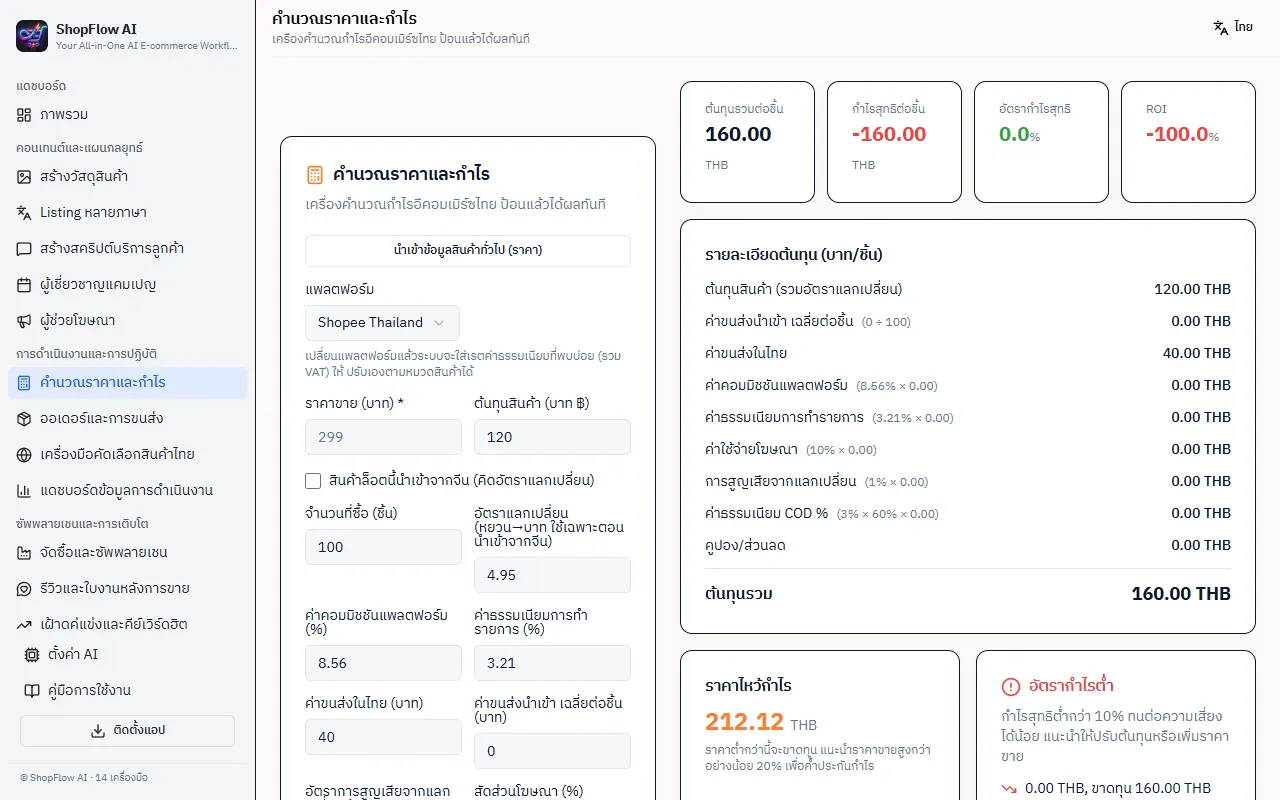
เลือกแพลตฟอร์มแล้วระบบใส่ค่าเริ่มต้นให้ Shopee และ Lazada ค่าคอมมิชชัน 8.56% ค่าธุรกรรม 3.21% TikTok Shop คอมมิชชัน 5.35% ค่าธุรกรรม 3.21% ค่าธรรมเนียมเก็บเงินปลายทาง 3% คิดตามสัดส่วนออเดอร์ COD (ค่าเริ่มต้น 60%) ใส่ต้นทุน ค่าส่ง ค่าโฆษณา คูปอง และอัตราแลกหยวน (ค่าเริ่มต้น 4.95) แล้วเห็นกำไรต่อชิ้น อัตรากำไร และราคาคุ้มทุน ต่ำกว่า 10% ขึ้นป้ายเตือน 25% ขึ้นไปขึ้นป้ายดี ทุกค่าแก้เองได้ และมีสวิตช์ นำเข้าจากจีน สำหรับกรอกต้นทุนเป็นหยวนPick a platform and the defaults load: Shopee and Lazada at 8.56% commission and 3.21% transaction fee, TikTok Shop at 5.35% and 3.21%, plus a 3% cash-on-delivery fee applied to the share of orders that are COD (default 60%). Enter cost, shipping, ad spend, coupons and the yuan rate (default 4.95) to see profit per unit, margin and break-even price; under 10% shows a warning and 25% or more shows a good badge. Every value is editable, and an import-from-China switch lets you enter cost in yuan.
ออเดอร์และการขนส่งOrders and delivery
ตารางออเดอร์แสดงเลขที่ สินค้า จำนวน ยอดรวม ผู้รับ ช่องทาง และสถานะ (รอชำระเงิน รอจัดส่ง จัดส่งแล้ว สำเร็จ) มีการ์ดสรุปจำนวนออเดอร์ รอจัดส่ง สำเร็จ และยอดขายรวมที่ไม่นับรอชำระและคืนเงิน มี 3 แท็บ คือจัดการออเดอร์ คำนวณค่าขนส่ง และสคริปต์ AI สำหรับแก้ปัญหาขนส่ง ข้อมูลที่เห็นตอนเปิดครั้งแรกเป็นตัวอย่าง ล้างแล้วนำเข้าจำนวนมากหรือเพิ่มเองได้The orders table lists order number, product, quantity, total, recipient, channel and status (awaiting payment, to ship, shipped, done), with summary cards for order count, to-ship, completed and total sales excluding unpaid and refunded orders. Three tabs cover order management, a shipping-cost calculator and an AI script for handling delivery problems. What you see on first open is sample data; clear it and bulk-import or add your own.
เครื่องมือคัดเลือกสินค้าไทยThai product picker
กรอกหมวดหมู่หรือคีย์เวิร์ด ช่วงราคา และแพลตฟอร์มเป้าหมาย (Shopee, Lazada, TikTok Shop) แล้วให้ AI วิเคราะห์ตลาดไทยและแนะนำสินค้าที่น่าสนใจ หมายเหตุ เป็นหนึ่งในสองเครื่องมือที่ผลตรวจ 7 ก.ย. ระบุว่าใช้ไม่ได้ แก้แล้วเมื่อ 8 ก.ย. แต่ยังไม่ตรวจซ้ำEnter a category or keyword, a price range and a target platform (Shopee, Lazada or TikTok Shop) and the AI analyses the Thai market and suggests products worth a look. Note: this is one of the two tools the 7 September check found broken; it was fixed on 8 September but has not been re-tested.
แดชบอร์ดข้อมูลการดำเนินงานOperations data dashboard
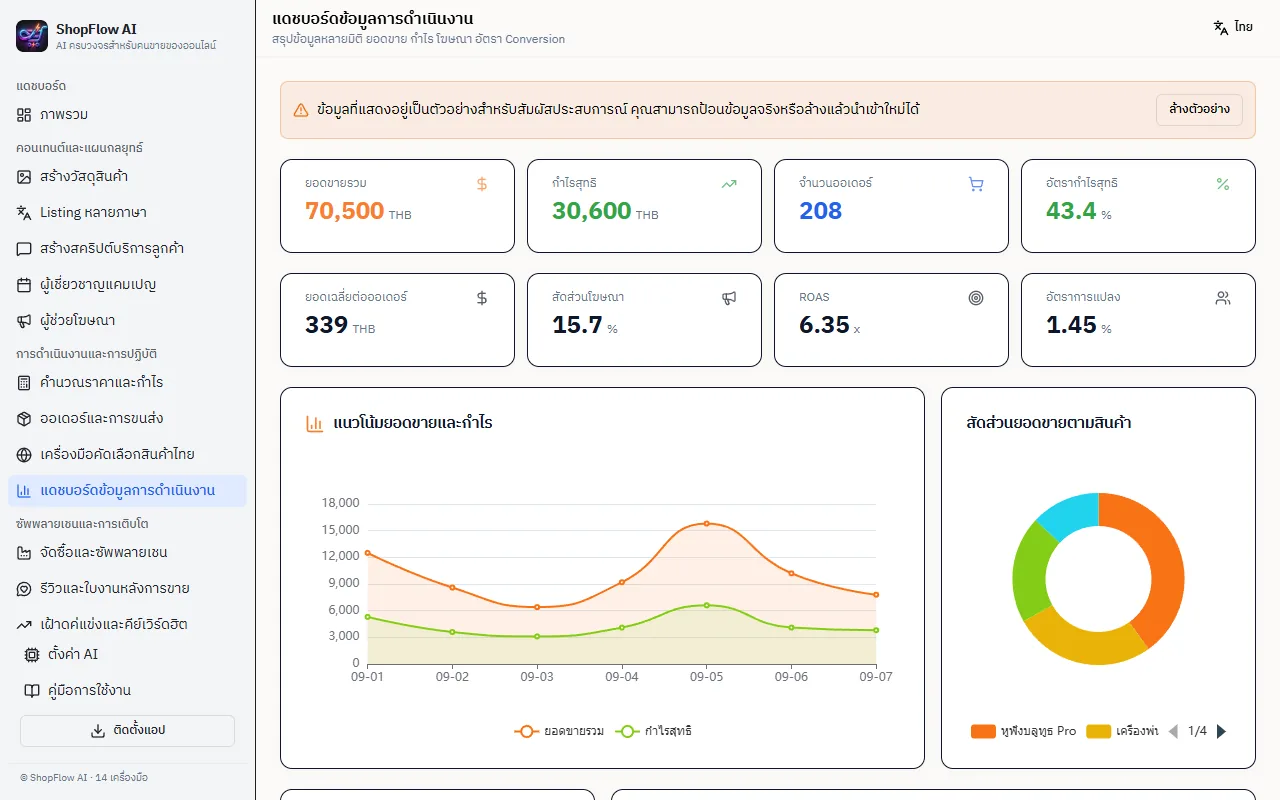
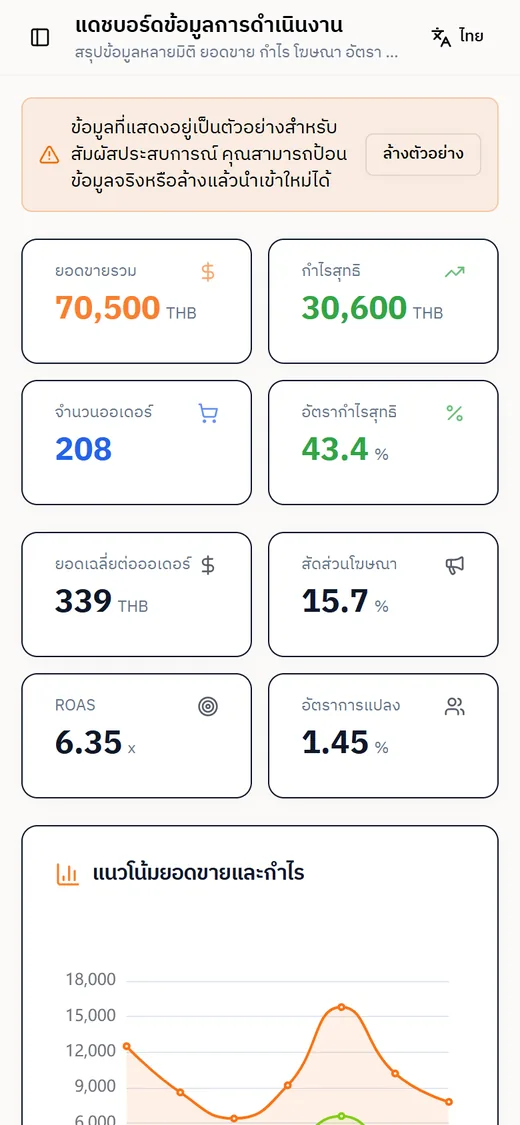
แสดง 8 ตัวเลขหลัก คือยอดขายรวม กำไรสุทธิ จำนวนออเดอร์ อัตรากำไรสุทธิ ยอดเฉลี่ยต่อออเดอร์ สัดส่วนโฆษณา ROAS และอัตราการแปลง พร้อมกราฟแนวโน้มยอดขายกับกำไรรายวันและกราฟวงกลมสัดส่วนยอดขายตามสินค้า ตัวเลขที่เห็นตอนแรกเป็นข้อมูลตัวอย่าง (แถบเตือนบอกไว้) กดล้างตัวอย่างแล้วป้อนตัวเลขจริงของคุณเองได้ ยังไม่ดึงจากแพลตฟอร์มอัตโนมัติIt shows eight headline numbers (total sales, net profit, order count, net margin, average order value, ad share, ROAS and conversion rate) plus a daily sales-and-profit trend chart and a donut of sales by product. The figures you first see are samples, as a banner says; clear them and key in your own numbers. Nothing is pulled from the marketplaces automatically.
ซัพพลายเชน รีวิว คู่แข่ง ลูกค้า และตกแต่งร้านSupply chain, reviews, competitors, customers and storefront
ห้าหน้าที่ใช้ข้อมูลที่คุณกรอกหรือวางเอง ไม่ต่อแพลตฟอร์ม ได้แก่ จัดซื้อและซัพพลายเชน (ซัพพลายเออร์ เทียบราคา ใบสั่งซื้อ สต็อก) รีวิวและใบงานหลังการขาย (คะแนนเฉลี่ย อัตรารีวิวดีและไม่ดี พร้อมให้ AI ตอบกลับ) เฝ้าดูคู่แข่งและคีย์เวิร์ดฮิต (ราคาคู่แข่ง คลังคีย์เวิร์ด) Private Domain และการดึงกลับลูกค้า (แบ่งกลุ่มลูกค้า สคริปต์ LINE) และตกแต่งร้านค้า (เลือกอุตสาหกรรม สไตล์ สี จัดเรียงโมดูลหน้าร้าน ดูตัวอย่างมือถือ) ทุกหน้ามีข้อมูลตัวอย่างให้ลองก่อนFive pages work on data you type or paste yourself, with no marketplace connection: procurement and supply chain (suppliers, price comparison, purchase orders, stock), reviews and after-sales tickets (average rating, good-versus-bad share, AI replies), competitor and trending-keyword watch (competitor prices, keyword bank), private domain and win-back (customer segments, LINE scripts) and storefront decoration (industry, style and colour, reorderable page modules, mobile preview). Each opens with sample data to try.
ตั้งค่า AI ซิงก์ข้ามเครื่อง และติดตั้งเป็นแอปAI settings, cross-device sync and install as an app
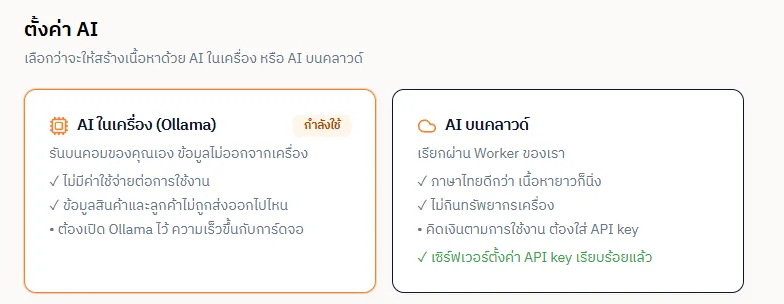
หน้าตั้งค่า AI ให้เลือกระหว่าง AI ในเครื่อง (Ollama) กับ AI บนคลาวด์ผ่านเซิร์ฟเวอร์ของเรา และเลือกให้ถอยไปใช้คลาวด์อัตโนมัติถ้าต่อเครื่องไม่ได้ ถ้าใส่รหัสเข้าใช้งานเดียวกันบนอีกเครื่อง ข้อมูลที่บันทึกไว้จะซิงก์ตามมา และมีปุ่มติดตั้งเป็นแอป (PWA) บนเดสก์ท็อปหรือหน้าจอหลักมือถือThe AI settings page chooses between local AI (Ollama) and cloud AI through our server, and can fall back to the cloud automatically when the local model is unreachable. Entering the same access code on another device brings your saved data across, and an install button adds the site as an app (PWA) on a desktop or phone home screen.
04 · วิธีทำงาน04 · How it works
ทำงานยังไง ตั้งแต่ต้นจนจบHow it works, start to finish
- 1
1. เปิดเว็บหรือติดตั้งเป็นแอป1. Open the site or install it
เข้า shopflow-ai.aisupermarket-thai.workers.dev ได้ทันที หน้าแรกแสดงตัวเลข 14 เครื่องมือและการ์ดทางลัด หรือกด ติดตั้งแอป ให้มีไอคอนบนเครื่อง ภาษาเริ่มต้นเป็นไทยGo to shopflow-ai.aisupermarket-thai.workers.dev. The home page shows the 14 tools as shortcut cards, or press install to put an icon on your device. The interface starts in Thai.
- 2
2. กรอกสินค้าชิ้นแรก2. Enter your first product
ไปที่ สร้างวัสดุสินค้า วางลิงก์ Lazada เพื่อดึงข้อมูล หรือพิมพ์ชื่อ หมวด ราคา กลุ่มเป้าหมาย และจุดเด่นเอง ข้อมูลนี้ถูกบันทึกเป็นข้อมูลสินค้าทั่วไปGo to product copy. Paste a Lazada link to pull the details, or type the name, category, price, audience and selling points. This is saved as the shared product record.
- 3
3. เลือกเครื่องมือแล้วนำข้อมูลเข้า3. Pick a tool and pull the product in
ในเครื่องมืออื่น เช่น Listing แคมเปญ หรือสคริปต์ลูกค้า กดปุ่ม นำเข้าข้อมูลสินค้าทั่วไป ฟอร์มจะเติมให้ ไม่ต้องพิมพ์ซ้ำIn any other tool, such as listings, campaigns or customer scripts, press import-shared-product and the form fills itself, so there is no retyping.
- 4
4. กดสร้างและดูผลไหลเข้าช่องผลลัพธ์4. Generate and watch the result stream in
ฟอร์มส่งคำสั่งไปที่ AI ที่เลือก (ในเครื่องหรือคลาวด์) ผลลัพธ์ไหลเข้าช่องทางขวาทีละส่วน ถ้าเจอข้อความ 401 ระบบเด้งช่องให้ใส่รหัสเข้าใช้งาน โหมด AI ในเครื่องไม่ต้องใช้รหัสThe form sends the instruction to the chosen AI, local or cloud, and the result streams into the right-hand panel. If the server answers 401, a dialog asks for the access code; local-AI mode needs none.
- 5
5. ตรวจ แก้ แล้วนำไปลงเอง5. Review, edit, then publish it yourself
กด คัดลอกทั้งหมด แล้วไปวางบน Shopee, Lazada หรือ TikTok Shop เอง ShopFlow ไม่ลงสินค้าหรือตอบแชทแทนคุณ ตัวเลขกำไรให้เช็กกับหน้าหลังบ้านของแพลตฟอร์มอีกครั้งPress copy-all and paste it into Shopee, Lazada or TikTok Shop yourself. ShopFlow neither lists products nor answers chats for you, and you should check the profit figures against the platform's own back office.
05 · ภาพ05 · Visuals
ภาพจากระบบจริงFrom the real system
8 ภาพ8 imagesภาพหน้าจอจริงถ่ายจากระบบที่เปิดใช้อยู่ ส่วนภาพโปรโมตและภาพประกอบมีป้ายกำกับไว้ทุกใบReal screenshots come from the running system; promo images and illustrations are labelled on every card.

06 · สถานการณ์06 · Scenarios
ตัวอย่างสถานการณ์ใช้งานExample scenarios
เป็นตัวอย่างสมมติเพื่อให้เห็นภาพ ไม่ใช่เรื่องของลูกค้าจริงIllustrative scenarios to help you picture it — not real customer stories.
เปิดร้านสินค้านำเข้าLaunching an imported product
สมมติว่าคุณจะนำของใช้ในบ้านจากจีนมาขายบน Shopee ลองเปิดเครื่องคำนวณราคา เปิดสวิตช์ นำเข้าจากจีน ใส่ต้นทุนเป็นหยวนกับค่าส่งต้นทาง ดูว่าตั้ง 199 บาทแล้วเหลือกำไรกี่เปอร์เซ็นต์ ถ้าต่ำกว่า 10% ก็ปรับราคาก่อนค่อยให้ AI เขียนชื่อและคำบรรยายภาษาไทยSuppose you are about to sell household goods imported from China on Shopee. Open the calculator, switch on import-from-China, enter the cost in yuan plus first-leg freight, and see what margin a 199-baht price leaves. If it lands under 10%, adjust the price first, then let the AI write the Thai name and description.
ขายหลายแพลตฟอร์มด้วยข้อมูลชุดเดียวOne product record across platforms
สมมติว่าคุณขายสินค้าตัวเดียวบน Shopee, Lazada และ TikTok Shop กรอกข้อมูลครั้งเดียว แล้วใช้ Listing หลายภาษา สร้างแคมเปญ และคำนวณราคาโดยสลับแพลตฟอร์มในตัวคำนวณ เพื่อเห็นว่าเรตค่าธรรมเนียมที่ต่างกัน (TikTok Shop 5.35% เทียบ 8.56%) ทำให้กำไรต่างกันแค่ไหนSuppose you sell one product on Shopee, Lazada and TikTok Shop. Enter it once, then use the multilingual listing and campaign tools and flip the platform in the calculator to see how the differing fee rates (5.35% on TikTok Shop versus 8.56%) change the profit.
ตอบแชทซ้ำ ๆ ให้เร็วขึ้นFaster answers to repeated chats
สมมติว่าแอดมินร้านต้องตอบคำถามเดิมวันละหลายสิบครั้ง เช่น ส่งกี่วัน เปลี่ยนคืนได้ไหม ให้วางคำถามที่พบบ่อยในหน้าสคริปต์บริการลูกค้า เลือกสไตล์ เป็นกันเอง แล้วเก็บชุดคำตอบไว้คัดลอกใช้ แอดมินยังเป็นคนกดส่งเองทุกครั้งSuppose a shop's admin answers the same questions dozens of times a day, such as delivery time or returns. Paste those questions into the customer-service page, choose a friendly tone and keep the reply set to copy from. The admin still presses send every time.
เช็กใจก่อนตั้งงบโฆษณาSanity-checking an ad budget
สมมติว่าคุณมีงบโฆษณา 3,000 บาทและสินค้ากำไรขั้นต้น 40% ใส่ตัวเลขในเครื่องคำนวณโฆษณาของ TikTok Shop เพื่อดูว่าต้องได้กี่ออเดอร์ถึงจะคุ้ม ก่อนตัดสินใจเริ่มยิง (ตัวเลข 3,000 และ 40% เป็นตัวอย่างสมมติ ไม่ใช่ผลจริงของร้านใด)Suppose you have a 3,000-baht ad budget and a product with a 40% gross margin. Put those into the TikTok Shop ad calculator to see how many orders break even before you start spending. (The 3,000 and 40% are illustrative, not any real shop's results.)
07 · เบื้องหลัง07 · Under the hood
เบื้องหลังระบบ ข้อมูล และความปลอดภัยUnder the hood: data and security
- แพลตฟอร์มPlatform
- หน้าเว็บเขียนด้วย React 19, TypeScript, Vite, Tailwind v4 และ shadcn/ui ทำงานบน Cloudflare Worker ที่ shopflow-ai.aisupermarket-thai.workers.dev ติดตั้งเป็นแอป (PWA) ได้ ภาษาบนหน้าจอมี 2 ภาษา คือไทยเป็นค่าเริ่มต้น และจีนThe front end is React 19, TypeScript, Vite, Tailwind v4 and shadcn/ui, served from a Cloudflare Worker at shopflow-ai.aisupermarket-thai.workers.dev, and installable as a PWA. The interface has two languages: Thai by default, and Chinese.
- AI ที่ใช้AI engines
- เลือกได้ 2 ทาง ในเครื่อง: เบราว์เซอร์ยิงไปที่ Ollama (ค่าเริ่มต้น qwen3.8:27b) ข้อมูลไม่ออกจากเครื่อง ทดสอบแล้วใช้เวลาราว 66 วินาทีต่อชิ้นงานยาว คลาวด์: ผ่าน Worker ของเราไปยังผู้ให้บริการ AI ที่ตั้งไว้ฝั่งเซิร์ฟเวอร์ (โค้ดรองรับ OpenAI, Claude และ OpenRouter) ข้อความที่คุณกรอกจะถูกส่งไปผู้ให้บริการนั้นTwo routes. Local: the browser calls Ollama directly (default model qwen3.8:27b), so data never leaves the machine; a long output took about 66 seconds in testing. Cloud: through our Worker to whichever AI provider is configured server-side (the code supports OpenAI, Claude and OpenRouter), which means what you type is sent to that provider.
- ที่เก็บข้อมูลWhere data lives
- ข้อมูลสินค้า ออเดอร์ และตัวเลขที่คุณกรอกเก็บในเบราว์เซอร์ของคุณ (localStorage) ถ้าใช้รหัสเข้าใช้งานเดียวกันบนอีกเครื่อง ระบบซิงก์ผ่าน Cloudflare KV โดยใช้ค่าแฮชของรหัสเป็นกุญแจ ตามแผนมีเพดานราว 1 MB ต่อชุดข้อมูลProduct data, orders and the numbers you enter are kept in your browser (localStorage). Using the same access code on another device syncs through Cloudflare KV, keyed on a hash of the code, with a ceiling of roughly 1 MB per data set according to the project plan.
- ความปลอดภัยSecurity
- ปุ่ม AI บนคลาวด์และการดึงสินค้าจากลิงก์ต้องส่งหัว x-shopflow-code ที่ตรงกับรหัสลับ ACCESS_CODE ที่ตั้งบนเซิร์ฟเวอร์ ไม่งั้นได้ 401 ส่วนตัวดึงสินค้ามีตัวกัน SSRF ไม่ให้ชี้เข้าเครือข่ายภายใน โหมด AI ในเครื่องไม่ผ่านเซิร์ฟเวอร์จึงไม่ต้องใช้รหัสThe cloud-AI and link-import endpoints require an x-shopflow-code header matching the ACCESS_CODE secret on the server, otherwise they answer 401. The importer has an SSRF guard so a link cannot point into an internal network. Local-AI mode bypasses the server, so it needs no code.
- การเชื่อมต่อภายนอกExternal connections
- ไม่เชื่อมบัญชีร้านบน Shopee, Lazada หรือ TikTok Shop ออเดอร์และยอดขายเป็นข้อมูลที่กรอกเองหรือข้อมูลตัวอย่าง สิ่งเดียวที่อ่านจากภายนอกคือหน้าสินค้าสาธารณะตามลิงก์ที่คุณวาง (ใช้ได้กับ Lazada และเว็บร้านทั่วไป ใช้เบราว์เซอร์ฝั่งเซิร์ฟเวอร์เปิดหน้าที่ต้องรันสคริปต์)It does not connect to any Shopee, Lazada or TikTok Shop seller account; orders and sales are typed in or sample data. The only outside read is the public product page behind a link you paste (works for Lazada and ordinary shop sites, using a server-side browser for script-rendered pages).
- ข้อจำกัดที่ควรรู้Limits to know about
- AI ในเครื่องใช้ได้เฉพาะตอนเปิดแอปจากเครื่องตัวเองที่ http://localhost:8001 เพราะเบราว์เซอร์ไม่ยอมให้เว็บ https เรียก localhost ผลลัพธ์จาก AI อาจผิดได้ ต้องอ่านก่อนใช้ รหัสเข้าใช้งานเดียวเท่ากับร้านเดียว ถ้าจะขายให้หลายร้านต้องทำระบบบัญชีผู้ใช้ใหม่Local AI only works when you open the app from your own machine at http://localhost:8001, because browsers refuse to let an https site call localhost. AI output can be wrong and must be read before use. One access code means one shop; selling it to several shops would need a proper user-account system.
08 · ความคืบหน้า08 · Progress
ความคืบหน้าและแผนต่อไปProgress and what comes next
- ทำแล้วDone
7 ก.ย. 2569 ตรวจ QA ครบ 14 เครื่องมือ ผล ใช้ได้เต็ม 4 บางส่วน 8 ใช้ไม่ได้ 27 Sep 2026: full QA pass over all 14 tools: 4 fully working, 8 partly, 2 broken
- ทำแล้วDone
8 ก.ย. 2569 ย้ายจากแพลตฟอร์ม Miaoda มาเป็นหลังบ้านของเราเองบน Cloudflare Worker ทำภาษาไทยทั้งหมด เพิ่ม AI ในเครื่องกับคลาวด์ ใส่ค่าธรรมเนียม Shopee/Lazada/TikTok Shop และรหัสเข้าใช้งาน8 Sep 2026: moved off the Miaoda platform onto our own Cloudflare Worker backend, made the whole interface Thai, added local and cloud AI, the Shopee/Lazada/TikTok Shop fee presets and the access code
- ทำแล้วDone
8-9 ก.ย. 2569 นำเข้าสินค้าจากลิงก์ (Lazada, ตามลิงก์ย่อ, หน้าที่ต้องรันสคริปต์) และซิงก์ข้ามเครื่อง8-9 Sep 2026: product import from a link (Lazada, short links, script-rendered pages) and cross-device sync
- ทำแล้วDone
9 ต.ค. 2569 แก้บั๊กกดสร้างแล้วไม่ขึ้นผล และข้อมูลในฟอร์มหาย9 Oct 2026: fixed the generate-does-nothing and form-data-lost bugs
- ถัดไปNext
ตรวจซ้ำทั้ง 14 เครื่องมือหลังแก้ โดยเฉพาะเครื่องมือคัดเลือกสินค้ากับเฝ้าดูคู่แข่งที่เคยใช้ไม่ได้Re-test all 14 tools after the fixes, especially the product picker and competitor watch that were broken
- ถัดไปNext
รวม ThaiECom เข้ามา (เจ้าของตัดสินใจ 6 ต.ค. 2569) แผน 7 เฟสเขียนไว้แล้ว ได้แก่ สายพาน AI 6 ตัว บันทึกงาน และชั้นเชื่อม API Shopee/Lazada/TikTok Shop ยังไม่เริ่มเขียนโค้ด และต้องรอสิทธิ์ API จากแพลตฟอร์มFold ThaiECom in (owner decision, 6 Oct 2026). A seven-phase plan exists covering the six-agent AI pipeline, a job log and Shopee/Lazada/TikTok Shop API connections; no code written yet, and it depends on API access from the platforms
- ถัดไปNext
ใช้เองก่อนแล้วค่อยขาย (ตัดสินใจ 6 ต.ค. 2569) ยังไม่ได้กำหนดราคาหรือแผนขายUse it in-house first, then sell (decided 6 Oct 2026); no price or sales plan set yet
09 · คำถาม09 · FAQ
คำถามที่พบบ่อยFrequently asked questions
ราคาเท่าไร ขายหรือยังHow much is it, and is it on sale?
ยังไม่ขายและยังไม่ได้กำหนดราคา เจ้าของตัดสินใจเมื่อ 6 ต.ค. 2569 ว่าจะใช้เองก่อนIt is not on sale and no price is set. The owner decided on 6 October 2026 to use it in-house first.
ลองใช้ได้ไหม ต้องมีรหัสหรือเปล่าCan I try it, and do I need a code?
เปิดเว็บดูทุกหน้าได้ และเครื่องคำนวณราคากับกำไรใช้ได้เต็มโดยไม่ต้องมีรหัส แต่ปุ่มที่เรียก AI บนคลาวด์ต้องใช้รหัสเข้าใช้งานที่เราตั้งไว้ กันค่าใช้จ่ายบานปลาย ถ้ารันบนเครื่องตัวเองด้วย AI ในเครื่องก็ไม่ต้องใช้รหัสEvery page can be opened and the price-and-profit calculator works fully without a code. The cloud-AI buttons need the access code we set to keep costs from running away. Running locally with local AI needs no code.
ข้อมูลสินค้าของฉันถูกเก็บที่ไหนWhere is my product data stored?
ในเบราว์เซอร์ของคุณ ถ้าคุณเลือก AI บนคลาวด์ ข้อความที่กรอกจะถูกส่งผ่านเซิร์ฟเวอร์ของเราไปยังผู้ให้บริการ AI เพื่อสร้างผลลัพธ์ ถ้าเลือก AI ในเครื่องข้อมูลไม่ออกจากเครื่อง ถ้าเปิดซิงก์ข้ามเครื่อง ข้อมูลจะถูกเก็บใน Cloudflare KV ด้วยIn your browser. If you choose cloud AI, what you type goes through our server to the AI provider to produce the result; with local AI nothing leaves your machine. If you use cross-device sync, a copy is also held in Cloudflare KV.
เชื่อมกับร้านบน Shopee หรือ Lazada ได้ไหมDoes it connect to my Shopee or Lazada shop?
ยังไม่ได้ ออเดอร์และยอดขายเป็นข้อมูลที่กรอกเองหรือข้อมูลตัวอย่าง ที่ทำได้คือวางลิงก์สินค้าของ Lazada เพื่อดึงชื่อ ราคา และรายละเอียด ส่วน Shopee กับ TikTok Shop บล็อกการดึง ต้องคัดลอกมาวางเอง การเชื่อม API ร้านค้าอยู่ในแผนรวม ThaiECom แต่ยังไม่เริ่มNot yet. Orders and sales are typed in or sample data. What works is pasting a Lazada product link to pull the name, price and details; Shopee and TikTok Shop block this, so copy those by hand. Marketplace API connections are part of the ThaiECom merge plan, which has not started.
เชื่อถือผลลัพธ์จาก AI ได้แค่ไหนHow far can I trust the AI output?
ใช้เป็นร่างแรก ต้องอ่านและแก้ก่อนลงขาย โมเดลอาจแต่งข้อมูลหรือพลาดรายละเอียดสินค้า ส่วนตัวเลขกำไรในเครื่องคำนวณมาจากสูตรในโค้ด ไม่ใช่ AI แต่ค่าคอมมิชชันที่ใส่ไว้เป็นค่าเริ่มต้น ควรเทียบกับตารางของแพลตฟอร์มปัจจุบันแล้วแก้ให้ตรงTreat it as a first draft to read and edit before listing. The model can invent or miss product details. The profit figures come from a formula in code, not the AI, but the fee rates are defaults you should compare with each platform's current schedule and correct.
ใครทำและดูแลWho builds and maintains it?
ZZAX Studio (ซีแซ่บ สตูดิโอ) เป็นผู้ทำและดูแลZZAX Studio builds and maintains it.
10 · วิธีเริ่ม10 · Get started
เริ่มได้ใน 3 ขั้นUp and running in three steps
ถ้าอยากได้ระบบแบบเดียวกันสำหรับธุรกิจของคุณ บอกโจทย์มาสั้น ๆ เราตอบกลับพร้อมขอบเขตงานและราคาภายใน 1 วันทำการIf you want something like this for your own business, send us a line about the problem. You'll get scope and price within one working day.
- 1ขั้นที่ 1 เปิดเว็บ ShopFlow AI แล้วกรอกข้อมูลสินค้าที่จะขายสักหนึ่งชิ้นStep 1: Open the ShopFlow AI site and enter details for one product you sell
- 2ขั้นที่ 2 เลือกเครื่องมือจากเมนูซ้าย เช่น คำนวณราคาและกำไร หรือ สร้างวัสดุสินค้าStep 2: Pick a tool from the left menu, such as the profit calculator or the product-copy generator
- 3ขั้นที่ 3 ถ้าจะใช้ปุ่ม AI ให้ตั้งเป็นโหมด AI ในเครื่องที่หน้าตั้งค่า AI หรือขอรหัสเข้าใช้งานจากเราStep 3: To use the AI buttons, switch to local-AI mode on the AI settings page or ask us for an access code
เริ่มงานกับเราWork with us
อยากได้ระบบแบบนี้สำหรับธุรกิจคุณWant a system like this for your business?
เล่าปัญหาของคุณมา เราจะบอกตรง ๆ ว่าช่วยได้ไหม ภายใน 1 วันทำการ ส่งแล้วได้รหัสติดตามงานทันทีTell us the problem and we'll say honestly whether we can help, within one working day. You get a tracking code the moment you send it.