คนที่อยากทำคลิปสั้นลง TikTok หรือ Reels ต้องคิดบท หาภาพ อัดเสียง ตัดต่อ ใส่ซับ ทำปก แล้วเขียนแคปชั่นทีละแพลตฟอร์ม กว่าจะได้คลิปเดียวก็หมดวัน ส่วนบริการ AI ที่ช่วยได้ก็คิดเงินรายคลิปจนทำไม่คุ้มMaking one short for TikTok or Reels means writing a script, finding images, recording voice, editing, subtitling, making a cover, and writing captions for each platform. One clip eats the day. The AI services that could help charge per clip until it stops paying.
← ผลงานทั้งหมด← All work
เครื่องมือเดสก์ท็อปDesktop tool
LifeSim StudioLifeSim Studio
โรงงานผลิตวิดีโอสั้นแนวจำลองชีวิต ที่รัน AI ในเครื่องตัวเอง 100%A short-video factory for life-simulation clips, running AI entirely on your own machine
กำลังพัฒนาIn development เครื่องมือเดสก์ท็อปDesktop tool
กำลังพัฒนา ระบบหลักเสร็จและเทสต์ผ่านครบแล้ว พิสูจน์ว่าเจนภาพและประกอบวิดีโอได้จริงIn development with the main pipeline complete and fully tested — image generation and video assembly proven working
76/76เคสทดสอบที่ผ่านPassing test cases
~18วินาที · เวลาเจนภาพต่อช็อตImage generation per shot
01 · ภาพรวม01 · Overview
ภาพรวมของระบบThe system at a glance
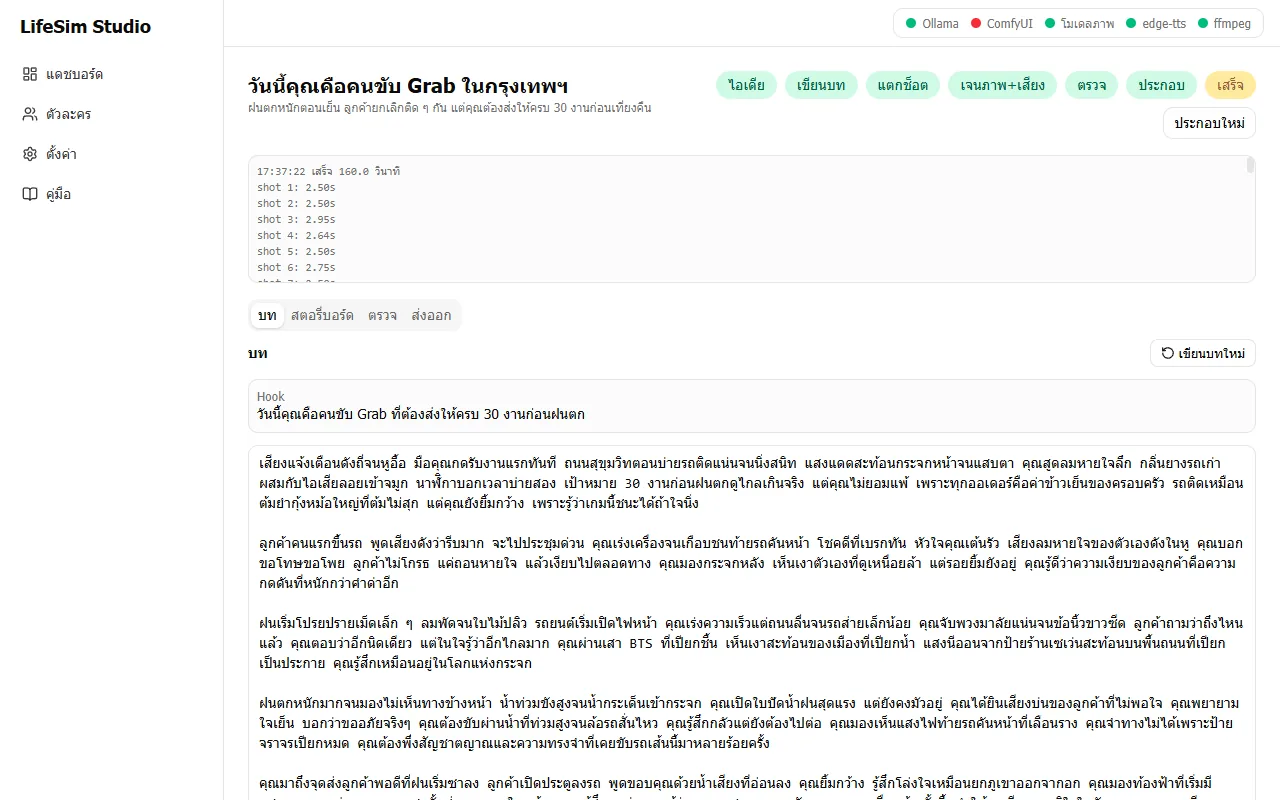
LifeSim Studio คือเครื่องมือผลิตวิดีโอสั้นแนวตั้งแนว "วันนี้คุณคือ…" ที่เล่าชีวิตอาชีพต่าง ๆ จากมุมมองบุคคลที่สอง เช่น คนขับ Grab พระหนุ่มที่เรียนเขียนโค้ด หรืออาม่าร้านยาจีน ผู้ใช้ใส่ไอเดียตอนเดียว ระบบเขียนบท แตกสตอรี่บอร์ด เจนภาพ พากย์เสียง ใส่ซับ และประกอบเป็นไฟล์ MP4 ความยาวราว 3 นาทีLifeSim Studio is a tool for making vertical short videos in the "Today you are…" style, telling the lives of different occupations in the second person, such as a Grab driver, a young monk learning to code or a Chinatown herbalist grandmother. The user supplies one episode idea and the system writes the script, storyboards it, generates images, records a voice-over, adds subtitles and assembles an MP4 of about three minutes.
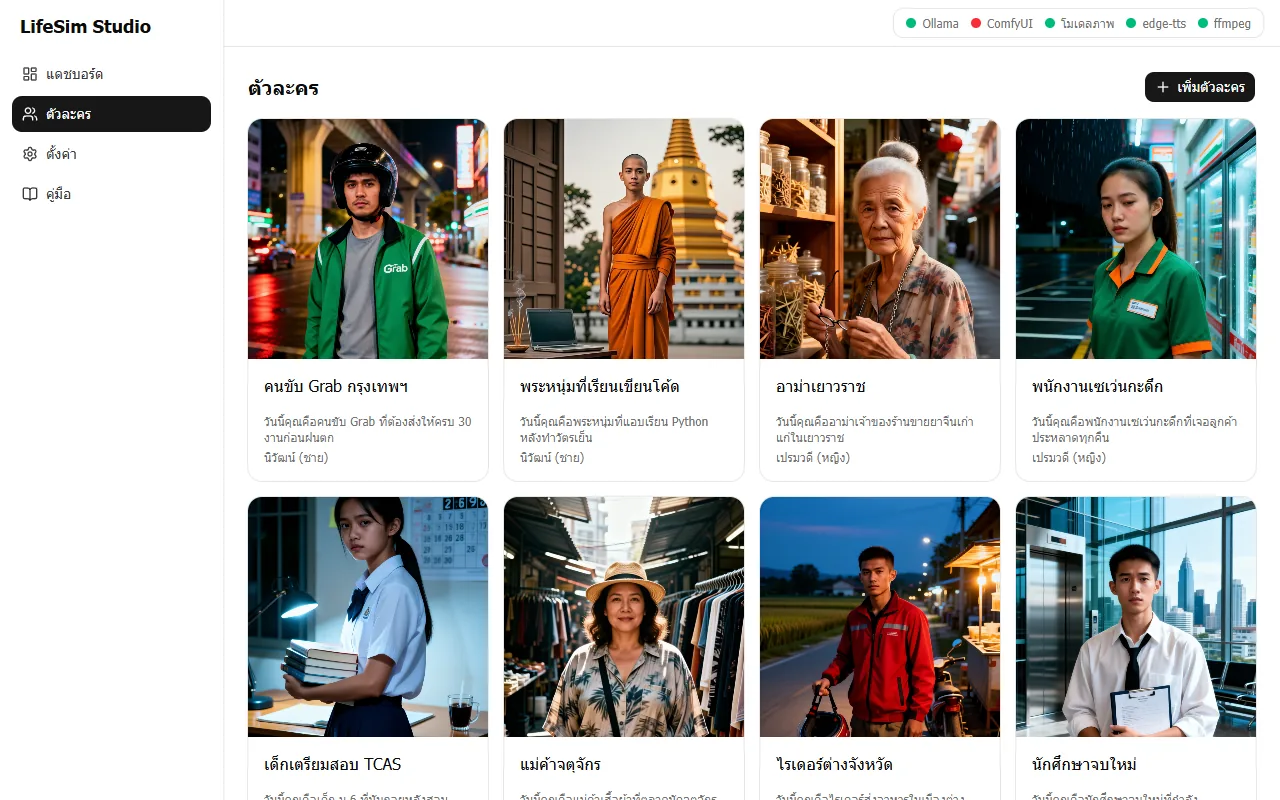
ทำงานเป็นเว็บที่รันในเครื่อง เปิดจากไอคอนบนเดสก์ท็อป หน้าแดชบอร์ดแสดงสถานะ Ollama ComfyUI โมเดลภาพ edge-tts และ ffmpeg ผู้ใช้เลือกตัวละครที่มีรูปอ้างอิง กดสร้างตอนใหม่ แล้วตรวจบทและสตอรี่บอร์ดที่ร่างให้ แก้ช็อตที่ไม่ถูกใจ ก่อนกดผลิต ไฟล์พร้อมแคปชันและซับจะอยู่ในแท็บส่งออกIt runs as a web app on your own machine, opened from a desktop icon. The dashboard shows the status of Ollama, ComfyUI, the image model, edge-tts and ffmpeg. The user picks a persona that has a reference image, creates a new episode, checks the drafted script and storyboard, fixes any shots they dislike and presses produce. The finished file with captions and subtitles appears in the Export tab.
สถานะคือกำลังพัฒนา ระบบหลักทำงานครบ ตอนแรก "วันนี้คุณคือคนขับ Grab ในกรุงเทพฯ" ผลิตเสร็จเมื่อ 24 ส.ค. 2569 ได้ 58 ช็อต ยาว 2 นาที 40 วินาที ขนาด 1080 คูณ 1920 พิกเซล 30 เฟรมต่อวินาที (ราว 44 MB) ชุดทดสอบ 88 ข้อผ่านครบเมื่อ 2 พ.ย. 2569 ยังไม่มีตัวเลขว่าเผยแพร่คลิปไปแล้วกี่คลิปหรือได้ผลตอบรับเท่าไรIt is in development with the main pipeline complete. The first episode, Today you are a Grab driver in Bangkok, was produced on 24 August 2026 with 58 shots, 2 minutes 40 seconds, 1080 by 1920 pixels at 30 fps (about 44 MB). The 88-check test suite passed fully on 2 November 2026. There is no figure for how many clips have been published or how they performed.
เหตุผลของการออกแบบคือ เครื่องมือฟรีและรันในเครื่องก่อน ผู้ใช้จึงไม่ต้องจ่ายค่า AI รายคลิป ผู้ให้บริการแต่ละส่วนเป็นปลั๊กอินที่เปลี่ยนเป็นตัวเสียเงินภายหลังได้ และทุกขั้นกลับมาทำต่อได้หลังปิดเปิดโปรแกรม ช็อตที่ผู้ใช้แก้หรือล็อกไว้จะไม่ถูกเขียนทับอัตโนมัติThe design reasoning is free, local tools first, so there are no per-clip AI fees. Each provider is a plug-in that can be swapped for a paid one later, every stage resumes after closing and reopening the program, and shots the user edited or locked are never overwritten automatically.
02 · โจทย์02 · The brief
สร้างขึ้นมาเพราะอะไรWhy this exists
ครีเอเตอร์คลิปสั้นและคนที่อยากหารายได้จาก TikTok, Shorts และ Reels โดยไม่อยากจ่ายค่าบริการ AI รายเดือนShort-video creators and anyone earning from TikTok, Shorts, and Reels who'd rather not pay monthly AI fees
ใช่โจทย์ของคุณไหมSound like your problem?
03 · ฟีเจอร์03 · Features
ทำอะไรได้บ้าง อย่างละเอียดWhat it does, in detail
8 ความสามารถ8 capabilitiesเขียนบทและสตอรี่บอร์ดอัตโนมัติAutomatic script and storyboard
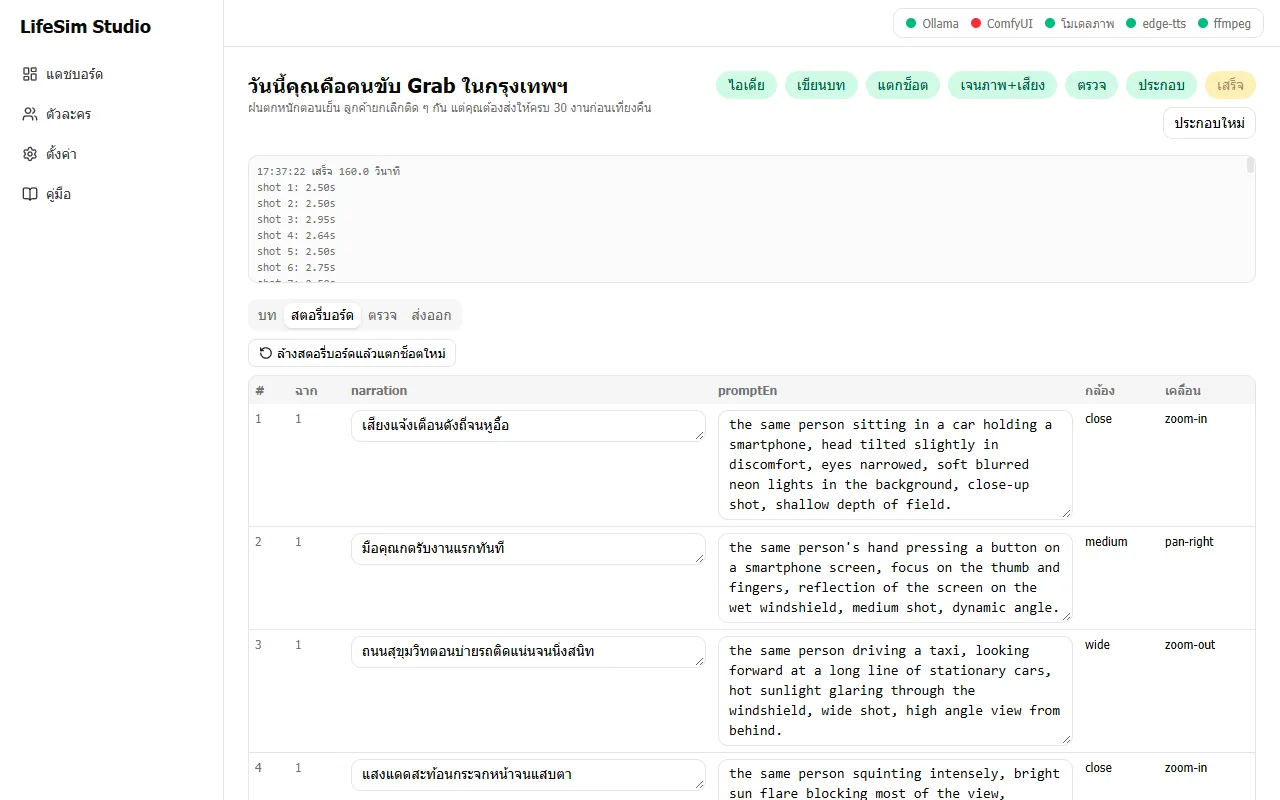
จากไอเดียตัวละคร Ollama (ตัวอย่าง qwen3.8:27b) เขียนบทมุมมองบุคคลที่สองพร้อม Hook เปิดเรื่อง แล้วแตกเป็นสตอรี่บอร์ด 40 ถึง 60 ช็อต แต่ละช็อตมีบรรยายไทย พรอมต์ภาษาอังกฤษสำหรับสร้างภาพ ขนาดภาพ (close, medium, wide) และการเคลื่อนกล้อง (zoom-in, pan-right, zoom-out) มีการตรวจจำนวนช็อตและตัดอักขระจีนที่โมเดลหลุดมาFrom the persona idea, Ollama (for example qwen3.8:27b) writes a second-person script with an opening hook, then breaks it into a 40 to 60 shot storyboard. Each shot has Thai narration, an English prompt for image generation, a shot size (close, medium, wide) and a camera move (zoom-in, pan-right, zoom-out). The shot count is validated and stray Chinese characters from the model are stripped.
ตัวละครหน้าเหมือนกันทั้งเรื่องThe character keeps the same face throughout
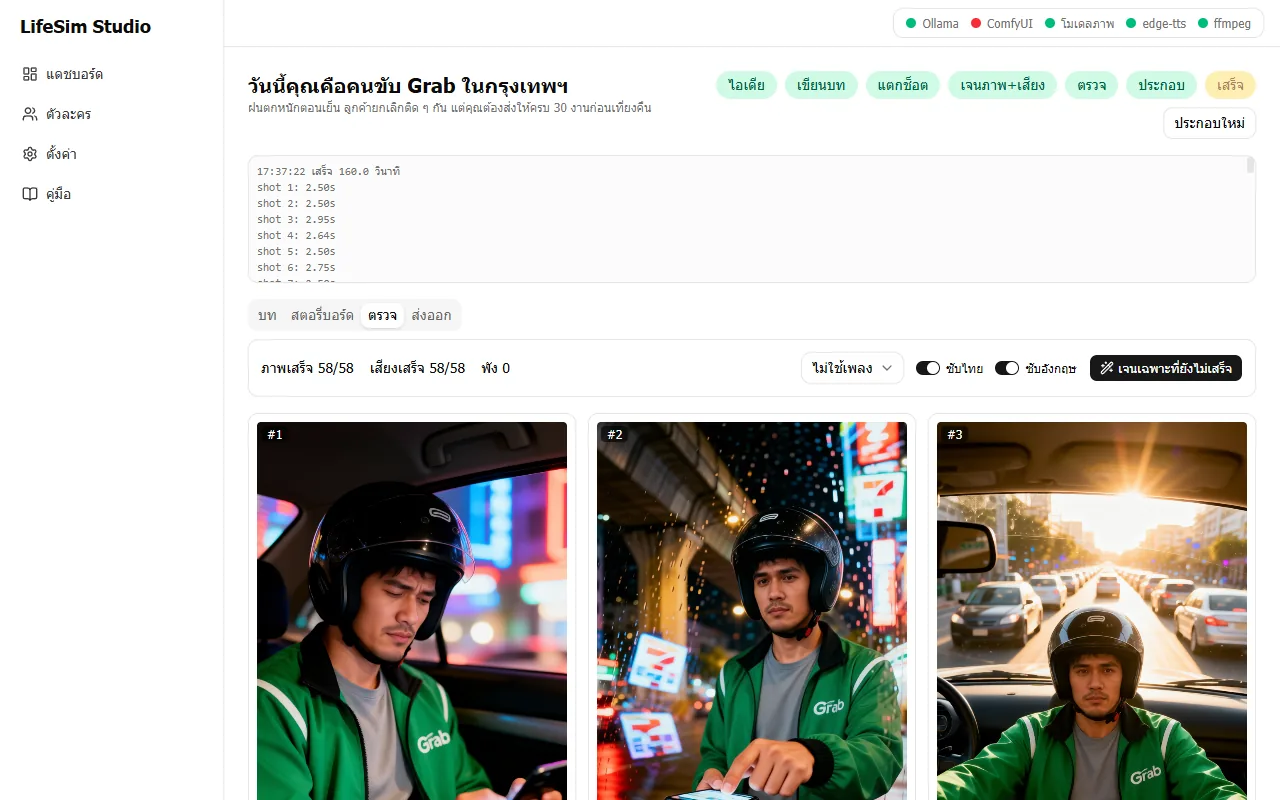
ผู้ใช้สร้างตัวละครพร้อมรูปอ้างอิง (ref) ระบบเจนทุกช็อตด้วย ComfyUI และโมเดล Qwen-Image-Edit 2511 โดยยึดรูป ref ต่อท้ายพรอมต์ด้วย Character Bible และใช้ seed เป็นลำดับต่อเนื่อง ผลตอนแรกตรวจด้วยตาแล้วว่าหน้าตัวละครตรงกันทุกช็อต มี 9 ตัวละครตัวอย่างในเครื่องThe user creates a persona with a reference image. Every shot is generated in ComfyUI with the Qwen-Image-Edit 2511 model anchored to that reference, with a Character Bible appended to each prompt and sequential seeds. In the first episode the face was checked by eye as matching in every shot. Nine sample personas exist in the app.
เสียงพากย์ไทยThai voice-over
ใช้ edge-tts พากย์ไทยทีละช็อต (เสียงตั้งต้น th-TH-NiwatNeural) ตัดความเงียบหัวท้าย ตอนแรกพากย์สำเร็จ 58 จาก 58 ช็อต ต้องต่ออินเทอร์เน็ตทุกครั้งที่พากย์ เพราะ edge-tts เรียกบริการออนไลน์ แม้ไม่มีค่าใช้จ่ายรายคลิปedge-tts voices each shot in Thai (default voice th-TH-NiwatNeural) with leading and trailing silence trimmed. The first episode voiced 58 of 58 shots. It needs an internet connection each time it voices, because edge-tts calls an online service, though there is no per-clip fee.
ประกอบวิดีโอด้วย ffmpegVideo assembly with ffmpeg
สร้างวิดีโอ 9:16 ขนาด 1080 คูณ 1920 พร้อมเอฟเฟกต์เคลื่อนกล้อง Ken Burns ซับ ASS ไทยอยู่เหนืออังกฤษในคิวเดียว (ปิดซับแต่ละภาษาได้) Hook ข้อความ 3 วินาทีแรก เพลงประกอบที่ลดเสียงเมื่อมีพากย์ และภาพปก ข้อความ Hook และซับยาวจะถูกตัดบรรทัดไม่ให้ล้นเฟรมIt builds a 9:16 1080 by 1920 video with Ken Burns camera moves, ASS subtitles with Thai above English in one cue (each language can be switched off), a three-second text hook, background music ducked under the voice, and a cover image. Long hook and subtitle text is wrapped so it stays inside the frame.
แคปชันสามแพลตฟอร์มและแพ็กเกจ CapCutThree-platform captions and a CapCut package
แท็บส่งออกมีปุ่มดาวน์โหลด MP4, SRT, ปก และแพ็ก CapCut (zip) พร้อมแคปชันแยกสไตล์ TikTok, YouTube Shorts และ Instagram Reels ที่กดคัดลอกได้ เพื่อนำไปตัดต่อต่อหรือโพสต์เอง ระบบไม่ได้โพสต์ให้The Export tab offers downloads of the MP4, SRT, cover and a CapCut package (zip) with captions styled for TikTok, YouTube Shorts and Instagram Reels, each with a copy button, to edit further or post yourself. The tool does not post for you.
ตรวจและแก้ทีละช็อตReview and fix shot by shot
แท็บตรวจแสดงภาพทุกช็อต สรุป ภาพเสร็จ 58/58 เสียงเสร็จ 58/58 มีปุ่มเจนเฉพาะที่ยังไม่เสร็จ เลือกเพลงหรือไม่ใช้เพลง สลับซับไทย/อังกฤษ ช็อตที่ล็อกหรือแก้เองไม่ถูกเขียนทับ ส่วนแท็บสตอรี่บอร์ดแก้บรรยายและพรอมต์ได้โดยตรงThe Review tab shows every shot with a summary such as images done 58/58 and voice done 58/58, a button to generate only unfinished shots, a music choice or none, and Thai/English subtitle toggles. Locked or hand-edited shots are never overwritten, and the Storyboard tab lets you edit narration and prompts directly.
ทำต่อได้หลังปิดโปรแกรม และจัดการ VRAMResumes after closing and manages VRAM
ทุกขั้นมีสถานะ pending running done failed edited และคิวงานกลับมาทำต่อได้ ระบบสั่งให้ Ollama ปล่อยโมเดลออกจาก VRAM ก่อนขั้นเจนภาพเพื่อไม่ให้ชนกับโมเดลภาพ ถ้าปิด ComfyUI กลางทางช็อตที่เหลือจะ failed แล้วกดเริ่มผลิตใหม่ได้ ข้ามช็อตที่เสร็จแล้วEvery stage has a status (pending, running, done, failed, edited) and the queue resumes. Before image generation the system tells Ollama to release its model from VRAM so it does not collide with the image model. If ComfyUI is closed midway the remaining shots fail and pressing produce again resumes, skipping finished shots.
หน้าตัวละครและคู่มือในโปรแกรมPersonas page and an in-app guide
หน้าตัวละครแสดงตัวละครพร้อมรูปอ้างอิง ผู้แสดงเสียง และคำอธิบาย เพิ่มตัวละครใหม่ได้ มีหน้าตั้งค่า (โมเดล เสียง ขนาดวิดีโอ ฟอนต์ ซับ) และหน้าคู่มือเป็นภาษาไทย ข้อผิดพลาดต่าง ๆ แจ้งเป็นภาษาไทยบอกว่าต้องไปดูอะไรThe Personas page shows each persona with reference image, voice and description, and new ones can be added. There are Settings pages (models, voice, video size, font, subtitles) and a Thai guide, and errors are reported in Thai saying what to check.
04 · วิธีทำงาน04 · How it works
ทำงานยังไง ตั้งแต่ต้นจนจบHow it works, start to finish
- 1
เปิดเครื่องมือที่ต้องใช้Start the tools it needs
เปิด Ollama และ ComfyUI (พอร์ต 8188) ด้วยตัวเอง ComfyUI ต้องเปิดด้วยแฟล็ก --lowvram และอื่น ๆ ตาม README บนเครื่องทดสอบ แล้วดับเบิลคลิกไอคอน LifeSim Studio หน้าต่างเปิดจะรายงานสถานะแต่ละอย่างเป็นภาษาไทยStart Ollama and ComfyUI (port 8188) yourself; on the test machine ComfyUI must be started with --lowvram and related flags per the README. Then double-click the LifeSim Studio icon, whose window reports each component's status in Thai.
- 2
เลือกตัวละครและใส่ไอเดียChoose a persona and enter the idea
เลือกตัวละครที่มีรูปอ้างอิง กดสร้างตอนใหม่ ใส่ไอเดีย เช่น วันที่ฝนตกหนักและต้องส่งให้ครบ 30 งาน ระบบเขียนบทให้Pick a persona with a reference image, create a new episode and enter an idea, such as a day of heavy rain and 30 deliveries to finish. The system writes the script.
- 3
ตรวจบทและสตอรี่บอร์ดCheck the script and storyboard
อ่านบทและแก้ได้ จากนั้นแตกช็อต 40-60 ช็อต ตรวจบรรยายและพรอมต์ของแต่ละช็อต ล้างแล้วแตกช็อตใหม่ได้Read and edit the script, then split it into 40 to 60 shots and check each shot's narration and prompt; the storyboard can be cleared and regenerated.
- 4
ผลิตภาพและเสียงProduce images and voice
กดเริ่มผลิต ระบบเจนภาพทีละช็อตและพากย์เสียงขนานกัน ตอนแรกใช้เวลาประมาณ 22 วินาทีต่อภาพตามที่บันทึกไว้ในรายงาน ดูความคืบหน้าและบันทึกการทำงานบนหน้าตอนPress produce; the system generates images shot by shot and voices them in parallel. The first episode took about 22 seconds per image as recorded in the report. Progress and logs show on the episode page.
- 5
ตรวจ ประกอบ และส่งออกReview, assemble and export
ดูภาพทุกช็อตในแท็บตรวจ เจนใหม่เฉพาะที่ไม่ถูกใจ แล้วกดประกอบ ได้ final.mp4 พร้อมซับ ปก และแคปชัน ไปโพสต์หรือตัดต่อต่อใน CapCutLook over every shot in the Review tab, regenerate only the ones you dislike and press assemble to get final.mp4 with subtitles, cover and captions, ready to post or refine in CapCut.
05 · ภาพ05 · Visuals
ภาพจากระบบจริงFrom the real system
4 ภาพ4 imagesภาพหน้าจอจริงถ่ายจากระบบที่เปิดใช้อยู่ ส่วนภาพโปรโมตและภาพประกอบมีป้ายกำกับไว้ทุกใบReal screenshots come from the running system; promo images and illustrations are labelled on every card.
06 · สถานการณ์06 · Scenarios
ตัวอย่างสถานการณ์ใช้งานExample scenarios
เป็นตัวอย่างสมมติเพื่อให้เห็นภาพ ไม่ใช่เรื่องของลูกค้าจริงIllustrative scenarios to help you picture it — not real customer stories.
สมมติว่าครีเอเตอร์อยากทำคลิปชุดอาชีพสัปดาห์ละหลายตอนSuppose a creator wants several occupation clips a week
สมมติว่าเขาเลือกตัวละครจาก 9 ตัวอย่างและใส่ไอเดียใหม่ทุกตอน ระบบทำบท ภาพ เสียง และประกอบให้ในเครื่อง เขาเหลือแค่ตรวจช็อตที่ไม่ถูกใจ แทนการนั่งตัดต่อทั้งวันSuppose they pick personas from the nine samples and enter a new idea per episode. The system produces script, images and voice locally and assembles the video, leaving them to review disliked shots rather than editing all day.
สมมติว่าอยากเทียบแคปชันสามแพลตฟอร์มโดยไม่เขียนเองSuppose they want captions for three platforms without writing them
สมมติว่าคลิปเสร็จแล้ว แท็บส่งออกมีแคปชันสไตล์ TikTok Shorts และ Reels ให้กดคัดลอกไปวางได้ทันทีSuppose a clip is done: the Export tab provides TikTok, Shorts and Reels style captions ready to copy and paste.
สมมติว่าหน้าตัวละครเพี้ยนในบางช็อตSuppose a character's face drifts in some shots
สมมติว่าช็อตที่ 12 หน้าเพี้ยน ผู้ใช้เจนใหม่เฉพาะช็อตนั้น แล้วล็อกช็อตที่ดีไว้ ไม่ต้องผลิตทั้งตอนใหม่Suppose shot 12's face drifts. The user regenerates only that shot and locks the good ones, with no need to remake the whole episode.
07 · เบื้องหลัง07 · Under the hood
เบื้องหลังระบบ ข้อมูล และความปลอดภัยUnder the hood: data and security
- แพลตฟอร์มPlatform
- เว็บแอปที่รันในเครื่อง ส่วนหน้าเป็น React 19 กับ Vite และ Tailwind ส่วนหลังเป็น Node.js (Express) เก็บข้อมูลเป็นไฟล์ JSON และโฟลเดอร์ต่อตอน เปิดจากไอคอนเดสก์ท็อปหรือคำสั่ง npm run launch ใช้บน Windows ที่มี ffmpegA web app run locally: a React 19, Vite and Tailwind front end and a Node.js (Express) back end, storing data as JSON files and a folder per episode. It starts from a desktop icon or npm run launch on Windows with ffmpeg installed.
- เครื่องมือ AI ในเครื่องLocal AI tools
- เขียนบทด้วย Ollama (ตัวอย่าง qwen3.8:27b และ qwen3:8b) เจนภาพด้วย ComfyUI กับ Qwen-Image-Edit 2511 int8 และ LoRA Lightning 4 ขั้น โมเดลภาพรวม 4 ไฟล์ราว 29.5 GB ทดสอบบน RTX 5080 16 GB ต้องเปิด ComfyUI ด้วยแฟล็กประหยัดหน่วยความจำ ไม่เช่นนั้นหน่วยความจำเต็มหลังราว 8 ภาพScripts come from Ollama (for example qwen3.8:27b and qwen3:8b), images from ComfyUI with Qwen-Image-Edit 2511 int8 and a Lightning 4-step LoRA. The four image-model files total about 29.5 GB, tested on an RTX 5080 16 GB. ComfyUI must be started with memory-saving flags or it runs out of memory after about 8 images.
- ข้อมูลและความเป็นส่วนตัวData and privacy
- บท ภาพ เสียง และวิดีโออยู่ในโฟลเดอร์ในเครื่อง ไม่ถูกอัปโหลด ยกเว้นข้อความบรรยายแต่ละช็อตที่ส่งให้บริการ edge-tts เพื่อสร้างเสียง การเขียนไฟล์ทำแบบอะตอมมิกและสำรองไฟล์ที่เสียหายไว้ก่อนScript, images, audio and video stay in local folders and are not uploaded, except that each shot's narration text goes to the edge-tts service to produce audio. Files are written atomically and a corrupt file is backed up before anything is overwritten.
- ข้อจำกัดที่ควรรู้Limits to know
- ยังไม่ใช่โปรแกรมที่คนทั่วไปติดตั้งแล้วใช้ได้ทันที ต้องมี Ollama ComfyUI โมเดลภาพขนาดใหญ่ และการ์ดจอ VRAM สูง และต้องเปิด ComfyUI เอง ตัวละครและภาพตัวอย่างบางภาพมีเสื้อและเครื่องแบบที่คล้ายแบรนด์จริง ควรตรวจเรื่องเครื่องหมายการค้าก่อนเผยแพร่It is not yet a program an ordinary person installs and uses at once: it needs Ollama, ComfyUI, large image models and a high-VRAM graphics card, and ComfyUI must be started by hand. Some sample personas and images show clothes and uniforms resembling real brands, so check trademarks before publishing.
- การทดสอบTesting
- ชุดทดสอบ 88 ข้อ ครอบคลุมเส้นทางเซิร์ฟเวอร์ ตัวเก็บข้อมูล การประกอบวิดีโอ ข้อผิดพลาดภาษาไทย และการตรวจค่าที่รับเข้า รันผ่านครบเมื่อ 2 พ.ย. 2569 โดยใช้ข้อมูลชั่วคราว ไม่แตะข้อมูลจริง88 tests cover the server routes, the data store, video assembly, Thai error messages and input validation, all passing on 2 November 2026 with temporary data and without touching the real data.
08 · ความคืบหน้า08 · Progress
ความคืบหน้าและแผนต่อไปProgress and what comes next
- ทำแล้วDone
23 ส.ค. 2569: สร้างระบบครบ 14 task บท สตอรี่บอร์ด เจนภาพ เสียง ประกอบ แคปชัน CapCut หน้าเว็บ ตัวเดินงาน และตัวเปิดโปรแกรมบนเดสก์ท็อป23 Aug 2026: built all 14 tasks: script, storyboard, images, voice, assembly, captions, CapCut package, web UI, job runner and the desktop launcher
- ทำแล้วDone
24 ส.ค. 2569: ผลิตตอนแรก วันนี้คุณคือคนขับ Grab ในกรุงเทพฯ ครบวงจร และแก้ข้อบกพร่องการแสดงผลของ Hook และซับที่ล้นเฟรม24 Aug 2026: produced the first episode end to end and fixed the hook and subtitle overflow bugs
- ทำแล้วDone
30 ส.ค. 2569: แก้ให้โปรแกรมเปิดได้แม้ไฟล์ข้อมูลเสีย ซ่อนคำเตือนข้ามช็อตขณะทำงาน และให้ SRT ถูกต้องเมื่อปิดซับ30 Aug 2026: made startup survive corrupt data, hid the skipped-shot warning while busy and kept the SRT valid with subtitles off
- ถัดไปNext
Task 15 ใส่คลิป Hook จาก MiniMax ซึ่งข้ามไปตาม MVPTask 15, a hook clip from MiniMax, which was skipped for the MVP
- ถัดไปNext
วัดสัดส่วนช็อตที่ต้องเจนใหม่ต่อตอน (ในรายงานระบุว่ายังไม่ได้วัด)Measure the share of shots that need regenerating per episode (the report says not yet measured)
09 · คำถาม09 · FAQ
คำถามที่พบบ่อยFrequently asked questions
ใช้ได้เลยหลังติดตั้งไหมCan I use it right after installing?
ยังไม่ได้ ต้องติดตั้งและเปิด Ollama กับ ComfyUI และโมเดลภาพก่อน และต้องมีการ์ดจอ VRAM สูงตามที่ทดสอบ (RTX 5080 16 GB)Not yet. Ollama, ComfyUI and the image models must be installed and running first, and a high-VRAM graphics card is needed as tested (RTX 5080 16 GB).
ต้องจ่ายค่า AI รายคลิปไหมAre there per-clip AI fees?
ไม่มี ทุกส่วนใช้เครื่องมือฟรีในเครื่อง ยกเว้นเสียงพากย์ที่เรียกบริการ edge-tts ออนไลน์ซึ่งไม่คิดค่าบริการแต่ต้องมีอินเทอร์เน็ตNo. Every part uses free local tools, except the voice, which calls the online edge-tts service that charges nothing but needs internet.
มันโพสต์ลง TikTok ให้เลยไหมDoes it post to TikTok for me?
ไม่ ระบบสร้างไฟล์วิดีโอ ซับ ปก และแคปชัน ให้ผู้ใช้นำไปโพสต์เองหรือตัดต่อต่อใน CapCutNo. It produces the video, subtitles, cover and captions for you to post or refine in CapCut yourself.
ใช้เวลาผลิตหนึ่งตอนนานแค่ไหนHow long does an episode take?
ตอนแรก 58 ช็อต ใช้เวลาเจนภาพราว 22 วินาทีต่อภาพ ตามรายงาน เวลารวมขึ้นกับเครื่องและจำนวนช็อต ยังไม่ได้บันทึกเวลารวมตั้งแต่ต้นจนจบThe first episode had 58 shots at about 22 seconds per image per the report. Total time depends on the machine and shot count, and an end-to-end total was not recorded.
หน้าตัวละครจะเหมือนกันทุกช็อตจริงไหมWill the face really stay consistent?
ตอนแรกตรวจด้วยตาแล้วตรงกันทุกช็อต แต่ยังไม่ได้วัดว่าต้องเจนซ้ำกี่ช็อต ผู้ใช้เจนใหม่เฉพาะช็อตที่เพี้ยนได้In the first episode it matched in every shot by eye, but how many shots needed redoing was not measured. You can regenerate just the drifting ones.
ใครพัฒนา และขายหรือยังWho builds it, and is it for sale?
ZZAX Studio พัฒนา ปัจจุบันเป็นเครื่องมือที่ใช้เองในเครื่อง ยังไม่มีแผนขายหรือราคาในเอกสารZZAX Studio builds it. For now it is a tool used on its own machine; no sales plan or price appears in the documents.
10 · วิธีเริ่ม10 · Get started
เริ่มได้ใน 3 ขั้นUp and running in three steps
ถ้าอยากได้ระบบแบบเดียวกันสำหรับธุรกิจของคุณ บอกโจทย์มาสั้น ๆ เราตอบกลับพร้อมขอบเขตงานและราคาภายใน 1 วันทำการIf you want something like this for your own business, send us a line about the problem. You'll get scope and price within one working day.
- 1ขั้นที่ 1 เปิดโปรแกรมแล้วพิมพ์ไอเดียตอนที่อยากทำStep 1: Open the app and type the episode idea you want
- 2ขั้นที่ 2 ตรวจบทและสตอรี่บอร์ดที่ระบบร่างให้ แก้ช็อตที่ไม่ถูกใจStep 2: Review the drafted script and storyboard, and fix any shots you don't like
- 3ขั้นที่ 3 กดเริ่มผลิต แล้วรอไฟล์วิดีโอพร้อมแคปชั่นและซับครบชุดStep 3: Hit produce and wait for the finished video with captions and subtitles
เริ่มงานกับเราWork with us
อยากได้ระบบแบบนี้สำหรับธุรกิจคุณWant a system like this for your business?
เล่าปัญหาของคุณมา เราจะบอกตรง ๆ ว่าช่วยได้ไหม ภายใน 1 วันทำการ ส่งแล้วได้รหัสติดตามงานทันทีTell us the problem and we'll say honestly whether we can help, within one working day. You get a tracking code the moment you send it.