ร้านและสำนักงานเล็กอยากใช้ AI ช่วยทำงานเอกสาร แต่ติดสองเรื่อง คือกลัวข้อมูลลูกค้าและเอกสารภายในหลุดออกไปอยู่บนคลาวด์ของต่างชาติ และเครื่องมือที่มีก็พิมพ์ไทยเพี้ยน จัดหน้าเอกสารไทยไม่ถูกSmall shops and offices want AI help with their paperwork but get stuck on two things: the fear of sending customer records and internal documents to someone else's cloud, and tools that mangle Thai text and cannot lay out a Thai document properly.
← ผลงานทั้งหมด← All work

เครื่องมือเดสก์ท็อปDesktop tool
ZzaxAiZzaxAi
ผู้ช่วย AI สำหรับงานสำนักงานไทย ที่ทำงานอยู่ในเครื่องของคุณเองA Thai office AI assistant that runs on your own computer
เบต้าBeta เครื่องมือเดสก์ท็อปDesktop tool
เว็บแนะนำตัวขึ้นจริงที่ zzaxai.com ตั้งแต่ 29 ต.ค. 2569 แต่ยังไม่เปิดลิงก์ดาวน์โหลด ต้องขอรุ่นทดลองผ่านฟอร์มในเว็บก่อน ตัวโปรแกรม Windows รุ่น 1.4.0 ติดตั้งใช้งานจริงแล้วในเครื่องของผู้พัฒนาThe product site has been live at zzaxai.com since 29 October 2026, but there is no public download link yet — you request a trial build through the form on the site. The Windows 1.4.0 build is installed and in real use on the developer's own machine.
01 · ภาพรวม01 · Overview
ภาพรวมของระบบThe system at a glance
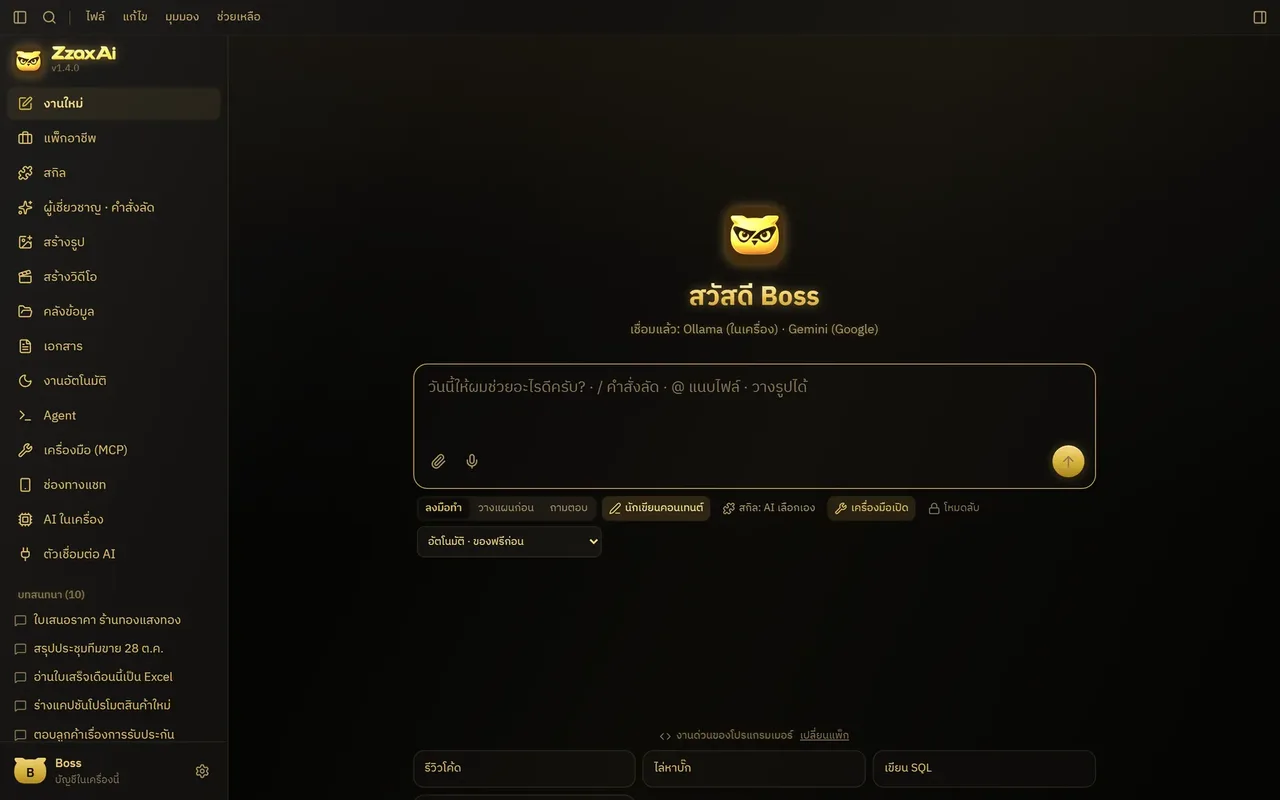
ZzaxAi คือโปรแกรมผู้ช่วย AI ที่ติดตั้งลงคอมพิวเตอร์ของคุณเอง ไม่ใช่เว็บที่ต้องส่งงานขึ้นเซิร์ฟเวอร์ของใคร ทำมาเพื่อร้านและสำนักงานเล็กในไทยที่อยากให้ AI ช่วยงานเอกสาร งานคอนเทนต์ และงานซ้ำ ๆ แต่ไม่อยากให้ข้อมูลลูกค้า สัญญา หรือยอดขายหลุดออกไปนอกออฟฟิศ ในแอปเดียวคุยกับ AI ได้ 17 แหล่ง ทั้งบริการคลาวด์ชื่อดังและโมเดลที่รันในเครื่องZzaxAi is an AI assistant you install on your own computer — not a website that ships your work to someone else's server. It's built for small Thai shops and offices that want AI help with paperwork, content and repetitive jobs without letting customer records, contracts or sales figures leave the office. One app talks to 17 AI sources, from well-known cloud services to models running on the machine itself.
ใช้งานเหมือนแอปแชททั่วไป พิมพ์หรือพูดสั่งงาน แนบไฟล์หรือรูปบิล แล้ว AI ทำงานให้ เช่น อ่านใบเสร็จเป็นตาราง Excel สรุปเสียงประชุม ร่างใบเสนอราคาแบบไทย หรือสร้างภาพสินค้า ครั้งแรกที่เปิด แอปจะถามว่าคุณทำงานด้านไหน แล้วจัดชุดผู้เชี่ยวชาญ สกิล และงานสำเร็จรูปให้ตรงกับอาชีพนั้น ทุกคำตอบมีป้ายบอกว่าประมวลผล "ในเครื่อง" หรือ "ส่งขึ้นคลาวด์"It works like a normal chat app: type or speak, attach a file or a photo of a bill, and the AI does the job — turning receipts into an Excel table, summarising a meeting recording, drafting a Thai-format quotation, or generating product images. On first launch it asks what kind of work you do and sets up matching specialists, skills and ready-made tasks. Every answer carries a label saying whether it was processed "on this computer" or "sent to the cloud".
ตอนนี้เป็นรุ่น 1.4 สำหรับ Windows 10 และ 11 ติดตั้งใช้งานจริงบนเครื่องของผู้พัฒนา เว็บ zzaxai.com ขึ้นแล้วตั้งแต่ 29 ต.ค. 2569 แต่ยังไม่มีลิงก์ดาวน์โหลดสาธารณะและยังไม่ประกาศราคา คนที่อยากลองต้องกรอกฟอร์มขอรุ่นทดลองในเว็บ ทีมจะตอบกลับทางอีเมลพร้อมลิงก์ตัวติดตั้ง ช่วงทดลองยังไม่มีค่าใช้จ่าย รุ่น Mac กำลังจัดทำThe current release is version 1.4 for Windows 10 and 11, installed and in daily use on the developer's own machine. The zzaxai.com site has been live since 29 Oct 2026, but there's no public download link and no announced price yet: to try it you fill in the trial request form and get an installer link back by email. The trial is free for now, and a Mac version is in progress.
จุดยืนของแอปคือ "ไม่ต้องเชื่อใจเรา เพราะข้อมูลไม่ผ่านมือเราเลย" ไม่มีบัญชีกลาง ไม่มีฐานข้อมูลของผู้พัฒนาที่เก็บงานของคุณ และเมื่อมีความเสี่ยงว่าข้อมูลอ่อนไหวจะหลุด แอปเลือกหยุดแล้วแจ้งเตือน แทนการแอบส่งขึ้นคลาวด์ให้งานผ่านไปThe app's stance is "you don't have to trust us, because your data never passes through us". There is no central account and no developer database holding your work, and when sensitive data is at risk of leaving, the app stops and tells you rather than quietly falling back to the cloud to get the job done.
02 · โจทย์02 · The brief
สร้างขึ้นมาเพราะอะไรWhy this exists
เจ้าของร้านและสำนักงานเล็กในไทยที่ต้องทำเอกสาร ใบเสนอราคา ใบเสร็จ และอยากให้ข้อมูลอยู่ในเครื่องตัวเองOwners of small Thai shops and offices who deal with documents, quotations and receipts and want their data to stay on their own machine
ใช่โจทย์ของคุณไหมSound like your problem?
03 · ฟีเจอร์03 · Features
ทำอะไรได้บ้าง อย่างละเอียดWhat it does, in detail
10 ความสามารถ10 capabilitiesคุยกับ AI 17 แหล่งในหน้าต่างเดียว17 AI sources in one window
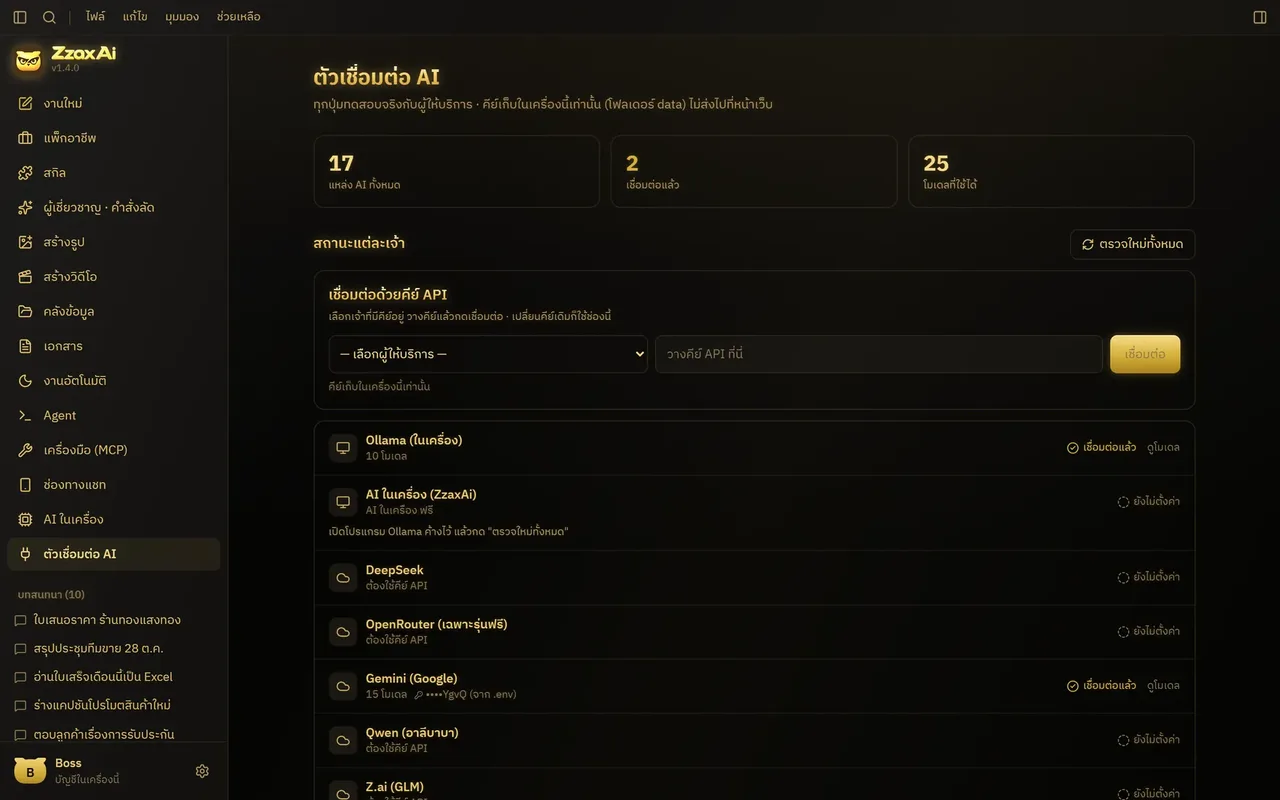
ต่อได้ทั้ง Gemini, GPT, Claude, DeepSeek, Qwen, Doubao, Kimi, GLM, ERNIE, Yi, Hunyuan, MiniMax, SenseNova, SiliconFlow, OpenRouter, Ollama และ AI ในเครื่องของแอปเอง ในหน้า "ตัวเชื่อมต่อ AI" แค่เลือกค่ายจากช่องเดียว วางคีย์ แล้วกดเชื่อมต่อ หน้าแอปแสดงคีย์แค่ 4 ตัวท้าย และสลับรุ่นได้กลางบทสนทนาConnect Gemini, GPT, Claude, DeepSeek, Qwen, Doubao, Kimi, GLM, ERNIE, Yi, Hunyuan, MiniMax, SenseNova, SiliconFlow, OpenRouter, Ollama and the app's own local AI. On the "AI connectors" screen you pick a provider, paste a key and press connect; the app only ever shows the last four characters, and you can switch models mid-conversation.
AI ในเครื่อง ติดตั้งคลิกเดียวOne-click local AI
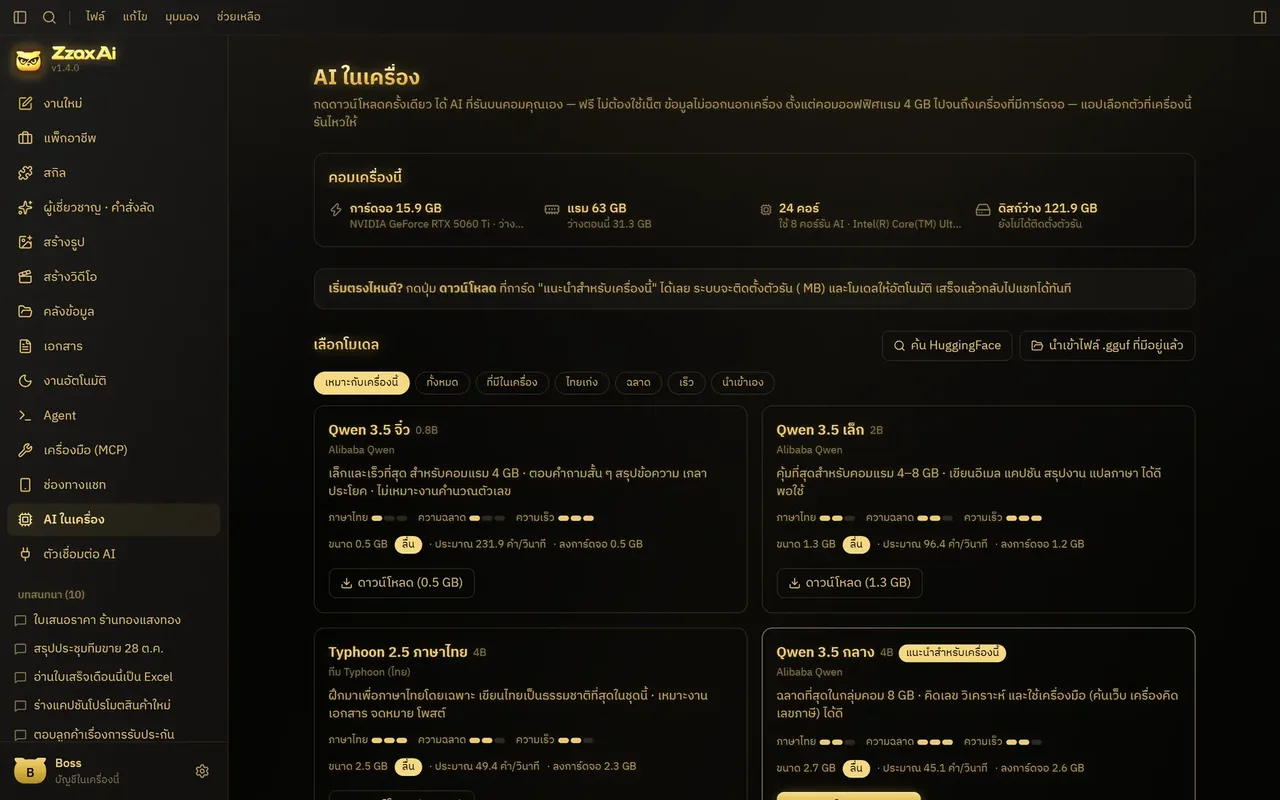
หน้า "AI ในเครื่อง" ตรวจการ์ดจอ แรม และพื้นที่ดิสก์ของคุณ แล้วแนะนำรุ่นที่เครื่องไหว จากทั้งหมด 11 รุ่นตั้งแต่ตัวเล็กที่ซีพียูรันได้ไปจนถึงตัวใหญ่สำหรับการ์ดจอแรง กดดาวน์โหลดแล้วใช้ได้เลยโดยไม่ต้องลงโปรแกรมเสริม และไม่มีค่าบริการรายเดือน นำเข้าไฟล์โมเดลที่มีอยู่แล้วหรือค้นจาก HuggingFace ในแอปก็ได้The "Local AI" screen checks your GPU, RAM and disk space and recommends what your machine can handle, from 11 models ranging from small CPU-friendly ones to large models for strong GPUs. Press download and it works — no extra software, no monthly fee. You can also import model files you already have or search HuggingFace from inside the app.
เอกสารไทยที่ถูกแบบThai documents done properly
ออกใบเสนอราคา ใบแจ้งหนี้ ใบเสร็จ และใบกำกับภาษี โดยเลขที่เอกสารแยกชนิดและนับใหม่ทุกปี พ.ศ. คิด VAT 7% ปัดเศษแบบสรรพากร และเขียนยอดเป็นตัวหนังสือ พิมพ์ A4 ได้ทันที ไฟล์ Word, PowerPoint และ Excel ที่แอปสร้างตั้งระยะบรรทัด 1.4 เท่าให้สระและวรรณยุกต์ไทยไม่ชนกันIt produces quotations, invoices, receipts and tax invoices with numbering per document type that resets each Thai Buddhist year, 7% VAT rounded the way the Revenue Department does it, and amounts written out in Thai words, ready to print on A4. Word, PowerPoint and Excel files are laid out with 1.4 line spacing so Thai vowels and tone marks don't collide.
ใบเสร็จและสลิปกลายเป็น ExcelReceipts and slips into Excel
ลากรูปบิลมาวาง AI อ่านออกมาเป็นตาราง ตรวจผลรวม ภาษี เลขผู้เสียภาษี และวันที่ พ.ศ. ให้ แถวที่น่าสงสัยจะติดธงให้ดูซ้ำ แล้วส่งออกเป็นไฟล์ .xlsx ได้เลยDrop in a photo of a bill and the AI reads it into a table, checking totals, tax, the taxpayer ID and the Thai-calendar date. Rows that look wrong are flagged for a second look, and the result exports straight to an .xlsx file.
สกิลและแพ็กอาชีพSkills and job packs
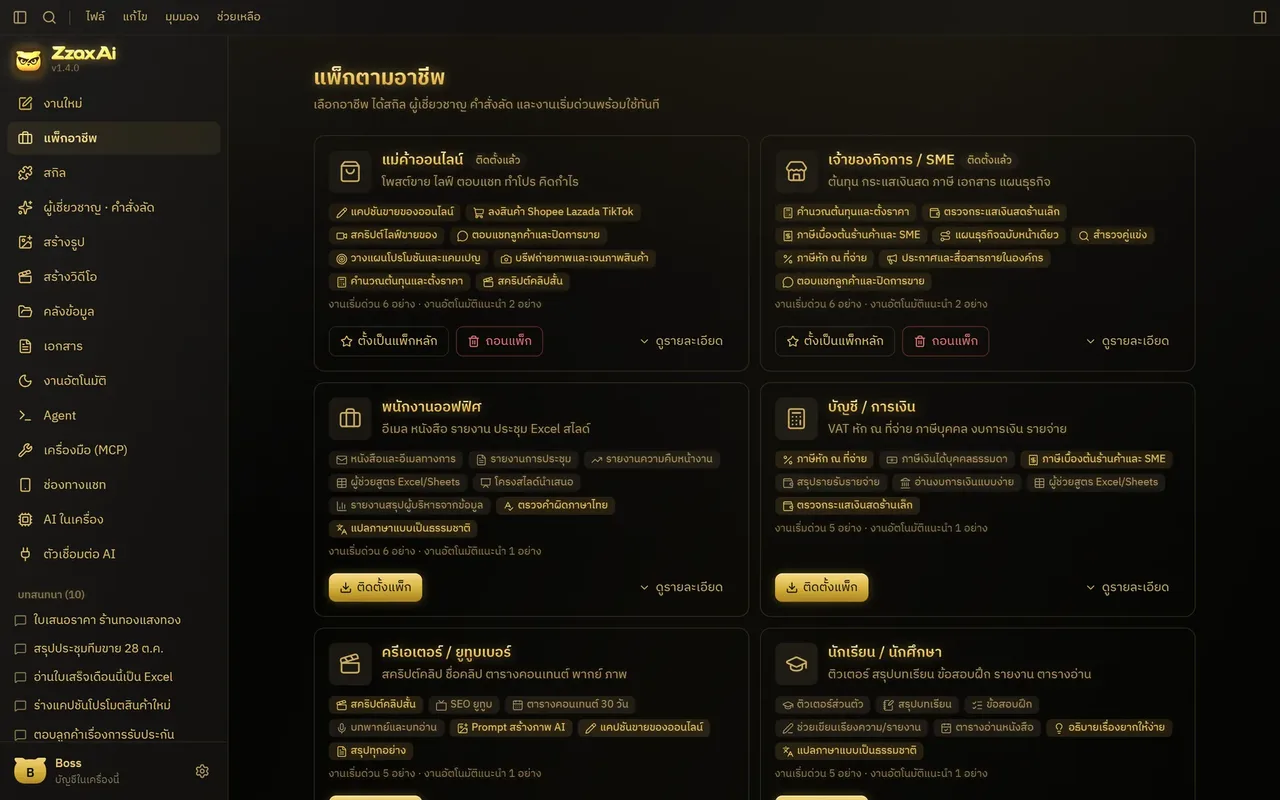
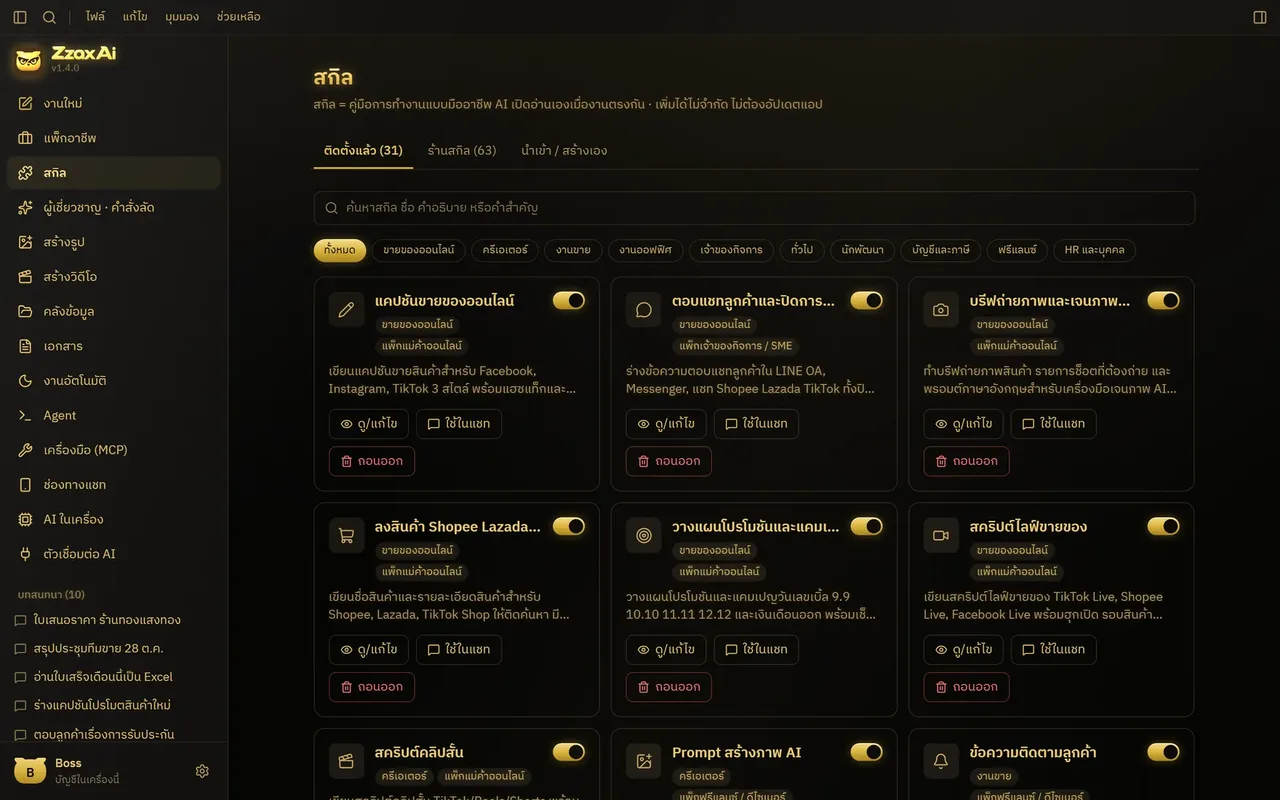
มีสกิลสำเร็จรูป 63 ตัว เช่น ตรวจสัญญา คิดต้นทุนและราคา ทำปฏิทินคอนเทนต์ สแกนคู่แข่ง และเช็กกระแสเงินสด กดเลือกแล้วตอบคำถามไม่กี่ข้อก็ได้ผลเป็นไฟล์ และมี 13 แพ็กอาชีพ เช่น ร้านค้าออนไลน์ เจ้าของ SME ร้านอาหารและคาเฟ่ บัญชี การตลาด ครู งานธุรการ และงานเอกสารกฎหมายThere are 63 ready-made skills — contract review, costing and pricing, content calendars, competitor scans, cash-flow checks — where you pick one, answer a few questions and get a file back. And 13 job packs, such as online shop, SME owner, restaurant and café, accounting, marketing, teaching, admin, and legal paperwork.
สร้างรูปและวิดีโอบนการ์ดจอของคุณImages and video on your own GPU
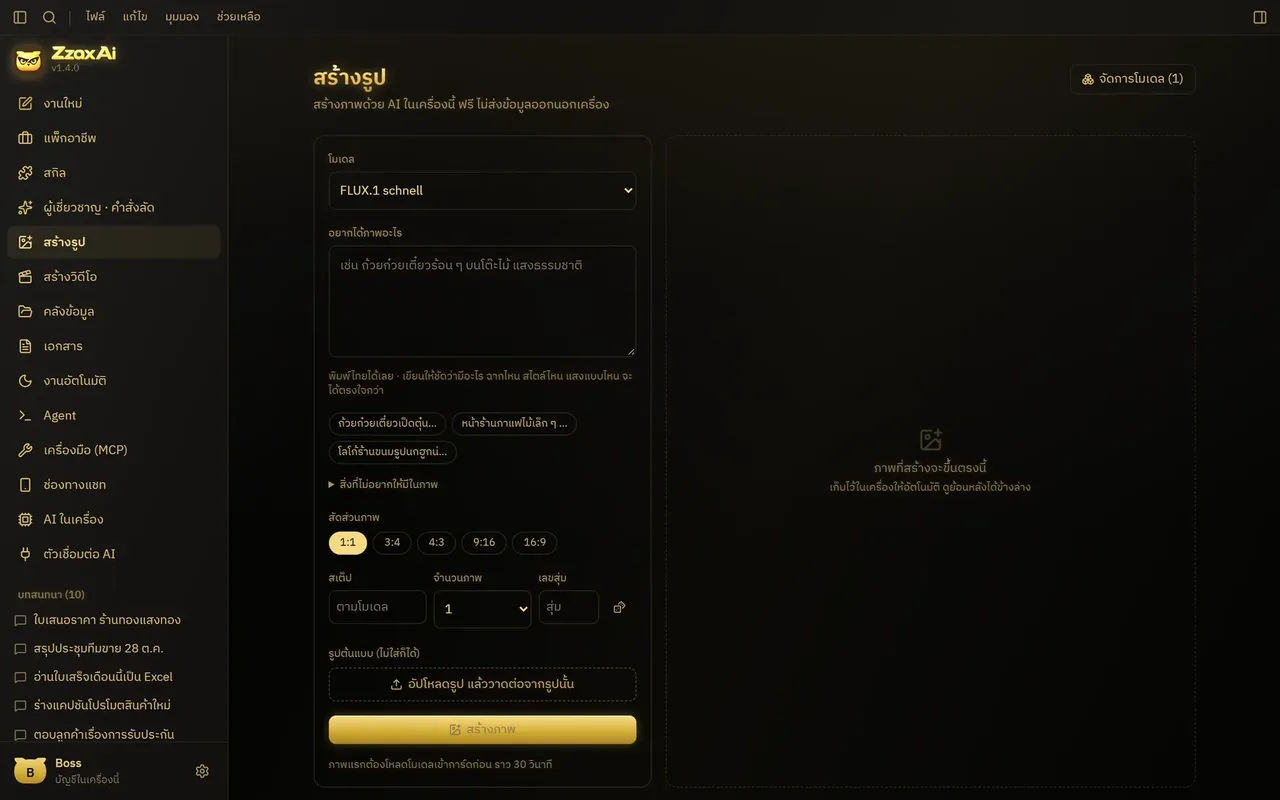
เมนู "สร้างรูป" และ "สร้างวิดีโอ" พิมพ์คำบรรยายภาษาไทย เลือกโมเดลและสัดส่วนภาพ แล้วกดสร้าง ไฟล์เก็บในเครื่องอัตโนมัติ ไม่มีลายน้ำ ไม่จำกัดจำนวน มีโมเดลภาพ 12 ตัวและโมเดลคลิป 11 ตัวให้เลือกติดตั้ง บนเครื่องผู้พัฒนา (การ์ด RTX 5060 Ti) ภาพ 1024×1024 ใช้ราว 29 วินาที งานนี้ต้องใช้การ์ดจอ NVIDIAIn "Create image" and "Create video" you type a Thai description, choose a model and aspect ratio, and press create; files are saved locally with no watermark and no limit. There are 12 image models and 11 video models to install. On the developer's machine (an RTX 5060 Ti) a 1024×1024 image takes about 29 seconds. This feature needs an NVIDIA GPU.
คลังไฟล์ที่ค้นภาษาไทยเจอA file library that finds Thai text
อัป PDF, Word, Excel หรือ CSV เข้าคลัง แล้วถาม AI ได้เลย ระบบตัดคำไทยและทำดัชนีให้ จึงค้นเจอแม้พิมพ์ไม่ตรงคำ และยังค้นย้อนไปในแชทเก่าทุกแชทในเครื่องได้ โดยไม่มีระบบความจำบนคลาวด์Upload PDF, Word, Excel or CSV files and ask the AI about them. The app segments Thai words and builds an index, so it finds matches even when your wording differs, and it can search back through every past chat on the machine — with no cloud-side memory.
งานอัตโนมัติและภารกิจหลายขั้นAutomation and multi-step missions
ตั้งเวลาให้สรุปยอดเมื่อวานทุกเช้า เฝ้าข่าวหรือเว็บคู่แข่ง ตั้งเตือนความจำจากในแชท หรือสั่งเป็นภารกิจหลายขั้นแล้วรอผล เมื่อเสร็จแอปส่งผลเข้าแชทให้เอง งานที่รันตอนคุณไม่อยู่ใช้ได้เฉพาะเครื่องมือที่คุณตั้งอนุญาตอัตโนมัติไว้แล้วเท่านั้นSchedule a summary of yesterday's sales every morning, watch news or a competitor's site, set reminders from chat, or launch a multi-step mission and come back to the result, which lands in your chat when done. Jobs that run while you're away can only use tools you have already set to auto-approve.
เสียงไทย พูดแทนพิมพ์Thai voice input
กดไมค์แล้วพูด หรือโยนไฟล์เสียงประชุมเข้ามาให้ถอดความ แล้วสรุปเป็นประเด็น ข้อตัดสินใจ และงานที่ต้องทำ การถอดเสียงทำด้วยโมเดลในเครื่องก่อนเสมอTap the mic and talk, or drop in a meeting recording to be transcribed and summarised into points, decisions and action items. Transcription always runs on a local model first.
ต่อเครื่องมือเพิ่มแบบขออนุญาตก่อนAdd tools, with permission first
รองรับมาตรฐาน MCP จึงเสียบเครื่องมือใหม่เข้าไปได้เรื่อย ๆ ทุกครั้งที่ AI จะใช้เครื่องมือ จะมีการ์ดขออนุญาตขึ้นให้กด และเลือกโหมดการตอบได้ 3 แบบ คือ ลงมือทำ วางแผนก่อน หรือถามตอบอย่างเดียว สองโหมดหลังจะไม่ให้ AI เห็นเครื่องมือที่เปลี่ยนแปลงของจริงเลยIt supports the MCP standard, so new tools can be plugged in over time. Whenever the AI wants to use one, a permission card appears for you to approve. There are three answer modes — act, plan first, or Q&A only — and in the last two the AI never sees tools that change anything for real.
04 · วิธีทำงาน04 · How it works
ทำงานยังไง ตั้งแต่ต้นจนจบHow it works, start to finish
- 1
1. ขอรุ่นทดลองและติดตั้ง1. Request a trial and install
กรอกฟอร์มที่ zzaxai.com ได้อีเมลตอบกลับพร้อมลิงก์ตัวติดตั้ง Windows แล้วติดตั้งลงคอม ข้อมูลทั้งหมดจะอยู่ในโฟลเดอร์ของแอปบนเครื่องนั้นFill in the form at zzaxai.com, receive an email with the Windows installer link, and install it. All data lives in the app's folder on that computer.
- 2
2. ตั้งค่าครั้งแรกตามอาชีพ2. First-run setup by job
ตัวช่วยตั้งค่าถามว่าคุณทำงานด้านไหน แล้วจัดแพ็กอาชีพ ผู้เชี่ยวชาญ และสกิลให้The setup wizard asks what kind of work you do and arranges a job pack, specialists and skills to match.
- 3
3. เลือกสมองที่จะใช้3. Choose the brain
กดติดตั้ง AI ในเครื่องหนึ่งครั้ง หรือวางคีย์ของผู้ให้บริการที่คุณมีอยู่ งานลับให้ใช้โมเดลในเครื่อง งานทั่วไปใช้คลาวด์ก็ได้Install the local AI with one click, or paste a key from a provider you already use. Keep confidential work on the local model; general tasks can use the cloud.
- 4
4. สั่งงานจริง4. Give it real work
แนบใบเสร็จ พิมพ์ "ออกใบเสนอราคาให้…" หรือเลือกสกิลจากคลัง AI ทำงานแล้วคืนผลเป็นข้อความหรือไฟล์ พร้อมป้ายบอกว่าประมวลผลที่ไหนAttach a receipt, type "make a quotation for…", or pick a skill from the library. The AI returns text or a file, labelled with where it was processed.
- 5
5. ปล่อยให้ทำงานซ้ำเอง5. Let it repeat the work
ตั้งงานตามเวลาหรือภารกิจไว้ แล้วรับผลในแชท หรือสั่งต่อผ่าน LINE และ Telegram ตอนอยู่นอกออฟฟิศ โดยงานยังรันบนเครื่องเดิมSet up scheduled jobs or missions and get the results in chat, or keep giving instructions through LINE or Telegram when you're out, while the work still runs on the same computer.
05 · ภาพ05 · Visuals
ภาพจากระบบจริงFrom the real system
8 ภาพ8 imagesภาพหน้าจอจริงถ่ายจากระบบที่เปิดใช้อยู่ ส่วนภาพโปรโมตและภาพประกอบมีป้ายกำกับไว้ทุกใบReal screenshots come from the running system; promo images and illustrations are labelled on every card.

06 · สถานการณ์06 · Scenarios
ตัวอย่างสถานการณ์ใช้งานExample scenarios
เป็นตัวอย่างสมมติเพื่อให้เห็นภาพ ไม่ใช่เรื่องของลูกค้าจริงIllustrative scenarios to help you picture it — not real customer stories.
ร้านค้าที่ต้องทำบัญชีจากกองบิลA shop doing the books from a pile of bills
สมมติว่าคุณมีใบเสร็จค่าของเข้าร้านหลายสิบใบต่อเดือน ถ่ายรูปแล้วลากเข้าแอป AI ในเครื่องอ่านออกมาเป็นตาราง Excel ติดธงใบที่ยอดรวมไม่ตรง โดยรูปบิลไม่ต้องออกจากคอมของร้านSuppose your shop collects dozens of supplier receipts each month. Photograph them, drag them into the app, and the local AI turns them into an Excel table, flagging any whose totals don't add up — without the bill photos ever leaving the shop's computer.
ฟรีแลนซ์ที่ออกใบเสนอราคาบ่อยA freelancer sending frequent quotations
สมมติว่าคุณต้องส่งใบเสนอราคาทุกสัปดาห์ พิมพ์บอกชื่อลูกค้า รายการ และราคา แล้วได้เอกสารแบบไทยที่มีเลขที่ตามปี พ.ศ. VAT 7% และยอดเป็นตัวหนังสือ พร้อมพิมพ์Suppose you send quotations every week. Type the customer's name, the items and prices, and get a Thai-format document with Buddhist-year numbering, 7% VAT and the amount in words, ready to print.
เจ้าของร้านที่อยากได้ภาพสินค้าเองAn owner making their own product images
สมมติว่าคุณมีคอมที่มีการ์ดจอ NVIDIA และอยากได้ภาพโปรโมตเมนูใหม่ พิมพ์คำบรรยายภาษาไทยในหน้าสร้างรูป ได้ภาพไม่มีลายน้ำเก็บในเครื่อง โดยไม่ต้องสมัครเว็บไหนหรืออัปรูปสินค้าขึ้นไปให้ใครSuppose you have a PC with an NVIDIA card and want promo images for a new menu item. Type a Thai description on the image screen and get watermark-free images saved locally, without signing up anywhere or uploading product photos to anyone.
07 · เบื้องหลัง07 · Under the hood
เบื้องหลังระบบ ข้อมูล และความปลอดภัยUnder the hood: data and security
- แพลตฟอร์มPlatform
- แอปเดสก์ท็อปสำหรับ Windows 10/11 (64 บิต) สร้างด้วย Electron ข้างในมีตัวกลางเล็ก ๆ (Node.js) ที่รับคำขอเฉพาะจากเครื่องตัวเอง (127.0.0.1) หน้าจอเป็น React มีธีมสว่าง มืด และดำทองA desktop app for Windows 10/11 (64-bit) built on Electron. Inside is a small Node.js back end that only accepts requests from the machine itself (127.0.0.1); the interface is React, with light, dark and black-gold themes.
- สเปกเครื่องที่ต้องใช้System requirements
- แรม 8 GB ขึ้นไป (แนะนำ 16 GB) พื้นที่ว่างประมาณ 2 GB สำหรับตัวแอป (ไม่รวมโมเดล) การ์ดจอไม่จำเป็นสำหรับงานแชทและเอกสาร แต่ถ้ามีจะเร็วขึ้นมาก ส่วนการสร้างรูปและวิดีโอต้องใช้การ์ดจอ NVIDIA และแอปจะบอกว่าแต่ละโมเดลต้องใช้การ์ดกี่ GB8 GB RAM or more (16 GB recommended) and about 2 GB of disk for the app itself, not counting models. A GPU isn't needed for chat and documents but makes things much faster; image and video generation require an NVIDIA GPU, and the app tells you how much VRAM each model needs.
- ที่เก็บข้อมูลWhere data lives
- แชท ไฟล์ เอกสาร และค่าตั้งทั้งหมดเก็บเป็นฐานข้อมูลไฟล์เดียวในเครื่อง (Windows: %APPDATA%\ZzaxAi\data) อัปเดตแอปแล้วข้อมูลยังอยู่ ผู้พัฒนาไม่มีเซิร์ฟเวอร์ที่เก็บงานของคุณChats, files, documents and settings are stored in a single on-device database (Windows: %APPDATA%\ZzaxAi\data) that survives updates. The developer has no server holding your work.
- ความเป็นส่วนตัวและความปลอดภัยPrivacy and security
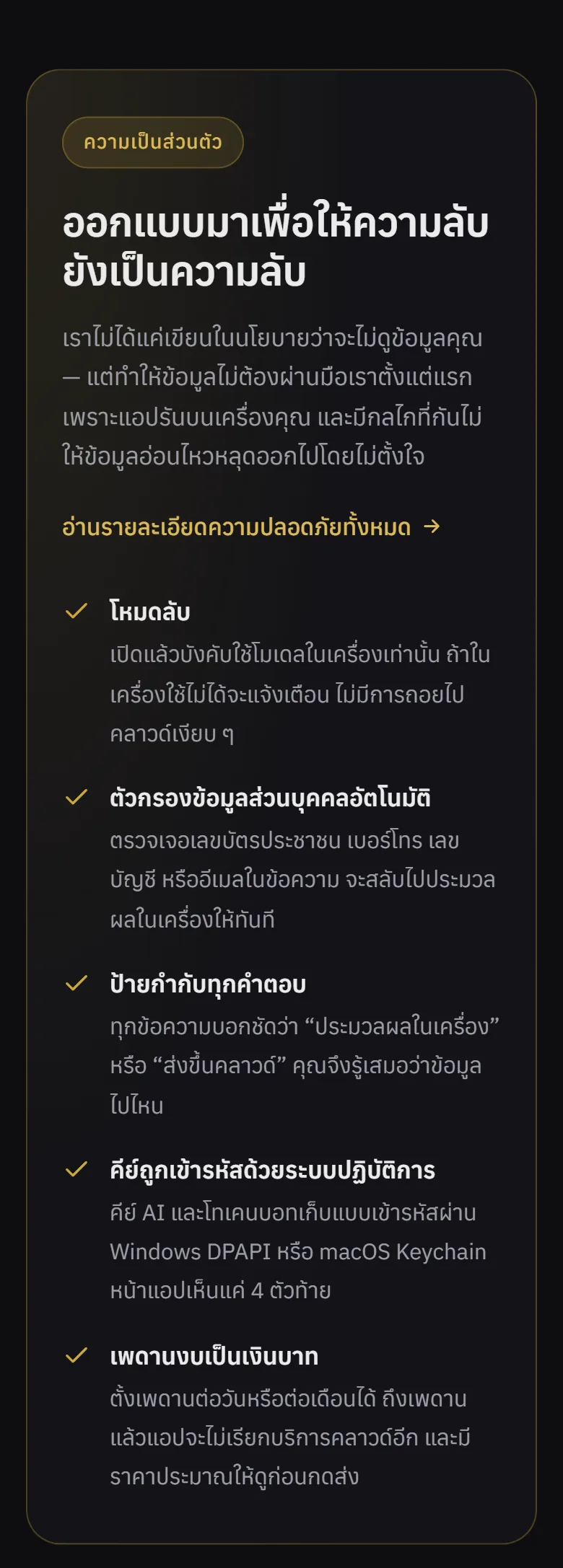
- โหมดลับบังคับใช้โมเดลในเครื่องและปิดการค้นเว็บ ตัวกรองข้อมูลส่วนบุคคลตรวจเลขบัตรประชาชน (ตรวจหลักตรวจสอบจริง) เบอร์โทร เลขบัญชี และอีเมล แล้วสลับไปประมวลผลในเครื่องเอง คีย์และโทเคนบอทเข้ารหัสด้วย Windows DPAPI หรือ macOS Keychain และตั้งเพดานงบเป็นเงินบาทรายวันหรือรายเดือนได้Private mode forces the local model and turns off web search. A personal-data filter spots Thai ID numbers (with real checksum validation), phone numbers, bank accounts and emails and switches to local processing on its own. Keys and bot tokens are encrypted with Windows DPAPI or the macOS Keychain, and you can set daily or monthly spending caps in baht.
- การเชื่อมต่อภายนอกOutside connections
- แอปออกอินเทอร์เน็ตเฉพาะตอนคุณเลือกใช้ AI คลาวด์ ค้นเว็บ ดาวน์โหลดโมเดล หรือส่งข้อความผ่าน LINE และ Telegram คีย์ถูกส่งไปหาผู้ให้บริการเจ้าของคีย์นั้นเท่านั้น ถ้าใช้แต่โมเดลในเครื่องก็ทำงานได้โดยไม่ต่อเน็ตThe app only goes online when you choose a cloud AI, web search, a model download, or LINE and Telegram messaging. Each key is sent only to the provider it belongs to. With local models alone it works fully offline.
- ข้อจำกัดที่ควรรู้Known limitations
- ตัวติดตั้งยังไม่ได้เซ็นชื่อนักพัฒนา Windows จึงอาจขึ้นเตือนครั้งแรก (กด More info แล้ว Run anyway) PDF ที่เป็นภาพสแกนยังอ่านไม่ได้ต้องแปลงเป็นรูปก่อน คุณภาพโมเดลในเครื่องยังสู้โมเดลคลาวด์ตัวท็อปไม่ได้ และห้ามเปิดตัวแอปออกอินเทอร์เน็ตตรง ๆ ให้ใช้ LINE หรือ Telegram แทนThe installer isn't code-signed yet, so Windows may warn on first run (click More info, then Run anyway). Scanned-image PDFs can't be read yet and must be converted to images first. Local models still trail the best cloud models in quality, and the app must not be exposed directly to the internet — use LINE or Telegram for remote access instead.
08 · ความคืบหน้า08 · Progress
ความคืบหน้าและแผนต่อไปProgress and what comes next
- ทำแล้วDone
รุ่น 1.0 (28 ต.ค. 2569): ตั้งชื่อ ZzaxAi เอกสารไทย อ่านใบเสร็จเป็น Excel ความจำ ค้นเว็บ เสียงไทย และรหัสผ่านแอปVersion 1.0 (28 Oct 2026): renamed ZzaxAi, Thai documents, receipts to Excel, memory, web search, Thai voice and an app password
- ทำแล้วDone
รุ่น 1.1–1.2 (28 ต.ค. 2569): คลังสกิล แพ็กอาชีพ ภารกิจหลายขั้น ตัวเฝ้าเว็บ AI ในเครื่องคลิกเดียว และธีมดำทองVersions 1.1–1.2 (28 Oct 2026): skill library, job packs, multi-step missions, web watchers, one-click local AI and the black-gold theme
- ทำแล้วDone
รุ่น 1.4.0 (29 ต.ค. 2569): โหมดการตอบ 3 แบบ จัดหน้า Word/PPT/Excel ใหม่ สร้างหน้าเว็บและเว็บไซต์หลายหน้า ค้นแชทเก่า และป้ายโปสเตอร์ · เว็บ zzaxai.com ขึ้นจริงวันเดียวกันVersion 1.4.0 (29 Oct 2026): three answer modes, reworked Word/PPT/Excel layouts, web pages and multi-page sites, past-chat search, and posters · zzaxai.com went live the same day
- ทำแล้วDone
สร้างรูปและวิดีโอในเครื่อง พร้อมคลังโมเดลและตัวจัดการดาวน์โหลด (1 พ.ย. 2569)On-device image and video generation with a model library and download manager (1 Nov 2026)
- กำลังทำIn progress
รุ่น Mac (.dmg): เพิ่มโค้ดรองรับชิป Apple และงานสร้างตัวติดตั้งบนเครื่องคลาวด์แล้ว (2 พ.ย. 2569) ยังไม่ได้ปล่อยให้ใช้Mac version (.dmg): Apple-silicon support and cloud build jobs added (2 Nov 2026), not yet released
- ถัดไปNext
เตรียมเปิดขาย: เซ็นชื่อตัวติดตั้ง ใส่ราคา และทำหน้าดาวน์โหลด รวมถึงอ่าน PDF ที่เป็นภาพสแกนGetting ready to sell: code-signed installers, pricing and a download page, plus reading scanned-image PDFs
09 · คำถาม09 · FAQ
คำถามที่พบบ่อยFrequently asked questions
ราคาเท่าไรHow much does it cost?
ช่วงทดลองยังไม่มีค่าใช้จ่าย ราคาขายจริงยังไม่ได้กำหนด ถ้าใช้เฉพาะ AI ในเครื่อง (รวมการสร้างรูปและวิดีโอ) ไม่มีค่าบริการต่อเนื่อง ถ้าเลือกใช้ AI คลาวด์ ค่าใช้จ่ายเป็นของผู้ให้บริการรายนั้นตามจริง โดยแอปแสดงยอดเป็นบาทและตั้งเพดานงบได้The trial is free and retail pricing hasn't been set. Using only local AI (including image and video generation) has no ongoing fee; if you choose a cloud AI, you pay that provider directly, and the app shows the cost in baht and lets you cap it.
ดาวน์โหลดได้ที่ไหนWhere can I download it?
ยังไม่มีลิงก์ดาวน์โหลดสาธารณะ ให้กรอกฟอร์มขอรุ่นทดลองที่ zzaxai.com แล้วทีมจะตอบกลับทางอีเมลภายใน 1 วันทำการพร้อมลิงก์ตัวติดตั้ง ช่วงนี้รับผู้ทดลองจำนวนจำกัดThere's no public download link yet. Fill in the trial request form at zzaxai.com and you'll get a reply by email within one business day with the installer link. Trial places are limited for now.
ข้อมูลของผมถูกเก็บไว้ที่ไหนWhere is my data stored?
ในเครื่องของคุณเท่านั้น ในโฟลเดอร์ข้อมูลของแอป ผู้พัฒนาไม่มีบัญชีกลางหรือเซิร์ฟเวอร์ที่เก็บแชท ไฟล์ หรือรูปที่สร้างของคุณOnly on your computer, in the app's data folder. The developer has no central account or server holding your chats, files or generated images.
ต้องต่อเน็ตตลอดไหม และคอมต้องแรงแค่ไหนDoes it need the internet, and how powerful a PC?
ถ้าใช้โมเดลในเครื่องไม่ต้องต่อเน็ต งานแชทและเอกสารใช้ได้บนเครื่องแรม 8 GB ขึ้นไปโดยไม่ต้องมีการ์ดจอ ส่วนการสร้างรูปและวิดีโอต้องมีการ์ดจอ NVIDIALocal models work offline. Chat and documents run on 8 GB RAM or more without a GPU; image and video generation need an NVIDIA GPU.
ใช้บน Mac หรือมือถือได้ไหมDoes it run on Mac or phones?
ตอนนี้ตัวติดตั้งพร้อมบน Windows 10 และ 11 รุ่น Mac กำลังจัดทำ ส่วนมือถือใช้สั่งงานผ่าน LINE หรือ Telegram โดยตัวแอปยังรันอยู่ที่คอมของคุณThe installer is ready for Windows 10 and 11; a Mac version is in progress. On a phone you give instructions through LINE or Telegram while the app keeps running on your computer.
ติดปัญหาติดต่อใครWho do I contact for help?
อีเมล zzaxstudio@gmail.com หรือ LINE @zabver ทีมช่วยตั้งค่าให้เข้ากับงานของผู้ทดลองแต่ละรายEmail zzaxstudio@gmail.com or LINE @zabver. The team helps each trial user configure the app for their own work.
10 · วิธีเริ่ม10 · Get started
เริ่มได้ใน 3 ขั้นUp and running in three steps
ถ้าอยากได้ระบบแบบเดียวกันสำหรับธุรกิจของคุณ บอกโจทย์มาสั้น ๆ เราตอบกลับพร้อมขอบเขตงานและราคาภายใน 1 วันทำการIf you want something like this for your own business, send us a line about the problem. You'll get scope and price within one working day.
- 1ขั้นที่ 1 เปิด zzaxai.com แล้วกรอกฟอร์มขอรุ่นทดลองStep 1: Open zzaxai.com and fill in the form to request a trial build
- 2ขั้นที่ 2 ติดตั้งโปรแกรมบนคอม Windows แล้วกดติดตั้ง AI ในเครื่องหนึ่งครั้ง หรือใส่คีย์ผู้ให้บริการที่คุณมีอยู่Step 2: Install it on a Windows PC, then either click once to install the local AI or paste in a provider key you already have
- 3ขั้นที่ 3 เลือกแพ็กอาชีพที่ตรงกับงานของคุณ แล้วลองสั่งงานเอกสารจริงหนึ่งงานStep 3: Pick the job pack that matches your work, then give it one real document task to do
เริ่มงานกับเราWork with us
อยากได้ระบบแบบนี้สำหรับธุรกิจคุณWant a system like this for your business?
เล่าปัญหาของคุณมา เราจะบอกตรง ๆ ว่าช่วยได้ไหม ภายใน 1 วันทำการ ส่งแล้วได้รหัสติดตามงานทันทีTell us the problem and we'll say honestly whether we can help, within one working day. You get a tracking code the moment you send it.