โรงน้ำแข็งคุมทุกอย่างด้วย Excel หลายไฟล์ เสมียนหลายคนไล่คีย์ตัวเลขทุกร้านทุกสายแล้วบวกซ้ำหลายรอบ ไฟล์จริงของโรงขึ้น #REF! ทั้งเดือน ผลต่างเงินโอนติดลบทั้งคอลัมน์ และสรุปเงินเชื่อรายเดือนไม่ตรงAn ice factory runs on a pile of spreadsheets: several clerks re-key every shop on every route and add it all up again and again. The factory's real files showed #REF! across a whole month, a transfer-difference column that was negative all the way down, and a monthly credit summary that did not reconcile.
← ผลงานทั้งหมด← All work

เครื่องมือเดสก์ท็อปDesktop tool
ระบบโรงน้ำแข็ง IcePlantIcePlant Ice Factory System
เลิกไล่คีย์ Excel หลายไฟล์ คีย์ใบสายรถครั้งเดียว ที่เหลือคิดให้เองStop re-keying a stack of spreadsheets: enter each truck's sheet once and let the rest calculate itself
เบต้าBeta เครื่องมือเดสก์ท็อปDesktop tool
ไม่มีเว็บสาธารณะ เป็นโปรแกรมที่ติดตั้งในเครื่องลูกค้า ตอนนี้ติดตั้งใช้งานจริงแล้วที่โรงน้ำแข็งเมืองพรหม รุ่นล่าสุด v0.10.0 (29 ต.ค. 2569) ข้อมูลเก็บแบบเข้ารหัสอยู่ในเครื่องหลักของโรง ไม่ขึ้นเซิร์ฟเวอร์กลางThere is no public website — this is software installed on the customer's own PC, and it is now in real use at the Mueang Phrom ice factory. Latest build v0.10.0 (29 October 2026). Data is stored encrypted on the factory's main machine, not on any central server.
01 · ภาพรวม01 · Overview
ภาพรวมของระบบThe system at a glance
IcePlant คือโปรแกรมที่ติดตั้งบนคอมพิวเตอร์ของโรงน้ำแข็ง เพื่อแทนที่ไฟล์ Excel หลายไฟล์ที่เสมียนต้องไล่คีย์และบวกซ้ำทุกวัน เสมียนคีย์ใบสายรถที่คนขับเอากลับมาเพียงครั้งเดียว แล้วโปรแกรมคิดยอดขาย เงินขาดเกิน ค่าคอมมิชชันคนขับ เงินโอน เงินเชื่อ สรุปรายวัน เงินเดือน และการแบ่งหุ้นให้เองIcePlant is software installed on an ice factory's own PC. It replaces the pile of Excel files that clerks re-key and re-add every day. A clerk enters each driver's paper route sheet once, and the program works out sales, cash over or short, driver commission, bank transfers, credit, the daily summary, payroll and profit sharing.
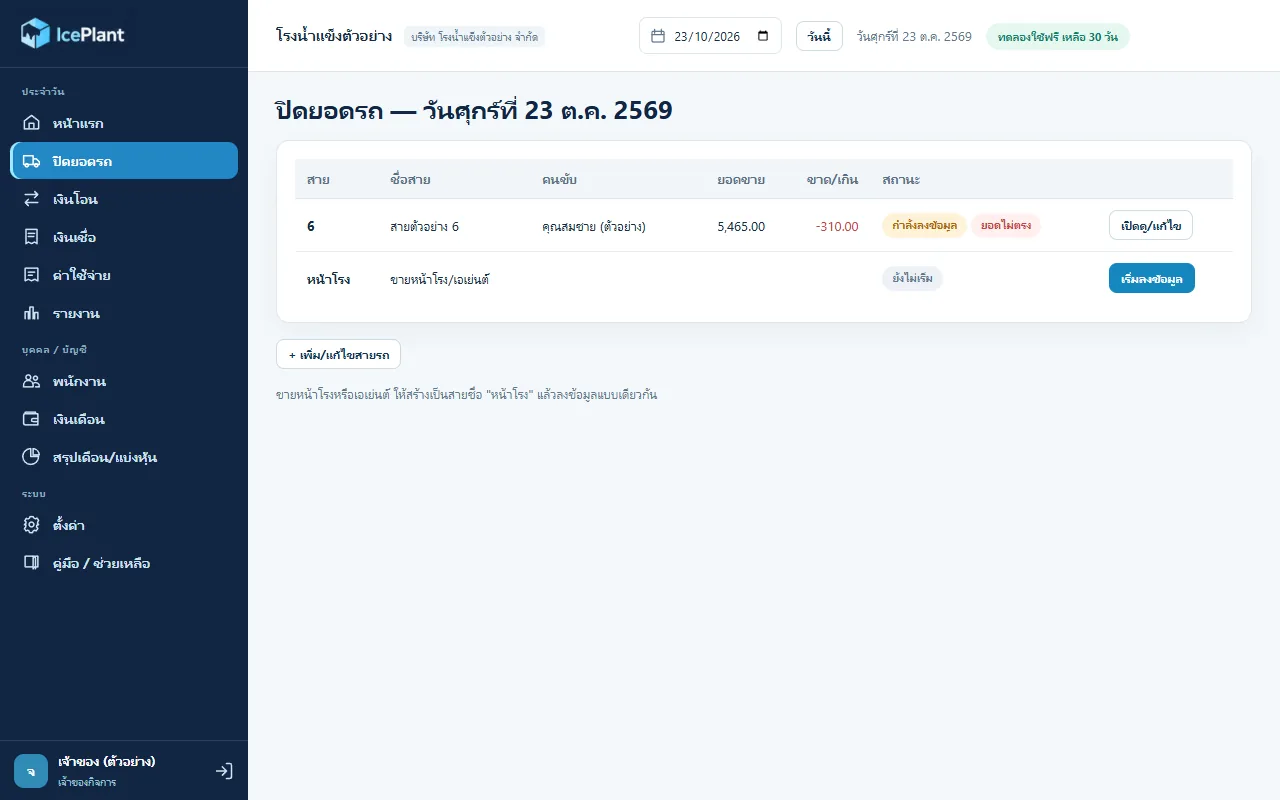
งานประจำวันเริ่มที่เมนู "ปิดยอดรถ" เสมียนเลือกวันที่ กดเริ่มลงข้อมูลที่สายรถ กรอกจำนวนที่ขึ้นรถแต่ละรอบ ของคงเหลือ ของที่เปลี่ยนคืน แล้วกรอกรายร้านตามใบกระดาษ กด Enter เพื่อข้ามไปช่องถัดไปเหมือนใน Excel จากนั้นนับแบงก์และใส่ค่าน้ำมัน โปรแกรมจะขึ้นยอดขาด/เกิน และค่าคอมทันที พร้อมบันทึกให้อัตโนมัติ ก่อนกด "ปิดยอด"The daily work starts at the Close Route screen. The clerk picks a date, starts the route, enters what went on the truck each run, what came back and what was swapped, then the per-shop lines from the paper sheet; Enter jumps to the next cell like in Excel. After counting the banknotes and entering fuel, the program shows cash over/short and commission at once, saves automatically, and the clerk presses Close.
สถานะปัจจุบันคือรุ่น 0.10.0 (29 ต.ค. 2569) ออกแบบจากใบงานกระดาษและไฟล์ Excel จริงของโรงน้ำแข็งเมืองพรหม และติดตั้งในเครื่องของเจ้าของโปรเจกต์แล้ว ส่วนการใช้งานประจำวันหน้างานจริง ยอดขายที่เกิดจากโปรแกรม และลูกค้ารายอื่น ยังไม่มีหลักฐานยืนยันในเอกสารที่ตรวจ จึงเรียกได้ว่าอยู่ช่วงทดลองใช้ (beta)The current build is 0.10.0 (29 October 2026). It was designed from the paper route sheets and real spreadsheets of the Mueang Phrom ice factory and is installed on the project owner's own PC. Daily use on the factory floor, any revenue from it, and other customers are not confirmed in the documents we checked, so it is best described as a beta.
ที่ออกแบบให้ข้อมูลอยู่ในเครื่องของโรงเอง ไม่ขึ้นเซิร์ฟเวอร์กลาง เพราะเจ้าของโรงกังวลเรื่องข้อมูลหลุด และยังคงใช้ใบกระดาษให้คนขับ เพราะคนขับไม่ถนัดมือถือ ภาระการคีย์จึงอยู่ที่เสมียนที่เดียว และคีย์ครั้งเดียวที่ต้นทาง ที่เหลือคำนวณต่อให้Data stays on the factory's own machine instead of a central server because the owner worried about leaks, and drivers keep using paper because they are not comfortable with smartphones. The keying burden sits with the clerk alone, once, at the source; everything else is calculated downstream.
02 · โจทย์02 · The brief
สร้างขึ้นมาเพราะอะไรWhy this exists
เจ้าของและเสมียนโรงน้ำแข็งที่ใช้คอมไม่เก่ง มีสายรถหลายสาย คนขับยังส่งใบกระดาษ และไม่อยากเอาข้อมูลขึ้นเซิร์ฟเวอร์Ice factory owners and clerks who are not confident with computers, run many delivery routes, still get paper sheets from drivers, and do not want their data on a server
ใช่โจทย์ของคุณไหมSound like your problem?
03 · ฟีเจอร์03 · Features
ทำอะไรได้บ้าง อย่างละเอียดWhat it does, in detail
10 ความสามารถ10 capabilitiesปิดยอดรถรายสายตามใบกระดาษRoute close-out that mirrors the paper sheet
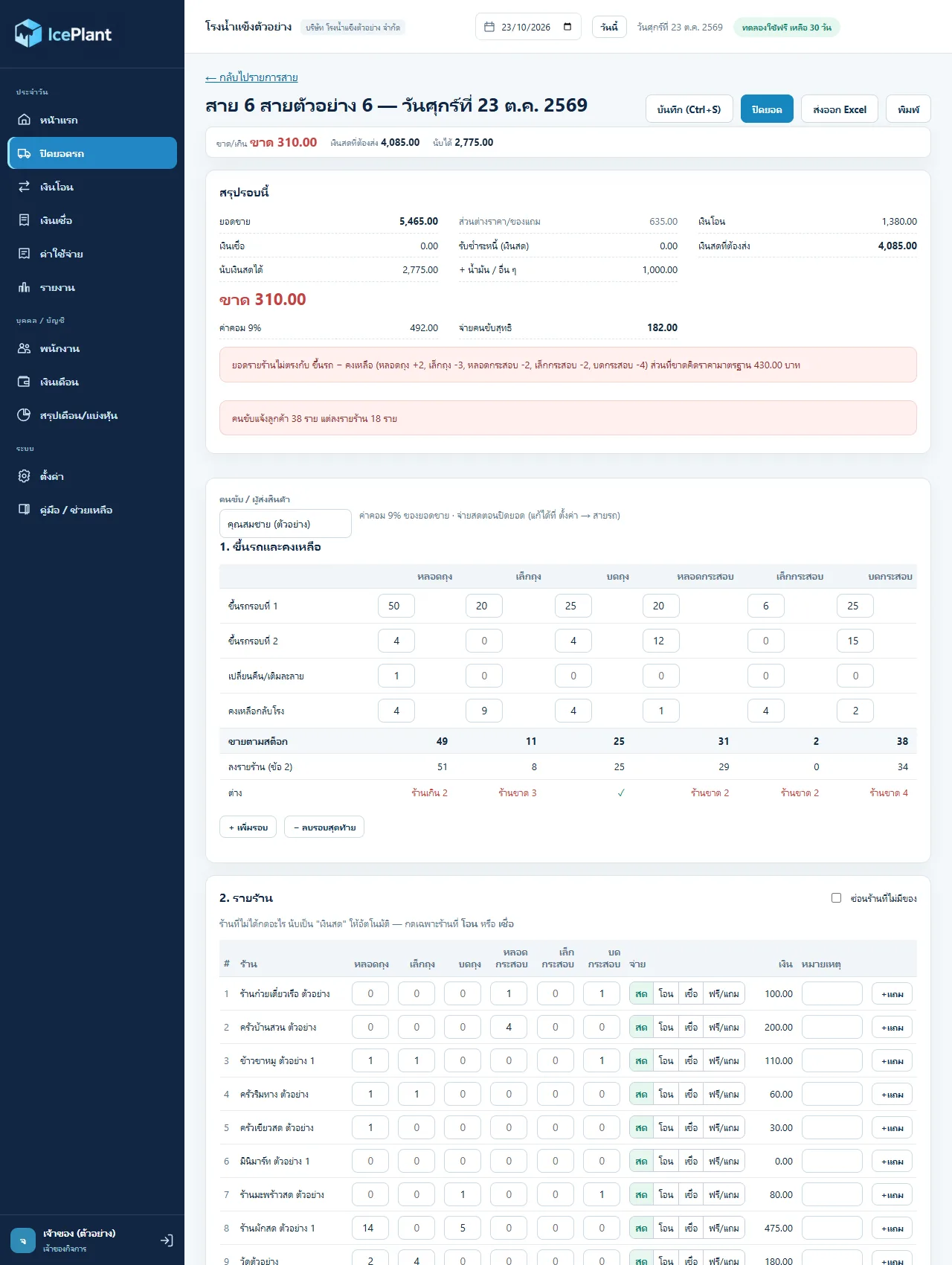
หน้าลงใบสายมี 2 ส่วน ส่วนที่ 1 ขึ้นรถและคงเหลือ (ขึ้นรถรอบที่ 1, 2 … เปลี่ยนคืน/เติมละลาย คงเหลือกลับโรง) ส่วนที่ 2 รายร้าน แถว "ขายตามสต็อก" = ขึ้นรถทุกรอบ − คงเหลือ − เปลี่ยนคืน และเทียบกับยอดรายร้านให้เห็นว่าร้านเกินหรือขาดกี่หน่วยในแต่ละสินค้า ตั้งราคามาตรฐานต่อสินค้า (ตัวอย่างถุง 30 บาท กระสอบ 50 บาท) และราคาพิเศษรายร้านได้ เช่น 25 บาทต่อถุงThe sheet has two parts: loads and leftovers (run 1, run 2, swaps/melt refills, leftover back at the factory) and the per-shop lines. The "sold by stock" row is loaded minus leftover minus swaps, and is compared with the per-shop total so each product shows how many units the shops are over or short. A standard price is set per product (sample: bag 30 baht, sack 50) with special per-shop prices such as 25 baht a bag.
เลือกวิธีจ่ายรายร้านด้วยปุ่มเดียวOne button per shop for payment type
แต่ละบรรทัดร้านมีปุ่ม สด / โอน / เชื่อ / ฟรี-แถม ถ้าไม่กดอะไรถือเป็นเงินสดเอง เพราะในใบกระดาษเงินสดรายร้านไม่ได้จดไว้ จึงไม่ต้องกรอกเงินสดรายร้าน ระบบหาเงินสดจากยอดขายหักโอน เชื่อ และของแถมEach shop line has Cash / Transfer / Credit / Free-gift buttons. Pressing nothing means cash, because the paper sheet never recorded per-shop cash; the program derives cash as sales minus transfers, credit and freebies.
นับเงินสด หาเงินขาด/เกินCash count and over/short
กรอกจำนวนแบงก์ 1,000 / 500 / 100 / 50 / 20 และเหรียญ พร้อมค่าน้ำมันหรือค่าใช้จ่ายอื่นที่คนขับจ่ายระหว่างทาง โปรแกรมเทียบกับ "เงินสดที่ต้องส่ง" แล้วบอกขาดหรือเกิน ติดลบคือขาด ในภาพตัวอย่างขาด 310 บาท พร้อมข้อความเตือนว่ายอดรายร้านไม่ตรงกับยอดขึ้นรถEnter the count of 1,000 / 500 / 100 / 50 / 20 notes and coins, plus fuel or other costs the driver paid on the road. The program compares this with the cash that should be handed in and reports over or short (negative means short). The sample screenshot shows 310 baht short with a warning that the shop lines do not match the stock.
ค่าคอมมิชชันคนขับตั้งได้ต่อสายPer-route driver commission
ตั้งเปอร์เซ็นต์ค่าคอมต่อสายได้ 0 ถึง 10 เปอร์เซ็นต์ (ทศนิยมได้ ตั้งแต่รุ่น 0.10.0) คิดจากยอดขาย ตัวอย่างสายที่ตั้ง 9 เปอร์เซ็นต์จากยอด 5,465 บาทได้ 492 บาท และตั้งได้ว่าจะจ่ายสดตอนปิดยอด หรือรวมเข้าเงินเดือนของคนขับ ยอดที่ขาดหักจากค่าคอมให้Commission per route can be set from 0 to 10 percent (decimals allowed since 0.10.0) of sales. In the sample, 9 percent of 5,465 baht gives 492 baht. A route can pay commission in cash at close-out or fold it into the driver's payroll, and any shortage is deducted from the commission.
นำเข้าเงินโอนจาก K SHOP และจับคู่ให้K SHOP transfer import with auto-matching
หน้าเงินโอนรับไฟล์ Excel ที่ดาวน์โหลดจากรายงานรับเงินของ K SHOP (รองรับวันที่แบบ พ.ศ.) แล้วจับคู่รายการโอนกับร้านที่ติ๊ก "โอน" ในใบสาย รายการที่เหลือจับคู่ด้วยมือและกดให้ระบบจำชื่อผู้โอนไว้ใช้ครั้งหน้า มีเวลาตัดรอบตั้งได้ ค่าเริ่มต้น 20:30 โอนหลังเวลานี้นับเป็นยอดของวันถัดไปThe Transfers page takes the Excel file downloaded from K SHOP's receipts report (Buddhist-era dates are handled) and matches each transfer to a shop ticked "Transfer" on the route sheets. Leftovers are matched by hand and the sender name can be remembered for next time. A cut-off time is configurable, 20:30 by default; transfers after it count toward the next day.
เงินเชื่อไม่ต้องคีย์ซ้ำCredit without re-keying
ติ๊ก "เชื่อ" ที่บรรทัดร้านในใบสาย หนี้ก็ขึ้นในหน้าเงินเชื่อเอง เมื่อรับชำระก็บันทึกการชำระแล้วตัดหนี้ และมีช่อง "หนี้เก่าที่คนขับเก็บเป็นเงินสด" ในใบสาย ระบบตัดหนี้ร้านให้และนับรวมในเงินสดที่ต้องส่ง โดยไม่นับเป็นยอดขายTicking "Credit" on a shop line puts the debt on the Credit page automatically; payments are recorded against it. A field for old debts the driver collected in cash cuts the shop's debt and adds to the cash to hand in, without counting as sales.
ลงเวลาพนักงานด้วยมือหรือจากไฟล์เครื่องสแกนนิ้วAttendance by hand or from a fingerprint-scanner file
สถานะมี ทำงาน หยุด ลาป่วย ลาป่วยพร้อมใบรับรองแพทย์ ลากิจ ขาดงาน ลงทีละวันหรือกดทั้งกลุ่มพร้อมกัน นำเข้าไฟล์จากเครื่องสแกนได้ รองรับไฟล์ภาษาไทย (TIS-620 หรือ UTF-16) เวลาแบบ AM/PM ปี พ.ศ. คอลัมน์วันที่กับเวลาแยกกัน และกะดึก แต่ยังไม่ได้ทดสอบกับไฟล์จากเครื่องจริงของโรงStatuses are Work, Off, Sick, Sick with medical certificate, Personal leave and Absent, entered per day or in bulk for a group. Files from a scanner can be imported, including Thai-encoded files (TIS-620 or UTF-16), AM/PM times, Buddhist-era years, separate date and time columns and night shifts; it has not yet been tested against a real scanner file from the factory.
เงินเดือน เบี้ยขยัน และปิดเดือนPayroll, attendance bonus and month close
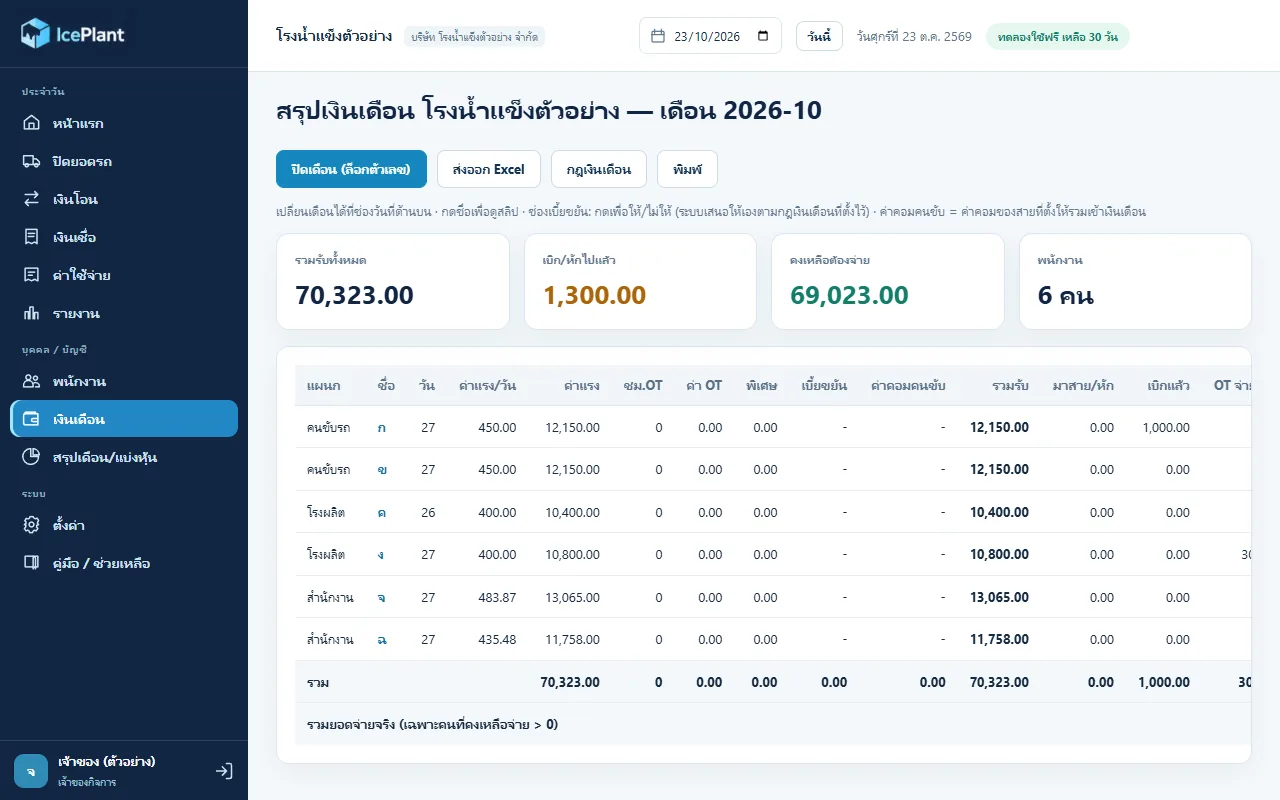
รองรับพนักงานรายวัน รายเดือน และเงินเดือนเหมา คิด OT เบิกเงิน OT ที่จ่ายแล้ว ประกันสังคม และหักมาสาย เบี้ยขยันตั้งกฎได้ว่าสถานะไหนทำให้หมดสิทธิ์ ยอมให้เกิดกี่ครั้ง และจ่ายแทนวันที่ไม่ได้ทำงานได้ไม่เกินกี่วัน (ค่าเริ่มต้น 5 วัน) เมื่อปิดเดือนตัวเลขถูกล็อก ส่งออก Excel และพิมพ์สลิปได้It handles daily-rate, monthly and fixed-salary staff, overtime, advances, overtime already paid, social security and late deductions. The attendance bonus is rule-driven: which statuses forfeit it, how many occurrences are tolerated, and how many missed days it may top up (default 5). Closing the month locks the figures; Excel export and payslip printing are available.
สรุปบัญชีรายเดือนและแบ่งหุ้นMonthly accounts and profit sharing
รวมยอดขายทั้งเดือนจากใบปิดยอดทุกสาย หักค่าน้ำมันรถ ค่าคอม เงินเดือนพนักงาน และรายจ่ายรายเดือนที่เพิ่มเอง เหลือเป็นยอดคงเหลือสุทธิ แล้วแบ่งตามจำนวนหุ้นของผู้ถือหุ้นแต่ละคน ถ้าเดือนนั้นขาดทุนจะขึ้นว่าไม่มีปันผล ปิดเดือนเพื่อล็อกตัวเลขหลังจ่ายปันผลได้It totals the month's sales from every closed route, subtracts truck fuel, commission, payroll and any monthly costs you add, leaving a net balance, then splits it by each shareholder's number of shares. A loss-making month shows no dividend, and closing the month locks the numbers after payout.
หลายโรงในโปรแกรมเดียว พร้อมสิทธิ์รายบัญชีSeveral factories in one program, with per-account rights
เจ้าของสร้างโรง สินค้า สายรถ ร้านค้า และบัญชีผู้ใช้เองในหน้าตั้งค่า แล้วกำหนดต่อบัญชีว่าเข้าได้โรงไหน ใช้เมนูใดได้ในระดับ ดู กรอก แก้ หรือลบ ทุกการแก้ไขถูกบันทึกว่าใครทำ และหน้าประวัติการแก้ไขเปิดดูได้เฉพาะบัญชีที่เข้าได้ทุกโรงThe owner creates factories, products, routes, shops and user accounts in Settings, then sets per account which factory it can enter and which menus at view, enter, edit or delete level. Every change is logged against a user, and the audit history is visible only to accounts with access to all factories.
04 · วิธีทำงาน04 · How it works
ทำงานยังไง ตั้งแต่ต้นจนจบHow it works, start to finish
- 1
ติดตั้งและตั้งค่าครั้งแรกInstall and first-run setup
ติดตั้งบนคอมของโรง แล้วเลือกว่าเครื่องนี้เป็นเครื่องหลักหรือเครื่องลูก ที่เครื่องหลักใส่ชื่อบริษัทและสร้างบัญชีเจ้าของ โปรแกรมแสดงรหัสกู้คืนหนึ่งชุดเพียงครั้งเดียว ต้องจดเก็บไว้Install on the factory PC and choose whether it is the main machine or a client. On the main machine enter the company name and create the owner account; a single recovery code is shown once and must be written down.
- 2
นำเข้ารายชื่อร้านและตั้งราคาImport shops and set prices
ตั้งค่า → ร้านค้า → นำเข้าจาก Excel ใช้ใบรายชื่อลูกค้าแบบเดิมของโรงได้ ระบบหาหัวตารางเองและอ่านช่องราคาเช่น 25/50 (ถุง 25 กระสอบ 50) หรือ ฟรี มีหน้าตรวจก่อนนำเข้า ร้านเดิมที่สายและชื่อตรงกันจะถูกปรับ ไม่สร้างซ้ำSettings → Shops → Import from Excel accepts the factory's existing customer list. The program finds the header row and reads price cells such as 25/50 (bag 25, sack 50) or "free". A preview comes first, and existing shops with the same route and name are updated rather than duplicated.
- 3
ทุกวัน: ลงใบสายและปิดยอดEvery day: enter the sheets and close
คนขับส่งใบกระดาษ เสมียนเปิดสายของวันนั้นแล้วลงข้อมูลตามใบ ดูตัวเลขขาด/เกินและคำเตือนทางขวา แก้จนตรงแล้วกดปิดยอด หากต้องแก้ภายหลังผู้ที่มีสิทธิ์กดเปิดสายใหม่ได้Drivers hand in the paper sheets; the clerk opens that day's route and keys it in, checks the over/short figure and warnings, fixes anything that does not tally, then presses Close. Someone with the right permission can reopen a route later.
- 4
นำเข้าเงินโอนและจับคู่Import transfers and match
ดาวน์โหลดรายงานรับเงินจาก K SHOP นำเข้าที่หน้าเงินโอน ให้ระบบจับคู่อัตโนมัติ แล้วจับคู่ที่เหลือด้วยมือ ระบบจำชื่อผู้โอนไว้ใช้ครั้งต่อไปDownload the receipts report from K SHOP, import it on the Transfers page, let the program match automatically, then match the rest by hand. Sender names are remembered for next time.
- 5
ดูสรุปรายวันและส่งต่อRead the daily summary and pass it on
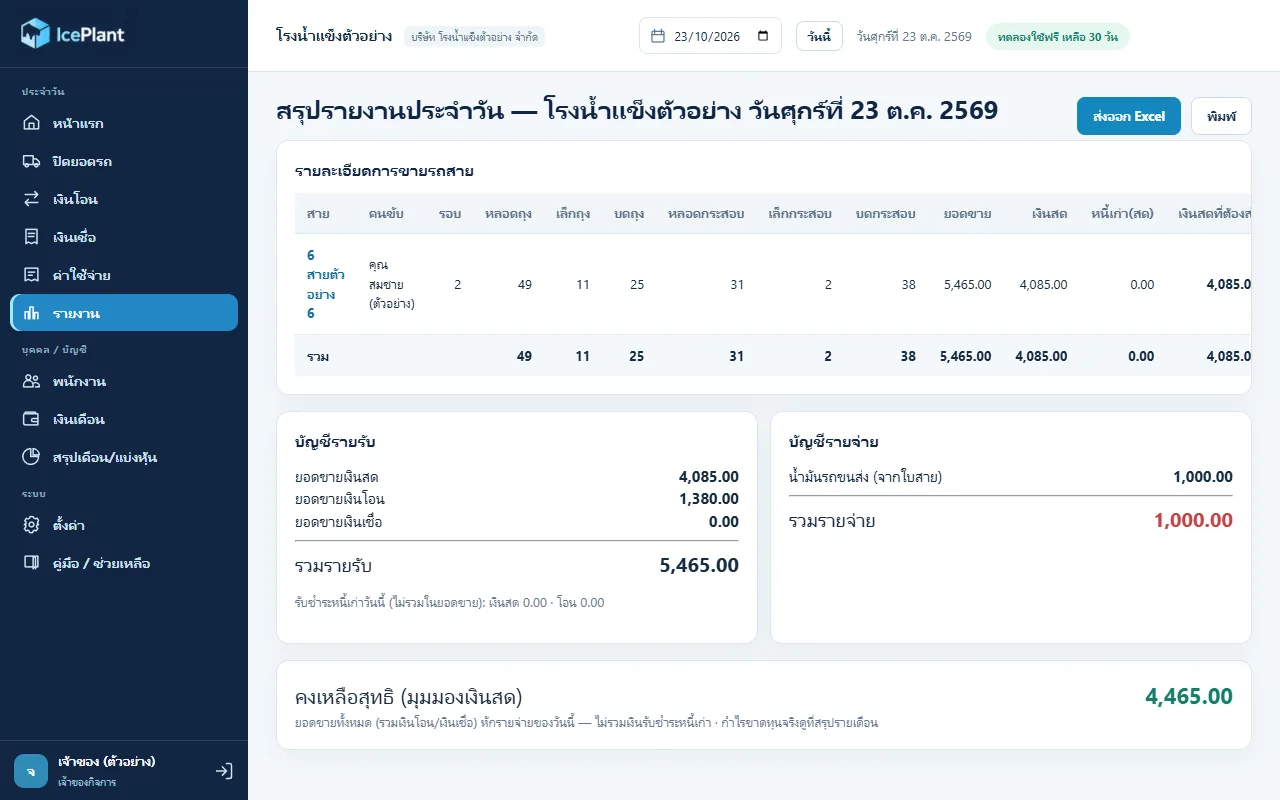
หน้ารายงานรวมรายละเอียดการขายทุกสาย บัญชีรายรับ รายจ่าย และคงเหลือสุทธิ ส่งออก Excel หรือพิมพ์ได้ และถ้าเจ้าของเชื่อมบัญชี Google ไว้ ข้อมูลจะถูกส่งขึ้น Google Sheets ของเจ้าของเองทุก 30 วินาทีเมื่อมีการเปลี่ยนแปลงThe Reports page combines every route's sales, income and expense accounts and the net balance. It exports to Excel or prints, and if the owner has linked a Google account the data is pushed to the owner's own Google Sheets every 30 seconds when something changes.
- 6
สิ้นเดือน: เงินเดือน ปิดเดือน แบ่งหุ้นMonth-end: payroll, close, profit share
ตรวจเวลาและเงินเบิกของพนักงาน ดูสรุปเงินเดือนพร้อมเบี้ยขยัน ปิดเดือนเงินเดือน แล้วเปิดหน้าสรุปบัญชีและแบ่งหุ้น เพิ่มรายจ่ายรายเดือน และปิดเดือนเพื่อล็อกตัวเลขCheck staff attendance and advances, review payroll with the attendance bonus, close the payroll month, then open the accounts and profit-share page, add monthly costs and close the month to lock the figures.
05 · ภาพ05 · Visuals
ภาพจากระบบจริงFrom the real system
6 ภาพ6 imagesภาพหน้าจอจริงถ่ายจากระบบที่เปิดใช้อยู่ ส่วนภาพโปรโมตและภาพประกอบมีป้ายกำกับไว้ทุกใบReal screenshots come from the running system; promo images and illustrations are labelled on every card.
06 · สถานการณ์06 · Scenarios
ตัวอย่างสถานการณ์ใช้งานExample scenarios
เป็นตัวอย่างสมมติเพื่อให้เห็นภาพ ไม่ใช่เรื่องของลูกค้าจริงIllustrative scenarios to help you picture it — not real customer stories.
สมมติว่าโรงมีสายรถหลายสายและเสมียนสามคนSuppose the factory runs many routes with three clerks
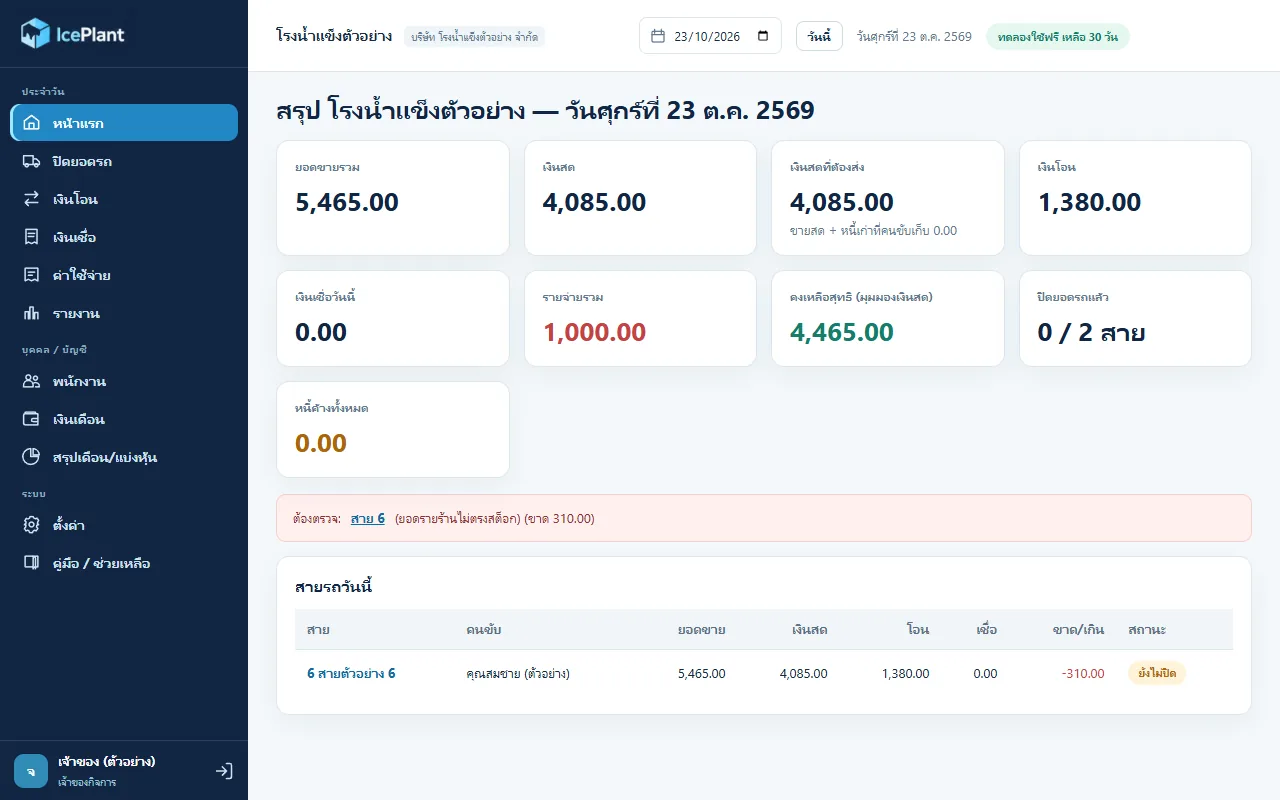
สมมติว่าเมื่อก่อนเสมียนแต่ละคนคีย์ใบสายลงไฟล์ของตัวเองแล้วมีคนรวมยอดอีกที ถ้าใช้โปรแกรมนี้ ทุกคนคีย์ในที่เดียวผ่านวงแลน แล้วหน้าแรกแสดงยอดรวม เงินสดที่ต้องส่ง และสายที่ยังไม่ปิดหรือยอดไม่ตรงให้เห็นทันทีSuppose each clerk used to key route sheets into their own file and someone merged the totals later. With this program everyone keys into one place over the LAN, and the home screen shows total sales, cash due, and which routes are still open or do not tally.
สมมติว่าเจ้าของอยากดูยอดโดยไม่ต้องเข้าโรงSuppose the owner wants to see sales without visiting
สมมติว่าเจ้าของเชื่อมบัญชี Google ครั้งเดียวที่เครื่องหลัก โปรแกรมจะสร้างชีตให้และส่งยอดขึ้นเอง เจ้าของเลือกส่งแค่ยอดสรุป (ไม่มีชื่อร้าน) หรือส่งทั้งหมดได้ แล้วเปิดดูจากมือถือผ่าน Google Sheets ของตัวเองSuppose the owner links a Google account once on the main machine. The program creates the sheet and pushes figures itself. The owner chooses summary-only (no shop names) or everything, and views it on a phone through their own Google Sheets.
สมมติว่าถึงสิ้นเดือนต้องจ่ายเงินเดือนและปันผลSuppose month-end means payroll and dividends
สมมติว่ามีพนักงานรายวัน รายเดือน และผู้ถือหุ้นหลายคน เสมียนลงเวลาและเงินเบิกตลอดเดือน พอสิ้นเดือนหน้าเงินเดือนคำนวณค่าแรง OT เบี้ยขยัน และยอดคงเหลือต้องจ่ายให้ ส่วนหน้าแบ่งหุ้นคำนวณปันผลต่อหุ้นจากยอดสุทธิของเดือนSuppose there are daily-paid and monthly staff and several shareholders. Clerks log attendance and advances all month; at month-end the payroll page computes wages, overtime, attendance bonus and the net due, and the profit-share page computes dividend per share from the month's net.
07 · เบื้องหลัง07 · Under the hood
เบื้องหลังระบบ ข้อมูล และความปลอดภัยUnder the hood: data and security
- แพลตฟอร์มPlatform
- โปรแกรมเดสก์ท็อปสำหรับ Windows สร้างด้วย Electron และ Node.js ฐานข้อมูลเป็น SQLite ที่รันด้วย sql.js ส่งออกและนำเข้า Excel ด้วยไลบรารี exceljs ตอนนี้ยังไม่มีรุ่น macOS หรือมือถือA Windows desktop program built on Electron and Node.js with a SQLite database run through sql.js, and Excel import/export via exceljs. There is no macOS or mobile build yet.
- ที่เก็บข้อมูลและการเข้ารหัสStorage and encryption
- ข้อมูลอยู่ในไฟล์บนเครื่องหลักเท่านั้น เข้ารหัสแบบ AES-GCM (เอกสารลูกค้าเรียกว่า AES-256) และกุญแจถูกห่อด้วยระบบป้องกันของ Windows ผูกกับเครื่องนั้น ไฟล์สำรอง .icebak เข้ารหัสและเปิดบนเครื่องใหม่ได้ด้วยรหัสกู้คืน ถ้าไม่มีรหัสนี้จะเปิดไม่ได้Data lives only in a file on the main machine, encrypted with AES-GCM (the customer documents say AES-256), with the key wrapped by Windows' own protection and bound to that machine. Encrypted .icebak backups open on a new machine only with the recovery code; without it they cannot be opened.
- เครือข่ายในโรงOffice network
- เครื่องหลักเปิดเซิร์ฟเวอร์ในวงแลนที่พอร์ต 47100 เครื่องลูกค้นหาเครื่องหลักผ่าน UDP พอร์ต 47101 หรือพิมพ์เลขเครื่องเอง สื่อสารในเครือข่ายภายในเท่านั้น ต้องเปิดเครื่องหลักค้างไว้ และครั้งแรก Windows Firewall จะถามให้กดอนุญาตThe main machine runs a LAN server on port 47100; client machines find it through UDP on port 47101 or by typing its address. Traffic stays on the internal network. The main machine must stay on, and Windows Firewall asks for permission the first time.
- การเชื่อมต่อภายนอกExternal connections
- เชื่อม Google Sheets และ Google Drive แบบเลือกเอง ผ่าน OAuth ที่เห็นเฉพาะไฟล์ที่โปรแกรมสร้างเอง และมีทางสำรองเป็น Apps Script ส่วนเงินโอนใช้ไฟล์ Excel จาก K SHOP ไม่ได้เชื่อม API ธนาคาร ถ้าไม่เปิดเชื่อม ข้อมูลไม่ออกจากเครื่องGoogle Sheets and Drive links are optional, using OAuth that can see only files the program created, with an Apps Script fallback. Bank transfers come from K SHOP's Excel export rather than a bank API. If nothing is linked, no data leaves the machine.
- ใบอนุญาตและข้อจำกัดLicensing and limits
- ติดตั้งใหม่ทดลองใช้ได้ 30 วัน สูงสุด 3 โรง เมื่อหมดอายุยังดู ส่งออก และสำรองได้ แต่บันทึกใหม่ไม่ได้ คีย์ถาวรเป็นแบบออฟไลน์ผูกกับรหัสเครื่องหลัก ตัวติดตั้งยังไม่ได้เซ็นชื่อดิจิทัล Windows จึงเตือนครั้งแรกให้กด More info แล้ว Run anywayA fresh install is a 30-day trial for up to 3 factories. After expiry you can still view, export and back up but not save new entries. Permanent keys are offline and tied to the main machine's ID. The installer is not code-signed, so Windows warns on first run and you press More info then Run anyway.
- การทดสอบTesting
- ชุดทดสอบอัตโนมัติ 118 ข้อ ครอบคลุมสูตรคำนวณ เงินเดือน การนำเข้า การสำรอง ใบอนุญาต และความปลอดภัย รันผ่านครบเมื่อ 2 พ.ย. 2569 ตอนจัดทำหน้านี้118 automated tests cover the calculations, payroll, imports, backup, licensing and security. All passed on 2 November 2026 while this page was being prepared.
08 · ความคืบหน้า08 · Progress
ความคืบหน้าและแผนต่อไปProgress and what comes next
- ทำแล้วDone
25 ต.ค. 2569: รุ่นทดลองแรก ปิดยอดรถ เงินโอน เงินเชื่อ ค่าใช้จ่าย สรุปรายวัน แบบเครื่องหลักและเครื่องลูก; 25-26 ต.ค. 2569: ส่งขึ้น Google Sheets และ Drive, ไฟล์สำรองเข้ารหัสพร้อมรหัสกู้คืน, ใบอนุญาตออฟไลน์, นำเข้ารายชื่อร้านจาก Excel25 Oct 2026: first trial build with route close-out, transfers, credit, expenses and the daily summary, in main/client mode; 25-26 Oct 2026: Google Sheets and Drive push, encrypted backups with a recovery code, offline licensing, shop import from Excel
- ทำแล้วDone
26 ต.ค. 2569: พนักงาน ลงเวลา เงินเดือน เบี้ยขยัน สรุปบัญชีรายเดือนและแบ่งหุ้น และแก้ข้อบกพร่องที่ผู้ตรวจ 4 ทีมพบ 53 ข้อ (รุ่น 0.7.0)26 Oct 2026: staff, attendance, payroll, attendance bonus, monthly accounts and profit sharing, plus fixes for the 53 defects four reviewers found (0.7.0)
- ทำแล้วDone
รุ่น 0.8.0 ถึง 0.9.0: ดีไซน์ใหม่ทั้งหมด ไอคอนก้อนน้ำแข็ง เมนูคู่มือในโปรแกรม เอกสารคู่มือติดตั้งและนโยบายข้อมูล และตรวจรอบ 2 (29 ต.ค.)0.8.0 to 0.9.0: a complete redesign, ice-cube icon, in-app help, install guide and data policy documents, and a second audit round (29 Oct)
- ทำแล้วDone
29 ต.ค. 2569 รุ่น 0.10.0: เลือกโหมดจ่ายค่าคอมต่อสาย (สดหรือรวมเงินเดือน) จำกัดค่าคอม 0 ถึง 10 เปอร์เซ็นต์ และกฎเบี้ยขยันที่ปรับได้29 Oct 2026, 0.10.0: per-route commission payout mode (cash or payroll), commission capped at 0 to 10 percent, and configurable attendance-bonus rules
- กำลังทำIn progress
รอเจ้าของยืนยันกฎเบี้ยขยันจริงของโรง ยี่ห้อเครื่องสแกนนิ้วพร้อมไฟล์ตัวอย่าง และไฟล์ Excel รายชื่อร้านจริงเพื่อทดสอบนำเข้าWaiting on the owner to confirm the factory's real attendance-bonus rule, the fingerprint-scanner model with a sample file, and a real shop-list Excel file to test the import
- ถัดไปNext
ทดลองติดตั้งพร้อมกันบนเครื่องที่สองในวงแลนจริงของโรงTrial install on a second machine on the factory's real LAN
09 · คำถาม09 · FAQ
คำถามที่พบบ่อยFrequently asked questions
ราคาเท่าไหร่How much does it cost?
ยังไม่ได้กำหนดราคาขาย ในเอกสารมีเพียงว่าติดตั้งใหม่ทดลองใช้ฟรี 30 วัน แล้วขอรับคีย์ถาวรจากผู้ขายโดยส่งรหัสเครื่องNo price has been set. The documents only say a new install is a free 30-day trial, after which you request a permanent key from the seller by sending the machine ID.
ข้อมูลของโรงอยู่ที่ไหน ผู้พัฒนาเห็นไหมWhere is our data, and can the developer see it?
อยู่ในไฟล์เข้ารหัสบนเครื่องหลักของโรงเอง ไม่ขึ้นเซิร์ฟเวอร์ของผู้พัฒนา ผู้พัฒนาเข้าถึงข้อมูลของโรงไม่ได้ ยกเว้นกรณีที่โรงเปิดส่งขึ้น Google Sheets ของโรงเองซึ่งเป็นบัญชีของโรงIn an encrypted file on the factory's own main machine, not on a developer server, and the developer cannot reach it. The exception is data the factory chooses to push to its own Google Sheets, which sit in the factory's own account.
ใช้กับ Excel เดิมและไฟล์ธนาคารได้ไหมDoes it work with our Excel files and bank statements?
นำเข้ารายชื่อร้านจาก Excel ได้ และนำเข้ารายงานรับเงินของ K SHOP ได้ ธนาคารอื่นหรือรูปแบบอื่นยังไม่มีในเอกสาร และรายงานทุกหน้าส่งออกเป็น Excel ได้You can import the shop list from Excel and K SHOP's receipts report. Other banks or formats are not covered in the documents. Every report exports to Excel.
ถ้าเครื่องหลักพังหรือลืมรหัสต้องทำอย่างไรWhat if the main machine fails or the password is forgotten?
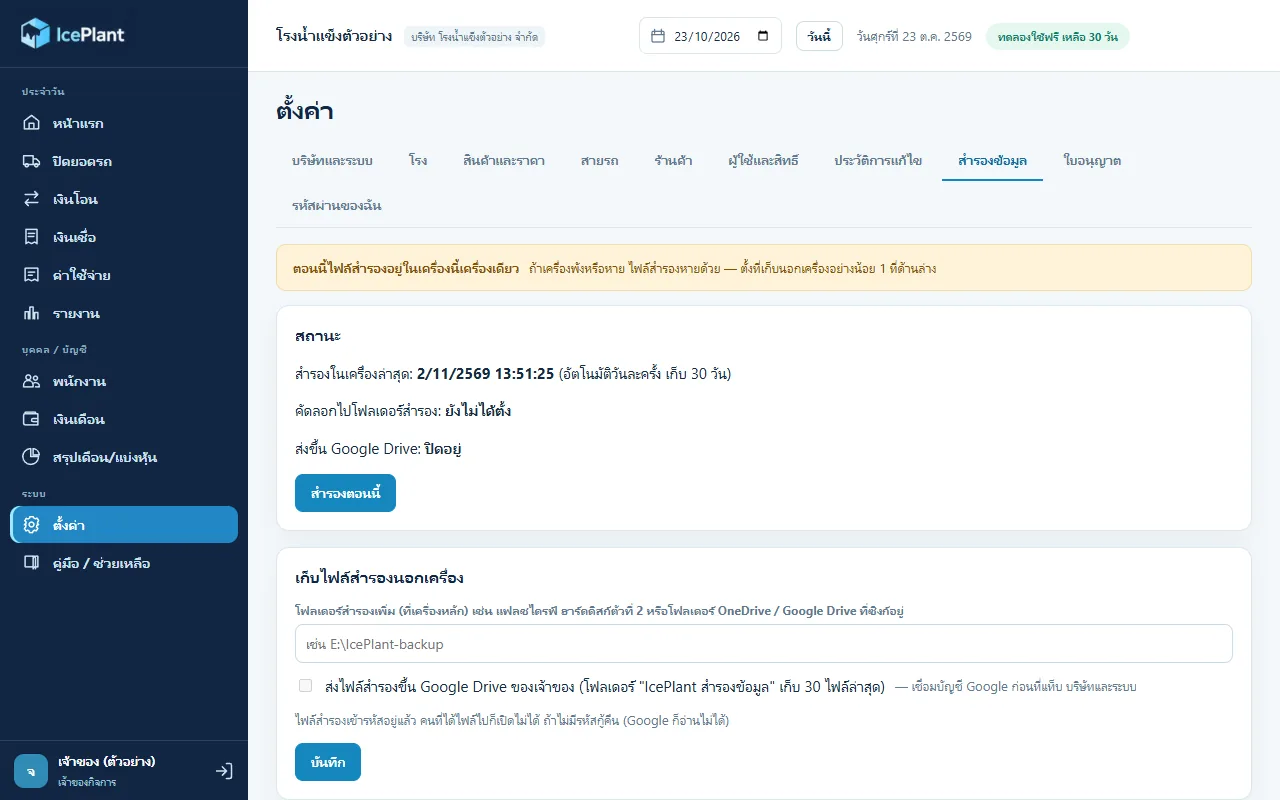
เครื่องหลักสำรองให้เองวันละครั้งและเก็บ 30 วัน ควรตั้งที่เก็บนอกเครื่องอย่างน้อยหนึ่งที่ เช่นแฟลชไดรฟ์หรือ Google Drive เมื่อเครื่องพังให้ติดตั้งใหม่แล้วเลือกกู้ข้อมูลจากไฟล์สำรองพร้อมรหัสกู้คืน ถ้ารหัสกู้คืนหายจะเปิดไฟล์สำรองไม่ได้The main machine backs up daily and keeps 30 days. Set at least one off-machine location such as a flash drive or Google Drive. After a failure, reinstall and restore from the backup file with the recovery code. If the recovery code is lost, backups cannot be opened.
ใช้บนมือถือหรือ Mac ได้ไหมCan it run on phones or Mac?
ตอนนี้ยังไม่ได้ ใช้ได้บน Windows เท่านั้น เครื่องลูกก็ต้องลงโปรแกรมตัวเดียวกันและอยู่ในวงแลนเดียวกับเครื่องหลักNot yet. It runs on Windows only, and client machines install the same program and must be on the same LAN as the main machine.
ใครดูแลและติดต่อได้ที่ไหนWho maintains it and how do I contact them?
ZZAX Studio เป็นผู้พัฒนาและดูแล ติดต่อได้จากหน้า zzaxstudio.com/iceplant/ (หมายเหตุ: เบอร์โทรในหน้าเว็บกับในคู่มือไม่ตรงกัน ดูข้อแก้ไข)ZZAX Studio builds and maintains it; contact details are on zzaxstudio.com/iceplant/ (note that the phone number on the website and in the guide differ, see corrections).
10 · วิธีเริ่ม10 · Get started
เริ่มได้ใน 3 ขั้นUp and running in three steps
ถ้าอยากได้ระบบแบบเดียวกันสำหรับธุรกิจของคุณ บอกโจทย์มาสั้น ๆ เราตอบกลับพร้อมขอบเขตงานและราคาภายใน 1 วันทำการIf you want something like this for your own business, send us a line about the problem. You'll get scope and price within one working day.
- 1ขั้นที่ 1 ติดตั้งโปรแกรมบนคอมของโรง แล้วเลือกว่าเครื่องนี้เป็นเครื่องหลักหรือเครื่องลูกStep 1: Install the program on the factory's PC and choose whether this machine is the main one or a client
- 2ขั้นที่ 2 ที่เครื่องหลัก ใส่ชื่อบริษัท สร้างบัญชีเจ้าของ และจดรหัสกู้คืนเก็บไว้ (แสดงครั้งเดียว)Step 2: On the main machine, enter the company name, create the owner account, and write down the recovery code (shown only once)
- 3ขั้นที่ 3 นำเข้ารายชื่อร้านจากไฟล์ Excel เดิมของโรง แล้วเริ่มลงใบสายรถของวันนี้Step 3: Import the shop list from the factory's existing Excel file, then start entering today's route sheets
เริ่มงานกับเราWork with us
อยากได้ระบบแบบนี้สำหรับธุรกิจคุณWant a system like this for your business?
เล่าปัญหาของคุณมา เราจะบอกตรง ๆ ว่าช่วยได้ไหม ภายใน 1 วันทำการ ส่งแล้วได้รหัสติดตามงานทันทีTell us the problem and we'll say honestly whether we can help, within one working day. You get a tracking code the moment you send it.