คนทำคอนเทนต์ที่อยากได้แค่ "เสียงพูดอย่างเดียว" หรือ "ซับไตเติล" จากคลิป ต้องเสียเงินสมัครเว็บต่างประเทศรายเดือน หรือลงโปรแกรมหนัก ๆ ที่ต้องมีการ์ดจอแรง ส่วนเว็บฟรีส่วนใหญ่ถอดภาษาไทยผิดเยอะจนต้องมานั่งแก้เอง และมักขอให้สมัครสมาชิกก่อนถึงจะโหลดไฟล์ได้Creators who just want the speech track or a subtitle file from a clip end up paying a monthly fee to an overseas site or installing heavy software that needs a strong graphics card. Most free sites get Thai badly wrong, so the text has to be fixed by hand, and they usually ask you to sign up before you can download anything.
← ผลงานทั้งหมด← All work
เว็บแอปWeb app
ถอดไวTodWai
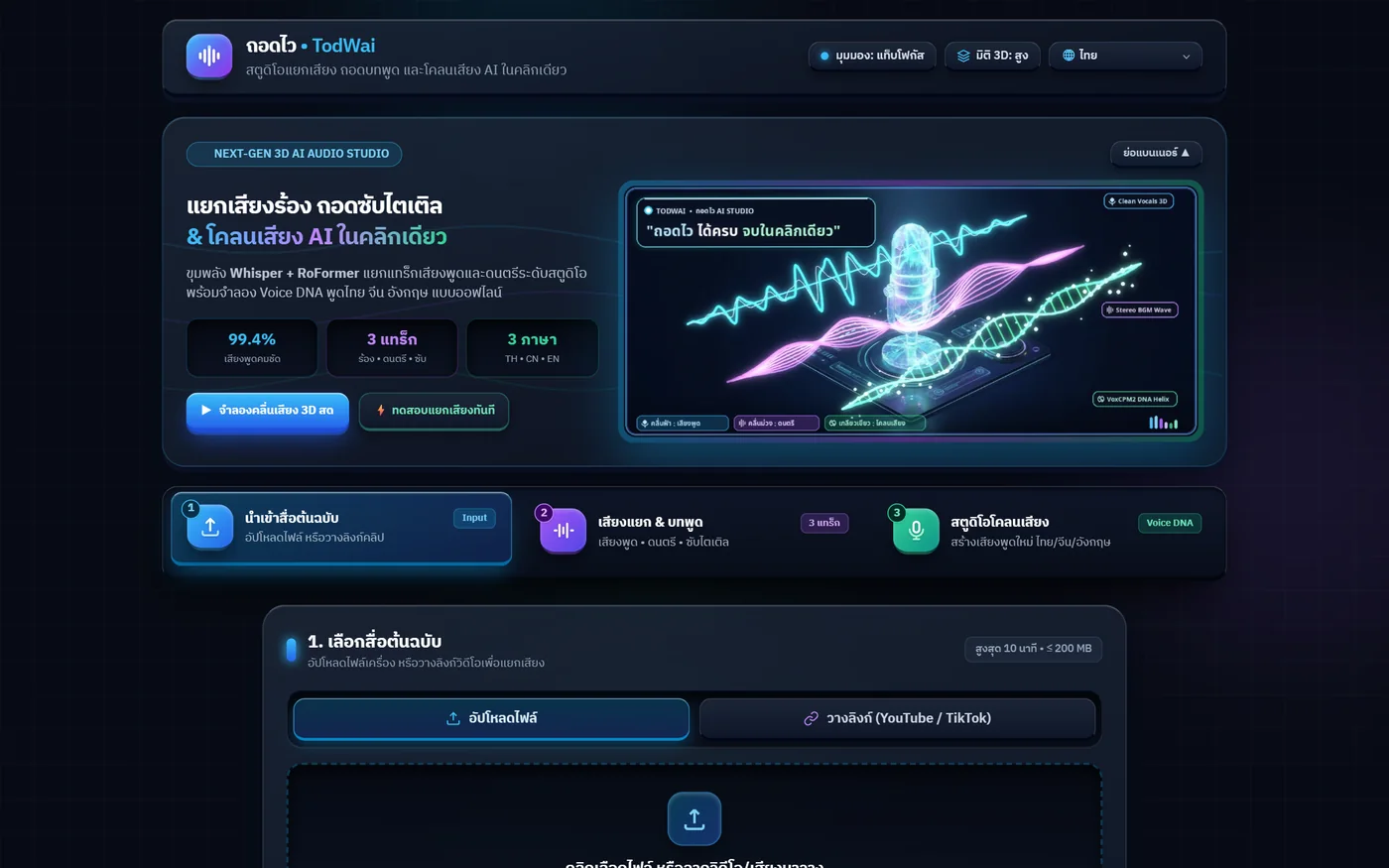
วางลิงก์คลิปหรืออัปไฟล์ แล้วได้เสียงร้อง ดนตรี และบทพูดพร้อมซับแยกออกมาให้ ในคลิกเดียวPaste a clip link or upload a file and get the vocals, the music and a timed transcript back in one click
ใช้งานจริงLive เว็บแอปWeb app
ใช้งานได้จริงบนเว็บที่ zzaxstudio--todwai.modal.run ไม่ต้องสมัครสมาชิก เปิดแล้วใช้ได้เลย หน้าเว็บมี 9 ภาษา จำกัดคลิปละไม่เกิน 10 นาที และ 15 งานแยกเสียง กับ 20 งานโคลนเสียงต่อวันต่อผู้ใช้ ไฟล์ทุกไฟล์ถูกลบอัตโนมัติภายใน 60 นาทีLive on the web at zzaxstudio--todwai.modal.run with no sign-up needed. The interface is in 9 languages. Clips are capped at 10 minutes, with 15 separation jobs and 20 voice-clone jobs per user per day, and every file is deleted automatically within 60 minutes.
9ภาษาในหน้าเว็บInterface languages
37-74วินาทีต่อคลิป (วัดจริง)Seconds per clip, measured
3แพลตฟอร์มที่วางลิงก์ได้Platforms you can paste from
01 · ภาพรวม01 · Overview
ภาพรวมของระบบThe system at a glance
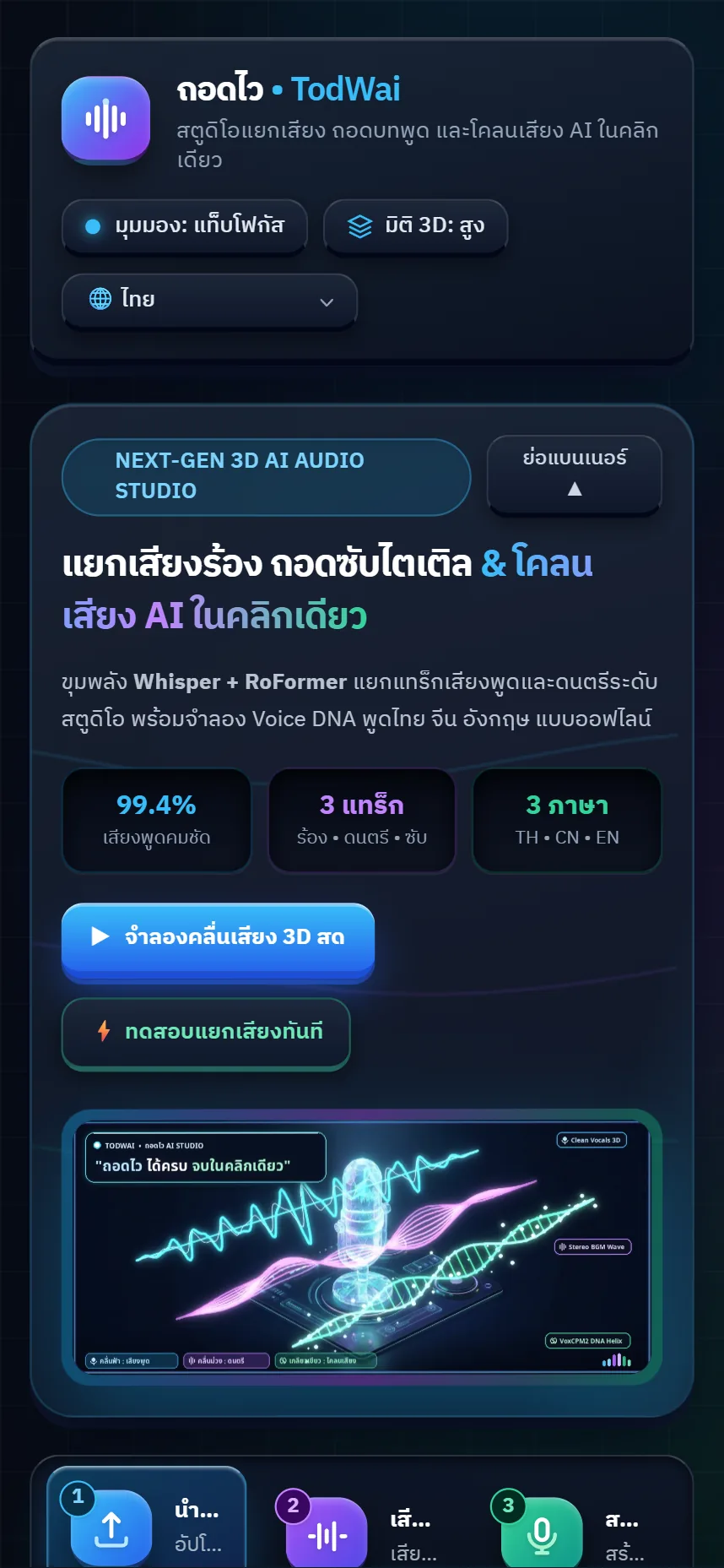
ถอดไว คือเว็บที่รับคลิปหรือไฟล์เสียงเข้าไป แล้วคืนออกมาเป็นสามอย่างในครั้งเดียว คือไฟล์เสียงพูดล้วน ไฟล์ดนตรีล้วน และบทพูดที่มีเวลากำกับพร้อมบันทึกเป็นซับ .SRT ได้ทันที เปิดใช้ได้จากเบราว์เซอร์ ไม่ต้องสมัครสมาชิกและไม่ต้องลงโปรแกรมTodWai takes a clip or an audio file and gives back three things at once: a voice-only track, a music-only track, and a timestamped transcript that saves straight to .SRT subtitles. It runs in a browser with no sign-up and nothing to install.
จุดที่ต่างจากเว็บทั่วไปคือภาษาไทย งานนี้สลับไปใช้โมเดลถอดเสียงไทยที่ฝึกมาเฉพาะทาง ทำให้ความผิดพลาดลดจากราว 8–18% เหลือราว 4% ของตัวอักษร ในคลิปทดสอบของเจ้าของ และรองรับการวางลิงก์จาก YouTube, TikTok และ Douyin ได้โดยตรงWhat sets it apart is Thai. It switched to a Thai-specialised transcription model, which cut the character error rate from roughly 8–18% to about 4% on the owner's test clips, and it accepts YouTube, TikTok and Douyin links directly.
นอกจากแยกเสียงกับถอดบทพูด ยังแยกตามผู้พูดให้ด้วย ได้ไฟล์เสียงและบทพูดของแต่ละคนแยกกัน และมีสตูดิโอโคลนเสียงที่พิมพ์ข้อความแล้วให้พูดด้วยเสียงต้นแบบ ทั้งไทย จีน และอังกฤษ โดยต้องติ๊กยืนยันว่ามีสิทธิ์ใช้เสียงนั้นก่อนทุกครั้งBeyond separation and transcription it also splits by speaker, giving an audio file and a transcript per person, and includes a voice studio that reads typed text in a reference voice across Thai, Chinese and English — after you confirm you have the right to use that voice.
เรื่องที่ยากที่สุดของโปรเจกต์นี้ไม่ใช่เรื่องเสียง แต่เป็นเวลารอ ตอนแรกเครื่องบนคลาวด์ใช้เวลาตื่นนานถึง 9 นาทีทุกครั้งที่ดับ หลังหาสาเหตุเจอว่าภาพระบบใหญ่เกินไปและย้ายไปรันบนเครื่องซีพียูล้วน เวลารอเหลือ 6–11 วินาที และงานทั้งคลิปจบใน 37–74 วินาทีThe hardest part was not the audio but the waiting. At first the cloud machine took up to nine minutes to wake whenever it went to sleep. After tracing it to an oversized system image and moving to CPU-only machines, the wait dropped to 6–11 seconds and a whole clip finishes in 37–74 seconds.
02 · โจทย์02 · The brief
สร้างขึ้นมาเพราะอะไรWhy this exists
คนตัดคลิป ครู นักเรียน คนทำสื่อ และเจ้าของร้านที่อยากได้บทพูดหรือเสียงแยกจากคลิปของตัวเอง โดยไม่ต้องลงโปรแกรมหรือมีการ์ดจอVideo editors, teachers, students, media makers and shop owners who want the transcript or the separated audio from their own clips without installing anything or owning a graphics card
ใช่โจทย์ของคุณไหมSound like your problem?
03 · ฟีเจอร์03 · Features
ทำอะไรได้บ้าง อย่างละเอียดWhat it does, in detail
8 ความสามารถ8 capabilitiesแยกเสียงร้องกับดนตรีออกจากกันVoice and music pulled apart
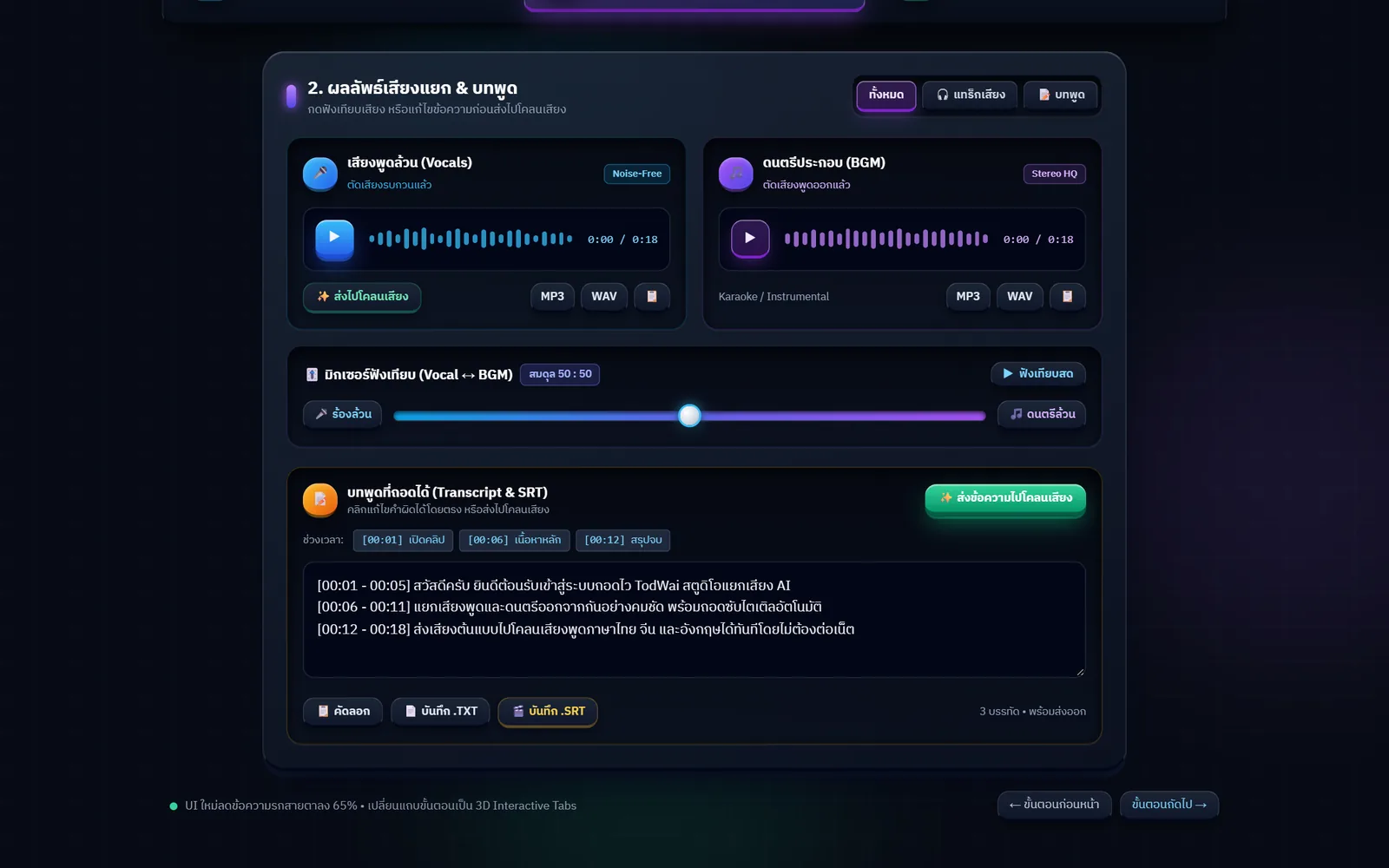
ได้ไฟล์เสียงพูดล้วนและดนตรีล้วนเป็นคนละไฟล์ โหลดเป็น MP3 หรือ WAV ก็ได้ ในหน้าเว็บมีแถบฟังเทียบให้เลื่อนผสมสองแทร็กฟังสดก่อนโหลด จะเอาไปทำคาราโอเกะหรือเอาเสียงพูดไปตัดต่อต่อก็ได้You get a voice-only file and a music-only file, downloadable as MP3 or WAV, with a live slider in the page to blend the two and listen before saving — useful for karaoke tracks or for editing the speech on its own.
บทพูดพร้อมเวลา บันทึกเป็นซับได้เลยA timed transcript that saves as subtitles
ถอดบทพูดออกมาเป็นข้อความพร้อมเวลาเริ่มจบของแต่ละประโยค กดคัดลอก บันทึกเป็น .TXT หรือบันทึกเป็น .SRT เพื่อเอาไปใส่โปรแกรมตัดต่อได้ทันที ทดสอบแล้วว่าไฟล์ .SRT มีเวลาและข้อความครบถูกต้องThe transcript comes with a start and end time for each line. Copy it, save it as .TXT, or save it as .SRT to drop into an editor. The .SRT output was checked and carries complete, correct timings and text.
ภาษาไทยที่ไม่ต้องมานั่งแก้ทั้งหน้าThai that does not need rewriting
ใช้โมเดลถอดเสียงที่ฝึกกับภาษาไทยโดยเฉพาะในระดับเร็วและแนะนำ ผลทดสอบของเจ้าของลดความผิดพลาดจากราว 8–18% เหลือราว 4% ของตัวอักษร ส่วนระดับคมชัดสูงใช้โมเดลตัวใหญ่สำหรับงานที่ต้องการความแม่นที่สุดThe fast and recommended levels use a transcription model trained specifically on Thai; on the owner's tests it cut the character error rate from roughly 8–18% to about 4%. The high level uses the large model for work that needs the best accuracy.
วางลิงก์จาก 3 แพลตฟอร์มได้ตรง ๆPaste a link from three platforms
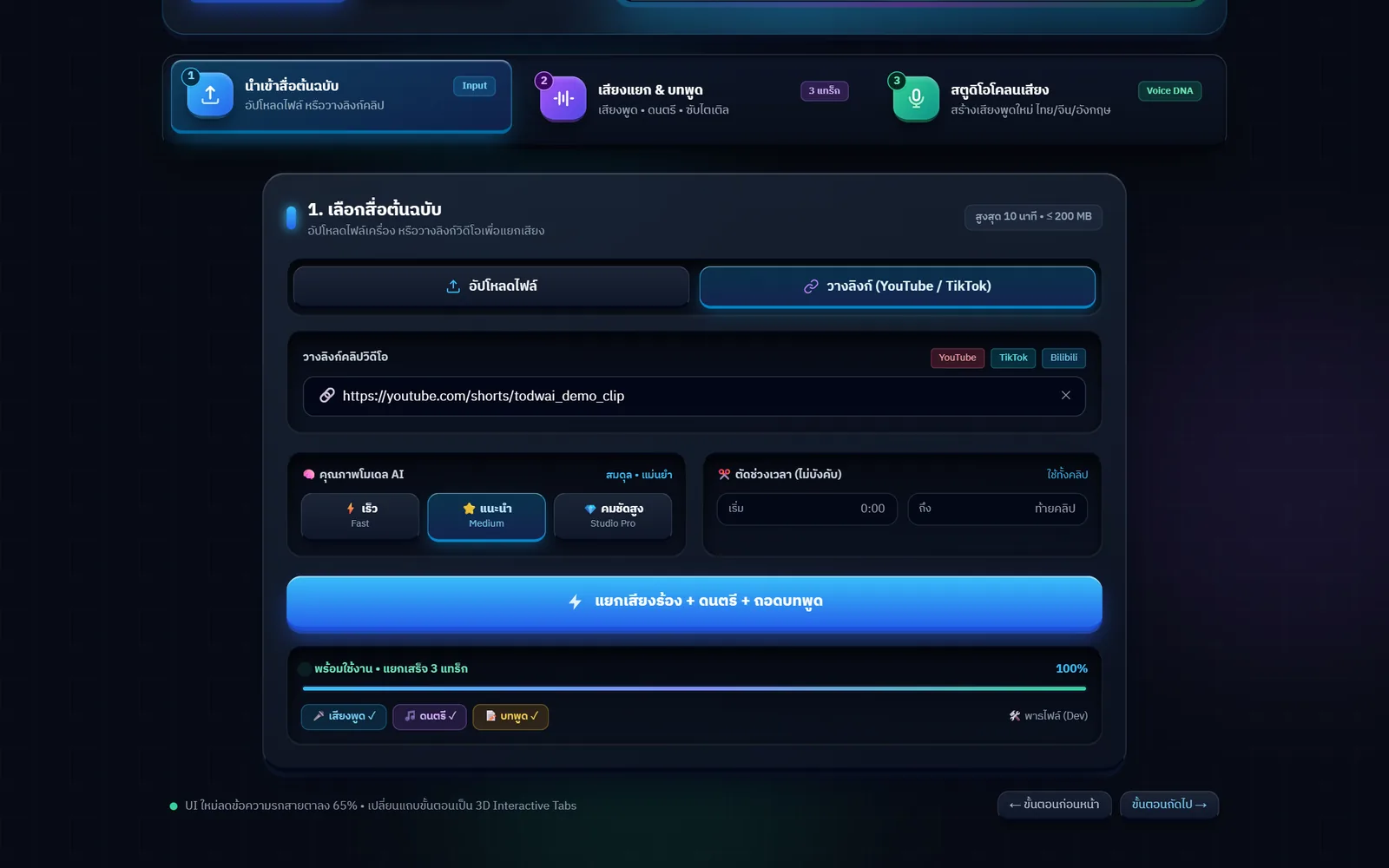
รองรับ YouTube, TikTok และ Douyin โดย Douyin ต้องใช้วิธีพิเศษเพราะวิธีปกติดึงไม่ได้แม้มีคุกกี้สด ทดสอบจริงแล้วทั้งสามแพลตฟอร์ม ใช้เวลาราว 36–70 วินาทีต่อคลิปYouTube, TikTok and Douyin are supported. Douyin needed a special route because the usual method fails even with fresh cookies. All three were tested end to end at roughly 36–70 seconds per clip.
แยกว่าใครพูดช่วงไหนWho spoke when
ระบบจัดกลุ่มผู้พูดให้เอง ได้ไฟล์เสียงของแต่ละคนและไฟล์บทพูดที่แยกตามคนพูด เหมาะกับคลิปสัมภาษณ์หรือประชุมที่ต้องรู้ว่าใครพูดอะไร ทดสอบแล้วกับคลิปที่มีผู้พูด 4 คนSpeakers are grouped automatically, producing an audio file per person and a transcript split by speaker — handy for interviews or meetings. It was tested on a clip with four speakers.
สตูดิโอโคลนเสียง พร้อมด่านยืนยันสิทธิ์A voice studio with a consent gate
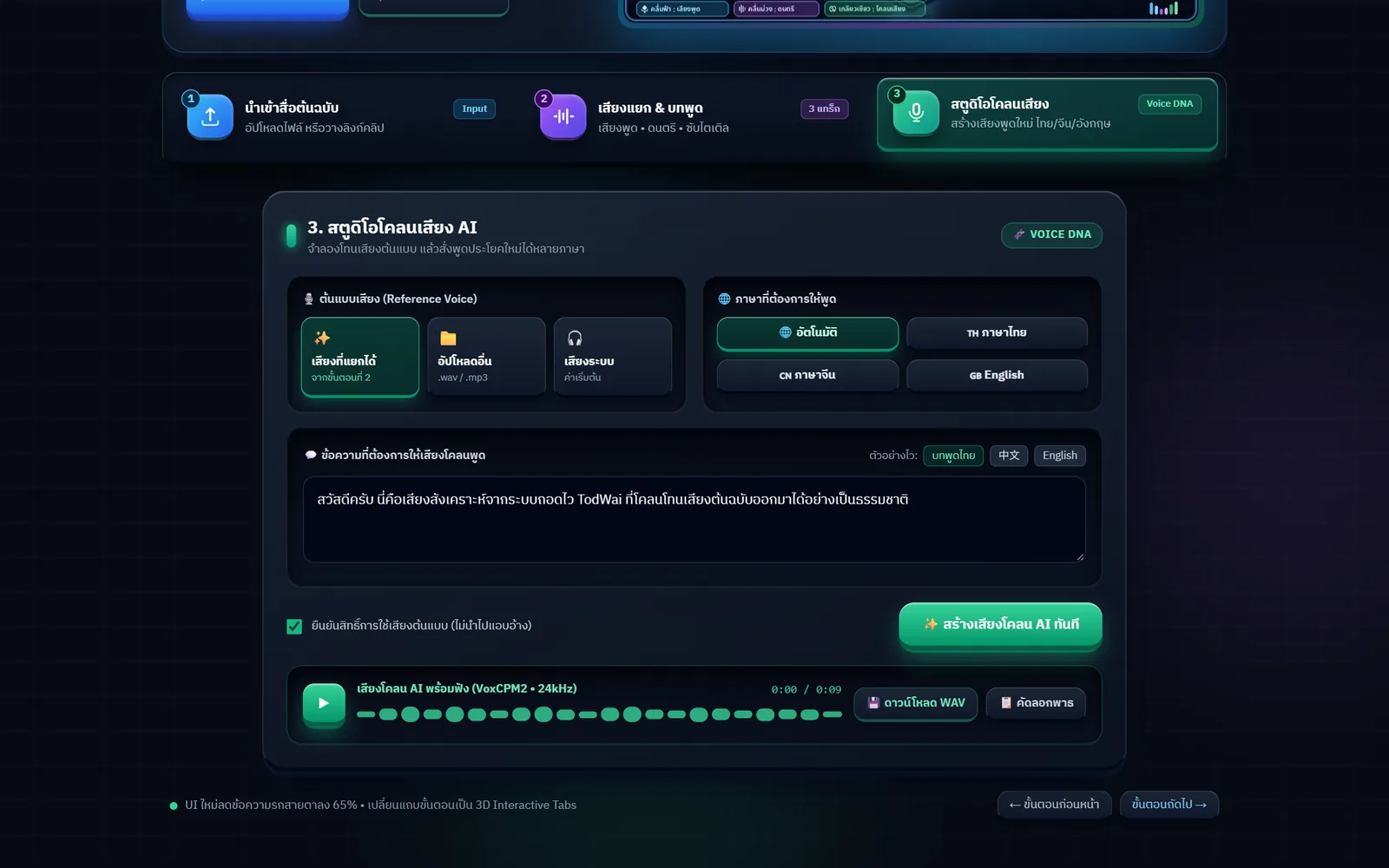
เลือกเสียงต้นแบบจากที่แยกได้ หรืออัปไฟล์เสียงเอง แล้วพิมพ์ข้อความให้พูดเป็นไทย จีน หรืออังกฤษ ได้ไฟล์ WAV คุณภาพ 24kHz ก่อนสร้างต้องติ๊กยืนยันว่ามีสิทธิ์ใช้เสียงต้นแบบนั้นPick a reference voice from what was separated or upload your own, then type what it should say in Thai, Chinese or English and get a 24kHz WAV. Before it runs you must tick a box confirming you have the right to use that voice.
เลือกความเร็วกับความแม่นเองได้Choose speed or accuracy
มี 3 ระดับ คือ เร็ว แนะนำ และคมชัดสูง ระดับที่สูงขึ้นใช้โมเดลตัวใหญ่กว่าและใช้เวลานานกว่า ทำให้เลือกได้ตามงาน เช่น ดูคร่าว ๆ ใช้เร็ว ส่งลูกค้าใช้คมชัดสูงThree levels — fast, recommended and high — where each step up uses a larger model and takes longer, so a rough pass can be fast while client work can be set to high.
ไฟล์ถูกลบเองภายใน 1 ชั่วโมงFiles delete themselves within an hour
ไฟล์ที่อัปขึ้นและไฟล์ผลลัพธ์ทั้งหมดถูกลบอัตโนมัติภายใน 60 นาที ไม่ได้เก็บไว้ถาวร และไม่ต้องสมัครสมาชิกจึงไม่มีการเก็บบัญชีผู้ใช้Uploaded files and every result are deleted automatically within 60 minutes; nothing is kept permanently, and since there is no sign-up there are no user accounts to store.
04 · วิธีทำงาน04 · How it works
ทำงานยังไง ตั้งแต่ต้นจนจบHow it works, start to finish
- 1
1. ใส่คลิปหรือวางลิงก์1. Add a clip or paste a link
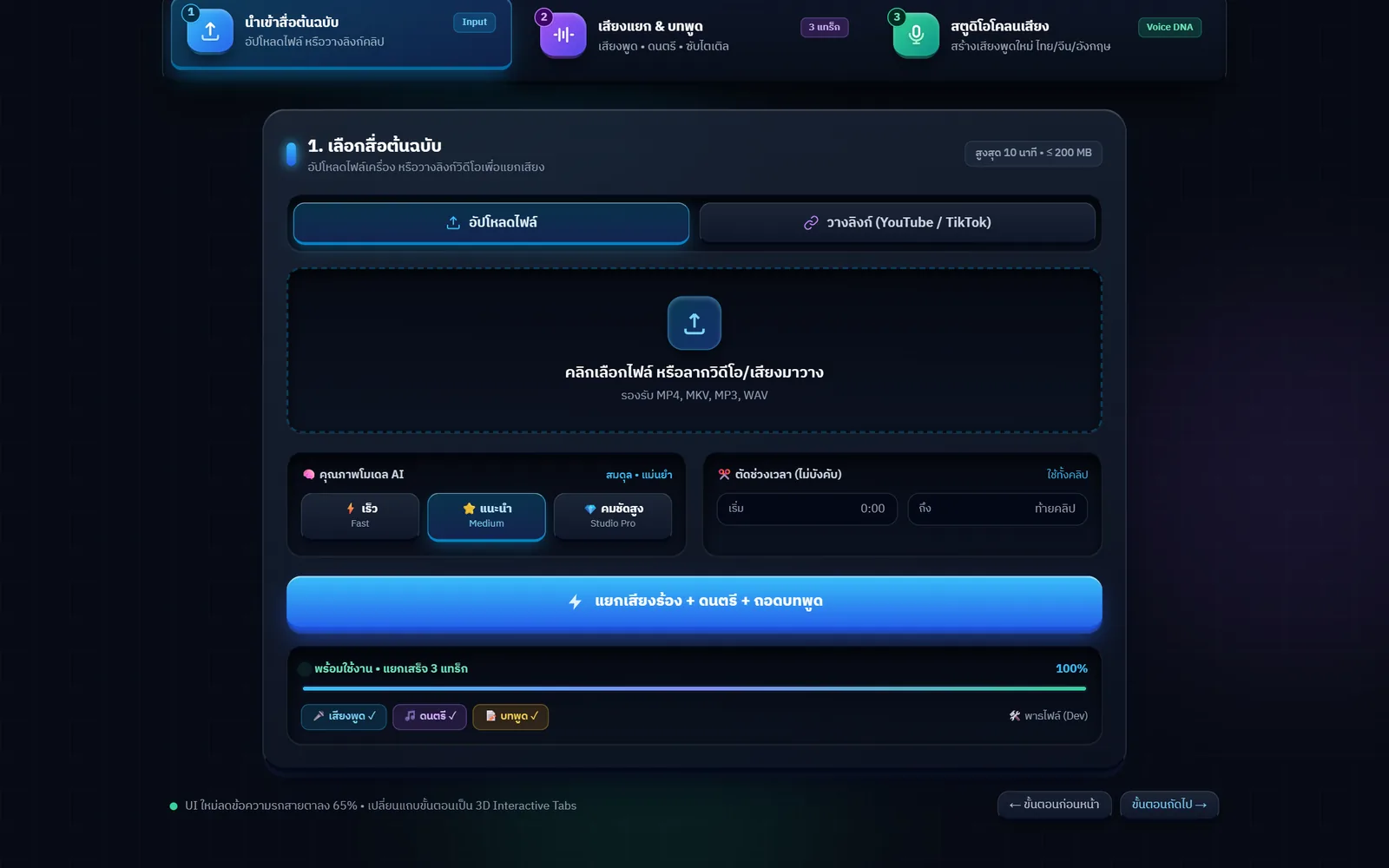
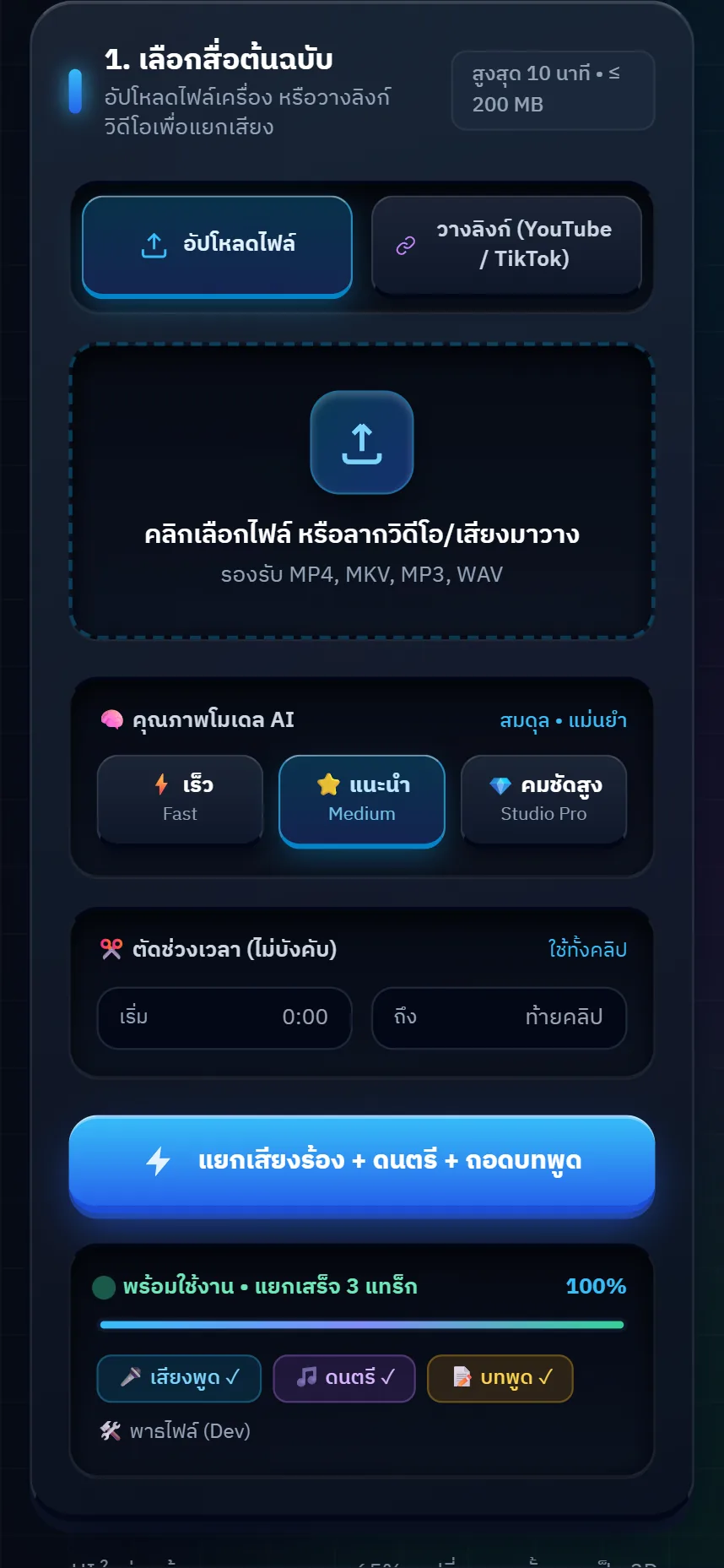
ลากไฟล์วิดีโอหรือเสียงมาวาง (MP4, MKV, MP3, WAV) หรือสลับไปแท็บวางลิงก์แล้ววางลิงก์คลิป จำกัดคลิปละไม่เกิน 10 นาที และไฟล์ไม่เกิน 200 MBDrag in a video or audio file (MP4, MKV, MP3, WAV) or switch to the link tab and paste a clip URL. Clips are capped at 10 minutes and 200 MB.
- 2
2. เลือกระดับความละเอียด2. Pick a quality level
เลือกระหว่าง เร็ว แนะนำ หรือ คมชัดสูง และตัดช่วงเวลาเริ่ม–จบได้ถ้าต้องการเฉพาะบางช่วงของคลิปChoose fast, recommended or high, and optionally set a start and end time to work on just part of the clip.
- 3
3. ระบบแยกเสียงและถอดบทพูด3. The system separates and transcribes
เครื่องบนคลาวด์แยกเสียงร้องออกจากดนตรี ถอดบทพูด แล้วจัดกลุ่มผู้พูด หน้าเว็บแสดงสถานะระหว่างรอ รวมเวลาราว 37–74 วินาทีต่อคลิปA cloud machine splits voice from music, transcribes the speech and groups the speakers, with progress shown while you wait — around 37 to 74 seconds per clip.
- 4
4. ฟังเทียบแล้วโหลดไฟล์4. Compare, then download
ฟังเสียงพูดล้วนกับดนตรีล้วน เลื่อนแถบผสมฟังเทียบ แล้วเลือกโหลดเป็น MP3 หรือ WAV ส่วนบทพูดโหลดเป็น .TXT หรือ .SRTPlay the voice-only and music-only tracks, blend them with the slider, then download MP3 or WAV, and the transcript as .TXT or .SRT.
- 5
5. ส่งต่อไปโคลนเสียง (ถ้าต้องการ)5. Send it on to the voice studio
กดส่งเสียงหรือข้อความที่ได้ไปยังสตูดิโอโคลนเสียง เลือกภาษาแล้วให้พูดข้อความใหม่ด้วยเสียงต้นแบบ โดยต้องยืนยันสิทธิ์ใช้เสียงก่อนSend the separated voice or the transcript to the voice studio, choose a language and have it speak new text in that voice — after confirming you have permission to use it.
05 · ภาพ05 · Visuals
ภาพจากระบบจริงFrom the real system
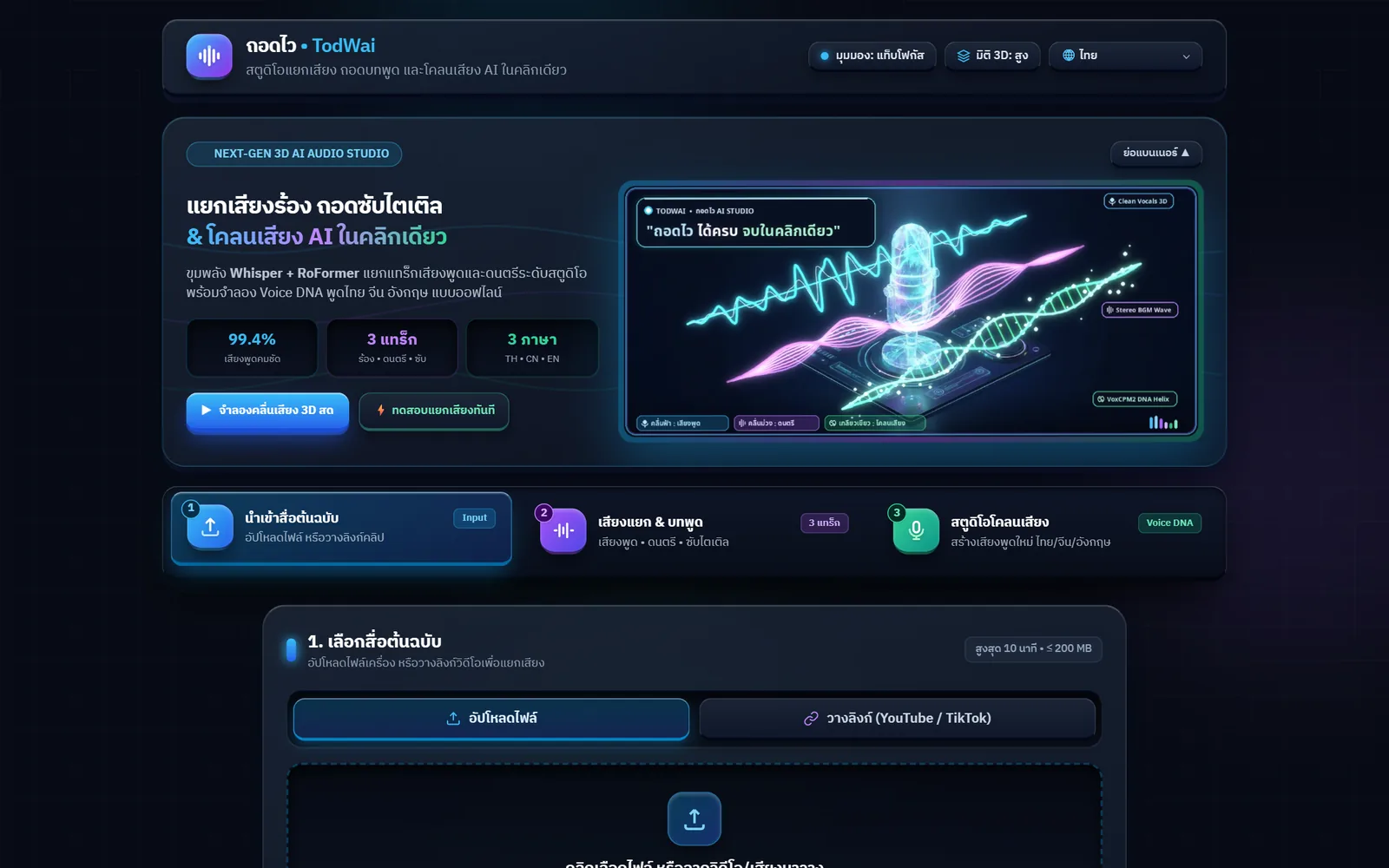
7 ภาพ7 imagesภาพหน้าจอจริงถ่ายจากระบบที่เปิดใช้อยู่ ส่วนภาพโปรโมตและภาพประกอบมีป้ายกำกับไว้ทุกใบReal screenshots come from the running system; promo images and illustrations are labelled on every card.
06 · สถานการณ์06 · Scenarios
ตัวอย่างสถานการณ์ใช้งานExample scenarios
เป็นตัวอย่างสมมติเพื่อให้เห็นภาพ ไม่ใช่เรื่องของลูกค้าจริงIllustrative scenarios to help you picture it — not real customer stories.
คนตัดคลิปที่ต้องทำซับAn editor who needs subtitles
สมมติว่าต้องใส่ซับคลิปสัมภาษณ์ 8 นาที วางลิงก์แล้วรอไม่ถึงนาที ได้ไฟล์ .SRT ที่มีเวลาครบ เอาเข้าโปรแกรมตัดต่อแล้วแก้เฉพาะคำที่ผิด แทนที่จะพิมพ์เองทั้งคลิปSuppose an eight-minute interview needs subtitles: paste the link, wait under a minute, and get a complete .SRT to load into the editor and fix only the stray words, instead of typing the whole thing.
ครูที่อยากได้บทเรียนเป็นข้อความA teacher who wants the lesson as text
อัดคลิปสอนไว้แล้วอยากได้เป็นเอกสารให้นักเรียนอ่าน อัปไฟล์ขึ้นถอดไวแล้วโหลดบทพูดเป็น .TXT ไปจัดหน้าเป็นใบความรู้ต่อA recorded lesson can be uploaded and the transcript downloaded as .TXT, then laid out as a handout for students to read.
คนทำเพลงที่อยากได้ดนตรีล้วนA musician who wants the backing track
อยากได้เสียงดนตรีจากคลิปเพื่อเอาไปร้องทับหรือทำคาราโอเกะ แยกเสียงแล้วโหลดเฉพาะไฟล์ดนตรี โดยฟังเทียบสมดุลก่อนได้ว่าตัดเสียงร้องออกหมดจริงไหมTo sing over a track or build a karaoke version, separate the clip and download the music-only file, checking the balance first to hear whether the vocals really came out.
คลิปประชุมที่ต้องรู้ว่าใครพูดA meeting recording that needs speakers named
คลิปประชุมหลายคนพูดสลับกัน ถอดไวแยกบทพูดตามผู้พูดให้ ทำให้สรุปประชุมได้เร็วขึ้นและย้อนฟังเฉพาะเสียงของคนที่ต้องการได้In a recording where several people take turns, the transcript is split by speaker, which speeds up writing the minutes and makes it easy to replay just one person.
07 · เบื้องหลัง07 · Under the hood
เบื้องหลังระบบ ข้อมูล และความปลอดภัยUnder the hood: data and security
- ถอดบทพูดTranscription
- ใช้ faster-whisper เป็นแกน และสลับไปใช้โมเดลที่ฝึกกับภาษาไทยโดยเฉพาะในระดับเร็วกับแนะนำ ส่วนระดับคมชัดสูงใช้โมเดล large-v3Built on faster-whisper, switching to a Thai-specialised model for the fast and recommended levels, with large-v3 for the high level.
- แยกเสียงSource separation
- บนเว็บใช้ Demucs ที่รันบนซีพียู ส่วนรุ่นที่ติดตั้งในเครื่องของเจ้าของใช้ BS-RoFormer กับการ์ดจอ ซึ่งเร็วกว่าและคมกว่าThe web version uses Demucs on CPU, while the owner's installed build uses BS-RoFormer on a graphics card, which is faster and cleaner.
- โคลนเสียงVoice cloning
- ใช้ VoxCPM2 ซึ่งเป็นโมเดลเปิดที่รันเองได้ รองรับไทย จีน และอังกฤษ ได้ไฟล์ออกมาเป็น WAV 24kHzUses VoxCPM2, an open model we run ourselves, covering Thai, Chinese and English and producing 24kHz WAV output.
- ที่รันและค่าใช้จ่ายWhere it runs
- หน้าเว็บและงานประมวลผลรันบน Modal แบบจ่ายตามที่ใช้ ตั้งไว้ไม่เกิน 3 เครื่องพร้อมกัน และหลับเองเมื่อไม่มีคนใช้ ทำให้ค่าใช้จ่ายอยู่ในเครดิตฟรีรายเดือนThe site and the processing run on Modal, billed by use, capped at three machines at a time and scaling down when idle, which keeps the cost inside the monthly free credit.
- ความเป็นส่วนตัวPrivacy
- ไม่มีระบบสมาชิก ไม่เก็บบัญชีผู้ใช้ ไฟล์ที่อัปและผลลัพธ์ถูกลบอัตโนมัติภายใน 60 นาที และมีโควต้าต่อผู้ใช้ต่อวันเพื่อกันการใช้ในทางที่ผิดThere are no accounts, uploads and results are deleted automatically within 60 minutes, and per-user daily quotas limit misuse.
- รุ่นติดตั้งในเครื่องThe desktop build
- มีรุ่นที่ติดตั้งบนวินโดวส์ซึ่งทำงานได้โดยไม่ต้องต่อเน็ตหลังโหลดโมเดลแล้ว ใช้การ์ดจอในเครื่อง เหมาะกับไฟล์ที่ไม่อยากอัปขึ้นคลาวด์ ตอนนี้ยังใช้เฉพาะในสตูดิโอA Windows build runs offline once the models are downloaded and uses the local graphics card, which suits files that should not leave the machine. It is currently used inside the studio only.
08 · ความคืบหน้า08 · Progress
ความคืบหน้าและแผนต่อไปProgress and what comes next
- ทำแล้วDone
11–13 พ.ย. 2569 ทำรุ่นติดตั้งในเครื่องให้แยกเสียง ถอดบทพูด และดึงคลิปจาก YouTube, TikTok และ Douyin ได้ครบ11–13 Nov 2026: the desktop build handled separation, transcription and clip downloads from YouTube, TikTok and Douyin.
- ทำแล้วDone
เปลี่ยนมาใช้โมเดลถอดเสียงไทยเฉพาะทาง ลดความผิดพลาดจากราว 8–18% เหลือราว 4% ของตัวอักษรSwitched to a Thai-specialised transcription model, cutting the character error rate from roughly 8–18% to about 4%.
- ทำแล้วDone
13 พ.ย. 2569 เปิดรุ่นเว็บให้ใช้จากเบราว์เซอร์ พร้อมโควต้ารายวันและลบไฟล์อัตโนมัติ13 Nov 2026: opened the browser version with daily quotas and automatic file deletion.
- ทำแล้วDone
14 พ.ย. 2569 แก้ปัญหารอเครื่องตื่นนาน 9 นาที เหลือ 6–11 วินาที โดยย้ายไปรันบนเครื่องซีพียูล้วนและเลิกฝังโมเดลไว้ในภาพระบบ14 Nov 2026: fixed the nine-minute cold start, bringing it down to 6–11 seconds by moving to CPU machines and unbundling the models from the system image.
- ทำแล้วDone
14 พ.ย. 2569 เปลี่ยนชื่อเป็น ถอดไว พร้อมหน้าเว็บใหม่และภาษาในเมนูครบ 9 ภาษา14 Nov 2026: renamed to TodWai with a new interface and all nine menu languages.
เก็บผลการใช้งานจริงจากคนนอก และดูว่าโควต้ารายวันที่ตั้งไว้พอดีหรือยังGathering real usage from people outside the studio and checking whether the daily quotas are set right.
- ถัดไปNext
ทำตัวติดตั้งรุ่นวินโดวส์ให้คนอื่นโหลดไปใช้แบบออฟไลน์ได้Packaging the Windows build so other people can install and run it offline.
- ถัดไปNext
แก้ชื่อเฉพาะที่ถอดผิดบ่อย เช่น ชื่อแบรนด์และชื่อสถานที่ในท้องถิ่นTeaching it the proper nouns it still gets wrong, such as brand names and local place names.
09 · คำถาม09 · FAQ
คำถามที่พบบ่อยFrequently asked questions
ต้องสมัครสมาชิกไหม เสียเงินหรือเปล่าDo I need an account? Does it cost anything?
ไม่ต้องสมัครและยังไม่เก็บเงิน เปิดเว็บแล้วใช้ได้เลย มีโควต้าจำกัดต่อคนต่อวันคือแยกเสียง 15 งานและโคลนเสียง 20 งาน เพื่อให้ค่าเครื่องอยู่ในงบที่รับไหวNo account and no charge — open the site and use it. There is a daily cap per person of 15 separation jobs and 20 voice-clone jobs so the machine cost stays within budget.
ไฟล์ที่อัปไปเก็บไว้นานไหมHow long are my files kept?
ไฟล์ที่อัปและไฟล์ผลลัพธ์ทั้งหมดถูกลบอัตโนมัติภายใน 60 นาที ควรโหลดไฟล์ที่ต้องการเก็บไว้ก่อนออกจากหน้าเว็บUploads and results are deleted automatically within 60 minutes, so download anything you want to keep before you leave the page.
ภาษาไทยถอดแม่นแค่ไหนHow accurate is it with Thai?
จากคลิปทดสอบของเจ้าของ ความผิดพลาดอยู่ราว 4% ของตัวอักษร ซึ่งดีขึ้นมากจากของเดิมที่ราว 8–18% แต่ยังไม่สมบูรณ์ ชื่อเฉพาะและคำทับศัพท์ยังผิดอยู่บ้าง ควรอ่านตรวจก่อนใช้งานจริงOn the owner's test clips the character error rate is around 4%, much better than the 8–18% before, but it is not perfect — proper nouns and loanwords still slip through, so read it over before publishing.
คลิปยาวแค่ไหนถึงจะรับได้How long a clip can it take?
รับได้ไม่เกิน 10 นาทีและไฟล์ไม่เกิน 200 MB ต่อครั้ง ถ้าคลิปยาวกว่านั้นให้ตัดช่วงเวลาเริ่ม–จบในหน้าเว็บ หรือแบ่งคลิปก่อนอัปUp to 10 minutes and 200 MB per job. For longer clips, set a start and end time on the page or split the file before uploading.
โคลนเสียงใครก็ได้ไหมCan I clone anyone's voice?
ไม่ได้ ก่อนสร้างเสียงต้องติ๊กยืนยันว่ามีสิทธิ์ใช้เสียงต้นแบบนั้น ควรใช้กับเสียงตัวเองหรือเสียงที่ได้รับอนุญาตเท่านั้น การเอาเสียงคนอื่นไปใช้โดยไม่ขออาจผิดกฎหมายNo. You must tick a box confirming you have the right to that voice before anything is generated. Use your own voice or one you have permission for; using someone else's without asking can be illegal.
ใช้บนมือถือได้ไหมDoes it work on a phone?
ได้ หน้าเว็บย่อขยายตามจอมือถือ อัปไฟล์จากมือถือหรือวางลิงก์แล้วโหลดผลลัพธ์ได้เหมือนบนคอมYes. The page adapts to a phone screen, and you can upload from the device or paste a link and download the results just as on a computer.
10 · วิธีเริ่ม10 · Get started
เริ่มได้ใน 3 ขั้นUp and running in three steps
ถ้าอยากได้ระบบแบบเดียวกันสำหรับธุรกิจของคุณ บอกโจทย์มาสั้น ๆ เราตอบกลับพร้อมขอบเขตงานและราคาภายใน 1 วันทำการIf you want something like this for your own business, send us a line about the problem. You'll get scope and price within one working day.
- 1ขั้นที่ 1 เปิด zzaxstudio--todwai.modal.run ในเบราว์เซอร์ ไม่ต้องสมัครสมาชิกStep 1: open zzaxstudio--todwai.modal.run in a browser; no sign-up required
- 2ขั้นที่ 2 ลากไฟล์วิดีโอหรือเสียงมาวาง หรือวางลิงก์คลิป แล้วเลือกระดับความละเอียดStep 2: drop in a video or audio file, or paste a clip link, then pick a quality level
- 3ขั้นที่ 3 กดแยกเสียง รอสักครู่ แล้วโหลดไฟล์เสียง ไฟล์บทพูด หรือซับ .SRT ที่ต้องการStep 3: press separate, wait a moment, then download the audio, the transcript or the .SRT subtitles
เริ่มงานกับเราWork with us
อยากได้ระบบแบบนี้สำหรับธุรกิจคุณWant a system like this for your business?
เล่าปัญหาของคุณมา เราจะบอกตรง ๆ ว่าช่วยได้ไหม ภายใน 1 วันทำการ ส่งแล้วได้รหัสติดตามงานทันทีTell us the problem and we'll say honestly whether we can help, within one working day. You get a tracking code the moment you send it.