สตูดิโอทำแอปหลายตัว แต่ละตัวต้องมีคลิปและโพสต์ของตัวเอง เดิมต้องเปิดหลายโปรแกรม ทำคลิปที่หนึ่ง เขียนแคปชันอีกที่ แล้วไล่ลงทีละแพลตฟอร์มเอง เสียเวลาและลืมง่ายว่าอันไหนลงไปแล้วThe studio runs several apps and each needs its own clips and posts. That used to mean juggling separate tools — make the clip in one place, write the caption in another, then upload platform by platform — which eats time and makes it easy to lose track of what went out.
← ผลงานทั้งหมด← All work
เว็บแอปWeb app
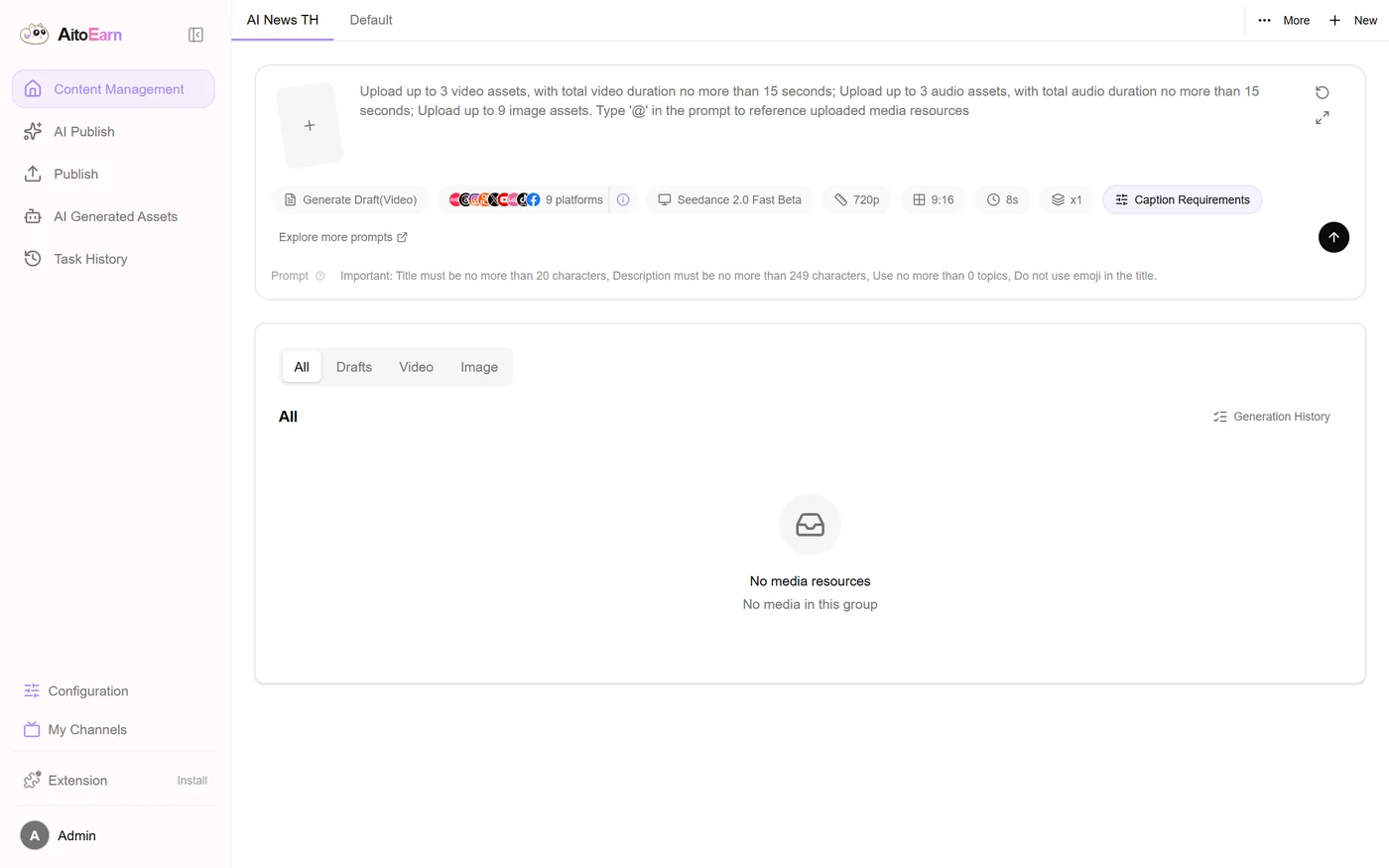
ห้องคอนเทนต์ AiToEarnAiToEarn content room
ห้องทำคอนเทนต์ของสตูดิโอ สั่ง AI ร่างคลิป ตั้งเวลา แล้วลงหลายแพลตฟอร์มจากหน้าเดียวThe studio's content room: let AI draft the clip, schedule it, and publish to many platforms from one screen
เบต้าBeta เว็บแอปWeb app
ตัวระบบเป็นโอเพนซอร์สชื่อ AiToEarn ของทีม yikart เรานำมาติดตั้งบนเซิร์ฟเวอร์ของสตูดิโอเองเมื่อ 13 พ.ย. 2569 เพื่อใช้ทำคอนเทนต์ของแอปตัวเอง ยังเป็นเครื่องมือภายใน ไม่ได้เปิดให้คนนอกสมัคร และยังอยู่ช่วงตั้งค่า ยังไม่ได้ผูกช่องทางจริง หน้าเว็บปิดด้วยรหัสผ่านไว้ ผู้ที่ไม่มีรหัสจะเปิดเข้าไปไม่ได้The system itself is AiToEarn, an open-source project by the yikart team. We installed it on our own studio server on 13 Nov 2026 to produce content for our own apps. It is an internal tool, not open for outside sign-ups, and is still being set up with no channels connected yet. The site is password-protected, so anyone without the password cannot get in.
9แพลตฟอร์มที่ระบบลงให้ได้Platforms it can publish to
7บริการที่รันคู่กันบนเซิร์ฟเวอร์Services running on the server
01 · ภาพรวม01 · Overview
ภาพรวมของระบบThe system at a glance
งานนี้ไม่ใช่โปรแกรมที่เราเขียนขึ้นเอง แต่เป็นการเลือกเครื่องมือโอเพนซอร์สชื่อ AiToEarn ของทีม yikart มาติดตั้งบนเซิร์ฟเวอร์ของสตูดิโอ แล้วตั้งค่าให้เป็นห้องทำคอนเทนต์กลางของแอปในเครือThis is not software we wrote. It is an open-source tool called AiToEarn, by the yikart team, that we chose, installed on the studio server and set up as the shared content room for our own apps.
ที่เลือกวิธีนี้เพราะงานทำคอนเทนต์ของเราซ้ำกันทุกแอป คือคิดคลิป เขียนแคปชัน ตั้งเวลา แล้วลงหลายช่องทาง ถ้าเขียนระบบเองคงใช้เวลาหลายเดือน ในขณะที่ของโอเพนซอร์สที่มีอยู่แล้วทำได้ครบและแก้เพิ่มเองได้We went this way because the content work repeats across every app — think up a clip, write a caption, schedule it, post it to several channels. Building that ourselves would have taken months, while an existing open-source tool already covers it and can be modified.
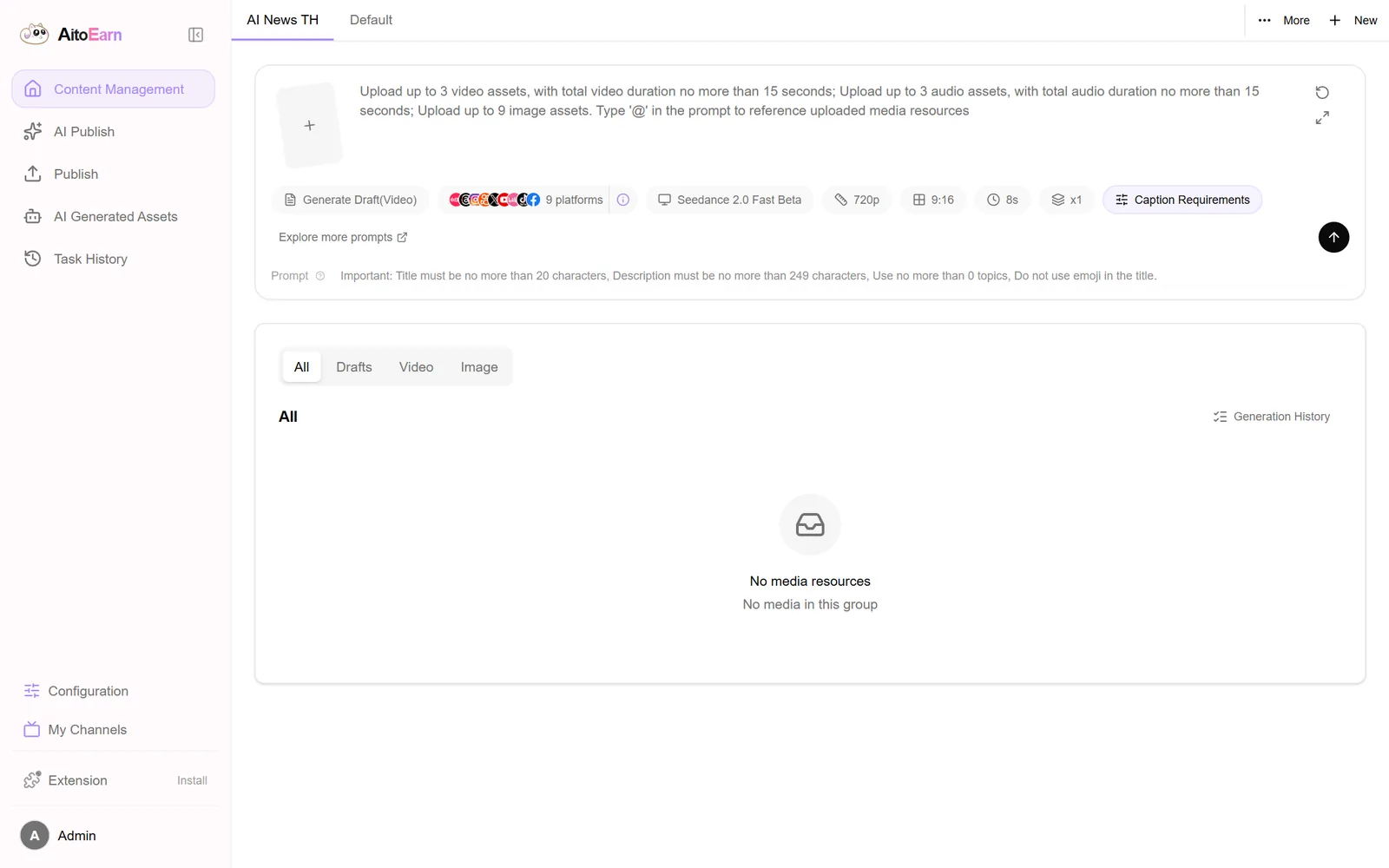
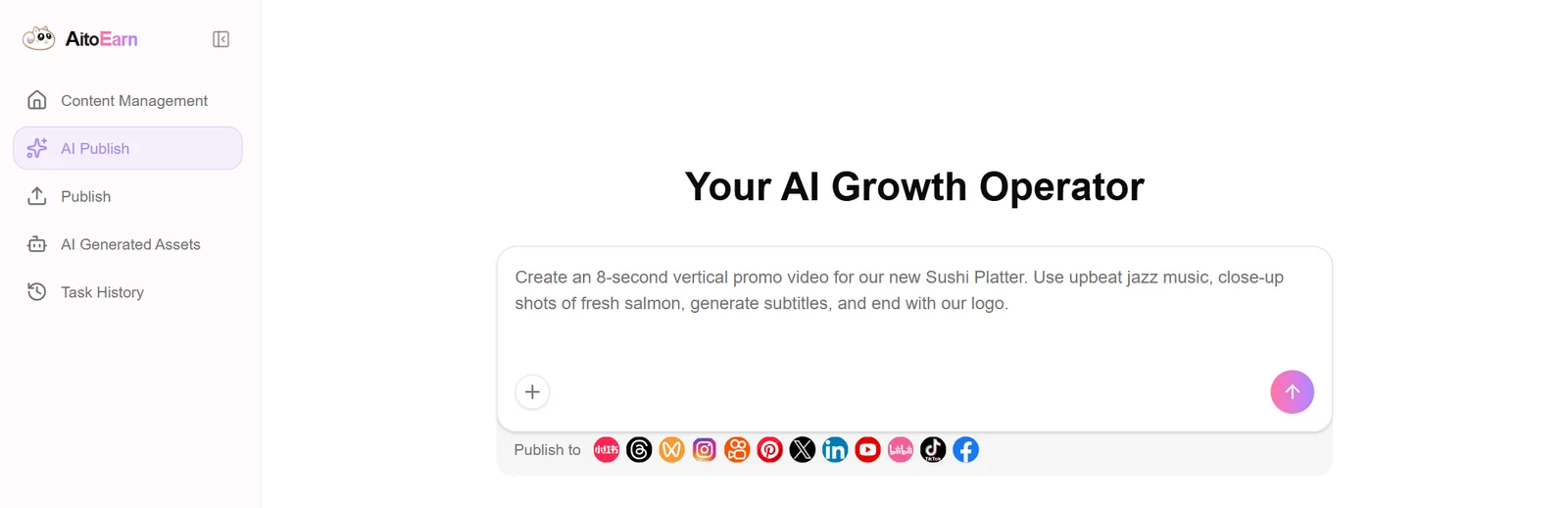
ในหน้าสั่งงาน พิมพ์เป็นประโยคเดียวว่าอยากได้คลิปแบบไหน ระบบจะร่างคลิปสั้นพร้อมแคปชันและซับให้ แล้วส่งเข้าปฏิทินเพื่อตั้งเวลาลงตามช่องทางที่ผูกไว้ มีพื้นที่งานแยกตามโปรเจกต์ เช่น ช่องข่าว AI แยกจากงานอื่นOn the creation screen you type one sentence describing the clip you want; the system drafts a short video with caption and subtitles, then sends it to the calendar to be scheduled on the connected channels. Workspaces keep projects apart, such as the AI news channel.
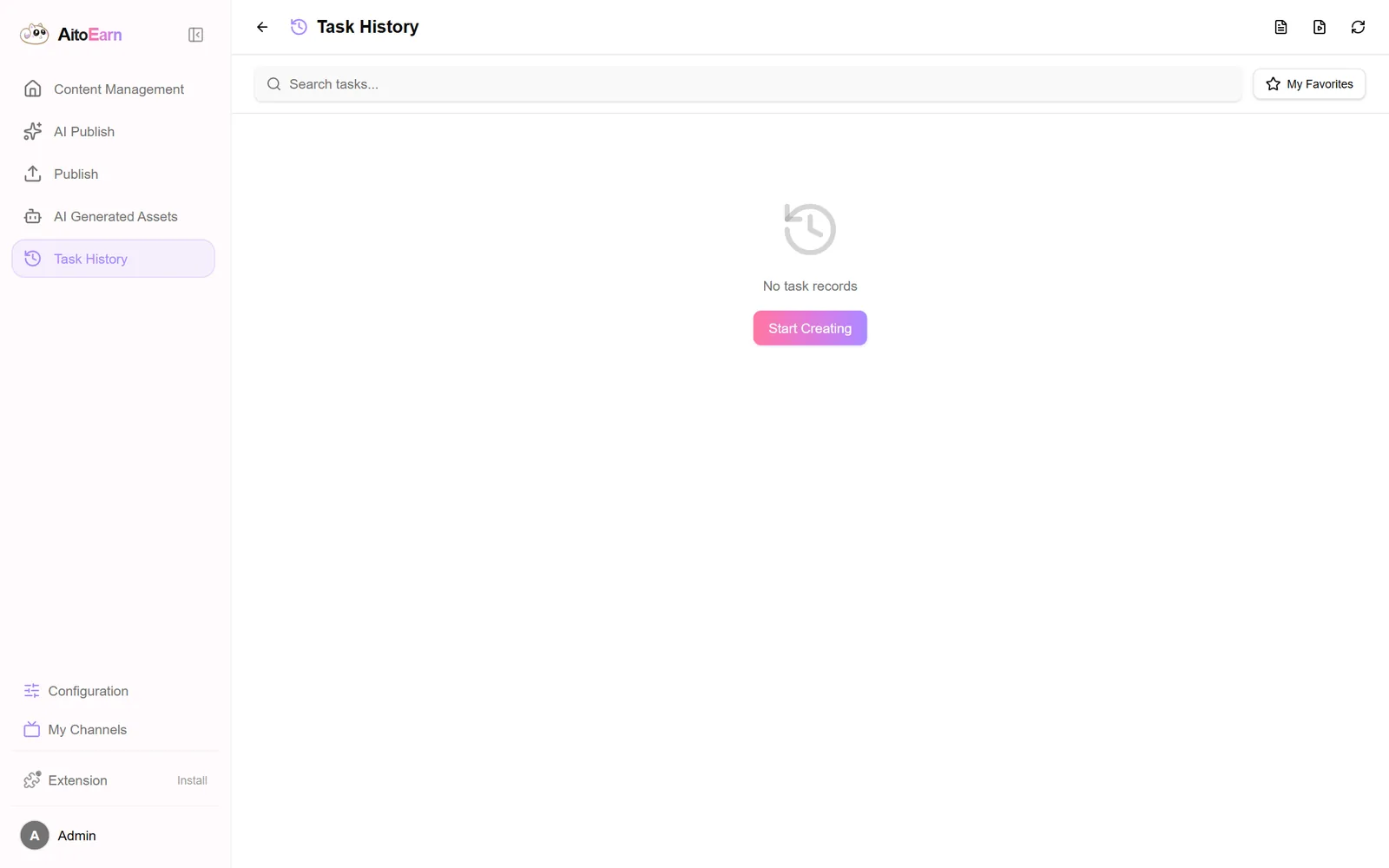
ตรงไปตรงมา ตอนนี้ยังเป็นช่วงตั้งค่า เพิ่งติดตั้งเมื่อ 13 พ.ย. 2569 ยังไม่ได้ผูกช่องทางโซเชียลจริง ปฏิทินและประวัติงานจึงยังว่าง และเป็นเครื่องมือภายใน ไม่ได้เปิดให้คนนอกใช้To be straight: it is still being set up. It was installed on 13 Nov 2026, no social channels are connected yet, so the calendar and the job history are still empty, and it is an internal tool not open to outsiders.
02 · โจทย์02 · The brief
สร้างขึ้นมาเพราะอะไรWhy this exists
ใช้ภายในสตูดิโอ (ไม่เปิดให้คนนอกสมัคร) สำหรับทำคอนเทนต์ของแอปในเครือInternal to the studio, not open for public sign-up, used to produce content for our own apps
ใช่โจทย์ของคุณไหมSound like your problem?
03 · ฟีเจอร์03 · Features
ทำอะไรได้บ้าง อย่างละเอียดWhat it does, in detail
6 ความสามารถ6 capabilitiesสั่งงานด้วยประโยคเดียวOne sentence to start
ในหน้าสั่งงานพิมพ์ว่าอยากได้คลิปแบบไหน เช่น คลิปแนวตั้ง 8 วินาทีโปรโมตเมนูใหม่ ใส่เพลงจังหวะสนุกและซับ ระบบจะร่างให้ แนบไฟล์ภาพ เสียง หรือวิดีโอของเราเข้าไปอ้างอิงด้วยก็ได้On the creation screen you describe the clip you want — say an eight-second vertical promo for a new dish with upbeat music and subtitles — and it drafts one. You can also attach your own images, audio or video for it to reference.
ลงหลายแพลตฟอร์มจากที่เดียวMany platforms, one screen
หน้าสั่งงานมีไอคอนช่องทางให้เลือกลง 9 แพลตฟอร์ม เมื่อผูกบัญชีแล้วสามารถสั่งลงพร้อมกันได้จากหน้าเดียว ไม่ต้องเปิดทีละแอปThe creation screen lists nine platform icons to publish to. Once accounts are connected, a post can go to several at once from a single screen instead of opening each app.
ปฏิทินโพสต์รายสัปดาห์A weekly posting calendar
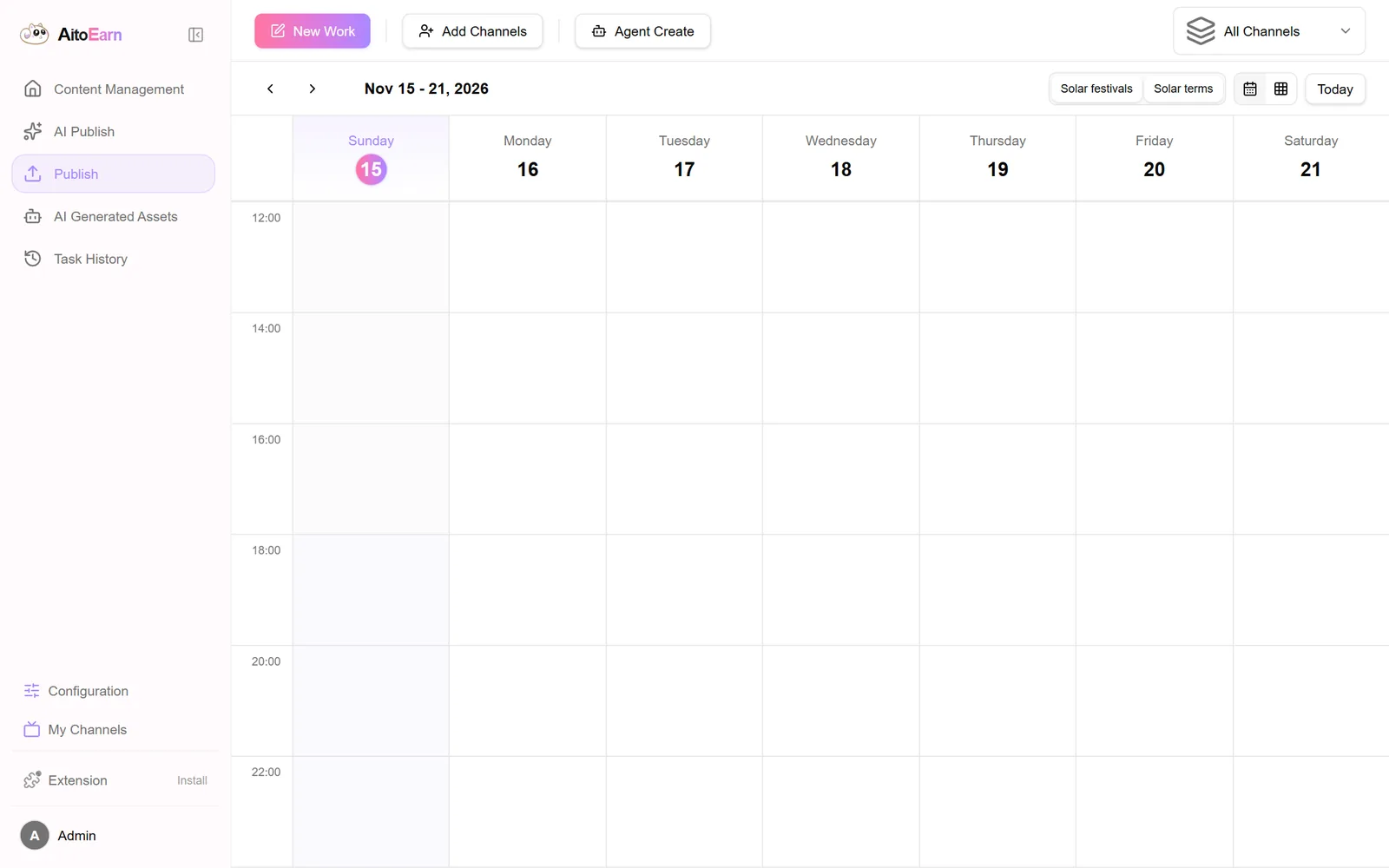
หน้าปฏิทินแสดงทั้งสัปดาห์เป็นช่องเวลา ลากงานไปวางเวลาที่ต้องการได้ และกรองดูเฉพาะช่องทางที่สนใจ ทำให้เห็นภาพรวมว่าอันไหนลงวันไหนแล้วบ้างThe calendar lays out the week in time slots so work can be dropped onto a chosen time and filtered by channel, giving a clear view of what is already scheduled.
แยกพื้นที่งานตามโปรเจกต์A workspace per project
มีแท็บพื้นที่งานด้านบน เช่น ช่องข่าว AI กับงานทั่วไป ทำให้ไฟล์และคิวโพสต์ของแต่ละโปรเจกต์ไม่ปนกันWorkspace tabs at the top — such as the AI news channel and general work — keep each project's files and posting queue separate.
คลังไฟล์และประวัติงานAn asset library and job history
ไฟล์ที่ AI สร้างถูกเก็บไว้ในคลังของระบบ และมีหน้าประวัติงานให้ย้อนดูว่าสั่งอะไรไปบ้าง ตอนนี้ยังว่างเพราะเพิ่งติดตั้งAI-generated files are kept in the system library, with a history page for reviewing past jobs. Both are still empty because it was only just installed.
รันบนเซิร์ฟเวอร์ของเราเองRunning on our own server
ทั้งหน้าเว็บ ฐานข้อมูล ที่เก็บไฟล์ และตัวช่วย AI รันเป็นคนละส่วนบนเซิร์ฟเวอร์เดียวกับแอปอื่นของสตูดิโอ ไฟล์และข้อมูลจึงอยู่กับเรา และไม่มีค่าสมาชิกรายเดือนThe web interface, the database, the file store and the AI helper each run as their own service on the same server as the studio's other apps, so the files and data stay with us and there is no subscription.
04 · วิธีทำงาน04 · How it works
ทำงานยังไง ตั้งแต่ต้นจนจบHow it works, start to finish
- 1
1. เลือกพื้นที่งาน1. Pick a workspace
เลือกว่ากำลังทำคอนเทนต์ให้โปรเจกต์ไหน เพื่อให้ไฟล์และคิวโพสต์ไม่ปนกับงานอื่นChoose which project the content is for, so its files and posting queue stay separate from the rest.
- 2
2. พิมพ์สั่งและแนบไฟล์2. Describe it and attach files
พิมพ์ว่าต้องการคลิปแบบไหน แนบภาพ เสียง หรือวิดีโอที่อยากให้ใช้ แล้วตั้งค่าความยาว สัดส่วนจอ และความละเอียดType what the clip should be, attach any images, audio or video to use, then set the length, aspect ratio and resolution.
- 3
3. AI ร่างให้แล้วเราตรวจ3. AI drafts, we review
ระบบร่างคลิปพร้อมแคปชันและซับ เราดูแล้วแก้หรือสั่งใหม่ได้ก่อนเอาไปใช้จริงIt drafts the clip with caption and subtitles; we review, adjust or regenerate before anything is used.
- 4
4. ตั้งเวลาในปฏิทิน4. Schedule it
เอางานที่ผ่านแล้วไปวางในปฏิทินตามวันเวลาที่ต้องการ และเลือกว่าจะลงช่องทางไหนบ้างApproved work goes onto the calendar at the chosen day and time, with the channels selected.
- 5
5. ระบบลงให้ตามเวลา5. It posts on schedule
เมื่อถึงเวลา ระบบจะลงให้ตามช่องทางที่ผูกไว้ และบันทึกไว้ในประวัติงานว่าลงอะไรไปแล้วWhen the time comes it publishes to the connected channels and records what went out in the job history.
05 · ภาพ05 · Visuals
ภาพจากระบบจริงFrom the real system
4 ภาพ4 imagesภาพหน้าจอจริงถ่ายจากระบบที่เปิดใช้อยู่ ส่วนภาพโปรโมตและภาพประกอบมีป้ายกำกับไว้ทุกใบReal screenshots come from the running system; promo images and illustrations are labelled on every card.
06 · สถานการณ์06 · Scenarios
ตัวอย่างสถานการณ์ใช้งานExample scenarios
เป็นตัวอย่างสมมติเพื่อให้เห็นภาพ ไม่ใช่เรื่องของลูกค้าจริงIllustrative scenarios to help you picture it — not real customer stories.
คลิปโปรโมตแอปในเครือPromo clips for our own apps
แอปอย่างส่งไว จดไว หรือถอดไว ต้องมีคลิปสั้นเล่าฟีเจอร์ใหม่เรื่อย ๆ ห้องนี้ทำให้สั่งร่างคลิปและตั้งคิวลงได้จากที่เดียว แทนที่จะทำแยกทีละแอปApps like Songwai, JodWai and TodWai constantly need short clips about new features. This room lets us draft and queue them in one place instead of doing it app by app.
ช่องข่าว AI ที่ต้องลงทุกวันAn AI news channel that posts daily
งานที่ต้องลงสม่ำเสมอ ใช้ปฏิทินวางคิวล่วงหน้าทั้งสัปดาห์ แล้วเช็กย้อนได้ว่าวันไหนยังว่างFor work that has to go out regularly, the calendar lets a whole week be queued ahead and shows which days are still empty.
ทีมเล็กที่ไม่อยากจ่ายรายเดือนA small team that would rather not pay monthly
เครื่องมือทำนองนี้ส่วนใหญ่คิดค่าสมาชิกรายเดือนต่อช่องทาง การติดตั้งโอเพนซอร์สบนเซิร์ฟเวอร์ที่มีอยู่แล้วจึงถูกกว่าในระยะยาว และข้อมูลไม่ต้องฝากใครMost tools like this charge monthly per channel, so installing an open-source one on a server we already run is cheaper over time and keeps the data in-house.
07 · เบื้องหลัง07 · Under the hood
เบื้องหลังระบบ ข้อมูล และความปลอดภัยUnder the hood: data and security
- ที่มาของระบบWhere it comes from
- AiToEarn เป็นโครงการโอเพนซอร์สของทีม yikart เผยแพร่ที่ github.com/yikart/AiToEarn เราไม่ได้เขียนตัวระบบเอง แต่เป็นคนเลือก ติดตั้ง ตั้งค่า และดูแลให้ใช้งานได้AiToEarn is an open-source project by the yikart team at github.com/yikart/AiToEarn. We did not write it; we chose it, installed it, configured it and keep it running.
- ส่วนประกอบที่รันWhat runs
- แยกเป็นหลายส่วนบนเซิร์ฟเวอร์เดียวกัน คือหน้าเว็บ ตัวเซิร์ฟเวอร์หลัก ตัวช่วย AI ฐานข้อมูล MongoDB ตัวพักข้อมูล Redis ที่เก็บไฟล์ และตัวรับคำขอด้านหน้าIt runs as several parts on one server: the web interface, the main server, the AI helper, a MongoDB database, a Redis cache, a file store and a front-end request handler.
- ที่ตั้งWhere it lives
- อยู่บนเซิร์ฟเวอร์เดียวกับแอปอื่นของสตูดิโอ ใช้ตัวจัดเส้นทางตัวเดียวกันและใบรับรองความปลอดภัยอัตโนมัติIt sits on the same server as the studio's other apps, behind the same router with automatic security certificates.
- การเข้าถึงAccess
- เป็นเครื่องมือภายใน ไม่เปิดให้คนนอกสมัคร และปิดด้วยรหัสผ่านหน้าเว็บIt is an internal tool with no public sign-up, protected by a password at the front door.
- ค่าใช้จ่ายCost
- ไม่มีค่าสมาชิกรายเดือน ใช้เซิร์ฟเวอร์ที่เช่าอยู่แล้ว ส่วนค่าเรียกโมเดล AI จ่ายตามที่ใช้No subscription: it uses a server we already rent, and AI model calls are paid per use.
08 · ความคืบหน้า08 · Progress
ความคืบหน้าและแผนต่อไปProgress and what comes next
- ทำแล้วDone
13 พ.ย. 2569 ติดตั้ง AiToEarn บนเซิร์ฟเวอร์ของสตูดิโอและเปิดใช้ที่โดเมนของเราเอง13 Nov 2026: installed AiToEarn on the studio server and brought it up on our own domain.
- ทำแล้วDone
แยกพื้นที่งานสำหรับช่องข่าว AI ออกจากงานทั่วไปSet up a separate workspace for the AI news channel.
- ทำแล้วDone
15 พ.ย. 2569 ปิดหน้าเว็บด้วยรหัสผ่าน ไม่ให้คนนอกเข้าถึงหน้าแอดมิน15 Nov 2026: put the site behind a password so outsiders cannot reach the admin screens.
ผูกช่องทางโซเชียลจริงของแอปในเครือเข้ากับระบบConnecting the real social channels of our own apps.
- ถัดไปNext
ลองใช้ทำคลิปโปรโมตจริงสักชุด แล้ววัดว่าประหยัดเวลาได้จริงไหมเทียบกับทำมือRunning a real batch of promo clips and measuring whether it actually saves time versus doing it by hand.
- ถัดไปNext
ถ้าใช้ได้ดี จะทำเป็นบริการติดตั้งและดูแลให้ร้านหรือทีมที่สนใจIf it works well, offering installation and upkeep as a service to shops or teams that want it.
09 · คำถาม09 · FAQ
คำถามที่พบบ่อยFrequently asked questions
ระบบนี้เราเขียนเองหรือเปล่าDid you build this yourselves?
ไม่ใช่ครับ ตัวระบบเป็นโอเพนซอร์สชื่อ AiToEarn ของทีม yikart เราเป็นคนเลือก ติดตั้งบนเซิร์ฟเวอร์ของเราเอง ตั้งค่า และดูแลให้ใช้งานได้ หน้านี้จึงแสดงงานติดตั้งและใช้งาน ไม่ใช่การอ้างว่าเราเขียนโปรแกรมนี้No. The system is AiToEarn, an open-source project by the yikart team. We chose it, installed it on our own server, configured it and keep it running, so this page is about that work rather than a claim that we wrote it.
เข้าไปลองใช้ได้ไหมCan I try it?
ยังไม่เปิดให้คนนอกครับ เป็นเครื่องมือที่ใช้ทำคอนเทนต์ของแอปเราเอง หน้าเว็บปิดด้วยรหัสผ่านไว้ กดลิงก์แล้วจะขึ้นให้ใส่รหัส ถ้าสนใจอยากได้ระบบแบบนี้ของตัวเอง ทักมาคุยได้Not yet. It is the tool we use for our own apps and the site asks for a password, so the link will prompt you to sign in. If you want a system like it for yourself, get in touch.
ต่างจากเครื่องมือตั้งเวลาโพสต์ทั่วไปยังไงHow is it different from a normal scheduler?
ต่างตรงที่มีขั้นสร้างคลิปด้วย AI อยู่ในตัว ไม่ใช่แค่ตั้งเวลาโพสต์ไฟล์ที่ทำไว้แล้ว และเพราะติดตั้งบนเซิร์ฟเวอร์ของเราเอง ไฟล์กับข้อมูลจึงไม่ต้องฝากไว้กับบริการรายเดือนของใครIt includes an AI drafting step rather than only scheduling files you already made, and because it runs on our own server the files and data are not parked with someone else's subscription service.
ลงได้กี่แพลตฟอร์มHow many platforms can it post to?
หน้าสั่งงานแสดงช่องทางให้เลือก 9 แพลตฟอร์ม แต่ต้องบอกตามตรงว่าเรายังไม่ได้ผูกบัญชีจริงและยังไม่ได้ทดสอบลงครบทุกช่องทางThe creation screen offers nine platforms, though to be straight we have not connected real accounts yet or tested posting to all of them.
10 · วิธีเริ่ม10 · Get started
เริ่มได้ใน 3 ขั้นUp and running in three steps
ถ้าอยากได้ระบบแบบเดียวกันสำหรับธุรกิจของคุณ บอกโจทย์มาสั้น ๆ เราตอบกลับพร้อมขอบเขตงานและราคาภายใน 1 วันทำการIf you want something like this for your own business, send us a line about the problem. You'll get scope and price within one working day.
- 1เครื่องมือนี้ใช้ภายในสตูดิโอ ไม่ได้เปิดให้สมัครThis tool is internal to the studio and not open for sign-ups
- 2ถ้าอยากได้ระบบทำคอนเทนต์แบบนี้ในร้านหรือทีมของคุณ ทักมาคุยที่หน้าคุยโปรเจกต์If you want a content system like this for your own shop or team, start a conversation from the contact page
- 3เราติดตั้งบนเซิร์ฟเวอร์ของคุณเอง หรือจะให้เราดูแลให้ก็ได้We can install it on your own server, or run and maintain it for you
เริ่มงานกับเราWork with us
อยากได้ระบบแบบนี้สำหรับธุรกิจคุณWant a system like this for your business?
เล่าปัญหาของคุณมา เราจะบอกตรง ๆ ว่าช่วยได้ไหม ภายใน 1 วันทำการ ส่งแล้วได้รหัสติดตามงานทันทีTell us the problem and we'll say honestly whether we can help, within one working day. You get a tracking code the moment you send it.