เรื่องของครอบครัวกระจายอยู่ทุกที่ ใบเสร็จอยู่ในลิ้นชัก นัดหมอจดไว้ในกระดาษ ค่าใช้จ่ายคุยกันในแชทที่เลื่อนหาย และของสำคัญมักรู้อยู่คนเดียว เวลาคนนั้นไม่อยู่ก็ไม่มีใครหาได้Family matters end up scattered everywhere: receipts in a drawer, doctor's appointments on a scrap of paper, expenses discussed in a chat that scrolls away — and the important things are usually known to one person only, so nobody can find them when that person is not around.
← ผลงานทั้งหมด← All work

แอปมือถือMobile app
บ้านดีBaanDee
ทุกเรื่องดี ๆ เริ่มที่บ้านดี จัดการเรื่องครอบครัวไว้ในที่เดียวEverything good starts at home — one place for the whole family's affairs
เบต้าBeta แอปมือถือMobile app
เว็บและ API ขึ้นจริงที่ baandee.zzaxstudio.com แล้ว ส่วนแอปยังเป็นการทดสอบแบบปิด แอนดรอยด์อยู่ในการทดสอบแบบปิดของ Google Play ตั้งแต่ 25 ต.ค. 2569 และ iOS 1.0.0 build 8 ส่งให้ App Store ตรวจรอบที่สองเมื่อ 29 ต.ค. 2569 ยังดาวน์โหลดจากสโตร์สาธารณะไม่ได้The web app and API are live at baandee.zzaxstudio.com, but the mobile app is still in closed testing: Android has been in Google Play closed testing since 25 October 2026, and iOS 1.0.0 build 8 was submitted for its second App Store review on 29 October 2026. It cannot yet be downloaded from the public stores.
01 · ภาพรวม01 · Overview
ภาพรวมของระบบThe system at a glance
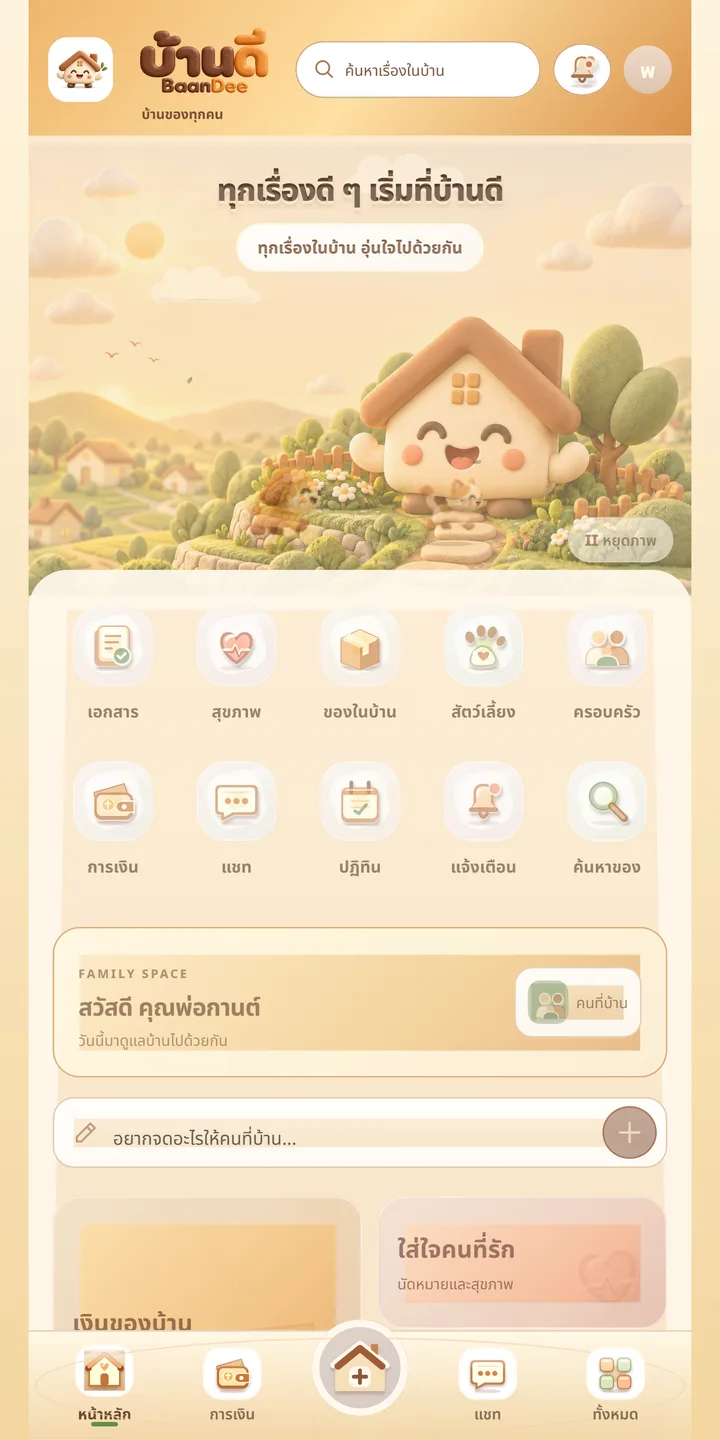
บ้านดี (BaanDee) คือแอปจัดการเรื่องครอบครัวไว้ในที่เดียว ทั้งนัดหมาย งานบ้าน รายการที่ต้องซื้อ เอกสาร การเงิน สุขภาพ สัตว์เลี้ยง และแชทในบ้าน สำหรับครอบครัวที่ปกติกระจายเรื่องสำคัญไว้ตามลิ้นชัก กระดาษ และแชทที่เลื่อนหาย โดยแบ่งสิทธิ์ให้ผู้ใหญ่กับสมาชิกคนอื่นเห็นไม่เท่ากันBaanDee is an app that keeps a family's affairs in one place: appointments, chores, shopping lists, documents, finances, health, pets and household chat, for families who usually scatter important things across drawers, paper and chats that scroll away. Adults and other members are given different levels of access.
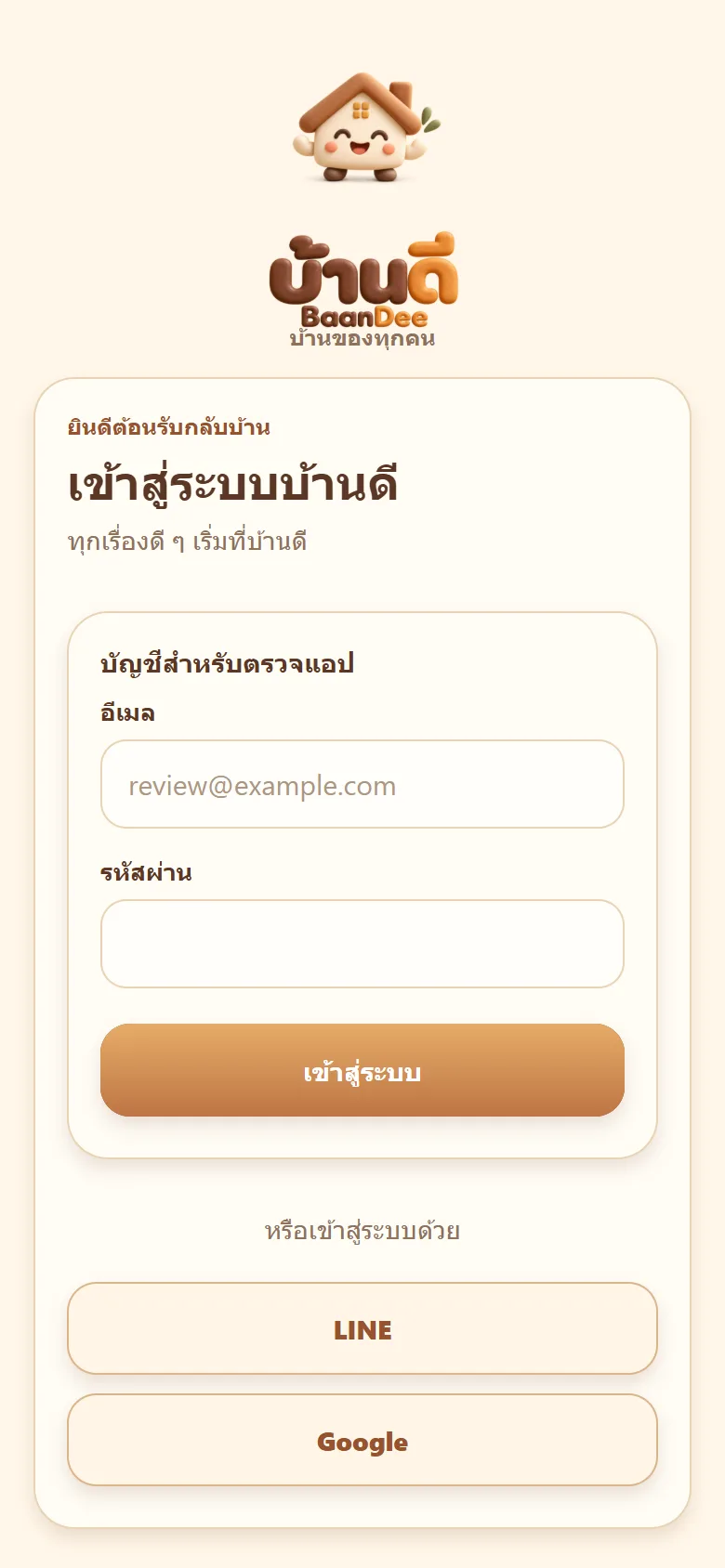
วิธีใช้คือเข้าสู่ระบบด้วย LINE, Google หรือ Apple สร้างบ้านของตัวเอง แล้วส่งรหัสเฉพาะของบ้านให้คนในครอบครัวเข้ามา เจ้าของบ้านตั้งสิทธิ์ของแต่ละคน หมวดเอกสาร การเงิน และสุขภาพเปิดให้เฉพาะสมาชิกผู้ใหญ่ ส่วนปฏิทินและรายการซื้อของทุกคนเห็นร่วมกัน และแจ้งเตือนเข้าโทรศัพท์เมื่อถึงเวลานัดTo use it, sign in with LINE, Google or Apple, create your household, then share the household's own join code with family. The owner sets each person's permissions. The documents, finance and health sections open only to adult members, while the calendar and shopping list are shared by everyone, with phone notifications when an appointment is due.
สถานะตอนนี้คือเบต้า: เว็บและ API ขึ้นจริงที่ baandee.zzaxstudio.com แล้ว แอป Android อยู่ในการทดสอบแบบปิดของ Google Play ที่ส่งตรวจเมื่อ 25 ต.ค. 2569 และ iOS 1.0.0 build 8 ส่งตรวจ App Store รอบที่สองเมื่อ 29 ต.ค. 2569 ยังดาวน์โหลดจากสโตร์สาธารณะไม่ได้ และยังไม่มีตัวเลขผู้ใช้หรือจำนวนบ้านจริงIt is currently in beta: the web app and API are live at baandee.zzaxstudio.com, the Android app is in Google Play closed testing (submitted on 25 October 2026), and iOS 1.0.0 build 8 went into its second App Store review on 29 October 2026. It cannot yet be downloaded from the public stores, and there are no user or household numbers.
จุดยืนคือเป็นพื้นที่ส่วนตัวของคนในบ้าน ข้อมูลไม่เปิดสาธารณะ และผู้ใช้ลบรายการหรือลบบัญชีได้เองจากหน้าตั้งค่าThe stance is a private space for the people in the home: the data is not public, and users can delete records or the whole account themselves from settings.
02 · โจทย์02 · The brief
สร้างขึ้นมาเพราะอะไรWhy this exists
ครอบครัวไทยที่อยากเก็บเรื่องบ้าน เอกสาร การเงิน สุขภาพ และนัดหมาย ไว้ด้วยกันและแบ่งสิทธิ์ให้ผู้ใหญ่กับเด็กเห็นไม่เท่ากันThai families who want household matters, documents, finances, health records and appointments kept together, with adults and children given different levels of access
ใช่โจทย์ของคุณไหมSound like your problem?
03 · ฟีเจอร์03 · Features
ทำอะไรได้บ้าง อย่างละเอียดWhat it does, in detail
9 ความสามารถ9 capabilitiesสร้างบ้านและเชิญสมาชิกด้วยรหัสบ้านCreate a household and invite with a join code
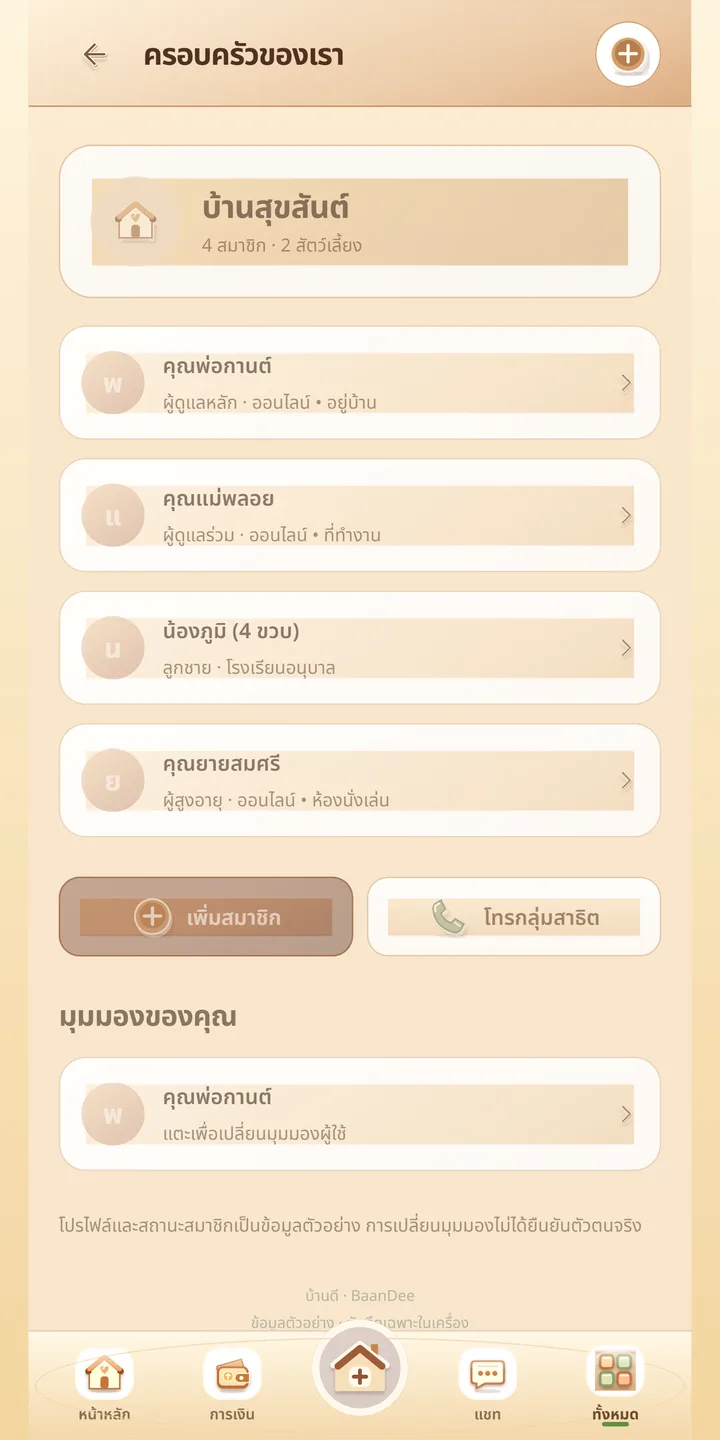
ผู้ใช้สร้างบ้านของตัวเอง ระบบออกรหัสเฉพาะของบ้านให้ส่งต่อให้สมาชิก หน้า "ครอบครัวของเรา" แสดงบ้านพร้อมจำนวนสมาชิกและสัตว์เลี้ยง รายชื่อสมาชิกพร้อมบทบาท ปุ่มเพิ่มสมาชิก และปุ่มโทรหากลุ่มสมาชิกA user creates their own household and the system issues a join code to pass on. The "Our family" page lists the household with its member and pet counts, each member with a role, an add-member button and a button to call the group.
กำหนดสิทธิ์ผู้ใหญ่กับเด็กPermissions for adults and children
เจ้าของบ้านและสมาชิกผู้ใหญ่จัดการข้อมูลสำคัญได้ ส่วนสมาชิกคนอื่นใช้พื้นที่ร่วมกันตามสิทธิ์ที่ตั้ง หมวดเอกสาร การเงิน และสุขภาพเปิดให้ผู้ใหญ่เท่านั้น และผู้ใช้เลือกมุมมองของแต่ละคนได้The owner and adult members manage the important data, while other members share the space according to the permissions set. The documents, finance and health sections are adults-only, and each person's view can be chosen.
ปฏิทินครอบครัวและแจ้งเตือนA family calendar with alerts
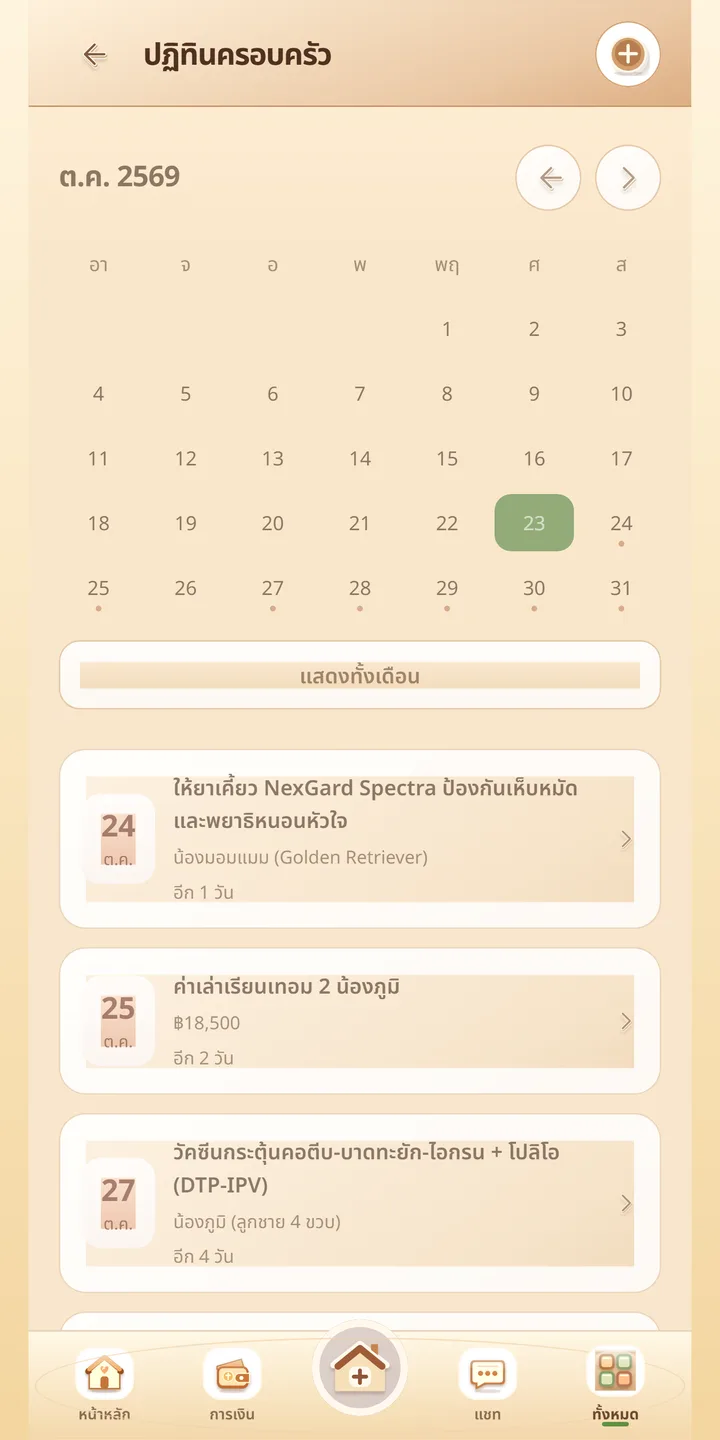
ปฏิทินรายเดือนแสดงนัดหมายของทุกคน เช่น วัคซีนสัตว์เลี้ยงหรือนัดตรวจที่โรงพยาบาล พร้อมจำนวนวันที่เหลือ และเปิดแจ้งเตือนบนโทรศัพท์เมื่อถึงเวลาA monthly calendar shows everyone's appointments, such as a pet vaccination or a hospital check-up, with the days remaining, and phone notifications fire when the time comes.
การเงินและบิลFinances and bills
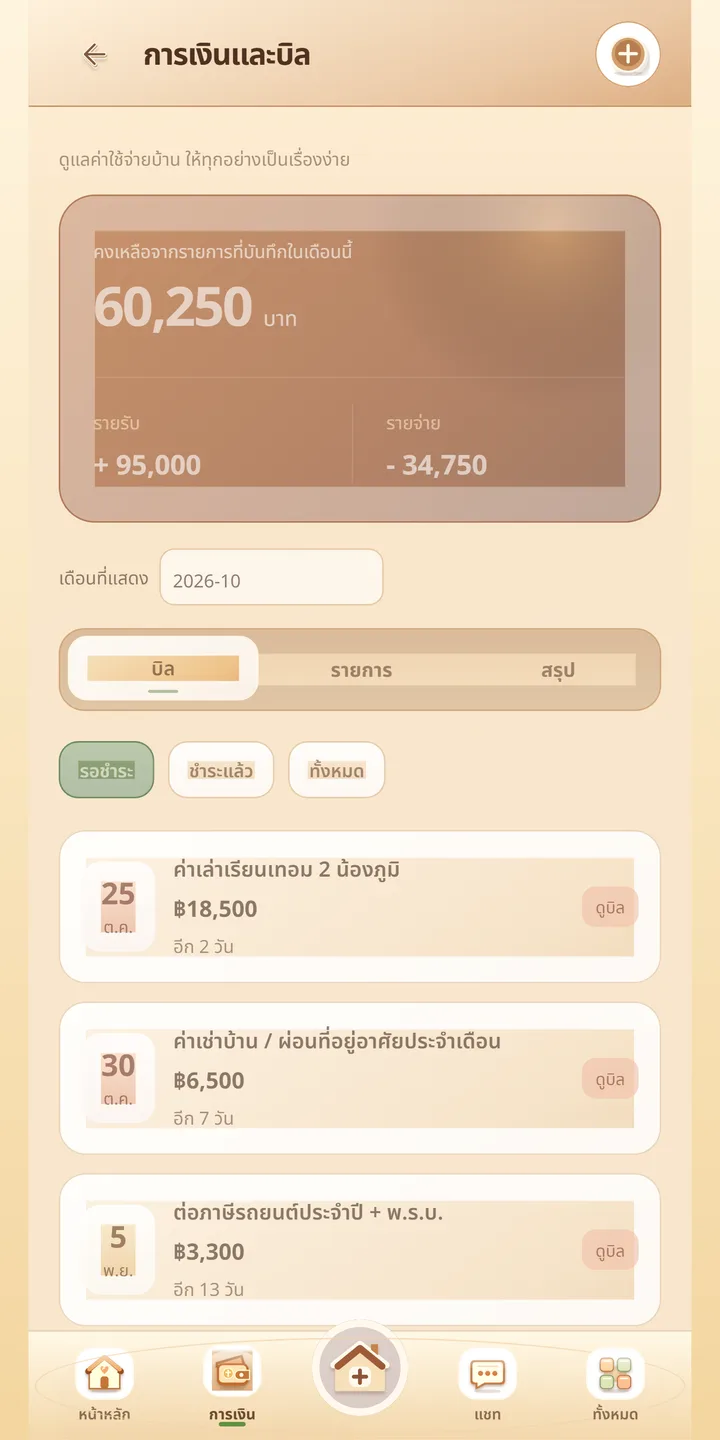
หน้า "การเงินและบิล" แสดงสรุปรายรับรายจ่ายรายเดือน แยกแท็บ บิล รายการ และสรุป พร้อมรายการค่าใช้จ่ายที่กำลังจะครบกำหนดและจำนวนวัน บันทึกเป็นข้อความ ไม่ได้แนบไฟล์The "Finances and bills" page shows a monthly income and expense summary with Bills, Items and Summary tabs, plus upcoming expenses with days to go. Entries are saved as text, not attached files.
สุขภาพครอบครัวและสัตว์เลี้ยงFamily health and pets
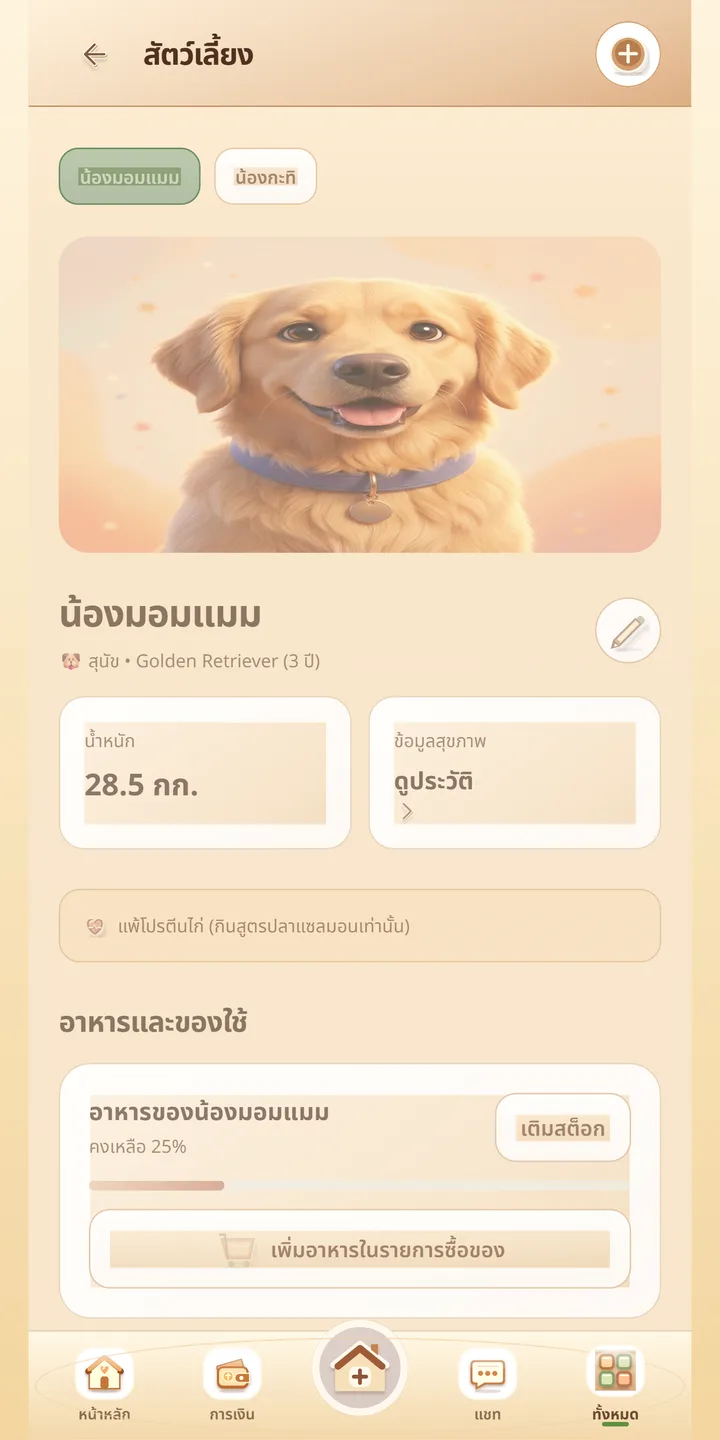
หมวดสุขภาพจดนัดหมายและประวัติ เช่น วัคซีนหรือนัดตรวจ ส่วนหมวดสัตว์เลี้ยงมีโปรไฟล์สัตว์ ชนิดและพันธุ์ อายุ น้ำหนัก ประวัติ และรายการอาหารหรือของใช้ที่ต้องเติมThe health section records appointments and history such as vaccinations or check-ups. The pet section has a profile per animal with species and breed, age, weight, history, and food or supplies to restock.
แชทในบ้านHousehold chat
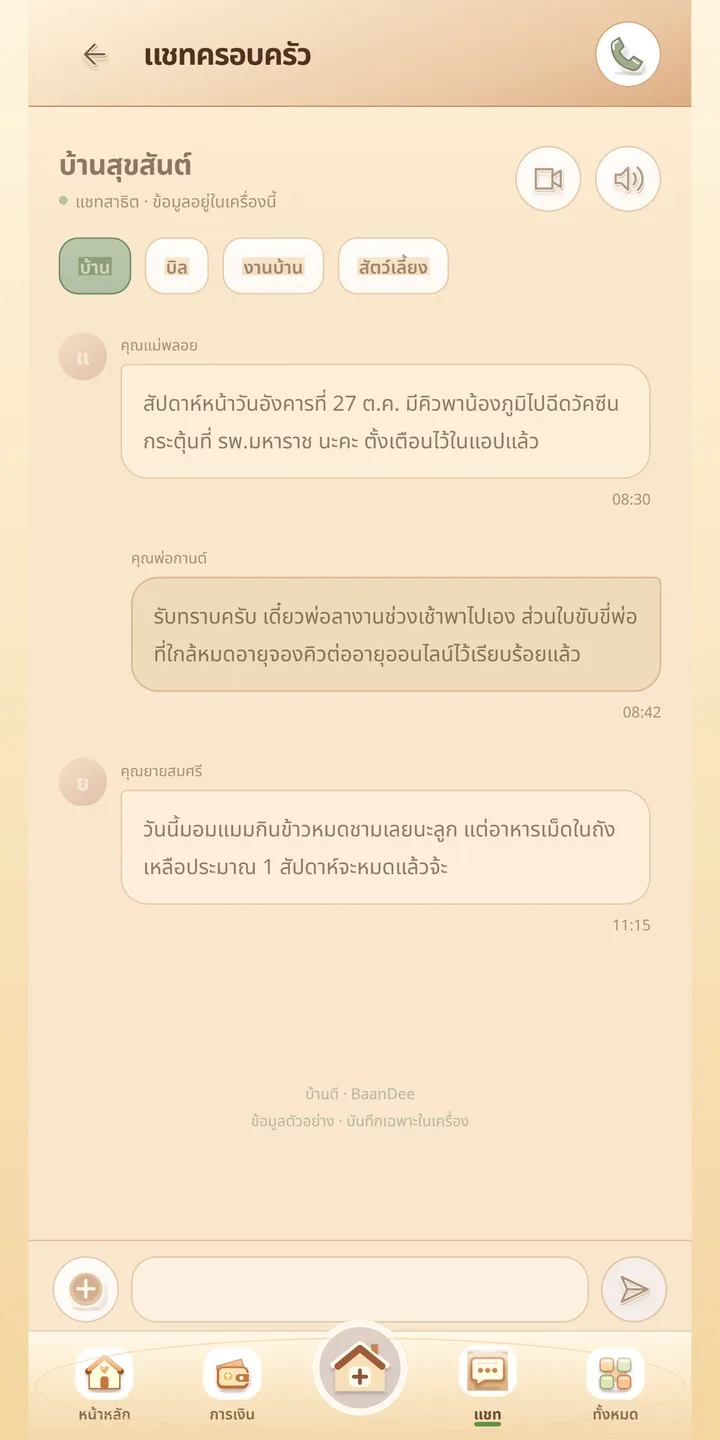
แชทแยกหัวข้อ เช่น บ้าน บิล งานบ้าน และสัตว์เลี้ยง คุยกับสมาชิกในบ้านได้ในแอปเดียวChat is split by topic, for example home, bills, chores and pets, so you can talk with household members inside the one app.
เอกสารและบันทึกข้อความDocuments and text notes
หมวดเอกสาร การเงิน และสุขภาพเก็บเป็นบันทึกข้อความในหมวดที่ผู้ใหญ่เข้าถึง ไม่ใช่การอัปโหลดไฟล์เอกสารจริง ตามข้อความหน้าร้านของแอปThe documents, finance and health sections store text notes in sections open to adults, not uploaded document files, as the app's store text puts it.
ค้นหาและจัดการรายการSearch and managing records
ค้นหารายการที่บันทึกไว้ได้จากช่องค้นหาบนหน้าแรก และจัดการสมาชิกกับสิทธิ์ในบ้านจากหน้าครอบครัวSearch saved records from the box on the home screen, and manage members and permissions from the family page.
เข้าสู่ระบบและลบข้อมูลเองSign-in and self-service deletion
เข้าสู่ระบบด้วย LINE, Google หรือ Apple ผู้ใช้ลบรายการหรือลบบัญชีเองจากหน้าตั้งค่าได้ และมีหน้านโยบายความเป็นส่วนตัวกับหน้าขอลบบัญชีที่ baandee.zzaxstudio.com/privacy-policy.html และ delete-account.htmlSign in with LINE, Google or Apple. Users can delete records or their account from settings, and there are a privacy policy page and an account-deletion page at baandee.zzaxstudio.com/privacy-policy.html and delete-account.html.
04 · วิธีทำงาน04 · How it works
ทำงานยังไง ตั้งแต่ต้นจนจบHow it works, start to finish
- 1
1. เข้าสู่ระบบ1. Sign in
เปิด baandee.zzaxstudio.com หรือแอป แล้วเข้าสู่ระบบด้วย LINE, Google หรือ AppleOpen baandee.zzaxstudio.com or the app and sign in with LINE, Google or Apple.
- 2
2. สร้างบ้าน2. Create the household
กดสร้างบ้านของคุณ ตั้งชื่อ และรับรหัสบ้านTap create your household, name it and receive the join code.
- 3
3. เชิญและตั้งสิทธิ์3. Invite and set permissions
ส่งรหัสบ้านให้คนในครอบครัว แล้วกำหนดว่าใครเห็นหมวดไหนได้Send the join code to family, then decide who can see which section.
- 4
4. เริ่มจากสิ่งง่าย ๆ4. Start simple
ลงนัดหมายและรายการที่ต้องซื้อก่อน ทุกคนเห็นตรงกันและได้แจ้งเตือนBegin with appointments and the shopping list, which everyone sees and is notified about.
- 5
5. เพิ่มเรื่องสำคัญ5. Add the important things
ค่อย ๆ จดเอกสาร การเงิน สุขภาพ และสัตว์เลี้ยง ในหมวดที่ผู้ใหญ่เข้าถึงGradually add documents, finances, health and pets in the sections open to adults.
05 · ภาพ05 · Visuals
ภาพจากระบบจริงFrom the real system
7 ภาพ7 imagesภาพหน้าจอจริงถ่ายจากระบบที่เปิดใช้อยู่ ส่วนภาพโปรโมตและภาพประกอบมีป้ายกำกับไว้ทุกใบReal screenshots come from the running system; promo images and illustrations are labelled on every card.
06 · สถานการณ์06 · Scenarios
ตัวอย่างสถานการณ์ใช้งานExample scenarios
เป็นตัวอย่างสมมติเพื่อให้เห็นภาพ ไม่ใช่เรื่องของลูกค้าจริงIllustrative scenarios to help you picture it — not real customer stories.
พ่อแม่ลูกที่นัดหมอซ้อนกันParents and children with overlapping appointments
สมมติว่าครอบครัวมีนัดฉีดวัคซีนสัตว์เลี้ยงวันที่ 27 และนัดตรวจโรงพยาบาลวันที่ 3 ทุกคนเห็นปฏิทินเดียวกัน และได้แจ้งเตือนก่อนถึงวันSuppose a family has a pet vaccination on the 27th and a hospital check on the 3rd. Everyone sees the same calendar and gets a reminder before the day.
ลูกหลานดูแลพ่อแม่สูงอายุAdult children looking after older parents
สมมติว่าลูกสองคนช่วยกันจดยาและนัดหมอของคุณพ่อ ทั้งคู่เห็นข้อมูลสุขภาพ แต่หลานวัยเด็กในบ้านไม่เห็นหมวดนี้Suppose two grown children share notes on their father's medicines and appointments. Both see the health record, but the young grandchild in the house does not see that section.
ค่าใช้จ่ายประจำเดือนMonthly household costs
สมมติว่าเจ้าของบ้านจดค่าเช่า ค่าเทอม และค่าไฟ ดูสรุปรายรับรายจ่ายรายเดือน และเห็นบิลที่ใกล้ครบกำหนดก่อนลืมSuppose the owner records rent, school fees and electricity, views the monthly income and expense summary and spots bills nearing their due date before forgetting them.
ดูแลสัตว์เลี้ยงร่วมกันSharing pet care
สมมติว่าครอบครัวมีสุนัข จดน้ำหนัก ประวัติวัคซีน และเตือนซื้ออาหารเมื่อใกล้หมด ใครไปซื้อก็เห็นรายการเดียวกันSuppose a family has a dog and logs its weight, vaccine history and a reminder to buy food when it runs low, so whoever goes shopping sees the same list.
07 · เบื้องหลัง07 · Under the hood
เบื้องหลังระบบ ข้อมูล และความปลอดภัยUnder the hood: data and security
- แพลตฟอร์มPlatform
- เว็บและ API อยู่บน Cloudflare Workers กับฐานข้อมูล D1 ใช้ better-auth จัดการล็อกอิน แอปมือถือสร้างด้วย Expo / React Native บันเดิล com.zzaxstudio.baandeeThe web and API run on Cloudflare Workers with a D1 database, with better-auth handling sign-in. The mobile app is built with Expo / React Native under the package com.zzaxstudio.baandee.
- การเข้าสู่ระบบSign-in
- เปิดใช้จริงแล้ว: Google, LINE และ Apple (Apple บนแอป iOS เนทีฟแก้และ deploy เมื่อ 29 ต.ค. 2569) ส่วนเบอร์โทร SMS และ Facebook เขียนโค้ดไว้แต่ยังไม่เปิดLive now: Google, LINE and Apple (the native iOS Apple sign-in fix was deployed on 29 October 2026). Phone SMS and Facebook are coded but not enabled.
- ความเป็นส่วนตัวPrivacy
- ข้อมูลในบ้านไม่เปิดสาธารณะ เข้าถึงตามสิทธิ์สมาชิก ผู้ใช้ลบรายการและบัญชีได้เอง และแอปถอด expo-image-picker ที่ไม่ได้ใช้ออกเพราะมันฝังคำขอสิทธิ์ไมโครโฟนโดยไม่จำเป็นHousehold data is not public and is accessed according to member permissions. Users can delete records and their account, and the app removed the unused expo-image-picker because it embedded an unnecessary microphone-permission request.
- โค้ดและการสำรองCode and backup
- ที่เก็บโค้ดเป็น GitHub private (PhiraHao/baandee) ประวัติ git ถูกล้างไฟล์โปรไฟล์เบราว์เซอร์ทดสอบที่หลุดเข้าไปออกแล้วเมื่อ 29 ต.ค. 2569The code is in a private GitHub repo (PhiraHao/baandee), and a leaked test browser profile was scrubbed from git history on 29 October 2026.
- ข้อมูลหน้าร้านStore listings
- รายการ Google Play ติดป้ายประกาศการใช้ AI ในภาพหน้าร้าน และฟอร์ม Data Safety กรอกครบ 8 ประเภทThe Google Play listing flags AI use in the store images, and the Data Safety form is completed for 8 categories.
- ข้อจำกัดที่ควรรู้Limits to know
- ยังเป็นเบต้า ไม่มีเว็บหน้าร้านของตัวเอง นอกจากหน้าแอปและหน้านโยบาย Android ต้องมีผู้ทดสอบ 12 คนครบ 14 วันก่อนขอสิทธิ์เผยแพร่จริงIt is still in beta, with no marketing site beyond the app and policy pages, and Android needs 12 testers for 14 days before production access can be requested.
08 · ความคืบหน้า08 · Progress
ความคืบหน้าและแผนต่อไปProgress and what comes next
- ทำแล้วDone
22 ต.ค. 2569 Android AAB รุ่น 1.0.0 (versionCode 3) เผยแพร่ในช่องทดสอบภายในของ Google Play และเว็บ/API ขึ้นจริง22 Oct 2026: the Android AAB 1.0.0 (versionCode 3) published on Google Play's internal testing track, with the web/API live
- ทำแล้วDone
23–25 ต.ค. 2569 ทำภาพหน้าร้านครบทุกชุด และกรอกรายการ Google Play 11/11 ส่งการทดสอบแบบปิดให้ตรวจเมื่อ 25 ต.ค.23-25 Oct 2026: store graphics finished for every set, the Google Play listing completed 11/11 and the closed test submitted for review on 25 Oct
- ทำแล้วDone
29 ต.ค. 2569 แก้เหตุที่ iOS รอบแรกโดนปฏิเสธ (Guideline 5.1.1 ข้อความขอสิทธิ์ไมโครโฟน) แก้ล็อกอิน Apple แบบเนทีฟ และส่ง build 8 ตรวจรอบที่สอง29 Oct 2026: fixed the cause of the first iOS rejection (Guideline 5.1.1, microphone-permission text), fixed native Apple sign-in, and submitted build 8 for a second review
- กำลังทำIn progress
รอผลตรวจ iOS รอบสอง และหาผู้ทดสอบ Android ให้ครบ 12 คน 14 วันWaiting on the second iOS review and recruiting 12 Android testers for 14 days
- ถัดไปNext
ขอสิทธิ์เผยแพร่ production บน Google Play หลังทดสอบแบบปิดครบ และเปิดล็อกอินด้วยเบอร์โทร (SMS) กับ FacebookRequest Google Play production access once the closed test is complete, and enable phone (SMS) and Facebook sign-in
09 · คำถาม09 · FAQ
คำถามที่พบบ่อยFrequently asked questions
ตอนนี้ดาวน์โหลดได้หรือยังCan I download it now?
ยังไม่ได้จากสโตร์สาธารณะ แอปอยู่ระหว่างทดสอบแบบปิดบน Android และรอตรวจบน iOS แต่ใช้เวอร์ชันเว็บที่ baandee.zzaxstudio.com ได้Not from the public stores yet: it is in closed testing on Android and awaiting review on iOS, but the web version at baandee.zzaxstudio.com is usable.
ต้องเสียเงินไหมDoes it cost money?
ยังไม่ได้กำหนด ไม่มีบันทึกเรื่องราคาNot yet defined; there is no pricing on record.
ใครเห็นข้อมูลของบ้านเราWho can see our household's data?
เฉพาะสมาชิกของบ้านตามสิทธิ์ที่ตั้ง หมวดเอกสาร การเงิน และสุขภาพเปิดให้ผู้ใหญ่เท่านั้น ไม่เปิดสาธารณะOnly the household's members, according to the permissions set; the documents, finance and health sections are for adults only, and nothing is public.
เก็บไฟล์เอกสารหรือรูปได้ไหมCan I store document files or photos?
หมวดเอกสาร การเงิน และสุขภาพเก็บเป็นบันทึกข้อความ ไม่ใช่การอัปโหลดไฟล์ ตามข้อความหน้าร้านThose sections store text notes rather than uploaded files, as the store text states.
ลบข้อมูลได้ไหมCan I delete my data?
ได้ ลบรายการหรือลบบัญชีเองได้จากหน้าตั้งค่า หรือขอลบที่หน้า delete-accountYes, delete records or your account yourself from settings, or request deletion on the delete-account page.
ใครดูแลระบบWho runs it?
ZZAX Studio ติดต่อ zzaxstudio@gmail.comZZAX Studio, contactable at zzaxstudio@gmail.com.
10 · วิธีเริ่ม10 · Get started
เริ่มได้ใน 3 ขั้นUp and running in three steps
ถ้าอยากได้ระบบแบบเดียวกันสำหรับธุรกิจของคุณ บอกโจทย์มาสั้น ๆ เราตอบกลับพร้อมขอบเขตงานและราคาภายใน 1 วันทำการIf you want something like this for your own business, send us a line about the problem. You'll get scope and price within one working day.
- 1ขั้นที่ 1 เปิด baandee.zzaxstudio.com แล้วเข้าสู่ระบบด้วย LINE, Google หรือ AppleStep 1: Open baandee.zzaxstudio.com and sign in with LINE, Google or Apple
- 2ขั้นที่ 2 กดสร้างบ้านของคุณ แล้วส่งรหัสบ้านให้คนในครอบครัวเข้ามาStep 2: Create your household, then share its join code with your family
- 3ขั้นที่ 3 ตั้งสิทธิ์ของแต่ละคน แล้วเริ่มจากลงนัดหมายกับรายการที่ต้องซื้อก่อนStep 3: Set each person's permissions, then start with appointments and the shopping list
เริ่มงานกับเราWork with us
อยากได้ระบบแบบนี้สำหรับธุรกิจคุณWant a system like this for your business?
เล่าปัญหาของคุณมา เราจะบอกตรง ๆ ว่าช่วยได้ไหม ภายใน 1 วันทำการ ส่งแล้วได้รหัสติดตามงานทันทีTell us the problem and we'll say honestly whether we can help, within one working day. You get a tracking code the moment you send it.